Overview

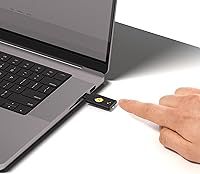
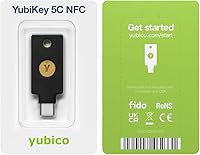
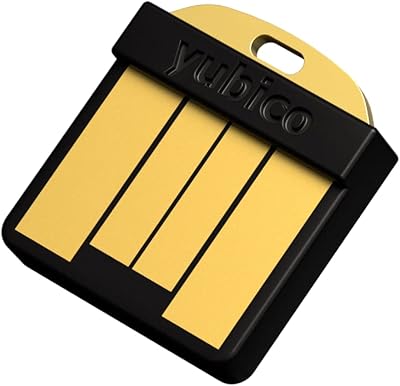
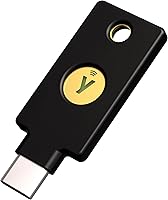
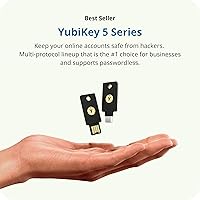
The Yubico YubiKey 5C NFC is a hardware authentication token from one of the most trusted names in account security, and it solves a very specific problem: passwords get stolen, but physical keys don't. It connects via USB-C for laptops and desktops, and taps over NFC for phones — so one small device covers both workflows without compromise. It clips onto a keychain, weighs almost nothing, and requires no batteries or internet connection to function. Priced in premium territory, it reflects the confidence that both enterprises and everyday users have placed in Yubico for years. This is purpose-built security, not a convenience accessory.
Features & Benefits

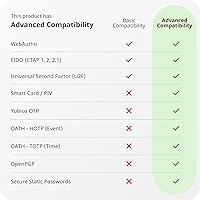
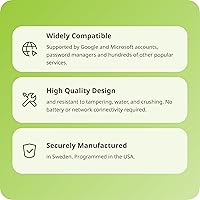
The protocol support here is genuinely broad: this security key handles FIDO2/WebAuthn for modern passkey logins, FIDO U2F for older two-factor setups, TOTP, HOTP, PIV smart card, OpenPGP, and Yubico OTP — covering virtually any service that supports hardware authentication. It holds up to 100 passkey credentials on the device itself, keeping your login data completely offline and away from cloud breaches. The build quality matches those ambitions: IP68 water resistance, a crush-resistant shell, and zero moving parts mean this hardware token is made to survive real-world daily carry. Manufacturing happens in Sweden, with programming done in the USA under rigorous security standards.

Best For

This hardware token makes the most sense for people who already understand why SMS-based two-factor codes fall short. IT professionals, developers running cloud infrastructure on AWS IAM or Azure AD, and remote workers handling sensitive corporate systems will feel immediately at home. But it isn't strictly for technical users — anyone with a Google or Microsoft account who wants real phishing resistance can benefit. The USB-C connection handles modern laptops, while the NFC tap works with most current Android and iOS devices. It also suits those exploring passkeys who still need solid backward compatibility with older U2F services.

User Feedback

With over 7,700 ratings averaging 4.5 out of 5 stars, buyer satisfaction is consistently high. Setup earns frequent praise — most people report registering the key across their accounts in just a few minutes. Durability comes up often too, with users describing years of problem-free daily carry. That said, a few criticisms are worth flagging. This security key has no USB-A connector, which catches some buyers off guard if their machine lacks USB-C. First-time hardware key users mention a learning curve, though most describe it as brief. One thing Yubico states clearly: firmware cannot be updated after manufacture — an intentional security choice, but one to know upfront. Many experienced buyers recommend purchasing a backup key alongside the first.

Pros

  • Provides hardware-level phishing resistance that no authenticator app or SMS code can match.
  • USB-C and NFC in one device covers modern laptops and phones without needing two separate keys.
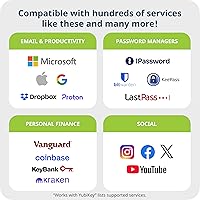
  • Works across 1,000-plus services including Google, Microsoft, major password managers, and enterprise IAM platforms.
  • Stores up to 100 passkey credentials entirely offline, away from cloud infrastructure and potential breaches.
  • IP68 water resistance and crush-resistant housing survive real-world daily carry without babying.
  • No batteries, no moving parts, and no subscription fees — it either works or it does not, indefinitely.
  • The Yubico YubiKey 5C NFC supports an unusually wide protocol range, from FIDO2 and PIV to OpenPGP.
  • Buyers consistently report years of reliable daily use with no degradation in performance over time.
  • Manufactured and programmed under strict security standards, backed by FIDO2 and U2F certifications.
  • Pairs well with the Yubico Authenticator app for a more organized TOTP management experience.

Cons

  • No USB-A connector makes this hardware token unusable on older machines without a separate adapter.
  • Firmware is permanently locked at manufacture — accessing newer features requires buying a replacement key.
  • Units purchased through Amazon may ship with older firmware versions that cannot be upgraded.
  • The initial setup learning curve is real, particularly for first-time hardware key users unfamiliar with FIDO2 versus TOTP workflows.
  • Buying a backup key is strongly advisable, which effectively doubles the upfront cost from day one.
  • NFC performance on older or mid-range Android devices can require repositioning to find a reliable tap zone.
  • Apple ID support remains inconsistent depending on the device and context, limiting full iOS account coverage.
  • The one-year warranty feels short relative to the expected multi-year lifespan of the device.
  • Niche or smaller online services often lack FIDO2 support, leaving some accounts relying on weaker fallback methods.
  • Desktop version of the Yubico Authenticator app feels less refined than the mobile experience on some Windows setups.

Ratings

The Yubico YubiKey 5C NFC consistently earns high marks across thousands of verified global purchases, and the scores below reflect what real buyers actually experience after months of daily use — not just first impressions. Our AI has analyzed verified reviews worldwide, actively filtering out incentivized, spam, and bot-generated feedback, to surface an honest picture of where this hardware token genuinely delivers and where a few rough edges remain. Both the strengths that make it a standout and the friction points that frustrate a minority of users are transparently represented here.
Security & Phishing Protection
97%
Users who switched from SMS codes or authenticator apps consistently report that the hardware-based authentication gives them a level of confidence those methods never could. IT professionals managing corporate accounts describe it as the single most effective change they made to their security posture. The fact that login simply cannot happen without the physical key present resonates deeply with buyers who have experienced account compromise before.
A small number of users point out that if a service does not yet support FIDO2 or U2F, the security advantage is partially lost and they fall back to weaker methods. This is a limitation of ecosystem adoption rather than the hardware itself, but it does affect a subset of accounts for some buyers.
Build Quality & Durability
93%
Buyers frequently mention tossing this security key into bags, dropping it, and running it through the wash — only to find it working perfectly afterward. The IP68 rating is not just marketing language; multiple reviewers describe real submersion incidents with zero damage. The keychain loop feels solid and has not shown wear even after years of daily carry, according to long-term owners.
A handful of buyers note that the plastic housing, while tough, does collect minor surface scratches over time, which bothers those who prefer their gear looking pristine. The keychain ring is functional but not reinforced metal, so a small number of users opted for a separate carabiner clip for added peace of mind.
Compatibility & Protocol Support
91%
The range of supported protocols means this hardware token works across an impressive variety of real-world tools — from Google and Microsoft accounts used daily to corporate IAM platforms like Okta and Azure AD. Password manager users in particular appreciate that both 1Password and Dashlane Premium support hardware key login, reducing reliance on a single master password. Buyers running Linux setups also confirm solid compatibility without needing special drivers.
A recurring frustration surfaces around Apple ID, where FIDO2 hardware key support remains inconsistent depending on the context and device. Some buyers also note that older enterprise systems still locked to proprietary MFA methods cannot use this key at all, limiting its reach in certain corporate environments.
Ease of Setup
78%
22%
For users already familiar with two-factor authentication, the registration process across major services like Google and GitHub typically takes just a few minutes per account. The Yubico Authenticator app is well-regarded for making TOTP setup approachable, and most buyers describe the overall initial experience as straightforward once they understand the workflow.
First-time hardware key buyers consistently flag a noticeable learning curve, particularly around understanding the difference between FIDO2 passkeys, U2F second factors, and TOTP slots. Several reviews describe an initial hour of confusion before things clicked, and Yubico's own documentation, while thorough, can feel dense for non-technical users.
Connectivity & Daily Use
88%
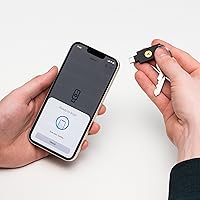
The combination of USB-C and NFC in a single device is the feature buyers praise most in practical terms. Plugging in at a desk and tapping on an iPhone or Android phone without switching devices or dongles is a genuinely convenient workflow. NFC range is reliable and responsive, with very few reports of tap failures under normal use conditions.
The absence of a USB-A connector is the single most common criticism from buyers who own older laptops or work in environments with legacy hardware. Without an adapter, this security key simply cannot be used on machines that lack USB-C, which catches a meaningful portion of buyers off guard despite clear product labeling.
Portability & Form Factor
94%
At 0.353 oz and barely larger than a house key, this hardware token disappears onto a keychain without adding noticeable bulk. Buyers who carry it every day report forgetting it is there until they need it. The slim profile also means it does not block adjacent USB ports when plugged in, which desk-setup users specifically appreciate.
A small number of users wished for a protective cap over the USB-C connector, particularly those who keep the key loose in a bag or pocket. While the connector itself appears durable, the concern about debris or contact damage over years of unprotected carry is a reasonable one that comes up occasionally.
NFC Performance
86%
Android users report particularly smooth NFC authentication, with most taps registering in under a second across a range of devices from different manufacturers. iOS performance has improved as Apple has expanded NFC background reading support, and buyers using recent iPhone models describe the tap experience as reliable and quick.
Older Android devices and some mid-range models occasionally require repositioning the key to find the NFC sweet spot, which a minority of users find inconsistent enough to be annoying. A small number of iOS users on older models report that NFC only works within specific apps rather than at the system level, limiting some use cases.
Firmware & Updateability
52%
48%
Yubico's intentional design choice to lock firmware after manufacture does serve a genuine security purpose — it prevents malicious firmware injection, which is a real threat vector for authentication hardware. Buyers who understand this reasoning tend to accept it readily and even see it as a feature rather than a limitation.
A meaningful segment of buyers discover post-purchase that the firmware version shipped from Amazon may not be the latest, and there is no way to update it. For users who want access to newer features or security patches, this requires purchasing a new key entirely. The lack of firmware updates is arguably the most polarizing aspect of ownership for technically aware buyers.
Value for Money
74%
26%
Buyers who have experienced account takeovers or work in high-stakes professional environments tend to view the price as an easy call given the protection it provides. Long-term owners point out that a single key has served them reliably for three or more years, making the per-year cost quite reasonable in hindsight.
For casual users or those securing only a handful of personal accounts, the premium price can feel hard to justify compared to free authenticator apps. The recommendation to buy a second key as a backup — however sensible — effectively doubles the upfront investment, which is a barrier for budget-conscious buyers.
Software & App Experience
81%
19%
The Yubico Authenticator app earns consistent praise for its clean interface and cross-platform availability. Users who migrate from Google Authenticator or Authy describe the TOTP management experience as more organized, with account entries clearly linked to the hardware token rather than stored locally on the phone.
Some users report that the desktop version of the app feels less polished than mobile, with occasional UI quirks on Windows. A few buyers also note that the app is not strictly required for many use cases, creating some confusion about when it is actually needed versus when the key functions on its own.
Account Coverage
89%
Buyers managing large numbers of online accounts find real value in a single device that spans email, cloud storage, social platforms, password managers, and enterprise tools. The 100 passkey slots are more than enough for most personal users, and even power users running dozens of services rarely report running short.
The coverage is only as good as the services that have implemented FIDO2 or U2F support, and some niche platforms still rely on TOTP or SMS only. Buyers occasionally discover that a specific service they wanted to protect does not support hardware keys yet, which can feel like a gap given the breadth of the compatibility claims.
Reliability Over Time
92%
Multi-year ownership reviews are notably positive, with buyers describing consistent performance across operating system updates, browser changes, and new device purchases. The lack of a battery means there is no degradation curve — the key either works or it does not, and the overwhelming majority report it simply keeps working.
A very small number of buyers report a key stopping recognition after a year or two of use, though it is unclear whether these cases involve damage or manufacturing variance. The one-year warranty is somewhat short given the expected lifespan, and buyers outside that window have no official recourse for rare hardware failures.
Enterprise & IT Suitability
88%
IT administrators deploying hardware keys across teams praise the broad IAM platform support, particularly for Okta, Azure AD, and AWS IAM. The PIV smart card capability adds enterprise utility beyond basic MFA, enabling certificate-based authentication workflows that organizations with strict compliance requirements depend on.
Deploying at scale requires each key to be individually registered per user account, which creates overhead for larger teams without centralized provisioning tools. Some enterprise buyers also note that the lack of firmware updateability complicates long-term fleet management, especially when new security standards require protocol-level changes.

Suitable for:

The Yubico YubiKey 5C NFC is built for anyone who takes account security seriously and wants protection that goes well beyond what a password or SMS code can offer. It is an especially strong fit for security-conscious professionals — developers, IT administrators, and remote workers — who regularly authenticate into platforms like Okta, Azure AD, AWS IAM, or enterprise Google Workspace environments. If your daily machine is a modern USB-C laptop and your phone supports NFC, this hardware token covers both without needing adapters or carrying multiple keys. Everyday users who have experienced phishing attempts, account breaches, or credential theft will find the shift to physical authentication genuinely reassuring. It also suits people exploring passkeys who still need backward compatibility with older FIDO U2F services, making the transition to passwordless login gradual rather than abrupt. Those managing sensitive accounts across password managers, cloud storage, and financial platforms will appreciate having a single trusted device anchor their entire authentication workflow.
Not suitable for:

Buyers who primarily use older hardware without USB-C ports will run into an immediate practical problem — this security key has no USB-A connector, and without an adapter it simply will not plug into legacy machines. If most of your important accounts are on platforms that have not yet adopted FIDO2 or U2F support, the hardware key's core advantage largely disappears and a free authenticator app may be sufficient for your situation. The firmware cannot be updated after the key is manufactured, which is an intentional security design but means buyers who want access to future protocol improvements will eventually need to purchase a replacement rather than update in place. Casual users securing just one or two low-stakes accounts will likely find the investment difficult to justify when free software alternatives exist. Anyone who tends to misplace small items should also think carefully before committing, since losing the only registered key without a backup can result in a frustrating account recovery process — a real risk that some first-time buyers underestimate.

Specifications

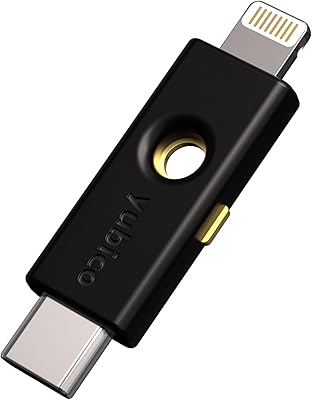
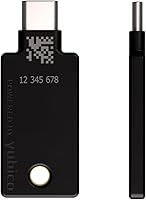
  • Connector: Connects to devices via a USB-C plug for wired authentication on compatible laptops, desktops, and tablets.
  • Wireless: Supports Near-Field Communication (NFC) for tap-based authentication on NFC-enabled smartphones and tablets.
  • Dimensions: Measures 1.77″ in length, 0.7″ in width, and 0.15″ in depth, sized to sit alongside standard keys on a keyring.
  • Weight: Weighs 0.353 oz, making it light enough to carry daily on a keychain without noticeable bulk.
  • Protocols: Supports FIDO2/WebAuthn, FIDO U2F, TOTP (OATH-HOTP/TOTP), PIV smart card, OpenPGP, and Yubico OTP across a single device.
  • Passkey Slots: Stores up to 100 discoverable FIDO2 passkey credentials directly on the hardware, with no cloud dependency.
  • Water Resistance: Rated IP68, meaning it is fully dust-tight and can withstand submersion beyond 1 meter under controlled conditions.
  • Build: Constructed from a crush-resistant composite material with no moving parts, no battery, and no charging required.
  • Cryptography: Supports RSA 2048, RSA 4096 (via OpenPGP), ECC p256, and ECC p384 cryptographic specifications for strong key operations.
  • Certifications: Holds FIDO2 Certified and FIDO Universal 2nd Factor (U2F) Certified status from the FIDO Alliance.
  • Manufacturing: Hardware is manufactured in Sweden and programmed in the USA under Yubico's internal security standards.
  • Compatible OS: Works with Windows, macOS, Linux, Android, and iOS without requiring additional drivers for standard FIDO2 and U2F operations.
  • Authenticator App: Compatible with the Yubico Authenticator app, available for both mobile and desktop platforms, for TOTP account management.
  • Form Factor: Keychain-compatible design includes an integrated loop for attaching to a standard key ring or carabiner clip.
  • Warranty: Covered by a one-year manufacturer warranty against defects in materials and workmanship from the date of purchase.
  • USB Standard: Operates over USB 2.0 signaling via its USB-C connector, compatible with USB 3.x ports through standard backward compatibility.
  • Device Type: Recognized by operating systems as a FIDO HID Device, CCID Smart Card, and HID Keyboard — requiring no custom drivers for basic use.
  • Firmware: Firmware is permanently locked after manufacture and cannot be updated or modified after the key ships from the factory.

Related Reviews
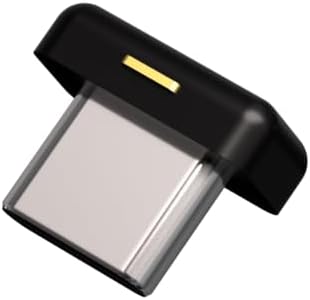
Yubico YubiKey 5C Nano
90%
93%
Ease of Use
91%
Reliability
88%
Build Quality & Durability
90%
Compatibility with Services
95%
Portability & Size
More
Yubico YubiKey 5Ci
Yubico YubiKey 5Ci
88%
92%
Ease of Use
89%
Durability
94%
Cross-Device Compatibility
88%
Setup & Installation
91%
Security Features
More
Yubico YubiKey 5 Nano
89%
91%
Value for Money
96%
Security & Protection
88%
Build Quality & Durability
89%
Setup & Installation
93%
Compatibility with Platforms
More
Yubico Security Key NFC
90%
92%
Value for Money
89%
Build Quality & Durability
94%
Portability & Size
93%
Ease of Use
88%
Security Features
More
Sirui Traveler 5C Carbon Fiber Tripod
85%
94%
Portability & Weight
88%
Build Quality & Durability
85%
Ease of Use
90%
Stability & Support for Larger Cameras
72%
Leg Locking System
More
BUFFALO MiniStation Extreme NFC 2TB Portable HDD
84%
91%
Build Quality & Durability
89%
Data Security Features
87%
Portability & Design
80%
Transfer Speed
88%
Compatibility with Mac and PC
More
Rockville X6.5C 6.5″ Competition Car Audio Speakers
84%
91%
Sound Quality
88%
Build Quality
72%
Ease of Installation
94%
Performance at High Volumes
90%
Durability
More
Motorola X Sol Republic Deck Bluetooth NFC Wireless Speaker
83%
87%
Sound Quality
91%
Portability
88%
Battery Life
92%
Bluetooth Range
89%
Ease of Setup
More
Estée Lauder Double Wear Stay-in-Place Flawless 24-Hour Concealer, 0.4 Fl Oz, Shade 3.5C
86%
91%
Coverage Effectiveness
94%
Longevity & Wear Time
87%
Skin Compatibility
90%
Oil Control & Matte Finish
84%
Hydration & Comfort
More

FAQ

Yes, it works with NFC-enabled iPhones running iOS 13.3 or later. You simply tap the key against the top of your iPhone when prompted during login. For older iPhones without NFC background reading support, functionality may be limited to specific apps rather than system-wide authentication.

Absolutely. Most modern Android phones support NFC, and the tap experience is generally very reliable. You can also use the Yubico Authenticator app on Android to manage TOTP accounts stored on the key, which is a solid alternative to cloud-based authenticator apps.

This is the most important practical concern with any hardware authentication key. You should register a second backup key to each account before you need it — not after. Most services that support hardware keys allow you to register multiple keys, and keeping a spare stored somewhere safe at home is the standard recommendation from experienced users.

No, this specific model only has a USB-C connector and no USB-A port. If your laptop only has USB-A ports, you would need a USB-C to USB-A adapter, or you should consider a different model in the YubiKey 5 lineup that comes with a USB-A connector instead.

For most common use cases — like logging into Google, Microsoft, or GitHub with FIDO2 — no drivers or software are needed. The operating system recognizes the key automatically. The Yubico Authenticator app is optional and only needed if you want to use the TOTP functionality to store time-based one-time codes on the device.

No, and this is worth understanding before you buy. Yubico intentionally locks the firmware at the point of manufacture as a security measure, preventing any post-sale modification. The trade-off is that if a new protocol or feature is added in future firmware, you would need to purchase a new key to access it. Some buyers see this as a limitation; others see it as a deliberate security guarantee.

A good starting point is Yubico's own compatibility catalog, which lists verified services. Generally, major platforms like Google, Microsoft, GitHub, Dropbox, and most enterprise IAM tools support FIDO2 or U2F. Smaller or older services sometimes only support TOTP codes, and a few still rely on SMS only — in those cases, the key can still store TOTP accounts via the Yubico Authenticator app.

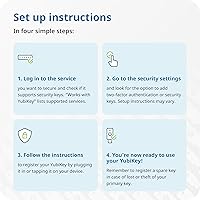
There is a learning curve, but it is not steep once you understand the basic concept. The process involves going into the security settings of each account and registering the key under the two-factor or passkey section — the key itself does not need any configuration. Most people get through their first few accounts within 30 minutes. The initial confusion usually comes from understanding the difference between FIDO2 passkeys and TOTP codes, but day-to-day use after setup is just a tap or plug-in.

For FIDO2 passkey credentials, the key stores up to 100 entries directly on the hardware. For FIDO U2F second-factor registrations, there is effectively no limit since those do not store data on the key itself. TOTP accounts managed through the Yubico Authenticator app are also stored on the key, though they share the available storage space with passkeys, so very heavy TOTP users may approach the limit.

First, try a different USB-C port or a known-working cable or adapter, since port issues are a common cause of recognition failures. If the problem persists across ports, try the key on a different computer to rule out a driver or system-specific conflict. On Linux, some users need to add a udev rule to grant the correct device permissions. If the key is genuinely faulty and still within the one-year warranty period, Yubico's support team handles replacements directly.