Overview

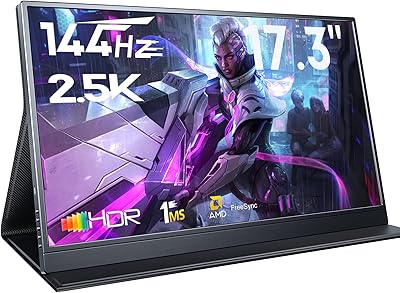
The CAPERAVE CF17H 17.3″ Portable Gaming Monitor enters a crowded budget travel monitor segment where most rivals top out at 15.6 inches, making the extra screen real estate a genuine differentiator worth paying attention to. At this price tier, you're also getting an aluminum chassis and an included protective sleeve — two additions that often cost extra on competing options. That said, a strong spec sheet and real-world performance don't always line up, and this monitor is no exception. Solid value is on the table, but a few of the bolder claims deserve a closer look before you commit.

Features & Benefits

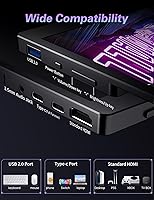
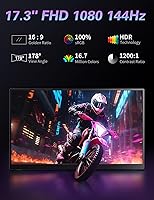
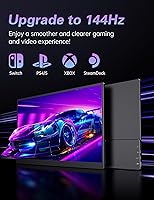
The standout claim is the 144Hz refresh rate, though reaching it over USB-C depends entirely on your source device supporting the necessary bandwidth — not every laptop or console will get there, so check compatibility first. For devices that do, motion is noticeably smoother. The dual USB-C plus HDMI setup is genuinely practical, letting you connect a MacBook, Switch, or PS5 without digging for adapters. The IPS matte panel manages reflections well enough, but 300 nits is modest in bright environments. The kickstand covers a few usable angles, and the built-in speakers handle system audio adequately. Blue light reduction and flicker-free tech are quiet but real benefits during long work sessions.

Best For

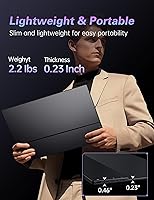
This travel gaming screen is a strong match for remote workers and students who want a proper second display without hauling a full-size monitor through an airport. Console players will appreciate the ability to plug in a Switch or PS5 via HDMI for a much larger picture than a laptop screen allows. At 2.2 pounds with an aluminum frame and a travel sleeve included, frequent travelers are clearly the target audience. Creative professionals, however, should look elsewhere — the 1080p ceiling is perfectly fine for productivity and casual gaming, but it falls short for color-critical work or anyone expecting higher-resolution output.

User Feedback

Buyers frequently highlight how plug-and-play the USB-C single-cable connection feels with compatible laptops, calling it one of the easier setups in this category. The kickstand gets mixed marks — stable enough on a flat desk, but some users wish it offered a wider tilt range. Speaker impressions are predictably modest: usable in quiet rooms, not much more. The more consistent concern is the 144Hz claim, with a meaningful portion of buyers reporting they couldn't reach that refresh rate via USB-C on their specific devices. Build quality is generally well-regarded at this price, though a handful of reviews flag that packaging could do better protecting the screen in transit.

Pros

  • The 17.3-inch screen gives you noticeably more working area than the 15.6-inch portable monitors that dominate this price range.
  • Single-cable USB-C connectivity works cleanly with compatible laptops, reducing desk clutter and setup time significantly.
  • The matte IPS panel handles reflections well, making it comfortable to use in typical indoor environments without constant glare distractions.
  • At 2.2 pounds, this travel gaming screen is easy to slip into a backpack without feeling like you added a brick.
  • Full-size HDMI means you can connect a PS5, Switch, or Xbox directly without hunting for a separate adapter.
  • The included protective sleeve adds real travel value that many competing monitors charge extra for or skip entirely.
  • Blue light reduction and flicker-free technology make extended work or study sessions noticeably less fatiguing on the eyes.
  • The aluminum construction feels more durable and premium than the plastic shells common at this price point.
  • Plug-and-play setup with most modern laptops and consoles means minimal configuration headaches right out of the box.

Cons

  • Reaching 144Hz over USB-C is device-dependent, and a meaningful number of buyers report being unable to hit that refresh rate with their hardware.
  • At 300 nits, brightness is underwhelming in well-lit rooms and essentially unsuitable for use near a window in daylight.
  • The kickstand tilt range is limited, which can make finding a comfortable viewing angle awkward depending on your desk or seating setup.
  • Built-in speakers produce low volume and thin audio quality, making them inadequate for anything beyond basic system notifications.
  • CAPERAVE is a relatively new and lesser-known brand, so long-term reliability data and after-sales support track records are still limited.
  • Some buyers have reported that packaging does not protect the screen adequately during shipping, with a few units arriving with cosmetic damage.
  • The 17.3-inch footprint, while a selling point for screen space, makes it slightly bulkier to pack than smaller portable monitors in tight bags.

Ratings

The scores below for the CAPERAVE CF17H 17.3″ Portable Gaming Monitor were generated by our AI rating engine after analyzing verified purchase reviews from buyers worldwide, with spam, bot activity, and incentivized feedback actively filtered out. Each category reflects what real users experienced day-to-day — not just what the spec sheet promises. Strengths are credited where earned, and recurring pain points are scored honestly.
Portability
88%
At 2.2 pounds with an aluminum shell and an included travel sleeve, this portable monitor genuinely earns its travel-friendly label. Buyers who commute between offices or carry it through airports repeatedly praised how little it adds to a packed bag compared to full-size monitors.
The 17.3-inch footprint is harder to fit into slim laptop sleeves and smaller backpack compartments than the more common 15.6-inch alternatives. A handful of users noted the sleeve, while useful, does not compress the overall profile enough for tight packing situations.
Display Quality
79%
21%
The IPS matte panel delivers wide viewing angles and handles indoor reflections better than glossy alternatives, which users working in cafes and hotel rooms appreciated. Colors look vibrant and consistent enough for everyday productivity and casual gaming without obvious washout at typical viewing distances.
At 300 nits, the brightness ceiling becomes a real limitation in sunlit rooms or near windows, with several buyers noting the image looked noticeably dim in those conditions. Color accuracy, while acceptable for general use, does not satisfy users with professional creative workflows.
Refresh Rate Performance
63%
37%
When connected to a compatible laptop with full USB-C DisplayPort Alt Mode support, the 144Hz refresh rate delivers a genuinely smoother gaming experience compared to standard 60Hz portable monitors. Users with qualifying devices praised the reduced motion blur during fast-paced titles.
A significant portion of buyers reported being unable to reach 144Hz at all over USB-C due to device compatibility limitations, which is a frustrating gap between the advertised spec and real-world outcomes. Consoles connected via HDMI are capped at 60Hz regardless, meaning the headline refresh rate is out of reach for many typical use cases.
Connectivity
86%
The combination of dual USB-C ports and a full-size HDMI port covers nearly every common device without requiring extra adapters, which users consistently flagged as a practical advantage. MacBook and Windows laptop owners found single-cable USB-C setup fast and frustration-free when their device supported it.
The USB-C ports do not all behave identically across every device, and some buyers had to experiment with which port and cable combination worked best for power plus video simultaneously. There is no DisplayPort input, which limits options for certain desktop PC users.
Build Quality
77%
23%
The aluminum body feels noticeably more solid than the all-plastic competitors clustered at this price point, and most buyers reported no flex or creaking during regular transport and use. The slim bezel adds to the perception of a well-assembled product that punches slightly above its price tier.
Some buyers flagged cosmetic damage upon arrival, pointing to packaging that does not adequately protect the screen during transit. Long-term durability data is limited given the brand is relatively new, which introduces some uncertainty for buyers planning to use this monitor heavily over several years.
Kickstand Stability
68%
32%
On a flat desk surface, the integrated kickstand holds the monitor steady through typical typing and clicking vibrations without wobbling noticeably. Users who primarily work at desks found it a convenient replacement for a separate monitor stand in temporary workspaces.
The tilt range is narrow, and buyers who wanted a steeper or shallower angle for ergonomic comfort found the kickstand limiting. On softer surfaces like a bed or a couch, stability drops off quickly, making it impractical for casual lounging use.
Ease of Setup
91%
Plug-and-play performance with compatible laptops was one of the most consistently praised aspects across buyer reviews, with many users reporting the monitor was recognized and working within seconds of plugging in the USB-C cable. No driver installation was required in the majority of reported setups.
Setup becomes less straightforward when the source device has limited USB-C capabilities, requiring buyers to troubleshoot port configurations or swap cables before achieving stable video output. A few MacBook users noted needing to manually adjust display settings in macOS to unlock the correct resolution.
Speaker Quality
44%
56%
The integrated speakers handle basic audio needs like video call audio or quiet background music, which is genuinely useful when headphones are not available. Having built-in audio output at all in this form factor is considered a convenience win by users who occasionally need it.
Volume is low and the sound profile is thin and tinny, making the speakers unsuitable for any serious media consumption or gaming audio. Most buyers who cared about sound switched to headphones or an external speaker immediately and treated the built-in audio as a last-resort fallback.
Eye Comfort
82%
18%
Blue light reduction and flicker-free technology made a noticeable difference for users who spend long hours working or studying in front of the screen, with several buyers specifically mentioning reduced eye fatigue during multi-hour sessions. The matte surface also cuts down on visual strain from overhead lighting.
The blue light filter is a software-level adjustment rather than a hardware coating on all modes, so the degree of protection varies depending on the settings used. Users sensitive to color shift may notice slightly warmer tones when the filter is active at higher intensity levels.
Value for Money
83%
Considering the screen size, aluminum build, 144Hz spec, dual USB-C connectivity, and included travel sleeve, the overall package represents strong value relative to what comparable portable monitors typically offer at this price range. Most buyers felt the feature-to-price ratio was favorable even accounting for the monitor's limitations.
The value calculation shifts for buyers who cannot reach 144Hz on their device, since that headline feature effectively disappears from the equation. Those who expected a plug-and-play premium experience comparable to more established brands may feel the real-world performance does not fully justify the asking price.
Brightness Adequacy
58%
42%
For use in a controlled indoor environment like a dim office, hotel room, or evening gaming session, 300 nits provides enough light output to display a clear and watchable image. Most buyers using the monitor primarily indoors reported no major complaints about the brightness level under those conditions.
In any environment with significant ambient light, the 300-nit ceiling becomes an obvious shortcoming that directly impacts usability. Buyers who initially planned to use the monitor outdoors or near bright windows consistently reported disappointment once they tested it in those conditions.
Gaming Experience
71%
29%
For casual and mid-intensity gaming on the go, the CF17H holds up well — the IPS panel shows decent color in games, and when 144Hz is achievable, the difference in motion smoothness is real and appreciated. Console players using HDMI found the 17.3-inch screen a meaningful upgrade over laptop displays for extended play sessions.
Competitive or high-refresh-rate PC gaming is where expectations need careful management, as USB-C bandwidth limitations and brightness constraints reduce the monitor's effectiveness in those scenarios. Input latency, while improved over 60Hz panels, was not consistently praised in the same way as monitors from more established gaming-focused brands.
Packaging & Unboxing
55%
45%
The product generally arrives with the monitor, protective sleeve, and cables included, giving buyers what they need to get started without additional purchases for basic use. Most straightforward deliveries resulted in buyers receiving the unit in functional condition.
Recurring reports of insufficient protective packaging during shipping point to a meaningful risk of cosmetic damage on the screen or chassis before the product even reaches the user. This is a pattern that appears consistently enough across reviews to flag as a genuine quality control concern rather than isolated incidents.

Suitable for:

The CAPERAVE CF17H 17.3″ Portable Gaming Monitor is a genuinely practical pick for remote workers and students who want a proper secondary display they can actually carry from place to place without dreading the weight. At 2.2 pounds with an aluminum build and a protective sleeve included in the box, it suits people who move between offices, libraries, coffee shops, or hotel rooms on a regular basis. Console gamers who want a bigger screen for their Switch, PS4, or PS5 while traveling will find the full-size HDMI port and 17.3-inch panel a meaningful upgrade over squinting at a laptop display. The single-cable USB-C setup also makes it a smart companion for MacBook or modern laptop users who just want to plug in and get a larger workspace without carrying an adapter kit. Anyone doing productivity work, light gaming, or media consumption on the go will likely find this monitor hits a comfortable balance of portability and screen size.
Not suitable for:

The CAPERAVE CF17H 17.3″ Portable Gaming Monitor is not the right tool for buyers with high-performance gaming at the top of their list, particularly those counting on getting a true 144Hz experience through USB-C — device compatibility determines whether you actually reach that refresh rate, and many won't. Photographers, video editors, or anyone doing color-sensitive work should look at purpose-built displays with wider color gamuts and higher resolution, since 1080p is the hard ceiling here. The 300-nit brightness is adequate in controlled indoor lighting but will feel limiting outdoors or in sunlit rooms. Buyers who prefer a VESA mount or a wider range of tilt angles may find the built-in kickstand restrictive for their setup. Those looking for a premium audio experience should also temper expectations, as the integrated speakers are a convenience feature rather than a meaningful audio solution.
Specifications

  • Screen Size: The display measures 17.3 inches diagonally, making it notably larger than the 15.6-inch portable monitors that dominate this category.
  • Resolution: Native resolution is 1920x1080 pixels (Full HD), delivering a sharp and detailed image for productivity tasks, gaming, and media playback.
  • Refresh Rate: The panel supports up to 144Hz, which improves motion clarity in fast-paced games when the source device supplies the necessary bandwidth.
  • Panel Type: Uses an IPS panel with a matte anti-glare surface coating, providing wide viewing angles and reduced reflections in typical indoor environments.
  • Brightness: Peak brightness is rated at 300 nits, which is adequate for controlled indoor lighting but may feel limited in brightly lit or sunlit spaces.
  • Aspect Ratio: The screen uses a standard 16:9 widescreen aspect ratio, compatible with virtually all modern video content and desktop layouts.
  • Connectivity: The monitor includes two USB Type-C ports and one full-size HDMI port, giving a total of three ports for flexible device connections.
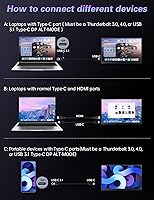
  • USB-C Support: Both USB-C ports support single-cable connectivity for devices with Thunderbolt 3.0 or USB-C DisplayPort Alt Mode, handling power and video simultaneously.
  • Dimensions: The unit measures approximately 17.05 x 11.54 x 2 inches, keeping the physical footprint proportional to its 17.3-inch screen size.
  • Weight: The monitor weighs 2.2 pounds, light enough to carry in a backpack alongside a laptop without adding significant load.
  • Body Material: The outer chassis is constructed from aluminum, giving the monitor a more rigid and premium feel compared to all-plastic alternatives in this price range.
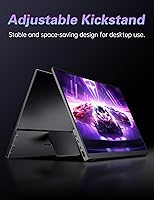
  • Kickstand: A built-in adjustable kickstand is integrated into the rear of the monitor, providing a stable freestanding base without requiring a separate stand.
  • Speakers: Integrated speakers are included for basic audio output, intended as a convenience feature rather than a high-fidelity listening solution.
  • Eye Care: The display incorporates blue light reduction and flicker-free technology to reduce eye strain during extended viewing sessions.
  • Power Input: The monitor operates at 5 volts, drawing power directly through the USB-C cable from a connected device or a compatible USB-C power adapter.
  • Included Accessories: The package includes a protective travel sleeve designed to cushion the monitor during transport and storage.
  • Model Number: The official model identifier for this unit is CF17H, manufactured and sold under the CAPERAVE brand.
  • Brand: CAPERAVE is the manufacturer of this monitor, a relatively new entrant in the portable display market with a focus on travel-oriented designs.

Related Reviews
CAPERAVE 17.3-inch 4K Portable Monitor
87%
92%
Display Quality
89%
Portability
88%
Ease of Setup
91%
Color Accuracy
85%
Compatibility with Devices
More
ASUS ROG Strix XG17AHP 17.3″ Portable Monitor
77%
93%
Display Smoothness
91%
Portability
89%
Included Accessories
58%
Battery Life
82%
Connectivity
More
UPERFECT 2K 144Hz 17.3-inch Portable Monitor
74%
91%
Display Clarity
83%
Color Accuracy
88%
Refresh Rate & Gaming
62%
Portability & Weight
74%
USB-C Connectivity
More
MagicRaven 17.3″ 2.5K 144Hz Portable Gaming Monitor
72%
91%
Image Sharpness
88%
Refresh Rate Performance
84%
Color Accuracy
61%
Brightness & Glare Handling
73%
Connectivity & Compatibility
More
Kenowa HD-133 13.3-inch Portable Monitor
68%
91%
Setup & Ease of Use
47%
Display Resolution
83%
Portability & Form Factor
76%
Connectivity & Compatibility
68%
Brightness & Visibility
More
Yodoit PTM17 17.3″ Portable Monitor
75%
91%
Screen Size & Usability
76%
Image & Color Quality
62%
Brightness & Glare
54%
HDR Performance
83%
Connectivity & Compatibility
More
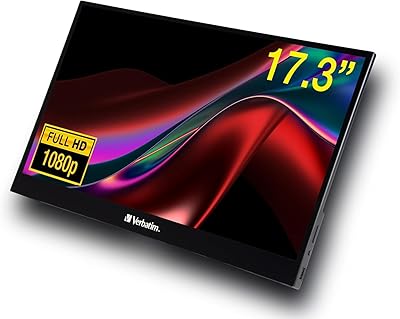
Verbatim 17.3″ Portable Touchscreen Monitor
70%
78%
Display Quality
71%
Touchscreen Performance
86%
Connectivity & Setup
59%
Portability
83%
Build Quality
More
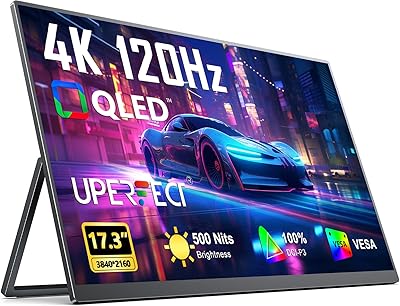
UPERFECT 17.3-inch 4K Portable Monitor
86%
94%
Display Quality
88%
Portability
90%
Gaming Performance
93%
Color Accuracy
85%
Ease of Setup
More
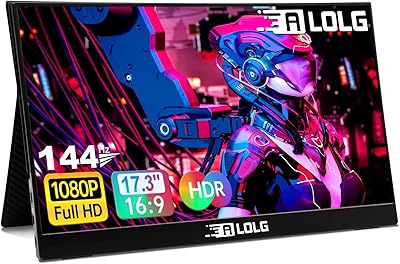
ALOGL 17.3-inch Portable Monitor FHD 1080P 144Hz
84%
89%
Display Quality
92%
Performance (Gaming)
95%
Portability
88%
Compatibility
85%
Build Quality
More
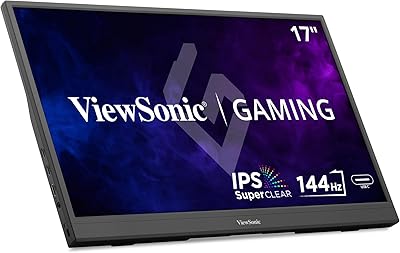
ViewSonic VX1754 17-inch 1080p IPS Portable Gaming Monitor
85%
93%
Portability & Design
89%
Gaming Performance (144Hz Refresh Rate)
88%
Display Quality (Colors & Viewing Angles)
85%
Ease of Setup & Usability
78%
Build Quality & Durability
More

FAQ

It depends entirely on your source device. To reach 144Hz over USB-C, your laptop or device needs to support DisplayPort Alt Mode or Thunderbolt 3 with sufficient bandwidth. Many modern Windows laptops can do it, but older machines, some MacBooks, and most gaming consoles cannot push that refresh rate over USB-C. If 144Hz is critical for you, verify your device specs before assuming it will work.

Yes, both consoles connect via the full-size HDMI port. The Switch works well in docked mode, and the PS5 connects straightforwardly too. Keep in mind that consoles typically output at 60Hz over HDMI, so you will not see 144Hz from them, but the screen will still display a clean 1080p image.

The monitor draws power through USB-C, so a single cable from a laptop with a USB-C port that supports Power Delivery should handle both video and power simultaneously. If your laptop does not supply enough power over USB-C, you may need a separate USB-C charger plugged into the second port.

Yes, it works with MacBooks that have USB-C or Thunderbolt ports, which covers most models from 2016 onward. A single USB-C cable typically handles both display output and charging. Some users report needing to adjust display settings in macOS to get the best resolution and refresh rate.

On a flat, hard surface like a desk, the kickstand holds the monitor solidly enough for everyday use. The angle range is somewhat limited compared to monitors with fully articulating stands, so if you need a very low or steep tilt, you may find it restrictive. On softer surfaces like a bed or couch, stability is less predictable.

The matte anti-glare coating does a reasonable job managing reflections, but at 300 nits of brightness, the image can look washed out when competing with direct sunlight or strong ambient light. For a dark office or hotel room it is fine, but outdoor or bright-window use is where it struggles most.

They are functional for things like video calls, YouTube, or background audio, but do not expect much volume or depth. Most people who care about sound will use headphones or a Bluetooth speaker instead. Think of the speakers as a backup option, not a feature you would seek this monitor out for.

Generally yes — the sleeve is sized for this monitor and provides basic padding against scratches and light bumps during travel. It is not a hardshell case, so it will not protect against serious impacts. For air travel or rougher commutes, consider a sleeve with thicker padding or a dedicated monitor bag.

The CF17H works with most devices that have USB-C with DisplayPort Alt Mode or Thunderbolt, as well as anything with a standard HDMI output. That covers a wide range of Windows laptops, MacBooks, iPads with USB-C, PS4, PS5, Nintendo Switch, and Xbox consoles. Always check that your specific device supports video output over USB-C if you plan to skip the HDMI cable.

For general productivity, gaming, and streaming, 1080p on a 17.3-inch screen looks perfectly sharp and usable. Pixel density is roughly 127 PPI, which is comparable to a standard 1080p laptop display. Where it starts to feel limiting is photo editing or video work where you want finer detail or a wider color gamut — for those tasks, this is not the right tool.