
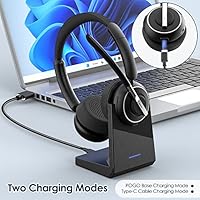
Overview

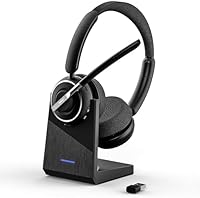
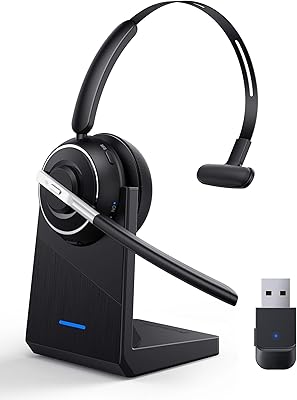
The PrancyBt KH120M entered a genuinely competitive market in mid-2023, pitching itself as a practical wireless headset for remote workers and home office regulars who want reliable call quality without overspending. PrancyBt isn't a household name, but the package it puts together here is more thoughtful than many budget competitors — you get a charging dock, a USB Bluetooth adapter, and the headset itself, all in one box. The on-ear leather cushions signal a clear focus on comfort during long sessions. Sitting at #351 in Computer Headsets, it holds its own without being a runaway bestseller.

Features & Benefits

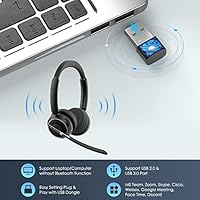
What makes this wireless headset stand out against similarly priced options is the combination of Bluetooth 5.2 and its own USB Bluetooth adapter. Rather than relying on your PC's built-in Bluetooth — which can be inconsistent — you plug in the adapter and get a noticeably more stable connection with less audio lag. The microphone uses AI-assisted noise cancellation to reduce background hum and ambient noise, which genuinely helps in moderately loud environments. One thing worth knowing upfront: the physical mute button only works for mobile calls. If you need to mute during Zoom or Teams, you have to handle it through the software itself.

Best For

This Bluetooth office headset makes the most sense for remote workers who spend a good chunk of their day on calls — think customer support roles, virtual meetings, or frequent client check-ins. The included USB adapter is a real plus if your desktop or older laptop doesn't have dependable built-in Bluetooth. All-day comfort is clearly a priority here, and the charging base means you're not constantly hunting for a cable at the end of a shift. If you want a complete, ready-to-use setup without purchasing extras separately, this fits the bill. It's less suited for music listening or audiophile use.

User Feedback

Buyers generally respond well to the KH120M's call clarity, particularly on mobile calls where the microphone does a decent job blocking out household background noise. The charging dock gets consistent praise for keeping the desk organized. On the flip side, the mute limitation on PC software catches some users off guard — worth knowing before committing. Comfort feedback is mixed: most find the leather cushions adequate for a few hours, but longer sessions can get warm. A handful of buyers also mention occasional pairing hiccups with the USB adapter on initial setup. Overall value is rated positively by the majority of purchasers.

Pros

  • The bundled USB Bluetooth adapter delivers a noticeably more stable PC connection than most laptops manage on their own.
  • Charging dock keeps the headset organized on the desk and fully charged without hunting for cables each morning.
  • Microphone noise cancellation handles steady background sounds — fans, traffic, HVAC — well enough for professional calls.
  • Bluetooth 5.2 provides a low-latency, reliable wireless link across a full room without dropout.
  • At 183 grams, this wireless headset is light enough to wear through a full morning of meetings without neck fatigue.
  • The all-in-one bundle delivers genuine value for buyers who would otherwise purchase a dock and adapter separately.
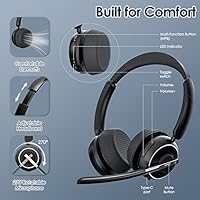
  • Physical volume and MFB buttons are easy to locate by touch mid-call without looking away from the screen.
  • Setup is genuinely plug-and-play on most modern operating systems — no driver installation required.
  • Call clarity on mobile calls consistently earns positive feedback, with recipients rarely noticing background noise.
  • Compatible with a wide range of devices including Windows PCs, Macs, Android phones, and iPhones.

Cons

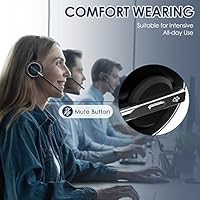
  • The hardware mute button does not function during Zoom, Teams, or Skype calls on a PC — software muting only.
  • Leather ear cups trap heat during sessions longer than three to four hours, causing noticeable discomfort.
  • The USB adapter is proprietary and paired exclusively to this headset model, making it irreplaceable if lost.
  • Noise cancellation struggles in louder or more dynamic environments beyond steady low-frequency background hum.
  • Build materials feel plasticky and do not inspire confidence about long-term durability under daily use.
  • No carrying case is included, which is a frustrating omission for users who move the headset between locations.
  • The charging dock connection can feel loose over time, occasionally requiring careful repositioning to initiate charging.
  • The included user manual is thin on detail, making first-time pairing more confusing than it needs to be.
  • Buyers comparing this Bluetooth office headset directly to established competitors will notice a gap in software support and refinement.
  • Battery performance over six or more months of daily use remains an open question given the product's relatively recent launch.

Ratings

The PrancyBt KH120M has been put through its paces by verified buyers across multiple global markets, and our AI scoring engine has analyzed that feedback — filtering out incentivized reviews and bot activity — to produce the balanced ratings below. Scores reflect real patterns from daily home office use, call center environments, and remote work setups, capturing both what this wireless headset does well and where it falls short.

Microphone Clarity
83%
Most buyers report that call recipients can hear them clearly even in moderately noisy home environments — a barking dog or kitchen background noise rarely bleeds through noticeably. For mobile calls especially, the mic performs above expectations at this price tier.
On PC-based platforms like Zoom or Teams, some users notice the noise cancellation is less aggressive than advertised, with ambient hum occasionally creeping in during quieter passages. It handles steady background noise better than sudden or dynamic sounds.
Noise Cancellation Effectiveness
74%
26%
The AI-assisted microphone filtering does a respectable job reducing consistent low-frequency noise, like HVAC hum or street traffic in the background. Colleagues on calls rarely complain about distracting sounds during normal home office conditions.
Users in louder environments — open-plan shared spaces or homes with kids — report the cancellation struggles to keep up. It is not on par with premium noise-isolating headsets, and expecting studio-level suppression will likely lead to disappointment.
Comfort & Wearability
71%
29%
The leather ear cushions feel soft initially, and the headset is light enough at 183 grams that most users do not feel significant fatigue during two to three hour stretches. The clamping force is generally described as gentle rather than tight.
Extended sessions beyond four hours start to become an issue for some wearers, with the ear cups trapping heat and causing mild discomfort. A few buyers with larger heads noted the headband adjustment feels slightly limited compared to competing models.
Bluetooth Connection Stability
86%
The bundled USB Bluetooth adapter is the real differentiator here — plugging it into a PC port delivers a noticeably more consistent connection than relying on a laptop's built-in Bluetooth. Signal dropout within the 10-meter range is rarely reported.
A subset of buyers mentions initial pairing difficulties, particularly on the first setup, requiring a reset cycle to establish the link. The adapter is also proprietary, meaning losing it means going back to potentially unreliable native Bluetooth.
Call Performance on Zoom & Teams
78%
22%
For everyday work calls, the KH120M holds its own — voice comes through clearly, latency is minimal with the USB adapter active, and the physical volume controls mean quick adjustments without alt-tabbing mid-meeting. Most remote workers find it reliable for daily use.
The mute button limitation is a genuine friction point: it simply does not function as a hardware mute for PC calling apps. Users have to mute via the software interface, which breaks the workflow for anyone used to a dedicated one-press mute button on their headset.
Charging Dock Usability
81%
19%
The charging base is one of the more practical inclusions at this price point — setting the headset on the dock at the end of the day keeps it topped up and gives the desk a tidier look than a dangling cable. Most buyers specifically mention appreciating this detail.
A few users note the dock connection feels slightly loose over time, requiring careful placement to ensure charging actually initiates. It is not a universal complaint, but worth monitoring if you rely on it for overnight charging consistency.
Battery Life
76%
24%
For a standard eight-hour workday, the battery holds up well enough that most users do not need a mid-day charge. The two-hour charge time via the dock is fast enough that a lunch break top-up is sufficient if needed.
Heavy users who run back-to-back calls for nine or more hours have occasionally reported the battery dipping toward the end of the shift. Battery longevity over the product's lifespan — particularly after six or more months of daily use — has not been widely tested yet.
Build Quality
67%
33%
The headset feels adequately constructed for its price bracket — the headband has a reasonable amount of flex without feeling flimsy, and the ear cup hinges move smoothly. The overall feel is functional rather than premium.
The plastic used in the construction gives a somewhat hollow impression, and the hinge pivot points feel like the most vulnerable part of the design during long-term use. It does not inspire the confidence of more established brands at a similar price.
Ease of Setup
88%
Plug-and-play USB adapter setup is genuinely straightforward — no driver installation required on most modern operating systems. The box includes everything needed to get started, and most buyers report being up and running within a few minutes of unboxing.
The initial Bluetooth pairing sequence is not well documented in the included manual, and a small number of users experienced confusion during first-time setup. A clearer quick-start guide or QR code to a video tutorial would meaningfully reduce setup friction.
Value for Money
79%
21%
The all-in-one bundle — headset, USB adapter, and charging dock — represents genuinely good value for buyers who would otherwise need to purchase accessories separately. For home office workers on a practical budget, the package justifies the asking price.
Buyers comparing it directly to established brands like Jabra or Poly in a similar range will notice the gap in build refinement and software ecosystem. As a standalone value play it works, but it does not outcompete the category leaders on objective performance.
Controls & Button Layout
72%
28%
Physical MFB, volume up, and volume down buttons are tactilely distinguishable without looking, which matters when you are mid-call and need a quick adjustment. The button placement on the ear cup is reasonably intuitive after a short learning curve.
The mute button's PC limitation is a recurring frustration that reduces the practical utility of the control layout for computer-based users. Buyers expecting full hardware control over their calling software will need to adjust their workflow accordingly.
Weight & Portability
84%
At 183 grams, this Bluetooth office headset is light enough to wear through a full morning of meetings without neck strain becoming a factor. It folds compactly enough to fit in a laptop bag for users who occasionally work from different locations.
There is no included carrying case, which is a minor omission for anyone moving the headset between home and a co-working space regularly. The charging dock is a desk fixture rather than a portable accessory, so travel charging requires the separate cable.
Compatibility Range
82%
18%
Bluetooth 5.2 paired with the included USB adapter covers a wide range of devices — Windows PCs, Macs, Android phones, and iPhones all pair without notable issues. Most users report clean switching between a phone call and a PC session with minimal hassle.
The USB adapter is paired exclusively to this model, so it cannot double as a general Bluetooth dongle for other devices. Users hoping to consolidate their wireless setup around a single adapter will be disappointed by this limitation.

Suitable for:

The PrancyBt KH120M is a practical fit for remote workers and home office regulars whose days revolve around video calls, client check-ins, or internal team meetings on platforms like Zoom, Teams, or Skype. If your current PC lacks reliable built-in Bluetooth — a common issue with older desktops and budget laptops — the included USB adapter solves that problem right out of the box without any extra spend. Call center agents or customer support professionals who need a headset that is ready to go at the start of each shift will appreciate the charging dock sitting on the desk overnight and delivering a full battery in the morning. Buyers who want a tidy, organized workspace will find the dock a genuinely useful addition rather than a gimmick. For anyone stepping up from a wired headset for the first time, the straightforward setup and physical button controls make the transition easy without a steep learning curve.

Not suitable for:

The PrancyBt KH120M is not the right tool for buyers who need a true hardware mute button during PC calls — the mute function simply does not work with Zoom, Teams, or Skype on the computer side, and having to navigate software controls mid-call is a real workflow disruption for anyone in back-to-back meetings. Users who wear headsets for six or more consecutive hours should also think carefully, as the on-ear leather design traps heat over extended sessions in a way that over-ear cushions typically do not. If audio quality for music listening or media consumption is a priority, this Bluetooth office headset is tuned for voice clarity rather than rich sound reproduction, and it shows. Buyers loyal to established names with mature app ecosystems, firmware update support, and premium build materials will find the overall package underwhelming by comparison. Finally, anyone who frequently moves between a home desk and a co-working space should note there is no carrying case included and the proprietary adapter cannot serve double duty with other devices.

Specifications

  • Brand: Manufactured and sold by PrancyBt, a consumer electronics brand that launched this model in mid-2023.
  • Model: The exact model designation is KH120M, which is the only variant this USB Bluetooth adapter is compatible with.
  • Bluetooth Version: Uses a Bluetooth 5.2 chip, which offers improved connection stability and lower latency compared to older Bluetooth 4.x standards.
  • Wireless Range: Rated for a wireless range of up to 10 meters (approximately 33ft) from the paired device under typical conditions.
  • Ear Placement: On-ear design, meaning the cushions rest against the outer ear rather than fully enclosing it.
  • Cushion Material: Ear cushions are covered in soft synthetic leather intended to reduce pressure and heat buildup during extended wear.
  • Noise Control: Active Noise Cancellation is applied to the microphone only; it reduces background noise picked up during calls rather than blocking ambient sound for the listener.
  • Controls: Physical buttons on the ear cup include MFB (multi-function button), dedicated volume up and down, and a mute button functional on mobile calls only.
  • Charging Time: A fully depleted battery charges to full capacity in approximately 2 hours via the included charging dock.
  • Item Weight: The headset weighs 183 grams (6.5 oz), keeping it in the lightweight category for an on-ear wireless headset.
  • Connectivity: Connects wirelessly via Bluetooth 5.2 or through the included proprietary USB Bluetooth adapter for more stable PC pairing.
  • In the Box: Package includes the KH120M headset, USB Bluetooth adapter, charging station, charging cable, and a printed user manual.
  • Compatible Devices: Works with PCs, laptops, and mobile devices including Android phones and iPhones via standard Bluetooth pairing.
  • Battery Type: Built-in rechargeable lithium-ion battery; a replacement cell is not user-swappable and is included pre-installed.
  • Package Dimensions: The retail box measures 7.95 x 7.6 x 3.43 inches, making it compact enough for straightforward shipping and storage.
  • Earpiece Shape: Earpiece is classified as on-ear with a rounded cushion profile designed to distribute contact pressure across the outer ear.
  • Adapter Note: The USB Bluetooth adapter is exclusively paired to the KH120M and cannot be used as a general-purpose Bluetooth dongle for other devices.
  • Mute Limitation: The physical mute button functions only during cellular or mobile calls; muting on Zoom, Teams, or Skype requires using the software controls on the PC.

Related Reviews
PrancyBt KH122M
PrancyBt KH122M
80%
83%
Call Clarity
78%
Microphone Quality
61%
Comfort & Fit
86%
Connectivity & Pairing
88%
USB Dongle Performance
More

FAQ

Not as a hardware control, unfortunately. The physical mute button on the headset only works when you are on a regular mobile phone call. For PC-based platforms like Zoom, Microsoft Teams, or Skype, you will need to mute through the software interface — either clicking the on-screen mute button or using the platform's keyboard shortcut. It is one of the most important things to know before buying this headset if you are primarily a PC user.

You can pair it via your laptop's built-in Bluetooth, but using the included USB adapter tends to give you a more stable, lower-latency connection. Built-in Bluetooth on many laptops and desktops is prone to occasional stuttering or dropouts, especially in environments with a lot of wireless interference. Plugging in the dedicated adapter is the recommended approach for daily work use.

No — the adapter is paired exclusively with the KH120M and will not work as a general Bluetooth receiver for other headsets, speakers, or devices. Keep that in mind because if you lose the adapter, you cannot replace it with a universal third-party dongle and expect the same performance.

For a standard eight-hour workday of mixed calls and idle time, the battery holds up well for most users. If you are on back-to-back calls for nine or more hours straight, you may find yourself running low toward the end of the day. The two-hour recharge via the dock is fast enough that a lunch break top-up keeps things going if needed.

Most buyers find the dock practical and stable enough for daily desk use. The headset sits on it reasonably well. That said, a small number of users have mentioned that the dock connection feels slightly loose after extended use, meaning you occasionally need to reposition the headset to confirm it is actually charging. It is worth double-checking the indicator light each time you set it down.

It works with Macs without any issues. The USB adapter is plug-and-play on both Windows and macOS — no driver installation required. Bluetooth pairing directly to a Mac also works if you prefer not to use the adapter.

For sessions up to three or four hours, the PrancyBt KH120M is generally comfortable thanks to its light weight and soft leather cushions. Beyond that, particularly in warmer environments, the on-ear design can start to trap heat and cause mild discomfort. If you regularly wear a headset for six or more hours continuously, you may want to try an over-ear design instead.

The noise cancellation on this headset is microphone-side only — meaning it reduces the background noise that your call recipients hear, not the ambient noise in your own ears. Do not expect it to block out surrounding sounds for you the way active noise cancelling headphones like Sony or Bose models do. It is strictly a call quality feature, not a listening feature.

Switching between devices is possible but not instant. The headset connects to one device at a time, so switching from your phone to your PC (or vice versa) requires disconnecting from the current device and re-connecting to the other. It is manageable for occasional switching but not as smooth as multipoint-pairing headsets that maintain two simultaneous connections.

No carrying case is included in the box. The package contains the headset, charging dock, USB adapter, cable, and manual — but nothing to protect the headset in transit. If you plan to move it between locations regularly, you will need to source a compatible pouch or case separately to avoid scratching the ear cups or bending the headband.