

Overview

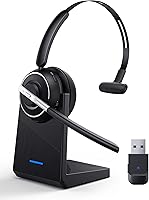
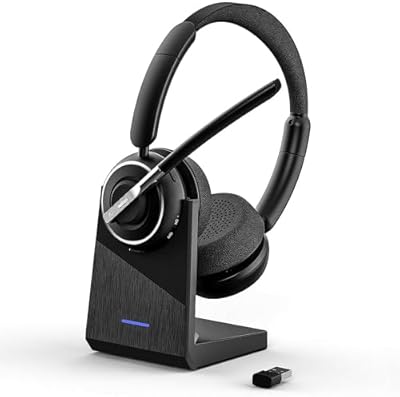
The PrancyBt KH122M enters a crowded mid-range wireless headset market with a few genuinely practical ideas that separate it from the usual pile of look-alike work headsets. Most notable is the physical toggle switch — flip it on, and it connects. No holding buttons, no hunting for a blinking LED. The Bluetooth 5.2 connection is solid, and the included USB dongle means corporate laptop users locked out of native Bluetooth are not left behind. There is also a charging base included, a small but real convenience that most headsets at this price skip entirely. This is a capable, no-nonsense tool built for work calls, not hi-fi listening.

Features & Benefits

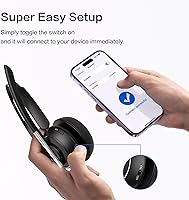
The toggle power switch sounds minor until you have spent twenty seconds holding down a button on a cheaper headset waiting for it to decide it is on. Here, you flick it and it pairs instantly after the first setup. The USB dongle is equally practical — plug it into a work computer that blocks Bluetooth and you are ready in seconds, no drivers required. A mute button with voice announcements that actually says ″mute on″ or ″mute off″ removes any guesswork mid-call. The rotating microphone arm adjusts without repositioning the whole headset, and the 45-hour battery means most people will charge it weekly, not daily.

Best For

This wireless work headset suits anyone who lives on video calls — remote workers, hybrid employees, and call center staff who need reliable audio across a full shift. It is particularly well-matched to people on managed corporate laptops where IT has disabled direct Bluetooth pairing, since the dongle bypasses that entirely. Anyone burned by complicated pairing rituals will appreciate how little setup this asks for. It handles switching between a laptop and mobile reasonably well for those who jump between devices throughout the day. If you need studio-quality sound or gaming audio, look elsewhere — this is built purely around clear communication.

User Feedback

Buyers consistently highlight call clarity as a genuine strength — both from the wearer's end and what recipients hear, which matters far more than people realize before buying a work headset. The dongle earns specific praise from users on locked-down office machines. On the downside, on-ear fatigue surfaces in reviews after long sessions; it is not an aggressive clamp, but on-ear designs tire ears over a full workday in a way over-ear cushions do not. A portion of users reported occasional dropouts, though a Bluetooth driver update frequently resolved the issue. The plastic construction feels functional rather than refined, which is honest and expected at this price point.

Pros

  • Physical toggle switch powers on and pairs instantly — no button-holding frustration ever again.
  • USB dongle lets you connect to locked-down corporate laptops without touching Bluetooth settings.
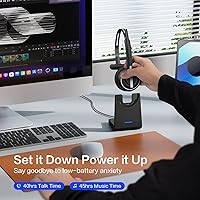
  • 45-hour battery life means most users only need to charge it once or twice a week.
  • The charging dock keeps it ready on your desk without hunting for a cable each morning.
  • Mute button with voice announcements eliminates the guesswork of whether you are actually muted.
  • Rotating microphone arm fine-tunes your mic position without repositioning the entire headset.
  • Call clarity is consistently praised by both wearers and the people on the other end of the line.
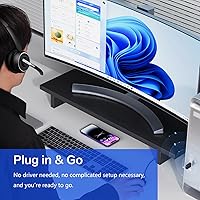
  • Plug-and-play USB dongle setup requires zero software installs or complicated configuration steps.
  • Compatible out of the box with Zoom, Teams, and Skype across Windows and Mac systems.
  • Includes a Type-C charging cable and docking base — a well-rounded package for the price.

Cons

  • On-ear fit causes noticeable ear fatigue for many users after three or more hours of continuous wear.
  • Microphone noise cancellation struggles in genuinely noisy environments despite the bold marketing claim.
  • Bluetooth dropouts occur for some users, and resolving them requires a manual driver update.
  • The all-plastic construction feels functional rather than durable, with some hinge wear reported over months.
  • Real-world wireless range falls short of the 33-foot spec when walls or partitions are involved.
  • The USB dongle is easy to lose when traveling — there is no dedicated storage for it on the headset.
  • Hardware mute button does not always sync correctly with platform mute indicators when paired via native Bluetooth.
  • The charging dock connection can become loose over time, occasionally interrupting overnight charging.

Ratings

The PrancyBt KH122M has been put through its paces by a wide range of remote workers, call center staff, and hybrid professionals worldwide — and the scores below reflect what those verified buyers actually experienced, with AI filtering applied to remove incentivized, bot-generated, and outlier reviews. Both the standout strengths and the recurring frustrations are captured honestly here, so you get a clear picture before committing.

Call Clarity
83%
Most users report that voices come through cleanly on both ends of a call, which is genuinely the most important test for a work headset. Colleagues on Zoom and Teams calls consistently noted they could hear the wearer without strain, even in moderately noisy home setups.
In louder environments — open-plan offices or busy households — some callers reported picking up background noise bleed, suggesting the mic noise cancellation has real limits beyond what the marketing implies.
Microphone Quality
78%
22%
The rotating microphone arm is a practical advantage; users can fine-tune positioning without shifting the whole headset. Voice pickup is clean and focused in quiet rooms, and the mute announcements genuinely help people avoid the embarrassing unmuted-mistake moment.
The mic performance drops noticeably in noisier settings, and a handful of users mentioned a slightly processed or thin quality to their voice as heard by recipients, which matters if you are on client-facing calls all day.
Comfort & Fit
61%
39%
Out of the box, the on-ear cushions feel soft and the clamping pressure is light enough that initial wear is comfortable. For shorter calls — under two hours — most users report no complaints about pressure or heat buildup.
On-ear designs have a well-known limitation, and this headset is no exception: extended wear over three or four hours leads to noticeable ear fatigue for a significant number of reviewers. It is not the worst culprit in the category, but it is worth knowing before buying for all-day call center use.
Connectivity & Pairing
86%
The physical toggle switch is a standout here — users who previously owned hold-to-power headsets consistently call it out as a relief. First-time pairing is fast, and subsequent connections are automatic with no re-pairing ritual required.
A portion of users, particularly those connecting via native Bluetooth rather than the dongle, reported occasional dropout episodes. The fix — updating the computer Bluetooth driver — works for most, but it is an extra step that should not be necessary at this price point.
USB Dongle Performance
88%
For users on managed corporate laptops where IT has locked out Bluetooth, the dongle is the reason to buy this headset. Setup is genuinely plug-and-play, and mute button control through the dongle works reliably across Teams, Zoom, and Skype without extra software.
The dongle is a relatively small USB-A adapter, so it is easy to misplace when traveling. A few users also noted that range via dongle felt slightly shorter than the stated 33 feet in practice, particularly through walls or office partitions.
Battery Life
91%
The 45-hour battery claim holds up well in real-world reports — most users describe charging it once or twice a week during heavy use, which removes the pre-meeting charging panic entirely. This is a clear advantage over competitors in the same tier.
Battery drain reporting is accurate only if you keep the headset on the charging base consistently. Users who leave it unplugged overnight occasionally find the charge lower than expected, suggesting some idle drain exists.
Charging Base & Dock
79%
21%
Having a dedicated charging station is a small but meaningful quality-of-life feature at this price. The headset sits securely in the dock, and knowing it charges passively whenever you are not wearing it builds a reliable daily routine around the device.
The dock itself is lightweight plastic and feels less sturdy than the headset. A couple of users reported the connection between headset and dock becoming slightly loose over time, requiring repositioning to ensure a solid charge.
Build Quality
64%
36%
The construction is solid enough for desk use and daily handling. The headband adjusts smoothly and the hinges feel reasonably robust for a plastic-bodied headset in this tier — it does not creak or flex excessively out of the box.
The all-plastic body does give a budget feel that some buyers find underwhelming, especially when comparing it to headsets with rubberized or metal accents. Long-term durability reports are mixed, with a few users noting hinge wear after several months of regular use.
Ease of Setup
93%
Nearly every user who reviewed setup commented positively — unbox, plug in the dongle, toggle on, done. There are no apps to install, no Bluetooth menu diving, and no pairing codes to enter. For non-technical users, this is a meaningful advantage.
The one friction point is that Bluetooth driver updates may be needed on some computers for stable wireless operation, and identifying that fix requires a degree of technical confidence that not all users have.
Mute Functionality
84%
The physical mute button is well-placed and easy to find without looking, which matters when you are mid-conversation and need to mute quickly. Voice announcements confirming mute status are a thoughtful addition that several reviewers specifically mentioned appreciating.
A small number of users noted that mute button behavior when connected via native Bluetooth — rather than the dongle — did not always sync reliably with the platform mute indicator in Teams or Zoom, causing occasional confusion.
Wireless Range
72%
28%
In open-space home office environments, the connection holds at distances well beyond a typical desk setup, giving users freedom to walk to a printer or kitchen without dropping the call. Most users working within 20 feet of their computer had zero issues.
The 33-foot range is optimistic in real-world conditions with walls or furniture in between. Users in larger offices or older buildings with signal interference reported the connection becoming choppy at moderate distances.
Noise Cancellation (Mic)
67%
33%
In a quiet home office, the noise-cancelling microphone does a decent job of reducing ambient hum — air conditioning, light keyboard noise, and fan sounds are noticeably reduced. Recipients on calls confirm the improvement over a standard mic in controlled settings.
The 99.99% noise cancellation figure is marketing language, not a real-world outcome. In genuinely noisy environments like shared office spaces or homes with children, background noise bleeds through enough to be distracting, and users should calibrate expectations accordingly.
Value for Money
81%
19%
Factoring in the USB dongle, charging base, 45-hour battery, and toggle switch all in one package, buyers broadly feel this headset delivers more practical utility per dollar than most similarly priced alternatives. The included accessories alone justify a portion of the cost.
Buyers with slightly higher budgets will find over-ear headsets with better long-term comfort at a comparable price, and the plastic build makes some wonder about longevity. Value is strong, but it is not without trade-offs that matter for heavy daily users.
Compatibility
87%
Works reliably with Windows and Mac computers, and switching to mobile mid-day is straightforward. Compatibility with all major UC platforms — Teams, Zoom, Skype — is confirmed by a large portion of reviewers, including enterprise users.
A small number of users on older operating systems or non-standard conferencing platforms reported inconsistent behavior, particularly around hardware mute button recognition. Linux users should proceed with caution as support is not guaranteed.

Suitable for:

The PrancyBt KH122M is built for people whose job revolves around calls — remote workers, hybrid office staff, and customer support agents who spend the bulk of their day on Zoom, Teams, or Skype. It is an especially strong fit for anyone on a managed corporate laptop where IT policy blocks direct Bluetooth pairing, since the plug-and-play USB dongle sidesteps that entirely without requiring admin rights or driver installs. Workers who move between their desk phone and mobile throughout the day will appreciate how quickly it reconnects, and the charging dock means it is always ready when the workday starts. If your biggest headset frustrations have been complicated pairing, a dead battery before an important call, or fumbling for a mute button mid-conversation, this wireless work headset addresses all three in practical, no-fuss ways. The 45-hour battery and docking base together make it genuinely low-maintenance for daily professional use.

Not suitable for:

The PrancyBt KH122M is not the right choice for anyone who needs to wear a headset for six or more hours straight without breaks — the on-ear design, while comfortable initially, causes ear fatigue for a significant number of users over extended sessions, and people in full-day call center roles may find over-ear cushioned alternatives a better long-term investment in comfort. It is also not suited to buyers expecting studio-quality audio or robust noise isolation for listening to music or media; the sound profile is tuned for voice clarity, not hi-fi reproduction. Users in genuinely loud open-plan offices should also temper expectations around the microphone noise cancellation — the marketing figure of 99.99% does not reflect real-world performance in busy environments, and recipients may still notice background noise on calls. Buyers who frequently work in large spaces or through multiple walls may find the practical wireless range falls short of the stated specification. Finally, this Bluetooth headset is not a strong pick for Linux users or anyone on non-standard conferencing platforms, where hardware mute button integration can be unreliable.

Specifications

  • Bluetooth Version: Uses Bluetooth 5.2, which offers faster pairing, lower latency, and a more stable connection than previous 5.0 or 5.1 implementations.
  • Wireless Range: Rated up to 33 feet (10 meters) in open-space conditions, though real-world range through walls or partitions may be shorter.
  • Battery Life: Manufacturer-rated at up to 45 hours of continuous use on a single full charge.
  • Charging Time: Reaches a full charge in approximately 2 hours via the included USB-C charging cable and docking base.
  • Charging Interface: Charges via USB-C connector; a USB-C cable is included in the box along with a dedicated charging station.
  • Connectivity Options: Connects via Bluetooth 5.2 or through the included USB-A dongle for computers without Bluetooth or with restricted wireless access.
  • Microphone Type: Features a 270-degree rotating boom microphone arm with active noise cancellation designed to isolate voice from ambient background sound.
  • Ear Form Factor: On-ear design with flexible cushioned ear cups that sit against the outer ear rather than fully enclosing it.
  • Power Control: Uses a physical on/off toggle switch rather than a hold-to-press button, enabling instant power-on and automatic reconnection.
  • Mute Control: Dedicated mute button located on the headset body with audible voice announcements confirming mute-on and mute-off status.
  • Platform Compatibility: Compatible with Zoom, Microsoft Teams, Skype, and other major UC platforms when connected via the USB dongle on Windows and Mac.
  • Weight: The headset weighs 0.43 kg (approximately 15.2 oz) including the headband and ear cup assembly.
  • Materials: Primary construction is plastic throughout the headband, ear cups, and microphone arm, with cushioned padding on the ear contact surfaces.
  • Included Contents: Package includes the headset, charging station, USB-C charging cable, USB-A Bluetooth dongle, and a printed user manual.
  • Device Compatibility: Works with laptops, desktop computers, and mobile phones supporting Bluetooth or USB connectivity.
  • Control Methods: Supports push-button controls, voice commands for mute status, and basic app-based adjustments where supported.
  • Package Dimensions: The retail box measures 7.52 x 7.09 x 3.78 inches, making it compact enough for standard shelf or desk storage.
  • Battery Type: Powered by a built-in rechargeable lithium-ion battery; one lithium-ion cell is included and pre-installed.

Related Reviews
PrancyBt KH120M
PrancyBt KH120M
79%
83%
Microphone Clarity
74%
Noise Cancellation Effectiveness
71%
Comfort & Wearability
86%
Bluetooth Connection Stability
78%
Call Performance on Zoom & Teams
More

FAQ

Yes, and this is actually one of the strongest reasons to consider this wireless work headset. The included USB-A dongle plugs directly into your computer and creates its own wireless connection to the headset without needing Bluetooth enabled at the OS level. No admin rights or software installs are required — it is genuinely plug-and-play.

Most wireless headsets require you to hold a button for several seconds until an LED blinks the right color to confirm it is on. The toggle switch here works like a light switch — flick it to on, and the headset powers up and reconnects to your last paired device immediately. It is a small change that becomes noticeably less frustrating after the first week.

When using the USB dongle, the hardware mute button does sync with Teams and Zoom so both the headset and the platform reflect the same mute state. If you connect via native Bluetooth instead of the dongle, that sync can be inconsistent depending on your OS and platform version, so dongle connection is the more reliable route for platform-integrated mute control.

It is on the optimistic side, as most battery ratings are, but real-world reports suggest the KH122M holds up well — many users charge it once or twice a week under normal daily use. At moderate volume levels during voice calls, getting 35 to 40 hours between charges is a reasonable expectation.

Honestly, that depends on your sensitivity to on-ear pressure. For sessions up to two or three hours, most users find it comfortable. Beyond that, on-ear designs in general — not just this one — tend to cause ear fatigue because the cushions rest on the outer ear rather than around it. If your job involves back-to-back calls all day, it is worth considering an over-ear alternative for long-term comfort.

The PrancyBt KH122M reduces ambient hum and low-level background noise effectively in a quiet home office, and call recipients typically confirm a clean voice signal in those conditions. In a genuinely loud setting — a busy open-plan office or a household with kids — some background noise does bleed through. The 99.99% noise cancellation figure is a marketing claim, not a real-world measurement, so calibrate your expectations accordingly.

Yes, both operating systems recognize the USB dongle automatically without requiring additional drivers or software. Bluetooth pairing on Mac follows the standard system Bluetooth menu. A small number of users have needed to update their Bluetooth drivers on Windows for a fully stable connection, but for most setups it works out of the box.

You can, though it requires a manual reconnect rather than seamless automatic switching between two paired devices simultaneously. The typical workflow is to toggle the headset off and back on near the new device, which reconnects quickly. It is workable for switching a few times a day but not instant enough to feel truly fluid if you are bouncing between devices constantly.

Everything you need is included: the headset, the USB dongle, a USB-C charging cable, a charging dock, and a user manual. You do not need to purchase any accessories to start using it right away, which is worth noting since some competitors at this price tier sell the dock separately.

The plastic construction is functional and consistent with what you would expect at this price tier, but it is not built like a premium device. The headband and hinges hold up well for most users in normal desk use. Where durability concerns have appeared in user reports, they tend to involve the charging dock connection loosening over time and, in some cases, hinge wear after six or more months of heavy daily use. Treating it as a work tool rather than a durable travel device is probably the right mindset.