Overview

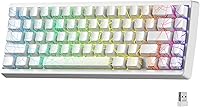
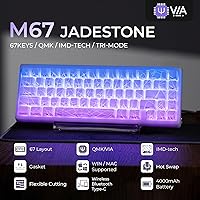
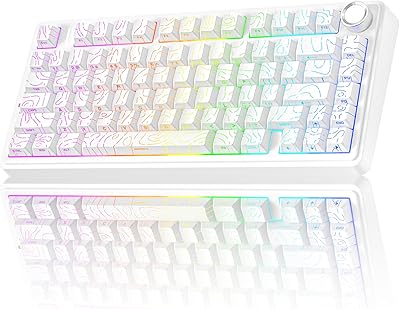
The HITIME XVX M67 60% Wireless Mechanical Keyboard enters a crowded mid-range market with one clear visual hook: a spider web pattern baked directly into each keycap using IMD technology, so the design glows rather than just sitting on the surface. The HITIME x XVX collaboration signals this is aimed at enthusiasts who want something distinctive without commissioning a full custom build. That said, the 60% layout is a real commitment — there is no dedicated function row, no numpad, and arrow keys require a function layer. If you rely on those keys constantly, this board will frustrate you. For everyone else, it is worth a closer look.
Features & Benefits

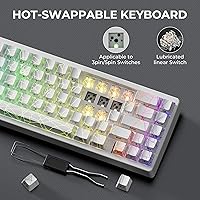
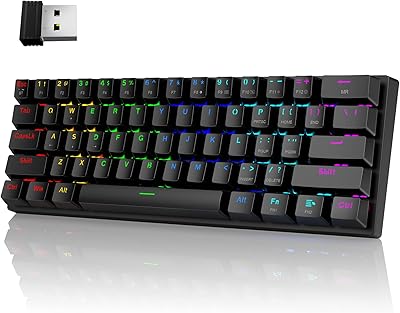
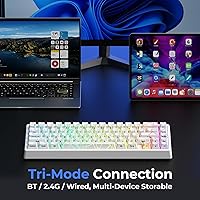
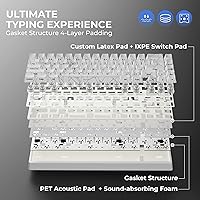
The M67 keyboard covers connectivity well: Bluetooth 5.0, a 2.4GHz dongle, and USB-C wired, letting you juggle up to five paired devices. The standout feature, though, is the IMD keycap technology — the spider web pattern is embedded inside the keycap itself, so RGB light shines through the design rather than around it. The gasket mount with four layers of silicone dampening gives keystrokes a softer, slightly bouncy feel that reduces clatter noticeably. Switches are hot-swappable, accepting both 3-pin and 5-pin options, so swapping to your preferred switch takes minutes. One important caveat: QMK/VIA remapping only works while plugged in via USB-C, though your layout carries over to wireless once saved.

Best For

This 60% wireless board is a natural fit for anyone who wants a themed, ready-to-use mechanical keyboard without sourcing parts and assembling a custom build. Hobbyists who enjoy tinkering will appreciate the QMK/VIA support and hot-swap flexibility at a price that still leaves room for aftermarket switches. Desk workers in open offices or libraries benefit from the dampened typing profile, which keeps noise reasonably low without requiring a separate foam mod. It works across Windows, macOS, and Linux, making it practical for people who move between machines regularly. It is less ideal for data-heavy workflows where a numpad matters, or for anyone not yet adjusted to a compact layout.

User Feedback

Buyers respond most positively to the keycap lighting — the spider web pattern illuminated from within genuinely looks different from a standard shine-through board, and it tends to meet expectations set by the product photos. The out-of-box typing feel earns consistent praise too; the pre-lubed switches and gasket dampening deliver a softness that surprises people upgrading from cheaper boards. Wireless reliability on 2.4GHz gets solid marks for gaming use specifically. Where feedback gets nuanced is the QMK setup process — a handful of buyers found the wired-only remapping requirement confusing at first. Battery life reports lean positive, with most users logging several days of real use before reaching for the cable.

Pros

  • The IMD spider web keycap design genuinely glows through the pattern, not just around it — it stands out visually in a crowded market.
  • Tri-mode wireless with up to five paired devices makes switching between a PC, laptop, and tablet nearly effortless.
  • Gasket-mount construction with silicone dampening gives keystrokes a noticeably softer, quieter feel straight out of the box.
  • Hot-swappable PCB accepts both 3-pin and 5-pin switches, so personalizing the typing feel requires no tools or soldering.
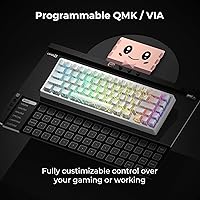
  • QMK/VIA support opens the door to full key remapping, macro layers, and custom RGB — rare at this price point.
  • The 4000mAh battery delivers real multi-day wireless use before needing a charge.
  • Pre-lubed linear switches feel smooth and ready to type on from day one without extra tuning.
  • Compatible with Windows, macOS, and Linux, covering essentially every mainstream computing environment.
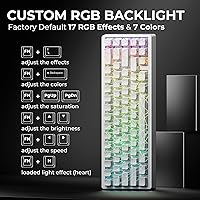
  • RGB options include per-key lighting plus dedicated LEDs under stabilizers and on the spacebar for a more layered light effect.
  • Packaging includes the battery, so there is no additional purchase required to get started wirelessly.

Cons

  • Key remapping through QMK/VIA only works while connected via USB-C — you cannot remap wirelessly, which catches some buyers off guard.
  • The 60% layout removes the dedicated function row, numpad, and direct arrow keys, which is a steep adjustment for many users.
  • Plastic chassis construction feels functional but does not have the heft or premium feel that some enthusiasts expect.
  • No dedicated software app beyond QMK/VIA means the learning curve for customization is steeper for non-technical users.
  • Bluetooth connection switching, while supported, can occasionally require manual re-pairing depending on the host device.
  • The spider web theme is bold and specific — buyers wanting a subtle or minimal aesthetic will find few alternatives in this lineup.
  • At 1.87 pounds, portability is reasonable but not ultralight for users who carry a keyboard daily in a bag.
  • Stabilizer tuning out of the box is decent but not exceptional — space bar and larger keys may rattle slightly for the most discerning typists.

Ratings

The scores below for the HITIME XVX M67 60% Wireless Mechanical Keyboard were generated by AI after analyzing verified global buyer reviews, with spam, bot-submitted, and incentivized feedback actively filtered out. Each category reflects the full spectrum of real user experiences — not just the highlights — so both genuine strengths and recurring frustrations are represented honestly.
Typing Feel
88%
The combination of gasket mounting and four silicone dampening layers gives keystrokes a noticeably soft, slightly bouncy quality that users coming from entry-level boards find immediately impressive. Pre-lubed linear switches contribute to a smooth, consistent feel from the first keystroke without any break-in period.
Enthusiasts with experience on high-end custom boards note the stock switches lack the refined smoothness of premium options like Gateron Oil Kings or Boba U4Ts. A few users also found the spacebar slightly inconsistent in feel compared to the alphas.
Sound Profile
83%
For a board in this price range, the dampened thock is genuinely satisfying — office users and late-night typists both report that colleagues and housemates rarely notice the keyboard in use. The silicone layers do a solid job absorbing the high-pitched clack that plagues cheaper gasketless boards.
The spacebar and larger stabilized keys produce a slightly rattly sound that breaks the otherwise consistent acoustic profile. Some buyers expected a deeper, more premium sound and found the overall result pleasant but not exceptional without additional foam or stabilizer modding.
Wireless Reliability
86%
The 2.4GHz connection in particular draws consistent praise from gamers who tested it for fast-paced titles, with users reporting virtually no perceptible input lag during extended play sessions. Bluetooth device switching between a desktop, laptop, and tablet works reliably for most buyers in everyday productivity use.
A small subset of users reported occasional Bluetooth dropout when the keyboard was more than a few feet from the paired device, particularly on older laptops. The Bluetooth connection is also slightly less consistent than the 2.4GHz dongle during high-demand use, which is typical for the technology but worth knowing.
IMD Keycap Aesthetics
91%
The spider web pattern glowing from within the keycap rather than just around it creates a visual effect that genuinely surprises buyers when they first power it on in a dim room. Most users agree the real-world appearance matches or exceeds the product photography, which is not always the case with themed keyboards.
The bold spider web design is polarizing — buyers who wanted a more understated desk setup occasionally feel the pattern is too loud for professional environments. In bright daylight, the in-keycap design is less visible, reducing the wow factor during daytime office hours.
Build Quality
74%
26%
The overall assembly feels solid for a mid-range plastic board, with no significant flex or creaking reported during normal typing. The gasket structure adds structural integrity beyond what the outer shell alone would suggest, and the keyboard sits stably on a desk without rocking.
The plastic case does not inspire confidence in the same way an aluminum or polycarbonate chassis would, and some users notice it feels lighter and less premium than it looks in photos. A handful of buyers reported minor inconsistencies in case seam alignment, though none described it as affecting function.
Hot-Swap Experience
89%
Switch swapping is straightforward and tool-friendly — a basic switch puller gets the job done in under ten minutes for a full replacement, and the PCB holds switches securely without wobble. Supporting both 3-pin and 5-pin switches gives buyers broad compatibility with the vast majority of aftermarket options.
A small number of users noted that some switch sockets required slightly more insertion force than expected, particularly near the board edges, suggesting minor PCB tolerance variation. This is not unusual for hot-swap boards in this tier but is worth approaching carefully to avoid bending pins.
QMK/VIA Programmability
78%
22%
For buyers familiar with QMK, having full remapping and macro support at this price point is a genuine differentiator — most competitors in this range offer proprietary software with far fewer options. Users who took the time to configure their layout report high satisfaction with the depth of customization available.
The wired-only remapping requirement catches a meaningful number of buyers off guard, especially those who set up the keyboard wirelessly first and then struggled to understand why VIA was not detecting it. First-time QMK users also report a steeper learning curve than expected, with limited product-specific documentation available.
Battery Life
84%
With moderate RGB brightness, most users comfortably get three to five days of daily use from a single charge, which is practical enough that keeping a USB-C cable handy feels like an afterthought rather than a necessity. Turning off the backlight entirely extends this noticeably, which productivity-focused users appreciate.
Running the RGB at full brightness across all zones reduces battery life considerably, dropping to under two days for heavy users — not unusual for a board this size, but the gap between best- and worst-case scenarios is wide. A battery level indicator would also be a helpful addition that the board currently lacks.
RGB Lighting Quality
82%
18%
The 17-plus built-in lighting modes cover a solid range of effects, and the additional LEDs beneath stabilizers and along the spacebar add a layered depth that single-layer RGB boards cannot replicate. Buyers who use the keyboard in a gaming setup with other RGB peripherals report it integrates visually well.
RGB customization through QMK/VIA requires more technical setup than most buyers expect — there is no simple companion app for drag-and-drop lighting control. Some users also noted slight per-key brightness inconsistency across the board, particularly noticeable on uniform-color lighting modes.
Multi-Device Switching
76%
24%
The ability to pair up to five devices and switch between them with a key combination is genuinely useful for people juggling a home PC, a work laptop, and a tablet at the same desk. Bluetooth switching is fast enough for everyday use and avoids the friction of physically re-pairing each time.
The switching mechanism relies on function-layer key combinations that some users find difficult to memorize, especially given the lack of a printed reference guide in the box. A couple of buyers also reported that re-establishing a Bluetooth connection after the keyboard had been idle occasionally required a second attempt.
60% Layout Usability
69%
31%
For users already accustomed to compact layouts, the 60% form factor frees up significant desk space and keeps hand travel minimal during gaming or typing-intensive work. QMK/VIA remapping allows arrow keys and other missing keys to be placed exactly where each user finds them most natural.
Buyers new to the 60% format consistently report a two-to-four-week adjustment period, and some never fully adapt — particularly those who rely on direct arrow key access during document editing or coding. The layout is a firm design commitment, not a minor inconvenience, and should not be underestimated.
Value for Money
87%
When you add up gasket mounting, tri-mode wireless, QMK/VIA support, hot-swap PCB, and IMD keycaps in a single package, the M67 keyboard delivers a feature density that competes with boards costing meaningfully more. First-time mechanical keyboard buyers especially feel they are getting far more than the price suggests.
Buyers who approach this as a premium product rather than a value-oriented one sometimes feel the plastic build and occasional QC inconsistencies do not fully match expectations. It represents strong value, but it is not a luxury product, and pricing it against higher-tier boards sets up an unfair comparison.
Out-of-Box Setup
79%
21%
Wired and 2.4GHz connections are genuinely plug-and-play — most users are typing within minutes of opening the box with no driver installation required. The included battery being pre-installed is a small but appreciated touch that reduces friction for first-time wireless keyboard users.
The documentation included in the box is minimal, and buyers who want to explore QMK or Bluetooth multi-device features quickly hit a wall without turning to third-party forums. The wired-only remapping requirement also creates confusion during initial setup for users who connect wirelessly first.
Portability
72%
28%
At under two pounds and with a compact 60% footprint, the spider web keyboard is far easier to slip into a bag than a full-size or tenkeyless board, making it a practical option for users who move between a home desk and an office or co-working space regularly.
There is no included carrying case or protective pouch, which means the keycaps and chassis are vulnerable during transport unless the buyer sources their own sleeve. The 2.4GHz dongle is also easy to misplace without a dedicated storage slot on the board itself.

Suitable for:

The HITIME XVX M67 60% Wireless Mechanical Keyboard is a strong pick for keyboard hobbyists who want a visually distinctive, ready-to-use board without the cost and effort of a full custom build. If you already know and accept the 60% layout — meaning you are comfortable using function layers for arrow keys and F-row shortcuts — the M67 keyboard rewards you with a well-rounded feature set at a mid-range price that is hard to argue with. People who regularly work across multiple machines, whether a home desktop, a work laptop, or a tablet, will get real practical value from the tri-mode wireless and five-device pairing. The gasket-dampened construction also makes it a considerate choice for shared workspaces or late-night typing sessions where noise is a genuine concern. QMK/VIA support means tinkerers can remap and reprogram everything to their liking once they are wired in, making this 60% wireless board a solid foundation for ongoing customization rather than a fixed product.
Not suitable for:

Anyone who relies heavily on a numpad for data entry, accounting, or spreadsheet work should look elsewhere — the HITIME XVX M67 60% Wireless Mechanical Keyboard simply does not include one, and no software workaround fully replaces dedicated number keys for that kind of workflow. Buyers who have never used a 60% board before should also be honest with themselves: the adjustment period for accessing F-keys, arrow keys, and navigation functions through layered shortcuts takes real time and patience, and not everyone finds it worth it. Writers or coders who do heavy editing and depend on fast, direct access to Delete, Page Up, Page Down, and Home will likely find the compressed layout slows them down. If you want to remap the keyboard and then immediately use it wirelessly, the wired-only remapping requirement adds a friction point that may feel cumbersome in a multi-device setup. And buyers expecting a heavy, premium-feeling chassis will find the mostly plastic construction functional but unspectacular in the hand.
Specifications

  • Layout: 60% compact form factor with no dedicated numpad, function row, or standalone arrow keys.
  • Dimensions: The keyboard measures 14.37 × 6.22 × 2.13 inches in its packaged form.
  • Weight: The board weighs 1.87 pounds, making it manageable for desk use but not ultralight for daily commuting.
  • Connectivity: Supports Bluetooth 5.0, 2.4GHz wireless via dongle, and USB-C wired connection.
  • Device Pairing: Can store and switch between up to 5 paired devices across all wireless modes.
  • Battery: Equipped with a built-in 4000mAh lithium polymer battery, which is included in the box.
  • Mount Type: Gasket-mount construction with four layers of silicone dampening between the PCB, plate, and case.
  • Switch Type: Ships with pre-lubed transparent linear switches that are hot-swappable and rated for 80 million keystrokes.
  • Switch Support: Hot-swap PCB is compatible with both 3-pin and 5-pin mechanical switches.
  • Keycap Technology: Uses IMD (In-Mold Decoration) technology, embedding the spider web pattern inside the keycap so RGB light shines through the design itself.
  • RGB Lighting: Offers 17 or more built-in backlight modes with per-key LEDs, plus dedicated LEDs under stabilizers and along the spacebar.
  • Firmware: Runs QMK/VIA open-source firmware, allowing full key remapping, macro creation, and custom lighting — remapping is available in wired mode only.
  • OS Support: Compatible with Windows, macOS, and Linux operating systems out of the box.
  • Material: Case and primary structural components are constructed from plastic.
  • Theme: Spider web visual theme applied to keycaps via IMD technology in a white colorway.
  • Brand: Manufactured by HITIME under the HITIME x XVX collaborative product line.

Related Reviews

Pauroty 60% Wireless Mechanical Keyboard
86%
88%
Connectivity Options
75%
Battery Life
93%
Portability
84%
Ergonomics
91%
RGB Customization
More
OHY H61 60% Mechanical Keyboard

78%
91%
Value for Money
78%
Typing Feel
93%
Hot-Swap Feature
67%
Build Quality
82%
RGB Lighting
More
Merdia Triple Mode 100-Key Wireless Mechanical Keyboard
74%
88%
Value for Money
84%
Wireless Connectivity
81%
Typing Experience
83%
Hot-Swap Functionality
67%
Build Quality
More
Keychron K8
Keychron K8
80%
91%
Typing Feel & Switch Quality
88%
Noise Level
86%
Multi-Device Connectivity
67%
Build Quality & Materials
72%
Battery Life
More
MOTOSPEED CK61 60% Mechanical Keyboard
85%
89%
Typing Experience
92%
RGB Lighting Customization
85%
Build Quality
91%
Key Switch Smoothness
94%
Portability/Size
More
Logitech MX Mechanical
81%
88%
Typing Feel & Switch Quality
91%
Noise Level
86%
Build Quality & Materials
93%
Battery Life
87%
Multi-Device Connectivity
More
AULA F75 Pro
AULA F75 Pro
82%
91%
Typing Sound & Feel
83%
Build Quality & Construction
89%
Hot-Swap & Customizability
86%
Wireless Performance
82%
Battery Life
More
NuPhy Air75 V2 Wireless Mechanical Keyboard
85%
91%
Typing Feel
88%
Wireless Reliability
93%
Battery Life
87%
Build Quality
84%
Multi-Device Switching
More
Logitech POP Keys Mechanical Wireless Keyboard
76%
88%
Typing Feel
84%
Build Quality
81%
Wireless Reliability
91%
Battery Life
93%
Design & Aesthetics
More
Womier SK65 65% Wireless Mechanical Keyboard
78%
88%
Build Quality
84%
Typing Feel
81%
Wireless Performance
83%
Sound Profile
86%
Hot-Swap Experience
More

FAQ

Not really. For 2.4GHz, plug the included dongle into your computer and the board connects automatically. For Bluetooth, hold the appropriate function key combination to enter pairing mode, then connect from your device settings as you would any wireless keyboard. The whole process takes under two minutes.

You have to be connected via USB-C to remap keys through QMK/VIA. Once you have saved your layout, though, it is stored on the keyboard itself and will work in wireless mode without any issues. It is a one-time wired step, not something you need to repeat every time.

On this 60% wireless board, arrow keys and F1–F12 are accessed through a function layer, typically activated by holding the Fn key and pressing the corresponding key. The exact mapping can be customized through QMK/VIA if the defaults do not suit your workflow. If you have never used a 60% board before, expect an adjustment period of a week or two.

The keyboard ships with pre-lubed transparent linear switches that feel smooth and relatively quiet straight out of the box. If you want something different — a tactile or clicky switch, for instance — the hot-swap PCB accepts both 3-pin and 5-pin switches, so swapping is just a matter of pulling the old ones out with a switch puller and pressing the new ones in. No soldering required.

With the RGB lighting on, most users report getting several days of regular typing before needing to recharge. If you turn the backlight off or reduce brightness significantly, that figure stretches further. The 4000mAh capacity is generous for a 60% board, so battery anxiety is unlikely to be a daily concern.

The design is not printed on the surface — it uses IMD technology, which means the pattern is embedded inside the keycap during manufacturing. This makes it significantly more durable than pad-printed legends and means it will not fade or rub off with regular use.

Yes, it is compatible with macOS out of the box. Key labels will reflect a Windows layout, so some keys like the Windows key will function as Command in practice. If you want to remap keys to better match Mac conventions, QMK/VIA makes that straightforward while connected via USB-C.

The gasket-mount construction and silicone dampening layers reduce the sharpness of keystroke noise meaningfully compared to a standard tray-mount board. The linear switches also help keep sound levels down. It is not silent, but most users in shared offices report it drawing little to no attention from colleagues.

Yes, Bluetooth 5.0 is broadly compatible with iOS, iPadOS, Android, and most modern tablets. The keyboard will function as a standard HID input device. Some function-layer shortcuts may behave differently depending on the operating system, but basic typing works reliably across platforms.

The IMD keycap design means the light shines through the pattern itself, which is more striking than a typical shine-through board, but like all RGB keyboards the effect is most visible in dimmer conditions. In a bright, sunlit room the lighting will be visible but noticeably less dramatic than it looks in product photos taken in low light.