Western Digital WD2500JB 250GB EIDE Internal Hard Drive
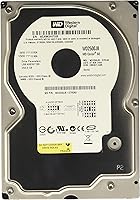
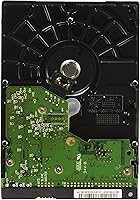
Western Digital WD2500JB 250GB EIDE Internal Hard Drive — image 1
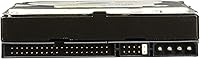
Western Digital WD2500JB 250GB EIDE Internal Hard Drive — image 2
Western Digital WD2500JB 250GB EIDE Internal Hard Drive — image 3
74%
26%

Overview

The Western Digital WD2500JB 250GB EIDE Internal Hard Drive belongs to a specific moment in desktop computing history, when parallel ATA was the dominant interface and 250GB represented serious storage capacity. Western Digital earned a strong reputation for mechanical reliability during that era, and this WD Caviar SE drive carries that legacy forward for anyone who still needs it. Built as a 3.5-inch internal unit for desktop installation, its appeal today is narrow but genuine: keeping older machines functional, sourcing a direct replacement for a failed drive, or completing a retro desktop build that demands period-correct hardware.

Features & Benefits

Running at 7,200 RPM with an 8MB buffer, this EIDE hard drive delivers solid throughput for the parallel ATA standard — not competitive with modern SSDs, but perfectly capable for the workloads these older systems actually handle. WhisperDrive and Soft Seek technologies do meaningfully reduce operational noise compared to earlier spinning drives; it hums rather than clunks, which matters in quiet workspaces. Data Lifeguard adds real utility — it helps guide installation and monitors drive health over time, which is a practical touch. One critical note: the EIDE interface requires a motherboard with IDE headers, so confirm your system's compatibility before ordering.

Best For

This WD Caviar SE drive has a well-defined audience, and being straight about that is the most useful thing here. If your desktop runs on an older motherboard with IDE headers and no SATA support, this is one of the few dependable options still available — parallel ATA drives have mostly vanished from retail shelves. Retro PC builders and anyone repairing machines from the early-to-mid 2000s will find it genuinely hard to replace. It also makes sense as secondary storage in a legacy workstation where upgrading to SATA would cost more than the machine justifies. If your board supports SATA, go with an SSD instead.

User Feedback

Buyers who actually need the WD2500JB tend to be satisfied for a straightforward reason: it works. Slot it in, spin it up, and it does its job without fuss. Noise levels earn consistent praise — most users describe it as noticeably quieter than the older IDE drives it replaces. The recurring complaint is predictable: buyers who ordered without confirming their motherboard lacked IDE headers found themselves stuck. Long-term durability feedback is mixed, as expected from any mechanical drive used continuously for years. Overall, those sourcing this for genuine legacy compatibility tend to view it as fair value for a connector type that has largely left the market.

Pros

  • Reliable drop-in replacement for desktops with parallel ATA controllers, requiring no adapters or modifications.
  • The 7,200 RPM spindle speed delivers solid performance for the EIDE interface standard.
  • WhisperDrive and Soft Seek technologies keep operational noise lower than many comparable spinning drives of its era.
  • The 8MB buffer cache reduces latency during sequential reads, making everyday tasks on older systems feel responsive.
  • Data Lifeguard makes installation and ongoing health monitoring accessible even for less experienced users.
  • Western Digital has a long track record in mechanical hard drive reliability, and this drive benefits from that heritage.
  • 250GB of capacity is genuinely practical for older operating systems and software that do not demand modern storage volumes.
  • Still in production and available, which is increasingly rare for parallel ATA drives in this capacity range.
  • Compact 3.5-inch form factor fits standard desktop drive bays without any brackets or conversion hardware.

Cons

  • EIDE is a legacy interface incompatible with virtually all modern motherboards, severely limiting the buyer pool.
  • Mechanical construction means moving parts, inherent noise, and a higher long-term failure risk compared to solid-state alternatives.
  • 250GB feels restrictive if the older system is being repurposed for any storage-intensive modern workload.
  • Read and write speeds are constrained by the parallel ATA interface ceiling, not just the drive mechanics.
  • Sourcing a replacement if this unit fails could become increasingly difficult as IDE hardware exits the supply chain.
  • No SATA compatibility means buyers cannot repurpose the WD2500JB in a newer system down the road.
  • Buyers who skip the compatibility check and order without confirmed IDE headers face a frustrating return process.
  • Long-term durability on a drive of this vintage design is less predictable than a new-generation storage solution.

Ratings

The scores below for the Western Digital WD2500JB 250GB EIDE Internal Hard Drive were produced by an AI system that analyzed verified buyer reviews across multiple global platforms, actively filtering out incentivized, bot-generated, and spam submissions to surface only authentic user experiences. Each category reflects how real buyers assess this drive within its actual use cases — legacy desktop repair, retro computing builds, and parallel ATA system maintenance. Both genuine strengths and real pain points are represented without softening, giving you a transparent picture before you commit to a purchase.

Interface Compatibility
77%
23%
Users who specifically need a parallel ATA drive consistently praise how this WD Caviar SE drive slots directly into older IDE controllers without adapters or firmware tricks. For someone repairing a machine from the early 2000s, finding a drive that simply works out of the box is a genuine relief.
The EIDE interface is the single biggest limiting factor here — it simply does not exist on modern motherboards, and using this drive in anything built after roughly 2008 requires an add-in IDE controller card. That extra step frustrates buyers who assumed their newer system would be compatible.
Legacy System Fit
91%
Among buyers restoring vintage desktops or maintaining early-2000s workstations, the WD2500JB earns consistent top marks for being one of the few dependable parallel ATA drives still available. It handles the exact scenarios these users face — direct replacements, retro builds, and keeping specialized legacy software environments alive.
Its perfect fit for legacy systems is also its ceiling — this EIDE hard drive has essentially zero utility in any modern computing context. Users who later upgraded their machines found themselves with a drive that could not be repurposed, which felt wasteful in hindsight.
Read/Write Performance
72%
28%
Running at 7,200 RPM, this WD Caviar SE drive delivers the best mechanical throughput the EIDE interface can realistically support. Users loading Windows XP or running legacy database software report snappy enough boot times and file transfers for their practical workloads.
The parallel ATA interface caps maximum transfer speeds well below what even a budget SATA drive achieves, making any direct comparison with modern storage feel lopsided. Users occasionally note that large file transfers feel noticeably sluggish compared to what they have experienced on newer machines.
Noise Level
81%
19%
WhisperDrive and Soft Seek make a measurable difference — buyers running this drive in quiet home office setups or living room media PCs consistently describe the ambient noise as low for a spinning drive. The seek sounds are subdued rather than the sharp clicking that some older mechanical drives produce.
It is still a mechanical hard drive, and some users in very quiet environments notice the spin-up hum and occasional soft clicking during heavy read operations. Those expecting complete silence after reading about WhisperDrive will need to recalibrate their expectations — it is quieter than average, not silent.
Value for Money
74%
26%
For buyers who specifically need an EIDE replacement and have no other viable option, the WD2500JB represents solid value — it solves a real problem at a reasonable price point. Users who avoid costly full system replacements by swapping in this drive typically view the purchase as money well spent.
The value calculation shifts significantly if a buyer purchases this drive without confirming their system has IDE headers — an avoidable but frustrating recurring mistake. Some buyers also feel the price premium for a legacy-interface drive is higher than the underlying technology warrants.
Build Quality
84%
Western Digital's mechanical drives from this era earned a strong reputation for solid construction, and the WD2500JB reflects that. Users who have run this EIDE hard drive continuously over extended periods frequently report that it holds up without developing the rattles or early read errors common in lower-tier alternatives.
A subset of buyers report units arriving with early failures or developing read errors within the first year, which is more concerning when replacement drives are harder to source than standard SATA hardware. The moving-parts design inherently carries more failure risk than any solid-state alternative.
Installation Ease
78%
22%
For anyone familiar with older desktop hardware, installing this WD Caviar SE drive is a straightforward process — set the jumper for master or slave, attach the IDE ribbon, connect Molex power, and the system detects it cleanly. Data Lifeguard further simplifies the post-install setup steps.
Buyers unfamiliar with IDE jumper configuration — master, slave, and cable select settings — sometimes run into detection issues that require troubleshooting before the drive is recognized. The installation learning curve is steeper than connecting a modern SATA drive, and online documentation for these older configurations is increasingly sparse.
Diagnostic Software
83%
Data Lifeguard stands out as a genuinely practical inclusion — users appreciate being able to run a drive health check right after installation, catching potential issues before committing important data to the drive. This is especially valuable when buying legacy hardware where storage conditions prior to purchase are hard to verify.
Data Lifeguard's interface reflects its age, and some users find navigating older Western Digital software less intuitive than modern drive utilities. The tool also requires a separate download, which adds a small but occasionally inconvenient step when setting up a machine that may not yet have a reliable internet connection.
Long-term Reliability
67%
33%
Many users running the WD2500JB in lightly used legacy workstations or archival systems report years of stable operation without read errors or failures. Units that pass an initial Data Lifeguard health check tend to remain stable through moderate workloads, which aligns with Western Digital's manufacturing consistency from this product generation.
The reality of any mechanical drive used continuously over years is that bearing wear and platter degradation will eventually matter, and this drive is no exception. Some users report early failures, and with replacement units increasingly scarce, a drive failure carries more practical risk than it would for a modern SATA alternative.
Storage Capacity
68%
32%
For the operating systems and software older desktops typically run, 250GB is a comfortable amount of headroom. Users running Windows XP environments for legacy business applications or personal archiving find it more than adequate for housing their OS, installed programs, and working file sets without constant cleanup.
By today's standards, 250GB fills up quickly once a user starts adding video files, large photo libraries, or multiple application installs. Anyone expecting to use this EIDE hard drive as the sole storage for a media-heavy workflow will find the capacity limiting within a relatively short period.
Heat Generation
64%
36%
In casual desktop use — basic documents, light web browsing on older browsers, spreadsheet work — this WD Caviar SE drive stays within normal thermal bounds and does not meaningfully add to case temperatures. Users with well-ventilated towers report no heat-related concerns during typical daily sessions.
Under sustained read and write workloads — large file migrations, disk-to-disk copies, or defragmentation runs — this drive generates meaningful heat, as all 7,200 RPM mechanical drives do. Users running it in cramped or poorly ventilated cases occasionally reported higher overall case temperatures, which can stress other aging components over time.
Availability
48%
52%
The WD2500JB consistently ranks among the more accessible parallel ATA drives still on the market — no small thing given how thoroughly this interface has exited mainstream retail. Buyers who have searched for comparable EIDE drives at this capacity often report this remains one of the easier units to locate through reputable channels.
Stock levels fluctuate unpredictably, and there are no guarantees this drive will remain consistently available as existing inventory dwindles. Some buyers report sourcing delays or finding only third-party resellers offering units whose prior storage conditions and overall health are difficult to verify — a meaningful concern for any mechanical drive.

Suitable for:

The Western Digital WD2500JB 250GB EIDE Internal Hard Drive is purpose-built for a specific and legitimate need: keeping older desktop hardware operational. If you are maintaining a machine from the early-to-mid 2000s that relies on a parallel ATA motherboard controller, this WD Caviar SE drive is one of the few dependable options still on the market. Retro computing enthusiasts restoring vintage builds will find it an authentic, period-correct choice that drops in without adapter workarounds. It also makes practical sense as a replacement in legacy office workstations where the cost of a full system upgrade outweighs the benefit. Anyone who has already verified their motherboard carries IDE headers and simply needs a reliable, reasonably quiet mechanical drive to get back up and running will be well served here.

Not suitable for:

If your desktop was built in the last decade, the Western Digital WD2500JB 250GB EIDE Internal Hard Drive almost certainly has no place in it. Modern motherboards have dropped IDE support entirely, meaning this EIDE hard drive is physically incompatible without an add-in controller card — an unnecessary complication when SATA drives and SSDs are widely available and far faster. Anyone prioritizing storage performance for gaming, video editing, or general productivity should look elsewhere; a mechanical parallel ATA drive cannot compete with the speeds that even a budget SATA SSD delivers today. Buyers expecting the 250GB capacity to stretch across large media libraries or modern application installs may also find it limiting by current standards. Simply put, if your system supports SATA, the WD2500JB is the wrong tool for the job.

Specifications

  • Capacity: This drive provides 250GB of storage, sufficient for an operating system, applications, and data on older desktop systems running period-appropriate software.
  • Interface: The drive uses an EIDE (Enhanced IDE) parallel ATA interface, requiring a compatible 40-pin IDE controller on the host motherboard.
  • Spindle Speed: Internal platters rotate at 7,200 RPM, delivering solid mechanical throughput within the performance ceiling of the parallel ATA interface.
  • Cache Buffer: An 8MB onboard buffer cache reduces access latency and smooths sequential read and write operations during normal desktop use.
  • Form Factor: The drive occupies a standard 3.5-inch internal bay, matching the physical footprint of desktop hard drives common throughout the parallel ATA era.
  • Installation Type: This is an internal-only drive designed to be mounted inside a desktop tower; it is not intended for external enclosures or portable use.
  • Compatible Devices: The drive is compatible with desktop computers that provide a parallel ATA IDE controller and a standard 3.5-inch drive bay with Molex power.
  • Drive Type: The WD2500JB is a traditional mechanical hard disk drive with spinning magnetic platters and a moving read/write head assembly.
  • Noise Technology: Western Digital's WhisperDrive and Soft Seek technologies reduce rotational hum and seek noise compared to earlier-generation mechanical drives in the same class.
  • Diagnostic Tool: The Data Lifeguard utility assists with drive installation, health monitoring, and basic diagnostics, and is available for download from Western Digital's support portal.
  • Dimensions: The drive measures 4 x 6 x 2 inches, conforming to the standard 3.5-inch desktop hard drive physical specification used across that product generation.
  • Weight: At 14.1 ounces, the drive falls within the typical weight range for a 3.5-inch mechanical hard drive of this capacity and era.
  • Brand: Manufactured by Western Digital, a company with decades of experience producing mechanical hard drives for consumer, workstation, and enterprise markets.
  • Model Number: The official model identifier is WD2500JB, useful for verifying compatibility with system documentation, legacy driver resources, and motherboard QVLs.
  • First Available: This model was first made available in March 2005, placing it squarely within the parallel ATA generation of mainstream desktop storage hardware.

Related Reviews
Western Digital RE4 1TB Internal Hard Drive
76%
91%
Reliability & Longevity
89%
RAID Compatibility
88%
TLER Firmware
71%
Value for Money
53%
Capacity Relevance
More
WD Black 6TB Internal Hard Drive
79%
83%
Read & Write Performance
88%
Storage Capacity Value
81%
Build & Reliability
63%
Thermal Performance
71%
Noise Level
More
WD Blue 3TB Internal Hard Drive
80%
91%
Value for Money
86%
Reliability & Longevity
93%
Installation Ease
62%
Read & Write Speed
84%
Noise & Vibration
More
WD Black 2TB 3.5″ Internal Hard Drive
79%
78%
Read & Write Performance
82%
Reliability & Longevity
74%
Noise & Vibration
76%
Value for Money
89%
Installation & Compatibility
More
Western Digital WD Blue 2TB Hard Drive
81%
88%
Long-Term Reliability
91%
Value for Money
74%
Read/Write Performance
83%
Noise & Vibration
92%
Installation Ease
More
Western Digital 1TB WD Gold Enterprise Class Internal Hard Drive
84%
91%
Performance Under Load
88%
Reliability for 24/7 Operation
75%
Ease of Setup
90%
Data Transfer Speed
87%
Durability and Build Quality
More
WD Red Plus 14TB NAS Hard Drive
82%
83%
Reliability & Longevity
91%
RAID Compatibility
67%
Value for Money
84%
Write Performance
93%
NAS Compatibility
More
Western Digital 4TB WD Red Plus NAS Internal Hard Drive
89%
91%
Performance
94%
Reliability
88%
Energy Efficiency
85%
Noise Levels
89%
Workload Handling
More
Western Digital 6TB WD Gold Enterprise Class Internal Hard Drive
88%
95%
Performance in Data-Intensive Tasks
93%
Reliability and Durability
88%
Vibration Protection Effectiveness
92%
Long-Term Stability (MTBF)
85%
Ease of Installation
More
Western Digital WD Gold 8TB Hard Drive
76%
83%
Reliability & Endurance
74%
Performance
88%
RAID Compatibility
81%
NAS Compatibility
78%
Noise & Vibration
More

FAQ

It depends entirely on whether your motherboard has an IDE (EIDE or PATA) controller. Most machines built after roughly 2007 or 2008 dropped IDE support in favor of SATA, so if your PC is relatively recent, this drive will not connect without an add-in controller card. Open the case and look for a wide 40-pin ribbon connector on the motherboard — if it is there, you are compatible.

You need a standard 80-conductor 40-pin IDE ribbon cable and a 4-pin Molex power connector from your power supply. Both were standard equipment in desktops from that era, so if you are working on an older machine, these cables are very likely already present inside the case.

Quieter than many spinning drives from its generation, thanks to WhisperDrive and Soft Seek — but it is still a mechanical hard drive. You will hear a faint hum during spin-up and light clicking during seek operations. Most users find it unobtrusive in a typical desktop setup, though it will never match the silence of a solid-state drive.

Yes, it works perfectly as a primary boot drive in a compatible system. The 250GB capacity is more than enough to host a period-appropriate operating system alongside a full suite of applications, and the 7,200 RPM speed keeps everyday tasks feeling reasonably responsive for that class of hardware.

For a system running Windows XP, Windows 2000, or an early Linux distribution, 250GB is genuinely roomy. If you are keeping an older desktop alive for light tasks — documents, archiving, web browsing, or legacy software — this capacity will comfortably cover it.

Data Lifeguard is a Western Digital utility that helps you initialize the drive, run diagnostic tests, and check drive health over time. It is worth running once after installation to confirm the drive passed its self-test, and useful for periodic checks if the machine will store anything important. You can download it directly from Western Digital's support site.

Parallel ATA drives are no longer in active mass production, so units currently available are almost certainly from existing inventory rather than fresh production runs. That is not necessarily a problem, but it does mean buying from a reputable seller who stores hardware properly is worth the extra attention.

No. This WD Caviar SE drive uses a 3.5-inch form factor built for desktop internal bays. Laptops use 2.5-inch drives with a completely different connector. It will not physically fit a standard laptop drive bay under any circumstances.

Any OS that supports standard ATA or IDE storage will recognize it — Windows 98, ME, 2000, XP, Vista, and most Linux distributions from that period work without special drivers. Even some modern operating systems can detect it if the host system provides an active IDE controller, though that combination is increasingly uncommon today.

All mechanical drives carry long-term failure risk, and this one is no different. If you are storing anything irreplaceable on the WD2500JB, regular backups are strongly recommended regardless of how the drive performs day to day. For a secondary or low-use archival role, many users report years of reliable operation without issues.