Overview

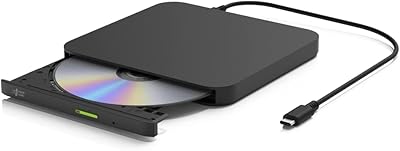
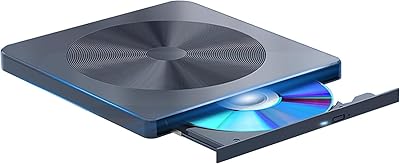
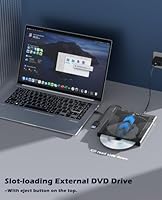
The Wbacon Wbacon-001 Slot-Loading External DVD Drive entered a market already crowded with cheap tray-based options, and it makes a reasonable case for itself by doing things slightly differently. Rather than the flip-out tray most budget drives use — which snaps and wobbles after months in a bag — this slot-loading drive accepts discs with a clean horizontal feed that feels more durable by design. Beyond disc playback and burning, there's an 8-in-1 hub built in, which is a genuine surprise at this price point. That said, this is not a prosumer tool. Think of it as a capable occasional-use companion for ripping old CDs or watching a DVD on a plane, especially with the included carrying case keeping it protected between uses.
Features & Benefits

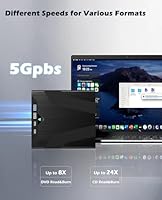
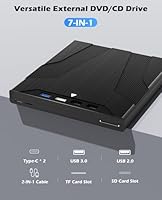
The slot-loading mechanism is what stands out immediately. Sliding a disc into a slot rather than balancing it on a spring-loaded tray is a small but real ergonomic win, especially on a desk with limited space. Speed-wise, 8x DVD and 24x CD won't impress power users, but for ripping a handful of albums or copying home video DVDs, it's plenty fast. The hub side adds a USB 3.0 port plus SD and TF card slots — though be aware that SD and TF cannot run simultaneously; you pick one at a time. The physical eject button is a genuinely useful backup when software locks up, and plug-and-play support means setup across Windows or macOS takes about thirty seconds.

Best For

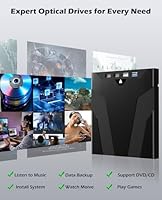
This slot-loading drive is an obvious fit for anyone working on a slim ultrabook or MacBook Air — machines that dropped optical drives years ago and left a gap for exactly this kind of peripheral. Students archiving project discs, parents ripping a decade of home video DVDs, or occasional travelers who still carry physical media are the natural audience here. The carrying case makes it genuinely toss-in-bag portable in a way most bare drives are not. Where it falls short is sustained high-volume burning. If you're duplicating batches of discs regularly or need archival-grade write reliability, this external DVD burner is probably underspecced for that workload — a more dedicated unit would serve better.

User Feedback

With a 3.9 out of 5 rating across roughly 87 reviews, the reception for the Wbacon hub drive leans positive but with clear caveats. Buyers who praised it consistently pointed to painless setup and the slot mechanism feeling more refined than expected at this price. On the negative side, a handful of users reported inconsistent disc reads — particularly with older or scratched media — and a few noted the hub ports didn't always deliver full USB 3.0 throughput. The review pool is still relatively small, so take the overall score as directional rather than definitive. Brand after-sales responsiveness appears adequate based on available comments, though it isn't always fast.

Pros

  • Slot-loading design is noticeably more durable and travel-friendly than tray-based drives at the same price.
  • Plug-and-play setup works across a wide range of operating systems with zero driver installation needed.
  • The included carrying case is a thoughtful addition that most competing drives skip entirely.
  • Built-in USB 3.0 port, SD, and TF card slots reduce the need to carry separate adapters.
  • A physical eject button provides a reliable backup when disc software becomes unresponsive.
  • At just over a pound, this slot-loading drive is light enough to forget it's in your bag.
  • 24x CD read and write speeds are more than adequate for ripping music or copying data discs.
  • Broad Windows compatibility stretching from legacy systems all the way through Windows 11 is genuinely useful.
  • The 8-in-1 hub functionality adds practical everyday value well beyond occasional disc use.
  • Compact package dimensions make it easy to store in a desk drawer or laptop sleeve pocket.

Cons

  • SD and TF card slots cannot be used simultaneously, which limits multi-source transfer workflows.
  • With only 87 ratings so far, there is not enough user data to confidently assess long-term reliability.
  • Some users have reported inconsistent reads with older or lightly scratched discs.
  • Hub port throughput has not consistently delivered full USB 3.0 speeds according to several buyers.
  • The Wbacon brand lacks the track record of more established optical drive manufacturers, raising longevity questions.
  • 8x DVD write speed may feel sluggish for anyone burning multiple full-length discs in a single session.
  • Build material quality of the carrying case has not been independently verified and may vary.
  • Mac compatibility appears functional but is not well-documented enough to call it fully proven.
  • After-sales support response times appear adequate but are not consistently fast based on available feedback.
  • The device relies on a single USB connection for both power and data, which can cause issues on underpowered USB ports.

Ratings

The scores below for the Wbacon Wbacon-001 Slot-Loading External DVD Drive were generated by our AI system after analyzing verified global user reviews, with spam, bot-submitted, and incentivized feedback actively filtered out. Each category reflects a balanced picture of what real buyers praised and where they ran into trouble — nothing is glossed over. Strengths and frustrations are weighted equally so you can make a genuinely informed call.
Ease of Setup
88%
Users across Windows and macOS consistently reported being up and running within a minute of plugging in — no driver hunts, no restart loops. For non-technical buyers who just want to pop in a disc and go, this plug-and-play behavior is one of the most frequently praised aspects of this slot-loading drive.
A small but vocal subset of Mac users experienced initial non-recognition that required unplugging, waiting, and reconnecting. It resolved quickly in most cases, but it was enough to create hesitation for buyers who expected a truly zero-friction first experience.
Slot-Loading Mechanism
83%
The slot-loading design genuinely impressed buyers who had previously used tray drives — feeding a disc into the slot felt more controlled and less fragile than balancing it on a spring-loaded tray. Travelers in particular valued the reduced risk of tray damage inside a crowded laptop bag during daily commutes.
Some users noted the slot opening felt slightly tight with certain disc brands, requiring a firm but careful push rather than a smooth glide. A few reported the mechanism did not center discs perfectly on the first try, leading to occasional re-insertion attempts before the drive accepted them.
Disc Read Reliability
71%
29%
For clean, well-maintained CDs and DVDs, the Wbacon hub drive performed consistently and without hiccups. Users ripping music collections or accessing commercially pressed movie DVDs reported no read errors and generally smooth performance throughout standard playback sessions.
The drive struggled noticeably with scratched or aged discs, generating read errors that more established optical drives tend to push through with error-correction. Several buyers with older DVD collections flagged this as a meaningful limitation, especially when trying to rescue marginally damaged media.
Write Performance
66%
34%
For burning a single data disc or backing up a small folder of files, the 8x DVD write speed was adequate and completed jobs without errors in most reported cases. Casual users burning the occasional mix CD or archiving a home video were generally satisfied with the results.
At 8x, write speeds lag behind what competing drives in the same price bracket offer, and sustained burning sessions — multiple discs back to back — drew complaints about slower-than-expected throughput. Users who burn regularly found the pace frustrating compared to drives they had used previously.
Hub Functionality
69%
31%
Having a USB 3.0 port and card reader slots built into the same device that handles disc duties is a genuine convenience for ultrabook users who are already short on ports. Buyers who used the USB port for a mouse or flash drive alongside disc playback found the combination practical and clutter-reducing.
The SD and TF card slots being mutually exclusive was a consistent source of frustration — buyers who discovered this limitation after purchase felt it was not communicated clearly enough upfront. USB 3.0 throughput also underdelivered in some tests, with actual transfer speeds falling short of what the interface rating implies.
Build Quality
62%
38%
The outer shell feels reasonably solid for a budget-tier portable drive, and the slot opening shows no obvious flimsy construction in typical use. Buyers who handled it carefully and used it at a desk reported no structural concerns over several months of occasional use.
The plastic casing feels lightweight in a way that reads more as thin than portable to some users, and the slot housing showed minor flex under pressure in a few reported cases. Long-term durability is an open question given the brand's short track record and the small number of reviews available.
Carrying Case Quality
67%
33%
Buyers appreciated that a case was included at all — most drives at this price ship naked in a plastic clamshell and nothing else. The case kept the drive protected from desk scratches and light dust, and it fit the drive snugly enough that it did not rattle around during transport.
The case material is soft-sided and offers minimal resistance to compression, so packing it under a heavy laptop or textbook in a bag could still cause cosmetic damage. Several users described the case as functional but noticeably low-cost, closer to a pouch than a true protective enclosure.
macOS Compatibility
64%
36%
The majority of macOS users who reviewed this external DVD burner reported that it was recognized automatically without needing any third-party drivers, which aligns with the plug-and-play claim. For basic disc reading and ripping on a MacBook, it functioned adequately in most reported scenarios.
A recurring cluster of negative feedback specifically called out inconsistent behavior on newer macOS versions, including occasional failure to mount discs and dropped connections mid-read. The limited review volume makes it difficult to determine whether these are isolated cases or a broader pattern.
Noise Level
58%
42%
At lower read speeds or during idle disc detection, the drive operates quietly enough that it does not draw attention in a home office or shared workspace. Buyers who used it occasionally for a few minutes at a time rarely flagged noise as a notable issue.
At higher read speeds — particularly during longer DVD playback or full-disc rips — the spinning noise became distracting for users in quiet environments. Several reviewers compared the sound level unfavorably to older internal drives they had used, which is not an encouraging benchmark for a portable device.
Portability
81%
19%
At just over a pound, this slot-loading drive is light enough to slip into a laptop bag without meaningfully adding to daily carry weight. The combined package of drive plus case is compact enough to fit in the accessory pocket of most standard laptop backpacks.
The footprint is slightly wider than the slimmest competing drives on the market, which matters to minimalist travelers who measure every centimeter of packing space. The USB cable, while functional, is not retractable, adding one more loose item to manage in a packed bag.
Value for Money
74%
26%
The combination of slot-loading design, integrated hub, and included carrying case at this price point offers more tangible features per dollar than most bare-bones tray drives in the same tier. For buyers who only need occasional disc access, the value equation holds up well without overspending.
Buyers who encountered disc read issues or hub speed underperformance quickly felt the value proposition erode, since the core function of the device did not meet their baseline expectations. A slightly higher investment in a more established brand might serve reliability-focused buyers better in the long run.
After-Sales Support
59%
41%
Wbacon does indicate a commitment to resolving purchase issues, and a handful of reviewers noted that their concerns were acknowledged by the seller. For straightforward problems like DOA units, replacement processes appeared to proceed without major obstacles in reported cases.
Response times were described as inconsistent, and the brand lacks the established support infrastructure that more recognized manufacturers provide. Buyers who needed technical guidance rather than just a replacement found the support experience underwhelming and sometimes unresponsive.
Windows Compatibility
86%
Across the Windows user base — which makes up the bulk of reviewers — setup was nearly universally described as effortless, with Windows 10 and 11 users in particular reporting immediate recognition and full functionality. Legacy Windows versions also appear to be supported without issue for users still running older systems.
A small number of Windows users experienced driver conflicts in specific system configurations, typically on heavily customized or enterprise-managed machines. These cases were rare but worth noting for IT environments where standard plug-and-play behavior cannot always be assumed.

Suitable for:

The Wbacon Wbacon-001 Slot-Loading External DVD Drive was clearly designed with a specific kind of buyer in mind: someone who owns a modern slim laptop, encounters a disc a few times a month, and just needs something reliable that doesn't require an IT degree to set up. MacBook Air and ultrabook users who've never had a built-in optical drive will find this particularly practical — plug it in, slide the disc, done. Students digitizing old course materials or family members ripping a collection of home video DVDs will appreciate the no-driver setup and the fact that it actually comes with a case to keep it from rattling around in a backpack. The built-in hub is a genuine bonus for anyone already juggling too many dongles, letting you read an SD card or connect a USB device alongside disc access. Travelers who carry physical media and want a lightweight, protected peripheral will also get solid value here.
Not suitable for:

Anyone expecting the Wbacon Wbacon-001 Slot-Loading External DVD Drive to pull double duty as a workhorse burner for high-volume disc duplication is likely to be disappointed. The 8x DVD write speed and the relatively modest build quality are appropriate for casual use, not for sustained, repeated burning sessions where heat and mechanical stress accumulate quickly. Users who rely heavily on simultaneous card-reading workflows should also be aware that the SD and TF card slots cannot operate at the same time — a real constraint if you regularly transfer from multiple sources at once. Those dealing with scratched, aging, or non-standard disc formats may encounter read reliability issues that more established optical drive brands handle better. And if you need guaranteed macOS compatibility without any troubleshooting, the limited review pool means there isn't enough user data yet to call it a sure bet on Apple hardware.
Specifications

  • Brand: Manufactured and sold by Wbacon, a consumer electronics brand that launched this model in July 2024.
  • Model Number: The official model designation is Wbacon-001.
  • Drive Type: Slot-loading external optical drive, which accepts discs via a horizontal feed slot rather than a spring-loaded tray.
  • Disc Support: Supports both CD and DVD formats for reading and writing, covering the most common physical media types in everyday use.
  • DVD Speed: Rated at up to 8x write speed and 8x read speed for DVD media.
  • CD Speed: Rated at up to 24x write speed and 24x read speed for CD media.
  • Interface: Connects to a host device via USB 3.0, which handles both power delivery and data transfer through a single cable.
  • Hub Ports: Includes one USB 3.0 port, one full-size SD card slot, and one TF (microSD) card slot as part of the integrated hub.
  • SD/TF Limit: The SD and TF card slots cannot operate simultaneously; only one card slot can be active at a time, though both can coexist with the USB 3.0 port.
  • Eject Button: A dedicated physical eject button is built into the drive body, allowing disc removal independent of any software or operating system response.
  • OS Compatibility: Compatible with Windows 98, SE, ME, 2000, XP, Vista, 7, 8, 10, and 11, as well as macOS, with no additional drivers required.
  • Plug and Play: Fully plug-and-play on supported operating systems, meaning no driver download or installation is necessary before use.
  • Weight: The unit weighs approximately 1.11 pounds, keeping it light enough for regular portable use.
  • Dimensions: Packaged dimensions measure 7.52″ x 7.05″ x 2.09″, reflecting the compact footprint of both the drive and its included case.
  • Carrying Case: A protective carrying case is included in the box, designed to shield the drive from dust, light scratches, and minor impacts during transport.
  • Power Source: Bus-powered via the USB connection, so no separate power adapter or AC outlet is required during operation.
  • Available Since: This model first became available for purchase in July 2024.

Related Reviews

ROOFULL External CD DVD Drive with USB 3.0 Type-C Ports + SD Card Slot
83%
92%
Value for Money
88%
Performance
91%
Ease of Use
89%
Portability
85%
Compatibility
More
ORIGBELIE External CD/DVD Drive BT524
85%
88%
Performance
90%
Compatibility
92%
Portability
95%
Ease of Setup
82%
Build Quality
More
BUNUD LightScribe 5-in-1 External CD/DVD Drive
76%
93%
Ease of Setup
71%
LightScribe Label Quality
78%
Build Quality & Materials
74%
Hub & Port Functionality
69%
Read & Write Speeds
More
Umaniy 7001 External CD/DVD Drive
75%
93%
Ease of Setup
88%
Value for Money
71%
Hub Port Functionality
74%
Disc Read Performance
72%
Disc Write and Burn Quality
More
Wbacon 7-in-1 External Blu-ray Drive
71%
67%
Disc Read Reliability
61%
Blu-ray Write Performance
84%
Connectivity & Port Variety
71%
Card Reader Utility
81%
Setup & Plug-and-Play Experience
More
Hitachi-LG GP96Y External DVD Drive
74%
91%
Ease of Setup
83%
OS Compatibility
77%
Fire TV Integration
84%
Read Performance
63%
Write Performance
More
Wbacon 5-in-1 External Blu-ray Drive
66%
88%
Ease of Setup
54%
Disc Read Reliability
51%
Blu-ray Playback Experience
73%
DVD & CD Burning
18%
Blu-ray Disc Burning
More
Dainty XCDW-1208-001 External Blu-ray Drive
74%
91%
Ease of Setup
74%
Blu-ray Read Performance
82%
DVD Performance
86%
CD Performance
88%
Portability & Design
More
PeroBuno 9-in-1 External USB DVD Drive
76%
88%
Plug-and-Play Setup
74%
Optical Drive Performance
61%
Ethernet Connectivity
81%
USB Hub Functionality
78%
SD and TF Card Reading
More
Seagate Game Drive for PlayStation 2TB
79%
94%
Ease of Setup
91%
Storage Capacity
93%
PS4 Compatibility
72%
PS5 Compatibility
74%
Transfer Speed
More

FAQ

No, you do not. The Wbacon Wbacon-001 Slot-Loading External DVD Drive is fully plug-and-play on Windows 7 through 11 and macOS. Just connect it via USB, wait a few seconds for your system to recognize it, and it is ready to use. No disc, no download, no setup wizard required.
It is listed as macOS compatible and most users report it working without any driver installation. That said, the review pool is still relatively small, so mac-specific edge cases are not yet well-documented. If you run into any recognition issues, a quick system restart after plugging in typically resolves them.

Yes, the USB 3.0 port and either card slot can be used at the same time. The one restriction is that the SD and TF card slots cannot both be active simultaneously — you have to choose one or the other. So if you need to read a full-size SD card while transferring files over USB, that works fine.

Slot-loading means you slide the disc directly into a horizontal opening on the drive, similar to how older car stereos accept CDs. There is no tray that pops out and has to be lined up carefully. For portable use, this is a real advantage — trays have moving plastic parts that can snap or warp in a bag, whereas a slot mechanism has fewer exposed components and tends to hold up better over time.

Like most external optical drives at this price tier, it produces some mechanical noise during spinning, especially at higher read speeds. It is unlikely to be disruptive in a normal home or office setting, but if you are in a very quiet environment like a library, you will hear it working.

The USB connection handles both data and power, so there is no separate adapter to carry. Just be aware that on older USB ports or heavily loaded hubs, underpowered connections can occasionally cause the drive to behave erratically. Plugging directly into a port on your laptop rather than through an unpowered hub is the safest approach.

There is a physical eject button built directly into the drive body for exactly this situation. If your media player or burning software freezes or fails to respond, pressing that button will release the disc mechanically, without needing the computer to cooperate.

No. This external DVD burner is designed for standard CDs and DVDs only. It does not support Blu-ray reading or writing. If you need Blu-ray compatibility, you will need a different drive specifically marketed as a Blu-ray reader or burner.

The case provides reasonable protection against dust and light bumps, which is more than most competing drives offer at a similar price. It is not a hard-shell case, so it would not survive being sat on or crushed under heavy luggage. For tossing into a laptop bag or backpack, though, it does the job well.

At 24x CD speed, ripping a standard 74-minute audio CD typically takes around four to six minutes depending on the disc condition and the software you are using. That is a comfortable speed for casual music archiving. Scratched or degraded discs will slow things down, as the drive has to re-read damaged sectors multiple times.