Overview

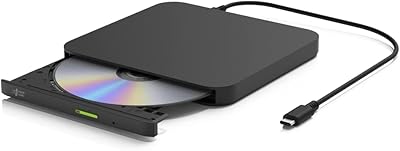
The ORIGBELIE BT524 External CD/DVD Drive is a slim, bus-powered optical drive built for laptop users who no longer have a built-in disc slot. It handles both reading and burning over a single USB connection and ships with a USB-C adapter and a carrying case, so you're not scrambling for accessories on day one. ORIGBELIE isn't a household name, but the brand backs this drive with a 24-month warranty and what appears to be genuinely responsive customer support — a reassuring sign for a lesser-known peripheral maker. It competes in a crowded category of similarly slim drives where practical extras and reliable after-sales support help it stand out.

Features & Benefits

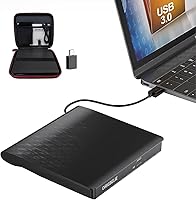
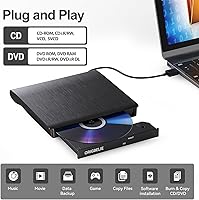
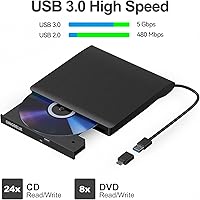
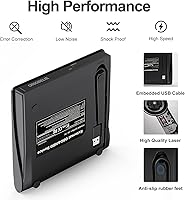
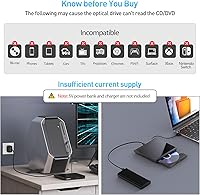
On the technical side, this external disc drive connects via USB 3.0 and requires no driver installation — though it's worth clarifying that plug-and-play means no drivers, not no software. You'll still need a media player or burning application to do anything useful with a disc. Speeds reach 24x for CDs and 8x for DVDs, which is standard for this category. The drive handles a solid range of formats including CD±R/RW, DVD±R/RW, and DVD-RAM. A thoughtful design choice is the integrated data cable that tucks under the unit body, plus a separate power cable for computers with insufficient USB power. Worth noting: Blu-ray, Chromebook, Xbox, and most tablets are not supported.

Best For

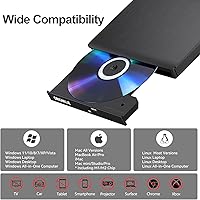
This portable burner is a natural fit for MacBook and ultrabook owners who occasionally need to work with physical media — think ripping an old music collection, burning a data backup, or installing software that only shipped on disc. Home users working through boxes of old DVDs they want to archive digitally will also get solid use out of it. Office workers who regularly encounter legacy software on disc will appreciate how little setup is involved. The included carrying case makes it genuinely pack-and-go rather than just theoretically portable. Users running older Windows versions or Linux benefit from the wide OS compatibility, which spans XP through Windows 11 without any driver searching.

User Feedback

With over 1,700 ratings and a 4.1 out of 5 average, the ORIGBELIE drive has earned solid marks overall — though the score tells you there is real-world friction alongside the genuine wins. Most satisfied buyers highlight easy setup and how reliably the drive recognizes discs right away. On the other side, Mac users should know upfront that the physical eject button does not function after playback; you'll need to eject via the OS menu instead, which is a Mac-level limitation rather than a product defect. A number of buyers also report initial confusion between the built-in data cable and the supplemental power cable. The included carrying case draws consistent praise as an unexpectedly practical bonus.

Pros

  • No driver installation required on Windows, Mac, or Linux — just plug in and open your software.
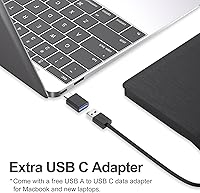
  • The bundled USB-C adapter means modern thin laptops are covered without buying anything separately.
  • Broad format support handles CD±R/RW, DVD±R/RW, DVD-RAM, VCD, and SVCD without extra configuration.
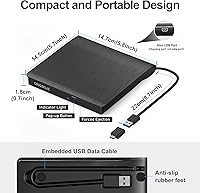
  • The integrated cable tucks neatly under the drive body, so there is no loose cord to misplace.
  • A supplemental power cable is included for computers with weak USB output — a genuinely thoughtful addition.
  • The carrying case adds practical portability that most competing drives in this category skip entirely.
  • OS compatibility spans Windows XP all the way through Windows 11, plus Mac OS and Linux.
  • A 24-month warranty and responsive customer support are reassuring extras at this price point.
  • At 10.4 ounces and under an inch thick, it slips easily into any laptop bag side pocket.

Cons

  • Blu-ray is entirely unsupported — a meaningful limitation if any part of your collection uses that format.
  • The physical eject button is non-functional on Mac OS after disc use; software ejection is the only option.
  • Multiple buyers report confusion between the built-in data cable and the separate power supply cable.
  • Plug-and-play does not mean software-free — a media player or burning app is still required to use discs.
  • As a lesser-known brand, long-term durability and parts availability may concern buyers who keep peripherals for years.
  • Chromebook, tablet, smartphone, Xbox, Surface, and projector connections are explicitly not supported.
  • DVD write speed tops out at 8x, which is adequate but means longer wait times for large disc burns.
  • No added functionality beyond optical disc use — no card reader slot, no extra USB ports, nothing else.

Ratings

The scores below were generated by AI after analyzing thousands of verified buyer reviews for the ORIGBELIE BT524 External CD/DVD Drive worldwide, with spam, bot-submitted, and incentivized feedback actively filtered out. Both the genuine strengths and the real-world friction points buyers regularly encounter are transparently reflected in every category score. Whether this portable burner belongs in your bag or on a competitor shortlist depends on the specifics, and the breakdown below is designed to show you exactly where it earns its marks and where it falls short.

Ease of Setup
88%
Most Windows and Linux users report being up and running within seconds of plugging in — no driver downloads, no reboot, no configuration screens to navigate. On a busy workday, that kind of friction-free startup genuinely matters, and the large majority of verified buyers confirm disc recognition happened immediately and consistently.
The plug-and-play label creates a persistent misconception: media software is still required to actually play or burn a disc, which catches first-time buyers off guard more often than it should. A handful of users also noted their computer occasionally failed to mount a disc until they switched to a different USB port, suggesting minor power sensitivity on certain machines.
Mac OS Experience
57%
43%
The drive does connect and read discs on a Mac without any driver installation, and Mac users who primarily need to rip audio CDs or pull files off older discs generally find it functional for those quiet, straightforward tasks. The bundled USB-C adapter works reliably with current MacBook models right out of the box.
The physical eject button is entirely non-functional after disc playback on Mac OS — you must right-click the desktop icon or navigate the menu to eject every single time. This is a system-level limitation rather than a defect, but it generates a disproportionate share of confused and frustrated Mac user reviews that drag the overall rating down.
Portability
86%
The combination of a flat 0.7-inch profile, sub-11-ounce weight, integrated cable, and an included carrying case makes this one of the more genuinely travel-ready options in its category. Buyers who move regularly between home, office, and client sites single out the rigid case as a practical detail that most competing drives at this price simply skip.
While compact, it is not as small as the very slimmest ultra-portable competitors on the market. Users who prefer a minimal single-item setup may find managing the carrying case alongside the drive and its accessories slightly cumbersome when packing light for short trips.
OS Compatibility
81%
19%
Coverage spanning Windows XP through Windows 11, plus Mac OS and mainstream Linux distributions, is among the broadest in this category and removes the need to research driver support before purchasing. IT staff managing a diverse mix of old and new machines genuinely benefit from this range in day-to-day troubleshooting and software installs.
The exclusion list is significant enough to cause real returns if buyers skim the product listing — Chromebooks, tablets, Xbox consoles, and Blu-ray are all unsupported without exception. Windows 11 users also require a working internet connection and a media player app for full playback functionality, a Microsoft-side requirement that is not always obvious at the point of purchase.
Value for Money
83%
A USB-C adapter, supplemental power cable, storage bag, carrying case, and a 24-month warranty bundled into a budget-tier purchase represents genuine value relative to competing drives that ship with only a bare cable. Buyers consistently note feeling like they received more than expected given the price, particularly when they discover the carrying case.
The drive faces stiff competition from near-identical hardware sold under other brand names at comparable price points, making brand loyalty difficult to justify on specs alone. Frequent burners who go through multiple discs per week may find that the long-term cost of blank media and eventual drive replacement chips away at the initial value proposition.
Disc Compatibility
74%
26%
Support for CD±R/RW, DVD±R/RW, DVD-RAM, VCD, and SVCD covers the overwhelming majority of physical media that home and office users still regularly encounter. Buyers digitizing old music libraries or archiving home video DVDs consistently report that the drive handles a wide variety of disc ages and brands without excessive errors or failures.
Blu-ray is a hard stop with no workaround of any kind. A smaller but vocal segment of buyers also reports occasional failure to read older pressed discs or discs with minor surface marks, which is particularly frustrating when the primary goal is archiving aging and potentially irreplaceable media.
Read Performance
76%
24%
At up to 24x for CDs, read speeds match what every competitive drive in this category delivers, and ripping a standard audio CD typically takes only a few minutes under normal conditions. For casual tasks — pulling files off a disc, checking contents, or ripping a modest personal collection — it performs competently and without dramatic slowdowns.
The drive does nothing to distinguish itself from cheaper alternatives in raw read speed, and several users note it throttles noticeably when reading scratched or lower-quality pressed discs. Anyone planning to rip a large DVD library in bulk should factor the 8x ceiling into their time expectations — it adds up quickly across dozens of titles.
Write & Burn Performance
69%
31%
For occasional burning tasks — backing up files, creating a data disc, or writing a DVD-R for a family member — the drive handles the job reliably once burning software is configured. Users burning in smaller batches report clean, readable results when using name-brand blank discs from reputable manufacturers.
An 8x DVD burn ceiling is category-standard for bus-powered slim drives, but it means a full 4.7 GB disc can take upward of ten minutes, which feels slow when working through a stack. A recurring complaint also involves burn errors and coaster discs when using generic or no-name blank media, suggesting the drive is more finicky about disc quality than some alternatives.
Build Quality
63%
37%
The slim all-plastic shell is light enough to live permanently in a laptop bag without adding noticeable weight, and the tray mechanism operates smoothly enough for casual weekly use. For the price tier, the overall fit and finish are acceptable and do not feel embarrassingly cheap next to more expensive branded drives.
The casing is entirely plastic and does not inspire confidence for users who need a drive that can reliably survive regular commuting, checked luggage, or accidental drops. A minority of reviews mention the tray feeling slightly loose or misaligned after a few months of consistent use, raising questions about longevity under sustained daily handling.
Cable Management
72%
28%
The integrated cable that stores flat underneath the drive body is a genuinely tidy design choice — there is no loose cord to misplace or wrap up before packing. The addition of a supplemental power cable for underpowered USB ports is a considerate inclusion that prevents frustrating failed connections on older or lower-spec machines.
The presence of two cables — one built in, one loose and supplemental — generates consistent confusion among buyers who mistake the power cable for an alternative data cable. This single documentation gap appears repeatedly across reviews and suggests the product would benefit from clearer physical labeling or a more prominent explanation early in the setup guide.
Noise Level
73%
27%
During standard reads, this external disc drive operates at a low mechanical hum that most users describe as unremarkable in home and office environments. Burn and rip sessions produce consistent, predictable noise levels without the audible clicking or grinding that budget optical drives sometimes generate mid-operation.
It is not silent — no spinning optical drive is — and the spin-up sound during initial disc loading is more noticeable than some buyers expect from a compact modern peripheral. Users who frequently work in very quiet shared spaces or who are switching from a higher-end silent drive may find the acoustic profile a mild ongoing irritant.
Package Contents
84%
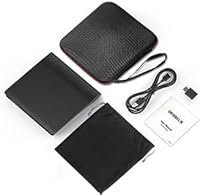
The box includes a USB-C adapter, supplemental power cable, soft storage bag, rigid carrying case, and user manual — a notably complete kit for a drive at this price point. Buyers who have previously purchased stripped-down competing drives frequently call out the hard carrying case as a tangible bonus that elevates the overall unboxing experience.
The user manual does not clearly distinguish the built-in data cable from the loose supplemental power cable, which is the most commonly cited source of setup confusion in user reviews. Clearer labeling on the cables themselves or a dedicated callout in the quick-start guide would resolve a complaint that surfaces with surprising regularity.
After-Sales Support
77%
23%
A 24-month warranty is meaningfully longer than what most competing drives at this price tier offer, and buyers who have contacted ORIGBELIE support report generally prompt and cooperative handling of defect claims and troubleshooting questions. The 7-day, 24-hour availability of customer support adds genuine reassurance for less technical users navigating disc software for the first time.
ORIGBELIE remains a relatively unknown name in peripherals, and some buyers express lingering uncertainty about whether warranty claims will be honored smoothly over the full two-year period. Support documentation is thin in areas where buyers most need guidance — particularly around software setup, Mac OS eject behavior, and the two-cable distinction that trips up new users regularly.

Suitable for:

The ORIGBELIE BT524 External CD/DVD Drive is a practical pick for anyone whose laptop or desktop no longer has a built-in optical slot and who only needs disc access occasionally rather than constantly. MacBook owners and ultrabook users are the clearest fit — the bundled USB-C adapter means no hunting for extra dongles, and the carrying case makes it genuinely easy to toss into a bag. Home users working through a backlog of old CDs or DVDs they want to digitize will find the format support broad enough to cover most consumer discs without issue. It also serves office workers well when they need to install legacy software that only ships on disc, or IT staff managing older machines that still rely on optical media. Even travelers on extended trips who want a lightweight option for physical media will appreciate how self-contained the full package is straight out of the box.

Not suitable for:

If you are hoping to watch Blu-ray movies or rip a Blu-ray disc, the ORIGBELIE BT524 External CD/DVD Drive is simply the wrong tool — that format is not supported at all. Chromebook users, Xbox owners, and anyone planning to connect this to a tablet, smartphone, or projector will hit a dead end, as those devices are explicitly outside its compatibility list. Mac users specifically should be prepared for a small but real workflow adjustment: the physical eject button does not work after playback, requiring a software eject through the OS every time. Anyone expecting true plug-and-play in the fullest sense — meaning zero software required — will be disappointed, since a media player or burning application is still necessary to actually use a disc. And if you need high-volume daily burning or professional-grade durability under sustained heavy use, this portable burner is not built for that kind of workload.

Specifications

  • Model Number: This drive carries the manufacturer model designation BT524 under the ORIGBELIE brand.
  • Interface: Connects via USB 3.0 Type-A and includes a bundled USB-A to USB-C adapter for laptops with only Type-C ports.
  • Dimensions: The unit measures 5.8 x 5.6 x 0.7 inches, slim enough to slide flat into a laptop bag side pocket.
  • Weight: The drive weighs 10.4 ounces, placing it on the lighter end of the portable optical drive category.
  • Max CD Speed: Supports CD read and write speeds of up to 24x for both standard and rewritable CD formats.
  • Max DVD Speed: Supports DVD read and write speeds of up to 8x, which is the category standard for bus-powered slim drives.
  • Supported Formats: Compatible disc formats include CD±R/RW, CD-ROM, DVD±R/RW, DVD-RAM, VCD, and SVCD.
  • Compatible OS: Works with Windows 11, 10, 8, 7, XP, and Vista, as well as Mac OS and most mainstream Linux distributions.
  • Unsupported Devices: Explicitly incompatible with Blu-ray discs, Chromebooks, Xbox consoles, tablets, smartphones, smart TVs, projectors, and Ubuntu systems.
  • Driver Requirement: No manual driver installation is required on any supported operating system; the drive is recognized automatically upon connection.
  • Cable Design: The primary USB data cable is physically integrated into the drive and stored flat underneath the unit body when not in use.
  • Power Cable: A separate supplemental USB power cable is included for computers whose USB ports do not deliver sufficient bus power on their own.
  • Color: Available in black with a low-profile matte finish suited to both home and office desk environments.
  • Warranty: Backed by up to 24 months of after-sales service coverage and 7-day, 24-hour customer support access.
  • In the Box: Package contents include the drive unit, USB-A to USB-C adapter, power supply cable, disc storage bag, carrying case, and user manual.

Related Reviews
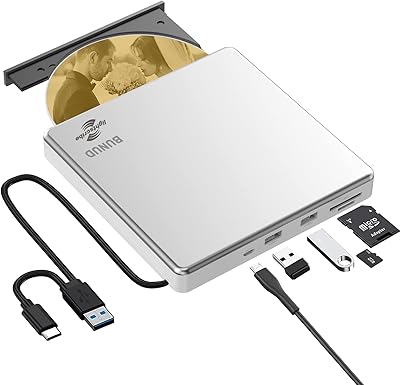
BUNUD LightScribe 5-in-1 External CD/DVD Drive
76%
93%
Ease of Setup
71%
LightScribe Label Quality
78%
Build Quality & Materials
74%
Hub & Port Functionality
69%
Read & Write Speeds
More
Wbacon Wbacon-001 Slot-Loading External DVD Drive
71%
88%
Ease of Setup
83%
Slot-Loading Mechanism
71%
Disc Read Reliability
66%
Write Performance
69%
Hub Functionality
More
Umaniy 7001 External CD/DVD Drive
75%
93%
Ease of Setup
88%
Value for Money
71%
Hub Port Functionality
74%
Disc Read Performance
72%
Disc Write and Burn Quality
More
Hitachi-LG GP96Y External DVD Drive
74%
91%
Ease of Setup
83%
OS Compatibility
77%
Fire TV Integration
84%
Read Performance
63%
Write Performance
More
PeroBuno 9-in-1 External USB DVD Drive
76%
88%
Plug-and-Play Setup
74%
Optical Drive Performance
61%
Ethernet Connectivity
81%
USB Hub Functionality
78%
SD and TF Card Reading
More
ROOFULL External CD DVD Drive with USB 3.0 Type-C Ports + SD Card Slot
83%
92%
Value for Money
88%
Performance
91%
Ease of Use
89%
Portability
85%
Compatibility
More
Verbatim 43886 Slimline External DVD Writer
79%
92%
Ease of Setup
81%
Build Quality
94%
Portability
78%
Read Performance
74%
Write Performance
More
Optiarc AD-5290S Internal SATA DVD Burner
75%
88%
Burn Reliability
83%
Build Quality
91%
Ease of Installation
86%
Format Compatibility
78%
M-Disc Archival Support
More
Lite-On DH-16AFSH Internal DVD Burner
82%
88%
Read & Write Reliability
91%
Installation Ease
86%
DVD Burn Speed
84%
CD Burn Speed
79%
Dual-Layer DVD Support
More
Copystars DVD Duplicator Sata CD-DVD Burner 24X 1 to 1 DVD Copier Duplicator Tower
82%
85%
Performance
92%
Ease of Use
88%
Writing Speed
90%
Compatibility
84%
Reliability
More

FAQ

Yes, it will. A USB-A to USB-C adapter is included in the box specifically for this situation, so you do not need to buy a separate dongle. Just attach the adapter to the built-in cable and plug it into your USB-C port.

No drivers are needed — your computer will detect the hardware automatically on all supported operating systems. However, you will still need software to actually play or burn a disc. VLC, Windows Media Player, or a dedicated burning app like ImgBurn all work well depending on what you need to do.

It is not defective. This is a Mac OS limitation that affects all external optical drives of this type, not just this one. On a Mac, right-click the disc icon on your desktop and select Eject, or use File > Eject from within your media application. It feels awkward at first but quickly becomes habit.

No — the ORIGBELIE BT524 External CD/DVD Drive does not support Blu-ray in any capacity, neither reading nor playback. If Blu-ray is a requirement for you, a separate Blu-ray capable drive would be the right choice.

The cable tucked underneath the drive body is the data cable; that is the one you plug into your computer to connect the drive. The separate loose cable is a supplemental power cable, intended only for computers whose USB ports do not supply enough power to run the drive reliably. Most users will only ever need the integrated data cable.

Unfortunately not — Chromebooks are explicitly listed as unsupported. The same applies to tablets, smartphones, Xbox consoles, smart TVs, Surface devices, and projectors. If your device is not running Windows, Mac OS, or a standard Linux desktop environment, it is worth double-checking compatibility before purchasing.

At the maximum 8x DVD write speed, a standard single-layer 4.7 GB disc typically takes around 8 to 12 minutes, depending on the disc brand and your computer's available processing headroom. Using quality name-brand blank discs tends to produce more consistent burn times and fewer read errors afterward.

It produces the expected mechanical hum and spin noise that any optical drive makes, but nothing unusually loud. Most users describe it as quiet for its category. You will hear it working, but it should not be disruptive in a typical home office or living room setting.

This portable burner comes with up to 24 months of after-sales coverage, which is notably longer than many budget competitors offer. The brand also provides 7-day, 24-hour customer support, so if you run into an issue weeks or months after purchase, reaching out directly to the manufacturer is the recommended first step.

Yes, compatibility goes all the way back to Windows XP and includes Vista, 7, 8, 10, and 11, all without needing to hunt for drivers. The one nuance on Windows 11 is that a media player application and an active internet connection may be needed for full playback functionality, which is a Microsoft requirement rather than a hardware limitation.