Overview

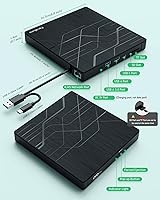
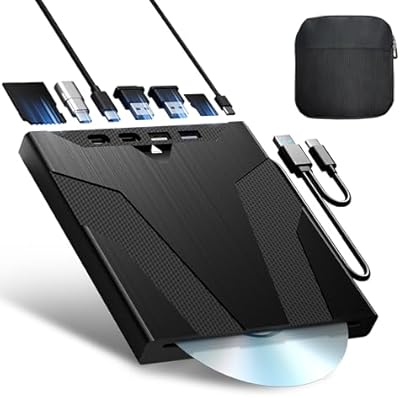
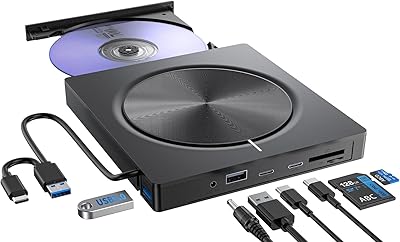
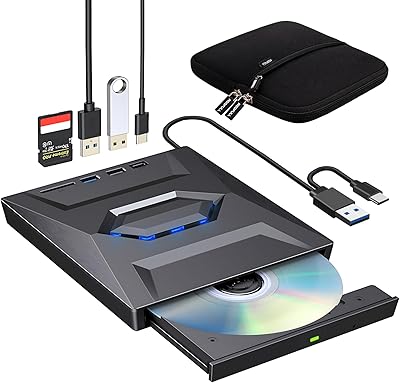
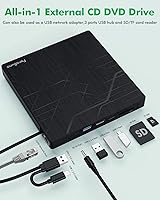
The PeroBuno 9-in-1 External USB DVD Drive was built for the reality most laptop owners now face: no optical drive, no Ethernet port, not enough USB slots. This all-in-one disc drive hub packs a CD/DVD burner, a wired network adapter, two USB-A ports, a USB-C port, and two card slots into one device roughly the size of a slim paperback. The cable is built right into the chassis — both a USB-A and USB-C connector — so there is nothing extra to carry or lose. A carrying case ships in the box. Priced above a basic optical drive, it makes sense only if you genuinely need more than one of its functions.
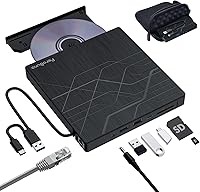
Features & Benefits

The optical side of the PeroBuno drive handles the formats most people actually use: CD-R, CD-RW, DVD±R, DVD±RW, and DVD-RAM are all supported, though Blu-ray is unsupported entirely. DVD writing tops out at 8x and CD at 24x — fine for occasional use, not fast enough to impress anyone burning large disc volumes regularly. The wired Ethernet port caps at 100 Mbps, which covers most hotel and office connections comfortably but falls short if you need true Gigabit throughput. Slide in an SD or microSD card, connect a USB drive to the hub ports, and you have a surprisingly capable port expander that handles several common laptop shortcomings in one go.

Best For

This external DVD burner makes the most sense for people who work in spots where Wi-Fi is slow or unreliable — a hotel, a conference room, a client site — and want a dependable wired fallback. It is also a natural fit for anyone with boxes of old DVDs or CDs they want to rip before the discs degrade. IT professionals who still deploy software on physical media will appreciate skipping the separate drive entirely. That said, it does not suit Chromebook users, tablet owners, or anyone hoping to watch Blu-ray films. If you actually need all of these functions rather than just one, the value stacks up quickly.

User Feedback

Buyers generally appreciate the PeroBuno drive for working without any driver installation on both Windows and Mac — plug it in and the system recognizes it. The most repeated complaint centers on the Ethernet speed cap: users expecting Gigabit performance are let down when they see 100 Mbps as the hard ceiling. Disc reads get solid marks for standard pressed DVDs and audio CDs, though a handful of buyers mention inconsistent reads with older or lightly scratched discs. Mac users occasionally find the software tray-eject workaround unintuitive at first. Build quality is described as adequate rather than sturdy. The bundled case earns consistent praise, as does replacing multiple dongles with a single device.

Pros

  • No driver installation needed — plug it in and both Windows and Mac recognize it immediately.
  • The built-in USB-A and USB-C cable means you will never arrive somewhere and realize the cable is back at your desk.
  • Replaces up to four separate accessories: a disc drive, Ethernet adapter, USB hub, and card reader.
  • Handles all common disc formats including CD-R, CD-RW, DVD±R, DVD±RW, and DVD-RAM.
  • The included carrying case is a genuinely useful addition, not just a box filler.
  • Wired Ethernet at 100 Mbps is consistently more stable than crowded public Wi-Fi for calls and remote work.
  • Both SD and microSD card slots are built in, so no adapter is needed for either format.
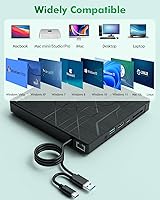
  • Works across Windows 11, 10, 8, 7, macOS, and Linux without compatibility headaches.
  • Lightweight and slim enough to slip into a laptop bag side pocket without adding noticeable bulk.

Cons

  • Ethernet tops out at 100 Mbps — a meaningful limitation if you are used to Gigabit home networking.
  • One of the two USB-A ports runs at USB 2.0 speeds, which can slow transfers if you pick the wrong port.
  • The plastic shell feels hollow and flex-prone, raising questions about durability over heavy daily use.
  • Blu-ray discs are completely unsupported with no workaround available.
  • Mac users must use a software menu to eject discs since the physical button is restricted by macOS.
  • The fixed built-in cable cannot be replaced if it frays or the connector tip is damaged.
  • Older or lightly scratched discs occasionally fail to read consistently on the first attempt.
  • The fabric carrying case offers scratch protection but little resistance to impact or compression.
  • Under heavy simultaneous use, performance can become unstable without supplementary power connected.

Ratings

The PeroBuno 9-in-1 External USB DVD Drive was evaluated by our AI system after processing verified global buyer reviews, with spam, incentivized submissions, and bot activity actively filtered out before scoring. The result is an honest breakdown that reflects what real users experienced day-to-day — not just the highlights. Both the strengths that earned repeat praise and the friction points that showed up consistently across multiple markets are transparently represented in the scores below.
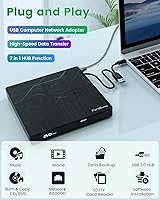
Plug-and-Play Setup
88%
Most buyers reported that connecting the drive to both Windows and Mac machines required zero manual driver installation — the system recognized it immediately. That kind of friction-free setup matters especially when you are troubleshooting a client machine or trying to install an OS under time pressure.
A small but consistent share of Mac users found the tray-eject process unintuitive since the physical button is restricted by macOS, requiring a right-click menu workaround. First-time Mac users occasionally needed a few minutes to figure this out before the drive felt truly ready to use.
Optical Drive Performance
74%
26%
For everyday disc tasks — ripping a CD collection, installing software from a DVD, or reading archived data discs — the drive performs reliably. Standard pressed DVDs and commercially produced CDs read without issue, which covers the bulk of what most home and office users actually need.
Write speeds top out at 8x for DVD and 24x for CD, which is adequate rather than fast. Users burning large volumes of discs or working with older or lightly scratched media reported occasional read failures and slower-than-expected completion times that added up across longer sessions.
Ethernet Connectivity
61%
39%
The wired RJ45 port delivers a noticeably more stable connection than Wi-Fi in environments like hotels, conference centers, or offices with congested wireless networks. For video calls, remote desktop sessions, or basic file transfers, 100 Mbps is genuinely sufficient and beats a flaky Wi-Fi signal every time.
The hard cap at 100 Mbps is a recurring frustration for buyers who assumed they were getting Gigabit throughput. If your workflow involves large file transfers or you are used to Gigabit home networking, this ceiling will feel like a step backward rather than a useful addition.
USB Hub Functionality
81%
19%
Having two USB-A ports and a USB-C port available simultaneously is genuinely useful when your laptop has only one or two ports to spare. Users running a mouse, a USB drive, and charging a device at the same time appreciated not needing a separate hub on their desk.
One of the USB-A ports runs at USB 2.0 speeds rather than 3.0, which can bottleneck transfers if you happen to plug a fast drive into the wrong port. The ports are physically close together, and some wider USB adapters block an adjacent slot.
SD and TF Card Reading
78%
22%
The dual card slots handle both standard SD and microSD cards without an adapter, which photographers and drone users on the go found especially convenient. Card detection was consistently fast across Windows machines, with files appearing in the file manager within a couple of seconds of insertion.
A handful of users reported that certain older or high-capacity SD cards were not recognized reliably on the first insertion, requiring a replug. Transfer speeds are functional but not remarkable — fine for offloading photos, less ideal if you are moving large video files from a fast UHS-II card.
Build Quality
63%
37%
The drive is noticeably lightweight, which helps when you are packing a bag for travel. The matte plastic finish resists fingerprints reasonably well, and the tray mechanism on the optical drive operates smoothly in normal use without feeling fragile.
The overall shell feels hollow and flex-prone compared to metal-bodied competitors. Several buyers described the chassis as feeling budget-grade, and a few noted that the tray hinge showed minor wobble after extended use, raising questions about long-term durability under daily commuting conditions.
Cable Design
83%
The built-in dual-connector cable — with both USB-A and USB-C heads tucked into the base of the unit — is a genuinely thoughtful design choice that removes the single most common source of frustration with external drives: a missing or forgotten cable. It works on virtually any modern laptop without hunting for adapters.
Because the cable is fixed rather than detachable, any damage to the connector ends means the entire unit becomes unusable. A couple of buyers flagged fraying at the cable housing after several months of regular unplugging and replugging, suggesting the strain relief could be more robust.
Portability and Form Factor
86%
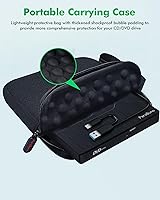
The drive is slim enough to slip into a laptop bag side pocket and light enough that you genuinely forget it is in there. The included carrying case adds a layer of scratch protection that felt like a thoughtful inclusion rather than an afterthought, especially for travel use.
The case, while appreciated, is fabric-soft rather than rigid, so it does not offer much protection against anything more than light impacts. A few users also noted the drive is slightly larger than single-function optical drives, meaning it is portable but not pocket-sized.
Mac Compatibility
69%
31%
The drive works on macOS without additional software, and disc icons appear on the desktop as expected once a disc is inserted. Users ripping CDs through Apple Music or reading data DVDs on MacBook Pros reported no major issues during routine use.
The tray-eject button bypass required on macOS trips up new users more than it should. A subset of buyers also reported that certain DVD region settings and media player configurations on macOS required manual adjustment that added friction to an otherwise simple setup.
Windows Compatibility
84%
Across Windows 10 and Windows 11 machines, the drive consistently registered without any driver prompts. IT users deploying operating systems from bootable discs or installing legacy software from CD-ROM reported reliable recognition across multiple machines and USB configurations.
Windows 11 users specifically noted that DVD video playback requires installing a separate media player since Microsoft removed native DVD playback support. This is a Windows limitation rather than a flaw in the hardware, but it catches some buyers off guard and adds a step they did not expect.
Disc Format Compatibility
76%
24%
Support for CD-R, CD-RW, DVD±R, DVD±RW, DVD-RAM, VCD, and SVCD covers nearly every disc format a typical home or office user encounters. For anyone digitizing an old collection of music CDs or archiving recordable DVDs, that breadth is more than adequate.
The complete absence of Blu-ray support is a firm limitation that rules out anyone hoping to watch physical movie releases or back up PS3-era game discs. This should be understood clearly before purchase — there is no workaround and no firmware update that adds Blu-ray capability.
Value for Money
77%
23%
Compared to buying a standalone optical drive, a separate Ethernet adapter, a USB hub, and a card reader individually, this all-in-one disc drive hub offers a reasonable consolidated value, particularly for users who need at least three of those four functions regularly.
For buyers who primarily need just one of those features — say, only a disc drive — the price is harder to justify against cheaper single-function options. The Ethernet speed cap also dulls the value argument for network-heavy users who expected Gigabit performance at this price point.
Power Delivery and Stability
67%
33%
For light workloads — reading a disc while a USB drive is connected — the bus power drawn from a single USB port is sufficient on most modern laptops. The supplementary DC power input is a useful pressure valve when connecting multiple accessories simultaneously.
Under heavier loads, such as burning a disc while transferring data through the USB hub and running Ethernet simultaneously, some users reported the drive becoming sluggish or briefly dropping connection. Connecting directly to the computer rather than through a USB hub is strongly advised for stable performance.

Suitable for:

The PeroBuno 9-in-1 External USB DVD Drive is a practical fit for anyone whose modern laptop has quietly dropped the ports they still occasionally need. Remote workers and frequent travelers get the most out of it, since the wired Ethernet port offers a reliable fallback when hotel or conference Wi-Fi is overcrowded or unstable. It is equally well-suited to users sitting on a collection of old CDs or DVDs they want to digitize — whether that is a music library, family home videos, or archived software — since the drive handles all common disc formats without fuss. IT professionals who still image machines or install software from physical media will appreciate having a drive that works immediately on both Windows and Mac without hunting for drivers. Home users who are tired of juggling a separate USB hub, card reader, and disc drive will find this all-in-one disc drive hub genuinely simplifies their desk setup.
Not suitable for:

The PeroBuno 9-in-1 External USB DVD Drive is the wrong tool if your primary need is fast, Gigabit-speed wired networking — the Ethernet port is capped at 100 Mbps, and no setting or firmware changes that. Anyone hoping to watch Blu-ray films or read Blu-ray data discs should look elsewhere entirely, as that format is simply not supported. Chromebook users, tablet owners, and anyone on a smartphone are also out of scope; the drive requires a full desktop or laptop operating system to function. If you only need one specific feature — just a disc drive, or just a card reader — you can almost certainly find a single-function device that does that one job better and for less money. The plastic build also means this external DVD burner is not the right choice for buyers who need something that can withstand rough handling in a field environment or daily bag-tossing over years of use.
Specifications

  • Brand: Manufactured by PeroBuno, a brand focused on multi-function external computer peripherals.
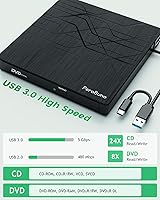
  • Host Interface: Connects to a computer via a built-in dual-head cable featuring both USB 3.0 Type-A and USB 3.0 Type-C connectors.
  • Optical Formats: Reads and writes CD±R, CD±RW, CD-ROM, DVD±R, DVD±RW, DVD-ROM, DVD-RAM, VCD, and SVCD formats.
  • DVD Speed: Maximum optical read and write speed for DVD media is 8x.
  • CD Speed: Maximum optical read and write speed for CD media is 24x.
  • USB Data Rate: USB 3.0 interface supports data transfer speeds of up to 5 Gbps (approximately 625 MB/s).
  • Ethernet Port: Includes one RJ45 port delivering wired network connectivity at speeds of up to 100 Mbps.
  • USB Hub Ports: Provides two USB-A ports (one USB 3.0, one USB 2.0) and one USB-C port for connecting external devices.
  • Card Slots: Equipped with one full-size SD card slot and one TF (microSD) card slot, operable simultaneously.
  • Power Input: Includes a supplementary DC power port for scenarios where bus power from a single USB connection is insufficient.
  • OS Support: Compatible with Windows 11, 10, 8, 7, XP, and Vista, as well as macOS and Linux distributions.
  • Incompatible Devices: Does not support Chromebook, tablets, smartphones, smart TVs, car stereos, projectors, or gaming consoles including PS4, PS5, and Xbox.
  • Blu-ray Support: Blu-ray disc reading and writing is not supported in any capacity on this drive.
  • Cable Design: The dual-head USB-A and USB-C data cable is permanently integrated into the base of the unit, eliminating the need for a separate cable.
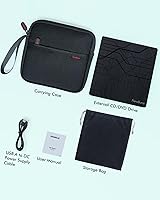
  • In-Box Accessories: Each unit ships with a fabric storage bag and a semi-rigid carrying case for transport and scratch protection.
  • Plug and Play: The drive is recognized automatically by compatible operating systems without requiring manual driver installation.
  • Region Code: DVD region code must be set to region 1 for playback of US and Canadian DVDs on Windows; CDs carry no region restriction.
  • Tray Operation: On Windows, the front button ejects the disc tray directly; on macOS, the tray must be opened via the Finder menu or right-click desktop icon.

Related Reviews

Wbacon Wbacon-001 Slot-Loading External DVD Drive
71%
88%
Ease of Setup
83%
Slot-Loading Mechanism
71%
Disc Read Reliability
66%
Write Performance
69%
Hub Functionality
More
Umaniy 7001 External CD/DVD Drive
75%
93%
Ease of Setup
88%
Value for Money
71%
Hub Port Functionality
74%
Disc Read Performance
72%
Disc Write and Burn Quality
More
Avolusion 1.5TB USB 3.0 Portable PS4 External Hard Drive
89%
92%
Performance
95%
Ease of Setup
89%
Portability/Size
90%
Data Transfer Speed
85%
Build Quality
More
Sonnics 1TB USB 3.1 Type C External Portable Hard Drive
87%
91%
Portability
88%
Performance
87%
Transfer Speed
90%
Compatibility
89%
Reliability
More
ROOFULL External CD DVD Drive with USB 3.0 Type-C Ports + SD Card Slot
83%
92%
Value for Money
88%
Performance
91%
Ease of Use
89%
Portability
85%
Compatibility
More
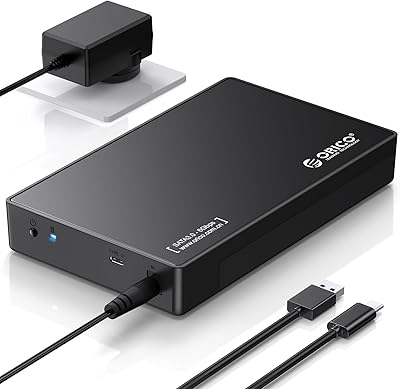
ORICO 3.5″ External Hard Drive Enclosure SATA III to USB 3.1 Type C
84%
92%
Ease of Setup
90%
Data Transfer Speed
85%
Build Quality
88%
Compatibility with OS
87%
Shock Protection
More
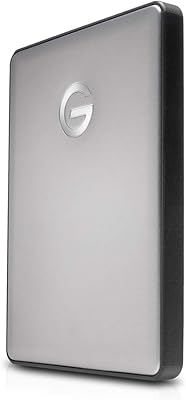
G-Technology 4TB G-DRIVE Mobile USB-C Portable External Hard Drive
88%
88%
Performance
94%
Portability
91%
Build Quality
89%
Compatibility
95%
Setup & Installation
More
G-Technology 2TB G-DRIVE Mobile USB-C Portable External Hard Drive
88%
91%
Portability
88%
Transfer Speed
89%
Build Quality
94%
Ease of Use (Plug-and-Play)
92%
Compatibility (Mac/Windows)
More
WAVLINK WL-ST334UA Dual-Bay USB 3.0 Hard Drive Docking Station
72%
83%
Offline Cloning Reliability
74%
Transfer Speed
79%
Build Quality
91%
Ease of Setup
38%
Mac Compatibility
More
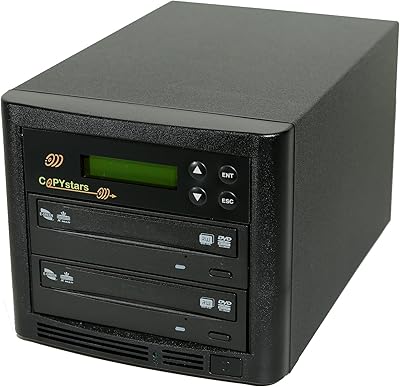
Copystars DVD Duplicator Sata CD-DVD Burner 24X 1 to 1 DVD Copier Duplicator Tower
82%
85%
Performance
92%
Ease of Use
88%
Writing Speed
90%
Compatibility
84%
Reliability
More

FAQ

No, you do not. On both Windows and Mac, the drive registers automatically as soon as you plug it in. For DVD video playback on Windows 11, you will need a media player such as VLC since Microsoft no longer includes native DVD playback support in that OS version — but that is a Windows limitation, not a hardware issue.

Yes, it works with MacBook models that have a USB-A or USB-C port. Just note that on macOS, the physical eject button on the drive is restricted by the operating system, so you will need to eject discs using the right-click menu on the desktop icon or through the Finder menu. It takes about thirty seconds to get used to and is not a recurring problem.

No. The PeroBuno 9-in-1 External USB DVD Drive does not support Blu-ray in any form — neither reading nor writing. If Blu-ray playback is your primary need, you will need to look at a separate Blu-ray-specific external drive.
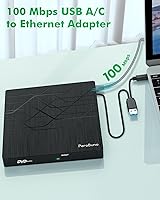
There is a firm limit of 100 Mbps on the Ethernet port. It is not Gigabit. For most remote work tasks — video calls, web browsing, remote desktop sessions — 100 Mbps is plenty. But if you regularly move large files over a local network or are used to Gigabit speeds at home, that ceiling will feel noticeable.

Yes, all the ports on this all-in-one disc drive hub can be used simultaneously. Keep in mind that under heavy combined loads — burning a disc while transferring files and running Ethernet — you may want to plug the supplementary DC power cable in if you have it available, since bus power from a single USB port can get stretched thin.

No. Chromebook is explicitly listed as incompatible, and there is no workaround. The drive requires a full desktop operating system — Windows, macOS, or Linux — to function.

Unfortunately, the cable is permanently built into the base of the unit and cannot be replaced separately. This is worth factoring into your decision if you are hard on cables or plan to unplug and replug the drive multiple times a day over a long period.

In most cases, yes. The drive reads standard CD-ROM and DVD-ROM formats, which covers the vast majority of software, games, and data discs from that era. Heavily scratched or degraded discs may not read reliably, but that would challenge any optical drive.

Yes, both card slots operate independently and can be used simultaneously. This is handy if you are transferring files from two different cards at once, such as offloading a camera SD card while also reading a microSD from a drone.

Yes, and this is actually one of the more practical use cases for the PeroBuno drive. IT professionals and advanced home users regularly use it to boot from installation DVDs on machines that lack an internal optical drive. Just make sure you connect directly to the computer's USB port rather than through another hub, as boot processes can be sensitive to indirect connections.