
Overview

The Wantek SC1 USB Computer Headset is a straightforward, no-fuss wired headset built for people who spend a good chunk of their day on calls without wanting to spend much on hardware. It sits firmly in the budget tier, yet it comes with a padded adjustable headband, memory foam ear cushions wrapped in faux leather, and dual connectivity via USB or 3.5mm jack. At just 5.6 ounces, it barely registers on your head during long sessions. With over 2,300 ratings averaging 4.2 stars, it has clearly found a loyal following among remote workers, students, and call center agents who just need reliable audio every day.

Features & Benefits

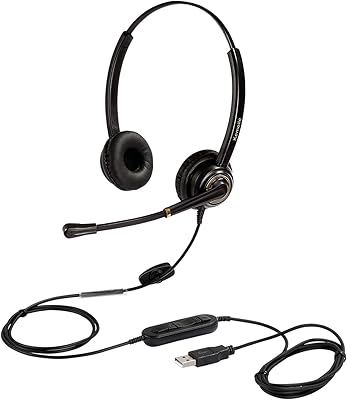
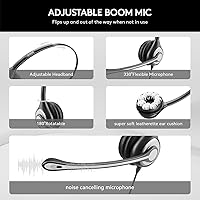
The mic on this wired headset is where it earns its keep. The boom arm swings 270 degrees so you can position it exactly where your voice projects best, and tilting it up acts as a physical mute — handy when a dog barks or someone walks into the room. The unidirectional pickup pattern focuses on your voice rather than ambient noise, which works well for calls, though it will not suppress every sound in a truly loud space. The rotatable ear cups ease pressure during long wear, and the inline control module lets you adjust volume or cut the mic with a single click, with indicator lights confirming the status.

Best For

This on-ear headset is a practical choice for anyone who needs dependable call audio on a tight budget. Home office workers who jump between Zoom, Teams, and phone calls throughout the day will appreciate the flexibility of both USB and 3.5mm connectivity. Students joining online classes get a plug-and-play setup with no drivers or software required. Call center and telemarketing users often gravitate toward it for the extended wear comfort and easy mic control. One honest caveat: if you wear glasses, on-ear designs can create pressure points after a few hours, so that is worth factoring in before buying.

User Feedback

Buyers consistently praise the microphone clarity for the price — many reviewers note that call participants can hear them without complaint, which is the baseline expectation and not one every budget headset reliably meets. Comfort during long sessions earns positive marks, particularly from remote workers and truck drivers who wear it for hours at a stretch. On the critical side, some users mention that the ear cushion padding feels thin after months of daily use, and a few wish the cable were longer for standard desktop setups. The inline controls are generally well-received, though a handful of buyers report the mute button or volume dial can feel inconsistent after extended use.

Pros

  • Microphone clarity consistently impresses call participants, making voice audio a genuine strength at this price point.
  • The rotating boom arm doubles as a physical mute when tilted up, which is faster and more intuitive than pressing a button.
  • Dual USB and 3.5mm connectivity means this wired headset works across virtually any device without adapters.
  • Inline controls let you adjust volume or mute with one click and indicator lights confirm the status instantly.
  • At 5.6 ounces, the headset is light enough to forget you are wearing it during long desk sessions.
  • Plug-and-play setup requires zero drivers or software — connect it and start your call within seconds.
  • The 270-degree adjustable mic boom gives real flexibility in positioning for different face shapes and desk setups.
  • A 12-month warranty adds a meaningful layer of confidence for a budget-tier purchase.
  • Rotatable ear cups allow quick single-ear monitoring without removing the headset entirely.
  • Compatible with major platforms including Zoom, Teams, Skype, and even gaming consoles like PS4 and Xbox.

Cons

  • Ear cushion padding can feel noticeably thin after several months of heavy daily use.
  • On-ear fit creates real pressure points for glasses wearers, limiting comfort during long sessions.
  • Cable length may fall short for users with desktop towers placed away from the desk surface.
  • The inline control dial can feel imprecise or inconsistent after extended use on some units.
  • Build materials feel plastic and lightweight in a way that raises questions about multi-year durability.
  • This on-ear headset offers no meaningful passive noise isolation, so ambient sound reaches your ears freely.
  • Audio performance is tuned narrowly for voice; music and media playback sound flat and uninvolving.
  • The faux leather cushions may cause warmth and mild sweating during prolonged warm-weather use.

Ratings

The scores below for the Wantek SC1 USB Computer Headset were generated by AI after analyzing thousands of verified global buyer reviews, with spam, bot activity, and incentivized feedback actively filtered out. The ratings reflect both what this wired headset genuinely does well and where real users ran into frustration — nothing is glossed over.

Microphone Clarity
83%
Call participants consistently report hearing remote workers and students clearly, even in moderately noisy home environments. The unidirectional pickup pattern does a solid job focusing on the speaker, and users on Zoom and Teams calls rarely need to repeat themselves or fiddle with mic settings after plugging in.
In genuinely loud spaces — open-plan offices, kitchens, or rooms with HVAC noise — the mic occasionally lets through more background sound than buyers expect. It handles everyday ambient noise well but struggles when the environment gets chaotic.
Comfort & Fit
71%
29%
Most users find the memory foam cushions and padded headband comfortable enough for three to four hour stretches, and the lightweight 5.6-ounce build avoids the neck fatigue that heavier headsets cause. Remote workers and students who wear it daily often praise how quickly they stop noticing it is there.
Glasses wearers frequently flag discomfort after an hour or two, as the on-ear cushions press directly against eyeglass frames and create real pressure points. Users with larger heads also note the clamping force can feel tight during longer sessions.
Audio Quality
67%
33%
For voice calls, video conferencing, and online classes, the audio output is clear and intelligible without any setup tweaking. The 32 Ohm dynamic drivers handle the spoken voice frequency range competently, and call participants sound easy to understand at moderate volume levels.
Music, video, and any content beyond voice comes across as flat and lacking low-end depth, which is typical of voice-optimized drivers. Buyers who expected a dual-purpose headset for both calls and casual listening tend to be disappointed by the narrow audio profile.
Build Quality
58%
42%
The headset feels adequately sturdy for everyday desk use, and the adjustable headband and rotating ear cups add mechanical flexibility that many budget competitors skip. Most buyers get through the first six months without any structural issues under normal use conditions.
The predominantly plastic construction starts to show its limitations with heavy daily use past the six-month mark, and ear cushion padding compresses noticeably over time. Several reviewers flag that the headband padding and faux leather surface begin to deteriorate faster than expected for a product in this category.
Value for Money
88%
At its price point, this on-ear headset delivers a feature set that rivals products costing noticeably more — dual connectivity, rotatable ear cups, inline controls with indicator lights, and a 12-month warranty are not standard at this tier. Buyers who compare it against alternatives in the same range consistently rate it as a strong pick for the money.
The value equation holds up well initially but weakens if you factor in potential replacement after a year of intensive use. A few buyers note that spending slightly more upfront on a more durable option would have been the smarter long-term decision for heavy call center or full-time remote work scenarios.
Inline Controls
74%
26%
The one-click mute buttons with indicator lights are a genuine convenience during back-to-back calls, letting users cut audio instantly without reaching for the keyboard or navigating software menus. The visual feedback from the indicator lights eliminates the anxiety of accidentally joining a meeting unmuted.
A portion of reviewers report that the volume dial feels imprecise or develops a loose feel after several months of daily use. The inline module also sits at a fixed position on the cable, which some users find awkward depending on how they route the cord across their desk.
Mic Flexibility
81%
19%
The 270-degree boom arm rotation gives users genuine control over mic positioning, accommodating different face shapes, desk setups, and speaking habits without much fuss. The mute-by-rotating feature is intuitive enough that most users adopt it as their primary mute method within the first day of use.
The boom arm does not lock into position with any real resistance, so it can drift slightly during energetic movement. Users who gesture or move around frequently may find themselves readjusting the mic arm more often than they would like.
Device Compatibility
86%
Working across PC, Mac, Android, iOS devices with a headphone jack, PS4, PS5, and Xbox without any driver installation is a practical advantage for users who regularly switch between devices. Students moving between a phone and a laptop, or remote workers using both a company PC and a personal device, find the dual-connector setup genuinely useful day to day.
USB functionality is limited to computers and does not extend to gaming consoles or most mobile devices, so users hoping for full feature parity across all their devices will need to rely on the 3.5mm jack in those situations. A small number of users report occasional compatibility quirks with older audio interfaces or non-standard USB hubs.
Setup & Ease of Use
92%
Plug-and-play performance is one of the most consistently praised aspects across all user groups — from first-time headset buyers to tech-averse remote workers who simply need it to work immediately. There are no drivers to install, no pairing sequences, and no software to configure before your first call.
Occasionally, users need to manually set the headset as the default audio device in their operating system or conferencing app the first time, which is a minor friction point that some less tech-savvy buyers find confusing. This is a platform behavior rather than a hardware flaw, but it generates enough support questions to be worth noting.
Cable & Cord Management
61%
39%
The cable offers enough length for most standard laptop and desktop setups where the machine sits on or near the desk surface. The flexible cord does not tangle aggressively and the wired connection avoids the latency and connectivity dropouts that plague cheaper wireless options at this price level.
Users with desktop towers positioned on the floor or away from the desk surface frequently find the cable length insufficient without an extension. The fixed, non-detachable cable also means any damage to the cord renders the entire headset unusable, with no option to swap in a replacement.
Noise Isolation
53%
47%
The physical on-ear design does provide a modest degree of passive isolation from ambient sound, which is enough to reduce low-level distractions in quiet home office environments during focused work sessions.
On-ear headsets by design cannot seal around the ear the way over-ear models do, so noise isolation is inherently limited. Users in shared spaces, open offices, or households with active background noise will find environmental sound bleeds through clearly, which affects concentration during long call sessions.
Long-Term Durability
55%
45%
For occasional or moderate use — a few calls per day, classroom sessions a few times a week — the headset holds up reliably through the warranty period and often beyond it without any functional issues. Many students and part-time remote workers report extended trouble-free use under lighter workloads.
Under heavy daily use typical of call center work or full-time remote employment, the weak points surface faster: the ear cushion foam compresses, the faux leather starts to peel at contact edges, and the inline control module can develop inconsistencies. It is not engineered for multi-year professional daily use at this price.
Headband Adjustability
77%
23%
The padded adjustable headband accommodates a reasonable range of head sizes and stays in position once set, which is appreciated by users who share a workstation or lend the headset to others. The additional headband padding compared to older versions of the design is noted positively by frequent wearers.
Users at the larger end of the head size spectrum report that maximum extension still feels snug, and the headband padding, while improved, still feels thinner than comparable on-ear designs from competing brands in a similar price range.
Indicator Lights
79%
21%
The small LED indicator lights on the inline control module give users instant visual confirmation that the mic is muted, which eliminates a common source of anxiety during important calls or presentations. Remote workers particularly value this during situations where they briefly step away from their desk.
The indicator lights are relatively dim and can be difficult to see in brightly lit rooms or in direct sunlight near a window. A few users also mention that the light positioning on the cable module is not always within easy sightline depending on how the cord is routed.

Suitable for:

The Wantek SC1 USB Computer Headset is a strong match for anyone who needs dependable voice communication every day without spending much. Remote workers who live on Zoom or Teams calls, students grinding through back-to-back online classes, and call center agents handling hours of phone time are the core audience here. The dual USB and 3.5mm connectivity means it works across desktops, laptops, and even smartphones without hunting for an adapter or installing drivers. Truckers and mobile workers who need a hands-free option that just works out of the box will also find it fits naturally into their routine. If your primary goal is clear, intelligible voice audio on calls rather than immersive music listening, this wired headset delivers exactly what you need at a price that makes it easy to justify.

Not suitable for:

The Wantek SC1 USB Computer Headset is not the right tool if you are chasing serious audio quality for music, podcasting, or content creation. The dynamic drivers are tuned for voice clarity, not the broad frequency range that makes music or cinematic audio enjoyable. People who wear glasses should also think twice — on-ear designs press the ear cushions directly against the temple arms of frames, which compounds discomfort noticeably after an hour or two. Those working in genuinely loud environments should know that the noise reduction here comes from the microphone pickup pattern, not from active noise cancellation technology that blocks sound from reaching your ears. Buyers who expect a headset to last several years of heavy daily use may find the build quality and cushion durability fall short of that expectation over time.

Specifications

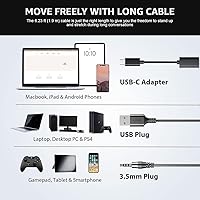
  • Connectivity: The headset includes both a USB plug and a 3.5mm audio jack, allowing it to connect to PCs, laptops, smartphones, tablets, and gaming consoles without adapters.
  • Ear Placement: On-ear design positions the cushions directly against the outer ear rather than surrounding it.
  • Driver Type: Dynamic drivers are used, tuned specifically for voice frequency reproduction and call clarity rather than wide-range music playback.
  • Impedance: The headset operates at 32 Ohms, which is well-suited for direct connection to computers and mobile devices without a separate amplifier.
  • Mic Rotation: The boom microphone adjusts through a 270-degree range, allowing precise positioning relative to the mouth.
  • Cup Rotation: Each ear cup rotates up to 180 degrees, enabling flat storage and single-ear monitoring during calls.
  • Inline Controls: An inline control module on the cable includes a volume dial, a one-click microphone mute button, and a speaker mute button, each with indicator lights.
  • Mute Method: Rotating the boom mic arm upward physically disables the microphone, functioning as a secondary mute without pressing any buttons.
  • Noise Control: Noise reduction is handled by the unidirectional pickup pattern of the microphone, which focuses on the speaker's voice and reduces ambient sound at the source; this is not electronic active noise cancellation for the listener.
  • Material: Ear cushions are made from faux leather wrapped around a memory foam core, and the headband features padded upholstery for extended wear comfort.
  • Weight: The headset weighs 5.6 ounces, keeping it light enough for all-day desk use without noticeable fatigue.
  • Dimensions: Folded dimensions measure approximately 7 x 6 x 2 inches, making it compact enough to store in a bag or desk drawer.
  • Compatibility: Works with Skype, Zoom, Microsoft Teams, WhatsApp, YouTube, Xbox, PS4, PS5, and most Windows and Mac operating systems.
  • Warranty: Wantek provides a 12-month manufacturer warranty covering defects, with direct customer support contact available for issues.
  • Cable Type: The cable is wired with an integrated inline control module and is described as offering flexible length for adjustable positioning at a desk.

Related Reviews
Logitech H960 USB Computer Headset
78%
83%
Microphone Quality
86%
Call & Voice Clarity
71%
Comfort & Wearability
94%
Ease of Setup
63%
Build Quality & Durability
More
Wantek 602 Wired Headset
77%
83%
Microphone Clarity
79%
Comfort & Wearability
58%
Build Quality & Durability
94%
Plug-and-Play Setup
67%
Noise Cancellation (Mic-Side)
More
Wantek H-USB600-SC USB Headset
79%
83%
Comfort & Wearability
76%
Microphone Clarity
61%
Build Quality
89%
Value for Money
93%
Plug & Play Ease
More
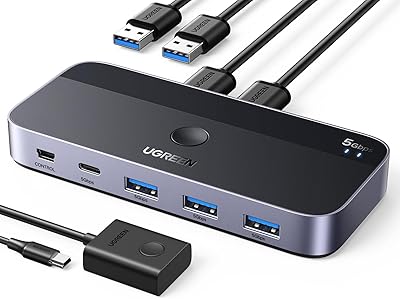
UGREEN USB 3.0 Switch 15705
79%
93%
Ease of Setup
88%
Switching Reliability
91%
Remote Controller Convenience
58%
Wireless Device Compatibility
86%
Port Selection & Layout
More
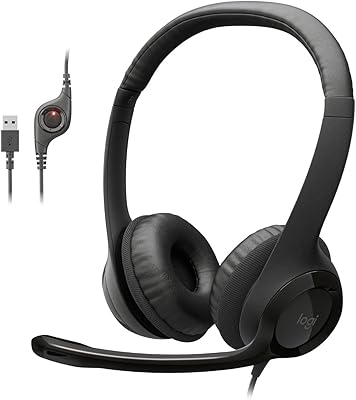
Callez C500U2 USB Headset
79%
84%
Microphone Clarity
88%
Wearing Comfort
63%
Build Quality & Durability
71%
Audio Playback Quality
54%
Noise Cancellation (Listener Side)
More
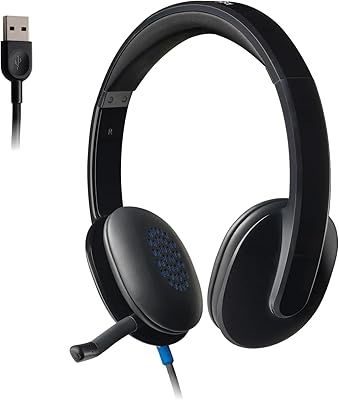
Logitech H390 USB Computer Headset
83%
86%
Microphone Voice Clarity
93%
Value for Money
97%
Ease of Setup
68%
Long-Term Comfort
82%
In-Line Control Tactility
More
Yealink UH37
Yealink UH37
79%
86%
Microphone Clarity
63%
Noise Cancellation
74%
Comfort for Extended Use
81%
Build Quality
91%
USB Compatibility
More
Logitech H540
Logitech H540
78%
83%
Microphone Clarity
78%
Comfort & Fit
74%
Audio Quality
61%
Build Quality & Durability
94%
Plug-and-Play Convenience
More
KEMEILE KML02DUSB USB Headset
85%
88%
Audio Quality
91%
Comfort for Long Use
85%
Noise-Cancelling Performance
84%
Microphone Clarity
72%
Build Quality
More
Wantek 602QS2 Binaural Office Telephone Headset
78%
83%
Audio Clarity
78%
Microphone Performance
86%
Wearing Comfort
74%
Build Quality
89%
Value for Money
More

FAQ

It works on both. The Wantek SC1 USB Computer Headset is plug-and-play on Windows and macOS alike — no drivers needed on either platform. Just plug in the USB or 3.5mm connector and your system should recognize it within a few seconds.

It is on the microphone side only. The unidirectional pickup pattern focuses on your voice and reduces background noise that gets transmitted to your caller. It does not block ambient sound from reaching your ears while you listen, so do not expect it to muffle your surroundings the way consumer ANC headphones do.

You can use it with smartphones via the 3.5mm jack, as long as your phone has a standard headphone port. The USB connection is better suited for computers and laptops. Keep in mind that some newer phones have dropped the 3.5mm jack, so you may need a separate adapter for those.

There are two ways. You can press the mute button on the inline control module on the cable, which has an indicator light to confirm the mic is off. Alternatively, just rotate the boom arm upward — the headset is designed so that raising the mic physically mutes it, which is actually faster in practice.

Most users find it comfortable for extended sessions, thanks to the memory foam cushions and the lightweight build. That said, if you wear glasses, the on-ear design can press the ear cushions against your frames and create pressure points over time. It varies by frame thickness and head shape, so it is worth factoring in if you wear glasses full-time.

The unidirectional microphone does a reasonable job of reducing off-axis sounds like keyboard clatter or distant voices. It is not perfect in a genuinely loud room, but in a typical home office or quiet classroom setting, callers generally report hearing you clearly without much background interference.

Yes, both platforms recognize this wired headset automatically without any configuration. You may want to go into your audio settings in Zoom or Teams the first time to confirm it is selected as the default input and output device, but there is no special setup beyond that.

It holds up well for most people over the short to medium term, but some buyers report that the ear cushion padding starts to compress and thin out after six months or more of heavy daily use. The plastic construction feels functional rather than premium, so if you need something to last two or three years of constant use, you may want to budget for a more robust option.

Yes, via the 3.5mm jack plugged directly into the controller. The USB connection will not work with consoles in the same way it does with computers, so stick to the 3.5mm cable for gaming use. Voice chat and in-game audio both work through that connection.

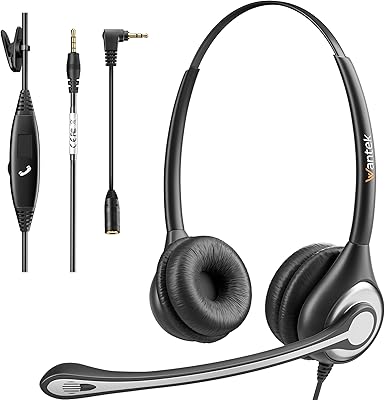
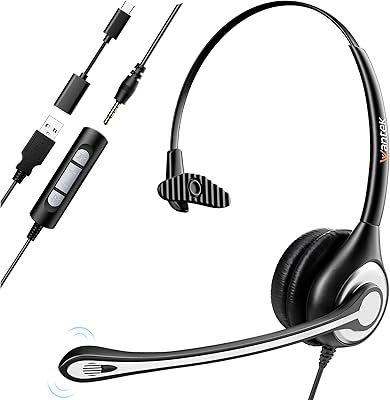
You get the headset itself with the attached cable that includes both the USB plug and the 3.5mm connector, along with the inline control module. There is no carrying case, extra cables, or ear cushion replacements included, so what you see is what you get.