

Overview

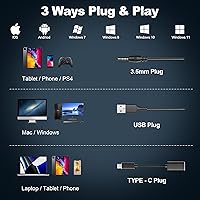
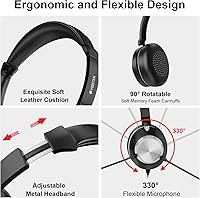
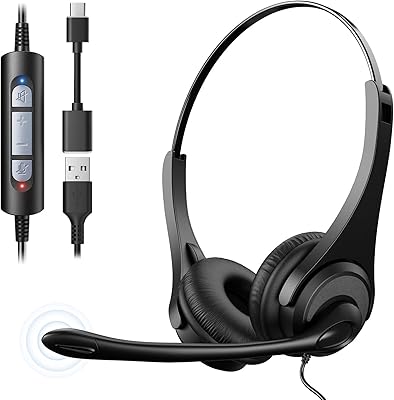
The Voistek 88C USB Headset enters a crowded budget market with a straightforward pitch: reliable audio for remote work, online classes, and call center use without breaking the bank. What sets this wired headset apart at first glance is its triple connectivity — USB-A, USB-C, and 3.5mm jack all bundled into one cable, which is genuinely rare at this price point. The build leans on ABS plastic and faux leather, keeping the weight down to a manageable 220 grams. It launched in April 2025 and has already accumulated 100 ratings, sitting at #277 in Computer Headsets — a respectable early foothold. Plug it in, and it works. No drivers, no setup fuss.

Features & Benefits

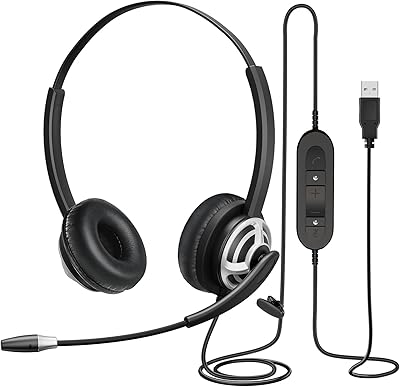
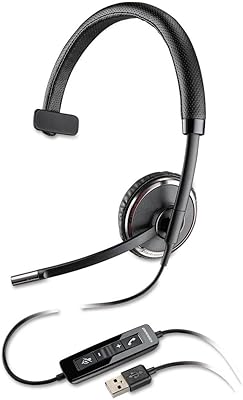
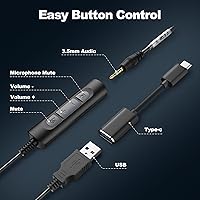
The inline controls are where this USB headset earns its keep in a real work setting. Volume adjustments and a dedicated mic mute sit right on the cable — no hunting through software menus mid-call. The noise-cancelling microphone does a reasonable job filtering ambient noise, though the 99% claim should be read as marketing enthusiasm rather than a laboratory measurement. At a quieter desk, it performs well. The 40mm dynamic drivers at 32 Ohm deliver sound that is clear and adequately balanced for voice calls, if not audiophile-grade. One practical note: the 120cm cable works fine if your laptop sits on the desk, but anyone with a tower PC on the floor may find it just barely long enough.

Best For

This wired headset is a natural fit for home office workers who bounce between a USB-C laptop and an older USB-A desktop — the 3-in-1 connector means you carry one headset and plug into whatever is in front of you. Students on a tight budget will appreciate the clear microphone pickup for online classes and group calls. Call center agents needing something comfortable through an eight-hour shift will find the lightweight build and breathable ear cups reasonable for sustained wear. It is less suited to anyone wanting premium audio for music or creative work. Think of the Voistek headset as a practical daily driver for communication, not a lifestyle accessory.

User Feedback

With 100 ratings and a 4.2-star average, early reception is genuinely positive for a headset this new. Buyers tend to highlight mic clarity on calls as a standout strength, particularly in relatively quiet home environments. On the other side, a handful of reviewers flag the plastic construction around the headband joint as a longer-term durability concern — worth noting if you plan to toss it in a bag daily. The inline controls get mostly positive mentions for convenience, though a few users find the buttons slightly stiff out of the box. Cable longevity also comes up occasionally. Overall, the picture that emerges is a solid budget performer that meets expectations without surprises, provided you go in knowing you are not buying a premium build.

Pros

  • Triple connector support — USB-A, USB-C, and 3.5mm — means one headset works across almost every device you own.
  • Plug-and-play operation on Windows, MacOS, and ChromeOS with zero driver installation required.
  • Inline volume and mute controls let you manage calls without touching your keyboard or screen.
  • At 220 grams, this wired headset is light enough for multi-hour wear without significant fatigue.
  • Microphone performs reliably in quiet environments, keeping your voice clear on Zoom, Teams, and Skype.
  • Breathable mesh ear cups reduce heat buildup compared to full leather alternatives at this price.
  • The adjustable headband fits a wide range of head sizes without frequent readjustment.
  • A 2-year warranty and 30-day return window offer solid buyer protection for a budget purchase.
  • Early user ratings sit at 4.2 out of 5, indicating consistent satisfaction among buyers with realistic expectations.

Cons

  • The 120cm cable is too short for desktop towers positioned under or beside the desk.
  • Noise cancellation falls well short of the advertised 99% figure in real-world noisy environments.
  • No mute indicator light makes it easy to lose track of whether your mic is live or silenced.
  • The plastic joint connecting the headband to the ear cups is a known weak point under daily stress.
  • Inline control buttons feel stiff out of the box and require firm, deliberate presses to register.
  • Audio output lacks bass depth and dynamic range for any use beyond voice calls and basic media.
  • Dangling unused connectors on the 3-in-1 cable can snag on desk edges or keyboard trays during use.
  • Inline mute button does not function correctly on some Android handsets when using the 3.5mm connection.

Ratings

The Voistek 88C USB Headset has been scored across 12 performance categories using AI analysis of verified global buyer reviews, with spam, bot-generated, and incentivized feedback actively filtered out before scoring. The results reflect an honest picture of where this wired headset genuinely delivers for everyday users — and where it falls short relative to realistic expectations at its price tier.

Microphone Clarity
78%
22%
For routine video calls on Zoom or Teams, the mic picks up voice well in relatively quiet spaces. Most users report that colleagues and classmates can hear them clearly without asking for repeats, which is the core job this headset was bought to do.
In noisier environments — a kitchen, a shared apartment, or a busy home — the mic struggles to isolate the speaker as cleanly. The 99% noise cancellation figure is optimistic; real-world performance is closer to decent filtering than near-total isolation.
Audio Output Quality
72%
28%
The 40mm drivers handle voice-focused audio well, producing a clear and adequately warm sound for calls and online lectures. Users who primarily use this USB headset for communication rather than music find the output fully satisfactory day to day.
For anything beyond calls — background music, YouTube, or casual listening — the sound feels flat and compressed. Bass is thin and the overall frequency range lacks the depth that even slightly pricier headsets in this category can offer.
Comfort & Wearability
74%
26%
At 220 grams, the headset is light enough that most users forget they are wearing it during shorter work sessions. The mesh ear cushions allow some airflow, which helps during warmer room conditions compared to full leather alternatives at this price.
During longer shifts — four hours or more — the on-ear design begins to create pressure points for some users with larger ears or glasses. The headband padding is minimal, and a few reviewers mention mild discomfort setting in during extended call center use.
Build Quality
61%
39%
The stainless steel headband reinforcement adds more structural confidence than fully plastic competitors. Out of the box, the headset feels assembled solidly enough for a standard desk environment where it stays put most of the day.
The plastic joint where the headband meets the ear cups is the most-cited durability concern in reviews. Users who travel with it or store it carelessly report early cracking or loosening at that connection point — not ideal for anyone needing portability.
Connectivity Versatility
91%
The 3-in-1 cable covering USB-A, USB-C, and 3.5mm is genuinely useful for professionals who switch between devices throughout the day. Owning one headset that works across a modern laptop, an older desktop, and a tablet without adapters is a real practical advantage.
The three connectors share a single cable, so the unused plugs dangle during use, which some users find mildly annoying. There is no cable management clip included, and the extra connectors can catch on desk edges or keyboard trays.
Plug-and-Play Setup
93%
Every reviewer who mentions setup notes the same thing: it just works. Plug into any USB port or the 3.5mm jack on Windows, Mac, or ChromeOS and audio routes immediately. For non-technical users or those setting up a work-from-home station quickly, this is a genuine relief.
A small number of users on older operating systems report needing to manually select the headset as the default audio device. This is a minor inconvenience rather than a real flaw, but it does chip away at the fully frictionless promise.
Inline Controls
77%
23%
Having physical volume and mute controls on the cable is a meaningful convenience during back-to-back meetings. Users consistently mention hitting mute instinctively mid-call without needing to interact with their screen, which adds up over a full workday.
The buttons feel slightly stiff when the headset is new, requiring deliberate pressure to register. A few users also report that the mute indicator — typically an LED on pricier models — is absent here, making it easy to lose track of whether the mic is live or not.
Cable Length & Management
58%
42%
For a standard laptop-on-desk setup, the 120cm cable reaches comfortably without creating tangles or excess slack. Users working at a tidy single-monitor desk rarely mention the cable as a problem.
Anyone with a desktop tower positioned under a desk or to the side will likely find 120cm too short without an extension cable. It is a frequent complaint among call center workers whose workstations place the PC further from their seated position.
Value for Money
83%
Considering the triple-connector system, noise-cancelling mic, and inline controls are all included at a budget price point, most buyers feel the purchase is justified. The 2-year warranty and 30-day return window add meaningful confidence for risk-averse shoppers.
A modest step up in budget opens access to headsets with noticeably better build quality and audio output. The value proposition is strong only if the buyer genuinely needs the multi-connector flexibility — otherwise slightly more money goes further elsewhere.
Noise Cancellation (Microphone)
63%
37%
In a quiet home office or private room, the microphone noise cancellation performs adequately, filtering out low-level background hum like air conditioning or fans. Callers on the other end rarely complain about environmental noise in controlled conditions.
The marketed 99% figure sets expectations that the hardware cannot consistently meet in typical real-world settings. Loud environments — family households, shared offices, urban apartments — expose the limitation quickly, with background noise noticeably bleeding through.
Platform Compatibility
88%
Verified to work across Zoom, Microsoft Teams, Google Meet, and Skype without configuration. Users on Windows, MacOS, and ChromeOS all report consistent recognition, making this wired headset one of the more reliably cross-platform options at this price.
Mobile device compatibility is hit or miss depending on the specific phone model and its 3.5mm implementation. A small number of Android users report that the inline mute button does not function correctly when connected via the 3.5mm jack on certain handsets.
Headband Adjustability
71%
29%
The adjustable headband accommodates a reasonably wide range of head sizes, and most users find a comfortable fit within the first minute of use. The sizing range covers both smaller and larger head shapes better than fixed-size budget competitors.
The adjustment mechanism uses a simple sliding notch system without clear size markings, which makes it difficult to return to a preferred setting after someone else uses the headset. The notches can also feel slightly imprecise, with the fit occasionally shifting during movement.

Suitable for:

The Voistek 88C USB Headset is genuinely well-matched for anyone whose primary use case is communication rather than audio entertainment. Remote workers who spend their days in back-to-back Zoom or Teams meetings will appreciate the plug-and-play simplicity and the inline mute button that keeps disruptions minimal. Students attending online classes on a tight budget get a capable microphone and reliable connectivity without needing to spend more. It is also a practical pick for professionals who regularly switch between a USB-C laptop and an older USB-A desktop, since the 3-in-1 cable eliminates the need to own separate headsets for each device. Call center agents or customer support staff who need something lightweight and comfortable for a full shift will find the breathable ear cups and adjustable headband more than adequate for the job. If your environment is reasonably quiet and your expectations are grounded in what a budget-tier headset can realistically deliver, this wired headset holds up well as a daily communication tool.

Not suitable for:

Buyers expecting premium audio quality or genuinely robust noise cancellation should look elsewhere before considering the Voistek 88C USB Headset. The 99% noise cancellation figure is marketing language, not a measured specification — in loud households, shared apartments, or open-plan offices, background noise will bleed through noticeably on the microphone. Anyone who needs a headset for music production, podcast recording, or serious listening will find the 40mm drivers too limited in frequency depth and dynamic range to be satisfying. The 120cm cable is a real constraint for anyone whose PC tower sits under a desk or at a distance from their workspace, and no extension is included in the box. Users who carry their headset in a bag daily should also be cautious — the plastic joint at the headband ear cup connection is the most commonly cited durability weak point, and rough handling is likely to shorten its lifespan. This USB headset is built for a desk, not a commute.

Specifications

  • Connectivity: The headset includes three connector types in a single cable: USB-A, USB-C, and a 3.5mm audio jack, covering the majority of modern and legacy devices.
  • Driver Size: Audio output is handled by 40mm dynamic drivers, a standard size for on-ear communication headsets in this category.
  • Impedance: The headset operates at 32 Ohm impedance, suitable for direct connection to computers, tablets, and phones without requiring an external amplifier.
  • Sensitivity: Microphone sensitivity is rated at 121 dB, indicating good pickup capability for voice at typical speaking distances.
  • Frequency Response: The headset covers a frequency range of 20 Hz to 20 kHz, encompassing the full range of human hearing for voice-focused applications.
  • Cable Length: The attached cable measures 120cm (approximately 47 inches), designed for laptop or monitor-level desktop setups.
  • Weight: The headset weighs 220 grams (7.8 oz), keeping it light enough for extended wear during long work or study sessions.
  • Ear Placement: Designed as an on-ear (supra-aural) headset with dual-ear coverage, providing stereo audio for calls and media.
  • Microphone Type: The adjustable boom microphone features active noise cancellation intended to reduce ambient background noise during calls.
  • Inline Controls: A wired inline control module on the cable provides dedicated buttons for volume up, volume down, and microphone mute.
  • Materials: The headset is constructed from ABS plastic and stainless steel for structural components, with faux leather used on the ear cup padding.
  • Ear Cup Shape: Ear cups are circular in shape with breathable mesh fabric cushioning designed to reduce heat buildup during prolonged use.
  • Compatibility: Compatible with Windows, MacOS, and ChromeOS operating systems, as well as tablets supporting standard USB or 3.5mm audio input.
  • Platform Support: Verified to work with major communication platforms including Zoom, Microsoft Teams, Skype, and Google Meet without additional configuration.
  • Bluetooth: This is a fully wired headset with no Bluetooth capability; all audio is transmitted through the physical cable connection only.
  • Water Resistance: The headset carries no water resistance rating and should be kept away from moisture, rain, and liquids.
  • Package Contents: The box includes the headset, an inline control module, a USB-A to USB-C cable adapter, and a printed user manual.
  • Warranty: Voistek provides a 24-month support warranty and a 30-day money-back guarantee from the date of purchase.

Related Reviews
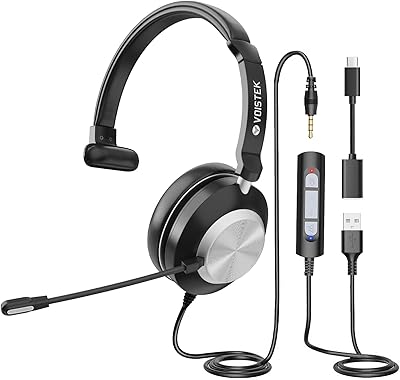
Voistek V9 USB Headset with Microphone
86%
88%
Audio Quality
85%
Comfort for Long Use
90%
Microphone Performance
74%
Durability
91%
Ease of Use
More
Voistek 881F35UC USB Headset with Microphone
86%
88%
Audio Quality
85%
Noise Cancellation
90%
Comfort for Long Use
80%
Microphone Flexibility
83%
Build Quality
More
Yealink UH37
Yealink UH37
79%
86%
Microphone Clarity
63%
Noise Cancellation
74%
Comfort for Extended Use
81%
Build Quality
91%
USB Compatibility
More
Logitech H570e USB Headset
84%
87%
Audio Quality
91%
Comfort for Long Sessions
88%
Noise-Canceling Microphone Performance
94%
Ease of Setup
82%
Build Quality
More
MAIRDI M805DUC USB Headset
84%
88%
Microphone Clarity
79%
Noise Cancellation
82%
Comfort & Wearability
86%
Build Quality
77%
Audio Playback Quality
More
Logitech H540
Logitech H540
78%
83%
Microphone Clarity
78%
Comfort & Fit
74%
Audio Quality
61%
Build Quality & Durability
94%
Plug-and-Play Convenience
More
KEMEILE KML02DUSB USB Headset
85%
88%
Audio Quality
91%
Comfort for Long Use
85%
Noise-Cancelling Performance
84%
Microphone Clarity
72%
Build Quality
More
Callez C500U2 USB Headset
79%
84%
Microphone Clarity
88%
Wearing Comfort
63%
Build Quality & Durability
71%
Audio Playback Quality
54%
Noise Cancellation (Listener Side)
More
Logitech H390 USB Computer Headset
83%
86%
Microphone Voice Clarity
93%
Value for Money
97%
Ease of Setup
68%
Long-Term Comfort
82%
In-Line Control Tactility
More
Yealink UH36
Yealink UH36
79%
84%
Microphone Quality
67%
Comfort & Fit
88%
Call Performance
63%
Build Quality
71%
Sound Quality for Music
More

FAQ

Yes, it does. Plug it into a USB port or the 3.5mm jack and MacOS recognizes it automatically. You may need to go into System Settings and select it as your default input and output device if your Mac does not switch over on its own, but no drivers or third-party software are required.

The physical mute on the cable cuts the microphone signal at the hardware level, so it works regardless of which app you are in. Keep in mind there is no indicator light on the inline control to confirm mute status, so you will want to glance at your app to verify the mic is silenced before speaking freely.

At 120cm, the cable is comfortable for a laptop on a desk or a desktop tower sitting on the desk surface. If your tower is under the desk or positioned more than about 3 feet from where you sit, you will likely need a USB extension cable. It is worth measuring your setup before you commit.

Via the 3.5mm jack, it will connect to phones that still have a headphone port. Audio playback generally works fine, but the inline mute and volume buttons may not respond correctly on all Android handsets, and iPhone users would need a Lightning or USB-C to 3.5mm adapter depending on their model.

Take that figure as marketing language rather than a lab-tested specification. In a quiet home office or private room, the mic does a solid job of filtering low-level background noise like fans or air conditioning. In genuinely noisy environments — a busy household, an open office, or an apartment with street noise — background sound will still bleed through noticeably. It is good for its price tier, but not in the same league as dedicated professional noise-cancelling microphones.

For most users, yes — the lightweight build and breathable ear cushions hold up reasonably well through a standard workday. Some users with larger ears or those who wear glasses report mild pressure after four or more hours of continuous use. If you have sensitive ears or a wider head, it is worth being aware that the on-ear design applies more pressure than over-ear alternatives.

First, try a different USB port. If it still does not register, check your sound settings and manually select the headset as your default playback and recording device — Windows and MacOS do not always switch automatically. If you are using the 3.5mm jack, make sure you are plugging into a combined headset port rather than a speaker-only port, which some desktops still have separately.

The headband is adjustable via a sliding notch mechanism, so it can accommodate different head sizes. The downside is there are no size markings on the band, which makes it a bit fiddly to return to your preferred fit after someone else adjusts it. For regular shared use, this minor inconvenience adds up over time.

This wired headset is designed primarily for desk use, and it shows in the build. The plastic joint where the ear cups connect to the headband is the weakest point — reviewers who commute with it or store it loosely in a bag report cracking or loosening at that connection over time. If portability is important to you, consider a headset with a folding design or a more reinforced hinge.

The box includes the headset itself, the inline control module, a USB-A to USB-C adapter cable, and a basic user manual. There is no carrying case or pouch included. If you plan to store or travel with it, you will need to source your own protective sleeve or case separately.