


Overview

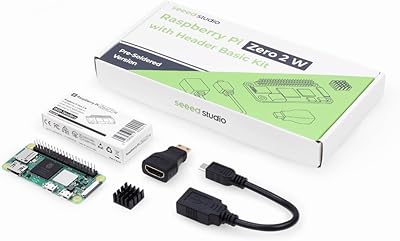
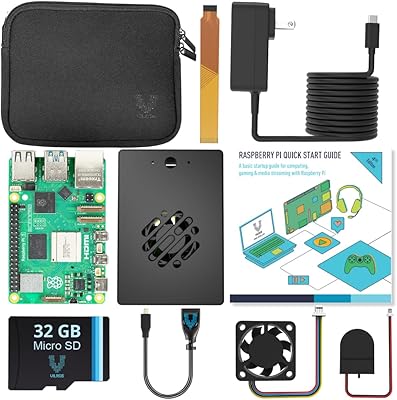
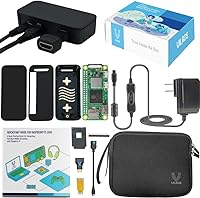
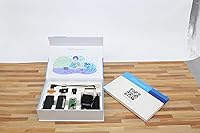
The Vilros Pi Zero 2 W Starter Kit is one of the more sensible ways to get into single-board computing without spending hours tracking down compatible accessories. Vilros is an approved Pi reseller, which matters — you're not rolling the dice on a gray-market board. The packaging has a clean, gift-ready look that works well if you're buying for a student or a curious hobbyist. One thing worth knowing upfront: this starter bundle does not include an SD card, keyboard, mouse, or monitor. Those omissions aren't unusual for kits at this level, but absolute beginners should budget for them. The board itself is the Zero 2 W, a quad-core upgrade over the older single-core Zero W.

Features & Benefits

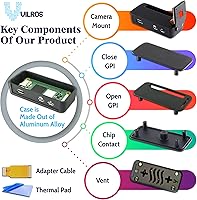
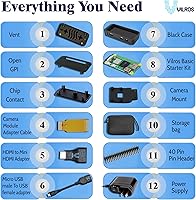
The jump from the original Zero W to the Zero 2 W is noticeable in day-to-day use — four cores instead of one makes a real difference when you're running a lightweight desktop or juggling a few background processes. The aluminum alloy case feels solid and ships with multiple cover options, so you can adapt it depending on your project needs. Vilros includes a 3A power supply with a physical on/off switch, which is a small but genuinely practical touch. Two adapter cables handle the Mini HDMI and Micro USB ports, and there's even a camera module cable and mount included — handy if you want to experiment with basic imaging or computer vision work.

Best For

This Pi Zero 2 W kit makes the most sense for someone who wants to get started without building a parts list from scratch. Beginners benefit most — the curated accessories take the uncertainty out of compatibility, and the quick-start guide gives enough direction to flash an OS and boot up. Makers running IoT sensors, a small home automation hub, or a retro gaming console will find the Zero 2 W capable enough for those tasks. It also doubles as a thoughtful gift; the packaging holds up well as a present for a student, a teen with a coding interest, or a maker-minded adult. Seasoned Pi users might use this starter bundle as a dedicated secondary board for a single low-power function.

User Feedback

With a 4.6-star average across 74 ratings, the Vilros kit earns its marks mostly through reliability and convenience. Buyers frequently praise the overall build quality of the aluminum case and how much easier the power supply's on/off switch makes repeated reboots. The complaints worth noting center on things not in the box rather than things that are: several reviewers point out that a true beginner's kit probably should ship with an SD card, since missing that card adds an extra step before anything runs. A few users mention the quick-start guide is adequate for those with some Linux experience but thin for complete newcomers. No widespread concerns about defective hardware, which speaks well to Vilros's sourcing.

Pros

  • Vilros is an approved Raspberry Pi reseller, so board authenticity and sourcing reliability are not concerns.
  • The 3A power supply with a physical on/off switch is a practical, often-overlooked convenience that saves repeated cable-pulling.
  • Aluminum alloy case with swappable covers protects the board and adapts to different project configurations without buying extra hardware.
  • Bundled Mini HDMI and Micro USB adapters mean no last-minute scramble to connect the board to a display or peripheral.
  • The quad-core processor handles lightweight multitasking noticeably better than the older single-core Zero W.
  • Camera module cable and mount are included, making basic computer vision or time-lapse projects immediately accessible.
  • Gift-ready packaging makes this starter bundle a polished, presentable option for a tech-curious recipient.
  • Built-in Wi-Fi and Bluetooth 4.2 eliminate the need for external dongles on most common projects.
  • A neoprene storage bag keeps the board and small accessories organized between project sessions.
  • Strong 4.6-star rating across a meaningful buyer pool suggests consistent quality control and reliable fulfillment.

Cons

  • No SD card is included, forcing beginners to purchase one separately and flash an OS before the board even boots.
  • The quick-start guide is too thin on detail to carry a complete Linux newcomer through setup without outside research.
  • With only 512MB of RAM, the board struggles under any workload heavier than a single lightweight application.
  • No keyboard, mouse, or monitor is included, so first-time buyers often underestimate the true total cost to get started.
  • Using GPIO HAT accessories requires soldering the included pin header — a step many beginners are not prepared for.
  • Wi-Fi is limited to the 2.4GHz band, which can be a bottleneck in dense or congested home network environments.
  • The small adapter cables and covers are easy to misplace during project changes, and replacements require separate sourcing.
  • The CSI camera connector fitment can require patience to seat correctly, with some users reporting fiddly alignment.

Ratings

Our AI-driven scores for the Vilros Pi Zero 2 W Starter Kit were generated by analyzing verified buyer reviews from global markets, with spam, bot submissions, and incentivized feedback actively filtered out to ensure every rating reflects real-world ownership experience. The thirteen categories below cover everything from core hardware performance to out-of-box readiness and accessory completeness — the factors that actually shape day-to-day satisfaction. Both the strengths that earn this starter bundle its strong average rating and the frustrations that keep it from a perfect score are transparently reflected in each scorecard.

Value for Money
82%
18%
For buyers who have ever tried to assemble a Pi Zero 2 W setup from scratch, the convenience of having a power supply, aluminum case, adapters, and camera hardware in one box at this price point is genuinely attractive. Sourcing those parts individually usually ends up costing more and taking considerably longer.
The missing SD card is the most common value complaint — for a kit clearly targeting beginners, leaving out an essential component that costs only a few dollars feels like a deliberate omission rather than an oversight. Buyers who already own a spare card won't mind, but true first-timers will need an extra purchase before anything runs.
Build Quality
88%
The aluminum alloy case is the standout hardware element — it feels solid in hand, dissipates heat more effectively than a plastic shell would, and the swappable cover system means you aren't locked into a single configuration as your project evolves. Several buyers noted it feels more premium than the price would suggest.
A small number of users reported that fitting the board snugly into the case required more patience than expected, with some covers needing firm pressure to seat properly. The pin header cutout on certain cover configurations can also feel tight when working with bulkier GPIO accessories or ribbon cables.
Board Performance
74%
26%
Compared to the original single-core Zero W, the quad-core processor makes a noticeable difference in day-to-day responsiveness — tasks like running a lightweight desktop environment, serving web pages, or emulating older game consoles feel significantly smoother. For its intended use case, the performance-to-footprint ratio is genuinely impressive.
The 512MB RAM ceiling is a real constraint that becomes apparent quickly once you push beyond a single focused task — loading a graphical browser, running multiple background services, or doing any compilation work will strain the board noticeably. Buyers expecting Pi 4 or Pi 5 levels of throughput will be disappointed.
Out-of-Box Readiness
63%
37%
The bundle does a commendable job of reducing compatibility guesswork — the included power supply, adapters, and case are all matched to the board, so buyers aren't stuck cross-referencing spec sheets before anything arrives. For someone who has worked through a Pi project before, reaching a working setup is relatively quick.
True beginners will hit a wall fast: there is no SD card, no keyboard, no mouse, and no monitor included — meaning the box alone cannot produce a working computer. Sourcing those missing pieces, flashing an OS image, and navigating Raspberry Pi OS for the first time is a multi-step process the quick-start guide only partially addresses.
Accessory Bundle
79%
21%
Ten items in the box is a respectable count for a kit at this price tier, and the selection is thoughtful — the camera cable and mount are genuinely useful additions that most competing bundles skip entirely. The neoprene storage bag is a small but practical touch for makers who frequently swap boards between projects.
The absence of an SD card is the single most discussed gap in the bundle — it is the one component you cannot skip, and its omission forces an additional purchase that undercuts the all-in-one premise. The pin header also ships unsoldered, which requires tools and skills that many buyers in this kit's target audience simply are not prepared for.
Power Supply
91%
The bundled 3A supply is sized correctly for the Zero 2 W's power draw, and the physical on/off switch is consistently called out in buyer feedback as a convenience that sounds minor but quickly becomes indispensable during iterative development and repeated testing sessions. No widespread instability or voltage complaints were found in the review pool.
The power supply uses a Micro USB connector, which is increasingly dated compared to USB-C, and the cable length can feel short in certain desk setups. A handful of buyers who intended to use an existing USB-C charger found they needed an additional adapter, adding a small but avoidable extra cost.
Wireless Connectivity
71%
29%
Having both Wi-Fi and Bluetooth 4.2 built directly into the board eliminates the need for USB dongles on most common project types — IoT sensors, home automation nodes, and wireless keyboard connections all work without consuming the board's single USB port. Bluetooth Low Energy support is a genuinely useful addition for sensor and peripheral work.
Wi-Fi is limited to the 2.4GHz band, which is a tangible constraint in dense apartment environments where that spectrum is heavily congested, and it can visibly affect throughput for projects that depend on sustained network performance. Moving to a 5GHz connection requires adding an external USB Wi-Fi adapter, which compounds the port scarcity problem.
Documentation
61%
39%
The included quick-start guide works well as an orientation card — it gives buyers a clear picture of what is in the box and enough context to know where to go next. For users with any prior Linux or Raspberry Pi experience, it covers the essentials efficiently without unnecessary padding.
Complete newcomers consistently find the guide too thin — it does not walk through flashing an SD card, configuring Wi-Fi on first boot, or resolving common early errors, all of which are genuine stumbling blocks for first-time Pi users. Most buyers in this category end up relying heavily on the Raspberry Pi Foundation's own online documentation and community forums.
Packaging & Presentation
86%
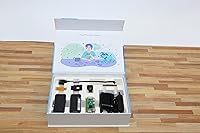
The retail box is designed to look and feel like a proper consumer tech product, which makes this starter bundle a genuinely presentable gift — something rarely true of bare boards or bare-bones budget kits. Gift-givers consistently note it arrives in a condition that requires no rewrapping or additional presentation effort.
The packaging is a strength rather than a weakness overall, so complaints here are minor: a few buyers noted the interior does not have individual molded cutouts for each accessory, making it slightly harder to inventory all ten items at a glance without fully unpacking the contents.
Expandability
76%
24%
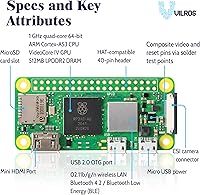
The HAT-compatible 40-pin GPIO layout gives buyers access to a broad ecosystem of add-on boards, sensors, and modules that the Raspberry Pi community has built out over many years. The included CSI camera connector also opens the board to photography, time-lapse, and basic machine vision experiments without sourcing any extra hardware beyond a compatible camera module.
The GPIO header ships unsoldered, which creates a real barrier for anyone wanting to use HATs or GPIO accessories without prior soldering experience. The single Micro USB OTG port is also a meaningful bottleneck — connecting a USB hub is possible but introduces additional current draw that requires careful power budgeting.
Thermal Management
83%
The aluminum alloy case functions as a passive heat spreader, which is a meaningful benefit when running sustained workloads — bare boards of this type can run warm enough to trigger thermal throttling during extended use, and the metal enclosure reduces that risk noticeably without requiring any fan noise.
The case provides no active cooling, so projects that push the CPU hard for long periods — particularly RetroPie builds running cycle-accurate emulators — can still experience throttling under heavy load. No thermal interface material is included to improve contact between the board's processor and the case walls.
Port Selection
68%
32%
Both a Mini HDMI video output and a Micro USB OTG data port are present on the board, and the kit bridges both to full-size connectors through included adapters, meaning basic display and peripheral connectivity works immediately without additional sourcing. The adapter-inclusive approach is a practical workaround for the board's compact physical form factor.
A single Micro USB port for all data and peripheral needs is a genuine daily constraint — connecting a keyboard and a USB storage device simultaneously requires a hub, and USB-C is entirely absent from the hardware. Buyers accustomed to more modern single-board computers with multiple ports will feel the limitation quickly in practice.
Software Ecosystem
87%
Raspberry Pi OS is a well-documented, actively maintained Linux distribution backed by years of community tutorials, project guides, and forum threads written specifically for Zero-series boards. For beginners, the sheer volume of freely available resources means that almost every obstacle encountered during setup or project development has a documented solution somewhere online.
The 32-bit constraint of the recommended Raspberry Pi OS Lite build means some newer 64-bit-only software packages are unavailable, which frustrates more advanced users trying to run modern toolchains. Switching to the full 64-bit build of Raspberry Pi OS demands RAM headroom the board cannot comfortably provide under typical workloads.

Suitable for:

The Vilros Pi Zero 2 W Starter Kit is the right buy for anyone who wants a structured, no-guesswork introduction to single-board computing. Beginners benefit most here — the bundled power supply, adapters, and aluminum case mean you're not cross-referencing compatibility charts before you even plug anything in. Students working on coding assignments, educators setting up a compact classroom demo station, and hobbyists planning a lightweight IoT sensor or home automation node will all find the Zero 2 W's quad-core processor capable enough for those tasks without overbuying on hardware. Gift-givers will appreciate the clean, tech-forward packaging, which makes this starter bundle a genuinely presentable choice for a curious teen or maker-minded adult. Seasoned Pi users who want a tidy secondary board dedicated to a single low-power function — a print server, a network monitor, or a retro game emulator — also get solid value without the overhead of sourcing each part individually.

Not suitable for:

The Vilros Pi Zero 2 W Starter Kit is not the right fit for anyone expecting a fully plug-and-play experience straight out of the box. The board ships without an SD card, which means absolute beginners still need to source one, download an OS image, and flash it before anything runs — a process that can trip up someone with zero Linux exposure. Power users or developers who need to run demanding workloads, multiple services simultaneously, or anything resembling a desktop environment will quickly hit the Zero 2 W's ceiling; 512MB of RAM is a hard constraint, and this board is not a substitute for a Raspberry Pi 4 or 5. Anyone expecting a complete desktop setup — monitor, keyboard, and mouse included — will find this starter bundle covers only a fraction of what they actually need to spend. The included quick-start guide is also too thin to carry a complete newcomer through troubleshooting, so anyone without patience for Linux self-learning should factor in significant extra research time.

Specifications

  • Processor: The board is powered by a 1GHz quad-core 64-bit ARM Cortex-A53 CPU, providing meaningfully more parallel processing capability than the single-core original Zero W.
  • GPU: A VideoCore IV GPU handles graphics output and hardware video decoding, supporting resolutions up to 1080p via the Mini HDMI port.
  • RAM: 512MB of LPDDR2 RAM is soldered directly to the board and cannot be expanded or upgraded.
  • Wi-Fi: The board supports 802.11b/g/n wireless networking on the 2.4GHz band only; there is no 5GHz dual-band support.
  • Bluetooth: Bluetooth 4.2 with Bluetooth Low Energy (BLE) is built in, enabling wireless peripheral connections and low-power IoT sensor communication.
  • Storage Slot: All storage and OS installation is handled via the onboard MicroSD card slot; no card is included in the kit.
  • Video Output: Video is delivered through a Mini HDMI port; the kit includes a Mini HDMI to standard HDMI female adapter for connecting to common displays.
  • USB Port: A single Micro USB 2.0 OTG port handles both data transfer and peripheral connections, with a Micro USB to standard USB female adapter included in the kit.
  • GPIO Header: The board carries a HAT-compatible 40-pin GPIO header, though the included pin header arrives unsoldered and must be attached before GPIO accessories can be used.
  • Camera Port: A CSI camera connector enables camera module support; the kit includes a dedicated adapter cable and mount compatible with standard Raspberry Pi camera modules.
  • Case: The bundled enclosure is machined from aluminum alloy and ships with multiple swappable covers to suit different project and connectivity configurations.
  • Power Supply: A 3A Micro USB power supply rated for Pi Zero operation is included, featuring a physical on/off switch to avoid repeated cable-pulling during development.
  • Adapters: The kit bundles both a Mini HDMI (female) to standard HDMI adapter and a Micro USB (male) to standard USB (female) adapter to bridge the board's compact ports to common peripherals.
  • Extras Included: Additional accessories in the box include a camera module adapter cable, a camera module mount, an unsoldered 40-pin header, and a neoprene storage bag for the board and components.
  • Operating System: The board runs Linux-based operating systems, with Raspberry Pi OS being the officially recommended and most thoroughly supported option for all skill levels.
  • Package Size: The retail box measures 10.43 x 7.32 x 2.72 inches and is presented in a clean, tech-gift-style package suitable for gifting.
  • Shipping Weight: The complete kit with all included accessories weighs 1.76 pounds as packaged and shipped.

Related Reviews
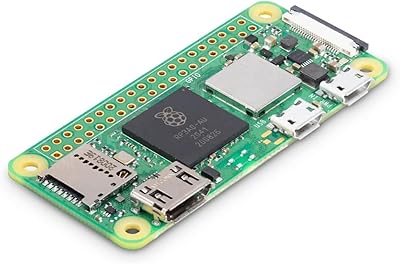
Raspberry Pi Zero 2 WH Kit
87%
88%
Performance
91%
Ease of Setup
94%
Size & Portability
90%
Wireless Connectivity (Wi-Fi/Bluetooth)
85%
Build Quality
More
Raspberry Pi Zero 2 W
80%
91%
Processing Performance
88%
Value for Money
73%
RAM & Memory Adequacy
86%
Wireless Connectivity
93%
GPIO & Ecosystem Compatibility
More
Vilros Raspberry Pi 5 4GB Starter Kit
82%
92%
Ease of Setup
89%
Cooling Performance
91%
Build Quality
84%
Value for Money
74%
RAM Adequacy
More
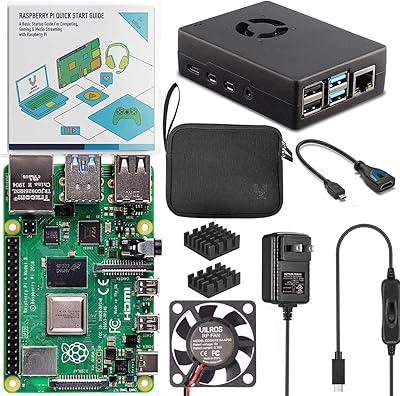
Vilros Raspberry Pi 5 8GB Starter Kit
80%
93%
Ease of Setup
89%
Thermal Performance
91%
Build Quality
67%
Value for Money
88%
Cooling System Design
More
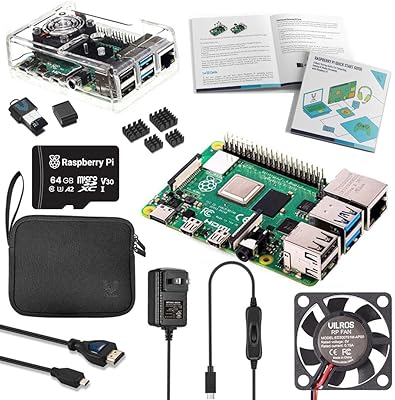
Vilros Raspberry Pi 4 4GB Starter Kit
81%
91%
Build Quality
88%
Thermal Management
84%
Ease of Setup
86%
Performance
89%
Power Supply Quality
More
Vilros Raspberry Pi 4 Starter Kit 8GB
82%
93%
Out-of-Box Readiness
88%
Value for Money
84%
Thermal Management
86%
Accessory Completeness
89%
Power Supply Quality
More
SunFounder Raspberry Pi Pico W Ultimate Starter Kit
81%
91%
Curriculum Quality
88%
Component Variety
78%
Beginner Accessibility
86%
IoT & Connectivity Features
84%
Value for Money
More
Vilros Arduino Uno Starter Kit
82%
92%
Value for Money
88%
Ease of Use
90%
Component Quality
85%
Instruction Manual
82%
Learning Curve
More
SunFounder Raspberry Pi Pico Starter Kit
88%
88%
Build Quality
94%
Component Variety
90%
Ease of Setup
92%
Instruction Clarity
89%
Programming Language Support
More
FREENOVE Super Starter Kit for Raspberry Pi Pico
85%
92%
Value for Money
88%
Ease of Use for Beginners
94%
Tutorial Quality
85%
Component Variety
90%
Project Range and Complexity
More

FAQ

No, and this is the most important thing to know before buying. You will need to pick up a MicroSD card separately — a Class 10 card with at least 16GB is the standard recommendation — and use the Raspberry Pi Imager tool to flash an operating system onto it before the board will boot. It adds one step to getting started, but once you know it is coming, it is straightforward.

A 16GB Class 10 or UHS-I card is the comfortable minimum, though 32GB gives you more breathing room for project files and software packages. SanDisk and Samsung cards are consistently reliable within the Raspberry Pi community. Avoid very cheap, off-brand cards — they can cause intermittent boot failures or data corruption that is easy to mistake for a hardware problem.

Yes. The kit includes a Mini HDMI to standard HDMI adapter, so you can connect the board to any TV or monitor with a standard HDMI input. You will still need a keyboard and mouse to actually interact with the system, since those are not part of the bundle — keep that in mind when budgeting for your full setup.

It is a solid starting point, but with one honest caveat: you need to be comfortable following online instructions to flash an SD card and configure Raspberry Pi OS. The included quick-start guide covers orientation, but it will not walk you through every step. If you are willing to spend some time on the Raspberry Pi Foundation's free documentation online, you will get up and running without much trouble.

The board is well-suited for lightweight, focused tasks — a Pi-hole network ad blocker, a home automation hub, basic IoT sensor nodes, retro game emulation via RetroPie, a small web server, or beginner Python coding projects. Where it hits its ceiling is anything memory-heavy: with only 512MB of RAM, running multiple browser tabs simultaneously or compiling large programs will be slow or impractical.

Yes, the layout is HAT-compatible, so it works with a wide range of Pi GPIO accessories. The important thing to know is that the 40-pin header included in the kit arrives unsoldered — you will need to attach it to the board yourself before any GPIO connections are possible. It is a straightforward soldering job, but it is a step to plan for if you have never picked up a soldering iron before.

The case ships with swappable covers designed to accommodate different configurations, including camera access. The kit includes the necessary adapter cable and mount to get a Pi-compatible camera module running, so the core hardware is there. Whether a specific third-party camera accessory fits neatly will depend on its form factor, so it is worth checking compatibility before buying a camera add-on separately.

They are genuinely different tools for different purposes. The Pi 4 and 5 run faster, have multiple gigabytes of RAM, support dual-band Wi-Fi, and are capable of serving as a light general-purpose desktop. The Zero 2 W is much smaller, draws far less power, and costs less — it makes sense when you need a compact, dedicated board for a single low-power task, not as a replacement for a full-size Pi if raw performance matters.

Buyers generally report no issues with the included 3A supply, and the physical on/off switch gets called out repeatedly as a genuinely useful convenience during development. It is sized correctly for the Zero 2 W's power draw, which eliminates the compatibility guesswork that comes with using a generic phone charger. Unless you have a specific reason to want a different PSU, the included one should serve you well.

It is a strong choice, particularly because the packaging is tidy and presentable rather than just a bare board in a static bag. The Zero 2 W is capable enough for beginner Python projects, simple electronics experiments, and game emulation. To set expectations properly, just let the recipient know they will also need an SD card, a keyboard, a mouse, and an available HDMI display to get started — managing those expectations upfront helps the gift land the way you intend.