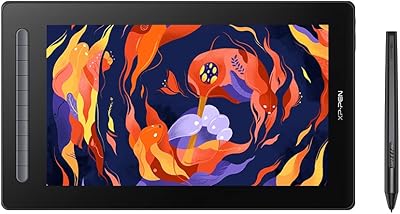
UGEE UE16 15.4-inch Pen Display

Overview
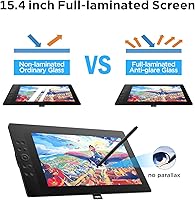
The UGEE UE16 15.4-inch Pen Display enters a competitive mid-range market where artists want color accuracy and screen real estate without paying flagship prices. The full-laminated panel with anti-glare glass keeps the drawing surface close to the display, which meaningfully reduces parallax — that frustrating gap between where your stylus touches and where the line actually appears. It launched in mid-2024, so the review base is still building, but early reception has been encouraging. One practical note worth flagging upfront: the 3-in-1 cable ships in a separate compartment inside the box, which is easy to overlook if you are not expecting it.
Features & Benefits
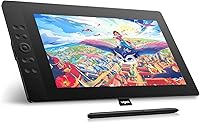
The color performance on this pen display is where it genuinely stands out. The screen covers well beyond standard sRGB — extending into Adobe RGB and DCI-P3 territory, with a black-and-white mode thrown in — which matters when work needs to translate across print and digital. The battery-free stylus offers an impressive range of pressure sensitivity, making thin hairlines and heavy strokes feel responsive and natural. Two programmable buttons on the stylus and a dedicated eraser reduce constant tool-switching. Add eight physical shortcut keys and a scroll wheel, and you spend considerably less time hunting the keyboard and more time actually drawing.
Best For
This drawing screen hits a sweet spot for artists ready to step up from a screenless tablet but not looking to spend Wacom-level money. Students in graphic design or animation programs will find the 15-inch surface roomy enough for daily work without dominating a small desk. It also makes a strong case for creators juggling multiple color profiles — someone producing both web graphics and print-ready files will appreciate the quick mode switching. Android compatibility is a genuine differentiator here; it opens the UE16 to artists who prefer mobile setups rather than being tethered to a desktop.
User Feedback
With roughly 90 ratings and a 4.4-star average, this pen display has a promising early track record — though the sample size is still too small to draw firm conclusions. Buyers consistently praise the color richness, the generous screen space for the price, and stylus responsiveness. On the flip side, a handful of users note a learning curve around driver installation, particularly on macOS. Ergonomics come up occasionally as well — the UE16 does not include a built-in stand, so anyone planning long sessions may want to budget for one separately. Compared to similarly priced Huion Kamvas models, early sentiment suggests the color output holds up well.
Pros
- Wide color coverage makes color-critical illustration and print-ready design work noticeably more reliable than budget alternatives.
- The full-laminated screen dramatically reduces parallax, making drawing feel far more intuitive and precise.
- Battery-free stylus with a built-in eraser and programmable buttons keeps the workflow moving without interruptions.
- Eight physical shortcut keys and a scroll wheel cut down on keyboard dependency during long drawing sessions.
- Android and Chrome OS support gives the UE16 genuine flexibility for mobile and non-desktop creative setups.
- Broad app compatibility means Photoshop, Illustrator, SAI, and other popular tools work without custom configuration on Windows.
- This pen display holds up well against similarly priced Huion Kamvas and XP-Pen Artist models on color output.
- The 15-inch drawing area is roomy enough for character illustration and multi-layer design work without constant canvas panning.
- Pressure sensitivity range is wide enough to capture both delicate feathering and heavy expressive strokes naturally.
Cons
- No stand is included, forcing buyers to source one separately just to use the display at a comfortable angle.
- macOS driver reliability is inconsistent — updates can break pressure sensitivity and sometimes require a full reinstall.
- The 3-in-1 cable ships in a separate box compartment that is easy to miss, causing unnecessary unboxing confusion.
- HDMI-only video input means modern laptops without that port will require an adapter at additional cost.
- Out-of-box pressure curve settings feel stiff to some artists and need manual adjustment in the driver software.
- The plastic-heavy chassis feels less premium than the price point might suggest, especially next to metal-bodied competitors.
- Shortcut key buttons have a hollow, shallow feel that makes tactile feedback less satisfying during extended use.
- With under 100 ratings at the time of writing, long-term durability and consistency data is still limited.
- Niche or newer drawing apps may require manual pressure configuration due to sparse official compatibility documentation.
Ratings
The UGEE UE16 15.4-inch Pen Display scores below are generated by AI after systematically analyzing verified global user reviews, with spam, bot activity, and incentivized feedback actively filtered out. This drawing screen has accumulated a modest but telling pool of real-world opinions from illustrators, students, and designers across multiple regions. Both the standout strengths and the genuine frustrations are reflected honestly in every category score.
Display Color Accuracy
Stylus Performance
Screen Lamination & Parallax
Build Quality & Durability
Shortcut Keys & Workflow Integration
Software & Driver Stability
Compatibility & Connectivity
Ergonomics & Long-Session Comfort
Unboxing & Setup Experience
Value for Money
Screen Size & Workspace
Pressure Sensitivity & Line Quality
Anti-Glare Coating
App & Platform Coverage
Suitable for:
The UGEE UE16 15.4-inch Pen Display is a strong fit for hobbyist and semi-professional digital artists who want a large, color-accurate drawing surface without spending flagship money. Students in graphic design, animation, or illustration programs will find the screen size generous enough for daily coursework while the price leaves room in the budget for software and other tools. Artists making the jump from a screenless tablet will appreciate how natural it feels to draw directly on the display — the full-laminated panel closes the gap between stylus tip and cursor in a way that fundamentally changes the drawing experience. Creators who regularly switch between print and web deliverables will benefit from the multiple color space modes, which allow quick transitions between different output profiles without needing a separate calibration device. The Android compatibility also makes this drawing screen a practical choice for artists who prefer a flexible, mobile-friendly setup rather than being tied to a desktop workstation full-time.
Not suitable for:
The UGEE UE16 15.4-inch Pen Display is probably not the right call for professional illustrators or designers who depend on rock-solid driver stability across every OS update — macOS users in particular have reported enough friction to be a genuine concern for anyone on a tight production schedule. It is also a poor fit for artists who frequently work on the go, since the weight and size make it impractical as a travel companion, and the HDMI-dependent connection adds cable bulk that does not suit a portable workflow. Buyers expecting a complete out-of-box setup will be mildly disappointed — there is no stand included, meaning you will either draw flat or spend extra on an accessory that should arguably come standard at this price point. Those used to the polished hardware feel and bulletproof driver ecosystem of higher-end Wacom displays may find the overall build quality and software experience a noticeable step down. Finally, artists with HDMI-free laptops should factor in the cost and inconvenience of an adapter before committing.
Specifications
- Screen Size: The active drawing area measures 15.4 inches diagonally, offering a generous workspace suited to full-body illustrations and multi-layer design projects.
- Display Type: The panel uses full-lamination technology combined with anti-glare glass, minimizing the gap between stylus tip and cursor for a more natural, paper-like drawing feel.
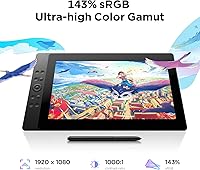
- Color Gamut: The display covers 143% of the sRGB color space, which extends meaningfully into Adobe RGB and DCI-P3 territory for color-critical creative work.
- Color Depth: 8-bit color depth allows the screen to reproduce up to 16.7 million distinct colors, supporting smooth gradients and accurate tonal transitions.
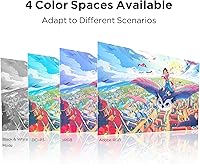
- Color Modes: Four selectable color space profiles — sRGB, Adobe RGB, DCI-P3, and Black and White — allow users to match the display output to their specific project or delivery format.
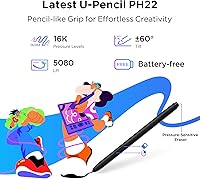
- Pressure Levels: The battery-free U-Pencil stylus supports 16,000 levels of pressure sensitivity, enabling highly nuanced control over line weight and brush opacity.
- Tilt Support: The stylus recognizes tilt angles up to 60 degrees, allowing natural shading and brush-stroke variations consistent with traditional media techniques.
- Stylus Features: The U-Pencil includes two customizable hotkeys, a pressure-sensitive eraser on the opposite end, and a slim ergonomic body designed for extended drawing sessions.
- Shortcut Keys: Eight physical shortcut keys are arranged along the tablet body, complemented by a scroll wheel that cycles between four preset functions via a dedicated switch button.
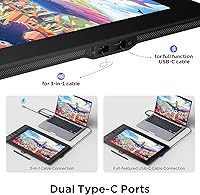
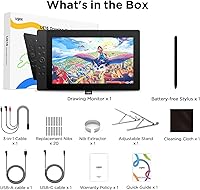
- Connectivity: The UE16 connects via a bundled 3-in-1 cable using HDMI for video output and USB for power and data; the cable is packed separately inside the box.
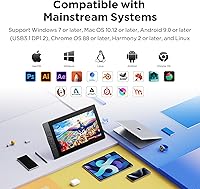
- Compatible OS: Supported operating systems include Windows 7 and later, macOS 10.12 and later, Chrome OS 88 and later, Android 9.0 and later, and Linux.
- App Compatibility: The tablet works out of the box with major creative applications including Adobe Photoshop, Illustrator, Clip Studio Paint, SAI, MediBang Paint, and ibis Paint X.
- Dimensions: The physical unit measures approximately 15.4 x 15.4 x 0.04 inches, giving it a relatively square footprint with an exceptionally slim profile.
- Weight: The device weighs 5.99 pounds, making it stable on a desk but not particularly suited to frequent travel or mobile use.
- Stand Included: No stand or adjustable arm is included in the box; users who prefer an angled drawing position will need to purchase a compatible stand separately.
- Launch Date: The UE16 became commercially available in June 2024, making it a relatively new entrant in the mid-range pen display category.
- Market Rank: At the time of this writing, the product holds the number 101 position in the Computer Graphics Tablets category on Amazon, reflecting early but growing traction.
- Manufacturer: The UE16 is designed and manufactured by UGEE, a brand with an established presence in the graphics tablet market targeting creative professionals and students.
Related Reviews
HYANKA BSF-15-4 15-Inch Car Subwoofer

ASUS ProArt Display PA169CDV 15.6” 4K Pen Display
FMC 15.6-Inch Wireless Portable Monitor
Wacom Intuos3 PTZ431W Wide Format Pen Tablet
FourQ Underwater Fishing Camera 4.3-inch HD Display
XP-Pen Innovator 16 15.6″ Pen Display
ANGEL POS 15-Inch Capacitive Touchscreen Monitor
TUOHAITIME K10 11-inch Android Tablet
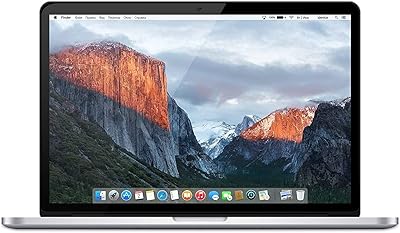
Apple MacBook Pro 15.4-inch 2015, Intel Core i7, 16GB RAM, 512GB SSD