Overview

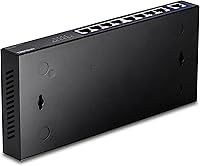
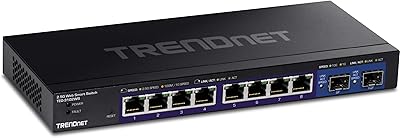
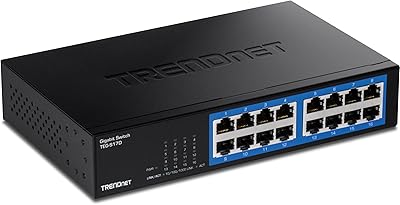
The TRENDnet TEG-S591 9-Port Multi-Gig Switch is a practical, no-nonsense upgrade for home labs, prosumer setups, and small offices that have outgrown standard gigabit speeds. This multi-gig switch is fully unmanaged — plug it in and it works, with no web interface to configure or CLI to learn. The compact, fanless chassis can wall-mount or sit on a shelf, making it easy to tuck away neatly. For government contractors or regulated buyers, NDAA and TAA compliance adds real procurement value. TRENDnet backs the unit with a lifetime warranty, which, for a passively cooled unmanaged switch at this price point, is a meaningful differentiator.
Features & Benefits

What makes the TEG-S591 worth considering is how much usable speed it unlocks without requiring new cabling. All eight 2.5G ports auto-negotiate at either 1G or 2.5G, meaning your existing Cat5e runs will handle the upgrade without a single patch cable change. The dedicated 10G uplink port is where things get interesting — connect a NAS or a high-bandwidth router here and you have a proper fast backbone for the whole network. Internally, the 60Gbps non-blocking switching fabric means you won't hit a throughput ceiling even with multiple devices pushing full 2.5G simultaneously. And since there's no fan, passive cooling keeps it completely silent in any room.

Best For

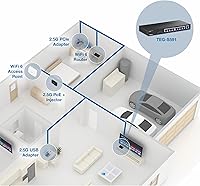
This TRENDnet unit is a strong fit for home lab and prosumer users who want to max out NAS transfer speeds or fully backhaul a Wi-Fi 6E access point — tasks where standard gigabit becomes the bottleneck. It's equally well-suited to remote workers and small offices that need reliable multi-gig connectivity without the overhead of managed switch configuration; there are no VLANs, no QoS settings, and no admin panel, by design. Government and education buyers will appreciate the NDAA and TAA compliance. Anyone still running Cat5e throughout their home can treat this as a drop-in upgrade without touching a single cable run.

User Feedback

With a 4.6-star rating across nearly 2,900 reviews, the reception for the TEG-S591 is consistently positive. Buyers most often praise how quickly it gets a network up and running, with many confirming that real-world 2.5G speeds do hold up as advertised when connected over Cat5e or Cat6. Silent operation comes up repeatedly as a genuine highlight, especially for users who placed it in a living room or bedroom. On the critical side, some reviewers note that the plastic chassis feels less substantial than competitors in a similar price range, and a handful wish it offered basic management features. Still, most find the trade-offs acceptable for an unmanaged unit.

Pros

  • Works over existing Cat5e cabling, so you get 2.5G speeds without rewiring a single drop.
  • The dedicated 10G uplink port is a genuine asset for connecting a NAS or high-bandwidth router.
  • Completely fanless operation keeps things silent, making placement anywhere in a home a non-issue.
  • Plug-and-play setup means there is nothing to configure — power on and it works immediately.
  • A lifetime manufacturer warranty at this price tier is rare and adds long-term peace of mind.
  • NDAA and TAA compliance opens the door for government and education procurement without extra hurdles.
  • Wall-mount capability helps keep cable runs clean and frees up shelf or desk space.
  • The 60Gbps non-blocking fabric means multiple devices can run at full speed simultaneously without contention.
  • Verified buyer reports consistently confirm that real-world 2.5G link speeds hold up as advertised.
  • Compact footprint makes the TEG-S591 easy to tuck away in tight spaces or shallow network closets.

Cons

  • Fully unmanaged design means no VLANs, no QoS, and no port-level traffic visibility whatsoever.
  • The plastic chassis feels noticeably lightweight, which can undermine confidence in commercial or rack installations.
  • Nine ports may not be enough for growing home labs or offices adding devices quickly.
  • No PoE support, so powering access points or IP cameras requires a separate switch or injectors.
  • No SFP+ or fiber uplink option limits flexibility in environments with longer cable runs.
  • Passive cooling keeps it quiet but may raise concerns about long-term heat management in enclosed spaces.
  • The included power adapter is external and adds a small amount of cable clutter near the unit.
  • A 4K MAC address table is modest and could become a constraint in larger, more complex network topologies.
  • No link aggregation support, which limits throughput bonding options for high-demand server connections.

Ratings

Our AI scoring for the TRENDnet TEG-S591 9-Port Multi-Gig Switch was generated by analyzing thousands of verified global buyer reviews, with spam, bot-generated, and incentivized submissions actively filtered out before any scoring was applied. The ratings below reflect both the genuine strengths that repeat buyers consistently highlight and the real frustrations that surface across home lab, small office, and prosumer use cases. Nothing has been smoothed over — the scores represent an honest picture of where this multi-gig switch delivers and where it falls short.
Throughput Performance
93%
Verified buyers repeatedly confirm that real-world 2.5G link speeds hold up under sustained workloads, including large NAS transfers and simultaneous multi-device traffic. The non-blocking 60Gbps switching fabric means none of the ports are throttling each other, which users transferring multi-gigabyte files notice immediately compared to a basic gigabit switch.
A small number of users report that certain older NICs or poorly specified Cat5e runs occasionally negotiate down to 1G instead of 2.5G, which can require troubleshooting cable quality rather than the switch itself. This is a cabling edge case, but it trips up buyers who assumed any Cat5e run would automatically hit full speed.
Ease of Setup
97%
Unboxing to working network takes under two minutes for most buyers — plug in power, connect cables, and the LEDs confirm link status immediately with no configuration whatsoever. Home users and non-technical buyers consistently rate this as one of the strongest aspects, particularly those upgrading from ISP-provided hardware who have never touched a standalone switch before.
The plug-and-play simplicity is a deliberate design choice, but it leaves more advanced users with no fallback options — there is no way to assign a static IP to a port, set up a guest VLAN, or inspect traffic even if you wanted to. For buyers who grow into their network over time, that ceiling becomes a limitation faster than expected.
Noise Level
96%
Fanless passive cooling means absolute silence during operation, which buyers who placed the TEG-S591 in a bedroom, living room AV cabinet, or home office desk genuinely appreciate. This is not a minor comfort feature — several reviewers specifically switched from a competitor model after fan noise became disruptive during late-night work or media use.
The trade-off for silent running is that the chassis gets noticeably warm during extended periods of heavy load, which can be a concern if placed in an enclosed shelf or cabinet without adequate airflow. A handful of buyers flagged this as something to plan around during installation, though no widespread reports of thermal throttling or failures exist.
Value for Money
88%
At its price point, buyers consistently describe this multi-gig switch as one of the more competitively positioned unmanaged 2.5G options available, especially given the 10G uplink port and lifetime warranty bundled in. Home lab users in particular feel they are getting significantly more headroom per dollar than comparable gigabit switches cost just a few years ago.
Some buyers feel the plastic build quality does not quite justify the price when compared to metal-chassis competitors that occasionally appear at similar or slightly higher price points during sales. Those coming from budget-tier switches may be satisfied, but buyers from a professional networking background may feel the materials underdeliver relative to the cost.
10G Uplink Utility
86%
Having a single 10G RJ-45 uplink port is a meaningful differentiator for buyers connecting a 10G-capable NAS, router, or backbone switch, effectively turning the TEG-S591 into a proper aggregation point for a multi-gig home network. NAS users in particular cite this as the primary reason they chose this model over cheaper 8-port 2.5G-only alternatives.
The uplink is a single port with no redundancy or link aggregation support, so if your router or NAS only has one 10G interface, you are using it all on this connection. There is also no SFP+ option for fiber, which matters for users needing longer cable runs between networking closets or separate buildings.
Build Quality
67%
33%
The chassis is compact, lightweight, and fits cleanly on a shelf or wall mount without feeling oversized. The port spacing is sensible, LED indicators are clearly visible, and the unit does not flex or creak under normal handling during installation.
Multiple reviewers describe the plastic enclosure as feeling noticeably hollow and less substantial than competing units, and a few note that the metal accenting is purely cosmetic rather than structural. Buyers expecting something that feels closer to a commercial-grade switch based on the specs will likely be underwhelmed when they first handle the chassis.
Port Count & Density
71%
29%
Nine ports covers a surprisingly wide range of small home and office setups — connecting a desktop, NAS, access point, smart TV, gaming console, and a couple of wired workstations is well within reach without daisy-chaining additional switches.
Home labs and small offices that are actively growing find nine ports limiting within a year or two, especially once you account for the 10G uplink being reserved for a router or NAS. Buyers who anticipate adding more wired devices would be better served planning for a 16-port model from the outset.
Compatibility
89%
Standards-based IEEE 802.3bz and 802.3an compliance means the TEG-S591 auto-negotiates cleanly with a wide range of 2.5G and 10G network cards, routers, and NAS devices from virtually every major vendor. Buyers report successful use alongside ASUS, Synology, QNAP, UniFi, and Netgear equipment without configuration friction.
A small number of users have reported intermittent compatibility quirks with certain older or budget 2.5G NICs that do not fully conform to the 802.3bz standard, causing those devices to drop to 1G. This is more of a NIC firmware issue than a switch defect, but it creates troubleshooting overhead for affected buyers.
Installation Flexibility
84%
Wall-mount capability with included hardware makes this TRENDnet unit genuinely versatile for buyers who want to keep it out of the way — mounted low near a cable entry point or high on a utility wall in a media closet. The compact footprint means it fits in tight spaces where a full-width rack-style unit simply would not.
There is no rack-mount option, which rules it out for buyers who manage even a modest home rack or equipment shelf designed for standard 19-inch units. Those transitioning toward a more structured rack setup will eventually need to replace it with something rack-compatible.
Thermal Management
72%
28%
For typical home and light office use cases — a NAS, a few workstations, and an access point — the passive cooling handles the thermal load without any issues, and the chassis temperature stays within a range that raises no long-term durability concerns under normal conditions.
Under sustained heavy loads with multiple ports simultaneously running near 2.5G capacity, the chassis gets warm enough that a few buyers expressed concern about longevity in a sealed or poorly ventilated space. There is no thermal indicator or warning mechanism, so users cannot easily tell when the unit is running hotter than ideal.
NDAA & TAA Compliance
91%
For procurement-restricted buyers in government agencies, school districts, or contractors on federally funded projects, the dual NDAA and TAA compliance removes a significant sourcing barrier that eliminates most competing unmanaged multi-gig switches at this price tier. Reviewers in these sectors explicitly called it a deciding factor.
This compliance designation carries no practical benefit for standard residential or commercial buyers, and some of the cost premium associated with compliance certification may be embedded in the price whether or not a given buyer needs it. It is a meaningful spec for some, entirely irrelevant for others.
Warranty & Support
83%
A lifetime manufacturer warranty on a passively cooled, unmanaged switch is a genuine long-term value add, and buyers who have engaged TRENDnet support describe the experience as functional and responsive during business hours with English-speaking agents.
The lifetime warranty is tied to the original purchaser and does not transfer on resale, which limits its value for buyers purchasing through secondary markets. A handful of reviewers also noted that the support experience can slow down during peak periods, with wait times longer than expected for a brand of TRENDnet's size.
LED Indicators
78%
22%
Per-port link and activity LEDs make it straightforward to confirm that each device has negotiated the correct speed, which is especially useful when first deploying the switch and verifying that Cat5e runs are hitting 2.5G as expected. The indicators are visible from a normal installation distance without needing to crouch close to the unit.
There is no per-port speed indicator that distinguishes between a 1G and 2.5G link at a glance, which means users have to check their connected device's NIC status to confirm the actual negotiated speed. For buyers troubleshooting a link that dropped to 1G due to a cabling issue, this adds an extra diagnostic step.
Packaging & Out-of-Box Experience
74%
26%
The included quick installation guide is concise and clear enough that most buyers never need to search for additional documentation. The power adapter, mounting hardware, and switch all arrive well-protected, and unboxing reports are almost universally positive with no transit damage complaints at scale.
No Ethernet cables are included, which is an obvious expectation for buyers new to standalone networking hardware but not necessarily an oversight given the target audience. The quick guide also lacks any meaningful troubleshooting guidance for the minority of buyers who encounter negotiation issues with specific devices.

Suitable for:

The TRENDnet TEG-S591 9-Port Multi-Gig Switch is a well-matched choice for home lab users, prosumers, and small office setups that have hit the ceiling of standard gigabit networking and need a straightforward, affordable path forward. If you run a multi-bay NAS and want to push sustained transfers above 1Gbps, or if you are backhauling a Wi-Fi 6E access point that can realistically exceed gigabit throughput, this multi-gig switch gives you the bandwidth headroom to do it without touching your existing Cat5e cabling. Remote workers sharing large files across a local network will also find the 2.5G ports genuinely useful day-to-day. The fanless design makes it an easy fit in noise-sensitive environments like a home office, bedroom media cabinet, or living room AV rack. Government agencies, school districts, and contractors operating under federal procurement guidelines will appreciate that this TRENDnet unit is both NDAA- and TAA-compliant, which removes a common sourcing obstacle for regulated buyers.
Not suitable for:

The TRENDnet TEG-S591 9-Port Multi-Gig Switch is not the right tool for network administrators who need any degree of traffic control or visibility. There is no web interface, no VLAN support, no QoS configuration, and no port mirroring — it is entirely unmanaged, which is a hard limitation if your environment requires segmentation or prioritized traffic handling. Businesses running VoIP systems, surveillance networks, or multi-tenant setups that depend on managed switching features should look elsewhere. The plastic chassis, while functional, does not inspire confidence in dense rack environments or high-heat closets where build quality and heat dissipation matter more. With only nine ports total, growing teams or expanding home labs may find it undersized within a year or two. If your workload genuinely demands SFP+ fiber uplinks or PoE delivery to connected devices, this unit offers neither, and no amount of workarounds will change that.
Specifications

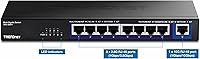
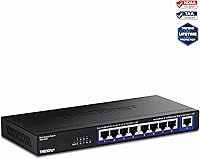
  • Total Ports: The switch provides 9 total ports: 8 x 2.5G RJ-45 ports and 1 x 10G RJ-45 uplink port.
  • Switching Capacity: The non-blocking switching fabric delivers a total capacity of 60Gbps, ensuring no internal bottlenecks under full load.
  • Forwarding Rate: Packet forwarding is rated at 44.64Mpps based on 64-byte packet size, providing consistent throughput across all ports simultaneously.
  • Port Speeds: The 8 standard ports auto-negotiate at 1Gbps or 2.5Gbps, while the dedicated uplink port supports 1Gbps, 2.5Gbps, and 10Gbps.
  • MAC Address Table: The switch supports a MAC address table of 4,000 entries, sufficient for small office and home lab environments.
  • RAM Buffer: An onboard RAM buffer of 1MB handles temporary packet storage during traffic bursts to reduce frame loss.
  • Jumbo Frames: Jumbo frame support extends up to 12KB, which benefits large file transfers to NAS devices and storage-heavy workloads.
  • Dimensions: The chassis measures 9.45″ L x 4.1″ W x 1″ H, making it compact enough for shelf placement or wall mounting.
  • Weight: The unit weighs 1.6 pounds, light enough for flexible installation including vertical wall-mount configurations.
  • Cooling Method: The switch uses entirely passive, fanless cooling — no moving parts means zero acoustic output during operation.
  • Power Supply: A 12V, 1A external power adapter is included in the box; no PoE output is provided on any port.
  • Mounting Options: The chassis supports both desktop placement and wall mounting, with mounting hardware included for flexible installation.
  • Case Material: The enclosure is constructed from plastic with metal-accented detailing; it is functional but not rated for heavy-duty rack environments.
  • Standards: The switch is compliant with IEEE 802.3bz (2.5G), IEEE 802.3an (10G), IEEE 802.3ab (1G), and IEEE 802.3x (flow control).
  • Compliance: The unit is NDAA Section 889 and TAA compliant, qualifying it for U.S. and Canadian government procurement programs.
  • Management: The switch is fully unmanaged with no web interface, CLI, VLAN support, QoS settings, or SNMP capability of any kind.
  • Warranty: TRENDnet covers this switch under their Lifetime Manufacturer Protection program, which applies to the original purchaser.
  • Cabling Requirement: All 2.5G ports are rated to operate at full 2.5Gbps over Cat5e or better cabling, eliminating the need to rewire existing installations.

Related Reviews

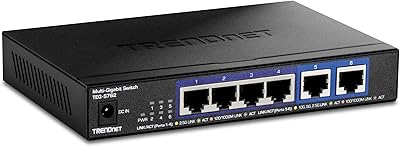
TRENDnet TEG-S562 6-Port Multi-Gig Switch
85%
91%
Throughput Performance
88%
Build Quality
94%
Ease of Setup
97%
Fanless Noise Level
86%
Value for Money
More
TRENDnet TEG-3102WS Multi-Gig Web Smart Switch
86%
91%
Port Speed & Multi-Gig Performance
88%
Build Quality & Hardware Design
94%
Fanless & Noise Level
71%
Web Management Interface
83%
10G SFP+ Uplink Capability
More
TRENDnet TPE-TG327 7-Port Multi-Gig PoE+ Switch
86%
96%
Ease of Setup
89%
Build Quality
91%
PoE Reliability
67%
PoE Power Budget
83%
2.5G Port Performance
More
TRENDnet TEG-S380 8-Port 2.5G Unmanaged Switch
82%
96%
Ease of Setup
88%
Real-World Throughput
83%
Build Quality
67%
Thermal Management
81%
Port Count and Flexibility
More
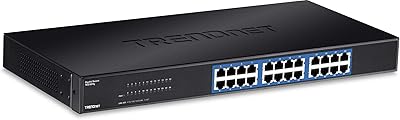
TRENDnet TEG-S24g 24-Port Gigabit Switch
82%
91%
Reliability & Longevity
94%
Ease of Setup
88%
Build Quality
67%
Thermal Management
89%
Port Density & Performance
More
TRENDnet TEG-S762 6-Port 10G Network Switch
83%
88%
Value for Money
94%
Ease of Setup
83%
Port Configuration
81%
Build Quality
67%
Thermal Management
More
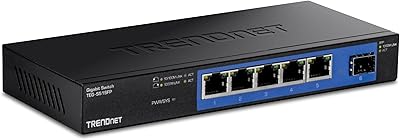
TRENDnet TEG-S51SFP 5-Port Gigabit Switch
86%
91%
Build Quality
96%
Ease of Setup
98%
Noise Level
72%
Thermal Management
74%
Port Count & Layout
More
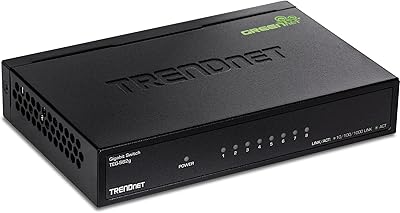
TRENDnet TEG-S82G 8-Port Gigabit Switch
82%
97%
Ease of Setup
88%
Build Quality
96%
Noise Level
91%
Port Performance
89%
Energy Efficiency
More
TRENDnet TEG-S750 5-Port 10G Switch
86%
88%
Performance
94%
Setup & Installation
85%
Build Quality
90%
Compatibility
92%
Quiet Operation
More
TRENDnet TEG-S7102 10-Port 10G Unmanaged Switch
83%
96%
Ease of Setup
88%
Port Density & Layout
91%
Throughput & Performance
84%
Build Quality
71%
Fan Noise & Thermals
More

FAQ

No setup is required at all. The switch is completely unmanaged — just plug in the power adapter, connect your devices with Ethernet cables, and it starts working immediately. There is no admin panel, no app, and no configuration wizard.

Cat5e is fully supported at 2.5Gbps, and that is one of the more practical selling points of this switch. You do not need to pull new Cat6 or Cat6A cable to benefit from the speed upgrade, as long as your runs are within reasonable distance limits — typically up to 100 meters.

You can connect it to anything with a 10G RJ-45 port — a NAS, a router, a server, or another switch. It is simply a higher-speed port, not restricted to any specific role. Many home lab users connect a 10G-capable NAS here to get the most out of their storage transfers.

It is completely silent. The TRENDnet TEG-S591 9-Port Multi-Gig Switch uses passive cooling with no fan whatsoever, so there is zero noise at any point during operation. It is one of the more practical reasons people choose this unit for home environments.
No, it does not. This is a fully unmanaged switch, which means there is no VLAN support, no QoS, no port mirroring, and no traffic prioritization of any kind. If you need those features, you will need to look at a managed switch instead.

No, the TEG-S591 does not provide Power over Ethernet on any port. If you need to power access points, IP cameras, or VoIP phones through the cable, you will need a separate PoE switch or individual PoE injectors.

For most home users, it does not affect your day-to-day use at all. NDAA compliance means the switch does not use components from certain restricted foreign manufacturers, and TAA compliance means it meets Trade Agreements Act sourcing requirements for U.S. government procurement. It matters mainly if you are purchasing for a government agency, school district, or federally funded project.

The chassis does get noticeably warm during extended operation, which is normal for a passively cooled device. Most users report it stays within a comfortable range under typical loads, but you should avoid enclosing it in a sealed cabinet with no airflow. Leave some space around it and it should be fine.

No, the TEG-S591 is not rack-mountable in a standard 19-inch rack. It supports desktop placement and wall mounting only. The form factor is too compact and the chassis is not designed with rack ears or a 1U rack-compatible width.

The lifetime warranty covers manufacturing defects and is tied to the original purchaser. TRENDnet offers English-speaking technical support during normal business hours for troubleshooting or warranty claims. It does not cover physical damage or misuse, but for a passively cooled, no-moving-parts switch, the warranty represents solid long-term value.