Overview

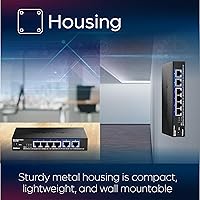
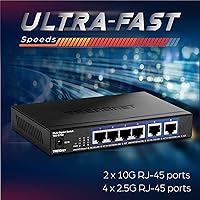
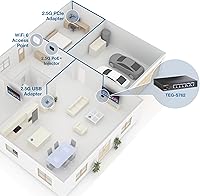
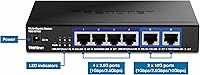
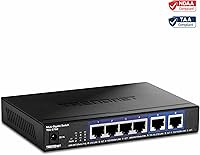
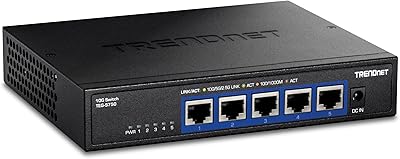
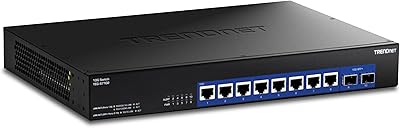
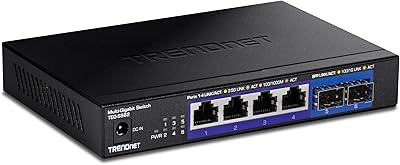
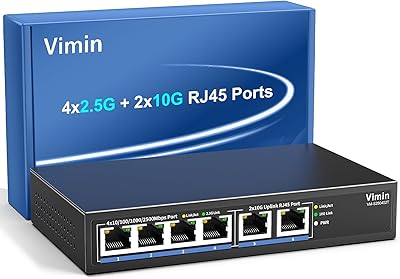
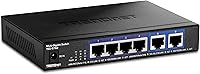
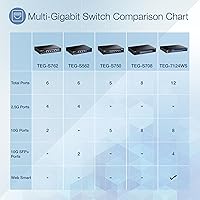
The TRENDnet TEG-S762 6-Port 10G Network Switch is a practical mid-range option for home lab builders, small offices, and prosumer NAS setups that want multi-gig speeds without paying enterprise prices. The port mix is thoughtfully split: four 2.5G ports handle everyday devices while two 10G ports serve bandwidth-hungry connections like a fast NAS or uplink router. Being fully unmanaged, there is no web interface to configure — you plug it in and it works. The compact metal chassis is small enough to tuck on a shelf or wall-mount out of the way. Just know going in: no SFP+ slots, no VLAN support, pure hardware switching.
Features & Benefits

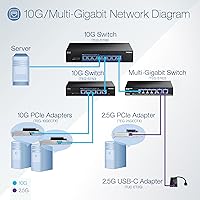
The 60Gbps switching fabric means all six ports can push traffic simultaneously without choking each other — useful when multiple users are hammering a NAS or moving large files at once. The 2.5G ports are particularly practical since they run over Cat5e or better cabling, delivering a real speed boost without pulling new wire. Two 10G RJ-45 ports let you connect a server, high-speed NAS, or 10G-capable router directly — though those ports need a compatible 10G NIC on the other end to actually hit full speed. Jumbo frame support up to 12KB helps with virtualization and bulk transfers. NDAA and TAA compliance is a quiet but meaningful bonus for public sector buyers.

Best For

This 10G switch is a natural fit for home lab enthusiasts running TrueNAS, Plex, or VMware who need local transfers that actually keep pace with their storage. It also works well for small offices wanting to step up from gigabit without the complexity of a managed switch — no CLI, no VLAN configuration, just faster throughput. Content creators shuttling large video files between a workstation and NAS will appreciate the headroom the 10G uplink provides. If you are still running Cat5e throughout your space, the 2.5G ports let you skip the rewiring entirely. Government and education procurement teams will find the NDAA and TAA compliance straightforward to verify.

User Feedback

The TEG-S762 holds a strong rating across several hundred verified purchases, and the consistency across different use cases — home labs, small offices, NAS builds — suggests broad real-world reliability. Buyers frequently highlight hassle-free setup and stable link negotiation as standout positives, along with the fanless design staying quiet under a desk. On the downside, some users report the 10G ports run noticeably warm under sustained load, though most do not consider it a dealbreaker. A handful mention occasional negotiation quirks with certain third-party NICs. Compared to similarly priced alternatives, most reviewers find the overall value solid, though a few wish the wall-mount hardware felt sturdier straight out of the box.

Pros

  • Plug-and-play setup takes minutes — no configuration, no CLI, no learning curve.
  • Four 2.5G ports work over existing Cat5e cabling, saving real money on rewiring.
  • Two 10G RJ-45 ports provide genuine high-speed uplink capacity for NAS and server connections.
  • The all-metal chassis feels durable and holds up well in desk or closet deployments.
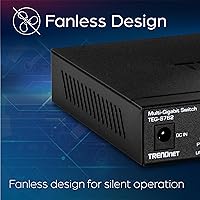
  • Completely fanless operation keeps things silent in living rooms, offices, and bedrooms.
  • NDAA and TAA compliance opens the door for government and education procurement without extra paperwork.
  • 60Gbps non-blocking fabric handles simultaneous heavy transfers across all ports without bottlenecking.
  • Compact footprint with wall-mount support makes installation flexible even in tight spaces.
  • Lifetime warranty for U.S. and Canada buyers adds meaningful long-term purchase confidence.
  • Strong, consistent buyer ratings across diverse use cases suggest reliable real-world performance.

Cons

  • Only six ports total — most users will outgrow this capacity faster than they expect.
  • 10G ports run noticeably warm under sustained load, which is a concern in poorly ventilated spaces.
  • No SFP+ slots means fiber uplinks are completely off the table.
  • Achieving full 10G speeds requires a compatible 10G NIC on every connected device — that cost adds up.
  • Occasional link negotiation quirks with certain third-party NICs require manual driver-level troubleshooting.
  • Wall-mount bracket hardware feels underbuilt relative to the switch chassis itself.
  • The included power adapter feels budget-grade and has drawn occasional criticism from buyers.
  • Lifetime warranty is geographically restricted and excludes international buyers entirely.
  • No management interface means zero visibility into traffic, port errors, or bandwidth usage.
  • Jumbo frames require manual MTU configuration on every connected device, which trips up less experienced users.

Ratings

The TRENDnet TEG-S762 6-Port 10G Network Switch has been scored by our AI system after parsing hundreds of verified global buyer reviews, with spam, bot activity, and incentivized submissions actively filtered out. The scores below reflect both the genuine strengths buyers consistently celebrate and the friction points that surface with enough frequency to matter. Nothing here is cherry-picked — the full picture is what helps you decide.
Value for Money
88%
Buyers repeatedly position this multi-gig switch as one of the most cost-effective ways to add 10G capability to a home lab or small office without jumping to enterprise-tier hardware. Most feel they got more throughput per dollar than competing options at similar price points.
A subset of buyers feel the price is harder to justify when they only need the 2.5G ports and consider the 10G ports overkill for their setup. A few also note that slightly cheaper alternatives exist if NDAA compliance is not a requirement.
Ease of Setup
94%
The unmanaged design means there is genuinely nothing to configure — buyers running TrueNAS, Plex servers, or basic office networks report being up and running within minutes of unboxing. Link negotiation with most modern devices happens automatically and reliably.
The lack of any management interface cuts both ways. Users who later want to segment traffic with VLANs or monitor port activity quickly realize this switch simply cannot do that, which occasionally leads to frustrated returns from buyers who did not fully consider their needs upfront.
Port Configuration
83%
The split between four 2.5G ports and two 10G ports is a practical choice for mixed environments — everyday workstations on the 2.5G side, NAS and uplink router on the 10G side. Buyers running video editing workflows especially appreciate having dedicated high-speed uplink capacity.
Six total ports feels limiting once buyers start connecting multiple high-speed devices. Several reviewers note they outgrew the port count faster than expected and wish there were an 8-port variant in the same price range. The absence of any SFP+ ports also frustrates those wanting fiber uplinks.
Build Quality
81%
19%
The all-metal chassis feels solid and noticeably more premium than the plastic-bodied switches in this price range. At just under two pounds, it is dense and planted on a desk or shelf without feeling flimsy, and the port connectors feel well-seated.
Some buyers report that the included wall-mount hardware feels underspecified relative to the chassis itself — a few screws and a bracket that works but does not inspire confidence over the long term. The power adapter also receives occasional criticism for feeling budget-grade given the switch's otherwise sturdy construction.
Thermal Management
67%
33%
The fanless design is a genuine win for desk or closet deployments where noise matters. Most buyers running the switch under typical office or home lab loads report it staying comfortably warm at most, with no thermal throttling observed during normal operation.
When both 10G ports are pushed simultaneously under sustained load — think large NAS-to-server transfers running for extended periods — the unit gets noticeably hot to the touch. A handful of buyers in warm ambient environments express concern about long-term reliability under those conditions, though outright failures are rare in the review pool.
2.5G Port Performance
91%
Buyers consistently report stable, full-speed 2.5Gbps links with no dropped connections across a wide variety of devices and NIC brands. The ability to use existing Cat5e cabling rather than upgrading to Cat6 or Cat6A is cited frequently as a meaningful real-world cost saving.
A small number of users report that certain older NICs occasionally negotiate down to 1G instead of 2.5G, requiring a manual driver update or NIC setting adjustment to resolve. This is not a switch firmware issue per se, but it adds friction for less experienced buyers.
10G Port Performance
79%
21%
When paired with a proper 10G-capable NIC, buyers running NAS workloads describe transfer speeds that genuinely saturate spinning disk arrays and make a noticeable difference moving large media libraries or VM disk images across the local network.
It is worth stressing what several buyers learned the hard way: achieving 10G throughput requires a compatible 10G NIC on every device using those ports, and standard 1G or 2.5G adapters will simply link at their own maximum speed. Some buyers felt this expectation was not clearly set before purchase.
Noise Level
96%
Completely silent operation is one of the most consistently praised aspects across the review pool. Home lab users running the switch in a living room or bedroom setup specifically call out the fanless design as a deciding factor in choosing this over managed alternatives.
There is virtually no criticism of the noise level itself. The only tangentially related concern is that the passive cooling approach is what contributes to the heat buildup under sustained 10G loads, so silence and thermals are a trade-off rather than a problem unique to either.
Compatibility
74%
26%
The switch plays well with a wide range of routers, NAS devices, and network adapters from major brands. Buyers integrating it into existing Ubiquiti, ASUS, or Synology ecosystems generally report plug-and-play compatibility without any configuration changes needed.
Occasional negotiation quirks with specific third-party NICs are a recurring theme in lower-rated reviews. A handful of buyers also note that certain older devices refuse to negotiate above 1G on the 2.5G ports, which required troubleshooting that goes beyond what an unmanaged switch can assist with.
Form Factor & Mounting
77%
23%
The compact footprint makes it easy to tuck into a networking closet, mount on a wall bracket, or place flat on a shelf without consuming significant real estate. For buyers working with tight spaces, the small physical profile is a genuine practical advantage.
The wall-mount kit, while functional, is described by several buyers as minimal — the bracket hardware feels like an afterthought rather than a well-engineered mounting solution. Those planning a clean wall installation may want to source sturdier mounting hardware independently.
Switching Throughput
89%
The non-blocking 60Gbps switching capacity means all ports can move data simultaneously at full rated speed without competing for internal bandwidth. Buyers running multiple parallel large file transfers — such as a NAS backup alongside a live Plex stream — report no perceptible slowdown.
For the small subset of buyers doing extremely high packet-rate workloads with small frames, the forwarding rate ceiling becomes a consideration. This is an edge case for prosumer use, but advanced home lab users running certain network stress tests have observed limits under very specific synthetic conditions.
Jumbo Frame Support
82%
18%
Support for jumbo frames up to 12KB is a practical benefit for buyers running virtualization stacks or iSCSI storage setups where larger frame sizes reduce CPU overhead and improve bulk transfer efficiency. IT-savvy buyers flag this as an often-overlooked spec that matters in real workloads.
Because the switch is unmanaged, enabling jumbo frames requires configuring every connected device individually to use the same MTU — a step that less experienced buyers sometimes miss, leading to intermittent connectivity issues they incorrectly attribute to the switch itself.
NDAA & TAA Compliance
86%
For buyers in government agencies, public education, or federally funded projects, having NDAA and TAA compliance out of the box removes a significant procurement hurdle. Several reviewers in those sectors specifically purchased this switch over cheaper alternatives purely for compliance reasons.
For the majority of home lab and small business buyers, this compliance designation adds no tangible benefit to their daily use. A few buyers feel it contributes marginally to the price premium and would prefer a lower-cost non-compliant option if one were offered under the same model line.
Warranty & Support
78%
22%
The lifetime warranty for U.S. and Canada buyers provides genuine long-term peace of mind, and TRENDnet's English-speaking support team receives decent marks for responsiveness during business hours. Buyers who have actually contacted support generally describe the experience as competent and helpful.
The warranty is geographically limited, which matters for international buyers who find themselves excluded from the lifetime protection. A few buyers also note that reaching support outside standard business hours is simply not an option, which can be frustrating when a networking issue surfaces on a weekend.

Suitable for:

The TRENDnet TEG-S762 6-Port 10G Network Switch is purpose-built for buyers who want a meaningful speed upgrade without the complexity or cost of enterprise networking gear. Home lab enthusiasts running TrueNAS, Plex, or VMware workloads will find the mixed-port design genuinely practical — four 2.5G ports for everyday machines and two 10G ports reserved for the NAS or uplink router that actually needs that headroom. If your building is already wired with Cat5e, the 2.5G ports let you skip a costly recabling project entirely while still tripling your throughput over standard gigabit. Small offices that want faster local transfers without hiring someone to configure VLANs or manage a CLI will appreciate the plug-and-play simplicity. Content creators regularly moving large video files between a workstation and a fast NAS will notice the difference immediately. Government agencies and educational institutions with NDAA and TAA procurement requirements will also find this one of the few switches at this price point that clears those compliance hurdles without negotiation.
Not suitable for:

The TRENDnet TEG-S762 6-Port 10G Network Switch is a poor fit for anyone who needs network segmentation, traffic prioritization, or any form of remote visibility into port activity — it is strictly unmanaged, and that is not something a firmware update will ever fix. Growing teams or lab setups with more than six devices will hit the port ceiling quickly, and there is no stacking option or easy path to expansion within the same product line. Buyers hoping to connect fiber-based uplinks will be disappointed by the absence of SFP+ slots, making this a copper-only solution. Anyone expecting 10G speeds on existing devices without purchasing a dedicated 10G NIC for each connected machine will be underwhelmed — the switch can only deliver what the endpoint hardware supports. In warmer server rooms or environments without good ambient airflow, the passive cooling approach under sustained 10G loads may raise concerns about long-term reliability. Finally, international buyers outside the U.S. and Canada should know the lifetime warranty does not apply to them, which changes the long-term value calculation somewhat.
Specifications

  • Total Ports: The switch provides 6 total RJ-45 ports arranged as four 2.5G ports and two 10G ports.
  • 2.5G Ports: Four 2.5GBASE-T RJ-45 ports support speeds up to 2.5Gbps and are backward compatible with 1G and 100Mbps devices.
  • 10G Ports: Two 10GBASE-T RJ-45 ports deliver up to 10Gbps per port for high-throughput uplink or server connections.
  • Switching Capacity: The non-blocking switching fabric provides 60Gbps of total throughput, allowing all ports to operate simultaneously at full rated speed.
  • Forwarding Rate: The switch processes up to 44.64 million packets per second using a 64-byte packet size benchmark.
  • Jumbo Frames: Jumbo frame support extends up to 12KB, reducing CPU overhead in large file transfer and virtualization environments.
  • Management Type: The switch is fully unmanaged, requiring no software, web interface, or CLI configuration — it operates automatically upon connection.
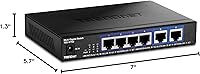
  • Dimensions: The unit measures 7″ in length, 5.7″ in width, and 1.3″ in height, making it suitable for desktop or wall-mount placement.
  • Weight: The switch weighs 1.78 pounds, reflecting its solid all-metal chassis construction.
  • Chassis Material: The enclosure is built from metal, providing passive heat dissipation and greater durability compared to plastic-bodied alternatives.
  • Power Input: The switch is powered by an included 12V DC, 1A external power adapter.
  • Cooling Method: Thermal management is handled entirely through passive convection with no internal fan, resulting in silent operation.
  • Operating Temperature: The unit is rated for operating temperatures between 32°F and 104°F (0°C to 40°C).
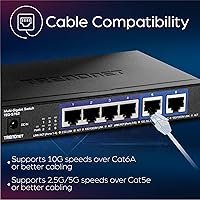
  • Cable Compatibility: The 2.5G ports function over Cat5e or better cabling, while the 10G ports are recommended for use with Cat6A for reliable full-speed operation.
  • Mounting Options: The switch supports both desktop placement and wall mounting, with wall-mount hardware included in the box.
  • Compliance: The switch carries both NDAA and TAA compliance certifications, making it eligible for U.S. government and federally funded procurement.
  • Warranty: TRENDnet provides lifetime manufacturer protection for buyers in the United States and Canada.
  • What Is Included: The package includes the TEG-S762 switch unit, a quick installation guide, and a 12V 1A power adapter.
  • Interface Type: All six ports use standard RJ-45 connectors; there are no SFP or SFP+ optical slots on this model.
  • Data Transfer Rate: Aggregate switching throughput across all ports reaches 60 Gigabits per second under full non-blocking operation.

Related Reviews

TRENDnet TEG-S750 5-Port 10G Switch
86%
88%
Performance
94%
Setup & Installation
85%
Build Quality
90%
Compatibility
92%
Quiet Operation
More
TRENDnet TEG-S7102 10-Port 10G Unmanaged Switch
83%
96%
Ease of Setup
88%
Port Density & Layout
91%
Throughput & Performance
84%
Build Quality
71%
Fan Noise & Thermals
More
TRENDnet TEG-S562 6-Port Multi-Gig Switch
85%
91%
Throughput Performance
88%
Build Quality
94%
Ease of Setup
97%
Fanless Noise Level
86%
Value for Money
More
TRENDnet TEG-S51SFP 5-Port Gigabit Switch
86%
91%
Build Quality
96%
Ease of Setup
98%
Noise Level
72%
Thermal Management
74%
Port Count & Layout
More
TRENDnet TEG-S82G 8-Port Gigabit Switch
87%
94%
Ease of Setup
91%
Energy Efficiency
88%
Performance/Stability
89%
Noise Level
85%
Build Quality
More
TRENDnet TEG-S24g 24-Port Gigabit Switch
82%
91%
Reliability & Longevity
94%
Ease of Setup
88%
Build Quality
67%
Thermal Management
89%
Port Density & Performance
More
TRENDnet TPE-S50 6-Port PoE+ Switch
84%
79%
Performance
85%
Build Quality
91%
Ease of Setup
82%
Reliability
94%
Fanless Operation
More
TRENDnet TEG-S591 9-Port Multi-Gig Switch
89%
92%
Performance
88%
Ease of Setup
90%
Reliability
89%
Build Quality
85%
Fanless Design (Noise Level)
More
VIMIN 6-Port 10G/2.5G Ethernet Switch
88%
95%
Port Performance
92%
Data Throughput Stability
94%
Setup & Installation Ease
90%
Build Quality
78%
Thermal Management
More
TRENDnet TEG-S17D 16-Port Gigabit Switch
86%
91%
Build Quality
96%
Ease of Setup
88%
Network Performance
89%
Port Count & Density
74%
Thermal Management
More

FAQ

No, there is nothing to configure at all. The TRENDnet TEG-S762 6-Port 10G Network Switch is fully unmanaged, which means you simply plug in your devices and the switch handles everything automatically. There is no app, no web dashboard, and no driver to install.
Cat5e is sufficient for 2.5Gbps operation, so you do not need to replace your existing cabling to take advantage of the 2.5G ports. If you plan to use the 10G ports at full speed over longer cable runs, Cat6A is the safer choice, but for typical home or small office distances Cat6 often works fine in practice.

Not automatically — the switch can only deliver 10G if the device on the other end also has a 10G-capable network adapter installed. Most desktop and laptop computers ship with 1G or 2.5G NICs at best, so you would need to add a 10G PCIe or USB network adapter to see those speeds. The switch itself is ready, but the endpoint hardware has to match.

In most cases, yes. Synology and QNAP NAS units with multi-gig network ports connect reliably to this switch without any special configuration. Just make sure your NAS has a 2.5G or 10G port to take full advantage of the available speeds, as units with only 1G ports will simply link at 1G.

Some warmth under sustained 10G load is expected given the fanless passive cooling design. Under typical home lab or small office workloads, this should not cause problems. If you are running both 10G ports at full capacity continuously in a warm room with limited airflow, it is worth ensuring the switch has open space around it rather than being packed tightly in an enclosed cabinet.

No — this is an unmanaged switch, which means there is no VLAN support, no port isolation, no QoS configuration, and no traffic monitoring of any kind. Every port is on the same flat network by design. If you need traffic segmentation or management features, you would need to look at a managed multi-gig switch instead.

The lifetime warranty applies to buyers in the United States and Canada only. International customers are covered by TRENDnet's standard limited warranty instead, which varies by region. If you are purchasing outside North America, it is worth checking the warranty terms that apply in your country before buying.

The switch itself does not have negotiation settings to adjust, so the issue is almost always on the device side. Start by checking that your NIC driver is fully up to date, since some adapters require a recent driver update to advertise 2.5G capability properly. Also confirm in your OS network adapter settings that multi-speed negotiation is enabled rather than locked to 1G.

It is completely silent — there is no fan anywhere in the unit. The metal chassis handles all heat dissipation passively, which makes this switch a solid choice for desks, bookshelves, or any environment where noise is a concern. Many buyers specifically chose it over alternatives for exactly this reason.

The switch itself handles local network traffic between connected devices and does not directly determine your internet speed — your router and ISP connection handle that. Where this multi-gig switch shines is in local transfers: moving files between a NAS and a workstation, streaming from a local Plex server, or running virtual machines across a home lab. To benefit from 10G internet specifically, you would also need a 10G-capable router and a 10G internet plan from your provider.

Where to Buy