
Overview

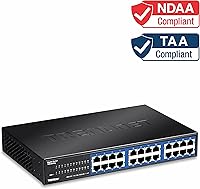
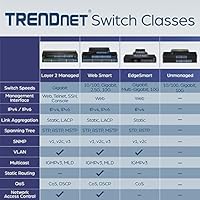
The TRENDnet TEG-S24g 24-Port Gigabit Switch is a no-frills, plug-and-play networking workhorse that has quietly earned its place in small business server rooms and home labs since 2011. That kind of longevity says something — products that stick around that long tend to do so because they simply work. The fanless metal chassis makes it a natural fit for noise-sensitive environments where a fan-cooled switch would be disruptive. Being TAA and NDAA compliant also opens doors for government and regulated-sector buyers with strict procurement requirements. Just be clear going in: this is an unmanaged switch, which means zero setup headaches but also zero control over VLANs, QoS, or traffic prioritization.

Features & Benefits

All 24 ports run at gigabit speeds backed by a 48 Gbps switching fabric, meaning the switch handles simultaneous traffic across every port without throttling — more than enough for most small office or lab workloads. The GREENnet technology is a practical bonus; it scales power draw per active port, and at just 13 watts under normal loads, the energy savings are real rather than marketing noise. Cable management stays clean thanks to the internal power supply, with no external brick needed. The rack-mount kit is included, so sliding it into a 1U slot is straightforward. Pair that with a lifetime warranty and this TRENDnet unmanaged switch represents solid long-term value.

Best For

This gigabit switch is a natural fit for small office deployments where the IT team is one person wearing many hats — nobody wants to configure VLANs on a switch that just needs to move traffic. Home lab builders connecting NAS boxes, virtual machine hosts, and workstations will appreciate having 24 ports without the cost or complexity of a managed unit. Government agencies and education departments with strict procurement rules will find the TAA and NDAA compliance particularly useful. Network installers who need a quiet, rack-ready option for client sites will find it fits the brief well. It is not the right call for organizations that anticipate needing traffic segmentation or advanced network controls down the line.

User Feedback

Across several hundred reviews, the TEG-S24g draws consistent praise for reliability over time — buyers who installed it years ago and simply never had to think about it again are a recurring theme. The quiet, fanless operation gets mentioned frequently, particularly by users who placed it in shared office spaces. On the critical side, some buyers report the unit gets noticeably warm under sustained heavy load, so rack placement with adequate airflow genuinely matters. A handful of reviewers flag the absence of managed features as a dealbreaker once their networks outgrew basic switching needs. That said, the lifetime warranty earns repeated positive mentions as a confidence-builder for long-term deployments.

Pros

  • All 24 ports run at full gigabit speeds with no bottlenecking under simultaneous traffic loads.
  • The fanless design produces absolutely zero noise, making it viable in offices, studios, and home environments.
  • Plug-and-play setup takes minutes — no software, no web interface, no configuration headaches.
  • Metal chassis feels genuinely solid and holds up well in long-term rack deployments.
  • Built-in power supply eliminates the clutter of an external brick and keeps rack cabling tidy.
  • Lifetime manufacturer warranty provides real ownership confidence that most competing switches skip.
  • TAA and NDAA compliance makes the TEG-S24g eligible for government and regulated-sector procurement.
  • GREENnet technology keeps power draw at around 13 watts, which is impressively low for 24 active ports.
  • Rack-mount kit is included in the box — no separate hardware purchase needed for 1U installation.
  • A well-established product track record since 2011 means reliability data is deep and consistent.

Cons

  • No VLAN, QoS, or any management features — networks with segmentation needs will outgrow this immediately.
  • The chassis runs noticeably warm under sustained heavy load, requiring careful rack placement and airflow.
  • No SFP uplink ports limits fiber connectivity options for larger or multi-site network buildouts.
  • RMA process through TRENDnet support has received mixed reviews for response time and consistency.
  • Warranty and compliance benefits apply only to US and Canada, limiting value for international buyers.
  • No rubber feet included, making clean desktop or shelf placement less straightforward than rack mounting.
  • Support is restricted to business hours, which creates gaps for time-sensitive network issues.
  • Buyers whose network needs evolve toward managed features face a full hardware replacement, not an upgrade.

Ratings

The TRENDnet TEG-S24g 24-Port Gigabit Switch has been scored by our AI engine after analyzing verified global buyer reviews, with spam, bot-submitted, and incentivized feedback actively filtered out. Scores reflect the full picture — what this TRENDnet unmanaged switch genuinely does well and where real-world buyers have run into frustration. Both the strengths and the legitimate pain points are represented transparently in each category below.

Reliability & Longevity
91%
Buyers who installed this gigabit switch years ago consistently report that it just keeps running without intervention. In small office and home lab environments, that kind of set-it-and-forget-it track record is exactly what unmanaged switches are judged on, and the TEG-S24g delivers it convincingly.
A small number of long-term users report unit failures after several years, though these cases appear infrequent relative to the install base. The lifetime warranty covers these situations, but the RMA process has drawn some criticism for being slow.
Ease of Setup
94%
There is genuinely nothing to configure — plug in the cables and the switch is live. Reviewers who dread networking tasks especially appreciate this, and installers note it cuts deployment time on client sites significantly compared to managed alternatives.
The zero-configuration nature is also a hard ceiling. Users who later need to isolate a device, set up a guest network, or manage bandwidth will find this switch simply cannot accommodate those needs, requiring a full hardware swap.
Build Quality
88%
The all-metal housing feels solid and purposeful, not like the lightweight plastic shells that show up on cheaper switches. At 5 pounds it has a reassuring heft, and several buyers specifically mention it holding up well after years in a rack.
The chassis does not include rubber feet for desktop use out of the box, which matters for buyers who want to place it on a shelf rather than rack-mount it. A few users also noted minor finish inconsistencies on the rear panel.
Thermal Management
67%
33%
The fanless design keeps noise levels at absolute zero, which is a genuine advantage in shared office spaces or home environments where audible fan noise would be intrusive. In lightly loaded deployments, the switch stays comfortably cool throughout the day.
Under sustained heavy traffic across many ports, the metal chassis gets noticeably warm. Several users recommend leaving at least one rack unit of clearance above and below it, and those who ignored this advice reported performance concerns over time.
Port Density & Performance
89%
Twenty-four gigabit ports backed by a 48 Gbps non-blocking fabric means this switch can handle full-speed traffic across all ports simultaneously without bottlenecking. For NAS-heavy home labs or small offices pushing large file transfers, this headroom is practically useful.
There are no SFP uplink ports, which limits fiber connectivity options if you need to tie into a larger network infrastructure. For straightforward copper deployments this is a non-issue, but growing networks may find it a constraint sooner than expected.
Energy Efficiency
82%
18%
The GREENnet technology dynamically adjusts power per active port, and at a measured 13 watts under typical loads, this switch costs almost nothing to run around the clock. For businesses with multiple network devices, that kind of passive saving adds up over months.
The energy savings are most pronounced when many ports are idle, so dense deployments with near-full port utilization will see less benefit. The savings are real but should not be the primary purchase driver — they are a welcome side effect, not a headline feature.
Value for Money
86%
Getting 24 gigabit ports, a metal chassis, an internal power supply, and a lifetime warranty in a single package at this price tier is genuinely competitive. Budget-conscious buyers consistently note that comparable builds from other brands cost noticeably more.
Buyers comparing this to entry-level managed switches at a slightly higher price point sometimes feel the lack of any management features makes the value proposition less clear as their networks grow. If you anticipate needing VLANs within a year or two, the math changes.
Noise Level
97%
With no fan at all, this switch produces zero operational noise under any load. Users in recording studios, quiet offices, and bedroom home labs specifically seek out this switch for exactly that reason, and it never disappoints on this front.
There is virtually nothing negative to say here from a noise perspective. The only related concern is that the absence of active cooling means thermal management falls entirely on placement and ambient airflow, which requires some forethought.
Rack Mount Design
84%
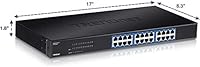
The included rack-mount kit makes 1U installation straightforward, and the 17-inch form factor fits standard racks without adapters. Installers appreciate that TRENDnet includes the mounting hardware rather than treating it as an add-on purchase.
The rack ears feel slightly less robust than the main chassis, and a couple of professional installers noted they prefer aftermarket options for permanent deployments. Desktop use without a rack also lacks a clean mounting solution since feet are not included.
TAA & NDAA Compliance
93%
For procurement managers in government agencies, education institutions, or defense-adjacent organizations, compliance is non-negotiable. The TEG-S24g satisfies both TAA and NDAA requirements, which meaningfully narrows the field of eligible 24-port gigabit switches at this price point.
Compliance only applies to US and Canada buyers, limiting its relevance for international procurement scenarios. Additionally, some procurement officers have noted that verifying compliance documentation through TRENDnet's support channels can take longer than expected.
Warranty & Support
78%
22%
A lifetime warranty on networking hardware is not common at this price tier, and buyers who have had to use it generally confirm that replacements do get processed. English-speaking support during business hours is a step above many competitors in this segment.
Support is limited to business hours, which creates delays for urgent issues outside that window. Some users report inconsistent experiences with the RMA process, with response times varying significantly — a gap between the warranty promise and its execution.
Cable Management
81%
19%
Having the power supply built into the unit eliminates the external power brick that plagues many competing switches, keeping the rack or shelf area noticeably tidier. Users who have managed multi-device racks appreciate this detail more than buyers new to rack deployments.
All 24 ports sit on the front face with no rear port options, which can make high-density cabling look cluttered without a dedicated patch panel in front of it. In tight rack setups, managing 20-plus patch cables neatly takes some planning.
Advanced Features
31%
69%
For pure plug-and-play use, the simplicity of an unmanaged switch is exactly what many buyers want — no firmware updates, no web interface to navigate, no risk of misconfiguration locking you out of the network. That clarity of purpose has real appeal.
There are no VLANs, no QoS controls, no port mirroring, no link aggregation, and no management interface of any kind. Buyers who discover they need any of these capabilities after purchase have no upgrade path on this hardware — they need a different switch entirely.
Compatibility
87%
Auto-negotiation on all 24 ports means this switch works with 10, 100, and 1000 Mbps devices without any manual speed-matching. It plays well with virtually any brand of router, NAS, or workstation, making it a low-risk addition to mixed-hardware environments.
The 10 KB jumbo frame support covers most common NAS and virtualization scenarios, but some enterprise storage configurations expect larger frame sizes. This is an edge case for most buyers but worth checking against your specific storage environment before purchasing.

Suitable for:

The TRENDnet TEG-S24g 24-Port Gigabit Switch is an excellent fit for anyone who needs reliable, high-port-count wired networking without the overhead of managing a complex system. Small and mid-size offices where the IT function is handled by a generalist — or nobody at all — will appreciate that this switch requires zero configuration and simply works from the moment cables are plugged in. Home lab builders connecting NAS devices, virtualization hosts, and workstations will find 24 gigabit ports more than sufficient for even ambitious setups, and the fanless operation means it can live in a shared space without generating distracting noise. Government agencies, school districts, and other public-sector buyers operating under strict procurement rules will find the TAA and NDAA compliance a meaningful checkbox that narrows the compliant field considerably. Network installers who handle multiple small-site deployments will also appreciate the rack-ready metal chassis and included mounting hardware, which keeps installations clean and professional without extra sourcing.

Not suitable for:

The TRENDnet TEG-S24g 24-Port Gigabit Switch is the wrong tool for any environment where network segmentation, traffic control, or advanced monitoring are current or near-future requirements. If your setup needs VLANs to isolate a guest network or separate sensitive devices, this switch cannot deliver that — there is no management interface, no firmware to update, and no hidden advanced mode to unlock. Growing businesses that anticipate adding IP phones requiring QoS prioritization, or IT teams that want port mirroring for network diagnostics, will hit a hard wall and need to replace the hardware entirely rather than just reconfigure it. Buyers who plan to integrate fiber uplinks or connect to a larger campus network will also find the absence of SFP ports a genuine limitation. And if your rack environment runs hot or has poor airflow, the fanless design means you need to be deliberate about placement — this is not a switch you can shove into a cramped, poorly ventilated cabinet and forget about.

Specifications

  • Ports: The switch provides 24 x RJ-45 ports, each supporting 10/100/1000 Mbps auto-negotiation for backward compatibility with older and newer devices alike.
  • Switch Fabric: A 48 Gbps non-blocking switching fabric ensures full-speed simultaneous data transfer across all 24 ports without throughput degradation.
  • Power Draw: Under typical operating conditions, the switch consumes just 13 watts total, making it one of the more energy-efficient options in its port-count class.
  • MAC Table: An 8K MAC address table allows the switch to efficiently track and forward traffic across a substantial number of connected devices.
  • Jumbo Frames: Jumbo frame support up to 10 KB accommodates large data payloads commonly used in NAS storage and virtualization environments.
  • RAM Buffer: A 512 KB data RAM buffer helps smooth out brief traffic bursts and reduces the likelihood of packet loss during congestion spikes.
  • Cooling: The switch uses a fully fanless passive cooling design, eliminating mechanical noise and removing a common point of hardware failure over time.
  • Chassis: The enclosure is constructed from metal, providing structural rigidity and passive heat dissipation without relying on active airflow components.
  • Dimensions: The unit measures 17″ long by 8.3″ wide by 1.8″ high, fitting cleanly into a standard 1U rack space.
  • Weight: At 5 pounds, the switch is sturdy enough to feel well-built while remaining manageable for a single installer handling rack deployment.
  • Power Supply: The power supply is built internally into the unit, eliminating the need for an external power brick and simplifying cable management.
  • Operating Temp: The switch is rated to operate reliably between 32 and 104 degrees Fahrenheit, covering typical indoor office and data closet environments.
  • Management: This is a fully unmanaged switch with no web interface, CLI, or configuration options — traffic forwarding is entirely automatic and plug-and-play.
  • Compliance: The switch is both TAA and NDAA compliant, meeting federal procurement requirements for government and regulated-sector network deployments in the US and Canada.
  • Warranty: TRENDnet provides lifetime manufacturer protection for this switch, covering US and Canada buyers for the full ownership period with no expiration date.
  • Energy Saving: GREENnet technology dynamically scales per-port power consumption based on link activity and cable length, reducing overall energy use by up to 70% compared to non-GREENnet switches.
  • Rack Mount: A rack-mount kit is included in the box, allowing direct 1U rack installation without requiring a separate hardware purchase.
  • Voltage: The switch is rated for up to 240 volts input, making it compatible with standard power supplies across North American and international electrical environments.

Related Reviews
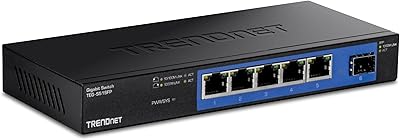
TRENDnet TEG-S51SFP 5-Port Gigabit Switch
86%
91%
Build Quality
96%
Ease of Setup
98%
Noise Level
72%
Thermal Management
74%
Port Count & Layout
More
TRENDnet TEG-S82G 8-Port Gigabit Switch
87%
94%
Ease of Setup
91%
Energy Efficiency
88%
Performance/Stability
89%
Noise Level
85%
Build Quality
More
TRENDnet TEG-S16DG 16-Port Gigabit Switch
84%
96%
Ease of Setup
91%
Build Quality
89%
Network Performance
97%
Noise Level
84%
Value for Money
More
TRENDnet TEG-S17D 16-Port Gigabit Switch
86%
91%
Build Quality
96%
Ease of Setup
88%
Network Performance
89%
Port Count & Density
74%
Thermal Management
More
TRENDnet TEG-284WS 28-Port Gigabit Web Smart Switch
85%
88%
Performance
85%
Build Quality
90%
Ease of Use
75%
Software/Firmware Experience
87%
Value for Money
More
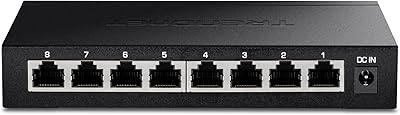
TRENDnet TEG-S380 8-Port 2.5G Unmanaged Switch
82%
96%
Ease of Setup
88%
Real-World Throughput
83%
Build Quality
67%
Thermal Management
81%
Port Count and Flexibility
More
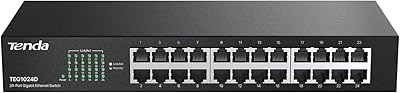
Tenda TEG1024D 24-Port Gigabit Switch
85%
91%
Setup & Installation
88%
Build Quality
85%
Performance & Speed
93%
Noise Level
87%
Durability
More
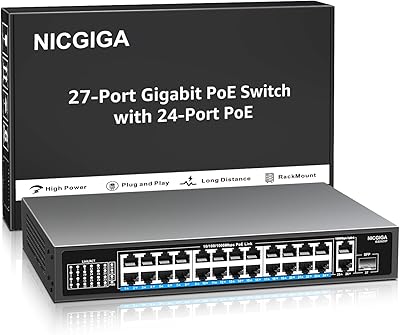
NICGIGA GS2421P 24-Port PoE+ Gigabit Switch
77%
91%
Value for Money
93%
Ease of Setup
78%
PoE Performance
84%
Build Quality
62%
Thermal Management
More
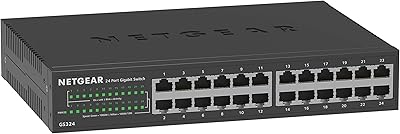
NETGEAR GS324 24-Port Gigabit Ethernet Switch
84%
97%
Ease of Setup
94%
Silent Operation
89%
Build Quality
92%
Port Performance & Stability
67%
Thermal Management
More
TRENDnet TEG-S762 6-Port 10G Network Switch
83%
88%
Value for Money
94%
Ease of Setup
83%
Port Configuration
81%
Build Quality
67%
Thermal Management
More

FAQ

No, there is nothing to configure at all. Plug your devices into the ports, connect the switch to your router or upstream network, and it starts forwarding traffic immediately. There is no management interface, no setup wizard, and no app required.

Yes, each port auto-negotiates speed independently, so a 100 Mbps device and a gigabit device can both be connected at the same time without any manual adjustment. The switch handles the speed matching automatically.

It produces zero noise because it has no fan at all. Passive cooling means the chassis absorbs and dissipates heat silently, which makes it a practical choice for offices, home environments, or any space where audible fan noise would be disruptive.

Some warmth is normal for a fanless metal switch under load, since the chassis itself acts as the heatsink. What matters is airflow around the unit — leave at least one rack unit of clearance above and below it, and avoid placing it in enclosed cabinets without ventilation.

No. Because this is an unmanaged switch, there are no VLAN, QoS, port mirroring, or any other traffic management capabilities available. If those features are on your requirements list now or in the near future, you would need a managed switch instead.

The lifetime protection applies for as long as you own the product, with no time limit. It is valid for buyers in the US and Canada. If the unit fails, TRENDnet handles replacement through their support and RMA process, though turnaround times can vary.

Yes, this gigabit switch is both TAA and NDAA compliant, which satisfies the sourcing requirements for most US federal and state government purchasing programs. That said, always verify compliance documentation with TRENDnet directly if your procurement process requires official paperwork.

Technically yes, but the unit does not include rubber feet, so it will sit flat on a surface without any grip or elevation. It works fine outside a rack in terms of function, but for long-term desktop use you may want to add adhesive feet to keep it stable and allow a little airflow underneath.

The MAC address table holds up to 8,000 entries, which is far more than a typical small office or home lab will ever saturate. Unless you are running a very large number of devices or sub-networks feeding into this switch, the table size will never be a limiting factor.

It is actually one of the more practical options for exactly that use case. The 48 Gbps switching fabric handles simultaneous high-bandwidth storage traffic without bottlenecking, jumbo frame support up to 10 KB covers most NAS configurations, and the fanless operation keeps the environment quiet. Just keep in mind that if you ever need link aggregation or network segmentation, you would need to step up to a managed switch.

Where to Buy