Overview

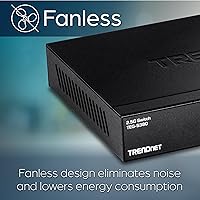
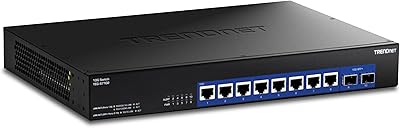
The TRENDnet TEG-S380 8-Port 2.5G Unmanaged Switch sits squarely in the sweet spot for home users and small offices that have hit the ceiling on standard gigabit networking. Plug it in, connect your devices, and you are done — no software to install, no configuration menu to navigate. It runs completely silent, thanks to a fanless design that makes it a natural fit for a desk or living room shelf. The metal chassis feels solid without adding unnecessary weight, and the compact footprint keeps things tidy. Backing it all up is a lifetime warranty, which is genuinely reassuring at this price point.

Features & Benefits

Each of the eight ports on this 2.5G switch handles speeds of 100Mbps, 1Gbps, or 2.5Gbps, so older devices connect without any fuss while newer hardware gets the full bandwidth boost. With a 40Gbps switching capacity, all eight ports can push heavy traffic simultaneously without anyone waiting in line — useful when multiple people are transferring large files or streaming 4K locally. Jumbo frame support up to 12KB helps NAS users and video editors move data faster across the local network, and the 16K MAC address table means the switch handles a surprisingly large number of connected devices without slowing down.

Best For

This multi-gig switch makes the most sense for home lab builders who want to future-proof their network without overcomplicating it. If you run a NAS, do high-resolution video editing, or regularly move large files between machines, the jump from 1Gbps to 2.5Gbps is genuinely noticeable. Worth being upfront about: because it is unmanaged, you cannot configure VLANs, traffic prioritization, or port mirroring — if you need that level of control, a managed switch is the right call. For buyers who require NDAA and TAA compliance, such as government agencies or contractors, this box ticks those requirements without a steep price premium.

User Feedback

With nearly 2,800 ratings and a 4.6-star average, buyer sentiment around the TRENDnet 8-port switch leans strongly positive. The most recurring praise centers on effortless setup and a clear, real-world speed improvement over previous gigabit hardware, with NAS users frequently calling out faster transfer times. On the critical side, some buyers report the chassis gets noticeably warm under sustained heavy load — not dangerous, but worth ensuring there is decent airflow around the unit. A handful of reviewers also flag that the LED link indicators do not differentiate between 1Gbps and 2.5Gbps connections, which is a minor but fair complaint. Warranty support feedback is largely favorable.

Pros

  • Plug-and-play setup requires zero configuration — ideal for non-technical users who just want it to work.
  • Real-world file transfer speeds over a NAS are noticeably faster compared to a standard gigabit switch.
  • Completely silent fanless operation makes it comfortable to place in living rooms or quiet home offices.
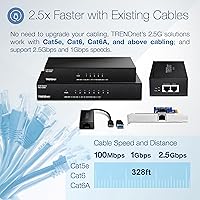
  • Works over existing Cat5e cabling, so most buyers avoid the cost and hassle of rewiring entirely.
  • Metal chassis feels durable and well-built for a switch in this price range.
  • Backward compatible with 1Gbps and 100Mbps devices, so nothing in your existing setup becomes obsolete.
  • 40Gbps switching capacity means all eight ports can handle heavy simultaneous traffic without slowing each other down.
  • Lifetime manufacturer warranty provides long-term peace of mind that is rare at this price point.
  • NDAA and TAA compliance makes this multi-gig switch a viable choice for government and education procurement.
  • Compact footprint fits easily on a desk or shelf without dominating the space.

Cons

  • No management interface means VLANs, QoS, and traffic control are completely off the table, permanently.
  • LED indicators do not show whether a port is connected at 1Gbps or 2.5Gbps, leaving users guessing.
  • The chassis runs noticeably warm under sustained heavy load — avoid enclosed or poorly ventilated spaces.
  • Older or longer Cat5e runs may fall back to 1Gbps rather than reliably hitting the full 2.5Gbps speed.
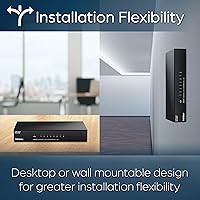
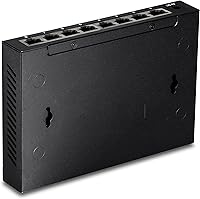
  • No rack-mount or wall-mount hardware is included, making clean permanent installation more difficult.
  • Eight ports fills up quickly in growing home labs or small offices with more than a handful of wired devices.
  • Lifetime warranty coverage is limited to the US and Canada, excluding international buyers entirely.
  • No 10G uplink port means this switch cannot serve as a high-speed backbone in a tiered network setup.

Ratings

The TRENDnet TEG-S380 8-Port 2.5G Unmanaged Switch earns a strong collective score after our AI system processed thousands of verified global buyer reviews, actively filtering out incentivized, duplicate, and bot-generated submissions. The scores below reflect both where this multi-gig switch genuinely excels and where real users have run into friction. Nothing is glossed over — the pain points carry just as much weight as the praise.
Ease of Setup
96%
Buyers across all experience levels consistently report the same story: unbox it, plug in cables, and the network just works. There is no app to download, no web interface to configure, and no driver installation — a genuine relief for home users who want upgraded speeds without a learning curve.
The flip side of zero configuration is zero control. Users who later discovered they needed VLAN segmentation or port-based traffic rules had to replace the unit entirely, since there is simply no management interface to unlock those features down the road.
Real-World Throughput
88%
A strong majority of NAS users and home lab builders report measurable speed gains over their previous gigabit switches, with file transfers that used to take minutes finishing noticeably faster. Those running Cat6 cabling in particular tend to hit close to the full 2.5Gbps ceiling consistently.
Results vary more than the spec sheet implies when Cat5e cabling runs are long or older. Some buyers on longer cable runs report connections dropping back to 1Gbps, which suggests the 2.5G link is more sensitive to cabling quality and distance than a standard gigabit connection.
Build Quality
83%
The all-metal enclosure gives this 2.5G switch a reassuringly solid feel for a device in its price range — it does not flex, rattle, or feel hollow. At under two pounds, it is easy to tuck behind a monitor or mount on a shelf without any concern about it feeling cheap over time.
The chassis has no mounting holes or bracket options out of the box, which limits clean rack or wall installation for buyers trying to keep a tidy setup. A few users also noted that the port labeling is small and difficult to read in low-light conditions.
Thermal Management
67%
33%
Fanless cooling is the right call for a home or office environment — silent operation is something buyers regularly call out as a genuine quality-of-life improvement, especially for those who previously dealt with the persistent hum of fan-cooled switches.
Under sustained heavy load, the metal chassis gets noticeably warm to the touch. While no buyers have reported failures directly attributed to heat, several flag that airflow around the unit matters more than you might expect, and tucking it in an enclosed cabinet is not advisable.
Port Count and Flexibility
81%
19%
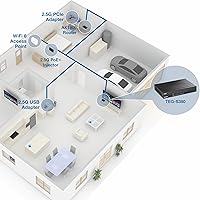
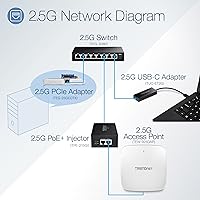
Eight ports strikes a practical balance for most home networks and small offices, offering enough connections for a NAS, a desktop, a gaming console, a Wi-Fi access point, and a few more devices without daisy-chaining. Backward compatibility with 1Gbps and 100Mbps devices means nothing has to be replaced to make it work.
For growing home labs or small offices with more than eight wired devices, eight ports fills up faster than expected. There is no uplink port or 10G option on this model, so users who want a multi-speed hierarchy in their network will need additional hardware.
Link Speed Indicators
54%
46%
LED indicators on each port give a quick visual confirmation that a device is connected and active, which is genuinely helpful during initial setup when verifying that all cable runs are live.
The LEDs do not distinguish between a 1Gbps and a 2.5Gbps connection, which means buyers have no easy way to confirm at a glance whether a device is actually negotiating the faster speed. This is a recurring frustration among more technical users who want that quick feedback without digging into a connected device's network settings.
Value for Money
86%
Compared to competing 8-port 2.5G switches, the pricing lands in a range that most buyers consider fair for the port count, metal build, and lifetime warranty combination. Home lab users especially appreciate not having to pay a premium for a managed feature set they do not need.
A handful of buyers feel the price nudges into territory where a basic managed 2.5G switch becomes a viable alternative, particularly for those who might eventually want VLAN support. If management features are even a remote future possibility, the value calculation shifts.
Noise Level
97%
Completely silent operation is not an exaggeration here — there are no fans, no coil whine reports, and no audible noise under any load condition buyers have described. This makes it one of the easiest switches to live with in a shared space or bedroom home office setup.
There is essentially nothing negative to say about noise, which is exactly the point of a fanless design. The only indirect downside is that the passive cooling approach is what contributes to the warmth under load noted by some users.
Switching Capacity
84%
With 40Gbps of total switching capacity across eight 2.5G ports, the internal backplane is not the bottleneck — all ports can run at full tilt simultaneously. Users running multiple simultaneous large file transfers between NAS and workstations report consistent throughput across sessions.
Most home users will never stress the switching capacity enough to notice a limitation, but buyers coming from a managed switch background may find the lack of QoS or traffic shaping means bandwidth-hungry devices can crowd out others during peak usage.
Compatibility with Existing Cabling
79%
21%
One of the more practical selling points is that Cat5e cabling — already present in a large percentage of homes and small offices — is sufficient for 2.5Gbps over reasonable distances. Many buyers upgraded their switch without touching a single cable, which keeps total cost of ownership low.
The 2.5G standard is more demanding on cabling than standard gigabit, and buyers with older or marginal Cat5e runs sometimes find their connections fall back to 1Gbps. It is not a dealbreaker, but it is worth testing cable quality before assuming every port will hit top speed.
MAC Address Table
78%
22%
The 16K entry MAC address table is well above what most home networks or small offices will ever need, meaning the switch handles environments with dozens of active devices without any degradation in forwarding performance.
For the target audience, this is essentially a non-issue, and the large table size rarely comes up in buyer feedback. However, buyers evaluating this for small business use should note that the absence of management tools limits how effectively a large connected device pool can be organized or segmented.
NDAA and TAA Compliance
89%
For government buyers, contractors, or education institutions where procurement rules require NDAA and TAA compliant hardware, this switch checks the boxes without forcing a move to a much more expensive managed tier. Several buyers in these sectors specifically highlight compliance as the deciding factor.
Compliance certification is highly relevant for a narrow buyer segment and largely irrelevant for everyone else. It does not add any functional networking capability, so general consumers should not weigh it heavily in their purchase decision.
Warranty and Long-Term Support
85%
A lifetime manufacturer warranty for a networking device at this price is genuinely uncommon, and buyers who have had to claim it report a reasonably smooth experience with TRENDnet's US-based support team. It adds a layer of confidence that is hard to put a precise number on.
The lifetime warranty applies only to US and Canadian buyers, which excludes a portion of the global customer base. A small number of reviews also mention that reaching support during peak periods requires some patience, though resolution quality is generally rated positively.
Form Factor and Placement
82%
18%
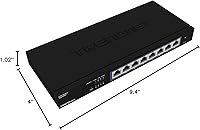
At roughly 9.4 inches long and just over an inch tall, the TRENDnet 8-port switch fits naturally on a desk, shelf, or media cabinet without dominating the space. The low profile is a practical advantage for buyers who want networking hardware that does not draw attention.
No rubber feet replacement options are included, and a few buyers report the original pads loosening over time on smooth surfaces. The lack of any rack-mount or wall-mount hardware in the box is a mild annoyance for buyers who want a cleaner permanent installation.

Suitable for:

The TRENDnet TEG-S380 8-Port 2.5G Unmanaged Switch is a strong fit for anyone who has hit the ceiling on standard gigabit networking and wants a meaningful speed upgrade without touching their existing Cat5e or Cat6 cabling. Home lab enthusiasts who run a NAS alongside multiple workstations will notice the difference immediately — large file transfers that used to drag out over minutes complete substantially faster. Gamers and 4K local media streamers benefit from the extra headroom, particularly in households where several bandwidth-hungry devices compete on the same wired network. Small office users who need a quiet, always-on switch that requires zero ongoing attention will appreciate the fanless, plug-and-play nature of the device. Government agencies, contractors, and education institutions with strict procurement requirements will also find the NDAA and TAA compliance genuinely useful, since compliant 8-port 2.5G options at this price tier are not especially common. The lifetime warranty adds a layer of long-term confidence that most competing switches at this price simply do not offer.

Not suitable for:

The TRENDnet TEG-S380 8-Port 2.5G Unmanaged Switch is the wrong tool for anyone who needs even basic network management capabilities. If VLANs, port mirroring, traffic prioritization, QoS policies, or link aggregation are on your requirements list — now or in the foreseeable future — an unmanaged switch will leave you completely stuck, and you will end up replacing it rather than upgrading it. Power users managing mixed network segments, separating IoT devices from work machines, or setting up guest networks will find the lack of any management interface a hard dealbreaker. Buyers with longer or older Cat5e cable runs may also find that not every port reliably negotiates a 2.5Gbps connection, which undermines the core value proposition. Those outside the US and Canada should note that the lifetime warranty does not apply to their region, which changes the long-term value calculation. Finally, anyone needing more than eight wired ports, or who wants a 10G uplink to a core switch, will need to look at a different model entirely.
Specifications

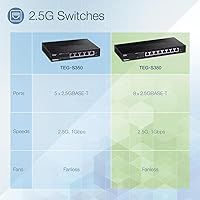
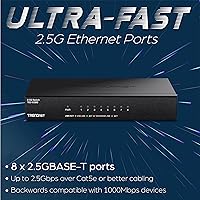
  • Port Count: The switch provides 8 x 2.5GBASE-T RJ-45 ports, each capable of operating at 100Mbps, 1Gbps, or 2.5Gbps depending on the connected device.
  • Switching Capacity: Total internal switching capacity is 40Gbps, meaning all eight ports can simultaneously carry full-bandwidth traffic without creating a backplane bottleneck.
  • MAC Address Table: The switch maintains a 16K entry MAC address table, supporting large numbers of networked devices without degrading packet forwarding performance.
  • Jumbo Frames: Jumbo frame support extends up to 12KB, which improves throughput efficiency for NAS transfers, virtualization traffic, and high-bitrate media workflows.
  • Management: The switch is fully unmanaged and requires no configuration, offering a true plug-and-play experience with no web interface, app, or software required.
  • Cooling System: Passive fanless cooling is used throughout, producing zero operating noise under all normal load conditions.
  • Dimensions: The unit measures 9.4″ long by 4″ wide by 1.02″ tall, making it compact enough for desk, shelf, or media cabinet placement.
  • Weight: The switch weighs 1.72 pounds, light enough for flexible placement without requiring dedicated support hardware.
  • Case Material: The enclosure is constructed from metal, providing structural rigidity and passive heat dissipation without adding excessive bulk.
  • Power Supply: A 12V DC, 1A power adapter is included in the box, so no additional power hardware is required at purchase.
  • Operating Temperature: The switch is rated for operating environments between 32°F and 104°F (0°C to 40°C), suitable for standard indoor deployment.
  • Compatible Cabling: The switch achieves 2.5Gbps speeds over Cat5e or better cabling, allowing most users to upgrade without replacing their existing in-wall wiring.
  • Compliance: The switch carries both NDAA and TAA certification, meeting federal procurement requirements for government, defense-adjacent, and education deployments in the US.
  • Warranty: TRENDnet provides lifetime manufacturer protection for US and Canadian buyers, covering defects in materials and workmanship for the life of the product.
  • LED Indicators: Each port includes an activity LED indicator that shows connection status and link activity, though it does not differentiate between 1Gbps and 2.5Gbps link speeds.
  • Backward Compatibility: All eight ports are fully backward compatible with 100Mbps and 1Gbps devices, so existing network equipment does not need to be replaced when adding this switch.
  • Voltage Input: The switch operates on 12V DC input as supplied by the included adapter, and is not compatible with PoE power sourcing.
  • PoE Support: This switch does not provide Power over Ethernet output on any port and cannot be used to power IP cameras, access points, or VoIP phones directly.

Related Reviews

TRENDnet TEG-S350 5-Port 2.5G Network Switch
78%
88%
Value for Money
91%
Network Performance
94%
Ease of Setup
86%
Build Quality
97%
Noise Level
More
BrosTrend 8-Port 2.5G Unmanaged Switch
83%
93%
Port Speed Consistency
96%
Ease of Setup
61%
Build Quality
74%
Thermal Performance
91%
Value for Money
More
VIMIN 18-Port 2.5G Unmanaged Switch
87%
86%
Performance
92%
Ease of Setup
88%
Build Quality
94%
Fanless Design
85%
Compatibility with Devices
More
TRENDnet TEG-S82G 8-Port Gigabit Switch
87%
94%
Ease of Setup
91%
Energy Efficiency
88%
Performance/Stability
89%
Noise Level
85%
Build Quality
More
Goalake 8-Port 2.5G Ethernet Switch
80%
91%
Port Count & Configuration
88%
Throughput & Switching Performance
93%
Ease of Setup
79%
Build Quality & Materials
96%
Fanless & Noise Level
More
VIMIN 6-Port 2.5G Unmanaged Network Switch
83%
88%
Throughput Performance
84%
Build Quality
93%
Setup & Ease of Use
67%
SFP+ Port Usability
96%
Fanless Noise Level
More
Tenda TEM2010F 8-Port 2.5G Ethernet Switch
77%
96%
Ease of Setup
91%
Network Performance
94%
Noise Level
82%
Build Quality
67%
Thermal Management
More
TRENDnet TEG-S16DG 16-Port Gigabit Switch
84%
96%
Ease of Setup
91%
Build Quality
89%
Network Performance
97%
Noise Level
84%
Value for Money
More
TRENDnet TEG-S7102 10-Port 10G Unmanaged Switch

83%
96%
Ease of Setup
88%
Port Density & Layout
91%
Throughput & Performance
84%
Build Quality
71%
Fan Noise & Thermals
More
Zyxel XMG1915-10EP 8-Port 2.5G PoE Switch
81%
78%
PoE Performance
84%
Cloud Management
86%
Setup & Onboarding
81%
Build Quality
89%
2.5G Port Speed
More

FAQ

No, and that is genuinely one of its strongest practical advantages. You plug in the power adapter, connect your devices with Ethernet cables, and the switch handles everything automatically. There is no app, no browser setup page, and no driver to install.

Cat5e is sufficient for 2.5Gbps speeds over typical home cable run distances, so most buyers do not need to touch their existing wiring at all. That said, if your Cat5e runs are very long or the cables are older and marginal in quality, some ports may fall back to 1Gbps instead of reaching the full 2.5Gbps. Running a quick cable test before committing to the upgrade is a good idea if you are unsure about your infrastructure.

Unfortunately, no. Because this is an unmanaged switch, there is no configuration interface of any kind, which means VLAN segmentation, port isolation, and traffic policies are not available. If network segmentation is a requirement for you, you will need a managed switch instead.

It is genuinely silent — there are no fans at all, so there is nothing to produce noise regardless of how hard the switch is working. The trade-off is that the metal case gets warm under sustained heavy traffic, so you should make sure there is reasonable airflow around it rather than placing it in a sealed cabinet.

That is a known limitation of this switch — the port LEDs do not distinguish between link speeds, so you cannot tell at a glance just by looking at the front panel. The most reliable way to confirm your connection speed is to check the network adapter settings on the connected device itself, which will show the negotiated link speed.

Yes, provided your NAS network card and the cable connecting it support 2.5Gbps. Many modern NAS units ship with 2.5G ports, and if yours does, moving large files to and from it will be meaningfully faster compared to a standard gigabit connection. The real-world improvement is most obvious when transferring large video files or doing backups.

Warm, yes — dangerously hot, no. Under heavy sustained load the metal chassis gets noticeably warm to the touch, which is normal for a passively cooled device. As long as you give it a few inches of clearance on the sides and top, thermal-related failures are not something most users report as a real concern.

Unfortunately, TRENDnet's lifetime protection is only available to buyers in the United States and Canada. If you are purchasing from outside those regions, the standard warranty terms apply instead, which is worth factoring into your decision if long-term coverage matters to you.

Yes, you can daisy-chain it to another switch or connect it directly to your router's LAN port as a simple expansion. Keep in mind that all traffic between the two switches will travel over whichever port and cable you use to connect them, so ideally use your fastest available port and a quality cable for that uplink connection.

For a typical home network or small home office, eight ports covers most setups comfortably — think a NAS, a desktop, a gaming console, a smart TV, a Wi-Fi access point, and a couple of spare ports. If you already have more than six or seven wired devices and expect to add more, it is worth looking at a 12- or 16-port option rather than running out of ports quickly.