TourBox NEO Creative Editing Controller


Overview
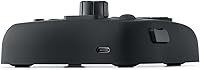
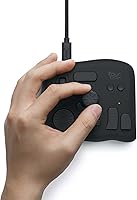
The TourBox NEO Creative Editing Controller is a wired USB input device built specifically for digital artists, photographers, and video editors who want faster, more tactile control over their creative software. Plug it in and it works — no batteries, no Bluetooth pairing headaches, no dropped connections mid-session. Priced in the mid-range, this editing controller targets working creatives who are serious enough about their craft to invest in dedicated hardware but aren't necessarily shopping at the professional-broadcast end of the market. It runs on Mac and Windows, though Linux users and anyone hoping to pair it with an iPad or Android tablet will need to look elsewhere. Think of it as a focused productivity tool, not an accessory you pick up on impulse.
Features & Benefits
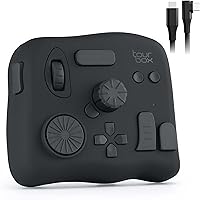
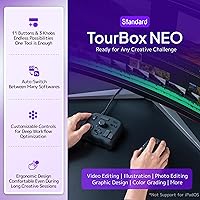
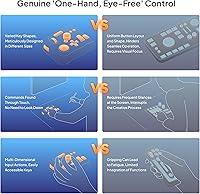
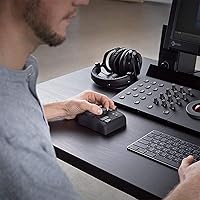
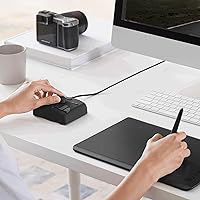
At the heart of this creative input device is a physical layout that makes real sense once your hand settles on it: a large dial for scrolling and image selection, dual tactile knobs that handle brush size, opacity, or color parameters depending on your preset, plus a scroll wheel and an array of programmable buttons — all reachable without shifting your grip. In Lightroom, one knob can manage exposure while another handles highlights. In Clip Studio Paint, those same knobs switch instantly to brush hardness and canvas rotation. With over 150 mappable actions per preset and full macro support, the customization depth is substantial. The compact build — just under 6.7 by 5.5 inches — keeps it from crowding a tablet-heavy desk.
Best For
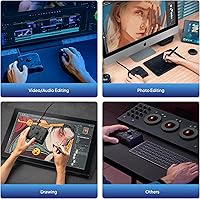
This editing controller earns its place on a desk when the person using it is willing to invest real setup time. Digital illustrators who constantly adjust brush parameters in Photoshop or Clip Studio Paint will find the knob-and-dial layout genuinely reduces hand travel across the keyboard. Photographers culling and grading in Lightroom or Capture One get one-handed workflow control that makes working through hundreds of images feel less grinding. Video colorists in DaVinci Resolve will appreciate the tactile precision for fine adjustments. Casual users or beginners who haven't yet built strong software habits may find the initial mapping process more frustrating than rewarding. Linux users and tablet-only creatives are simply not supported — a firm limitation worth knowing before purchasing.
User Feedback
With a 4.5-star average across nearly 900 ratings, the TourBox NEO has earned real credibility among working creatives. The most consistent praise centers on build quality — the knobs and buttons feel substantial, not plasticky — and on the practical payoff once a custom preset is dialed in. Photographers repeatedly single out the dial for image browsing as one of those small changes that noticeably speeds up a culling session. On the flip side, the TourBox Console software gets mixed marks; new users often describe it as unintuitive, and a handful of reviewers report occasional glitches following major OS updates. TourBox has pushed improvements over time, but setup patience is genuinely required — treat it as an investment, not an instant fix.
Pros
- Wired USB-C connection means zero latency, no pairing issues, and no batteries to manage.
- Solid, satisfying build quality — the knobs and buttons feel premium for the price tier.
- Over 150 mappable actions per preset gives serious depth for power users.
- Works natively with a wide range of creative apps including Lightroom, DaVinci Resolve, and Clip Studio Paint.
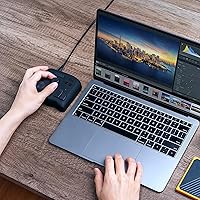
- Compact enough to sit comfortably next to a drawing tablet without crowding the desk.
- The dial is a genuine time-saver for culling images in Lightroom — photographers consistently call it out.
- Macro support lets you chain multi-step commands to a single button press.
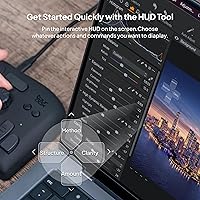
- On-device screen menu allows quick parameter switching without breaking focus.
- Strong community of users sharing preset configurations, which lowers the learning curve over time.
- 4.5-star average across nearly 900 ratings reflects durable satisfaction, not just initial excitement.
Cons
- Initial setup is time-intensive — building useful presets takes hours, not minutes.
- The TourBox Console software can feel unintuitive, especially for first-time users.
- Occasional software glitches reported after major macOS or Windows updates.
- No wireless option — committed desk users are fine, but mobility is off the table entirely.
- Not compatible with Linux or any mobile/tablet operating system, limiting its audience significantly.
- Buyers who don't already have established software workflows may struggle to get value quickly.
- The companion app is a required dependency — if it misbehaves, the hardware becomes largely unusable.
- No tactile labeling on buttons makes muscle memory essential, which takes time to build.
Ratings
The scores below for the TourBox NEO Creative Editing Controller were generated by AI after analyzing verified purchase reviews from buyers worldwide, with spam, bot activity, and incentivized feedback actively filtered out. Ratings reflect the full picture — where this creative input device genuinely delivers and where real users have run into friction — so you can make a confident, informed decision before buying.
Build Quality
Customization Depth
Software Experience
Workflow Impact
Ease of Setup
Hardware Layout
Compatibility
Value for Money
Tactile Feel
Stability & Reliability
Learning Curve
Physical Footprint
App Auto-Switching
Suitable for:
The TourBox NEO Creative Editing Controller is built for creatives who spend hours daily inside editing software and are ready to rethink how they interact with it. Digital illustrators working in Photoshop or Clip Studio Paint will get the most immediate value — constantly adjusting brush size, opacity, and canvas rotation through knobs rather than keyboard shortcuts genuinely reduces fatigue over a long session. Photo retouchers and colorists who work through large batches in Lightroom or Capture One will find the dial-based image browsing and one-handed parameter control a practical time-saver. Video editors doing color grading in DaVinci Resolve or Premiere Pro benefit from the tactile precision of the knobs when making fine adjustments to curves and wheels. The ideal buyer here is an intermediate-to-advanced creative on Mac or Windows who is willing to invest a few hours upfront configuring their presets and is looking for a wired, stable connection they can rely on in a professional setting.
Not suitable for:
The TourBox NEO Creative Editing Controller is not a plug-in-and-go shortcut for beginners who haven't yet developed strong software workflows — without a clear sense of which shortcuts you want to offload, the setup process will feel more like homework than a payoff. Linux users are flatly unsupported, as are anyone working exclusively on iPads or Android tablets, so those buyers should stop here. If you're a casual hobbyist who edits a few photos on weekends, the time required to build and refine custom presets is unlikely to feel worth it at this price point. People who dislike companion software dependency should also take note — the TourBox Console app sits in the middle of the whole experience, and if it frustrates you or behaves oddly after an OS update, you'll feel stuck. Finally, anyone expecting a significant hardware upgrade over the entry-level model in terms of wireless freedom will be disappointed; this is a strictly wired device by design.
Specifications
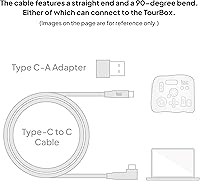
- Connectivity: Connects via wired USB-C, providing a stable, zero-latency link to your computer without any wireless pairing required.
- Compatible OS: Fully supported on macOS and Windows only; Linux, iPadOS, and Android are not compatible.
- Dimensions: The unit measures 6.69 x 5.51 x 1.57 inches, keeping it compact enough to fit beside most graphics tablets.
- Weight: Weighs 13.1 oz (approximately 371g), giving it a solid, grounded feel on the desk without being heavy.
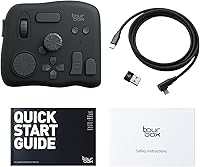
- Controls Layout: Includes a large dial, dual rotary knobs, a scroll wheel, and multiple programmable tactile buttons, all accessible with one hand.
- Customization Depth: Supports over 150 mappable actions per preset, with full macro support for chaining multi-step commands to a single input.
- Screen Menu: Features an on-device UI menu that lets you switch parameter contexts without touching your keyboard or moving the cursor.
- Macro Support: Native macro integration allows complex multi-action sequences to be assigned directly to any button or knob.
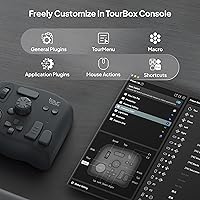
- Companion Software: Managed through TourBox Console, a free desktop application available for both macOS and Windows.
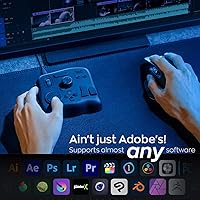
- Supported Apps: Compatible with Photoshop, Lightroom, Capture One, Premiere Pro, Final Cut Pro, DaVinci Resolve, Clip Studio Paint, Blender, AutoCAD, and additional creative applications.
- Presets: Multiple presets can be created and saved, allowing the controller to behave differently depending on which application is active.
- Manufacturer: Designed and produced by TourBox Tech Inc., a company focused exclusively on creative input hardware.
- Release Date: First made available in September 2020, with firmware and software updates issued since launch.
- Amazon Ranking: Holds a Best Sellers Rank of #139 in the Computer Keyboards category on Amazon at time of review.
- User Rating: Carries a 4.5 out of 5 star average rating based on nearly 900 verified customer ratings on Amazon.
- Cable Type: Uses a USB-C connection on the device side, making it compatible with modern laptops and desktops using a standard cable.
- Power Source: Bus-powered entirely through the USB connection — no external power supply, batteries, or charging is needed.
- Model Name: Officially designated as the TourBox NEO, positioned as the standard wired entry point in the TourBox product lineup.
Related Reviews
TourBox Lite Creative Controller Keypad
TourBox Elite Video Editing Controller
AC Infinity Controller 2 Fan Speed Controller
TourBox Elite Plus Bluetooth Creative Controller
Razer Stream Controller Streaming Keypad
Logitech MX Creative Console Customizable Keypad
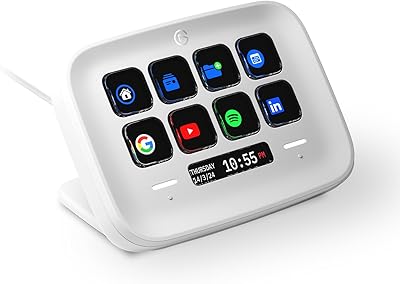
Elgato Stream Deck Neo Macro Keypad
Elgato Key Light Neo LED Panel Light
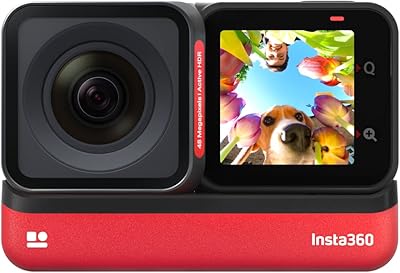
Insta360 ONE RS 4K Edition Action Camera