

Overview

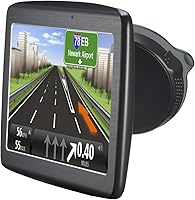
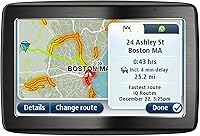
The TomTom VIA 1535TM 5-Inch GPS Navigator is a mid-range dedicated navigation device built for drivers who would rather not depend on a smartphone to get from A to B. The 5-inch touchscreen hits a practical sweet spot — large enough to read at a glance without dominating the dashboard. What sets this TomTom navigator apart from older GPS units is the one-time purchase model: pay once and lifetime map and traffic updates come included. That is a meaningful value proposition for anyone tired of monthly fees. It launched in 2011, so the interface shows its age, but the core navigation experience holds up well for everyday driving.

Features & Benefits

This dedicated GPS unit packs in a handful of genuinely useful features. Bluetooth hands-free calling means you can answer a call without fumbling with your phone or taking your eyes off the road. The one-shot voice recognition is particularly handy — speak a full address in one go and the device processes it without asking you to break it into street, city, and state separately. It works reliably under normal conditions, though heavy accents or noisy cabins can occasionally trip it up. Lifetime traffic updates arrive without ad interruptions, and the maps span the US, Canada, and Mexico. The Fold-and-Go EasyPort mount snaps in and out cleanly, and spoken stereo turn-by-turn directions keep your attention where it belongs.

Best For

This TomTom navigator is a natural fit for long-distance drivers, especially those who regularly cross into Canada or Mexico — the tri-country map coverage makes it genuinely useful without extra purchases. Drivers in rural or low-coverage areas will appreciate that this dedicated GPS unit does not depend on a cell signal to function; it works offline by default. Older drivers or anyone who finds smartphone navigation unnecessarily fiddly tend to respond well to its straightforward layout. Having Bluetooth built directly into your nav device also simplifies in-car setup for hands-free calling. Anyone hoping to avoid ongoing subscription costs will find the lifetime update model a compelling enough reason to give it serious consideration.

User Feedback

Across nearly 1,900 ratings, the VIA 1535TM holds a 3.9 out of 5 — a score that reflects solid satisfaction alongside some fair reservations. Buyers consistently praise map accuracy and the ease of mounting and removing the device, with many noting that voice recognition holds up well in everyday use. Where feedback turns more critical is around the interface, which feels noticeably dated next to a modern smartphone. The 3-hour battery life draws complaints from drivers who occasionally run it without a car charger. Traffic rerouting earns strong marks in urban areas but feels less responsive in rural settings. Long-term owners generally report dependable operation, though a subset has noted friction with software update delivery.

Pros

  • Lifetime map and traffic updates are included at no extra cost, removing any subscription burden.
  • Offline navigation works reliably without needing a cellular signal.
  • Tri-country map coverage spans the US, Canada, and Mexico right out of the box.
  • Bluetooth hands-free calling reduces the need for a separate in-car speakerphone.
  • One-shot voice address entry keeps eyes on the road during destination input.
  • The Fold-and-Go EasyPort mount installs and detaches quickly without tools.
  • Traffic rerouting performs well in urban areas and avoids ad interruptions.
  • The 5-inch screen is easy to read at a glance without crowding the dashboard.
  • Straightforward interface makes it accessible for drivers who dislike smartphone navigation.
  • Stereo spoken directions are clear and reduce the need to look at the screen while driving.

Cons

  • The interface design feels visibly dated compared to modern smartphone navigation apps.
  • Battery life of roughly three hours limits unplugged use away from the car.
  • Traffic rerouting is noticeably less effective in rural and suburban areas.
  • Voice recognition can struggle with heavy accents or noisy driving environments.
  • Points of Interest data is less comprehensive and frequently updated than app-based competitors.
  • The software update process has frustrated some long-term owners with inconsistent delivery.
  • No real-time crowd-sourced incident reporting, unlike Waze or Google Maps.
  • The device adds dashboard clutter for drivers whose vehicles already have built-in navigation.
  • Map update file sizes can be large, requiring a computer and a reliable connection to apply.
  • Overall hardware feels bulkier than newer GPS models released in recent years.

Ratings

Our AI-generated scores for the TomTom VIA 1535TM 5-Inch GPS Navigator are built by analyzing thousands of verified global user reviews, with spam, bot submissions, and incentivized feedback actively filtered out before any scoring is applied. The results reflect a balanced picture — genuine strengths land where they deserve credit, and real pain points are scored without sugarcoating. If buyers consistently ran into a frustration, it shows up here.

Navigation Accuracy
83%
Drivers consistently report that turn-by-turn routing is dependable across highways, city streets, and cross-border trips into Canada and Mexico. Long-haul road-trippers in particular find the directions precise and rarely misleading, even on less-traveled routes.
Some users note that the maps occasionally lag behind real-world road changes, especially in fast-developing suburban areas. A handful of reviewers have flagged outdated points of interest that no longer exist at listed addresses.
Map & Traffic Updates
78%
22%
The lifetime update model earns genuine appreciation from buyers who have owned the device for several years without spending another cent on map refreshes. No subscription, no ads interrupting traffic rerouting — that combination is hard to argue with for budget-conscious drivers.
The update process itself draws consistent frustration: files are large, the MyDrive Connect desktop software can be finicky, and some long-term owners report that updates occasionally fail mid-download without a clear explanation. It is not a smooth over-the-air experience.
Voice Recognition
71%
29%
The one-shot address entry works better than many users expect, handling typical American English addresses in a single spoken command without requiring the driver to break the input into separate fields. For everyday suburban and highway commutes, it reduces distraction meaningfully.
Accuracy drops noticeably with heavier accents, unusual street names, or background road noise at higher speeds. Several reviewers mention needing to repeat addresses or switch to manual entry, which partially defeats the hands-free benefit in noisy driving conditions.
Ease of Use
76%
24%
Drivers who switched from smartphone navigation specifically appreciate how focused this dedicated GPS unit is — there are no app updates, notification pop-ups, or account logins interrupting the experience. Older users frequently highlight how straightforward the menus feel once the device is set up.
The interface is visibly dated by modern touchscreen standards, with slower response times and a visual design that feels more 2011 than present day. Users accustomed to Google Maps or Apple Maps will find the interaction noticeably less fluid.
Bluetooth Calling
69%
31%
Pairing with a smartphone is straightforward, and the hands-free calling feature genuinely keeps drivers from reaching for their phone during a commute or long drive. Buyers who prioritize distraction-free driving find the built-in microphone and speaker adequate for typical call quality.
Call audio quality gets mixed reviews — it works well enough in quiet cabin conditions but becomes strained on the highway with wind and road noise. A few users report occasional Bluetooth dropouts that require re-pairing the device after it has been powered off and on.
Battery Life
44%
56%
For drivers who always run the device plugged into the car charger, the battery rarely comes up as an issue — it keeps the unit running through any trip length without interruption when connected to power.
The roughly 3-hour unplugged runtime is a genuine weakness that multiple reviewers call out directly. Anyone hoping to use the VIA 1535TM as a portable walking or transit device, or who forgets their car charger, will find the battery drains faster than expected and recovery charge time is slow.
Mount & Installation
86%
The Fold-and-Go EasyPort mount is one of the most consistently praised aspects of the device, with users noting how effortlessly it snaps onto a windshield and how cleanly the GPS clicks in and out of the cradle with a single hand. Moving it between vehicles takes seconds.
A small number of users report that the suction cup loses grip in extreme heat or on textured dashboard surfaces, requiring occasional repositioning. The mount arm also offers limited angle adjustment, which can be a problem in vehicles with steeply raked windshields.
Screen & Display
74%
26%
The 5-inch screen hits a practical size for dashboard use — large enough to read lane guidance and street names at highway speeds without requiring a squint. Most daytime driving conditions are handled without complaints about brightness or contrast.
Glare in direct afternoon sunlight is a recurring complaint, and the screen brightness ceiling feels modest compared to modern device displays. A few users also note that small text in the menus can be hard to read for drivers with even mild vision impairments.
Traffic Rerouting
67%
33%
In urban areas with dense road networks, users report that live traffic rerouting noticeably helps avoid congestion during rush hour. The absence of advertising interruptions during rerouting prompts is a detail that drivers genuinely appreciate after years with ad-heavy free apps.
Performance drops considerably in rural and suburban corridors where road network density is low and meaningful alternative routes are scarce. Some reviewers also note a lag between a reported incident and the device actually suggesting a detour, reducing its usefulness in fast-moving traffic situations.
Build Quality
72%
28%
Long-term owners frequently report that the device holds up well after several years of daily car use, with few reports of cracked screens or button failures for those who keep it plugged in and mounted properly. The overall construction feels solid for its class.
The plastic casing shows scuffs and wear over time, and the device does not feel particularly premium in hand compared to more recent GPS hardware. A subset of users have reported screen responsiveness degrading after extended use, particularly in hot climates.
Value for Money
79%
21%
For drivers who specifically want offline navigation with no recurring costs, the lifetime maps and traffic bundle represents solid long-term value — buyers who have used it for three or more years consistently describe the original purchase as money well spent.
Judged purely against what free smartphone apps now offer, the upfront cost is harder to justify for casual drivers who already carry a capable phone. The value calculation really depends on your use case, and for urban commuters with reliable cell service, the math does not always favor a dedicated device.
Software & Firmware
58%
42%
Core navigation software is stable for day-to-day use, and most drivers who keep the device updated report that routing logic and interface performance remain consistent over time without major crashes or freezes during normal operation.
The update delivery experience through MyDrive Connect is one of the most criticized aspects among long-term owners, with reports of failed installations, version compatibility errors, and limited customer support when something goes wrong. The software infrastructure feels like it has not kept pace with the hardware's longevity.
Audio Directions
81%
19%
Spoken turn-by-turn instructions are clear and well-timed, giving drivers enough advance notice before turns without over-announcing every minor maneuver. Stereo output comes through at a volume that competes adequately with typical in-car road noise when set to higher levels.
The voice options are limited in variety, and the synthesized tone feels noticeably mechanical compared to the more natural-sounding voices available on smartphone navigation apps today. Volume control integration with the car stereo is inconsistent depending on how the device is connected.
Portability
53%
47%
At 7.7 ounces, the device is light enough to transfer between vehicles quickly, and the EasyPort mount makes that process genuinely fast. Drivers who share a GPS between a personal and work vehicle find the swap convenient.
Beyond swapping between cars, portability is limited by the short battery life and the lack of a compact carrying case in the box. It is not a device you will comfortably carry around on foot, and the form factor — while fine for a dashboard — is bulkier than current GPS models from the same brand.

Suitable for:

The TomTom VIA 1535TM 5-Inch GPS Navigator is a strong match for drivers who want a reliable, self-contained navigation solution that does not depend on a cell signal or a monthly plan. Long-distance road-trippers — particularly those who regularly drive across the US, Canada, or Mexico — will get real value from the tri-country map coverage that comes ready to use out of the box. Drivers who spend time in rural or low-connectivity areas will especially appreciate that this dedicated GPS unit works entirely offline, something smartphone apps simply cannot guarantee. Older drivers or those who find phone-based navigation unnecessarily complicated tend to find the straightforward interface and spoken turn-by-turn directions a comfortable fit. The integrated Bluetooth hands-free calling also makes it a practical choice for anyone who wants to consolidate their in-car tech without adding a separate speakerphone device.

Not suitable for:

Buyers who are fully comfortable using Google Maps or Waze on a modern smartphone will likely find little reason to invest in the TomTom VIA 1535TM 5-Inch GPS Navigator, since those apps offer more polished interfaces, real-time crowd-sourced data, and better Points of Interest coverage at no additional cost. Tech-forward drivers who value a sleek, app-like experience will find the hardware interface noticeably dated — it was designed over a decade ago, and that shows in daily use. Anyone planning to use this unit unplugged for extended periods should know the battery lasts only around three hours, which makes it impractical as a portable handheld device away from a car charger. Drivers who rely heavily on precise traffic rerouting in rural or suburban corridors may also find the live traffic data less responsive compared to urban environments. If you already own a newer in-dash system or a vehicle with built-in navigation, adding this dedicated GPS unit would be largely redundant.

Specifications

  • Screen Size: The device features a 5-inch touchscreen display optimized for at-a-glance readability while mounted on a car dashboard.
  • Dimensions: The unit measures 1.3 x 5.3 x 3.7 inches, keeping the dashboard footprint compact without sacrificing screen visibility.
  • Weight: At 7.7 ounces, the device is light enough to mount and dismount without straining the suction cup or windshield fitting.
  • Battery Life: The internal battery provides approximately 3 hours of navigation use when running unplugged from a power source.
  • Connectivity: Integrated Bluetooth enables hands-free phone calling directly through the device without any additional hardware.
  • Voice Input: One-shot voice recognition accepts a complete address — street, city, and state — in a single spoken command.
  • Map Coverage: Preloaded maps cover the United States, Canada, and Mexico, including over one million additional mapped road miles in the US.
  • Map Updates: Lifetime map updates are included at no additional cost and are delivered via TomTom's MyDrive Connect desktop software.
  • Traffic Updates: Lifetime real-time traffic updates are included free of charge and are delivered without advertising interruptions.
  • Mount Type: The Fold-and-Go EasyPort mount allows tool-free windshield or dashboard installation and one-handed device removal.
  • Audio Output: Stereo audio delivers spoken turn-by-turn navigation instructions clearly through the device's built-in speaker.
  • Vehicle Type: This unit is designed specifically for car use and is not rated or optimized for motorcycle, truck, or marine navigation.
  • Model Number: The official manufacturer model number is 1EV5.019.03, which can be used to confirm compatibility with accessories and updates.
  • Manufacturer: The device is made by TomTom Incorporated, a Netherlands-based navigation technology company with decades of GPS hardware experience.
  • Included Items: The box includes the GPS navigator unit, an integrated Bluetooth module, and the Fold-and-Go EasyPort mount for windshield installation.

Related Reviews
Garmin Dezl OTR500 5.5-inch Truck GPS Navigator
75%
91%
Truck Routing Accuracy
88%
Display Quality
74%
PrePass Integration
72%
Load-to-Dock Guidance
69%
Ease of Setup
More
TomTom XL 335T 4.3-Inch Portable GPS Navigator
75%
83%
Navigation Accuracy
81%
Traffic Updates
88%
Ease of Use
62%
Display Quality
71%
Map Coverage
More
Glaury J701 7-inch Car GPS Navigator
70%
71%
Navigation Accuracy
83%
Screen Clarity & Readability
74%
Voice Guidance Quality
67%
Map Coverage & Freshness
79%
Vehicle Profile Customization
More
Garmin RV 795 7-Inch GPS Navigator
75%
91%
Screen Clarity
83%
RV-Specific Routing
86%
Campground Database
72%
Value for Money
84%
Ease of Setup
More
Garmin dezl OTR810 8-inch GPS Navigator
87%
94%
Routing Accuracy
91%
Display Clarity
88%
Ease of Use
89%
Truck-Specific Features
85%
PrePass Integration
More
LOVPOI A9 9-inch Truck GPS Navigator
65%
78%
Truck-Specific Routing
81%
Screen Readability
76%
Voice Alert System
71%
Map Coverage & Accuracy
83%
Ease of Setup & Mounting
More
Rand McNally RandTab6 6-inch GPS Truck Navigator
84%
94%
Route Customization
91%
Real-Time Traffic Updates
75%
Battery Life
89%
Screen Clarity & Touchscreen Usability
85%
Ease of Setup & Installation
More
Rand McNally RANDTAB8 8-inch GPS Truck Navigator
75%
88%
Routing Accuracy
91%
HazMat & Load Configuration
86%
Screen Readability
83%
POI Database Quality
79%
Mount & Physical Stability
More
NAVRUF 2025 9-Inch GPS Navigator
72%
74%
Map Accuracy & Coverage
78%
Truck Routing Performance
86%
Screen Size & Readability
82%
Ease of Setup & Use
81%
Value for Money
More
Garmin RV 895 RV GPS Navigator 8-inch
85%
93%
Custom Routing for RVs
88%
Touchscreen Display
67%
Battery Life
90%
Satellite Imagery
85%
Ease of Use
More

FAQ

Yes, this dedicated GPS unit stores all maps directly on the device, so it navigates completely offline. You do not need a cellular connection or Wi-Fi while driving. An internet connection is only required when you download map or software updates at home.

Updates are not automatic. You need to connect the device to a computer running TomTom's free MyDrive Connect software, which checks for available updates and walks you through the download. It is a straightforward process, though the update files can be large, so a stable connection and a bit of patience helps.

Absolutely — maps for the US, Canada, and Mexico are all preloaded, so you can cross borders without purchasing additional map packs. This makes the VIA 1535TM particularly well-suited for North American road trips where you might be switching between countries.

You pair your smartphone to the device just like you would pair it to a car's audio system. Once connected, incoming calls can be answered directly through the navigator, and your voice goes through the device's microphone while audio plays through its speaker. It keeps your phone in your pocket and your hands on the wheel.

For most drivers in a reasonably quiet car, yes — it handles typical American English addresses well. The one-shot approach, where you speak the full address in one go, works better than you might expect. That said, heavy accents, strong background noise, or unusual street names can occasionally cause it to misinterpret input, so it is worth double-checking the result on screen before you start driving.

For most car use, no. The device is designed to run from the included car charger, and the battery is mainly there so you can briefly carry it inside without losing your settings. If you were hoping to use it as a portable walking or transit navigator away from a vehicle for extended periods, the short battery life does become a real limitation.

Google Maps wins on interface polish, crowd-sourced real-time data, and Points of Interest freshness. Where this TomTom navigator has a genuine edge is in areas with poor or no cell coverage, where it continues working flawlessly while Google Maps can struggle. It also avoids the battery drain and data usage that comes with running a navigation app on a smartphone for hours at a time.

The Fold-and-Go EasyPort mount is included in the box. It attaches to the windshield via suction cup, and the device clicks in and out of the cradle easily with one hand. No additional accessories are required to get it set up and running right away.

User feedback suggests it performs best in urban areas with dense road networks where alternative routes are plentiful. On rural highways with fewer detour options, the rerouting tends to be less impactful simply because there are fewer roads to reroute you onto. It is a useful feature in cities, but do not expect it to work miracles on a two-lane country road.

It tends to be a strong fit for that situation. The interface is dedicated to one task — navigation — so there is no app-switching, notification clutter, or account sign-in required. The large screen, clear spoken directions, and physical mount all contribute to a more predictable, low-friction experience for drivers who find smartphones overwhelming.