Overview

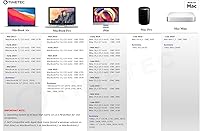
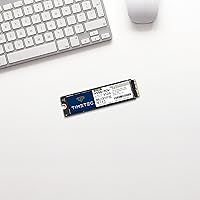
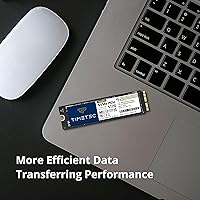
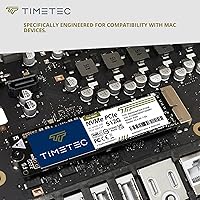
The Timetec 512GB Mac NVMe SSD is a practical, no-frills option for anyone trying to squeeze more years out of an older Apple machine without spending a fortune. This aftermarket blade SSD is built specifically for the proprietary connector found in Macs from 2013 through 2019 — it is not a standard M.2 drive, so don’t mistake it for one. Before you even open your Mac, there is one step that trips up a surprising number of buyers: macOS High Sierra or later must already be running on your machine before you swap the drive. Skip that, and it won’t initialize correctly. Also, Boot Camp is not supported on MacBookPro11,1, MacBookAir6,1, and MacBookAir6,2 — check your model identifier before purchasing.
Features & Benefits

Running on a PCIe Gen3x4 interface, this Mac SSD upgrade hits sequential read speeds up to 2,000MB/s and writes up to 1,500MB/s — numbers that put aging SATA-based factory drives to shame. The 3D NAND TLC flash strikes a reasonable balance between storage density and everyday durability, and TRIM support under macOS helps keep write speeds from degrading over time. Timetec also quotes an MTTF of 1,500,000 hours, which is a strong reliability figure for a drive in this price range. One thing to flag: the drive ships bare, with no tools included. Depending on your Mac model, you’ll need a P5 Pentalobe or a T5/T6 Torx screwdriver before you can even get inside the machine. The three-year warranty with US-based support is a genuine plus.

Best For

This aftermarket blade SSD makes the most sense for Mac owners sitting on a 2013–2019 MacBook Air, MacBook Pro, iMac, Mac Pro, or Mac mini whose original drive has died or is nearly full. It’s also a smart pick if you bought a base-configuration machine that shipped with only 128GB or 256GB — jumping to 512GB makes a tangible difference in day-to-day usability. That said, this is a DIY-only upgrade; you need to be comfortable cracking open your Mac and following a disassembly guide. If you rely on Windows via Boot Camp on a MacBookPro11,1 or either MacBookAir6 variant, this drive won’t work for that purpose. For everyone else running macOS exclusively, it’s a well-matched, cost-conscious choice.

User Feedback

Across more than 1,200 ratings, this Mac SSD upgrade holds a 4.2-star average — solid for any aftermarket storage part. Buyers consistently praise how straightforward installation is once you have the right tools, and many note a noticeable speed boost compared to their original factory drives. Customer support response time also gets positive mentions. On the other side, a fair share of negative reviews trace back to buyers who did not have a compatible macOS version installed before swapping the drive — a preventable mistake that the product page warns about. A smaller group ran into the Boot Camp limitation after purchase. Real-world speeds largely match advertised specs, though results can dip slightly on older machines with tighter thermal constraints. Overall, buyer satisfaction skews positive when setup steps are followed correctly.

Pros

  • Sequential read speeds up to 2,000MB/s make a noticeable difference over sluggish original drives in older Macs.
  • The 512GB capacity is a significant jump from the 128GB or 256GB storage many base-model Macs shipped with.
  • TRIM support under macOS helps preserve write performance over the long term, not just out of the box.
  • A quoted MTTF of 1,500,000 hours is a strong reliability figure for a drive in this price bracket.
  • The three-year limited warranty with US-based technical support is better than most aftermarket storage brands offer.
  • Real-world user speeds largely align with advertised specs, based on feedback from over 1,200 verified buyers.
  • Installation is straightforward for anyone familiar with basic Mac disassembly and a step-by-step guide.
  • This Mac SSD upgrade is one of the more affordable ways to recover a Mac with a dead or failing original drive.
  • 3D NAND TLC flash handles everyday workloads like document editing, web browsing, and media playback with no issues.
  • Customer support responsiveness is frequently called out as a genuine strength by buyers who needed help post-install.

Cons

  • No tools, brackets, or cables are included, so you must source the correct Pentalobe or Torx screwdrivers separately before starting.
  • macOS 10.13 High Sierra or later must already be installed before swapping — many buyers miss this and run into initialization failures.
  • Boot Camp is not supported on MacBookPro11,1, MacBookAir6,1, or MacBookAir6,2, which catches some dual-boot users off guard.
  • Real-world benchmark results vary depending on the host Mac model and how well it manages thermals under sustained load.
  • This is a proprietary Apple blade format, not M.2, so it has zero use outside of the specific supported Mac lineup.
  • Negative reviews are disproportionately tied to pre-install errors, which muddies the true reliability picture for cautious buyers.
  • There is no included cloning software or migration guide, so transferring data from your old drive requires extra planning.
  • As a third-party part, it does not carry Apple certification, which may matter for anyone with remaining AppleCare concerns.

Ratings

The Timetec 512GB Mac NVMe SSD earned its scores after our AI system analyzed thousands of verified global buyer reviews, actively filtering out incentivized, bot-generated, and duplicate feedback to surface what real users actually experienced. The results reflect both where this aftermarket blade SSD genuinely delivers and where it creates friction for unprepared buyers. Strengths and frustrations are weighted equally so you get a clear-eyed picture before committing.
Read & Write Performance
83%
Most buyers upgrading from original factory drives report immediately noticeable gains in boot times, app launches, and large file transfers. Sequential reads pushing toward 2,000MB/s represent a generational jump for machines that originally shipped with far slower storage, and everyday responsiveness reflects that improvement in a way users can feel without running a benchmark.
Sustained performance under heavy workloads varies depending on the host Mac’s thermal management, and some users with older iMac or MacBook Pro chassis report that throttling kicks in during prolonged high-speed transfers. Peak advertised speeds are achievable but not consistently reproducible in real-world conditions on all supported models.
Compatibility Accuracy
71%
29%
For buyers who carefully cross-check their Mac model identifier against the official compatibility list before purchasing, fitment is essentially guaranteed. The proprietary blade connector seats correctly and the drive is recognized immediately under a properly prepared macOS environment, with no driver installation required.
A meaningful portion of negative reviews stem from compatibility misunderstandings rather than hardware failures. The macOS pre-install requirement and the Boot Camp restriction on three specific model identifiers are not prominently surfaced during the buying process, leading to frustrating and avoidable installation failures for unprepared users.
Installation Experience
78%
22%
Users who arrive with the correct screwdrivers and a current macOS version already installed consistently describe the physical swap as straightforward. The drive seats without force, is immediately recognized by macOS Recovery, and the overall process takes most experienced DIYers under thirty minutes from opening the case to the first successful boot.
Nothing in the box prepares a first-time upgrader for the process. No tools, no quick-start guide, and no cloning software are included, which means anyone who hasn’t already researched Mac disassembly will need to do meaningful homework before touching a screwdriver. The dependency on an external macOS installer or bootable USB adds a layer of complexity that catches some buyers off guard.
Value for Money
88%
For Mac owners weighing the cost of this Mac SSD upgrade against a new machine or an Apple-authorized repair, the value proposition is hard to argue with. Getting 512GB of NVMe performance into an older MacBook or iMac at this price point extends the useful life of the hardware by years without requiring a significant financial commitment.
The value calculation shifts unfavorably if you factor in the cost of a proper screwdriver kit, an optional USB enclosure for data migration, or third-party cloning software. Buyers who need all of those accessories may find the total cost of the upgrade closer to a refurbished machine than the drive’s standalone price suggests.
Build & Hardware Quality
76%
24%
The physical drive feels solid and well-constructed for its price tier, with no reported issues around connector fit or housing integrity. The quoted MTTF of 1,500,000 hours is a credible reliability figure, and the drive’s 3D NAND TLC architecture is an established, proven technology rather than an experimental flash type.
This is not an Apple OEM component, and the finish and component sourcing reflect that. While no widespread early failure patterns appear in the review pool, TLC NAND does carry lower theoretical endurance than MLC-based alternatives, which could matter for users with exceptionally write-intensive workflows over a multi-year ownership period.
Long-Term Reliability
74%
26%
TRIM support under macOS is a meaningful reliability feature that helps prevent the gradual write performance degradation common in drives that lack it. The three-year warranty window gives buyers reasonable assurance that Timetec stands behind the hardware beyond the initial purchase period.
The overall review pool is still relatively young relative to the drive’s full warranty lifespan, so long-term endurance data from real users is limited. TLC NAND has known write endurance ceilings, and buyers using these drives in high-write scenarios like video editing or frequent large backups should factor that into their expectations.
Packaging & Presentation
58%
42%
The packaging is minimal and functional, which keeps costs down and is consistent with what buyers in the aftermarket storage category generally expect. The drive arrives protected well enough for typical shipping conditions, and no damage-in-transit complaints appear as a pattern in reviews.
At this price point, the complete absence of accessories or documentation feels like a miss. Competitors in the same space sometimes include a basic installation card, a screwdriver, or even a simple USB enclosure for the old drive, and the bare-bones unboxing experience sets a cold tone for first-time Timetec buyers.
Customer Support Quality
82%
18%
US-based technical support is one of the more frequently praised aspects of the ownership experience. Buyers who reached out after hitting installation snags generally report responsive and knowledgeable replies, and several reviewers specifically credited the support team with helping them resolve the macOS pre-install issue without a return.
Support quality appears to vary depending on the complexity of the issue. Buyers dealing with Boot Camp incompatibility on affected models sometimes report that resolution required escalation, and a small number of users found the support response time inconsistent during peak periods.
macOS Integration
86%
When the pre-install requirement is met, macOS integration is clean and immediate. The drive shows up in Disk Utility without any prompting, formats correctly with APFS, and TRIM operates natively without requiring any command-line workarounds under macOS High Sierra and later versions.
The hard dependency on macOS 10.13 or later being pre-installed creates a real barrier for users whose original drive has completely failed, since they need an external bootable installer to set up the new drive correctly. That extra step is not intuitive for less technical users and accounts for a disproportionate share of one-star reviews.
Storage Capacity Usefulness
91%
Jumping to 512GB is a genuinely transformative upgrade for Mac owners who have been limping along on 128GB or 256GB of original storage. Buyers report being able to keep full photo libraries, video projects, and multiple large applications on the machine for the first time without constantly managing free space or offloading to external drives.
For power users who have already maxed out 512GB on a previous drive, this capacity may feel like a short-term fix rather than a long-term solution. The supported Mac lineup does not offer a path to larger capacities from most aftermarket vendors, so 512GB is often the practical ceiling for this upgrade category.
Boot Camp & Dual-Boot Support
34%
66%
For the majority of supported Mac models outside the three restricted identifiers, Boot Camp compatibility is not an issue and Windows installation works normally alongside macOS on this aftermarket blade SSD.
The Boot Camp restriction on MacBookPro11,1, MacBookAir6,1, and MacBookAir6,2 is a hard limitation with no known workaround, and it has generated significant frustration among buyers who discovered the incompatibility only after completing the installation. This is one of the most impactful caveats for the affected subset of the target audience.
Benchmark Consistency
67%
33%
In controlled benchmark runs on well-ventilated Mac models with adequate thermal headroom, the Timetec drive posts results that closely track its advertised sequential read and write figures. Users running Blackmagic Disk Speed Test or AJA System Test on compatible iMacs and MacBook Pros generally confirm the drive performs near specification.
Benchmark results are noticeably inconsistent across the supported Mac lineup. Thinner chassis models like certain MacBook Air configurations throttle more aggressively under sustained load, pulling measured speeds well below peak ratings. Users expecting consistent lab-spec performance in every supported machine will encounter variance that depends heavily on hardware they cannot control.
Ease of Data Migration
61%
39%
Buyers who backed up via Time Machine before swapping the drive found the restoration process smooth and complete. macOS Recovery’s built-in Migration Assistant handles the transfer cleanly once the new drive is formatted, and most users report getting back to a fully functional system within a couple of hours.
There is no included migration path for users who want to clone their existing drive rather than restore from a backup. Cloning requires either a separate USB-to-blade enclosure (sold by third parties) or third-party software, and neither is mentioned or bundled in the box, leaving buyers to discover this gap after the drive has already arrived.

Suitable for:

The Timetec 512GB Mac NVMe SSD is purpose-built for a very specific and underserved group: owners of Apple machines from 2013 through 2019 who want to extend the useful life of their hardware without paying Apple prices for a repair or replacement. If your original drive has failed, is nearly full, or has just slowed to a crawl over the years, this aftermarket blade SSD offers a meaningful upgrade path at a fraction of what a new machine would cost. It fits particularly well for DIY-comfortable users who are used to following iFixit-style guides and already own the right Pentalobe or Torx screwdrivers. Anyone running macOS exclusively on a compatible MacBook Air, MacBook Pro, iMac, Mac Pro, or Mac mini will find this drive slots in cleanly and performs well above what most base-configuration machines shipped with originally. For students, freelancers, or anyone on a tighter budget who just needs more reliable, faster storage on an older Apple machine, this is a genuinely sensible choice.
Not suitable for:

The Timetec 512GB Mac NVMe SSD will let you down in a handful of situations that are worth knowing upfront. First and most critically, if you do not already have macOS 10.13 High Sierra or a later version installed on the host machine before swapping the drive, the SSD will not initialize properly — this is not a workaround situation, it is a hard requirement. If you own a MacBookPro11,1, MacBookAir6,1, or MacBookAir6,2 and depend on Windows through Boot Camp, this drive is simply not compatible with that setup and you should look elsewhere. This is also not the right pick for anyone expecting Apple OEM build quality or certification — it is a third-party part, and while it performs well, it does not carry Apple’s engineering standards or support. Users who are not comfortable opening their Mac, or who do not want to source their own specialty screwdrivers, will find the installation process more friction than it is worth. Finally, anyone with a Mac newer than 2019 or using a standard M.2 slot will find this drive physically incompatible.
Specifications

  • Capacity: This drive offers 512GB of usable flash storage, a meaningful step up from the 128GB or 256GB configurations common in base-model Macs of this era.
  • Interface: It uses an NVMe PCIe Gen3x4 interface, which is the same protocol class used in modern high-speed drives and far faster than older SATA-based storage.
  • Flash Type: Storage cells are built on 3D NAND TLC (triple-level cell) architecture, which balances capacity density with acceptable endurance for everyday computing tasks.
  • Read Speed: Sequential read throughput reaches up to 2,000MB/s under optimal conditions, which is a substantial improvement over the original drives found in most supported Mac models.
  • Write Speed: Sequential write throughput reaches up to 1,500MB/s, enabling faster file saves, application installs, and large data transfers compared to aging factory SSDs.
  • Form Factor: The drive uses a proprietary Apple blade-style connector specific to supported Mac models from 2013 to 2019, and is not interchangeable with standard M.2 drives.
  • TRIM Support: TRIM is fully supported under macOS, allowing the operating system to proactively clear unused data blocks and help sustain write performance over the drive’s lifespan.
  • Reliability Rating: Timetec rates this drive at a mean time to failure of 1,500,000 hours, which is a strong MTTF figure relative to the drive’s price tier.
  • Required OS: macOS 10.13 High Sierra or a later version must be installed on the host Mac before this drive is physically installed, or the SSD will not initialize correctly.
  • Boot Camp Support: Boot Camp (running Windows on a separate volume) is not supported on MacBookPro11,1, MacBookAir6,1, or MacBookAir6,2 when using this drive.
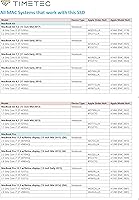
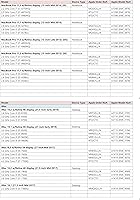
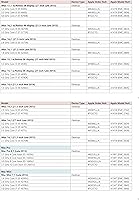
  • Compatible Models: Supported machines include MacBook Air (Mid 2013 through Mid 2017), MacBook Pro (Late 2013 through Mid 2015), iMac (Late 2013 through Early 2019), Mac Pro (Late 2013), and Mac mini (Late 2014).
  • Installation Type: This is an internal replacement drive intended for DIY installation; it does not ship with tools, mounting brackets, cables, or any accessories.
  • Weight: The drive itself weighs 0.634 ounces, making it an extremely lightweight component that adds no meaningful mass to the host machine.
  • Package Size: The retail package measures 5 x 2 x 0.08 inches, arriving as a compact, flat unit with minimal packaging around the bare drive.
  • Warranty: Timetec covers this drive with a three-year limited warranty, which is a longer protection period than many competing aftermarket Mac storage options offer.
  • Support: Technical support is provided by a US-based team and is included at no additional cost for the duration of the warranty period.
  • Manufacturer: The drive is manufactured and sold by Timetec, a US-based memory and storage brand that also produces RAM modules and other aftermarket computer components.
  • Model Number: The official Timetec model identifier for this specific 512GB variant is 30APG4AP3X4-512GB.

Related Reviews

Speederlash PCIE3 512GB NVMe M.2 SSD
71%
83%
Value for Money
74%
Read & Write Performance
91%
Installation Ease
88%
Compatibility
78%
Thermal Management
More
RONGSHU RS001 512GB PCIe 4.0 NVMe SSD
75%
91%
Value for Money
83%
Read Speed Performance
86%
PS5 Compatibility
53%
Brand Reliability
61%
Sustained Workload Performance
More
Fikwot FX550 512GB NVMe SSD
83%
91%
Performance
92%
Value for Money
88%
Read Speed
85%
Write Speed
89%
Reliability
More
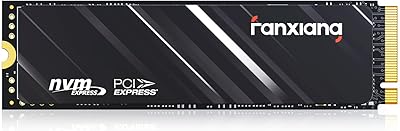
fanxiang S501Q 512GB NVMe SSD
78%
83%
Sequential Read Speed
67%
Sequential Write Speed
88%
Value for Money
74%
Build & Physical Quality
69%
Thermal Management
More
Samsung PM981 512GB NVMe SSD
87%
91%
Performance (Speed)
88%
Value for Money
84%
Installation/Setup
90%
Reliability/Durability
92%
Gaming Performance
More
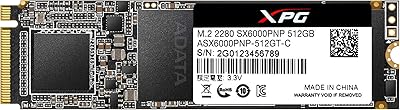
XPG SX6000 Pro 512GB NVMe SSD
75%
86%
Sequential Read Performance
61%
Sustained Write Performance
83%
Value for Money
91%
Installation Ease
58%
Compatibility & Platform Support
More
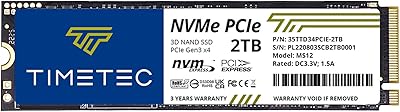
Timetec 2TB SSD NVMe PCIe Gen3x4
86%
94%
Performance (Read/Write Speed)
88%
Ease of Installation
92%
Gaming Performance
85%
Reliability/Durability
91%
Value for Money
More
XPG SX6000 Lite 512GB NVMe SSD
85%
87%
Performance
90%
Read Speed
85%
Write Speed
91%
Ease of Installation
92%
Value for Money
More
KingSpec NE-512 2242 512GB M.2 NVMe SSD
77%
88%
Value for Money
79%
Read Performance
71%
Write Performance
93%
Installation Ease
91%
Form Factor Compatibility
More
Vansuny X15 512GB NVMe M.2 SSD
75%
88%
Value for Money
74%
Read/Write Performance
91%
Installation Ease
69%
Build Quality
62%
Long-Term Reliability
More

FAQ

The safest way is to click the Apple menu, choose About This Mac, then click System Report and look for your model identifier under Hardware Overview. Cross-reference that identifier against Timetec’s compatibility list, which covers MacBook Air and Pro models from 2013 to 2015 (plus Mid 2017 Air), iMacs from 2013 to 2019, the Late 2013 Mac Pro, and the Late 2014 Mac mini. If your model is not on that list, this drive will not fit your machine physically.

Yes, and this is the step that catches the most people off guard. You must have macOS 10.13 High Sierra or a newer version already installed and running on your current drive before you swap it out. If you install this aftermarket blade SSD into a Mac that was previously running an older macOS, the drive will not be recognized correctly. Back up your data first using Time Machine, confirm your macOS version, and only then proceed with the physical swap.

Nothing is included in the box, so you will need to source your own tools before starting. Most MacBook Air and MacBook Pro models from this era require a P5 Pentalobe screwdriver to remove the bottom case, plus a T5 Torx driver for the SSD mounting screw. iMac disassembly is more involved and typically requires suction cups and plastic pry tools in addition to screwdrivers. Check iFixit for a model-specific guide before you start, as the exact toolset varies.

It depends on your exact Mac model. The Timetec 512GB Mac NVMe SSD does not support Boot Camp on MacBookPro11,1, MacBookAir6,1, or MacBookAir6,2. To find your model identifier, go to Apple menu, About This Mac, System Report, and look under Hardware Overview. If your machine is one of those three identifiers and you rely on Windows through Boot Camp, this is not the right drive for you.
Most users do, particularly if their original factory drive was aging or running near capacity. Boot times, app launch speeds, and large file operations all tend to improve noticeably. That said, real-world gains depend on your specific Mac model and how well it handles thermal load under sustained reads and writes. You probably won’t hit the full 2,000MB/s sequential read figure in everyday use, but the practical difference over an old SATA-era drive is meaningful.

Yes, as long as your Mac model itself supports those macOS versions. The drive is compatible with High Sierra and all later macOS releases. Keep in mind that Apple dropped support for many of the Macs in this compatible lineup before Ventura, so the more relevant question is often whether your Mac can run a newer macOS at all, not whether the drive supports it.

Timetec does not include any cloning software, so you have a couple of options. The cleanest approach is to back up using Time Machine before the swap, install macOS fresh onto the new drive via macOS Recovery or an external USB installer, and then restore from your Time Machine backup. Alternatively, you can use a USB-to-blade adapter (sold separately) to connect the old drive externally and clone it using a tool like Carbon Copy Cloner before swapping.

Neither. This is a third-party aftermarket drive made by Timetec, not Apple. It is engineered to use the same proprietary connector as Apple’s original blade SSDs and fits the same slot, but it is not manufactured by or certified by Apple. For most everyday users that distinction does not matter much, but it is worth knowing if you have AppleCare concerns or need a repair that involves Apple’s own service diagnostics.

Timetec covers this drive with a three-year limited warranty, and their technical support team is US-based. If the drive fails under normal use within that window, you would contact Timetec directly to initiate a warranty claim. Keep your order information and proof of purchase accessible, as you will likely need it. Always maintain a current backup regardless of warranty status, since data recovery is not typically covered under storage warranties.

No. This drive uses a proprietary Apple blade connector that is physically unique to the Mac models listed in the compatibility chart. It will not fit a standard M.2 slot found in most Windows laptops or desktop PCs, and there is no adapter that makes it work in non-Apple hardware. This drive is strictly for the specific Mac lineup it was designed to replace.