Overview

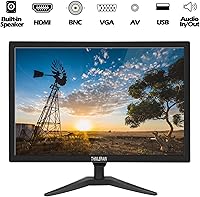
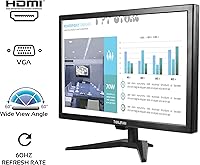
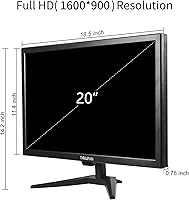
The Thinlerain T-20 20-Inch LED Monitor occupies a very specific corner of the market — a utility-first display built for kitchens, small offices, and light surveillance setups rather than demanding desktop work. What immediately stands out is the port selection: HDMI and VGA you would expect, but BNC and AV inputs hint at a commercial or security background. Resolution sits at 1600x900, which is a step below full HD — noticeable on a 20-inch panel if you are coming from a 1080p screen, but perfectly adequate for most practical uses. Thinlerain isn't a household name, but they've built enough budget displays to understand what utility buyers actually need.

Features & Benefits

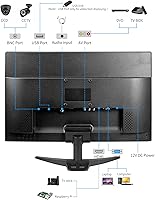
This 20-inch budget monitor packs a port lineup that genuinely surprises at this price point. Beyond HDMI and VGA, it includes BNC and AV inputs — the kind typically found on commercial-grade displays used in security setups, which explains why it attracts buyers well outside the typical office-monitor crowd. The built-in dual speakers are modest but functional, cutting out the need for a separate audio device in a kitchen or workshop. A USB slot lets you play video or photos directly from a flash drive, no computer required. The unit is VESA-compatible and weighs just under seven pounds, making wall mounting or arm installation genuinely straightforward. Brightness handles typical indoor lighting fine, though direct sunlight will wash out the glossy panel.

Best For

The Thinlerain display makes the most sense in scenarios where versatile connectivity matters more than cutting-edge image quality. It's a strong pick for kitchen wall mounts — think recipe browsing or streaming background content while cooking. Small retail shops or offices running analog security cameras will appreciate the BNC input, which lets this screen double as a surveillance feed monitor without extra conversion hardware. It also works well as a secondary desk monitor for tasks like email, chat, or reference material. FireStick users who want a compact screen in a spare room without mounting a full-sized TV will find the size and input options practical. If your PC or older laptop only has VGA out, this is one of the few modern screens that won't leave you searching for adapters.

User Feedback

Across roughly 130 reviews, this compact LED screen holds a 3.8 out of 5 — respectable, though the ratings tell two fairly different stories. Buyers who picked it up for surveillance or kitchen use tend to be the most satisfied, often calling out the easy plug-and-play setup and the unusual breadth of inputs as the deciding factor. On the other side, some users flag the stand as less sturdy than expected and note that the image washes out noticeably in bright rooms — a real limitation of the 250 cd/m² panel and glossy surface. The built-in speakers and remote control get mixed reviews; they work, but don't expect much volume or precision. Overall, satisfaction tracks closely with how well the buyer matched the screen to the right use case.

Pros

  • Unusually broad input selection — HDMI, VGA, BNC, AV, and USB — covers far more device types than most monitors at this price.
  • The BNC input lets it serve as a direct surveillance feed display without extra conversion hardware, a rare feature in this category.
  • VESA-compatible and light enough to wall-mount or arm-mount without needing heavy-duty installation hardware.
  • Built-in dual speakers and a 3.5mm audio jack reduce cable clutter in kitchen or secondary-room setups.
  • USB media playback lets you run video or photos directly from a flash drive, no connected computer needed.
  • Setup is consistently praised by buyers as fast and intuitive, with minimal configuration required out of the box.
  • The slim housing keeps the Thinlerain display well under seven pounds, making repositioning or reinstallation easy.
  • Includes a remote control — a convenience most monitors in this price bracket skip entirely.
  • A practical secondary monitor for older PCs and laptops that still rely on VGA output.
  • Solid value for niche use cases like surveillance monitoring, kitchen streaming, or a dedicated dongle companion screen.

Cons

  • The stand has been flagged by multiple buyers as wobblier than expected for a display of this size.
  • At 1600x900, the resolution is a visible step below 1080p — text sharpness and fine detail both suffer noticeably.
  • The glossy panel surface reflects ambient light aggressively; bright rooms and windows will cause persistent glare issues.
  • At 250 cd/m², the brightness ceiling is too low for well-lit environments, which limits where you can realistically place it.
  • Built-in speaker volume is modest at best; anyone expecting room-filling audio will be let down quickly.
  • The remote control feels cheap and imprecise — it works, but not in the way a confident product experience should.
  • The ABS plastic housing feels noticeably thin in hand, raising reasonable questions about durability over time.
  • Only a 30-day return window is offered, leaving little time to surface reliability issues that come with regular use.
  • Thinlerain has limited brand presence and customer support infrastructure, which can become a concern once the warranty period ends.
  • Not a practical choice for color-sensitive tasks; this compact LED screen lacks the panel accuracy that design or photo work demands.

Ratings

Our scores for the Thinlerain T-20 20-Inch LED Monitor were generated by AI after analyzing verified purchase reviews from buyers across multiple global markets, with spam, bot activity, and incentivized feedback filtered out before any category was scored. The results are deliberately transparent — real strengths are recognized, but the genuine pain points that frustrate buyers in the wrong use case are reflected just as clearly. If you are deciding whether this compact LED screen fits your specific situation, the breakdowns below give you an honest, data-backed picture of exactly where it delivers and where it falls short.

Value for Money
73%
27%
For buyers with a specific use case — kitchen wall mount, surveillance feed display, or secondary desk screen — the pricing feels reasonable given the breadth of inputs included. The combination of BNC, HDMI, VGA, AV, and USB connectivity in a single budget display is genuinely hard to replicate at this price from better-known brands.
For general-purpose computing or anyone expecting a crisp, bright display, the value proposition weakens quickly. The 1600x900 resolution and 250 cd/m² brightness ceiling mean you are paying for connectivity range rather than display performance, and that trade-off does not suit every buyer.
Input Port Variety
87%
The port lineup is genuinely unusual for a display at this price — BNC for analog cameras, AV for legacy devices, HDMI for modern sources, VGA for older hardware, and USB for flash drive playback. Surveillance buyers in particular have pointed to the BNC input as the single reason they chose this screen over comparable alternatives.
The USB port is limited to one, which becomes a friction point when you want to simultaneously use a flash drive and a USB-powered device. Some buyers also note that the on-screen input switching menu is slower and less intuitive than expected when cycling between the multiple available sources.
Picture Clarity
62%
38%
For streaming video, background media, or surveillance feeds, the 1600x900 picture is adequate and does not draw complaints from buyers using the display in those roles. At typical kitchen or workshop viewing distances, the image is clean enough that most non-technical users report being satisfied with what they see day to day.
Buyers accustomed to full HD (1920x1080) notice the resolution gap immediately, particularly in text sharpness and fine detail. Desktop productivity users working with spreadsheets or code report that fonts look softer than expected at close viewing distances, and this becomes harder to ignore during longer sessions.
Build Quality
53%
47%
The slim profile and sub-seven-pound weight make physical installation straightforward — wall mounting or repositioning is something most buyers handle alone without any struggle. The panel itself does not feel flimsy in a way that raises immediate durability concerns, and the ABS casing is consistent with what this price tier typically delivers.
Multiple buyers describe the housing as feeling thin and noticeably budget-grade when handled up close, particularly around the back panel and port area. There is a broader concern about long-term durability given the all-plastic construction and the 30-day return window, which leaves little room to assess reliability before coverage expires.
Mounting Flexibility
82%
18%
The VESA compatibility is one of the most consistently appreciated aspects among buyers who planned from the start to wall-mount or use an arm. At under seven pounds, the unit attaches to standard brackets without requiring heavy-duty hardware, and the slim profile sits flush against walls in a way that works well for kitchen or retail environments.
The VESA mounting pattern is compatible but the specific hole spacing is not clearly documented in the product listing, which has led some buyers to order the wrong bracket on the first try. The included stand, if you opt not to wall-mount, is where the physical experience noticeably degrades.
Stand Stability
44%
56%
On a stable, vibration-free desk surface, the stand keeps the monitor upright without immediate issues during light everyday use. Buyers who primarily use the screen for stationary tasks and rarely adjust the angle tend to report fewer stability complaints than those who interact with the screen more regularly throughout the day.
Stand wobble is one of the most frequently cited complaints across user reviews, with buyers describing the base as feeling underdeveloped relative to the panel size. Any desk vibration — from typing, nearby footsteps, or cable adjustments — causes the screen to shake noticeably, which becomes a persistent annoyance in active work environments.
Ease of Setup
83%
Setup is one of the most universally positive topics in user reviews — buyers across all technical skill levels report having the display running within minutes of unboxing. The plug-and-play behavior across all input types means there is rarely a driver install or configuration step required, which is a genuine relief for less technical users mounting a kitchen or workshop display.
The on-screen menu navigation takes some getting used to, particularly when switching between the five available inputs — button placement and menu logic are not immediately intuitive. A small number of buyers also report needing to adjust sharpness and color temperature out of the box before the default picture feels acceptable.
Brightness & Glare
51%
49%
In consistently dim or indoor environments with controlled lighting — a garage, an interior office room, or a dimly lit kitchen — the 250 cd/m² output is genuinely adequate, and buyers in these settings rarely flag brightness as a concern. The 1000:1 contrast ratio helps maintain some depth in darker content even within the panel's brightness limits.
The glossy surface finish turns ambient light into a visibility problem in any room with overhead fluorescents or windows, and the 250 cd/m² ceiling means the screen cannot compensate by pushing brighter. Buyers who installed the display near a window or in a sun-facing kitchen have noted that glare makes the image nearly unwatchable during daylight hours.
Speaker Quality
57%
43%
For casual audio needs — recipe narration, background music while cooking, or streaming dialogue heard from close range — the built-in speakers eliminate the need to run a separate audio device to the display, which buyers consistently mention as a practical convenience in secondary-room setups. Most agree they are functional enough that external speakers feel optional rather than necessary.
Maximum volume is noticeably limited — buyers trying to hear audio from across a small room frequently report having to strain to follow dialogue. The audio quality at higher volumes becomes thin and slightly distorted, which means the 3.5mm output jack for external speakers ends up being the more reliable long-term audio solution.
Remote Control
55%
45%
Having a remote control included at all is genuinely useful in wall-mount scenarios where reaching the physical buttons is inconvenient — buyers who installed the display above counter height in a kitchen specifically mention this as a welcome addition. Input switching and volume adjustments from across a small room work without any pairing or setup required.
The remote itself is frequently described as feeling flimsy and cheap, with buttons that require more force than expected and an IR response range that buyers find narrower than typical TV remotes. A few reviewers note that it occasionally fails to register inputs consistently, requiring multiple presses for the same command.
USB Media Playback
78%
22%
The ability to plug in a flash drive and immediately play video or photo content — no PC, no network, no configuration — is a practically useful feature for digital signage, retail displays, or kitchen recipe slides. Buyers specifically highlight this as the feature that made the display work in standalone installations where running a connected computer was not practical.
The media player is limited to basic video and image formats, and buyers with files encoded in less common codecs report playback failures without clear error messaging. File navigation via the on-screen media browser is rudimentary — workable for a small number of files but cumbersome if your drive contains a larger content library.
Motion Performance
66%
34%
For the typical content this display is used for — streaming video, surveillance feeds, recipe tutorials, or casual streaming stick browsing — the 60Hz refresh rate and 5ms response time are genuinely sufficient. Users do not report motion blur or input lag as concerns in these everyday use contexts, and the display handles standard and HD video without visible judder.
Anyone using this as a gaming monitor will notice that the 60Hz cap limits the visual experience compared to more gaming-oriented screens, and fast-paced titles can show visible motion smearing on the glossy panel. This is fundamentally a utility display, and buyers who approach it with gaming expectations consistently come away disappointed.
Long-term Reliability
58%
42%
Among buyers who have owned the display for several months without incident, the general sentiment is that it holds up adequately under light daily use — particularly in low-stress roles like kitchen media or office dashboards. No widespread reports of sudden hardware failures or early dead pixels have surfaced prominently in the review pool.
The 30-day return window is short enough that buyers who encounter reliability issues after the first month have no formal recourse, and the brand's limited footprint means customer service experiences post-warranty are inconsistent at best. The all-plastic construction and slim build raise reasonable questions about how this display holds up beyond the one-year mark.

Suitable for:

The Thinlerain T-20 20-Inch LED Monitor is a genuinely practical choice for anyone who needs a compact, multi-input display in a secondary or utility role rather than a primary workstation. Kitchen and workshop wall-mounts are where it earns its keep — the VESA compatibility and sub-seven-pound weight make installation manageable, and the built-in speakers mean you don't need to run extra cables just to hear audio. Small business owners running analog security cameras will find the BNC input particularly useful, since it removes the need for a separate conversion device to get camera feeds onto a screen. FireStick and streaming dongle users looking for a dedicated compact screen in a bedroom, garage, or spare room will also get solid value here. If your older PC or laptop only outputs via VGA, this is one of the rare modern displays that covers you without requiring a separate adapter. Secondary desk monitor users who handle color-critical work on a primary display can comfortably use this screen for chat, email, or documentation alongside it.

Not suitable for:

If your priority is image quality, color accuracy, or a crisp full HD picture, the Thinlerain T-20 20-Inch LED Monitor is likely to fall short of your expectations. At 1600x900 on a 20-inch glossy panel, the resolution gap compared to 1080p is visible — particularly for text-heavy work, detailed graphics, or anyone accustomed to a sharper display. The 250 cd/m² brightness ceiling becomes a real problem in well-lit rooms or near windows, where the glossy surface compounds the issue with noticeable glare. Serious gamers should look elsewhere entirely: the 60Hz refresh rate and 5ms response time are workable for casual content but inadequate for competitive gaming or fast-motion video. Anyone expecting robust build quality will likely be disappointed by the ABS plastic housing and the stand, which users have consistently described as less stable than expected. The 30-day return window also leaves little margin to discover longer-term reliability concerns before you are committed to the purchase.

Specifications

  • Screen Size: The panel measures 20 inches diagonally with a 16:9 widescreen aspect ratio.
  • Resolution: Native resolution is 1600x900 (HD+), which falls below full HD (1920x1080) and produces softer detail on text-heavy content at close viewing distances.
  • Panel Type: Uses LED backlighting with a glossy surface finish that can reflect ambient light in brightly lit environments.
  • Brightness: Maximum brightness is rated at 250 cd/m², adequate for dim to moderately lit indoor spaces but insufficient for high-ambient-light settings.
  • Contrast Ratio: Static contrast ratio is 1000:1, providing reasonable distinction between dark and light areas for general-purpose indoor viewing.
  • Response Time: Response time is rated at 5ms, suitable for standard video and office tasks but not optimized for fast-motion or competitive gaming.
  • Refresh Rate: The panel refreshes at 60Hz, covering everyday computing, streaming, and light media playback without supporting high-frame-rate gaming modes.
  • Video Inputs: Connectivity includes HDMI, VGA, composite AV, BNC, and a USB port that doubles as a media playback input.
  • Audio: Two built-in speakers are included alongside a 3.5mm audio jack that supports both line-in and headphone-out connections.
  • VESA Mounting: The monitor is VESA-compatible, allowing standard wall brackets and monitor arms to be used for flexible installation options.
  • Dimensions: The unit measures 19.5 inches wide, 11.8 inches tall, and 0.5 inches deep (panel body, excluding stand).
  • Weight: Total weight is 6.89 pounds, manageable for single-person wall mounting or repositioning without additional equipment.
  • Housing Material: The outer casing is constructed from ABS plastic, which is lightweight and impact-resistant but carries a budget-grade feel in hand.
  • BNC Input: The BNC connector supports direct connection to analog CCTV cameras, enabling use as a dedicated surveillance feed display without a conversion adapter.
  • USB Media Player: A built-in media player reads video and image files directly from a USB flash drive without requiring a connected computer or external device.
  • Remote Control: A remote control is included in the box, enabling input switching, volume adjustment, and on-screen menu navigation from a distance.
  • Voltage: The monitor is rated for up to 240 volts, compatible with standard household power supplies across most regions.
  • Warranty: Thinlerain provides a 30-day refund and exchange policy; no extended long-term manufacturer warranty is documented beyond this window.

Related Reviews
Sceptre E205W-16003R 20″ LED Monitor
76%
91%
Value for Money
63%
Image Clarity & Resolution
82%
Refresh Rate & Smoothness
77%
Response Time
88%
Connectivity & Port Selection
More
Thinlerain HD1303 13.3-inch Small Monitor
68%
91%
Input Versatility
88%
Setup & Ease of Use
83%
Value for Money
67%
Display Clarity
53%
Panel & Color Quality
More
Dell E2016H 20-inch Monitor
82%
85%
Display Quality
92%
Ease of Setup
80%
Design & Build Quality
89%
Value for Money
88%
Energy Efficiency
More
Thinlerain 17-inch HD170 Monitor
80%
89%
Value for Money
93%
Ease of Setup
65%
Display Quality
78%
Build Quality
55%
Sound Quality
More
Samsung T350 24-inch IPS Monitor
71%
86%
Image Clarity
78%
Color Accuracy
83%
Viewing Angles
41%
Ergonomics & Stand
62%
Brightness & Glare Handling
More
Thinlerain HD-116 11.6-inch Portable Monitor
68%
88%
Portability & Form Factor
62%
Display Quality
47%
Color Accuracy
53%
Viewing Angles
61%
Brightness
More
Thinlerain T-101-1200 10.1-Inch Mini Monitor
67%
73%
Value for Money
58%
Display Quality
81%
Input Versatility
52%
Build Quality
54%
Brightness & Visibility
More
Thinlerain HD-156 15.6-Inch Computer Monitor
73%
83%
Value for Money
91%
Port Versatility
67%
Image Quality
61%
Brightness & Visibility
58%
Build Quality
More
Gigastone LM-32FA51 32-inch FHD Monitor
77%
77%
Image Quality
83%
Eye Comfort
88%
Value for Money
51%
Stand & Ergonomics
62%
Build Quality
More
Lenovo D22e-20 21.5-inch FHD Monitor
84%
89%
Display Quality
91%
Value for Money
87%
Ergonomics
74%
Brightness
93%
Setup and Installation
More

FAQ

Yes, and this is actually one of the more natural fits for this display. It includes an HDMI input that connects directly to a FireStick or any other streaming dongle, and the VESA-compatible design means you can attach it to a standard wall bracket without any hassle. The built-in speakers handle audio without needing extra cables, which makes the kitchen setup genuinely clean and simple.

It will, and that is actually a meaningful selling point since most monitors at this size have dropped VGA support entirely. Just use a standard VGA cable and you are good to go. Keep in mind that VGA is an analog signal, so the image will not be quite as sharp as HDMI, but it is perfectly functional for everyday tasks like browsing, documents, or video calls.

BNC stands for Bayonet Neill-Concelman — it is a connector type used in professional video equipment and, most commonly, older analog CCTV security camera systems. If you have a surveillance camera that outputs a BNC signal, this display can show that feed directly without needing any extra converter box in between. For most home users, it is a feature you will never touch, but for small businesses or anyone with an analog camera setup, it is a genuine differentiator that is hard to find at this price point.

They are serviceable rather than impressive. For background audio, recipe videos, or casual streaming in a kitchen, they get the job done at a reasonable volume. If you are expecting to fill a room with sound or hear clear dialogue from across a space, you will want to plug in external speakers or headphones via the 3.5mm jack. Think of the built-in speakers as a useful convenience, not a primary audio solution.

Several buyers have noted the stand is wobblier than expected — it is one of the more consistent complaints in the user reviews. On a steady desk with minimal vibration, it is probably fine day-to-day, but it is not the most confidence-inspiring base. If stability matters to you, or if you plan to install it somewhere with regular movement nearby, the VESA wall mount option is the more reliable long-term approach for this display.

Yes, the built-in media player handles this natively. Load up a USB flash drive with videos or photos, plug it into the USB port, and the monitor reads and plays them without any connected computer or laptop needed. It is a handy feature for digital signage, recipe slideshows, or any setup where you want to run content independently without a host device.

It is noticeable, especially if you sit close or spend a lot of time reading text. On a 20-inch panel, 1600x900 works out to roughly 94 pixels per inch versus about 110 ppi for full HD, so text edges look slightly softer and fine detail is less crisp. For streaming video, casual browsing, or surveillance feeds, most people adapt quickly and it becomes a non-issue. For reading code or documents over long sessions, the gap is more apparent.

This is where the Thinlerain T-20 20-Inch LED Monitor has a real limitation worth understanding before you buy. At 250 cd/m², brightness sits on the lower end of the spectrum, and the glossy panel surface compounds the problem by reflecting overhead lights and windows directly back at you. In a dim or moderately lit room, it performs fine. In a sun-facing kitchen or a bright open-plan space, glare will be a persistent frustration.

For consoles and Macs, HDMI is your connection point, and it works without any fuss. PlayStation and Xbox users should note that the 60Hz refresh rate caps frame output at 60fps, which is limiting for competitive gaming but perfectly fine for single-player titles and media. Mac users with only USB-C or Thunderbolt ports will need an HDMI adapter, but once connected, the display functions normally as an extended or mirrored screen.

The official coverage is a 30-day refund and exchange window, and no extended warranty beyond that is documented for this product. Thinlerain is a smaller brand without the broad support infrastructure of major manufacturers, so post-warranty service options are limited. If you are purchasing through Amazon, their standard buyer protections apply alongside this, but it is wise to test everything thoroughly in the first few weeks and keep your proof of purchase on hand just in case.