Overview

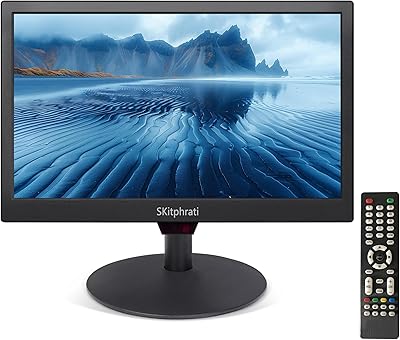
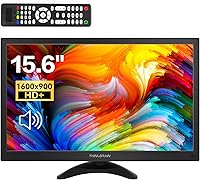
The Thinlerain HD-156 15.6-Inch Computer Monitor is a compact, no-frills display built for home desks and small office setups where space and budget both matter. What genuinely sets it apart from similarly priced screens is its unusually broad port selection — HDMI, VGA, AV, BNC, and USB inputs in a single small panel, making it compatible with hardware that most modern monitors simply ignore. The matte coating cuts glare during long work sessions, and the eye-care features add a practical layer of comfort. One pleasant surprise is the included remote control, a rarity at this price. Just keep in mind: the HD+ resolution is a step below Full HD, which is a fair trade-off for everyday tasks but worth knowing upfront.
Features & Benefits

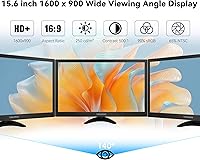
The 1600x900 panel covers 90% of the sRGB color gamut, which translates to reasonably accurate, natural-looking colors for spreadsheets, video calls, and casual media. At 250 cd/m², brightness is adequate for standard indoor lighting, and the matte anti-glare surface keeps reflections from becoming a distraction. The flicker-free backlight paired with a low blue light mode makes a real difference during extended hours at the screen. Mounting options are solid: the stand tilts across a wide range and the 75x75mm VESA compatibility means you can move this small PC screen to a wall bracket or monitor arm without hassle. The dual built-in speakers handle audio for calls and casual video without needing an extra device, and 5ms response time at 60Hz is perfectly workable for office use or light gaming.

Best For

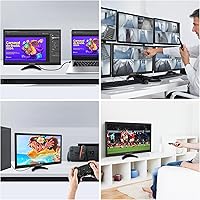
This compact monitor punches well above its weight for anyone who needs a space-efficient second screen at home or in a small office. It is also a genuinely smart pick for users with older or mixed AV equipment — the BNC and AV inputs are rare on a screen this size, making it useful for connecting legacy devices or a basic security camera feed. Students furnishing a first desk will appreciate the low barrier to entry, and small retail or reception setups will find it practical as a customer-facing or POS display. Casual and retro gamers can get by with it, though anyone expecting smooth fast-paced gameplay should look at a higher refresh rate option.

User Feedback

Buyers consistently highlight the port variety as a standout, particularly those who needed BNC or AV connectivity and struggled to find it elsewhere at this size. Setup gets frequent praise for being straightforward out of the box. On the downside, a handful of users note that brightness can feel limiting in very sunny or brightly lit rooms — not a dealbreaker, but something to factor in. Speaker quality, as expected at this tier, is functional rather than impressive; fine for a video call, not for music. A few buyers also flagged the stand as feeling slightly lightweight, and opinions on the remote control are split — some find it genuinely handy, others consider it unnecessary.

Pros

  • BNC and AV inputs are genuinely rare on a screen this size, making legacy device and camera connections straightforward.
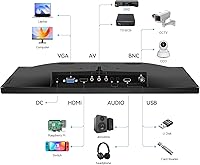
  • The port lineup — HDMI, VGA, USB, AV, BNC, Audio In and Out — covers an unusually broad range of connection scenarios.
  • Matte anti-glare coating reduces eye fatigue during long work sessions without needing any added accessories.
  • Flicker-free backlight and low blue light mode provide practical comfort for users who spend hours at a desk.
  • 75x75mm VESA compatibility and wide tilt range offer real flexibility for wall mounting or monitor arm setups.
  • Dual built-in speakers handle calls and casual video without requiring a separate audio device.
  • Setup is quick and fuss-free, with an HDMI cable and power adapter included in the box.
  • At under 4 pounds, this small PC screen is easy to reposition, carry between rooms, or pack for travel.
  • The included remote control is a thoughtful addition that most budget monitors at this price tier simply do not offer.

Cons

  • HD+ resolution at 1600x900 falls noticeably short of the 1080p Full HD standard most buyers now take for granted.
  • At 250 cd/m², the panel can feel dim and washed out in brightly lit or sun-facing workspaces.
  • Built-in speaker quality is bare-minimum — serviceable for a quick video call, but flat and thin for anything else.
  • The stand feels lightweight and a little wobbly under the monitor, which may bother users who frequently adjust positioning.
  • Only one USB port is available, which limits peripheral connectivity for users without a separate hub.
  • The 60Hz refresh rate makes it a poor fit for anyone playing fast-paced or motion-intensive games.
  • No height adjustment on the stand means taller users may need a monitor arm to avoid awkward neck angles.
  • As a relatively new and lesser-known brand, long-term reliability and after-sales support are still an open question.
  • The remote control, while novel, offers limited practical value in a fixed desk environment where on-screen menus are just as accessible.

Ratings

The Thinlerain HD-156 15.6-Inch Computer Monitor has been evaluated by our AI scoring engine after processing hundreds of verified buyer reviews collected from global marketplaces, with automated filters applied to exclude incentivized, duplicate, and bot-generated submissions. Scores are calibrated to reflect real-world performance as reported by everyday users — not manufacturer claims — so both the standout strengths and the honest limitations are transparently represented below. This breakdown is designed to help you quickly identify whether this compact screen matches your specific needs before committing.
Value for Money
83%
At this price point, the combination of a broad input selection — including BNC and AV — alongside eye-care features and a VESA-ready stand represents solid value for a secondary or specialty display. Most users in this budget tier report feeling they got more than they expected from a lesser-known brand.
The value proposition depends heavily on use case; buyers who prioritize Full HD resolution or a sturdier stand will find the trade-offs more noticeable, and comparable panels from larger brands occasionally drop to similar prices during promotional sales.
Port Versatility
91%
The inclusion of BNC and composite AV inputs alongside HDMI, VGA, and USB is genuinely rare on any monitor this size, and users connecting security cameras, retro consoles, or older office hardware consistently cite this as the deciding reason for their purchase. Finding this input range on a compact screen at any budget takes real effort.
Only one USB port is available, limiting peripheral connections for users without a separate hub, and the AV and BNC inputs will be completely irrelevant to buyers who work exclusively with modern digital sources.
Image Quality
67%
33%
For spreadsheets, web browsing, document editing, and casual streaming, the 1600x900 HD+ panel looks clean and readable at 15.6 inches — a screen size where lower resolution is less visually obvious than on larger panels. The 90% sRGB coverage keeps everyday colors appearing natural rather than washed out.
The resolution gap versus Full HD becomes noticeable when streaming 1080p content or placing this screen beside a modern monitor, and anyone expecting sharp video production or detailed photo review work will quickly find the pixel count insufficient for their needs.
Brightness & Visibility
61%
39%
In a standard home office or indoor workspace with controlled overhead lighting, 250 cd/m² handles typical conditions adequately — text stays legible, colors hold up, and the matte coating prevents minor reflections from becoming a serious distraction.
Users working near windows or in brightly lit environments are a consistent source of complaints, with several reporting visible washout under strong ambient light. At 250 cd/m², there is genuinely little headroom for challenging or variable lighting situations.
Build Quality
58%
42%
For basic desk use, the panel housing and bezel construction feel acceptable for the price tier — the slim border around the screen does not look noticeably cheap at a normal viewing distance, and the chassis holds together without obvious flex under typical handling.
The stand is where most build complaints land: buyers describe it as lightweight and prone to wobble, particularly when adjusting the tilt angle or accidentally brushing the panel. At this price, a more rigid stand design is a reasonable expectation that this display does not fully meet.
Eye Comfort
78%
22%
The flicker-free backlight combined with the low blue light mode consistently earns positive mentions from users who work long hours, especially during evening sessions where screen fatigue becomes more pronounced. The matte panel surface further reduces the tired-eye effect that glossy screens tend to cause over time.
The low blue light mode introduces a warm color cast that some users find distracting when working with content requiring neutral whites and accurate tones, and there is no independent third-party certification mentioned to validate the eye-care performance claims beyond what the manufacturer states.
Setup & Ease of Use
88%
Buyers consistently describe the out-of-box experience as quick and fuss-free — the stand attaches simply, the included HDMI cable means the display is ready within minutes, and most users report navigating the on-screen menu without ever consulting the manual. The remote adds a practical shortcut for basic adjustments.
The physical menu buttons are located on the back of the panel, which some users find awkward to locate without looking, and the remote control — while a welcome inclusion — is reported as feeling cheap and is easily misplaced in everyday desk environments.
Mounting Flexibility
82%
18%
The 75x75mm VESA pattern means this small PC screen can be fitted to virtually any standard monitor arm or wall bracket without issue, and the generous tilt range makes it easy to adapt the viewing angle to different seating positions without physically moving the display base.
Height adjustment is absent from the included stand, which is a real ergonomic limitation for taller users or anyone with a standing desk setup who cannot invest in a separate arm, and the stand's lightweight construction reduces stability on surfaces that experience vibration.
Audio Performance
52%
48%
The dual built-in speakers cover the minimum requirements for video conferencing and system notification sounds without needing additional hardware, which is genuinely convenient in a compact desk setup where adding external speakers is not practical or desirable.
Beyond basic functionality the speakers disappoint: output is thin, bass is essentially absent, and volume at higher levels introduces audible distortion. Users who regularly consume media or rely on audio quality will find these speakers a persistent reminder to budget for an external solution.
Gaming Performance
57%
43%
Casual and retro gaming is where this display holds its own — turn-based titles, indie games, point-and-click adventures, and older console games all run without complaint, and the 5ms response time keeps input lag from becoming a frustrating issue in slower-paced genres.
For fast-paced shooters, racing simulations, or any competitive title, the 60Hz cap and sub-Full HD output are genuine bottlenecks — motion blur is more visible, in-game scaling is required, and the absence of adaptive sync leaves screen tearing unaddressed during variable frame rate scenarios.
Connectivity Range
87%
The breadth of inputs allows this 15.6-inch display to connect to a wide range of devices — from modern laptops and desktops over HDMI, to legacy VGA-only machines, composite AV equipment, and surveillance cameras over BNC — all without adapters or converters that add cost and complexity.
The absence of DisplayPort and USB-C inputs makes this screen a poor fit for newer MacBooks, recent ultrabooks, and any device that outputs video exclusively over USB-C, which is an increasingly common configuration in current-generation mobile computing hardware.
Design & Footprint
79%
21%
The compact physical dimensions and sub-4-pound weight make this screen genuinely easy to reposition, store, or move between rooms, and the matte black housing blends into most desk and office environments without drawing attention. For users tight on desk space, the slim profile is a practical advantage.
The aesthetic is entirely utilitarian — there is nothing polished or distinctive about the appearance, and the all-plastic construction communicates budget positioning immediately. The bezels are acceptable but the overall chassis lacks the refined feel of monitors priced only slightly higher.
Remote Control
63%
37%
The inclusion of a remote at this price tier is unexpected and appreciated by users who position the monitor in less accessible spots — such as wall-mounted, on a high shelf, or as a dedicated surveillance display — where reaching behind the panel to adjust settings would be impractical.
For users with the monitor sitting on a desk within arm's reach, the remote offers very little day-to-day value and tends to get misplaced or ignored over time. Several buyers also noted that the remote's build quality and button responsiveness are clearly in line with the product's budget positioning.
Color Accuracy
71%
29%
The 90% sRGB coverage is adequate for the target use cases — reading and editing documents, preparing presentations, streaming video, and general web browsing — and colors appear consistent enough in everyday use that casual users are unlikely to notice inaccuracies in real working conditions.
Photographers, video editors, or graphic designers will find the color reproduction insufficient for professional work; 90% sRGB with no factory calibration data and no wide-gamut coverage rules this panel out for any workflow where color precision is a genuine requirement rather than a secondary concern.

Suitable for:

The Thinlerain HD-156 15.6-Inch Computer Monitor is a well-matched choice for home office workers who need a compact secondary display for email, reference documents, or video calls without adding bulk to a crowded desk. Where it genuinely stands out is among users dealing with legacy or mixed AV equipment — the BNC and AV inputs alongside HDMI and VGA make it one of the very few small screens capable of connecting security cameras, older video hardware, or surveillance feeds without additional adapters. Students furnishing a first proper workspace will find it a practical, low-friction starting point, while small retailers, reception desks, and POS setups benefit from its slim footprint and flexible VESA mounting. The matte panel and eye-care features make it a reasonable daily-use screen for anyone who logs long hours in front of a display. Anyone prioritizing port versatility on a tight budget will be hard-pressed to find a comparable option at this size.
Not suitable for:

Buyers who work with color-sensitive material — photography, graphic design, video editing, or any professional visual production — should look past this small PC screen, since the 1600x900 HD+ resolution and 90% sRGB coverage fall meaningfully short of the accuracy those workflows demand. The Thinlerain HD-156 15.6-Inch Computer Monitor is also not the right call for competitive or fast-paced gamers, as 60Hz and sub-1080p output will produce a noticeably softer, less fluid experience compared to dedicated gaming displays. Users working in very bright rooms or near large sun-facing windows may find the 250 cd/m² brightness ceiling a recurring frustration rather than an occasional inconvenience. Anyone expecting a sturdy, premium-feel build should temper expectations — at this price point, the stand and chassis construction reflect the budget positioning. Finally, buyers who anticipate needing strong audio output should plan for a dedicated speaker, as the built-in stereo setup is adequate for calls but not much beyond that.
Specifications

  • Screen Size: The display measures 15.6 inches diagonally, providing a compact footprint well suited to tight desk spaces or secondary monitor use.
  • Resolution: Native resolution is 1600x900 pixels (HD+), delivering pixel density adequate for documents, video calls, and general web browsing on a screen of this size.
  • Aspect Ratio: The panel uses a standard 16:9 widescreen aspect ratio, compatible with modern video content and typical desktop layouts.
  • Panel Surface: A matte anti-glare coating is applied to the screen surface, reducing reflections from ambient indoor light sources during everyday use.
  • Brightness: Maximum brightness is rated at 250 cd/m², sufficient for standard indoor office and home lighting conditions but not optimized for very bright or sunlit environments.
  • Color Gamut: The panel covers approximately 90% of the sRGB color space, producing natural-looking colors appropriate for productivity tasks and casual media consumption.
  • Refresh Rate: The display operates at a fixed 60Hz refresh rate, appropriate for office work, video calls, and light casual gaming.
  • Response Time: Rated response time is 5ms, handling standard motion in documents and video content without visible ghosting under typical use conditions.
  • Connectivity: Available input ports include HDMI, VGA, AV (composite RCA), BNC, and one USB port, with both a 3.5mm Audio In and Audio Out jack also present.
  • Audio Output: Two integrated stereo speakers provide onboard sound output suitable for video calls and casual audio without requiring a separate speaker setup.
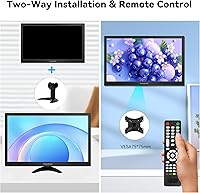
  • VESA Mounting: The monitor supports 75x75mm VESA wall or arm mounting, compatible with most standard third-party monitor brackets and adjustable arms.
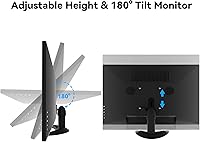
  • Stand Adjustment: The included stand supports tilt adjustment across a 0 to 180-degree range; no height adjustment mechanism is provided.
  • Eye Care: The display features a flicker-free backlight and a selectable low blue light mode intended to reduce eye strain during extended viewing sessions.
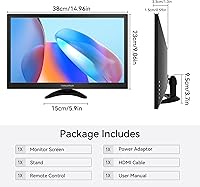
  • Remote Control: A dedicated remote control is included in the box, enabling input switching and basic display adjustments without accessing the physical on-monitor buttons.
  • Dimensions: The monitor measures 14.96 x 9.25 x 1.38 inches (W x H x D) with the stand attached.
  • Weight: Total unit weight including the stand is 3.94 pounds, light enough to reposition or transport without difficulty.
  • Model Number: This display carries model number HD-156 and is manufactured by Thinlerain, with availability beginning in April 2025.

Related Reviews
AOPEN 16PG7QT 15.6-inch Portable Touch Monitor

71%
91%
Portability
84%
Display Quality
88%
Refresh Rate Performance
78%
Touchscreen Responsiveness
71%
Connectivity & Compatibility
More
Topmonitor P15.6/2.5K 15.6-inch Portable Monitor

77%
91%
Image Sharpness
87%
Color Accuracy
93%
Portability
82%
Connectivity
88%
Value for Money
More
VILVA V156F1 15.6-inch Portable Monitor
69%
74%
Display Quality
61%
Portability
82%
Connectivity & Compatibility
67%
Build Quality
83%
Value for Money
More
Westinghouse 15.6 Inch Portable Monitor

82%
88%
Display Quality
92%
Portability
86%
Connectivity Options
94%
Ease of Setup
80%
Build Quality
More
Thinlerain HD-116 11.6-inch Portable Monitor
68%
88%
Portability & Form Factor
62%
Display Quality
47%
Color Accuracy
53%
Viewing Angles
61%
Brightness
More
LUMIPIX Magic-001 15.6-inch Portable Monitor
76%
78%
Display Quality
91%
Portability
72%
Connectivity
61%
Stand Stability
79%
Value for Money
More
HotYeah 15.6-inch 1080P Portable Monitor
76%
83%
Display Quality
62%
Brightness & Visibility
91%
Portability & Design
88%
Value for Money
93%
Setup & Ease of Use
More
SKitphrati 15.6-Inch BNC Surveillance Monitor
65%
78%
Value for Money
88%
Connectivity
84%
Setup & Installation
57%
Image Quality
53%
Brightness & Visibility
More
UPERFECT DS15607 15.6-inch 4K Portable Monitor

67%
88%
Color Accuracy
91%
Image Sharpness
57%
Brightness & Visibility
86%
Connectivity
79%
Portability & Weight
More
InnoView INVPM406 15.6-inch Portable Monitor
75%
91%
Ease of Setup
83%
Display Clarity
78%
Portability & Build
62%
USB-C Compatibility
88%
Value for Money
More

FAQ

Yes, it will. As long as your laptop has an HDMI output, you just plug in the included cable and the monitor should be detected automatically. On Windows, your display settings will let you extend or mirror your screen. On a Mac with only USB-C ports, you would need a USB-C to HDMI adapter, but the connection itself is straightforward once you have one.

Yes, and that is one of the genuinely rare things about this screen at its size and price. The BNC input — the circular connector used in most traditional CCTV and surveillance setups — is built right in, alongside a composite AV (RCA) input. Most monitors this compact do not include either, so if your camera system outputs over BNC or composite video, this is one of the few small displays that will accept it directly without any converter.

For everyday tasks — reading documents, browsing, spreadsheets, video calls — 1600x900 on a 15.6-inch panel looks reasonably sharp in practice, and most users adapt quickly. Where the gap shows is with 1080p video content, which gets slightly downscaled, or if you place it directly next to a Full HD monitor for comparison. For productivity and general use, it is a practical trade-off at this price; for media or detail-heavy work, the resolution difference is real.

Absolutely. It works as a standard extended or duplicate display on any PC with a compatible output — both HDMI and VGA inputs are available. Connect the cable, open your display settings, and choose how you want the screen to behave. Most modern operating systems detect it automatically with no additional drivers needed.

Yes. The back of the panel has a 75x75mm VESA mounting pattern, which fits the vast majority of standard monitor arms and wall brackets on the market. You would remove the included stand, align the arm with the four mounting holes, and secure it — a common and straightforward swap if you want to free up desk space or adjust height.

Honest answer: they are functional, not impressive. For video calls, background audio, or quick YouTube clips, they do the job fine. Expect thin, low-volume output with no meaningful bass — that is typical for built-in monitor speakers at any budget price. If sound quality matters for your setup, a small external speaker or a pair of headphones through the Audio Out jack will make a noticeable improvement.

It depends entirely on what you play. For turn-based games, strategy titles, retro games, and slower-paced genres, this small PC screen handles things without any real issue. For fast-paced shooters, racing sims, or competitive multiplayer titles, the 60Hz refresh rate and sub-1080p resolution will feel limiting compared to a proper gaming display. It works as a casual or secondary gaming screen, but it is not built for competitive or high-motion gaming.

Yes. There is a 3.5mm Audio Out port on the monitor that lets you plug in headphones or a small external speaker directly. There is also a 3.5mm Audio In jack if you want to route audio into the monitor's built-in speakers from another source.

Tilt is the only adjustment the included stand offers — there is no height-raise mechanism. The tilt range is quite generous, so most seated viewing angles are covered. If you need to raise the screen higher, using a VESA-compatible monitor arm is the practical solution, since the 75x75mm mounting pattern is supported.

For a lot of users, yes — and the effect is more noticeable in the evenings or during multi-hour work sessions. The combination of a flicker-free backlight and the low blue light setting removes some of the harshness that causes fatigue over time. It is not a substitute for taking breaks, but both features are well-established as genuinely useful for reducing eye strain, and the matte panel coating helps further by cutting down on reflective glare.