Overview

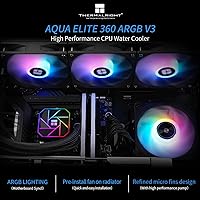
The Thermalright Aqua Elite 360 V3 AIO Cooler sits in an interesting spot in the market — it delivers genuinely competitive liquid cooling performance without asking you to spend what the big-name brands typically charge. Thermalright has built a strong reputation for making cooling hardware that punches above its weight class, and this 360mm AIO continues that tradition. It covers an impressively wide range of platforms, supporting AMD's AM4 and AM5 sockets as well as a long list of Intel LGA options including the current LGA1700. The ARGB lighting adds a visual bonus rather than serving as the main draw — the real story here is capable thermals at a price that leaves room in the budget. Installation has a few quirks worth knowing about beforehand.

Features & Benefits

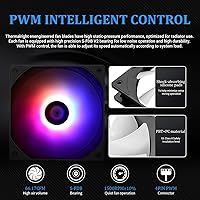
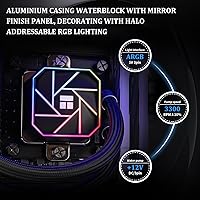
The pump at the heart of this liquid cooler is a fourth-generation design spinning up to 3,300 RPM, rated for roughly 40,000 hours of continuous operation — that longevity claim reflects a genuine engineering focus rather than marketing padding. Three 120mm fans with S-FDB bearings move a solid amount of air while staying genuinely quiet at idle, topping out around 23 dBA even under load. The aluminum radiator spans 360mm, giving it enough surface area to handle high-TDP processors without throttling under sustained workloads. Both pump and fans are PWM-controlled, so the system adjusts speed automatically rather than running flat-out constantly. The 5V ARGB header syncs with most major motherboard lighting software, though compatibility can vary depending on your specific board.

Best For

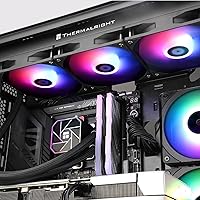
This 360mm AIO makes the most sense for builders running modern mid-to-high-end CPUs — think AMD Ryzen 7000-series on AM5 or Intel 13th and 14th-gen on LGA1700 — who want liquid cooling performance without paying a premium for brand recognition alone. If you are moving up from a large air cooler and want a meaningful thermal headroom upgrade, this Thermalright cooler handles that transition well. It also suits anyone building a system where aesthetics matter alongside function; the ARGB pump head and fans look genuinely good inside a windowed case. That said, it is not the ideal pick for extreme overclocking scenarios. Mid-tower builders with cases supporting a 360mm front or top mount will get the most out of it.

User Feedback

Buyers consistently highlight thermal performance as the standout quality — cooling results that regularly match or beat AIOs from brands charging noticeably more. Noise levels earn positive comments too, particularly at idle where the fans are barely perceptible. Where opinions get more mixed is around pump head mounting: the installation process trips up some users, especially those new to AIO builds, and the included instructions could be clearer in a few key steps. A handful of longer-term users mention faint pump noise developing after extended use, though this appears to be a minority experience rather than a widespread pattern. ARGB sync works reliably on most boards but shows occasional hiccups on certain non-ASUS and non-MSI motherboards. Overall, the value-to-performance ratio earns consistent praise.

Pros

  • Thermal performance routinely matches AIOs sold at significantly higher price points.
  • Covers a wide range of AMD and Intel sockets, including AM5 and LGA1700, without extra brackets.
  • Three PWM fans stay nearly silent at idle, making it comfortable in shared living or office spaces.
  • The fourth-generation pump is rated for long-term use and runs quietly for most users.
  • ARGB lighting on both fans and pump head looks cohesive and vibrant inside a windowed build.
  • S-FDB fan bearings reduce vibration and contribute to a quieter, more stable long-term operation.
  • Thermal paste is included in the box, removing one common additional purchase before build day.
  • This liquid cooler transfers cleanly between builds thanks to unusually broad platform support.
  • PWM fan curves respond smoothly to CPU load changes without erratic speed hunting.
  • The 360mm radiator provides genuine thermal headroom for high-TDP processors under real workloads.

Cons

  • Instruction manual quality is poor — most first-time installers will need a third-party video tutorial.
  • A subset of units develops faint pump buzzing after several months of continuous use.
  • ARGB sync can behave inconsistently on certain Gigabyte and ASRock motherboards after reboots.
  • Fan noise character under full load is slightly harsh compared to smoother-sounding premium alternatives.
  • Included thermal paste quantity leaves no real margin for error if a remount is needed.
  • Fan frames feel noticeably cheaper in hand compared to the otherwise solid pump head construction.
  • Tubing sleeve finish looks utilitarian and stands out as a weak point in aesthetics-focused builds.
  • Replacement parts and brand support are harder to access than with major Western AIO manufacturers.
  • Bracket fit on older Intel sockets feels less precise, requiring extra care to achieve good CPU contact.
  • Not well-suited for extreme overclocking scenarios where peak thermal headroom is the primary requirement.

Ratings

The scores below reflect an AI-driven analysis of verified global user reviews for the Thermalright Aqua Elite 360 V3 AIO Cooler, with spam, bot-submitted, and incentivized feedback actively filtered out before scoring. Ratings are calibrated to capture what real buyers consistently praised and where genuine frustrations surfaced — nothing is smoothed over to flatter the product. Both the strengths that make this liquid cooler a standout at its price tier and the pain points that affect a meaningful portion of buyers are represented transparently.

Thermal Performance
91%
Users running demanding CPUs — including Ryzen 9 chips and Intel Core i9 processors under sustained gaming or rendering loads — consistently report CPU temperatures that rival AIOs sold at significantly higher prices. The 360mm radiator surface area gives the cooler enough headroom to handle thermal spikes without throttling, which is exactly what high-TDP users need.
A small portion of users pairing this cooler with extreme overclocks on flagship CPUs found the thermal ceiling tighter than expected compared to premium-tier AIOs. It performs excellently at stock or moderate OC settings, but it is not engineered for pushing voltage-heavy configurations to their absolute limits.
Value for Money
94%
This is arguably where the cooler earns its strongest marks. Buyers repeatedly express surprise at how well it competes against name-brand AIOs that cost considerably more, making it a go-to recommendation for budget-conscious builders who refuse to compromise on cooling quality. For mid-tower gaming builds, the cost-to-performance ratio is genuinely hard to beat at this size.
The value proposition is strongest if you already own a compatible case and do not need to budget for a new chassis. A few buyers note that sourcing replacement fans or spare parts is less straightforward than with mainstream brands, which is a minor but real long-term consideration.
Fan Noise Level
83%
At idle and light workloads, the three included fans are impressively quiet — users working in home office environments report barely noticing the system running. The PWM control keeps fan curves sensible, so the cooler does not ramp up aggressively unless the CPU genuinely needs it.
Under extended full-load conditions, some users describe the fans as noticeably audible compared to competing AIOs at similar price points. It is not disruptive, but users in quiet recording or studio environments may find the high-RPM noise character slightly harsher than they expected based on the rated decibel spec.
Pump Reliability & Longevity
78%
22%
The rated 40,000-hour pump lifespan gives buyers confidence for long-term builds, and the majority of users who have owned the cooler for over a year report zero pump-related issues. The fourth-generation pump head runs consistently and quietly for most users across a wide range of system configurations.
A recurring thread in longer-term reviews involves faint pump buzzing or coil whine developing after several months of use in a smaller but notable subset of units. It does not appear to affect cooling performance, but it is an audible annoyance that the brand has not fully resolved across production batches.
Installation Experience
67%
33%
Buyers familiar with AIO installations generally find the mounting hardware complete and the process manageable. The wide socket compatibility means most users do not need to source additional brackets, and the included accessories cover all major AMD and Intel platforms without extra purchases.
First-time AIO builders flag the instruction manual as genuinely inadequate — the pump head mounting sequence in particular causes confusion, and several users report needing to consult third-party video tutorials to complete the install confidently. The bracket system works, but it demands more patience than competitors at this price tier.
ARGB Lighting Quality
81%
19%
The octagonal pump head with its built-in ARGB halo looks noticeably more premium than expected for a cooler at this price. Users with windowed cases frequently comment on how well the lighting integrates visually, and the fan ARGB rings produce smooth, vibrant color transitions that photograph well in build showcase posts.
Sync reliability varies depending on your motherboard ecosystem. Users on ASUS and MSI boards report smooth integration, but buyers on certain Gigabyte and ASRock boards encounter inconsistent behavior or lighting that does not hold settings after a reboot without manual reconfiguration.
Build Quality & Materials
79%
21%
The aluminum radiator feels solid and well-constructed, and the pump head has a satisfying density to it that does not feel like a cost-cut component. Tubing flexibility is good enough to route without stress in standard mid-tower cases, and the fittings show no signs of leaking or loosening in the vast majority of reported builds.
The fan frames have a slightly plasticky feel compared to what you get from premium-tier competitors, and a few users note minor cosmetic inconsistencies on the pump head finish out of the box. Nothing that affects function, but it is noticeable if you are comparing closely to higher-end AIOs.
Radiator Size & Fit
86%
The 360mm footprint fits comfortably in most mid-tower and full-tower cases that advertise 360mm support, and the radiator thickness is within standard tolerances that avoid fan clearance issues in the majority of popular chassis. Builders using cases like the Fractal Meshify or NZXT H7 report clean, stress-free mounting.
Compact mid-tower cases with limited radiator clearance can make installation tighter than expected, particularly when front-mounting alongside case fans. A handful of users in smaller enclosures report needing to remove certain case structural elements to fit the radiator, which is not always made clear before purchase.
PWM Fan Control
84%
The automatic speed adjustment tied to CPU temperature works reliably across different motherboard brands and BIOS fan control configurations. Users appreciate that the fans respond quickly to load changes without hunting or excessive speed oscillation, keeping acoustics predictable during mixed workloads like gaming sessions with intermittent rendering.
Some users prefer more granular tuning capability and find the default PWM curve on the conservative side, meaning the fans ramp up earlier than necessary on less demanding workloads. This is easy to adjust in BIOS but requires some comfort with fan curve configuration that not all buyers have.
Socket Compatibility
92%
The breadth of supported platforms is a genuine strength — covering everything from legacy Intel LGA1150 builds to current AM5 and LGA1700 systems means this cooler can transfer between builds without buying new mounting hardware. Users who upgrade CPUs frequently or build multiple systems see real practical value in this.
While the compatibility list is long, the quality of the mounting solution is not equally refined across all platforms. Users on older Intel sockets occasionally report that the bracket fit feels less precise than on the newer AMD and Intel platforms, which required slightly more care during installation to achieve optimal contact pressure.
Pump Noise at Idle
74%
26%
The majority of users report a completely inaudible pump at idle, which is important for home office builders or anyone running a secondary workstation in a quiet room. When the system is at rest, this liquid cooler blends into the background without the persistent hum that plagues lower-quality pump designs.
The minority experience of audible pump noise is real enough to warrant mention — some units exhibit a faint high-frequency tone at low load that becomes noticeable in very quiet environments. This seems to affect a specific production variance rather than the entire lineup, but it is not predictable before purchase.
Unboxing & Accessories
77%
23%
The package includes everything needed for a complete install on supported platforms, including thermal paste, which removes one common additional purchase. The accessory organization inside the box is reasonably logical, and most experienced builders can identify the correct brackets quickly without referencing the manual.
The thermal paste quantity included is sufficient for a single clean application but leaves little margin for error if you need to reseat the cooler. The instruction booklet quality feels like an afterthought relative to the hardware quality, and Thermalright would benefit from including a QR code linking to an installation video.
Aesthetics & Case Integration
82%
18%
The overall visual design is cohesive — the dark radiator finish, ARGB fans, and illuminated pump head work together rather than clashing, which is not always the case with budget AIOs that mix design languages across components. In a build with matching ARGB memory and GPU, it contributes meaningfully to the overall look.
The tubing sleeves have a utilitarian appearance that stands out as the weakest visual element when compared to braided or sleeved alternatives on premium AIOs. For buyers who care about every detail of an aesthetics-focused build, the tubing finish may feel inconsistent with the otherwise polished pump head design.

Suitable for:

The Thermalright Aqua Elite 360 V3 AIO Cooler is an excellent fit for PC builders who want genuine liquid cooling performance without paying the premium that comes with household-name brands like Corsair or NZXT. If you are running a mid-to-high-end CPU — a Ryzen 7 or 9 on AM5, or an Intel Core i7 or i9 on LGA1700 — and you want to keep temperatures in check during long gaming sessions or content creation workloads, this 360mm AIO delivers meaningful headroom without throttling concerns. AMD users making the jump to AM5 will find the mounting solution reliable and well-supported out of the box. It also suits builders upgrading from a large tower air cooler who want to free up clearance around the CPU socket for taller RAM kits while improving thermal headroom in the process. Anyone building an aesthetics-focused rig with a windowed panel will appreciate the ARGB pump head and fans, particularly if their motherboard supports 5V ARGB headers for lighting sync. The broad socket support list also makes this liquid cooler a smart investment for builders who repurpose hardware across multiple builds over time.
Not suitable for:

The Thermalright Aqua Elite 360 V3 AIO Cooler is not the right call for users planning to push flagship CPUs under heavy, sustained overclocks where every degree matters — at those extremes, the additional thermal margin offered by premium AIOs from established brands becomes meaningful. Builders working inside compact or small-form-factor cases should verify radiator clearance carefully before buying, as fitting a 360mm unit in a tight chassis can require case modifications that are not always obvious until you are mid-build. If you are a first-time AIO installer with no prior experience and no patience for video tutorials, the included instruction manual may leave you frustrated — the mounting process requires more research than the packaging implies. Users who run near-silent workstations for audio production or recording environments should also think carefully, since some units have exhibited faint pump noise under certain conditions that would be disruptive in a very quiet room. Finally, buyers who prioritize brand-backed warranty support and readily available replacement parts may prefer a more established name, as Thermalright's after-sales infrastructure is less developed than that of larger competitors.
Specifications

  • Radiator Size: The aluminum radiator measures 360mm in length, providing sufficient surface area to dissipate heat from high-TDP processors under sustained workloads.
  • Fan Dimensions: Three 120mm x 120mm x 25mm fans are included, using a standard slim profile that fits within typical radiator fan mounting clearances.
  • Fan Speed: Each fan operates at up to 1,500 RPM with a tolerance of plus or minus 10%, controlled automatically via the 4-pin PWM header.
  • Max Airflow: At peak speed, each fan moves up to 66.17 CFM of air through the radiator fins, supporting effective heat transfer under demanding CPU loads.
  • Noise Level: Fan noise is rated at a maximum of 23 dBA, keeping acoustic output low enough for most home office and gaming environments.
  • Pump Speed: The fourth-generation pump head spins at up to 3,300 RPM with a plus or minus 10% tolerance, maintaining consistent coolant circulation across variable thermal loads.
  • Pump Lifespan: Thermalright rates the pump head for up to 40,000 hours of continuous operation, which translates to roughly 4.5 years of around-the-clock use.
  • Bearing Type: All three fans use S-FDB (Stainless Fluid Dynamic Bearing) construction, which reduces mechanical vibration and supports longer operational life compared to standard sleeve bearings.
  • Lighting System: Both the fans and pump head feature ARGB lighting driven by a 5V 3-pin connector, compatible with major motherboard RGB sync ecosystems including ASUS Aura and MSI Mystic Light.
  • Power Connector: Fans connect via a standard 4-pin PWM header, allowing motherboard BIOS fan curve control without requiring additional software.
  • Radiator Material: The radiator is constructed from aluminum, which provides an effective balance of thermal conductivity and weight for a unit in this size class.
  • Pump Head Design: The pump head features an octagonal housing with an integrated ARGB halo ring surrounding the Thermalright logo, giving it a distinctive visual profile inside windowed cases.
  • Total Weight: The complete cooler assembly weighs approximately 4.25 pounds, which is within the typical range for 360mm AIO units and does not require additional motherboard support brackets in most cases.
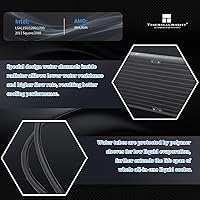
  • Socket Support: Compatible sockets include AMD AM4 and AM5, and Intel LGA1150, LGA1151, LGA1155, LGA1156, LGA1200, LGA1700, LGA2011, and LGA2066, covering a broad range of current and previous-generation platforms.
  • Coolant Tubing: The cooler uses protective mesh-sleeved tubing designed to minimize coolant evaporation over time and reduce the risk of kinking during installation or case routing.
  • Voltage: The ARGB lighting system operates at 5 volts, consistent with the 5V 3-pin standard supported by most modern motherboards with addressable RGB headers.
  • Wattage: Total power draw for the cooler system is rated at approximately 2.64 watts, making it a negligible contributor to overall system power consumption.
  • Thermal Paste: A small quantity of thermal paste is included in the box, sufficient for a single clean application on the CPU integrated heat spreader.

Related Reviews
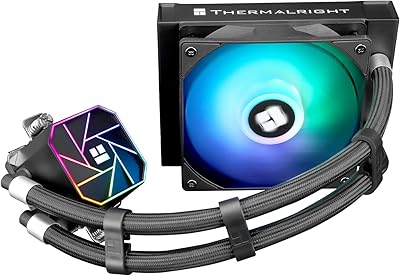
Thermalright Aqua Elite 120 V3
78%
74%
Thermal Performance
83%
Noise Level
91%
Installation Experience
78%
ARGB Lighting Quality
69%
Build Quality & Materials
More
Thermalright Aqua Elite 240 V3 CPU Cooler
80%
83%
Thermal Performance
76%
Noise Level
92%
Value for Money
88%
Installation Experience
79%
Build Quality
More
Thermalright Aqua Elite 240 V4 AIO Cooler
81%
78%
Thermal Performance
83%
Pump Quality & Reliability
81%
Fan Noise & Acoustics
89%
ARGB Lighting Quality
86%
Installation & Mounting
More
Thermalright Frozen Prism 360 AIO Liquid Cooler
79%
83%
Cooling Performance
91%
Value for Money
78%
Build Quality
69%
Fan Noise & Acoustics
74%
ARGB Lighting
More
Thermalright FW360 360mm AIO Liquid CPU Cooler
81%
88%
Thermal Performance
91%
LCD Display Quality
86%
Noise Level
58%
Software & LCD Setup
83%
Installation & Mounting
More
Thermalright FW240 Black ARGB CPU AIO Cooler
86%
92%
Cooling Performance
89%
Ease of Installation
86%
Noise Level
91%
Visual Appeal (RGB Lighting)
87%
Compatibility with CPUs
More
TRYX Panorama 360 360mm AIO Liquid Cooler
82%
93%
Display Quality
88%
Cooling Performance
91%
Build Quality & Materials
84%
Fan Performance & Noise
67%
Software (KANALI)
More
Montech HyperFlow ARGB 360 AIO Liquid Cooler
87%
90%
Cooling Performance
85%
Noise Level
92%
Ease of Installation
88%
Compatibility with Intel & AMD
91%
Warranty & Long-Term Reliability
More
Jungle Leopard PF 360 AIO CPU Cooler
77%
88%
LCD Display Quality
66%
Software Experience
81%
Thermal Performance
84%
Noise Level
78%
Build Quality
More
Thermalright Frozen Infinity 360 AIO CPU Cooler
79%
78%
Thermal Performance
83%
Noise Level
93%
Aesthetic Design
81%
ARGB Lighting Quality
76%
Build Quality & Materials
More

FAQ

Yes, it handles AM5 processors well in stock and lightly overclocked configurations. For a Ryzen 9 7950X or 9950X running at default power limits, this 360mm AIO keeps temperatures competitive with far more expensive options. If you plan to unlock eco mode or push power limits aggressively beyond stock, the thermal headroom gets tighter but remains workable for most users.

It is not difficult if you have installed an AIO before, but the included instruction booklet is genuinely thin on detail. The pump head mounting sequence is where most first-timers get stuck, particularly when aligning the backplate on AM5 or LGA1700 builds. Pulling up a video walkthrough before you start is a smart move — it saves a lot of frustration and reduces the chance of needing to reseat the cooler.

It depends on which Gigabyte board you have. On most current Gigabyte boards with RGB Fusion support, the 5V 3-pin ARGB connection works, but a handful of users report that lighting settings do not persist correctly after reboots without manual reconfiguration. If RGB sync reliability is important to your build, ASUS Aura and MSI Mystic Light boards tend to offer the smoothest experience with this cooler.

Absolutely — front mounting is actually the preferred orientation for many builders since it brings in cool ambient air directly through the radiator before it enters the case. Just make sure your case explicitly supports a 360mm front radiator, as some mid-towers have structural bracing or drive cages that reduce the usable space even when the spec sheet claims compatibility.

At idle and light loads, the fans are essentially inaudible in a closed room. Under sustained full load, they become audible but are not intrusive in a typical gaming setup — most users describe it as a consistent moderate whoosh rather than a high-pitched whine. If you run a very quiet workstation or record audio in the same room, you may find the full-load noise character slightly noticeable, but it is not a loud cooler by any objective measure.

Yes, LGA1700 support is built in and all required mounting hardware is included in the box. You do not need to purchase a separate Intel 12th or 13th-gen mounting kit — the cooler ships with everything needed for a direct install on that platform.

For the majority of users, the pump is completely silent and you would not know it is running. A small but real number of users report a faint high-frequency tone from the pump, particularly in very quiet environments. This seems inconsistent across production batches rather than being universal, but it is worth noting if you are extremely sensitive to background noise. Premium-tier brands have more consistent quality control in this area.

The fans each require their own PWM and ARGB connections, so you will need three available fan headers and three ARGB headers, or a fan hub and ARGB hub if your motherboard has limited headers. Many builds use a dedicated PWM hub to manage this cleanly — it is a common setup with triple-fan AIOs regardless of brand.

AIOs like this one are not designed for user-serviceable pump replacement in the way that custom loops are. If the pump fails out of warranty, the practical solution is replacing the entire unit rather than repairing it. The 40,000-hour pump rating suggests Thermalright designed it for longevity, but as with any closed-loop AIO, the pump is the component most worth monitoring over a multi-year ownership period.

Yes, LGA2011 is on the supported socket list and the necessary hardware is included in the package. If you are running an older Haswell-E or Broadwell-E workstation CPU and want a liquid cooling upgrade without buying a platform-specific cooler, this liquid cooler is a practical and cost-effective option for that use case.

Where to Buy