Overview

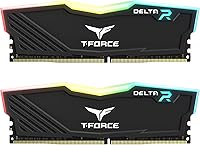
The TEAMGROUP T-Force Delta RGB 16GB DDR4 RAM enters a crowded market with a clear proposition: solid performance, eye-catching lighting, and a price that doesn't require justification. Running in a 2x8GB dual-channel configuration at 3600MHz, it lands squarely in the speed tier most builders actually need — fast enough for gaming and everyday workloads, without the diminishing returns that come with chasing higher frequencies. TEAMGROUP doesn't carry the same brand recognition as Corsair or G.Skill, but their quality consistency has earned genuine credibility over time. The CL18 latency is competitive rather than class-leading, and that's an honest trade-off at this price point. Expect dependable compatibility and a strong visual presence in any build.
Features & Benefits

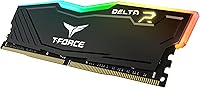
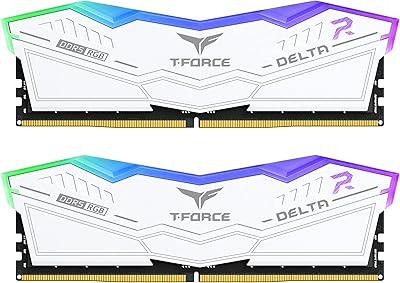
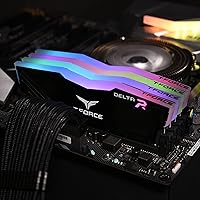
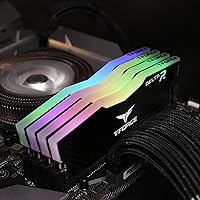
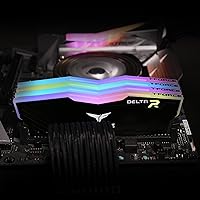
What makes this Delta RGB kit stand out visually is the full-frame diffuser — a 120-degree wide-angle design that spreads light evenly rather than concentrating it into a narrow top strip. The result inside a windowed case is noticeably more polished than cheaper alternatives. The built-in Force Flow effect runs independently of any software, which means you get RGB without needing to install anything. That said, ASUS Aura Sync is where the ecosystem integration truly shines; buyers on MSI or Gigabyte boards should verify compatibility before assuming seamless sync. The aluminum heat spreader handles thermals well under sustained load, and the asymmetric design reads as stylish rather than aggressive. One minor listing quirk: voltage is cited as both a 1.2–1.4V range and 1.35V specifically — the latter is correct and perfectly standard for DDR4.

Best For

This DDR4 memory module is squarely aimed at mid-range desktop builders who care about how their system looks as much as how it performs. It's a particularly strong fit for Ryzen-based systems, where 3600MHz dual-channel has long been the community-recommended memory configuration for extracting the most from the platform. ASUS board owners will get the cleanest RGB sync experience right out of the box. First-time builders will find the XMP setup approachable — though it's worth knowing upfront that you need to enable XMP manually in your BIOS; the kit won't hit rated speed automatically. Anyone chasing ultra-tight latency or already eyeing DDR5 will want to look at more specialized options, but for the value-focused RGB builder, this kit is hard to argue against.

User Feedback

Over 12,000 ratings with a 4.8-star average puts the T-Force Delta sticks among the most reviewed and best-regarded kits in the DDR4 category — a level of sustained positive feedback that's difficult to dismiss. Buyers frequently praise how straightforward installation is and how even and bright the lighting looks compared to similarly priced options. Stable XMP performance at the rated speed is another point that comes up repeatedly. On the critical side, some users on non-ASUS boards report difficulty getting RGB sync to work cleanly, and a recurring note across reviews is that forgetting to enable XMP in BIOS leaves the kit running at stock DDR4 speed — a simple fix, but one that has caught a few buyers off guard. Long-term durability feedback is largely reassuring, with very few reports of failure over time.

Pros

  • Full-frame RGB diffuser produces noticeably even, bright lighting that outperforms cheaper strip-only designs.
  • 3600MHz dual-channel configuration hits the performance sweet spot for Ryzen-based gaming systems.
  • The built-in Force Flow lighting effect works without any software installed, which is a genuine convenience.
  • ASUS Aura Sync integration is clean and reliable for buyers already in that motherboard ecosystem.
  • Aluminum heat spreader keeps temperatures stable under sustained workloads without adding bulk.
  • Over 12,000 ratings averaging 4.8 stars reflects consistent real-world satisfaction across a large user base.
  • XMP setup is straightforward for first-time builders willing to spend two minutes in BIOS.
  • The asymmetric design looks modern and restrained rather than aggressively styled, suiting a wider range of builds.
  • Long-term reliability feedback from buyers is reassuring, with very few reports of kit failure over time.
  • Competitive value compared to similarly specced kits from Corsair Vengeance or G.Skill Ripjaws at this speed tier.

Cons

  • CL18 latency is not the tightest available at 3600MHz, which matters to performance-focused buyers.
  • RGB synchronization on non-ASUS motherboards can be inconsistent and may require additional software workarounds.
  • The product listing contains a voltage discrepancy, citing both a 1.2–1.4V range and a fixed 1.35V spec, which can confuse buyers.
  • XMP must be manually enabled in BIOS; the T-Force Delta sticks will default to slower JEDEC speeds otherwise.
  • 16GB may feel limiting sooner than expected for users who multitask heavily or run memory-intensive creative applications.
  • TEAMGROUP carries less brand recognition than established names, which can make warranty and support experiences feel less certain.
  • No DDR5 compatibility means this kit has a shorter relevance window for builders planning to upgrade platforms soon.
  • The full-frame diffuser adds height that may create clearance issues with large aftermarket CPU coolers in tighter cases.

Ratings

The scores below were generated by AI after analyzing thousands of verified global purchases of the TEAMGROUP T-Force Delta RGB 16GB DDR4 RAM, with spam, incentivized reviews, and bot-flagged submissions actively filtered out before scoring. Each category reflects the honest distribution of buyer sentiment — where this DDR4 memory module genuinely impresses and where real users have run into friction. Both strengths and recurring pain points are represented transparently so you can make a fully informed decision.

Value for Money
91%
Buyers consistently note that this Delta RGB kit punches above its price bracket, delivering 3600MHz dual-channel performance alongside premium-looking RGB without the cost premium of Corsair Dominator or G.Skill Trident Z. For mid-range builds on a budget, that combination is genuinely hard to replicate at this price point.
A small segment of buyers feel that narrowing the gap to G.Skill Ripjaws or Corsair Vengeance LPX pricing makes the value case tighter than it appears, particularly for users who do not care about RGB and would prefer to pay less for plain sticks with tighter timings.
RGB Lighting Quality
93%
The full-frame diffuser design is one of the most frequently praised aspects across thousands of reviews, with buyers describing the light spread as even, vibrant, and noticeably more polished than the narrow-strip RGB found on competing kits at similar prices. Inside a windowed case, it makes an immediate visual impact.
A minority of users note that the lighting can appear slightly uneven at the very edges of the diffuser under certain viewing angles, and the fixed color cycling of the default Force Flow effect is not to every buyer's taste without a sync app to customize it.
Ease of Installation
88%
First-time builders in particular highlight how straightforward the physical installation is, with the modules seating firmly and the XMP profile loading cleanly in BIOS once enabled. The kit ships as a matched dual-channel pair, which removes any guesswork about slot pairing.
The single most common complaint tied to installation is that XMP must be manually activated in BIOS — buyers who miss this step find their kit running at default 2133MHz and incorrectly assume the product is faulty. The kit itself is not to blame, but the out-of-box experience could be clearer.
Performance at Rated Speed
86%
Once XMP is enabled, the T-Force Delta sticks hit and hold 3600MHz without instability across a wide range of platforms, including Intel and AMD Ryzen systems. For gaming workloads on Ryzen in particular, the performance improvement over slower DDR4 kits is tangible and well-documented by buyers.
The CL18 latency is the one area where enthusiast buyers express mild disappointment, noting that competing kits at the same frequency can offer CL16 or even CL14 profiles. The real-world gaming difference is marginal, but buyers chasing benchmark performance will feel the limitation.
RGB Software Compatibility
67%
33%
For ASUS motherboard owners, Aura Sync integration works cleanly and reliably, with buyers reporting accurate color matching and stable sync across multiple components. The software-free default lighting mode also ensures the kit looks great from first boot without any installation step.
Buyers running MSI, Gigabyte, or ASRock boards report inconsistent results with RGB sync — some achieve partial compatibility through third-party tools, others give up entirely and leave the kit on its default cycle. This is the most polarizing aspect of the ownership experience for non-ASUS users.
Thermal Management
83%
The aluminum alloy heat spreader keeps module temperatures well within comfortable operating ranges even during extended gaming sessions or multi-hour productivity workloads. Buyers running the kit in warm cases or with modest airflow report no thermal throttling or stability issues tied to heat.
A small number of buyers note that the heat spreader adds meaningful height to the module, creating clearance conflicts with wide-base tower coolers. This is not a thermal failure but a physical compatibility issue that catches some builders off guard mid-build.
Build & Physical Quality
84%
The modules feel solid and well-manufactured in hand, with the asymmetric heat spreader design sitting flush and consistent across both sticks in the kit. Buyers appreciate that the aesthetic looks intentional and mature rather than a generic RGB afterthought.
A few users mention minor cosmetic inconsistencies between the two sticks in their kit — slight differences in diffuser brightness or heat spreader finish alignment. These appear to be infrequent quality control variations rather than a systematic issue.
Long-Term Reliability
89%
Across a review base exceeding 12,000 verified buyers, reports of module failure or degradation over time are rare. Many buyers specifically mention running these sticks for one to three years without any drop in stability, clocking, or lighting performance, which is a meaningful reliability signal.
Because TEAMGROUP is a smaller brand than Corsair or Kingston, some buyers express residual uncertainty about warranty claim experiences, particularly for international purchases. The product performs reliably, but the brand's support infrastructure does not inspire the same confidence as tier-one competitors.
Compatibility Range
81%
19%
The kit works across a broad range of Intel and AMD desktop platforms, and the JEDEC RC 2.0 PCB contributes to stable signaling on modern memory controllers. Most buyers report no compatibility issues across a wide variety of mid-range and mainstream motherboards from major manufacturers.
Compatibility with some older or budget motherboards can require BIOS updates before the XMP profile loads reliably, and a small number of users report needing to manually set timings rather than relying on the XMP profile alone. It is not a dealbreaker, but it adds setup complexity for some.
Aesthetic Design
87%
The asymmetric minimalist design is one of the more visually distinctive choices in the DDR4 market at this tier, avoiding the over-styled look that makes some RGB kits feel dated after a build refresh. Buyers who want their system to look refined rather than aggressive find this kit particularly appealing.
A subset of buyers who prefer a more aggressive or symmetrical gamer aesthetic find the understated design underwhelming, and feel the heat spreader profile looks plain when the RGB is switched off or runs a single static color.
Packaging & Unboxing
76%
24%
The kit arrives well-protected, and buyers generally report no physical damage on arrival even through standard shipping. The retail packaging is clean and organized, with both sticks secured in a way that prevents contact damage during transit.
The packaging does not include any quick-start guide or clear instructions for enabling XMP, which contributes to the recurring BIOS confusion new builders experience. A simple printed note reminding buyers to enable XMP would reduce a large share of the setup frustration documented in reviews.
Overclocking Headroom
62%
38%
Some enthusiast buyers have successfully pushed this DDR4 memory module beyond its rated 3600MHz with manual timing adjustments, reporting stable operation at 3733MHz or slightly tighter CL timings on capable motherboards. For those willing to experiment, there is modest headroom available.
The CL18 baseline and the mid-range IC (integrated circuit) binning typical for this price tier mean overclocking potential is limited compared to higher-end kits. Buyers specifically seeking memory for aggressive overclocking will find the ceiling frustrating and should invest in a better-binned alternative.
Dual-Channel Stability
92%
As a pre-matched pair, the two sticks run in dual-channel mode reliably across virtually every compatible platform buyers have tested them on. The memory bandwidth improvement over single-channel configurations is immediately measurable, particularly on Ryzen systems where it directly affects CPU throughput.
A very small number of buyers report needing to reseat modules or try different DIMM slot combinations before the system posts reliably in dual-channel mode. This is almost always a motherboard or slot issue rather than a kit defect, but it does create initial confusion.

Suitable for:

The TEAMGROUP T-Force Delta RGB 16GB DDR4 RAM is a strong fit for mid-range desktop builders who want their system to look as good as it performs, without spending flagship money to get there. It is particularly well-matched to Ryzen platform builds, where a 3600MHz dual-channel configuration is the widely accepted sweet spot for balancing memory bandwidth and CPU performance. ASUS motherboard owners will get the most out of the RGB ecosystem, with Aura Sync delivering clean, coordinated lighting across compatible components right from the start. First-time builders will also find this kit approachable — the XMP profile is straightforward to enable in BIOS, and stable out-of-the-box behavior means less troubleshooting. For anyone upgrading from a single-stick or slower DDR4 setup on a budget, this DDR4 memory module delivers a meaningful, perceptible improvement in both performance and aesthetics.
Not suitable for:

The TEAMGROUP T-Force Delta RGB 16GB DDR4 RAM is not the right call for builders who prioritize tightly tuned latency over visual impact — enthusiasts chasing CL14 or CL16 kits for competitive performance margins will find better options from G.Skill or Corsair at a comparable price. Laptop or small form factor builders are out immediately, as this is a full-size DIMM designed exclusively for desktop platforms. Buyers running MSI, Gigabyte, or ASRock motherboards should also proceed with caution: Aura Sync is an ASUS-specific ecosystem, and getting consistent RGB synchronization on other platforms may require extra software steps or may not work reliably at all. Anyone already planning a DDR5 platform transition will find little long-term value here, as DDR4 kits will not carry forward to next-generation builds. Finally, users who need more than 16GB for professional workloads like video editing or 3D rendering should consider a 32GB kit from the outset rather than planning to upgrade later.
Specifications

  • Capacity: This kit provides 16GB of total memory arranged as two 8GB modules in a dual-channel configuration.
  • Memory Type: The modules use DDR4 SDRAM technology, compatible with desktop motherboards that support the DDR4 standard.
  • Speed: Rated at 3600MHz (PC4-28800), which represents one of the most practical and well-supported speeds for modern gaming platforms.
  • Latency: The kit operates at CL18 timings, a competitive but not class-leading latency profile for the 3600MHz speed tier.
  • Voltage: Standard operating voltage is 1.35V, which falls within safe and widely supported DDR4 norms across current desktop platforms.
  • Form Factor: Standard full-size DIMM format, designed exclusively for desktop motherboards and not compatible with laptop or SO-DIMM slots.
  • PCB Standard: Built on the latest JEDEC RC 2.0 PCB, which supports improved signal integrity and compatibility with modern memory controllers.
  • RGB Lighting: Features a full-frame 120-degree wide-angle diffuser that spreads light evenly across the entire module surface rather than just the top edge.
  • Lighting Effect: The built-in Force Flow RGB effect runs independently of any software, so the lighting is active even before an operating system or sync app is installed.
  • RGB Sync: Officially supports ASUS Aura Sync for ecosystem-level RGB coordination; compatibility with MSI Mystic Light or Gigabyte RGB Fusion should be verified per motherboard.
  • Heat Spreader: The aluminum alloy heat spreader helps dissipate heat during sustained workloads and adds structural protection to the PCB.
  • Design: Asymmetric minimalist styling gives the module a restrained, modern look that does not rely on aggressive gamer-oriented aesthetics.
  • Color: Available in black, with the RGB diffuser providing the primary visible color contribution during operation.
  • Dimensions: Each module measures 5.79 x 0.28 x 1.93 inches, which is taller than baseline DDR4 sticks and may affect clearance with large CPU coolers.
  • Weight: The kit weighs 3.53 ounces in total, consistent with other aluminum heat-spreader DDR4 dual-stick configurations.
  • Compatible Devices: Designed for desktop PCs only; not intended for use in workstations, servers, or any compact or mobile form factor.
  • XMP Support: The kit includes an XMP profile for one-click speed activation in BIOS, though the profile must be manually enabled to operate above default JEDEC speeds.
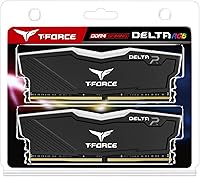
  • Module Count: Sold as a matched pair of two 8GB sticks, pre-validated for dual-channel operation to maximize memory bandwidth.

Related Reviews

TEAMGROUP T-Force Delta RGB 32GB DDR5 RAM
80%
88%
XMP Setup Ease
89%
Speed & Bandwidth
86%
System Stability
91%
RGB Aesthetics
71%
Value for Money
More
TEAMGROUP T-Force Vulcan Z 16GB DDR4 RAM
81%
93%
Value for Money
86%
Performance at Rated Speed
91%
Ease of Setup
88%
Stability & Reliability
79%
Compatibility
More
TEAMGROUP T-Force Delta RGB 32GB DDR5 RAM
80%
91%
Installation Ease
88%
Stability & Reliability
86%
Performance at Rated Speed
84%
RGB Lighting Quality
83%
Thermal Performance
More
TEAMGROUP T-Force Vulcan Z DDR4 16GB Kit (2x8GB) 3200MHz
82%
93%
Value for Money
91%
Installation & Setup
88%
XMP Profile Reliability
86%
Build Quality & Durability
84%
Thermal Management
More
TEAMGROUP T-Force Delta RGB DDR5 48GB RAM
82%
88%
XMP Compatibility
91%
Stability & Reliability
84%
Performance at Rated Speed
86%
RGB Lighting Quality
74%
Value for Money
More
TEAMGROUP T-Force Delta RGB DDR5 32GB RAM
83%
88%
Performance at Rated Speed
91%
XMP 3.0 Compatibility
84%
AMD Expo Compatibility
83%
Out-of-Box Setup
89%
Stability & Reliability
More
TEAMGROUP T-Force Delta Alpha 64GB DDR5 RAM
83%
91%
EXPO Activation & Setup
86%
Memory Performance
83%
Platform Compatibility
88%
RGB Lighting Quality
81%
Software Integration
More
TEAMGROUP T-Create Expert 16GB DDR4 Desktop RAM
83%
93%
XMP Stability
91%
Value for Money
89%
Long-Term Reliability
74%
Motherboard Compatibility
86%
Performance at Rated Speed
More
TEAMGROUP T-Create Expert 32GB DDR4 RAM Kit
85%
93%
XMP Compatibility
91%
Stability & Reliability
88%
Performance at 3600MHz
92%
Value for Money
89%
Ease of Installation
More
TEAMGROUP T-Force Delta RGB 96GB DDR5 RAM
82%
91%
Memory Performance
88%
XMP Setup Experience
89%
System Stability
74%
Capacity Value
87%
RGB Lighting Quality
More

FAQ

No, you do not. The built-in Force Flow effect runs automatically as soon as the system powers on, without any drivers or sync software installed. If you want to customize colors or synchronize with other components, you can use ASUS Aura Sync — but it is entirely optional.

The modules will almost certainly work as DDR4 memory on any compatible motherboard, but RGB synchronization is a different story. Aura Sync is an ASUS-specific ecosystem, so if you are running MSI Mystic Light or Gigabyte RGB Fusion, you may need extra software steps or may find that sync does not work reliably. It is worth checking your motherboard's RGB compatibility list before buying.

This is one of the most common memory questions, and the answer is simple: XMP has not been enabled. DDR4 modules default to the base JEDEC speed, which is typically 2133MHz or 2400MHz, regardless of what the kit is rated for. Go into your BIOS, find the XMP or DOCP setting, and enable it to unlock the rated 3600MHz speed.

Yes, for the vast majority of games, 3600MHz dual-channel is more than sufficient and represents a practical performance ceiling where real-world gains start to flatten. CL18 is not the tightest latency profile available at this speed, but the difference between CL18 and CL16 at 3600MHz is measurable in benchmarks and barely noticeable in gameplay.

It is a particularly good match for Ryzen. AMD's Infinity Fabric architecture is closely tied to memory frequency, and 3600MHz has long been identified by the community as the sweet spot that keeps the Fabric running at its most efficient speed. Running a 2x8GB dual-channel configuration at this speed is one of the simplest ways to improve a Ryzen system's overall responsiveness.

The T-Force Delta sticks stand 1.93 inches tall, which is on the taller side for DDR4. Large tower coolers with wide heatsink bases can sometimes overhang the first DIMM slot. Before installing, check your CPU cooler's specifications for DIMM clearance, especially if you are running something like a Noctua NH-D15 or a large Scythe cooler.

Technically yes, if your motherboard has four DIMM slots and supports 32GB configurations, but there are real caveats. Running four sticks instead of two puts more stress on the memory controller and can make hitting 3600MHz less stable. You may need to drop to a lower speed or loosen timings. Buying a 32GB kit upfront is almost always the cleaner path if you think you will need that capacity.

The TEAMGROUP T-Force Delta RGB 16GB DDR4 RAM competes closely with both in raw performance at 3600MHz. Where it differentiates itself is the full-frame RGB diffuser, which is visually more impactful than the narrower lighting on standard Ripjaws or Vengeance LPX sticks. Corsair's Dominator Platinum has better aesthetics and tighter latency options but costs considerably more. For the price, this Delta RGB kit holds up well against either alternative.
Not really, though it is fair to notice the discrepancy. The product listing mentions both a 1.2–1.4V range and a specific 1.35V figure. The 1.35V is the correct rated operating voltage for this kit under XMP, and it sits squarely within standard DDR4 territory. There is nothing unusual or worrying about it.

Based on the large volume of user feedback, long-term reliability appears solid. Across thousands of reviews, reports of module failure are rare, and many users report stable operation over extended periods without any degradation in performance or lighting. As with any memory kit, keeping your system well-ventilated helps, but there is no specific reliability concern with this DDR4 memory module that stands out from the feedback.

Where to Buy