Overview

The TEAMGROUP T-Force Delta RGB 32GB DDR5 RAM sits at a genuinely interesting position in the DDR5 market — fast enough to satisfy serious enthusiasts, but not so extreme that it demands exotic cooling or hours of manual tuning. Running at 7600MHz, this DDR5 kit clears the 5600–6000MHz range most mainstream platforms call home, while stopping short of the 8000MHz+ tier where real-world stability can get dicey. The 2x16GB dual-channel configuration makes sense for both gaming and bandwidth-hungry creative workloads. TEAMGROUP is not a boutique brand chasing hype — they have built enough memory products to understand that plug-and-play reliability matters more than paper specs.

Features & Benefits

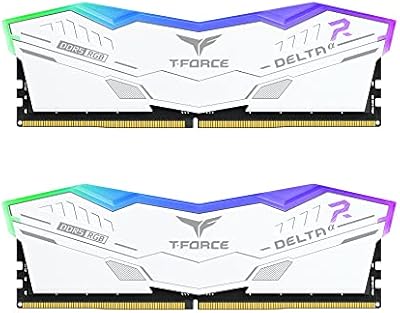
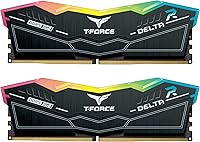
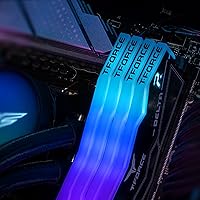
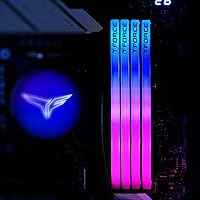
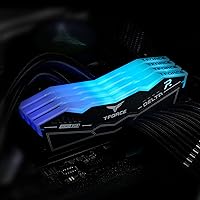
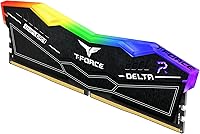
XMP 3.0 is the headline feature for most buyers, and it works as advertised — enable it in BIOS once, and the kit runs at its rated 7600MHz without touching a single timing manually. The Samsung A-Die ICs underneath the heat spreader are a meaningful detail: A-Die is known for tighter voltage tolerances and better overclocking headroom, which means this T-Force memory has real potential beyond its rated speed for those willing to push further. On-die ECC is worth clarifying — this is not server-grade error-correcting memory; it is an on-chip correction layer that quietly catches single-bit errors before they affect stability. The reinforced PMIC cooling design reduces thermal stress on the power hardware at 1.4V, and the 120-LED strips deliver broad, even coverage per module.

Best For

This DDR5 kit is squarely built for Intel-platform builders — those running Z690, Z790, or the newer 800-series motherboards paired with 13th, 14th Gen, or Arrow Lake processors. AMD users should look elsewhere; the Delta RGB modules are not validated for Ryzen, and forcing high-frequency DDR5 profiles on an unsupported platform routinely causes boot failures. Gamers running CPU-sensitive titles will see a real bandwidth benefit, and content creators handling large video or 3D workloads will notice the headroom too. The lighting integrates cleanly with ASUS Aura Sync, MSI Mystic Light, and Gigabyte RGB Fusion without major software friction. Manual timing tuning is available for advanced users who want to push beyond XMP, but the out-of-box profile holds up well on its own.

User Feedback

With over 3,800 ratings sitting at 4.6 out of 5, the overall picture is positive — but the specifics are worth unpacking. The most consistent praise centers on XMP stability at boot: most buyers report hitting the rated 7600MHz speed on first BIOS enable without needing a firmware update, which is not something you can always count on at this frequency. RGB brightness gets repeated mentions as punchy and even across the module, not just bright at the edges. On the critical side, a segment of users flagged compatibility issues with certain motherboards, particularly around XMP 3.0 voltage sub-profiles not landing exactly as expected. Long-term reports are mostly solid, though a handful of QC inconsistencies have been noted — a realistic caveat worth keeping in mind before buying.

Pros

  • XMP 3.0 makes hitting 7600MHz as simple as a single BIOS toggle — no manual timing work required.
  • Samsung A-Die ICs provide genuine overclocking headroom beyond the rated speed for builders who want to push further.
  • On-die ECC quietly improves day-to-day system stability without requiring any user configuration.
  • The reinforced PMIC cooling design reduces voltage instability during sustained high-frequency operation at 1.4V.
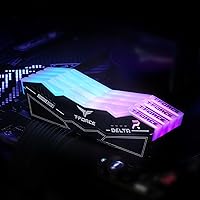
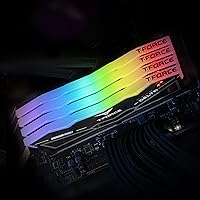
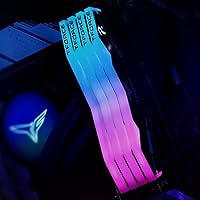
  • 120-LED RGB coverage per module is broad and even, with no obvious dim zones near the edges.
  • Integrates cleanly with ASUS Aura Sync, MSI Mystic Light, and Gigabyte RGB Fusion without extra software setup.
  • Over 3,800 user ratings averaging 4.6 out of 5 reflect a strong track record of real-world reliability.
  • The 2x16GB dual-channel layout delivers meaningful bandwidth for both gaming and creative workloads.
  • Most buyers report clean first-boot XMP success without needing a motherboard firmware update first.
  • Long-term stability feedback from users across months of continuous use is largely encouraging.

Cons

  • Strictly limited to Intel 600 and 700 series platforms — AMD Ryzen builders need to look elsewhere entirely.
  • CL36 primary timings are not the tightest available at this price tier; competing kits offer better latency profiles.
  • A subset of users has reported compatibility friction with specific motherboards when enabling the XMP 3.0 profile.
  • XMP 3.0 voltage sub-profile behavior does not always match advertised specs across every board and BIOS combination.
  • QC consistency is not perfect — a small but notable share of buyers have flagged unit-level variance.
  • RGB software conflicts have been reported by users whose lighting ecosystems fall outside the three major supported platforms.
  • The price premium over mainstream 5600–6000MHz DDR5 kits is difficult to justify for workloads that are not memory-bandwidth-intensive.
  • At 7600MHz with CL36, real-world latency gains over a well-tuned lower-speed kit can be marginal in certain workloads.
  • Buyers needing cross-platform flexibility will find the Delta RGB modules too narrowly validated for Intel-only use.

Ratings

Our AI rating system analyzed thousands of verified buyer reviews worldwide for the TEAMGROUP T-Force Delta RGB 32GB DDR5 RAM, actively filtering out spam, incentivized submissions, and bot-generated feedback to surface authentic experiences from real builders and enthusiasts. The scores below reflect a balanced synthesis of what this DDR5 kit consistently gets right and where buyers have encountered genuine friction — nothing here is softened to flatter the product. Strengths in XMP reliability, RGB quality, and raw bandwidth are weighed honestly alongside documented pain points in platform exclusivity, latency trade-offs, and occasional QC variance.

XMP Setup Ease
88%
Most buyers describe enabling 7600MHz as a one-time BIOS toggle with no manual timing input needed — enable XMP, save, and the kit runs at its rated speed from the next boot. For builders who want high-frequency performance without memory tuning expertise, this workflow is a real practical advantage.
A notable share of users needed a BIOS firmware update before the XMP 3.0 profile stabilized properly, adding an unexpected step for builders on older board firmware. Some also reported that voltage sub-profiles under XMP 3.0 did not land exactly as advertised on certain motherboard and chipset combinations.
Speed & Bandwidth
89%
At 7600MHz in dual-channel mode, this DDR5 kit delivers a bandwidth level that translates into measurable gains in CPU-bound gaming and data-heavy creative tasks like video encoding and large-asset batch processing. Builders moving up from 5600–6000MHz kits consistently report a noticeable throughput improvement in demanding workloads.
The gains are most apparent in bandwidth-sensitive workloads; for everyday desktop use, web browsing, and lighter productivity tasks, the difference versus a well-configured 6000MHz kit is difficult to perceive in practice. Users expecting dramatic improvements across all scenarios may find the real-world delta narrower than synthetic benchmark numbers suggest.
System Stability
86%
The combination of Samsung A-Die ICs, on-die ECC, and a reinforced PMIC design gives this DDR5 kit a solid engineering foundation for sustained stable operation. A strong majority of long-term reviewers report months of continuous use without memory-related crashes, BSODs, or spontaneous reboots under typical mixed workloads.
A subset of buyers — particularly those on Z690 boards with early BIOS revisions — reported instability at the rated XMP speed until a firmware update resolved the profile. The on-die ECC layer adds an internal reliability benefit, but it is not a substitute for a well-matched board and BIOS combination that properly supports the speed profile.
RGB Aesthetics
91%
The 120-LED strip per module consistently earns praise for brightness and coverage uniformity — buyers note the lighting extends evenly across the full module length without the dimming near the ends that affects some competing kits. Inside a windowed mid-tower case, the visual result is strong and cohesive without appearing overdone.
The RGB housing adds height to each module, which creates real clearance concerns near bulky air coolers in tighter builds. A handful of users also found the default brightness profile more aggressive than expected, and dimming to a subtle glow requires navigating the lighting software rather than any hardware control.
Value for Money
71%
29%
For builders actively targeting Intel Z790 or 800-series platforms and running memory-bandwidth-intensive workloads, the performance delivered at 7600MHz offers reasonable justification for the premium. The Samsung A-Die ICs and PMIC cooling design add technical substance that some competing kits at similar price points genuinely lack.
For users whose workloads are not memory-bandwidth-sensitive, the price gap over a solid 6000MHz DDR5 kit is difficult to rationalize given the slim day-to-day performance difference. Budget-focused builders and those running light gaming or routine productivity work will likely find better overall value choosing a lower-frequency alternative.
Overclocking Headroom
82%
18%
Samsung A-Die ICs are well-regarded among enthusiasts for tolerating operation beyond rated speeds, and this T-Force memory appears to follow that pattern — users with capable Z790 boards have reported stable runs above 7600MHz with conservative manual timing adjustments and modest voltage increases.
Actual headroom varies significantly depending on the CPU integrated memory controller quality and specific motherboard trace routing, so not every builder will reach the same ceiling. Users expecting to push comfortably into the 8000MHz range on a first attempt may find the process more iterative and board-dependent than anticipated.
Platform Flexibility
57%
43%
Within its supported ecosystem — Z690, Z790, and 800-series Intel boards — the Delta RGB modules perform as intended and appear on QVLs across major board brands including ASUS, MSI, and Gigabyte. For builders already firmly committed to a current Intel platform, the exclusivity is a non-issue in practice.
This kit is entirely incompatible with AMD Ryzen platforms and any Intel board predating the 600 series, which excludes a significant portion of the PC building market outright. Buyers who might transition to an AMD platform later, or who are purchasing memory for use across different builds, will find the scope of support frustratingly narrow.
Latency Profile
73%
27%
CL36 at 7600MHz is a reasonable primary timing for this speed tier, and the raw bandwidth advantage of running at this frequency largely offsets the wider CAS window in most real-world workloads. Gamers and content streamers in particular tend to benefit more from the throughput headroom than they lose from the less aggressive primary timings.
Competing kits at similar price points offer tighter primary timings that deliver better effective latency in response-time-sensitive applications. Users who prioritize the lowest possible memory access latency — especially in competitive gaming scenarios where every millisecond of response time is scrutinized — may find a tighter-timed lower-frequency kit a better practical fit.
Thermal Management
83%
The reinforced PMIC cooling design is a meaningful engineering choice for a kit operating continuously at 1.4V and 7600MHz. Reviewers running extended stress tests and multi-hour rendering sessions consistently report that the modules stay thermally stable without voltage-related crashes or performance dips under sustained load.
The heat spreader relies entirely on passive airflow, which means case ventilation quality has a larger-than-typical influence on module operating temperatures at this frequency. Builders in compact or poorly ventilated enclosures have occasionally flagged elevated temperatures during prolonged memory-intensive workloads, particularly in warm ambient environments.
RGB Software Integration
77%
23%
Integration with ASUS Aura Sync, MSI Mystic Light, and Gigabyte RGB Fusion works without significant friction for the majority of users on those three platforms. Lighting effects and color synchronization with other components generally behave predictably after a straightforward initial software setup, with no custom drivers needed.
Users running lighting ecosystems outside the three officially supported platforms have reported sync conflicts and occasional modules reverting to a default color cycle after system restarts. TEAMGROUP's own lighting utility provides a fallback, but a portion of users find it less polished and less feature-complete than their preferred motherboard vendor tools.
Build & Finish Quality
85%
The black aluminum heat spreader feels solid in hand and seats cleanly in DIMM slots without requiring excessive insertion force. Buyers frequently note a build quality that feels appropriate for the price tier, contrasting favorably with competing kits that use thinner or more flexible spreader materials.
The spreader finish is susceptible to fingerprints and light surface scuffs during installation — a minor cosmetic complaint that comes up consistently from detail-oriented builders who handle their components carefully. There are no widespread structural defect reports, but the surface is worth treating gently during module seating.
QC Consistency
72%
28%
The large majority of buyers across more than 3,800 reviewed purchases received working, stable units that hit their rated spec straight out of the box. DOA and early-failure reports represent a small fraction of total feedback, suggesting manufacturing quality control is broadly adequate for a high-volume product at this price tier.
A consistent enough thread of QC variance reports exists to flag as a real consideration — some buyers received kits where one module showed instability the paired module did not, pointing to potential batch-level inconsistency. This pattern is not the dominant experience, but it appears frequently enough in the review pool to take seriously.
Long-Term Reliability
84%
Users who have run the Delta RGB modules continuously for six months or more generally report no meaningful degradation in stability or performance over time. No worsening XMP boot behavior, no creeping instability under load, and no LED failures developing gradually are the consistent themes in long-term ownership feedback.
The long-term dataset is still relatively shallow compared to established DDR4 products with years of field history, and a small number of users have reported gradual instability emerging months after an initially stable period. Unit-to-unit variance in long-run durability may be slightly wider than the aggregate score alone suggests.

Suitable for:

The TEAMGROUP T-Force Delta RGB 32GB DDR5 RAM is a strong match for Intel platform builders running Z690, Z790, or 800-series motherboards with 13th, 14th Gen, or Arrow Lake processors — anyone in that bracket who wants near-top-end DDR5 speeds without spending weeks dialing in manual timings will find this kit genuinely practical. The XMP 3.0 profile means setup is a single BIOS toggle, which makes it approachable for enthusiasts who are not memory overclocking specialists but still want to run well above baseline DDR5 speeds. Gamers who play CPU-sensitive titles stand to benefit from the memory bandwidth uplift at 7600MHz, particularly in games where frame rates are gated by processor throughput rather than GPU horsepower. Content creators — video editors, motion graphics artists, and 3D rendering hobbyists — will also find the dual-channel bandwidth useful when handling large assets in RAM-heavy applications. The Samsung A-Die ICs and reinforced PMIC design give this kit a practical ceiling beyond its rated spec, making it a reasonable pick for builders who might want to experiment with manual tuning later. If RGB lighting matters to your build aesthetic and you already use ASUS Aura Sync, MSI Mystic Light, or Gigabyte RGB Fusion, the 120-LED coverage per module integrates without needing a separate controller app.

Not suitable for:

The TEAMGROUP T-Force Delta RGB 32GB DDR5 RAM is explicitly not validated for AMD Ryzen platforms, and buyers building on AM5 or AM4 should cross this off their list entirely — forcing unsupported XMP profiles on incompatible platforms is a reliable path to boot instability and wasted troubleshooting time. It also will not work on older Intel platforms predating the 600 series, so LGA1200 and earlier socket users need to look at DDR4 options instead. Budget-focused builders may find the price harder to justify if their workloads are not genuinely memory-bandwidth-sensitive, since the real-world performance gap between a 5600MHz kit and a 7600MHz kit is narrower than the price difference might suggest for everyday tasks like web browsing, light productivity, or casual gaming. Buyers who prioritize the lowest possible latency over raw clock speed should also evaluate tighter-timed lower-frequency alternatives, since CL36 at 7600MHz trades some primary timing tightness for throughput. Those running RGB-free or minimalist builds will find no practical value in the lighting features and might be better served by a stripped-down kit at a lower price point.

Specifications

  • Capacity: This kit delivers 32GB of total memory via two 16GB modules, configured for dual-channel operation.
  • Memory Type: Built on DDR5 SDRAM, the current-generation standard that provides higher peak bandwidth and improved power efficiency compared to DDR4.
  • Clock Speed: Rated at 7600MHz (PC5-60800), placing this kit well above the 5600–6000MHz range common in mainstream DDR5 builds.
  • CAS Latency: Primary CAS latency is CL36 at the rated 7600MHz XMP speed.
  • Voltage: Operates at 1.4V, standard for high-frequency DDR5, with voltage delivery managed by the onboard PMIC.
  • XMP Support: Supports Intel XMP 3.0, enabling automatic speed configuration via a single BIOS setting without requiring manual timing input.
  • Die Type: ICs are built on Samsung A-Die, a revision known for stable operation at high frequencies and overclocking potential beyond rated speeds.
  • On-Die ECC: Includes on-die ECC, an onboard error-correction layer that catches single-bit memory errors internally before they can affect system stability.
  • PMIC: Each module is equipped with a dedicated Power Management IC featuring an enhanced cooling design to reduce thermal and voltage instability at high speeds.
  • RGB Lighting: Each module features a 120-LED ultra-wide RGB strip compatible with ASUS Aura Sync, MSI Mystic Light, and Gigabyte RGB Fusion.
  • Compatibility: Validated for Intel 600 and 700 series chipsets (Z690, Z790, and 800-series); not supported on AMD Ryzen or pre-600-series Intel platforms.
  • Form Factor: Standard DIMM form factor designed for desktop motherboards; not compatible with laptop SO-DIMM slots.
  • Dimensions: Each module measures 5.51 × 0.3 × 1.29 inches (L × W × H).
  • Kit Weight: The complete 2-module kit weighs approximately 4.6 oz total.
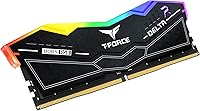
  • Heat Spreader: Fitted with a black aluminum heat spreader designed to aid passive thermal dissipation across the module surface.

Related Reviews
TEAMGROUP T-Force Delta RGB DDR5 32GB RAM
83%
88%
Performance at Rated Speed
91%
XMP 3.0 Compatibility
84%
AMD Expo Compatibility
83%
Out-of-Box Setup
89%
Stability & Reliability
More
TEAMGROUP T-Force Delta RGB 32GB DDR5 RAM
80%
91%
Installation Ease
88%
Stability & Reliability
86%
Performance at Rated Speed
84%
RGB Lighting Quality
83%
Thermal Performance
More
TEAMGROUP T-Force Delta RGB DDR5 48GB RAM
82%
88%
XMP Compatibility
91%
Stability & Reliability
84%
Performance at Rated Speed
86%
RGB Lighting Quality
74%
Value for Money
More
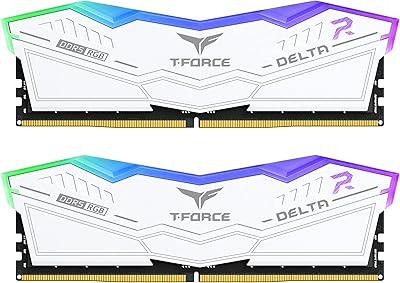
TEAMGROUP T-Force XTREEM 32GB DDR5 Desktop RAM
82%
71%
Out-of-Box Compatibility
88%
Rated Speed Performance
86%
System Stability
77%
Value for Money
89%
Platform Versatility
More
TEAMGROUP T-Force Vulcan Alpha DDR5 32GB (2x16GB) 5600MHz RAM
89%
94%
Gaming Performance
89%
Ease of Installation
90%
Compatibility with Intel Systems
91%
Compatibility with AMD Systems
87%
Overclocking Stability
More
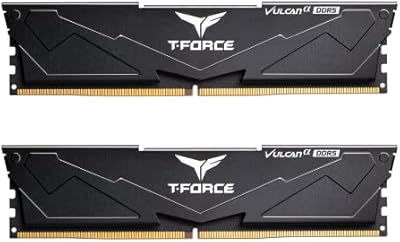
TEAMGROUP T-Force Delta Alpha 64GB DDR5 RAM
83%
91%
EXPO Activation & Setup
86%
Memory Performance
83%
Platform Compatibility
88%
RGB Lighting Quality
81%
Software Integration
More
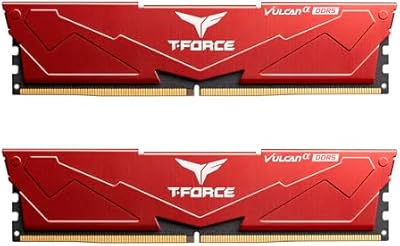
TEAMGROUP T-Force Delta RGB 96GB DDR5 RAM
82%
91%
Memory Performance
88%
XMP Setup Experience
89%
System Stability
74%
Capacity Value
87%
RGB Lighting Quality
More
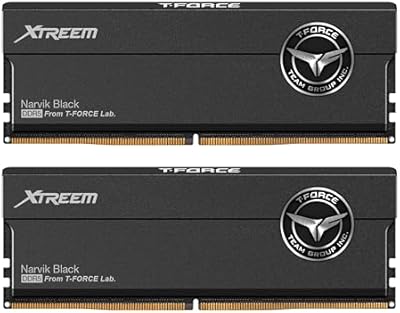
TEAMGROUP T-Force Vulcan Alpha DDR5 32GB Desktop RAM
80%
88%
EXPO Setup Experience
71%
Compatibility Range
84%
Value for Money
86%
Stability & Reliability
79%
Thermal Performance
More
TEAMGROUP T-Force XTREEM DDR5 32GB (2x16GB) 7600MHz
87%
94%
Performance
91%
Stability & Reliability
88%
Ease of Installation
89%
Heat Dissipation
93%
Overclocking Capability
More
TEAMGROUP T-Force XTREEM 32GB 8000MHz DDR5 RAM
83%
88%
Performance
93%
Overclocking Headroom
67%
Compatibility
69%
Value for Money
92%
Build Quality
More

FAQ

No — this DDR5 kit is validated exclusively for Intel 600 and 700 series chipsets. If you are building on AMD AM4 or AM5, you will need a different memory kit. Trying to run high XMP profiles on an unsupported platform is a reliable way to end up with boot failures and unnecessary troubleshooting.

Not always, but it is a smart precaution. Most modern Z690 and Z790 boards on reasonably current firmware will boot XMP 3.0 profiles without issue. If your board is still running launch-day firmware, a BIOS update before installation significantly reduces the chance of the 7600MHz profile failing to stabilize on first boot.

Not automatically. DDR5 modules default to a lower JEDEC base speed — typically around 4800MHz — when first installed. To reach 7600MHz, you need to enter your BIOS, locate the memory profile settings, and enable XMP. That is genuinely the entire process in most cases; no manual timing entry required.

The Delta RGB modules are supported across Z690, Z790, and the newer 800-series chipsets. That said, compatibility can still vary between individual motherboard models within the same chipset family, so checking your board manufacturer's Qualified Vendor List before purchasing is worth the few minutes it takes — especially at this speed tier.

No, and the distinction is important. Server ECC uses extra physical chips on the module to detect and correct errors in real time across the memory bus. On-die ECC is built directly into the memory die itself and catches single-bit errors internally before they ever leave the memory cell. It is a genuine stability benefit, particularly at high frequencies, but it is not the same technology as Registered ECC server DIMMs.

Potentially, yes. Samsung A-Die ICs have a reasonable reputation for overclocking headroom beyond their rated speed, and some builders have pushed A-Die kits past their XMP profile with manual tuning. Your actual ceiling depends on your specific motherboard, CPU memory controller quality, and cooling setup. Treat the XMP rating as a guaranteed stable baseline, not a hard upper limit.

If you are running ASUS Aura Sync, MSI Mystic Light, or Gigabyte RGB Fusion, integration is generally straightforward — those are the three primary ecosystems these modules are built to support. Outside those platforms, a small number of users have reported software conflicts, so results may vary. The modules will still light up by default; the question is only whether your software can control the color and effect settings.

For gaming, 32GB is more than sufficient for virtually every current title. For content creation, it depends on your workload — 4K video editing, large Photoshop projects, and complex 3D scenes can push memory usage higher, and heavy multitasking while rendering may eventually feel constrained. For most users in 2024, 32GB is a practical, well-rounded amount that covers the majority of real-world use cases.

Each module stands 1.29 inches tall (approximately 32.8mm), which is on the taller side due to the RGB lighting assembly. Most mid-range and high-end tower coolers clear that height without issue. If you are using a low-profile cooler or building in a compact ITX case with tight clearance near the DIMM slots, check your cooler's rated clearance before ordering.

Looking at the overall picture — more than 3,800 ratings averaging 4.6 out of 5 — instability reports appear to be a minority experience. The complaints that surface tend to cluster around specific motherboard and BIOS combinations, or around XMP 3.0 voltage sub-profiles not behaving exactly as expected on certain boards. A BIOS update usually resolves those cases. A small number of QC variance reports also exist, which is not unusual at this scale, but it is worth factoring into your decision.