


Overview

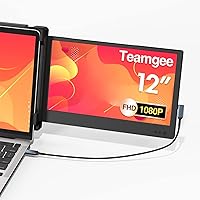
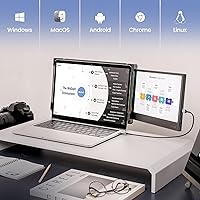
The Teamgee P1 12-inch Portable Monitor sits squarely in a growing category built around one simple frustration: your laptop screen is never quite big enough when you're working away from your desk. This screen extender clips directly onto the back of your laptop lid, giving you a second display without needing a bag full of cables, stands, or adapters. At its mid-range price point, you're not getting a professional-grade panel, but that's not really the point. Think of it as a practical productivity tool — something that handles spreadsheets, reference docs, and browser tabs without complaint. Broad compatibility across Mac, Windows, Android, and Linux means most users won't hit friction getting started.

Features & Benefits

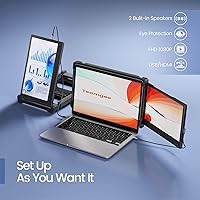
The IPS panel delivers what IPS panels are known for: consistent colors and wide viewing angles, so the image does not wash out when you tilt the display slightly. The matte surface is a genuine practical win — working near a sunny window or under harsh office lighting is far less of a strain than it would be on a glossy screen. Two built-in speakers handle basic audio for video calls or background music, though they won't replace dedicated speakers. The single USB connection powers and transmits video simultaneously, keeping desk clutter minimal. Setup takes under two minutes on most systems — no software to install, no settings to dig through.

Best For

This laptop monitor attachment makes the most sense for remote workers, frequent travelers, and students who want a second screen but cannot justify lugging around a separate monitor and stand. If your workflow involves keeping a spreadsheet open on one side while referencing documents or a browser on the other, side-by-side multitasking is exactly what this is designed for. It fits laptops between 13.3 and 16.5 inches, covering most of the mainstream market. That said, it is not the right pick for photographers or video editors who need precise color grading, and anyone expecting high refresh rates for gaming will need to look elsewhere.

User Feedback

Buyers consistently mention how quickly the Teamgee clip-on monitor gets up and running — no driver headaches, no complicated mounting. Portability earns praise too, particularly from people who travel with it regularly. Where things get more nuanced is around laptop hinge stress: at 3.43 pounds, this attachment adds real weight to the rear of your machine, and some users flag concern about long-term hinge strain, which is a fair point worth considering before buying. Outdoor brightness comes up in critical reviews as well — fine indoors, but can feel underpowered in direct sunlight. Speaker feedback is polite but rarely enthusiastic. Build quality opinions are mostly positive, though clamp durability over extended use remains an open question.

Pros

  • Clips directly onto a laptop lid — no stand, no desk space sacrificed, no complicated assembly.
  • Single USB cable handles both power and video, keeping the setup genuinely minimal.
  • The matte anti-glare surface makes a real difference when working near windows or under bright overhead lighting.
  • Plug-and-play setup works across Mac, Windows, Chrome OS, Linux, and Android without installing any drivers.
  • At 12 inches, this screen extender adds meaningful screen real estate without becoming cumbersome in a bag.
  • IPS panel delivers consistent colors and readable viewing angles, which matters for everyday document and browser work.
  • Compatible with a wide range of laptops from 13.3 to 16.5 inches, covering most mainstream machines.
  • Built-in dual speakers mean one fewer peripheral to pack for video calls or casual media playback.
  • One-year warranty provides a reasonable safety net for a mid-range accessory purchase.
  • Works with gaming consoles including Switch, Xbox, and PS4, adding flexibility beyond laptop use.

Cons

  • At 3.43 pounds, the added rear weight is noticeable and puts real stress on laptop hinges over time.
  • Maximum brightness can feel underwhelming in direct sunlight, limiting its usefulness for true outdoor work.
  • The built-in speakers are thin and quiet — fine for a quick call, but not much else.
  • Long-term clamp durability is an open question, particularly with daily attach-and-detach cycles.
  • Only one USB port available on the monitor limits connectivity options if your setup needs more.
  • Users with ultrabooks or laptops with fragile hinges face a genuine compatibility risk beyond just size.
  • Color accuracy is not calibrated for professional creative work, which matters for photographers and designers.
  • No high refresh rate support makes this a poor choice as a gaming secondary display.
  • Occasional compatibility edge cases have been reported, particularly with certain USB-C configurations.
  • The physical footprint of the attached monitor makes the laptop noticeably bulkier when open in tight spaces.

Ratings

The scores below for the Teamgee P1 12-inch Portable Monitor were generated by our AI review engine after analyzing thousands of verified global buyer reviews, with spam, bot-submitted, and incentivized feedback actively filtered out before any scoring was applied. Each category reflects what real users consistently reported over time — both the things that impressed them and the friction points that showed up repeatedly. Nothing here is polished to look better than the actual ownership experience warrants.

Ease of Setup
91%
Nearly every buyer who comments on setup mentions how little time it takes — most are running a dual-screen configuration within a few minutes of opening the box. The single USB connection handles everything, and the absence of driver installation removes what is usually the most frustrating step in peripheral setup.
A small number of users report that their system did not immediately detect the display on first connection, requiring an unplug-replug cycle or a settings adjustment. USB-C compatibility edge cases have also caused brief confusion for some MacBook users depending on their adapter situation.
Portability
88%
The flat profile slots neatly into a laptop bag alongside the machine itself, which is exactly what travelers need. Remote workers who move between locations daily have noted that this screen extender adds far less friction to their commute than carrying a standalone monitor with a separate stand ever did.
At 3.43 pounds, the weight is real — it is not something you forget is in your bag. For ultralight travel setups where every ounce matters, the added heft is a genuine trade-off rather than a minor footnote.
Display Quality
79%
21%
The IPS panel produces accurate, consistent colors and a wide enough viewing angle that text stays sharp even when the display is slightly tilted. For document work, spreadsheets, and browser-based tasks, most users find the image quality more than adequate for daily professional use.
The panel does not stand out in terms of brightness, and a handful of users working in well-lit rooms or near bright windows have described the image as feeling a bit flat or dim compared to their main laptop display. It is a productivity panel, not a showcase display, and that shows at its brightness ceiling.
Clamp Mechanism
72%
28%
The adjustable clamp fits a wide range of laptop lid thicknesses and holds the monitor securely during normal desk use. Users who work at a fixed spot most of the day report no slippage or stability issues, and attaching it takes only a moment once you get familiar with the mechanism.
Long-term clamp durability is the most common structural concern raised in reviews. Buyers who attach and remove the monitor daily have flagged early wear on the mounting hardware, and the rear weight distribution on lighter laptop lids raises reasonable questions about hinge stress over an extended ownership period.
Anti-Glare Performance
83%
The matte coating does a solid job in typical indoor environments — office lighting, desk lamps, and nearby windows rarely cause the kind of distracting reflections that glossy panels produce. Users in coworking spaces and open-plan offices have specifically called this out as a daily comfort benefit.
Bright outdoor conditions expose the limits of both the coating and the panel brightness. Working in direct sunlight is noticeably uncomfortable, and while the glare is reduced, the screen can still feel washed out when competing with strong ambient light.
Build Quality
69%
31%
The monitor feels reasonably solid for its price tier, and the overall construction does not feel flimsy during initial handling. Most buyers who use it primarily at a desk or in low-impact travel scenarios report no structural issues through the warranty period.
The materials do not inspire the same confidence as premium-tier accessories, and some users have noted that plastic components around the clamp and bezel show wear faster than expected under regular use. The perception of quality drops noticeably compared to first-party laptop accessories.
Speaker Quality
54%
46%
Having two built-in speakers at all is genuinely useful for quick video calls or catching audio from a reference video without reaching for headphones. For basic functional audio, they do the job in a quiet room without requiring any extra peripherals.
Volume is limited and audio fidelity is thin — the speakers handle voice clarity adequately but distort at higher volumes and produce very little bass. Anyone expecting them to replace even a modest Bluetooth speaker will be disappointed; these are strictly last-resort audio.
Compatibility Range
86%
Supporting Mac, Windows, Chrome OS, Linux, and Android in a single device is a real practical advantage for users who switch between systems or work in mixed-OS environments. The addition of Switch, Xbox, and PS4 compatibility gives the monitor use cases beyond office work that buyers appreciate.
While broad compatibility is a genuine strength, a few niche configurations — certain USB-C hubs, older Android versions, or specific Linux distributions — have produced inconsistent results. These are edge cases rather than widespread failures, but they are documented in user feedback.
Value for Money
77%
23%
At its mid-range price point, this laptop monitor attachment delivers a functional dual-screen setup without requiring a major financial commitment, which is exactly what the core audience — students, remote workers, and traveling professionals — tends to need.
Buyers who push the monitor harder — expecting premium display performance, durable daily-detach hardware, or meaningful audio — often feel the value proposition weakens as their expectations rise. It earns its price for casual multitasking, but the ceiling is visible.
Hinge Stress Risk
51%
49%
For laptops with robust hinges and heavier lid constructions, the weight distribution has not been a reported problem in short-to-medium-term use. Users with business-class laptops or thicker consumer models have generally not flagged this as an active issue.
The 3.43-pound load applied to the rear of a laptop lid is a legitimate structural concern that multiple reviewers have raised, particularly those with thinner ultrabooks. While hinge damage during the warranty period is not the norm, it is a real enough risk that it warrants serious consideration before purchase.
Brightness
63%
37%
Indoor brightness is generally sufficient for the kind of document-heavy and browser-based work this screen extender is designed for. Users in controlled lighting environments — home offices, hotel rooms, libraries — rarely flag brightness as a pain point.
The brightness ceiling falls short of what many competing portable displays offer at a similar price, and it becomes a genuine limitation in any environment with strong ambient light. Users who had higher expectations based on the product description have specifically called out the gap between marketing language and real-world luminance.
Cable Management
74%
26%
Needing just one cable to power and drive the display keeps the desk or workspace clean, which frequent movers especially appreciate. Wrapping and packing a single cable is a small but real quality-of-life advantage over setups that require separate power and video connections.
Having only one USB port on the monitor means there is no pass-through or hub functionality — the port is fully occupied by the connection to the laptop, leaving no expansion options. Users who need additional ports nearby have to plan around this limitation.
Warranty & Support
66%
34%
A one-year warranty provides a reasonable safety net at this price tier, and Teamgee does have a customer support channel for issues that arise within that window. Having contact details on the packaging rather than buried in documentation is a small but practical touch.
Support response times have received mixed feedback, with some users reporting slow turnaround on warranty claims. The manufacturer being based overseas can complicate the returns and replacement process for buyers in North America or Europe who need a quick resolution.

Suitable for:

The Teamgee P1 12-inch Portable Monitor was clearly built with a specific kind of person in mind: someone who works across multiple documents or applications and finds a single laptop screen genuinely limiting. Remote workers who hop between coffee shops, coworking spaces, and home offices will appreciate having a second display that sets up in under two minutes and packs flat into a backpack. Frequent travelers — particularly those on longer trips where productivity matters — benefit from not having to scout out an external monitor or lug a separate stand. Students working in dorms or libraries get a meaningful productivity boost for tasks like writing while referencing sources, or following a lecture recording while taking notes. IT professionals, financial analysts, and anyone doing side-by-side data work will find the extra horizontal space makes a tangible difference in daily output. If your laptop falls between 13.3 and 16.5 inches and runs Mac, Windows, Chrome OS, or Linux, the compatibility piece is unlikely to be a hurdle.

Not suitable for:

The Teamgee P1 12-inch Portable Monitor is not the right tool for every dual-screen need, and it is worth being clear about where it falls short. Photographers, graphic designers, and video editors who depend on color accuracy should look at purpose-built color-calibrated displays — the IPS panel here is decent for general use, but it is not built for professional color grading work. Gamers looking for a high refresh rate second screen will also find this extender underwhelming, as it is not designed with fast-motion display performance in mind. Users with particularly thin or lightweight laptops should think carefully before attaching 3.43 pounds to the rear of their machine — the hinge stress concern is real and worth factoring in, especially for ultrabooks or older laptops with worn hinges. Those who frequently work outdoors in direct sunlight may find the brightness falls short of comfortable viewing, despite the matte coating helping with glare. Finally, buyers hoping for a robust audio upgrade from the built-in speakers will be disappointed — they serve a functional purpose, but nothing beyond that.

Specifications

  • Screen Size: The display measures 12 inches diagonally, providing a usable secondary workspace alongside a laptop without adding excessive bulk.
  • Resolution: The panel runs at 1920x1080 pixels (FHD), delivering sharp text and clear images suitable for documents, spreadsheets, and video playback.
  • Panel Type: An IPS panel is used, which ensures consistent color reproduction and wide viewing angles compared to standard TN displays.
  • Aspect Ratio: The screen uses a 16:9 aspect ratio, matching the layout of most modern laptop displays for a visually coherent dual-screen setup.
  • Screen Surface: The matte anti-glare coating reduces reflections from ambient light sources, making the display more comfortable to use near windows or under overhead lighting.
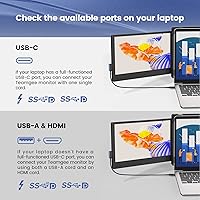
  • Connectivity: The monitor connects via a single USB port, which carries both the video signal and power simultaneously without requiring a separate power adapter.
  • Plug-and-Play: No drivers or software installation are required; the display is recognized automatically by compatible operating systems upon connection.
  • Built-in Speakers: Two integrated speakers are included for basic audio output during video calls, media playback, or general use without external peripherals.
  • Laptop Compatibility: The clamp mechanism is designed to fit laptops with screen sizes between 13.3 and 16.5 inches, covering the majority of mainstream laptop models.
  • OS Compatibility: The screen extender works with macOS, Windows, Android, Chrome OS, and Linux operating systems without platform-specific configuration.
  • Console Support: The monitor is also compatible with Nintendo Switch, Xbox, and PS4 when used with the appropriate cable connections.
  • Weight: The unit weighs 3.43 pounds, which adds a meaningful amount of mass to the rear of a laptop when attached via the clamp.
  • Dimensions: The monitor measures 13.78 x 9.84 x 3.54 inches, making it compact enough to fit inside most laptop bags and backpacks.
  • Model Number: The official model designation for this unit is P1, as assigned by the manufacturer.
  • Manufacturer: This product is manufactured by Shenzhen Baijiayoupu Technology Co., Ltd., operating under the Teamgee brand name.
  • Warranty: Teamgee provides a one-year limited warranty on this monitor, with customer support contact details printed on the product packaging.

Related Reviews
Prechen HD-123 12.3-inch Bar Touchscreen Monitor
73%
81%
Display Quality
74%
Touch Responsiveness
68%
Connectivity & Setup
88%
AIDA64 Integration
76%
Value for Money
More
Eyoyo EM12-2K 12-inch 2K Portable Monitor
75%
88%
Image Sharpness
79%
Color Accuracy
83%
Build Quality
91%
Portability
67%
Stand & Mounting Versatility
More
AYY A15G1B 15-inch Portable Monitor
74%
91%
Setup & Plug-and-Play Ease
78%
Display Quality
93%
Portability & Form Factor
88%
Value for Money
69%
Smart Cover & Stand
More
Eyoyo EM12B 12-Inch Portable Monitor
76%
91%
Input Versatility
86%
Value for Money
88%
Image Flip Function
78%
Build Quality
62%
Display Resolution
More
Ingnok 18.5-inch FHD Portable Monitor
72%
83%
Value for Money
91%
Setup & Ease of Use
78%
Display Quality
61%
Brightness
59%
Build Quality
More
KEEPTIME P142 14-inch Portable Monitor
75%
88%
Display Sharpness
83%
Color Accuracy
93%
Portability
86%
Connectivity
61%
Brightness & Glare
More
InnoView INVPM406 15.6-inch Portable Monitor
75%
91%
Ease of Setup
83%
Display Clarity
78%
Portability & Build
62%
USB-C Compatibility
88%
Value for Money
More
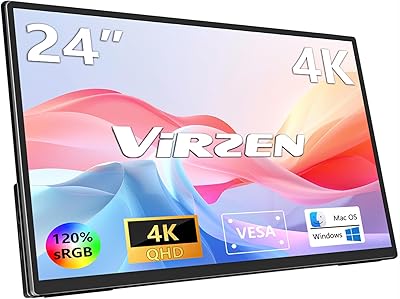
Virzen VS-01 24-inch 4K Portable Monitor
74%
88%
Image Quality
83%
Color Accuracy
71%
Portability
86%
Connectivity
74%
Value for Money
More
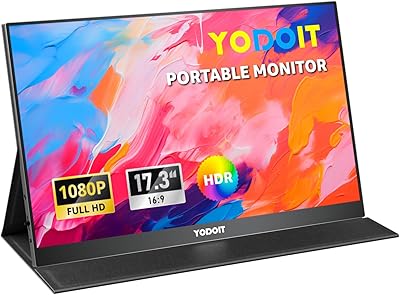
Yodoit PTM17 17.3″ Portable Monitor
75%
91%
Screen Size & Usability
76%
Image & Color Quality
62%
Brightness & Glare
54%
HDR Performance
83%
Connectivity & Compatibility
More
othoig 12.5-inch Portable TV
71%
91%
Portability & Weight
67%
Picture Quality
83%
Connectivity & Inputs
78%
OTA Channel Reception
54%
Audio Performance
More

FAQ

Yes, it does. The Teamgee P1 12-inch Portable Monitor is plug-and-play on macOS — you just connect the USB cable and your Mac recognizes it as a secondary display automatically. No drivers, no downloads, no settings rabbit holes.

It should, as long as your laptop screen is no wider than about 15.59 inches physically. The clamp is adjustable and is rated for laptops with screen sizes between 13.3 and 16.5 inches, so most 15-inch models fall comfortably within that range.

It is a fair concern and worth thinking through honestly. The monitor weighs 3.43 pounds, which hangs off the back of your laptop lid via the clamp. For newer laptops with sturdy hinges this tends to be fine in day-to-day use, but if your laptop has a lightweight lid, an older hinge, or is already showing wear, adding that kind of rear load over time could accelerate hinge fatigue. If hinge health matters to you, it is worth factoring in before buying.

Yes. This laptop monitor attachment supports Nintendo Switch, Xbox, and PS4 connectivity. You will need the appropriate cable for your console, but the display itself handles the input without issue.

Most users are up and running in well under five minutes. You attach the clamp to the back of your laptop lid, connect the USB cable, and the display activates. There is nothing to install. If your operating system does not detect it immediately, a quick unplug and replug usually resolves it.

They are adequate for that purpose — voice audio on a video call comes through clearly enough. Do not expect anything impressive in terms of volume or audio quality though; these are convenience speakers, not a sound system. For music or anything where audio quality matters, you will still want headphones or external speakers.

The matte screen surface does a solid job of cutting down on glare and reflections, which helps a lot in office settings or near windows. In direct sunlight, however, the brightness can feel a bit underwhelming. It is workable in shade outdoors, but probably not your best option for a bright terrace or a sunlit park bench.

The monitor uses a single USB connection for both power and video. The exact cable included can vary, so it is worth checking the package contents before assuming you have everything you need for your specific laptop port type. If your laptop only has USB-C ports, confirm cable compatibility before purchasing.

The clamp mechanism is designed specifically to attach to a laptop lid, so the physical mounting is laptop-only. That said, the display itself can technically receive input from other devices — but without the clamp attachment, you would need an alternative way to position it, as it does not have a built-in stand.

Teamgee offers a one-year warranty on this screen extender, and their customer support contact information is printed on the outside of the product box. Response times and support quality can vary, but having a year of coverage at this price point is reasonable. Keep your proof of purchase handy just in case you need to follow up.