Overview

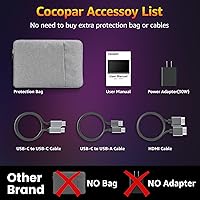
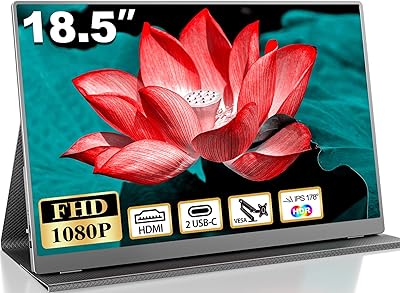
The Cocopar T185FHLS 18.5-inch Portable Monitor arrived in late 2024 as a newer face in a crowded field dominated by brands like ASUS ZenScreen and Lepow. Cocopar has built a reputation for value-focused portable displays, and this travel display fits that mold — a slim IPS panel that slips into a bag without much fuss. At its mid-range price, it targets road warriors and remote workers rather than power users with strict color demands. Worth noting upfront: no carrying sleeve or case is included, which feels like an oversight given the intended audience. The borderless matte design looks clean, and the integrated kickstand means you are set up in seconds.
Features & Benefits

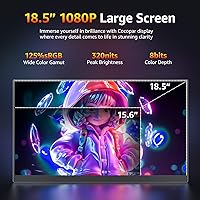
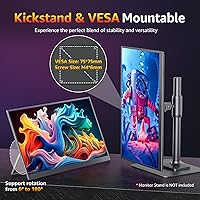
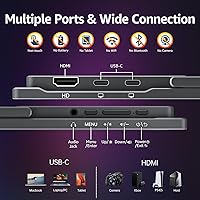
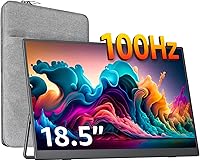
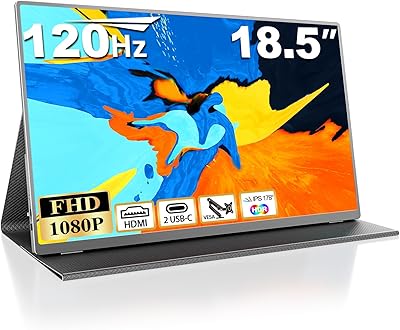
The IPS panel runs at 1080p and 100Hz, which is genuinely useful if you watch a lot of video or do light gaming on the road. The 125% sRGB color coverage is a standout for this price tier — photos and edited footage look noticeably richer than on most budget travel screens. Connectivity is well-covered: two USB-C ports and an HDMI input handle MacBooks, PCs, and consoles without adapter juggling. The 180-degree kickstand offers real flexibility, and VESA holes mean you can mount this travel display at a fixed desk if needed. The built-in speakers are there, but treat them as a convenience feature rather than anything audiophiles would enjoy. At 320 nits, brightness is adequate indoors but can feel limiting near a sunny window.

Best For

This portable monitor is a natural fit for remote workers and travelers who need a second screen without adding significant weight to their bag — at under three pounds, it won't be the heaviest thing you pack. Students living in tight spaces will appreciate that the kickstand replaces a bulky separate stand entirely. MacBook and Surface owners benefit most from the dual USB-C setup; one cable is usually all it takes. Console players heading to a friend's place or a hotel room will find the HDMI port and screen size genuinely practical for PS5 or Xbox sessions. Content creators who need decent color accuracy on the go, without hauling a desktop display, also land squarely in the target audience here.

User Feedback

Buyers consistently highlight setup speed as a strong point — plug in a USB-C cable and it just works across macOS, Windows, and ChromeOS without driver hunting. The screen size also draws positive comments; 18.5 inches feels genuinely spacious compared to the 15-inch portables many people have used before. On the other side of the ledger, some users report the kickstand feels less sturdy over time with repeated folding. A few note that brightness struggles in brightly lit rooms or direct sunlight, which aligns with the 320-nit spec. USB-C power delivery behavior has come up too — results can vary slightly depending on the host device and cable quality used. Overall impressions tend to be positive for the price, though buyers switching from name-brand monitors sometimes note the difference.

Pros

  • Single USB-C cable connection works reliably across macOS, Windows, and ChromeOS with no driver setup required.
  • At 18.5 inches, the screen feels noticeably roomier than most 15-inch portable competitors in the same price range.
  • 125% sRGB color coverage makes photos and video footage look richer than typical budget travel screens.
  • The 100Hz refresh rate keeps scrolling and casual gaming visibly smooth compared to standard 60Hz portables.
  • Dual USB-C ports plus HDMI cover almost every modern laptop, PC, and console without needing extra adapters.
  • The 180-degree adjustable kickstand handles a wide range of desk and lap angles without needing a separate stand.
  • VESA mount compatibility lets you fix this portable monitor to an arm or wall bracket for a permanent secondary screen setup.
  • The matte anti-glare coating reduces eye strain during long work sessions under indoor lighting.
  • At under three pounds and 0.27 inches thin at its slimmest, this travel display fits easily into most laptop bags.
  • Built-in speakers cut down on cable clutter when audio quality is not a priority.

Cons

  • 320 nits brightness struggles visibly in well-lit rooms and becomes genuinely uncomfortable in direct sunlight.
  • No carrying case or protective sleeve is included, which is a notable omission for a display marketed at travelers.
  • Kickstand durability has drawn concern from some buyers after extended use with repeated folding and unfolding.
  • USB-C power delivery behavior can be inconsistent depending on the host device and cable quality, requiring some trial and error.
  • Cocopar is a lesser-known brand with a thinner support and warranty track record compared to established monitor makers.
  • Built-in speaker audio quality is thin and best treated as a last-resort option rather than a usable feature.
  • Color accuracy, while above average for the price tier, is not suitable for professional color-critical editing work.
  • No included carrying case means buyers must factor in the added cost and effort of sourcing protective transport accessories separately.
  • USB-C cable quality dependency means the out-of-box experience can vary if you use a third-party or lower-spec cable.

Ratings

Our AI scoring system evaluated the Cocopar T185FHLS 18.5-inch Portable Monitor by processing verified purchase reviews from buyers across North America, Europe, and Asia — automatically filtering out incentivized, repetitive, and bot-generated submissions to ensure the scores reflect genuine ownership experiences. Each category captures the honest patterns that emerge when thousands of real users put this travel display through its paces across hotel desks, coffee shops, dorm rooms, and home offices. The result is a transparent scorecard that surfaces both where this portable monitor genuinely earns its place and where buyers have consistently hit its limits.
Display Quality
83%
The IPS panel earns consistent praise from remote workers who appreciate crisp, readable text across spreadsheets and browser windows during long sessions. Viewing angles are wide enough that colleagues can glance at the screen without noticeable color shift, which matters in shared coffee shop and open-office settings.
Some buyers note that fine text looks slightly soft compared to premium IPS panels on higher-end portables in the same size range. A handful of users also report minor backlight uniformity inconsistencies in very dark content, though this appears uncommon at this price tier.
Color Accuracy
76%
24%
The 125% sRGB coverage genuinely surprised buyers coming from standard portables, with photos and edited video looking noticeably more saturated during travel editing sessions. Content creators doing casual retouching on the road report the color rendering holds up well for social media previews and client review work.
Users who pushed the display for more demanding color work found the out-of-box calibration can drift slightly in cooler or warmer tones depending on content type. Without factory calibration data or an ICC profile provided, achieving truly accurate results requires manual adjustment that not every buyer wants to undertake.
Brightness Performance
58%
42%
In controlled indoor environments — hotel rooms, standard office lighting, evening home use — 320 nits is sufficient for comfortable extended work without eye strain. The matte coating does a reasonable job of cutting soft reflections, which partially compensates for the modest brightness in gentle ambient light conditions.
Buyers who set up near windows or worked in open, sunlit spaces consistently report the screen washes out and becomes difficult to read. This is one of the most frequently recurring complaints across user feedback, and several buyers specifically cited it as a deal-breaker for outdoor cafe or brightly lit conference room use.
Refresh Rate & Motion
81%
19%
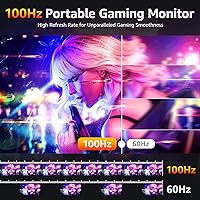
Scrolling through long documents and web pages feels noticeably fluid at 100Hz compared to the 60Hz portables many buyers had used previously, a difference multiple remote workers highlighted after switching. Casual console gamers connecting a PS5 or Xbox also appreciated the smoother on-screen motion during moderate-paced gameplay.
Buyers comparing this travel display to dedicated gaming monitors noted that 100Hz, while a genuine step up, does not match the responsiveness of 144Hz or faster panels when quick reaction time matters. For competitive gaming the gap is real, though for the productivity-first audience this screen primarily targets, it is rarely a practical issue.
Build Quality
69%
31%
The slim chassis feels solid and well-constructed for its price tier, and the borderless matte panel gives it a cleaner, more considered appearance than the brand name might suggest at first glance. Multiple buyers noted the overall fit and finish exceeded their expectations based on cocopar being a lesser-known label.
The kickstand hinge is the most frequently flagged durability concern, with some buyers reporting it loosens or feels less firm after months of daily folding and unfolding. Several users also noted the plastic body accumulates minor scratches more easily than expected, which is a real consideration given that no case ships in the box.
Portability
86%
At 2.76 pounds and under a third of an inch at its thinnest, this portable monitor slides into a laptop bag alongside a 15-inch notebook without requiring reorganization or a dedicated carry case. Frequent fliers and daily commuters consistently cite the weight-to-screen-size ratio as one of the main reasons they chose it over smaller alternatives.
Buyers coming from ultra-light 13-inch portables may find the added mass noticeable after a full day of carry in a shoulder bag. The lack of an included protective sleeve means sourcing a case separately, which slightly undermines the grab-and-go appeal the slim design is clearly intended to deliver.
Connectivity
89%
Two USB-C ports and a full-size HDMI input cover a wide range of devices — MacBooks, Windows laptops, Chromebooks, PS5, PS4, and Xbox — without needing a hub or adapter in most everyday setups. Thunderbolt 3, 4, and 5 compatibility makes it especially strong for Apple users who want a reliable one-cable connection.
USB-C power delivery behavior varies slightly depending on the cable and host device used, and some buyers needed to test different cables or ports before landing on a fully stable connection. A small number of Windows users reported brief handshake delays when hot-plugging, though these resolved without requiring a full system restart in most cases.
Setup & Compatibility
92%
Plug-and-play behavior across macOS, Windows, and ChromeOS is the most consistently praised aspect of the ownership experience — buyers describe connecting it for the first time and having it recognized and running within seconds, with zero software to install. This reliability is particularly appreciated by users who switch regularly between platforms or operating systems.
Buyers using older laptops with USB-C ports that do not support video output found the initial experience confusing, as the display would not respond without switching to the HDMI fallback. Clearer documentation in the box about which USB-C standards are required would prevent first-day frustration for less technically experienced users.
Kickstand Design
64%
36%
The 180-degree adjustment range is genuinely broad, letting users dial in shallow angles for lap use, upright positions for desk work, and everything in between without needing a separate stand or riser. Several buyers appreciated that chosen angles hold reliably during normal use on standard flat desk surfaces.
On softer or uneven surfaces — beds, couches, or fabric table coverings — the kickstand tends to slide or tip, significantly limiting usefulness outside of hard flat desks. Longer-term reports from users past the six-month mark suggest the hinge tension degrades with heavy daily use, causing the screen to slowly drift from the intended angle.
Speaker Quality
41%
59%
The built-in speakers serve as a workable fallback when no external audio gear is available — catching brief audio cues during a presentation or joining a short video call in a quiet hotel room is manageable. Buyers who use them only occasionally and at moderate volume find them passable for light, incidental duty.
Users who rely on the speakers for regular media consumption report thin, low-volume output with minimal bass and a tendency to distort at higher levels. The consensus is consistent across reviews: the speakers function as a checkbox feature rather than a genuine audio solution, and most buyers quickly default to headphones or a Bluetooth speaker.
Value for Money
78%
22%
Buyers comparing this portable monitor against similarly priced competitors generally find the combination of 18.5-inch screen size, 100Hz refresh rate, and 125% sRGB color coverage to be a compelling package for the mid-range tier. Many report expecting to pay more for this feature set, which creates a strong positive first impression at unboxing.
Buyers who factor in the missing carry case, kickstand longevity questions, and cocopar's thinner brand support network relative to ASUS or LG sometimes find the value equation less clear-cut than the spec sheet implies. For buyers who weigh post-purchase support and warranty reliability heavily, the cost savings may not fully offset those uncertainties.
Gaming Suitability
72%
28%
Casual and console gamers who travel with a PS5, Xbox, or gaming laptop find the 100Hz panel and HDMI input make for a competent travel gaming screen, with motion handling that holds up well in moderately paced titles. The matte coating cuts glare during evening hotel room gaming sessions, a practical detail that several buyers specifically praised.
Competitive gamers will find the display limiting — it is a productivity-first screen with gaming capability rather than a dedicated gaming monitor. The absence of any listed response time specification and the lack of AMD FreeSync or NVIDIA G-Sync support means screen tearing can occur in fast, graphically demanding titles.
Desk Mounting
82%
18%
The four VESA holes allow the cocopar 18.5-inch screen to integrate cleanly into a permanent home or office desk setup on a standard monitor arm, a feature many buyers did not expect at this price point. Users who run it as a fixed secondary display on an arm report it feels stable and sits well alongside a primary monitor.
VESA mounting requires purchasing a compatible arm or bracket separately, adding cost and setup effort that not every buyer anticipates. A few users noted that sourcing hardware for the specific hole pattern required additional research, which would benefit from clearer guidance in the product documentation.
Screen Real Estate
84%
At 18.5 inches, this travel display offers more usable working area than the 15-inch and 15.6-inch portables that dominate the category, and buyers coming from smaller screens consistently describe the size jump as immediately impactful for side-by-side window management. Remote workers handling spreadsheets, code editors, or video timelines benefit noticeably from the extra horizontal space.
The larger footprint means it occupies more bag space than compact alternatives, which can be a real trade-off for travelers who prioritize minimalist packing. A handful of users noted it takes up more surface area than expected when propped on a small coffee shop table or airline tray seat-back.

Suitable for:

The Cocopar T185FHLS 18.5-inch Portable Monitor makes the most sense for people whose work or lifestyle regularly pulls them away from a fixed desk. Remote workers and freelancers who bounce between hotels, co-working spaces, and client offices will find the single-cable USB-C setup genuinely convenient — no dongles, no driver installs, just plug in and get to work. MacBook and Surface users in particular benefit from the dual USB-C ports and Thunderbolt 3/4/5 compatibility. Students in dorms or small apartments get a real secondary screen without surrendering desk space, since the built-in kickstand eliminates the need for a separate monitor arm or stand. Console gamers who travel with a PS5 or Xbox will also appreciate having a proper 18.5-inch screen with an HDMI port available without hunting for a hotel TV. Content creators who need more reliable color than a typical budget display offers — but aren't ready to invest in a professional-grade portable — will find the 125% sRGB coverage a meaningful step up for on-the-go editing work.
Not suitable for:

Buyers with more demanding or specialized needs will likely find this travel display falls short in a few important areas. If you work frequently near windows or in bright, open-plan offices, the 320-nit brightness ceiling is a real limitation — it is a comfortable indoor panel, not an outdoor or high-ambient-light one. Serious gamers who prioritize display performance should also temper expectations; 100Hz is respectable for casual play, but this is fundamentally a productivity-first travel screen and not a substitute for a dedicated gaming monitor. Professional photographers or video editors who require strict color accuracy and a calibrated display will find the 125% sRGB spec interesting but ultimately insufficient for critical color work. Buyers who prefer the reassurance of a well-established brand with a proven support network may also hesitate — cocopar is a smaller player, and its long-term customer service track record is less documented than rivals like ASUS or LG. Finally, anyone who needs a carrying case or protective sleeve included out of the box will need to budget for one separately, since nothing ships with this monitor.

Specifications

  • Screen Size: The display measures 18.5 inches diagonally, offering a noticeably larger viewing area than the 15-inch portable monitors that dominate this category.
  • Resolution: Native resolution is 1920x1080 pixels (Full HD), delivering sharp text and clear video at typical arm-length viewing distances.
  • Panel Type: Uses an IPS panel, which provides consistent color reproduction and wider viewing angles compared to TN-based alternatives.
  • Refresh Rate: Supports a 100Hz refresh rate, producing visibly smoother motion than standard 60Hz portable displays during video playback and casual gaming.
  • Color Gamut: Covers 125% of the sRGB color space, resulting in more vivid and saturated colors than most budget-tier portable monitors can achieve.
  • Brightness: Peak brightness is rated at 320 nits, which is adequate for controlled indoor environments but can feel limiting in brightly lit or sunlit spaces.
  • Screen Surface: The panel uses a matte anti-glare coating that diffuses ambient light reflections to reduce eye strain during extended indoor sessions.
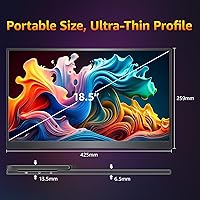
  • Dimensions: The full unit measures 16.7 x 10.19 x 0.62 inches, fitting comfortably alongside a 15-inch laptop in most standard travel bags.
  • Weight: Total weight is 2.76 pounds, manageable for daily travel carry but slightly heavier than the lightest ultra-slim portable options on the market.
  • Thickness: At its slimmest point the panel body measures just 0.27 inches, contributing to a low-profile form factor when laid flat in a bag.
  • Connectivity: Equipped with two USB-C ports and one full-size HDMI port, covering the majority of modern laptops, PCs, and gaming consoles without requiring extra adapters.
  • Power Input: Powered via USB-C at 5 volts, drawing power directly from a connected host device or a compatible USB-C wall adapter.
  • Thunderbolt Support: Compatible with Thunderbolt 3, 4, and 5 devices, enabling single-cable video and power delivery on supported MacBooks and PCs.
  • Kickstand: Features an integrated 180-degree adjustable kickstand that folds flat for transport and supports a wide continuous range of tilt angles when in use.
  • VESA Mount: Includes four VESA mounting holes, allowing attachment to compatible monitor arms or wall mounts for a more permanent stationary desk configuration.
  • Built-in Speakers: Incorporates built-in stereo speakers for basic audio output, reducing the need for external speakers in situations where sound quality is not a priority.
  • OS Compatibility: Works natively with macOS, Windows, and ChromeOS without requiring any additional driver installation on the host machine.
  • Model Number: The official model identifier is T185FHLS, useful for referencing when contacting customer support or searching for product-specific documentation.

Related Reviews
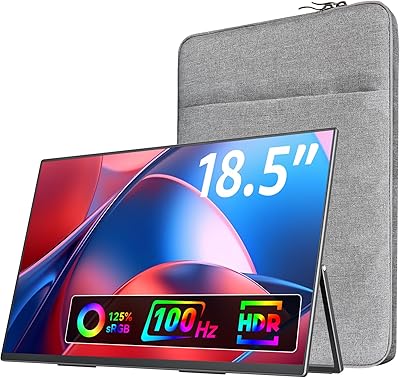
Upperizon U185C 18.5″ Portable Monitor
75%
91%
Screen Size & Impact
84%
Image Quality
82%
Refresh Rate & Motion
58%
USB-C Compatibility
79%
Included Magnetic Cover
More
Ingnok 18.5-inch FHD Portable Monitor
72%
83%
Value for Money
91%
Setup & Ease of Use
78%
Display Quality
61%
Brightness
59%
Build Quality
More
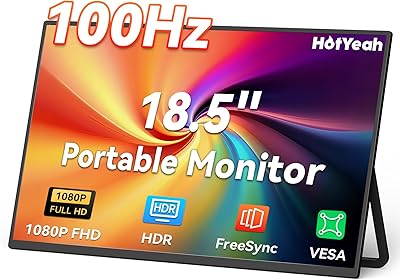
VisionOwl 18.5-Inch 1080p Portable Monitor
77%
91%
Screen Size & Real Estate
83%
Display Clarity & Sharpness
78%
Color Accuracy & Vibrancy
81%
Refresh Rate & Motion Performance
89%
Connectivity & Setup Ease
More
Motyeowe 18.5 Inch Portable Monitor
86%
89%
Display Quality
94%
Portability & Design
88%
Connectivity
84%
Performance (Gaming)
91%
Ease of Setup
More
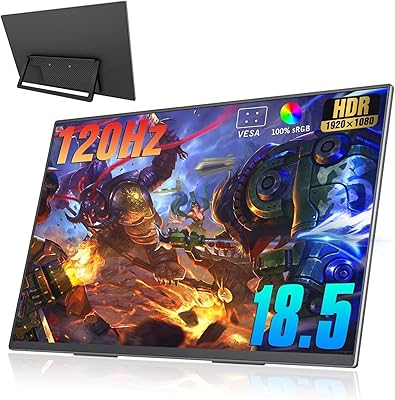
HotYeah 18.5-inch 1080P Portable Monitor
75%
83%
Display Clarity
78%
Color Vibrancy
81%
Refresh Rate & Motion
57%
Brightness & Outdoor Use
67%
USB-C Connectivity
More
CoolHood 18.5-inch Portable Monitor
88%
94%
Portability
88%
Display Quality
91%
Ease of Setup
85%
Gaming Performance
89%
Color Accuracy
More
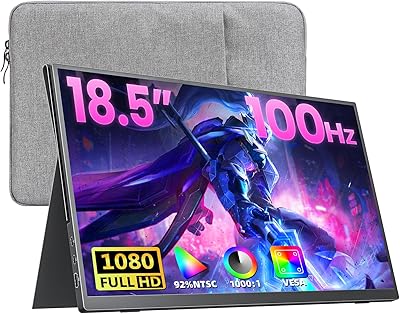
Qunub 18.5-inch Portable Monitor
85%
89%
Display Quality
94%
Portability
85%
Gaming Performance
90%
Setup & Installation
88%
Build Quality
More
CUIUIC 18.5″ Portable Monitor
74%
83%
Display Quality
88%
Screen Size & Real Estate
58%
Portability & Weight
61%
USB-C Connectivity
72%
Build Quality & Materials
More
Usparkle GS185CM1 18.5-inch Portable Monitor
77%
83%
Display Quality
88%
Refresh Rate Performance
91%
Portability & Form Factor
84%
Build Quality & Materials
76%
Connectivity & Compatibility
More
kksmart K-ZD185FH 18.5-inch Portable Monitor
76%
91%
Screen Size & Impact
88%
Image Quality
86%
Refresh Rate Performance
79%
Connectivity & Compatibility
72%
Portability & Form Factor
More

FAQ

Yes, as long as your MacBook supports USB-C video output — which all modern Apple silicon and recent Intel models do — a single USB-C cable handles both the video signal and power for the display simultaneously. No separate power adapter is needed in that configuration, which keeps your desk or bag setup clean.

It does. The full-size HDMI port connects directly to PS4 and PS5 with a standard HDMI cable. You will need to power this portable monitor separately via USB-C from a wall adapter or a power bank, since consoles do not supply power through HDMI. Once powered, setup is straightforward with no additional configuration required.

The kickstand works well on stable surfaces and covers a wide range of angles, but some buyers have reported it feeling less solid after extended daily use involving repeated folding and unfolding. Treating the hinge deliberately rather than forcing it open or snapping it shut should help extend its lifespan if you are a heavy daily traveler.

In a typical indoor setting — a dim office, a hotel room, a coffee shop with controlled lighting — 320 nits is perfectly comfortable. Placed near a bright window or in direct sunlight, the image can wash out noticeably even with the matte coating helping to cut reflections. This travel display is best treated as an indoor screen rather than an outdoor one.

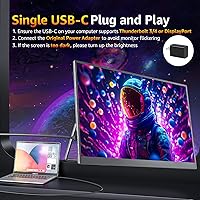
It draws power through its USB-C port at 5V, so in most setups a single cable from your laptop or a USB-C charger is all you need. On older laptops or hosts with lower USB-C power output, pairing the display with a dedicated USB-C power adapter alongside the video connection can improve stability and prevent any flickering.

No driver installation is required. It is recognized immediately as a standard external display on macOS, Windows, and ChromeOS the moment you plug it in. This plug-and-play behavior is one of the most consistently praised aspects of this monitor in buyer feedback, especially for users who need a fast setup in unfamiliar environments.

The 125% sRGB coverage puts it well ahead of most budget portables, and colors look genuinely rich for everyday content review and casual editing work. It is not a factory-calibrated professional panel, so precise color grading or print-accurate retouching is not its strength. For reviewing shots, trimming footage, or light retouching while traveling, it performs capably.

No protective case or sleeve is included in the box, which is a real gap for a display marketed at travelers. Before taking this portable monitor on a trip, it is worth picking up a padded laptop sleeve or dedicated monitor pouch separately, since the screen edges have no built-in cushioning against bumps in a bag.

Yes, the four built-in VESA holes make it compatible with standard monitor arms and wall brackets. This is a practical option if you want to use the cocopar 18.5-inch screen as a fixed secondary monitor at your desk without relying on the kickstand, and it frees up desk surface space at the same time.

Cocopar is a smaller, less established brand than ASUS or LG, which is a reasonable concern if long-term support and warranty service matter to you. In terms of raw specifications for the price, it competes fairly well with mid-range offerings from better-known names. Buyers who have owned a flagship portable from a larger brand may notice minor differences in build consistency, so checking recent buyer reviews before committing is a smart step.