Overview

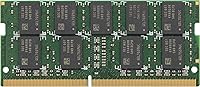
The Synology D4ES01-8G 8GB ECC DDR4 SODIMM RAM is Synology's own-branded memory module, purpose-built for compatible Synology NAS enclosures rather than everyday computers. ECC — Error-Correcting Code — means the RAM actively detects and fixes single-bit errors on the fly, preventing the kind of silent corruption that can quietly compromise files without ever triggering a visible alert. For a NAS holding critical backups or years of business data, that matters more than raw speed. Running at 3200 MT/s in a compact SO-DIMM form factor, this official NAS RAM upgrade carries a noticeable price premium over third-party options, but what you gain is guaranteed ecosystem fit within DSM.
Features & Benefits

The core strengths of this Synology ECC memory module are straightforward: error correction and officially verified compatibility. The ECC function runs continuously, catching and fixing single-bit memory faults before they can touch your stored data — something ordinary non-ECC RAM simply cannot do. Operating at 1.2V, the SO-DIMM design draws less power than standard full-size DIMMs, which is worth noting for hardware that runs around the clock. The 8GB capacity represents a practical upgrade for mid-range Synology units handling packages, Docker containers, or lightweight virtual machines. And thanks to official certification, DSM identifies and accepts the module immediately, with no warning messages appearing in the notification center.

Best For

This official NAS RAM upgrade is aimed squarely at users for whom data integrity is non-negotiable. If you're running Synology Surveillance Station with a dozen or more IP cameras, or spinning up Docker containers and lightweight VMs, the ECC protection here is doing real work in the background. Small business owners maintaining financial records or client files on a NAS will find the added reliability genuinely worth the cost. It's also the natural pick for anyone who has already fought with compatibility warnings in DSM when using third-party memory — buying the official module eliminates that problem entirely and keeps your system logs clean.

User Feedback

Sitting at 4.6 out of 5 stars from over 160 buyers, the D4ES01-8G stick has a strong track record, and the feedback is refreshingly consistent. Most owners report that the module went in and was recognized by DSM without any friction — ECC confirmed active in Synology's resource monitor, no drama. Some buyers went out of their way to verify this in the system logs and were satisfied with what they found. The main sticking point, raised repeatedly, is the price gap versus third-party DDR4 SO-DIMMs that many users say work fine in practice. A few reviewers also flag that checking Synology's official compatibility list for your specific model before purchasing is a smart move. Nobody seems to buy this expecting a bargain — they buy it for certainty.

Pros

  • ECC error correction actively protects stored data from silent, single-bit memory faults around the clock.
  • Officially certified by Synology, so DSM recognizes the module immediately with zero compatibility warnings.
  • Plug-and-play installation — most users report the NAS boots up and confirms ECC is active without any manual configuration.
  • Low 1.2V operating voltage keeps power draw in check for hardware running 24 hours a day.
  • The 8GB capacity is a practical and meaningful upgrade for mid-range Synology units running multiple packages simultaneously.
  • Buyers can verify ECC is functioning directly inside Synology's resource monitor and system logs.
  • Ranked #265 in Computer Memory on Amazon with a 4.6-star average — a strong signal for a niche, purpose-built component.
  • Eliminates the uncertainty of third-party compatibility testing for users who prefer a guaranteed fit the first time.

Cons

  • Significantly more expensive than third-party DDR4 ECC SO-DIMMs that many Synology users report working without issues.
  • Compatibility is limited to select Synology NAS models — always verify against Synology's official list before purchasing.
  • Offers no noticeable speed improvement for everyday NAS tasks like file transfers or media streaming.
  • The D4ES01-8G stick provides no ECC benefit whatsoever on Synology units that do not support error-correcting memory.
  • Only available in an 8GB capacity under this model, which may be insufficient for heavier virtualization workloads.
  • A relatively small pool of under 170 user ratings makes it harder to assess long-term reliability trends.
  • Synology's hardware ecosystem lock-in means you are paying a brand premium that offers no advantage if you ever switch NAS platforms.
  • No meaningful warranty or support differentiation over reputable third-party alternatives has been clearly documented by buyers.

Ratings

The scores below reflect an AI-assisted analysis of verified global buyer reviews for the Synology D4ES01-8G 8GB ECC DDR4 SODIMM RAM, with spam, bot-generated, and incentivized feedback actively filtered out before any category was scored. Each rating has been calibrated against real-world usage patterns reported by NAS owners ranging from home lab enthusiasts to small business operators running always-on storage workloads. Both the genuine strengths and the recurring frustrations are represented transparently so buyers can make an informed decision.

DSM Compatibility
96%
Across verified installs, buyers consistently report that DSM detects this official NAS RAM upgrade instantly on first boot, with no compatibility warnings appearing in the notification panel. For users who have previously dealt with third-party memory triggering persistent DSM alerts, this zero-friction recognition is the single most praised aspect of the module.
A small number of buyers — particularly those with less common Synology models — found they needed to cross-reference Synology's compatibility list before purchasing, since not every NAS officially supports this stick. The absence of an always-current compatibility lookup directly on the product listing adds a minor but real friction point at the research stage.
ECC Reliability
93%
Buyers who purchased this Synology ECC memory module specifically for error correction report consistent satisfaction — many verified ECC was active inside Synology's resource monitor post-installation, with no manual configuration required. For NAS users running around-the-clock workloads involving sensitive business files or surveillance archives, the hardware-level protection is described as genuinely reassuring.
ECC's benefits are invisible by design, so buyers who skip routine log checks may never see direct evidence it is working, making the value feel abstract for less technical users. A handful of reviewers also noted that ECC provides zero protection if the module is installed in a Synology model that does not officially support error-correcting memory.
Value for Money
54%
46%
For buyers who have experienced compatibility headaches with third-party memory — or who cannot afford downtime on a production NAS — the premium price is considered a worthwhile one-time, no-stress investment. The peace-of-mind factor is consistently cited by reviewers as something that, for their specific situation, justifies the cost differential over cheaper alternatives.
The price gap compared to third-party DDR4 ECC SO-DIMMs from reputable brands is significant and stands as the most frequently cited complaint across the entire review pool. Many users point out that compatible third-party modules have worked without incident, making the official branding very difficult to justify on a pure cost-per-gigabyte basis.
Data Protection
91%
For prosumer and small business NAS owners who understand how silent memory corruption can quietly damage file systems over months, the always-on ECC error correction in this module is a meaningful hardware-level safeguard. Reviewers storing financial databases, legal archives, or multi-year surveillance footage consistently describe it as the right component for the job.
ECC memory protects against a specific class of memory-level errors and does not replace RAID configurations, offsite backups, or filesystem-level checksums such as those available via Btrfs on Synology. Buyers who treat ECC as a complete data protection strategy may be overestimating the scope of what this technology actually covers.
Ecosystem Integration
94%
The D4ES01-8G stick's tightest advantage is how cleanly it sits within the Synology ecosystem — officially listed, certified, and recognized by DSM without any configuration required. For buyers who have invested heavily in Synology hardware and want every component to carry first-party certification, it is the obvious and uncomplicated choice.
Deep ecosystem integration is simultaneously this module's biggest limitation: it offers no flexibility outside of Synology's supported hardware list, and buyers who eventually migrate to a different NAS platform cannot carry this investment with them. The official integration advantage disappears entirely the moment a user moves to non-Synology infrastructure.
Installation Ease
88%
The physical installation process is described by most buyers as straightforward — standard SO-DIMM slot insertion, a clean click into place, and the NAS recognizes the added memory on the very next boot. No driver installation, no BIOS adjustment, and no command-line configuration is required at any stage.
A few buyers noted that accessing the memory slot on certain Synology models requires more disassembly than anticipated, involving multiple screws and drive-tray removal before the SO-DIMM bay is even reachable. This is a design characteristic of specific NAS hardware rather than a module flaw, but it caught some first-time upgraders off guard.
Long-term Stability
87%
Buyers who have been running this official NAS RAM upgrade for extended periods — some reporting well over a year of continuous uptime — describe no performance degradation, no system crashes attributable to the memory, and no DSM warnings surfacing post-installation. The ECC layer adds an additional level of confidence for those actively monitoring error logs.
The relatively modest pool of around 165 ratings limits the available long-term reliability data compared to high-volume consumer RAM products. A small number of buyers reported needing to reseat the module after the initial installation due to intermittent recognition issues, though this appeared to stem from installation technique rather than any manufacturing defect.
Power Efficiency
82%
18%
Operating at 1.2V, this Synology ECC memory module draws less power than a full-size DIMM would under equivalent workloads — a practical detail when the NAS is running continuously, 24 hours a day, every day of the year. Technically oriented buyers noted this as a sensible advantage for managing long-term electricity overhead.
The 1.2V operating voltage is a standard DDR4 specification shared by most competing SO-DIMM modules, so this is not a differentiated advantage exclusive to the official Synology variant. Buyers should not expect any measurable power savings compared to third-party DDR4 SO-DIMMs operating at the same voltage level.
Build Quality
79%
21%
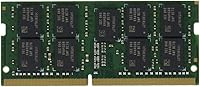
The module ships as a bare SO-DIMM without a heatspreader, which is correct and appropriate for NAS enclosures where passive airflow cooling is the norm and a heatspreader could interfere with slot clearance. Buyers report no physical defects on arrival and the module seats cleanly and securely in compatible slots.
Buyers accustomed to desktop RAM with heatspreaders may find the bare PCB appearance underwhelming, even if it is functionally correct for this use case. At this price point, there is also no visible build quality differentiation from a well-made third-party DDR4 SO-DIMM, which reinforces the perception that part of the premium is a brand charge.
Capacity Options
58%
42%
The 8GB capacity is a practical and commonly needed upgrade size for mid-range Synology NAS units running DSM packages, Docker containers, or lightweight virtual machines simultaneously. For buyers upgrading from 4GB of base installed RAM, this single module effectively doubles available memory and resolves the multitasking bottlenecks they were experiencing.
Buyers who require more than 8GB — particularly those running heavier virtualization workloads or high-camera-count Surveillance Station deployments — find this single capacity offering limiting under this model designation. The absence of a 16GB single-module option in this line frustrates users who want to maximize RAM while occupying fewer slots.
Workload Performance
74%
26%
For workloads that are genuinely memory-constrained — running multiple DSM packages, hosting Docker containers, or managing a multi-camera Surveillance Station feed — adding this module reduces the risk of the NAS swapping to disk, indirectly improving stability and response times when the system is under real load.
Buyers expecting a noticeable speed improvement to file transfers, media streaming, or general NAS responsiveness will likely be disappointed, as RAM is rarely the bottleneck in those everyday scenarios. Multiple reviewers noted that the performance impact was imperceptible in typical use, reinforcing that this module's core value is reliability, not raw throughput.
Vendor Support
67%
33%
Because this is an officially certified Synology product, buyers have a clearer escalation path if they encounter issues — Synology's own support team is accountable for the module, unlike third-party RAM where responsibility between the memory brand and the NAS manufacturer can be disputed. The official certification gives buyers legitimate leverage in support conversations.
In practice, several reviewers found Synology's support team tended to redirect memory-related queries back to the compatibility list rather than providing hands-on troubleshooting. The documentation included with the module is minimal, and buyers largely rely on community forums and Synology's online knowledge base to work through any post-installation questions.

Suitable for:

The Synology D4ES01-8G 8GB ECC DDR4 SODIMM RAM is the right call for anyone running a Synology NAS in a situation where data loss or silent corruption would be genuinely costly. Small business owners keeping financial records, client databases, or project archives on a Synology unit will appreciate that ECC memory quietly catches and corrects memory-level errors before they ever reach stored files. It's equally well-suited to prosumer setups running Synology Surveillance Station with multiple IP cameras, where stable, high-throughput memory matters more than raw speed gains. Buyers who have already encountered DSM compatibility warnings with third-party sticks — and want to be done with that headache permanently — will find this official NAS RAM upgrade the cleanest solution available. It also makes sense for those expanding a Synology unit into Docker or lightweight VM workloads, where an 8GB boost provides meaningful breathing room without introducing any compatibility uncertainty.
Not suitable for:

The Synology D4ES01-8G 8GB ECC DDR4 SODIMM RAM is a hard sell for budget-conscious buyers who are comfortable doing a little research. Plenty of third-party DDR4 ECC SO-DIMM modules from established brands work in compatible Synology enclosures without triggering warnings — often at a significantly lower cost — and for home users storing non-critical media or personal backups, the official branding adds little practical value. This module is also not a performance upgrade in any meaningful sense; if your goal is faster NAS throughput, the bottleneck is almost never RAM. Buyers with Synology units that do not officially support ECC memory will see no benefit from the error-correction feature at all, making the premium even harder to justify. And anyone using a non-Synology NAS — regardless of brand or chipset — should look elsewhere entirely, as this stick is engineered exclusively for Synology's own ecosystem.

Specifications

  • Brand: This memory module is manufactured and sold directly by Synology, the same company that produces the NAS hardware it is designed to support.
  • Model Number: The official model designation is D4ES01-8G, which corresponds to Synology's ECC SO-DIMM product line for supported NAS enclosures.
  • Capacity: The module provides 8GB of RAM, a meaningful upgrade tier for mid-range Synology units running multiple simultaneous packages or lightweight containers.
  • Memory Type: This is a DDR4 ECC Unbuffered SO-DIMM, a form factor commonly used in compact, low-power computing devices including NAS enclosures.
  • Memory Speed: The module is rated at 3200 MT/s (megatransfers per second), providing adequate bandwidth headroom for demanding NAS workloads including surveillance and virtualization.
  • Voltage: Operating at 1.2V, this module draws less power than standard full-size DIMMs, which is relevant for NAS hardware running continuously around the clock.
  • Error Correction: ECC (Error-Correcting Code) functionality detects and corrects single-bit memory errors automatically, protecting stored data from silent corruption without user intervention.
  • Form Factor: The SO-DIMM form factor is a compact, notebook-style memory format specifically required by most Synology NAS expansion slots.
  • Compatibility: This module is compatible with select Synology NAS enclosures that officially support DDR4 ECC memory; buyers should verify their specific model against Synology's published compatibility list.
  • Dimensions: The module measures 0.79 x 3.94 x 5.51 inches, consistent with the standard SO-DIMM physical specification.
  • Weight: The module weighs 1.1 ounces, which is typical for a bare SO-DIMM without a heatspreader.
  • Release Date: This module was first made available in September 2020 and remains a current, actively sold product in Synology's official accessory lineup.
  • Market Ranking: The module holds a ranking of #265 in the Computer Memory category on Amazon, a strong position for a product targeting a specific NAS ecosystem.
  • Average Rating: Across 165 verified ratings, this module holds a 4.6 out of 5 average score, reflecting consistently positive buyer experiences with installation and ECC functionality.

Related Reviews
Timetec 8GB DDR4 2400MHz SODIMM Laptop RAM
78%
91%
Value for Money
88%
Installation Ease
74%
Compatibility
86%
Performance Improvement
83%
Reliability
More
Crucial 8GB DDR4-2400 SODIMM Laptop RAM
84%
91%
Value for Money
93%
Installation Ease
77%
Performance Impact
73%
Compatibility Range
94%
Long-term Reliability
More
Timetec Pinnacle 8GB DDR4 3200MHz Laptop RAM
83%
93%
Value for Money
78%
Compatibility
91%
Ease of Installation
86%
Performance Gain
88%
Build & Reliability
More
Crucial Basics 8GB DDR4 2666MHz SODIMM RAM
85%
88%
Performance Boost
93%
Ease of Installation
91%
Compatibility with Laptops
85%
Power Efficiency (Battery Life)
92%
Overall Value for Money
More
A-Tech 8GB DDR4 2666MHz SODIMM Laptop RAM
81%
93%
Value for Money
91%
Installation Ease
78%
Compatibility Range
82%
Performance Impact
84%
Build & Module Quality
More
KLEVV DDR4 8GB 3200MHz SODIMM Laptop RAM
87%
88%
Performance
90%
Compatibility
94%
Ease of Installation
92%
Value for Money
85%
Stability during Regular Use
More
OLOy 8GB DDR4 3200MHz Laptop SODIMM RAM
77%
88%
Value for Money
91%
Installation Ease
67%
Compatibility
74%
Real-World Performance
78%
Reliability
More
A-Tech 8GB DDR4 2400MHz SODIMM Laptop RAM
82%
91%
Value for Money
68%
Compatibility
88%
Ease of Installation
78%
Performance Improvement
83%
Reliability & Longevity
More
A-Tech 8GB DDR4 2133MHz SODIMM Laptop RAM
81%
91%
Value for Money
67%
Compatibility Range
93%
Installation Experience
88%
System Stability
74%
Performance Uplift
More
NEMIX RAM 32GB DDR4-2666 ECC SODIMM Kit
81%
91%
NAS Compatibility
93%
ECC Reliability
88%
Installation Ease
78%
Value for Money
89%
Warranty & Support
More

FAQ

Compatibility depends on your specific Synology unit. Not every Synology NAS supports ECC memory or this particular module, so the safest step before purchasing is checking Synology's official compatibility list on their website using your exact model number. Do not assume compatibility based on the NAS generation or chipset alone.

It depends on the NAS model and the third-party module. Some Synology units do flag non-certified memory with a warning in DSM, while others accept compatible third-party sticks without any notification. If avoiding those warnings entirely matters to you, using this official NAS RAM upgrade is the straightforward way to guarantee a clean system log.

Once installed, you can verify ECC status directly in Synology's DSM interface under the resource monitor or system information panel. Many buyers have reported that the system clearly confirms ECC is enabled after booting with this Synology ECC memory module, without needing any manual configuration.

In many cases you can, but mixing ECC and non-ECC memory is not recommended and may cause ECC to be disabled system-wide or trigger instability on certain models. If your goal is to keep ECC active, the safest approach is to use matched ECC modules across all slots. Check Synology's documentation for your specific unit.

That honestly depends on what you're storing and how much uncertainty you can tolerate. If your NAS holds irreplaceable business data or you've already had a bad experience with third-party memory throwing compatibility warnings, the premium is justifiable. If you're running a home media server and are comfortable testing a reputable third-party option, you may find the savings more appealing than the official badge.

Probably not in everyday use. For most NAS workloads, the bottleneck is network bandwidth, drive speed, or CPU throughput — not RAM. That said, expanding memory does allow more packages, Docker containers, or virtual machines to run simultaneously without the system swapping to disk, which indirectly helps stability and responsiveness under heavy multitasking.

This module is designed and certified exclusively for compatible Synology NAS enclosures and is not guaranteed to function correctly in other devices. While the DDR4 SO-DIMM form factor is physically common, Synology's own certification process is tied to DSM and their specific hardware controllers, so using the D4ES01-8G stick in a non-Synology device is unsupported and may not work reliably.

Installation is straightforward for most Synology models. You typically remove the NAS drive trays, unscrew the chassis to access the memory slot, seat the module at an angle, press it down until it clicks, and reassemble. A basic Phillips screwdriver is usually all you need. DSM should recognize the new memory automatically on the next boot.

If your Synology NAS model has two SO-DIMM slots and officially supports 16GB of RAM, then yes, installing two of these modules to reach 16GB total is a supported configuration. Always verify your NAS model's maximum supported RAM and slot count in Synology's hardware specifications before purchasing a second stick.

On a NAS without ECC memory, a single-bit memory error can silently flip a data bit during a read or write operation, potentially corrupting a file without any visible warning. Over time, especially on always-on systems processing large volumes of data, uncorrected errors can lead to filesystem inconsistencies or corrupted backups that are only discovered when you need the data most. ECC eliminates that risk at the hardware level.

Where to Buy