Overview

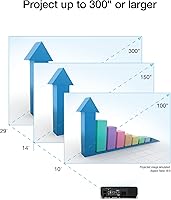
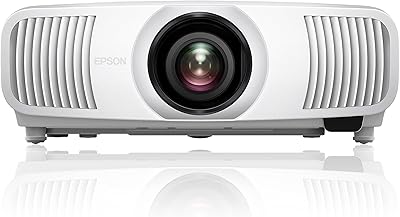
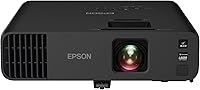
The Epson EX11000 1080p Laser Projector is built squarely for professional environments — conference rooms, training halls, and boardrooms where reliability and image quality aren't negotiable. Unlike lamp-based projectors that degrade over time and demand periodic bulb swaps, this laser projector uses a solid-state light source rated for tens of thousands of hours of use, which fundamentally changes the long-term ownership math. The 3-chip 3LCD engine is worth calling out specifically: it's a meaningful technical distinction from single-chip DLP designs, especially for color-critical work. At full HD resolution, images can stretch to 300 inches. Make no mistake — this is a professional-grade investment, not a casual home theater buy.
Features & Benefits

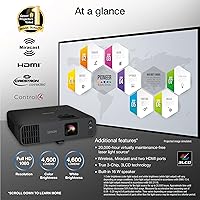
What makes the EX11000 stand out in a real office environment is its matched color and white brightness — both rated at the same high lumen output, so colors stay accurate when ambient light competes. That matters more than most buyers realize before they try a projector that doesn't balance them. The laser light source is rated at 20,000 hours, effectively eliminating bulb replacements entirely. On the connectivity side, two HDMI ports, USB power for streaming sticks, and Miracast wireless cover most room setups without hunting for adapters. The built-in 16W speaker handles smaller spaces adequately. Optical zoom, horizontal lens shift, and auto vertical keystone give installers genuine placement flexibility.

Best For

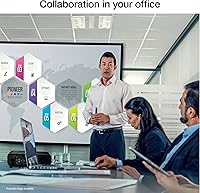
This Epson unit is a strong fit for corporate meeting rooms and boardrooms that need a projector running reliably day after day with minimal intervention. Training centers and classrooms benefit from the same logic — high daily usage is precisely where a laser light source justifies its cost over a conventional lamp unit. IT managers and AV integrators who want a low-maintenance, long-service solution will appreciate how little there is to babysit once it is installed. It also suits presenters who display a video conference feed alongside slide content simultaneously. If you are migrating from an older lamp-based projector, the long-term running cost comparison makes a strong case on its own.

User Feedback

Buyers consistently highlight brightness performance in lit rooms and color accuracy as standout strengths — the kind of feedback that comes from real office conditions rather than darkened demo spaces. Setup also earns positive marks, with most users reporting quick initial configuration. On the downside, the unit's 9.5-lb frame draws occasional comments from buyers expecting something more portable, and fan noise under load is noted by reviewers working in quieter environments. Miracast works reliably for most users, though a handful report pairing inconsistencies depending on the device. The built-in speaker earns mixed reactions: adequate for smaller groups, but many buyers opt for external audio in larger rooms.

Pros

  • Laser light source effectively eliminates bulb replacement costs and maintenance scheduling entirely.
  • Matched color and white brightness means images stay vivid and accurate in fully lit conference rooms.
  • 3-chip 3LCD technology delivers consistent color fidelity with no rainbow effect on any content type.
  • Optical zoom and horizontal lens shift give installers real flexibility without repositioning the mount.
  • Two HDMI ports plus USB power for streaming sticks cover most modern room configurations cleanly.
  • Full HD resolution keeps fine text and detailed charts sharp at large projection sizes.
  • Auto vertical keystone correction speeds up daily setup without manual realignment each session.
  • Built-in speaker handles voice-forward content adequately in smaller meeting rooms without extra hardware.
  • The EX11000 earns strong user ratings across brightness performance, color accuracy, and ease of initial setup.
  • High dynamic contrast ratio produces punchy, readable visuals even when displaying mixed media content.

Cons

  • At nearly 10 lbs, this laser projector is impractical for frequent room-to-room transport.
  • Miracast wireless pairing is inconsistent with certain Android devices and older laptops.
  • The upfront cost is a hard pill for buyers who run low daily hours or short deployment windows.
  • Fan noise increases noticeably during extended high-brightness sessions in quiet boardroom environments.
  • Horizontal lens adjustment is manual, adding fiddly fine-tuning steps during ceiling-mount installation.
  • Built-in audio struggles in larger rooms or open-plan spaces where ambient noise competes.
  • No native smart platform means a streaming stick or external device is always required for app-based content.
  • Advanced menu settings like color calibration and network config are buried deeper than experienced AV users expect.
  • Long-term laser longevity data is still limited given how recently this unit entered the market.
  • Brightness can drop slightly at the far end of the optical zoom range, a factor in light-challenged rooms.

Ratings

The Epson EX11000 1080p Laser Projector earns strong marks across professional use cases, and the scores below reflect AI analysis of verified buyer reviews from global markets — with spam, bot-generated, and incentivized feedback actively filtered out. The result is an honest picture of where this laser projector genuinely excels and where real-world buyers have run into limitations. Both sides are represented fairly.
Brightness Performance
93%
In real office conditions — overhead fluorescents on, blinds open — buyers consistently report that the image holds up without washing out. This is one of the most praised aspects across reviews, particularly from users who have dealt with dimmer lamp projectors in the same rooms.
A small number of users in very large venues with floor-to-ceiling windows note that extreme direct sunlight still competes with the image at maximum throw distances. It is rare feedback, but worth noting for unusually demanding lighting setups.
Color Accuracy
91%
The 3-chip 3LCD engine draws specific praise from buyers who previously used single-chip DLP units. Skin tones in video conferencing, chart colors in presentations, and rich media all render consistently without the color shifting that DLP users often tolerate without realizing it.
A few users calibrating for very specific color-critical work note that out-of-box color settings are tuned for general office use rather than strict accuracy. Minor calibration effort is needed to hit tighter color targets in specialized environments.
Light Source Longevity
94%
The laser light source is arguably the biggest practical advantage for high-usage environments. IT managers and facilities teams highlight that eliminating bulb replacement cycles removes both direct costs and scheduling headaches, especially in projectors running multiple sessions daily.
The long-rated lifespan is a forward-looking promise that buyers cannot fully validate at purchase. Some reviewers note the unit has not been on the market long enough for widespread real-world longevity data, so trust in the spec still requires some faith.
Connectivity & Wireless
78%
22%
Having two HDMI ports alongside USB power for streaming sticks covers most modern conference room layouts without a switcher. Miracast works reliably for Windows-based laptop users in particular, and the setup process for wired connections is straightforward.
Miracast pairing with certain Android devices and older laptops produces inconsistent results according to a recurring thread of reviews. Users relying heavily on wireless mirroring in mixed-device environments may hit friction that wired users simply never encounter.
Built-in Audio
62%
38%
For a small training room or a breakout space, the onboard speaker handles voice-forward content like presentations and video calls without needing an external setup. Buyers running quick demos or solo review sessions find it perfectly adequate in those contexts.
In rooms larger than a typical conference space, the speaker runs out of authority. Several buyers note that background noise in open-plan offices or larger halls makes the built-in audio feel thin, and most end up pairing the unit with external speakers for any regular use.
Setup & Installation
86%
The combination of optical zoom, horizontal lens shift, and auto vertical keystone gives installers real flexibility without awkward projector positioning. Most buyers report getting a clean, aligned image within minutes of mounting or placement.
Auto keystone handles vertical correction well but the horizontal adjustment is manual via a slider, which a handful of users find fiddly in tight ceiling-mount installations. It is not a dealbreaker, but it adds a few extra minutes during initial setup in constrained spaces.
Build Quality & Durability
83%
The chassis feels solid and well-constructed — not surprising at this price tier. Buyers who have run the unit through extended daily use report no rattles, no housing flex, and no signs of wear that would raise concerns about long-term reliability.
At 9.5 lbs, the physical weight is noticeable, and the footprint is not compact. Users who expected a more portable form factor at this spec level occasionally express surprise, particularly those considering it for flexible room-to-room deployment.
Image Sharpness
88%
Full HD 1080p at typical conference room throw distances produces sharp, readable text and detailed graphics. Spreadsheet data, fine chart labels, and presentation slides all render clearly without the soft-edge issues that lower-resolution projectors show at similar sizes.
At very large throw distances approaching the maximum image size, pixel density naturally drops and fine text can lose some crispness. It is a physics limitation rather than a product defect, but users expecting laser-sharp clarity at 200-plus-inch projection should set realistic expectations.
Fan Noise
66%
34%
Under normal operating loads in a room with ambient conversation or a running HVAC system, most buyers report the fan is easy to tune out. It does not disrupt standard meeting or presentation scenarios for the majority of users.
Under sustained heavy use — long sessions in warm rooms or high-brightness mode — the fan audibly steps up. Buyers using the projector in quiet boardrooms or recording environments flag this as a recurring annoyance, and it shows up consistently enough in reviews to warrant attention.
Portability
54%
46%
The unit is self-contained with built-in wireless and audio, which reduces the accessory bag needed for a mobile setup. For users who move it occasionally between fixed venues, the all-in-one nature partially offsets the weight.
Nearly 10 lbs in a bulky rectangular chassis is not a setup many professionals want to carry regularly. Buyers who expected something closer to a portable presenter-grade projector are often caught off guard, and this is one of the more consistent points of disappointment in reviews.
Value for Money
73%
27%
For organizations that calculate total cost of ownership — factoring out bulb replacement cycles, service calls, and brightness degradation over years — the pricing makes more sense than it does at first glance. Long-horizon buyers tend to rate value significantly higher than short-horizon ones.
The upfront cost is a genuine barrier, and buyers comparing sticker prices to lamp-based alternatives at a fraction of the cost often pause. Users who do not run high daily hours or plan long-term installations may never fully recoup the premium through running cost savings.
Wireless Streaming Compatibility
74%
26%
USB power ports for streaming sticks mean you can run a Roku, Fire TV, or Chromecast directly from the projector without hunting for a wall outlet. This is a small but frequently appreciated detail in rooms with limited power access near the screen.
Native smart features are absent — this is not a smart projector. Users expecting app-native streaming without an external stick need to bring their own device, and the wireless mirroring experience varies enough by platform that some buyers find the wired HDMI path more dependable.
Image Size Flexibility
89%
The 1.6x optical zoom range combined with lens shift gives substantial flexibility in matching the projector to different room depths without physically repositioning the mount. Buyers in multi-use venues appreciate being able to adjust the image size for different audience configurations.
At the far end of the zoom range, some users note a modest brightness reduction, which is typical of optical zoom systems. It is not dramatic, but in rooms already pushing ambient light limits, it can be a factor worth testing before finalizing the installation position.
Ease of Use
85%
Auto keystone correction on power-up reduces the repetitive manual adjustment that frustrates users of older projectors. The onscreen menu is logically organized, and most buyers report needing little time to get comfortable with daily operation after initial setup.
Some advanced settings — color calibration, network configuration, and input labeling — are buried deeper in the menu than experienced AV users expect. It is not a serious issue, but users managing multiple units across an organization may find the interface less efficient than dedicated commercial AV brands.

Suitable for:

The Epson EX11000 1080p Laser Projector is built for professionals and organizations that take projection seriously as a long-term infrastructure investment rather than a one-off purchase. Corporate meeting rooms and boardrooms that run multiple sessions daily will get the most out of the laser light source — no bulb degradation, no unplanned replacements, and consistent brightness from the first hour of use to the ten-thousandth. Training centers, classrooms, and multi-use event spaces benefit from the high lumen output because it holds up in lit rooms without forcing presenters to dim the environment for every session. IT managers and AV integrators who want a unit that stays installed and just works will appreciate how little ongoing maintenance the EX11000 demands once it is set up. Presenters who routinely share dual-content layouts — displaying a live video call alongside slides simultaneously — will find the full HD resolution and color accuracy give both feeds the clarity they need to be genuinely useful rather than merely visible.
Not suitable for:

The Epson EX11000 1080p Laser Projector is not the right tool for buyers approaching this from a home theater or casual entertainment angle. The price point reflects a professional-grade specification set, and buyers who will only run the projector a few hours a week are unlikely to recover that investment through operational savings over any realistic ownership period. At nearly 10 lbs in a sizable chassis, it is also not a practical choice for professionals who need to carry a projector between locations regularly — this unit is happiest mounted or stationed in a fixed room. Buyers prioritizing cinematic contrast, deep blacks, or HDR performance for film watching will find the feature set oriented toward business content rather than home video. Those who need reliable wireless mirroring across a wide mix of personal devices — particularly older Android hardware — should be aware that Miracast compatibility is not universally smooth and may require a wired fallback in mixed-device environments.
Specifications

  • Resolution: Native output is Full HD 1920 x 1080, delivering sharp, detailed images suitable for spreadsheets, presentations, and video conferencing at large projection sizes.
  • Brightness: Color and white brightness are both rated at 4,600 lumens, ensuring the image remains vivid and accurate in rooms with ambient lighting rather than only in darkened environments.
  • Light Source: A solid-state laser light source is rated for approximately 20,000 hours of operation, effectively eliminating bulb replacements over the working life of the unit.
  • Projection Tech: True 3-chip 3LCD technology processes 100% of the RGB color signal on every frame, producing consistent color without the rainbow artifacts associated with single-chip DLP designs.
  • Contrast Ratio: Dynamic contrast ratio reaches up to 100,000:1, providing punchy differentiation between bright highlights and darker areas in mixed content like video and slide decks.
  • Optical Zoom: A 1.6x optical zoom range allows meaningful adjustment of image size from a fixed mounting position without physically relocating the projector.
  • Keystone Correction: Automatic vertical keystone correction engages at startup, while a manual horizontal slider handles lateral alignment for installations where the projector cannot be perfectly centered.
  • Max Image Size: The projection system can produce images up to 300 inches diagonal, scaling far beyond what any flat-panel display can achieve in large venues or open meeting spaces.
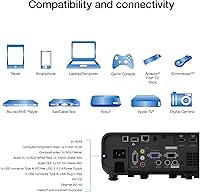
  • Connectivity: Inputs include two HDMI ports, USB-A with power output for streaming sticks, a wired Ethernet port, and Miracast wireless mirroring for compatible devices.
  • Built-in Audio: An integrated 16W speaker provides onboard audio output suitable for voice-forward content in small to mid-sized rooms without requiring an external sound system.
  • Wireless Standard: Wireless display connectivity uses the Miracast standard, enabling screen mirroring from compatible Windows laptops, Android devices, and Miracast-enabled hardware without additional adapters.
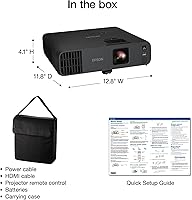
  • Dimensions: The unit measures 12.8 x 11.8 x 4.1 inches (W x D x H), occupying a moderate footprint suited to shelf placement, cart mounting, or ceiling installation.
  • Weight: The projector weighs 9.5 lbs, which suits fixed or semi-permanent installations but makes frequent manual transport between rooms less practical.
  • Model Number: The official Epson model number is V11HA72220, which should be referenced when ordering compatible accessories, mounts, or requesting warranty service.
  • ASIN: The Amazon Standard Identification Number for this unit is B0C35ZF3WR, useful for verifying the correct listing when purchasing through online marketplaces.
  • Availability Date: This projector was first made available for purchase in June 2023, placing it among Epson's more recent business laser projector releases.
  • Recommended Use: Epson classifies this unit for business use, specifically targeting corporate presentations, video conferencing, and large-group display scenarios rather than consumer home theater.
  • Special Features: Notable built-in features include Wi-Fi with Miracast, a 16W speaker, and a lightweight-relative-to-class chassis designed to reduce installation complexity.
  • User Rating: As of available data, the unit holds a 4.6 out of 5 star average across 110 verified ratings, placing it among the higher-rated units in its projector category.
  • Best Sellers Rank: The projector ranks at number 156 in the Video Projectors category on Amazon, reflecting solid market traction within a competitive professional projector segment.

Related Reviews
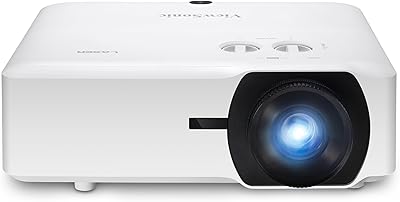
ViewSonic LS740HD 1080p Laser Projector
75%
92%
Brightness & Ambient Light Performance
84%
Image Sharpness & Resolution
89%
Setup & Installation Flexibility
78%
Throw Distance & Zoom Range
86%
Golf Simulator Compatibility
More
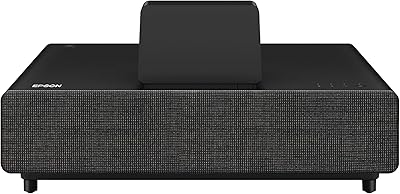
Epson EpiqVision Ultra LS500 4K Laser Projector
87%
94%
Image Quality
92%
Brightness Performance
88%
Ease of Setup
87%
Value for Money
70%
Sound Quality
More
Optoma GT3500HDR 1080p Full HD Home Laser Projector
88%
91%
Image Quality
87%
Brightness
85%
Ease of Setup
82%
Portability
90%
Design & Build Quality
More
Epson EpiqVision Mini EF21 Laser Projector
79%
83%
Picture Brightness
91%
Color Accuracy
88%
Ease of Setup
86%
Portability & Form Factor
84%
Smart Platform & App Experience
More
Nebula Capsule 3 Laser Portable Mini Projector
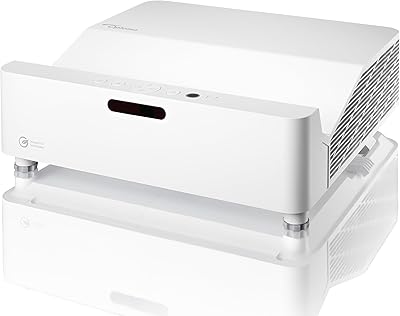
77%
83%
Image Quality
61%
Brightness & Ambient Light Performance
93%
Portability & Form Factor
88%
Smart OS & App Experience
86%
Autofocus & Image Correction
More
Epson Home Cinema LS11000 4K PRO-UHD Laser Projector
85%
94%
Visual Quality
88%
Brightness in Different Environments
91%
Motorized Lens Adjustment
89%
Ease of Setup and Installation
90%
HDR Performance
More
Epson EpiqVision Ultra LS800 Ultra Short Throw Laser Projector
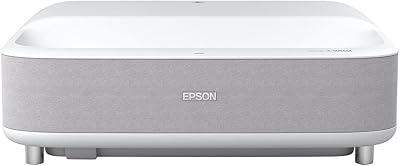
83%
92%
Display Quality
89%
Ease of Setup
80%
Sound Quality
78%
Value for Money
85%
Connectivity & Smart Features
More
Epson EpiqVision Ultra Short Throw LS300 3LCD Smart Laser Projector
84%
93%
Brightness
89%
Picture Quality
85%
Setup & Installation
82%
Sound Quality
90%
Connectivity & Smart Features
More
GKLPO 1080P Projector
86%
88%
Image Quality
92%
Wi-Fi Connectivity
89%
Bluetooth Connectivity
90%
Portability
85%
Setup & Ease of Use
More
ViewSonic PA503HD 4000-Lumen Full HD Projector
77%
91%
Brightness Performance
87%
Image Sharpness & Clarity
84%
Color Accuracy & Contrast
88%
Setup & Ease of Installation
86%
Value for Money
More

FAQ

Yes, and that is honestly one of its strongest practical qualities. The high lumen output with matched color and white brightness means the image holds up well under typical office lighting — overhead fluorescents, open blinds, and all. You do not need to dim the room for every presentation the way you would with a lower-brightness unit.

The biggest practical difference is that you never replace a bulb. Lamp projectors degrade in brightness over time and eventually need an expensive bulb swap, often at an inconvenient moment. The laser in this Epson unit is rated for roughly 20,000 hours of use, which for most organizations translates to many years of daily operation without touching the light source at all.

It can technically project movies, but it was not designed with home theater buyers in mind. The feature set and brightness are optimized for business presentations, conference rooms, and training spaces. If your priority is cinematic contrast, deep blacks, or HDR for film watching, there are better-suited options at this price point built specifically for that use case.

The EX11000 uses Miracast for wireless mirroring, which works well with most Windows laptops and many Android devices. iPhones and Macs do not natively support Miracast, so Apple users will need a wired HDMI connection or an adapter. If you have a mixed-device environment, keeping an HDMI cable handy is a good backup regardless.

Yes, and it is actually well set up for it. The USB port on the unit provides power, so you can plug a streaming stick directly into both the HDMI input and the USB power port without needing a separate outlet. It keeps the cable situation clean and eliminates the need for an extra power brick.

In a typical meeting room with people talking or background HVAC noise, most users do not find the fan distracting. Where it becomes more noticeable is in very quiet environments — a silent boardroom or a recording space — especially during extended high-brightness sessions when the fan steps up to manage heat. If your room is genuinely quiet, it is worth factoring in.

Yes, it supports standard ceiling mount installations. The optical zoom and horizontal lens slider give you some flexibility in positioning, which helps when ceiling mounting options are limited by room layout. Just note that the horizontal alignment is a manual slider rather than motorized, so final fine-tuning during installation requires a bit of hands-on adjustment.

For small conference rooms or breakout spaces where the content is mostly voice — presentations, video calls, webinars — the onboard speaker is genuinely adequate. Once you get into larger rooms or spaces with ambient noise, it starts to feel underpowered. Most buyers in medium-to-large venues end up connecting external speakers, which is easy enough through standard audio output.

The maximum spec is 300 inches diagonal, but achieving that requires a very long throw distance that most rooms cannot accommodate. In a typical conference room, you are more likely working in the 80 to 150 inch range, which is still dramatically larger than any flat panel. The 1.6x optical zoom helps you dial in the right size for your specific room depth without repositioning the projector.

The main practical difference most buyers notice is color rendering. The 3-chip 3LCD design in this unit processes all three color channels simultaneously, which means colors stay accurate and consistent. Single-chip DLP projectors cycle through colors rapidly, and some viewers — particularly those sensitive to it — notice a brief rainbow effect on high-contrast edges. For presentations with detailed charts, vivid media, or video conferencing, the 3LCD approach tends to produce a more natural, stable image.

Where to Buy