Overview

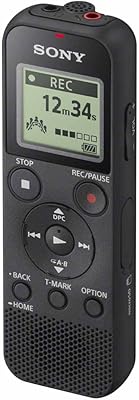
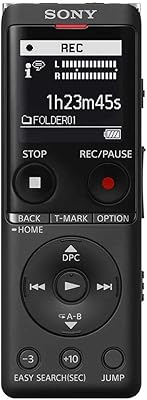
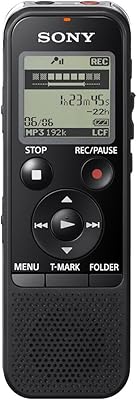
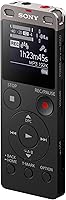
The Sony ICD-UX560 has been quietly holding its ground in the mid-range voice recorder market since 2016 — which says something in a category where budget competitors keep appearing. At roughly 4.25 inches tall and weighing next to nothing, it slips into a shirt pocket without a second thought. The backlit LCD is small but readable, and the physical controls are intuitive enough that you can start recording without consulting a manual. What really stands out is the quick-charge feature — three minutes of charging buys a full hour of recording time. And since it runs on standard AAA batteries, you are never stranded hunting for a proprietary cable.

Features & Benefits

What makes this Sony recorder so useful day-to-day is how well its three recording modes hold up in practice. Wide stereo works well in open rooms; the narrow focus mode cuts through background noise in crowded spaces like coffee shops or busy offices — a real advantage for interviews. Voice-operated recording is worth enabling for long sessions, since it pauses during silence and saves you from scrubbing through dead air later. The built-in 4GB storage handles hours of audio, and the MicroSD slot extends that further. A 3.5mm headphone jack and external mic input round things out for anyone who occasionally needs more precise audio control.

Best For

This voice recorder is a strong pick for students who want to set it on a desk and let voice activation handle the rest during long lectures. Journalists and field interviewers will appreciate the focused recording mode when ambient noise is a constant battle. Business professionals who dictate notes or capture meeting audio will find it unobtrusive and easy to operate on the fly. It is also a solid choice for travelers and researchers who cannot always rely on USB charging access. That said, this is probably not the right tool for podcasters or anyone who requires high-fidelity audio beyond standard MP3 capture.

User Feedback

Across a broad range of buyer reviews, the most consistent praise centers on audio clarity and how reliably voice activation triggers without constant manual adjustment. The button layout earns solid marks too — most users find it easy to operate one-handed without fumbling. On the downside, recurring complaints point to the file transfer process, with many finding the companion software dated and occasionally clunky to navigate. Battery life generally meets stated expectations, though users running back-to-back long sessions report cycling through AAA pairs faster than anticipated. Concerns about long-term durability are relatively uncommon but do surface among those using the recorder heavily every day.

Pros

  • Voice-activated recording eliminates dead air and makes long sessions far easier to review afterward.
  • The narrow focus recording mode is genuinely effective at isolating voices in noisy real-world environments.
  • Running on standard AAA batteries means you are never dependent on finding the right cable or power bank.
  • Three minutes of charging delivers a full hour of recording — a real lifesaver before back-to-back meetings.
  • The ICD-UX560 slips into a shirt pocket without adding any noticeable bulk or weight.
  • Onboard 4GB storage plus a MicroSD slot means running out of space mid-session is rarely a concern.
  • Physical button layout is intuitive enough for confident one-handed operation in the field.
  • A 3.5mm external mic input and headphone jack add meaningful flexibility for more demanding recording scenarios.
  • Audio clarity at close to mid-range distances is consistently strong enough for accurate transcription.
  • Sony build reliability means most users report years of functional use with no meaningful degradation.

Cons

  • The companion desktop software feels dated and has real compatibility issues on current operating systems.
  • File organization on the device itself is rudimentary and becomes tedious when managing many short recordings.
  • Menu navigation requires button presses through layers of options rather than quick, dedicated controls.
  • Microphone sensitivity drops off noticeably beyond a few meters, limiting usefulness in large rooms.
  • The Android phone control feature has patchy compatibility with newer Android versions and iOS users get nothing.
  • Background hiss becomes audible in quiet environments when sensitivity settings are pushed higher.
  • The plastic battery door feels noticeably cheaper than the rest of the unit and attracts durability concerns.
  • Heavy daily users report cycling through AAA batteries faster than official battery life figures suggest.
  • At its current price, several newer competitors offer comparable audio with more modern feature sets.
  • The small display becomes difficult to read clearly in bright outdoor lighting conditions.

Ratings

Our AI rating system analyzed thousands of verified global purchases of the Sony ICD-UX560, actively filtering out incentivized and bot-generated feedback to surface what real everyday users actually experienced. The scores below reflect a balanced picture — where this voice recorder genuinely shines and where it falls short — so you can make a confident, informed decision before buying.

Audio Clarity
88%
Users consistently report that recordings from lectures, boardroom meetings, and one-on-one interviews come through with impressive intelligibility. The built-in stereo microphone captures enough detail that reviewers rarely need to strain to follow spoken words on playback.
At higher sensitivity settings, background hiss becomes noticeable in quieter environments like private offices or library study rooms. A small but consistent group of users noted that whispering or low-volume speakers at a distance can sound thin or muffled.
Recording Modes
84%
The three distinct recording modes give this voice recorder real practical versatility. Journalists and students alike praise the narrow focus mode for pulling voices out of noisy cafeterias or conference halls without significant manual adjustment.
Switching between modes mid-session requires navigating a menu rather than a dedicated hardware button, which frustrates users who need to adapt quickly. A number of reviewers also found the difference between normal and wide stereo modes less dramatic than expected in real-world use.
Voice Activation
81%
19%
For lecture capture and long business meetings, voice-operated recording is one of the most praised features here. Users love returning to a clean recording with no dead air to scrub through, and the trigger sensitivity holds up well in typical indoor settings.
In rooms with ongoing ambient noise — think open-plan offices or street-facing windows — the voice activation can misfire and clip the beginning of sentences. A handful of reviewers noted it occasionally fails to trigger at all for soft-spoken participants sitting further away.
Ease of Use
86%
The physical layout is straightforward enough that most users report being ready to record within minutes of unboxing. Buttons are well-spaced and tactile, making one-handed operation in a bag or pocket genuinely practical without needing to look at the device.
The menu system feels dated by current standards and can take some patience to navigate for less tech-savvy users. A recurring complaint involves accidentally changing settings when trying to stop a recording quickly, particularly in high-pressure situations like live interviews.
Build Quality
74%
26%
For its weight class, the ICD-UX560 feels reasonably solid in hand, with a matte finish that resists casual scratches. Most users who carry it daily in a bag or coat pocket report no structural issues over months of regular use.
The plastic construction does not inspire confidence at this price point, and long-term users occasionally report that buttons begin to feel loose after extended daily use. A small segment of reviewers noted the battery door in particular feels flimsy compared to the rest of the unit.
Battery Life
76%
24%
Running on standard AAA batteries is a genuine advantage for travelers and field workers who cannot always access USB charging. The quick-charge feature — three minutes for roughly one hour of recording — is consistently praised as a practical lifesaver before important sessions.
Heavy users cycling through long back-to-back recording days report going through AAA pairs faster than Sony's official figures suggest. Battery drain also appears to accelerate noticeably when using the backlit display or voice activation simultaneously.
Portability
91%
At under 4.5 inches tall and weighing practically nothing, this Sony recorder disappears into a shirt pocket or small bag without any bulk. Reviewers who carry it to daily commutes, campus lectures, and field assignments consistently mention how little they notice it until they need it.
The slim profile, while great for portability, leaves limited room for a larger microphone array or better button spacing. A few users with larger hands find the device slightly awkward to hold steady during handheld recording sessions.
Storage & Expandability
83%
The onboard 4GB handles a substantial amount of audio, and the MicroSD slot lets power users extend storage almost indefinitely for field research or extended travel. Reviewers appreciate not having to micromanage file deletion between sessions.
File organization on the device itself is fairly rudimentary, which becomes a friction point when juggling many short recordings from different meetings or interviews. Some users also note that higher-capacity MicroSD cards occasionally require formatting before the device recognizes them correctly.
File Transfer & Software
53%
47%
The unit does connect via USB and transfers files without requiring proprietary drivers on most modern operating systems. For users who simply drag and drop MP3 files to a computer, the process is functional and straightforward enough.
The companion software is widely criticized as outdated, unintuitive, and occasionally unstable on current Windows and Mac operating systems. This is arguably the most consistent pain point across negative reviews — users expecting a polished desktop experience will be disappointed.
Microphone Sensitivity
78%
22%
In close-range scenarios — across a desk, at a conference table, or placed near a speaker — the built-in stereo mic performs well without additional accessories. Most users find it captures voices clearly enough for transcription and note review purposes.
Sensitivity drops off noticeably beyond a few meters, which limits usefulness in large lecture halls or conference rooms where the recorder cannot be placed centrally. Some users report that high-frequency sounds and sibilance can come through slightly harsh at louder volumes.
Display & Interface
69%
31%
The backlit LCD is readable in dim conditions, and the recording level indicator gives users enough visual feedback to confirm audio is being captured properly. Basic session info — time, storage remaining, mode — is accessible at a glance.
The screen is small enough that detailed menu navigation requires focused attention, especially for new users. Several reviewers noted that in bright outdoor conditions the display becomes hard to read, making quick mode changes inconvenient during outdoor fieldwork.
Value for Money
72%
28%
For users who prioritize audio reliability and Sony brand dependability over cutting-edge features, the ICD-UX560 delivers solid performance for the investment. Students and occasional business users in particular tend to rate it well given how long the device holds up before needing replacement.
At its current price, several newer competitors offer comparable or better audio performance with more modern software ecosystems and USB-C charging. Buyers aware of the device's 2016 release date may reasonably question whether the pricing fully reflects its age.
Android Integration
61%
39%
The Android phone control feature adds a layer of flexibility for mobile-first users who want to manage recordings from their phone rather than the device itself. Early adopters of this feature appreciated the concept when it launched.
In practice, the Android integration receives mixed feedback — compatibility issues with newer Android versions are a recurring complaint, and the feature feels like an afterthought rather than a polished workflow tool. iOS users get no equivalent functionality, which limits the appeal to a narrow subset of buyers.
Long-Term Durability
67%
33%
A meaningful portion of long-term owners report using the device for two or more years without any functional degradation, which speaks well for Sony's core component quality. The simple mechanical design means there are fewer complex parts that can fail over time.
Patterns in longer-term reviews point to button responsiveness declining with heavy daily use, and a few users experienced microphone sensitivity degrading gradually over time. These issues appear more common among users who carry the device loosely in bags without a case.

Suitable for:

The Sony ICD-UX560 is a strong fit for students who need a reliable, hands-off recording solution for daily lectures — set it on the desk, let voice activation handle the rest, and come home with clean audio ready to review. Journalists and interviewers working in unpredictable environments will appreciate the focused recording mode, which meaningfully cuts through ambient noise without requiring an external microphone. Business professionals who capture meetings, dictate notes on the go, or need a discreet backup to their phone will find this voice recorder easy to operate under pressure. Field researchers and frequent travelers particularly benefit from the AAA battery design, since running out of power in a remote location does not mean the session is over — a convenience that USB-only recorders simply cannot match. Anyone who has ever scrambled to charge a device before an important appointment will genuinely value the quick-charge feature, which delivers a usable hour of recording from just three minutes plugged in.

Not suitable for:

If you are looking for studio-adjacent audio quality or plan to use recordings for anything beyond documentation and transcription, the Sony ICD-UX560 is not the right tool. Podcasters, musicians, or oral historians who need high-fidelity stereo capture with rich dynamic range will find MP3 output at this level limiting and should invest in a dedicated field recorder instead. Users deeply embedded in the Apple ecosystem should also know that the Android phone control feature offers them nothing, and the companion desktop software has drawn consistent complaints about compatibility and usability on both current Mac and Windows platforms. If a modern, polished digital workflow — clean file management, reliable sync, and an intuitive desktop app — is important to how you work, this device will likely frustrate you. It is also worth acknowledging that this recorder launched in 2016, and buyers paying a mid-range price today are getting hardware and software that the market has had years to outpace.

Specifications

  • Brand & Model: Manufactured by Sony under the model designation ICD-UX560, released in May 2016 and still actively sold.
  • Dimensions: The unit measures 4.25 x 1.13 x 6.75 inches, making it compact enough to fit in a shirt or jacket pocket.
  • Weight: The device weighs approximately 0.16 ounces without batteries, making it one of the lightest recorders in its class.
  • Battery Type: Powered by 2 AAA batteries, which are included in the box; no proprietary charger or USB power source is required.
  • Quick Charge: A 3-minute charge delivers approximately 1 hour of recording time, providing a practical emergency power option before important sessions.
  • Internal Storage: Onboard storage capacity is 4GB, sufficient for many hours of audio depending on the selected recording quality setting.
  • Memory Expansion: A MicroSD card slot allows external storage expansion, enabling extended recording sessions without managing onboard file deletion.
  • Recording Modes: Three selectable modes are available: Wide/Stereo for open environments, Narrow/Focus for directional capture, and Normal for general use.
  • Microphone: A built-in stereo microphone is integrated into the unit, eliminating the need for external accessories in most standard recording scenarios.
  • Voice Activation: Voice-operated recording (VOR) automatically starts and pauses the recorder based on detected sound levels, reducing dead air in long sessions.
  • Audio Format: Recordings are saved in MP3 format, which is widely compatible with computers, media players, and transcription software.
  • Headphone Jack: A 3.5mm headphone output jack allows real-time audio monitoring and playback review directly on the device.
  • Mic Input: A 3.5mm external microphone input is included, enabling connection of a dedicated external mic for higher-quality or specialized recording needs.
  • Display: An LCD screen with backlight provides recording status, mode, remaining storage, and battery level information in low-light conditions.
  • Connectivity: The device connects to a computer via USB for file transfer, and is compatible with Android phones for remote control functionality.
  • Special Feature: Android phone control compatibility allows users to start, stop, and manage recordings remotely from a connected Android smartphone.
  • Color: Available in Black with a matte finish that resists casual surface scratches during everyday carry.
  • OS Compatibility: Compatible with personal computers running standard Windows and Mac operating systems, though companion software performance on newer OS versions has been inconsistent.

Related Reviews
Sony ICD-PX370 4GB
Sony ICD-PX370 4GB
83%
97%
Battery Longevity
89%
Portability & Form Factor
94%
File Transfer Convenience
78%
Recording Quality
91%
User Interface & Ease of Use
More
Sony ICD-UX570
Sony ICD-UX570
79%
83%
Audio Clarity
76%
Noise Cancellation
91%
Built-In USB Convenience
88%
Battery Life
92%
Portability & Form Factor
More
Sony ICD-PX240 4GB
Sony ICD-PX240 4GB
81%
83%
Audio Clarity
91%
Ease of Use
94%
Portability & Form Factor
78%
Battery Performance
67%
Storage & File Management
More
Sony ICD-UX512 2GB Digital Voice Recorder
83%
89%
Ease of Use
91%
Battery Life
78%
Audio Quality
95%
Portability
84%
Build Quality
More
Sony ICD-PX312 Voice Recorder
73%
91%
Ease of Use
88%
Battery Life
79%
Audio Clarity — Quiet Environments
48%
Audio Clarity — Noisy Environments
63%
Build Quality
More
Sony ICD-PX440 Digital Voice Recorder 4GB
87%
89%
Sound Quality
91%
Portability
87%
Battery Life
94%
Ease of Use
85%
Recording Time
More
Sony ICD-BX140 4GB Digital Voice Recorder
80%
93%
Ease of Use
86%
Audio Clarity for Speech
67%
Microphone Quality
91%
Battery Life
62%
Build Quality & Durability
More
Sony VRDMC3 DVDirect
81%
88%
Recording Quality
91%
Ease of Use
85%
Setup & Installation
78%
Connectivity Options
84%
Disc Compatibility
More
Sony MDRXB600IP Headphones
82%
88%
Bass Performance
85%
Comfort for Extended Use
83%
Noise Isolation
78%
Build Quality
81%
Portability
More
Sony BDP-S360
Sony BDP-S360
86%
94%
Video Quality
90%
DVD Upscaling
88%
Audio Performance
91%
Setup & Installation
85%
Build Quality
More

FAQ

Official figures suggest several hours of continuous recording on a fresh pair of AAA batteries, but heavy users running back-to-back sessions with the backlight and voice activation both active tend to go through batteries faster than those numbers imply. Carrying a spare pair of AAAs is a smart habit, especially on full-day fieldwork or conference days.

It depends on where you place the recorder. At close to mid-range distances — on a desk or table within a few meters of the speaker — audio clarity is generally strong. In a large auditorium where you cannot get the device close to the source, the built-in microphone will struggle, and you may find voices sound faint or distant on playback.

The phone control feature is Android-only, so iPhone users get no remote control functionality through the app. That said, the Sony ICD-UX560 still functions fully as a standalone recorder for iOS users — you just manage everything directly on the device itself.

You can connect the recorder to your computer via USB and either use the Sony companion software or simply drag and drop the MP3 files from the device as you would a USB flash drive. Most users find the drag-and-drop method far more reliable, since the companion software has a mixed track record on newer operating systems.

Wide/Stereo is best for capturing ambient sound in open spaces like conference rooms or group discussions where you want a full spatial recording. Narrow/Focus is the go-to for interviews or noisy environments where you need the microphone to prioritize sound directly in front of the device. Normal mode sits in between and works well for everyday dictation or general office use.

This is a known limitation. When voice activation is enabled, there can be a brief lag between the moment sound triggers the recorder and when it actually starts capturing, which occasionally clips the first syllable or two of a sentence. It works best in quieter environments where the contrast between silence and speech is clear-cut.

Yes, the device has a 3.5mm external microphone input that accepts a standard external mic. This is a useful option for users who need better directional control or higher sensitivity than the built-in stereo microphone provides, such as during field interviews or in larger rooms.

The recorder supports basic folder organization, but the system is fairly limited and the menu navigation required to manage it feels dated compared to modern devices. If you are recording many short files across different projects or clients, you will likely find the onboard file management frustrating and will want to organize everything once files are on your computer.

The device accepts standard MicroSD cards, and higher-capacity cards generally work, though some users have reported needing to format the card directly on the device before it is recognized correctly. Formatting through the device menu rather than your computer usually resolves any compatibility issues.

For general daily carry in a bag or pocket, this voice recorder holds up well for most users over a year or more of regular use. That said, patterns in longer-term reviews suggest that button responsiveness can decline with very heavy daily use, and the battery compartment door is a weak point in the build. Using a small protective pouch helps extend its lifespan noticeably.