Overview

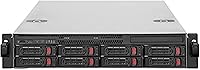
The SilverStone RM22-308 2U 8-Bay Rackmount Storage Chassis is a purpose-built storage platform aimed squarely at IT professionals, homelab builders, and small businesses that need real hot-swap functionality in a compact rack footprint. At two rack units tall, it fits neatly into standard 19-inch racks without eating up precious vertical space. The price sits firmly in premium territory, and that's appropriate — this isn't a consumer product dressed up in rack ears. What you're paying for is a purpose-engineered enclosure with enterprise-adjacent features. If you're running a NAS, a media server, or a storage-heavy workstation in a rack environment, this chassis deserves serious consideration.
Features & Benefits

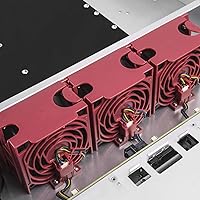
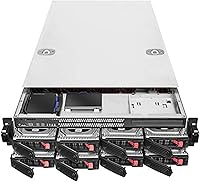
The rackmount chassis supports eight hot-swap bays that accept both 2.5-inch and 3.5-inch SAS/SATA drives, which means you can mix spinning HDDs and SSDs in the same enclosure without adapters or compromises. Connectivity runs through a Mini-SAS HD SFF-8643 port at 12 Gb/s — you'll need a compatible HBA card, as this is a chassis only. Three 80mm PWM fans keep things cool, and they're hot-swappable themselves, a nice touch for uptime-critical setups. Each drive bay has its own status LED, so spotting a failed drive takes seconds rather than a diagnostic session. E-ATX and SSI-EEB motherboard support rounds out a feature set that punches well above its consumer-grade competition.

Best For

This 8-bay server case is built for a specific kind of buyer — someone who knows what an HBA card is and already has a rack. IT administrators populating a rack with compact storage nodes will find the 2U footprint and eight-drive capacity genuinely useful. Homelab users who want enterprise-style functionality without the full enterprise price tag get a lot here, provided they're comfortable doing their own research on HBA compatibility. Media shops or data-heavy small businesses that need fast, local storage access in a small physical footprint will also find it fits the bill. This is not a plug-and-play device — but for the right builder, it's exactly what the rack ordered.

User Feedback

With over 340 ratings and a 4.5-star average, the SilverStone 2U storage enclosure has clearly won over most of the people who buy it. Build quality and hot-swap reliability come up repeatedly in positive reviews — buyers appreciate that the trays feel solid and that drive swaps go smoothly without system interruptions. Fan noise is the most consistent gripe. At full speed, three 80mm high-static-pressure fans are not quiet, and a few users flagged that PWM control through certain motherboards was inconsistent. HBA card compatibility also generated some trial-and-error reports, and the documentation is considered sparse. That said, most buyers at this price level feel the investment is justified once everything is configured correctly.

Pros

  • Eight hot-swap bays support both 2.5-inch and 3.5-inch SAS/SATA drives, enabling flexible mixed storage configurations.
  • All-metal construction feels genuinely solid — drive trays lock firmly and the chassis shows no flex under full load.
  • Per-bay status LEDs let you identify a failed drive at a glance during routine physical rack checks.
  • Three PWM fans keep drive temperatures stable even under sustained workloads in warm rack environments.
  • E-ATX and SSI-EEB motherboard support gives builders the flexibility to use enterprise-grade boards without compromise.
  • Hot-swap fans mean you can service cooling without taking the system offline — a real uptime advantage.
  • The 12 Gb/s Mini-SAS HD interface delivers full-bandwidth throughput when paired with a well-matched HBA card.
  • Rack rail quality is noticeably above average for the price tier, with smooth extension and solid fitment in standard 19-inch racks.
  • SGPIO support enables proper drive activity and fault signaling when configured correctly with a compatible HBA.

Cons

  • A compatible HBA card must be purchased separately — the total build cost is higher than the chassis price alone suggests.
  • Fan noise at full speed is loud enough to be disruptive in any environment without dedicated acoustic isolation.
  • Documentation is sparse, leaving HBA pairing, SGPIO wiring, and fan tuning guidance entirely to community forums.
  • At 33 pounds, solo rack installation is physically awkward and ideally requires a second person.
  • HBA compatibility is not universal — some users needed multiple card iterations before achieving a stable configuration.
  • PWM fan control behavior varies depending on the motherboard used, making consistent low-noise tuning unreliable.
  • No lift handles are included, which makes maneuvering the unit during installation more cumbersome than necessary.
  • SGPIO LED functionality requires correct configuration to work; incorrect setup leaves all bay LEDs static and useless.

Ratings

The SilverStone RM22-308 2U 8-Bay Rackmount Storage Chassis earns its strong reputation among a demanding crowd — IT professionals and serious homelab builders who don't have patience for corners being cut. The scores below were generated by AI after analyzing verified global user reviews, with spam, bot submissions, and incentivized feedback actively filtered out. Both the standout strengths and the friction points buyers actually ran into are reflected honestly here.
Build Quality
92%
The all-metal construction feels immediately substantial — buyers consistently note that the drive trays lock in firmly without wobble, and the chassis itself shows no flex when fully loaded. For a rack unit that may sit untouched for months between drive swaps, that solidity matters.
A handful of users noted that some tray latches felt slightly stiffer than expected out of the box, requiring a short break-in period. At 33 pounds, the unit is also heavy enough that single-person rack installation can be awkward without a second set of hands.
Hot-Swap Reliability
89%
Drive swaps go cleanly in real-world use — users running TrueNAS or Unraid report that pulling and reinserting drives mid-operation triggers clean device recognition without system hiccups. The backplane handles this consistently, which is exactly what you need in a live storage environment.
A small number of buyers reported intermittent recognition issues when hot-swapping certain older SATA drives, which appeared to be drive-side rather than chassis-side problems. Still, it's worth testing your specific drive models before committing to a production deployment.
Cooling Performance
84%
Three 80mm x 38mm PWM fans push serious airflow through a dense 2U space, and drives stay well within safe operating temperatures even under sustained sequential writes. Builders running spinning HDDs in warm rack environments have noted this chassis keeps thermal headroom comfortable.
The fans earn their airflow numbers by spinning fast, and at full speed the noise is hard to ignore — several buyers described it as uncomfortably loud for any office or home environment without acoustic isolation. PWM control helps, but the floor noise at low RPM is still noticeable.
Fan Noise
61%
39%
PWM support means you can dial the fans back through a compatible motherboard or fan controller, and at reduced speeds the noise becomes tolerable in a dedicated server room. Users in well-isolated rack cabinets or server closets report this being a non-issue in practice.
In a home office or quiet workspace, these fans at anything above 60 percent speed are genuinely disruptive. This is not a chassis you can tuck under a desk and forget about — the acoustic profile is firmly industrial, and buyers expecting near-silent operation will be disappointed.
Drive Compatibility
78%
22%
The 8-bay backplane handles a wide range of 2.5-inch and 3.5-inch SAS and SATA drives without issue in the majority of configurations. Buyers mixing enterprise HDDs with SATA SSDs in the same chassis report consistent backplane behavior across different drive generations.
Compatibility with specific HBA cards requires research before purchase — not all SFF-8643 HBAs behave identically with this backplane, and a few users encountered handshake issues that required firmware updates or card swaps to resolve. The documentation doesn't help much here.
HBA Card Integration
71%
29%
When paired with well-supported HBA cards like the LSI 9300 series or similar IT-mode controllers, the Mini-SAS HD SFF-8643 connection delivers reliable 12 Gb/s throughput and clean SGPIO signaling for drive status LEDs. Experienced builders find the integration straightforward.
This is chassis-only — no HBA is included, and buyers new to SAS ecosystems have found the compatibility landscape confusing. Some users had to try multiple cards before landing on a stable configuration, which adds unexpected cost and troubleshooting time to the build.
Motherboard Compatibility
86%
Support for E-ATX and SSI-EEB motherboards gives serious builders the flexibility to drop in enterprise-grade boards from Supermicro or similar without modification. That's a meaningful differentiator compared to chassis that force you into microATX or standard ATX configurations.
The generous motherboard support does mean the internal layout is designed for large boards, which can feel spacious to the point of awkward if you're mounting a standard ATX board. Cable management in those cases requires more planning than the chassis layout naturally encourages.
Drive Status Indicators
88%
Independent LEDs per bay make fault identification immediate — in a dark rack or server room, you can spot a failing drive at a glance without pulling up a management console. Buyers running unattended storage arrays particularly appreciate this during routine physical checks.
SGPIO functionality for activity and fault signaling depends entirely on proper HBA support and correct cabling. Users who didn't configure SGPIO correctly found the LEDs defaulted to static on, which eliminates their practical value until the setup is corrected.
Value for Money
74%
26%
For buyers who need genuine hot-swap SAS support in a 2U form factor, the price is defensible — comparable enterprise options from major OEMs cost considerably more and often come with proprietary lock-in. The feature set relative to the price is reasonable for the target audience.
For homelab users on a budget, the total cost of ownership climbs quickly once you factor in an HBA card, SFF-8643 cables, and compatible drives. Buyers who went in expecting a complete plug-and-play solution sometimes felt the final spend exceeded their expectations.
Documentation & Setup Guidance
47%
53%
The physical installation process itself is mechanically intuitive — rack rails align cleanly, and the chassis layout doesn't require reading a manual to understand. Experienced builders typically get it racked and cabled without consulting any documentation at all.
The included documentation is sparse to the point of being unhelpful for less experienced buyers. HBA pairing guidance, SGPIO wiring diagrams, and fan controller recommendations are all absent, forcing users to rely on community forums and third-party guides to fill the gaps.
Rack Rail Quality
81%
19%
The included rack rails fit standard 19-inch racks without modification and extend smoothly under load. Several buyers noted they felt more robust than the rails bundled with similarly priced chassis from competing brands, which is a practical win during maintenance pulls.
The rails are designed for standard rack depths, and a few users with shallow wall-mount racks or non-standard rack depths had fitment issues. Verifying rack depth compatibility before purchase is worth the extra step, as the rails offer limited adjustment range.
Thermal Design & Airflow Path
83%
The front-to-rear airflow path is well-engineered for a 2U unit — air moves efficiently across all eight drive bays before exhausting through the rear fans, avoiding the hot spots that plague poorly designed dense storage enclosures. Drive temperatures stay consistent across all bay positions.
The 80mm fan format, while effective, is inherently noisier than the 120mm or 140mm alternatives found in larger chassis. There's no real workaround here short of aggressive PWM tuning, as the physical space simply doesn't accommodate quieter large-format fans.
Ease of Installation
69%
31%
For builders with prior rackmount experience, the installation process is logical and the chassis layout doesn't create unnecessary obstacles. Drive tray insertion is smooth, and the rear PSU mount positions cables away from the drive bays cleanly.
First-time rackmount builders have reported a steeper learning curve than expected, particularly around SFF-8643 cabling and proper rail installation. At 33 pounds, the unit also demands careful handling during solo installations, and a few users noted the lack of a lift handle makes this more awkward than it needs to be.

Suitable for:

The SilverStone RM22-308 2U 8-Bay Rackmount Storage Chassis is purpose-built for buyers who already know their way around a rack. IT administrators managing compact server infrastructure will find the 2U footprint and eight hot-swap bays a genuinely practical combination — enough storage density to handle serious workloads without sacrificing too much rack space. Homelab enthusiasts who want enterprise-style drive management, including live hot-swaps and per-bay status LEDs, without paying true enterprise prices will get strong value here, provided they're prepared to source a compatible HBA card separately. Small media production companies or data-heavy SMBs that need fast, locally accessible storage in a physical footprint they can actually fit in a comms room or rack cabinet are exactly the audience this chassis was designed around. If you're comfortable with SFF-8643 cabling, HBA selection, and the general discipline of building a rack-mounted storage system, this enclosure gives you a solid, well-engineered foundation to work from.
Not suitable for:

The SilverStone RM22-308 2U 8-Bay Rackmount Storage Chassis is not the right call for buyers expecting a ready-to-run storage solution straight out of the box. This is a chassis only — no HBA card, no drives, no controller — and anyone unfamiliar with SAS ecosystems, SFF-8643 cabling, or IT-mode HBA configuration will face a real learning curve before anything spins up. Noise-sensitive environments are also a poor fit; the 80mm high-static-pressure fans are effective but loud, and no amount of PWM tuning will make this unit comfortable in a home office or bedroom server closet. Budget-conscious buyers should also think carefully about total build cost, since the HBA card and appropriate cabling needed to complete the system add meaningful expense on top of the chassis price. If you don't have a standard 19-inch rack already installed, or if you're looking for a plug-and-play NAS enclosure with its own management interface, this product is simply not designed for your use case.
Specifications

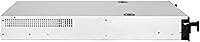
  • Form Factor: The chassis occupies 2U of vertical rack space and is designed for standard 19-inch rack enclosures.
  • Drive Bays: Eight hot-swap bays accept both 2.5-inch and 3.5-inch SAS and SATA hard drives and SSDs simultaneously.
  • Backplane Interface: The backplane uses a Mini-SAS HD SFF-8643 connector and supports transfer speeds up to 12 Gb/s per port.
  • SGPIO Support: SGPIO signaling is supported, enabling drive activity and fault status communication when paired with a compatible HBA card.
  • Drive Indicators: Each of the eight bays has an independent status LED for real-time, at-a-glance drive health monitoring.
  • Cooling System: Three 80mm x 38mm PWM fans provide front-to-rear airflow and are individually hot-swappable without powering down the system.
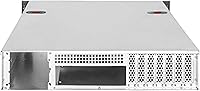
  • Motherboard Support: The chassis accommodates E-ATX and SSI-EEB form factor motherboards, supporting enterprise-grade board configurations.
  • Power Supply Mount: The power supply is rear-mounted, keeping cabling away from drive bays and simplifying internal cable management.
  • Dimensions: External dimensions measure 25.98 x 16.93 x 3.48 inches (length x width x height).
  • Weight: The fully assembled chassis without drives weighs approximately 33 pounds.
  • Material: The chassis body and drive trays are constructed from metal, contributing to structural rigidity under full drive load.
  • USB Ports: Two USB 2.0 ports are included for peripheral or management connectivity.
  • Fan Size: All three system fans are 80mm x 38mm in dimension, a high-static-pressure format suited to dense rack airflow paths.
  • Fan Control: Fan speed is regulated via PWM, allowing speed adjustments through compatible motherboard headers or fan controllers.
  • Drive Interface: The backplane natively supports both SAS and SATA drive protocols across all eight bays.

Related Reviews

SilverStone SST-RM44 4U Rackmount Server Chassis
79%
93%
Build Quality
91%
Liquid Cooling Support
89%
Motherboard Compatibility
88%
Expansion Slot Count
86%
Rail Installation
More
SilverStone RM400 4U Rackmount Server Chassis
83%
89%
Build Quality
82%
Ease of Installation
75%
Cooling Efficiency
90%
Security Features
85%
Motherboard Compatibility
More
SilverStone RM600 6U Rackmount Chassis
77%
93%
Build Quality
91%
Cooling Flexibility
89%
Drive Bay System
88%
PSU Redundancy Support
87%
Motherboard Compatibility
More
RackChoice 238C-A 2U Micro ATX Rackmount Chassis
84%
89%
Build Quality
91%
Cooling Performance
85%
Ease of Setup
76%
Internal Space Efficiency
92%
Compatibility with Motherboards
More
QNAP TL-D800C 8-Bay JBOD Storage Enclosure
71%
83%
Build Quality
78%
Drive Compatibility
74%
USB 3.2 Gen 2 Throughput
51%
JBOD Architecture Clarity
57%
NAS Integration
More
QNAP TL-R1200C-RP 12-Bay Rackmount JBOD Storage Enclosure
84%
88%
Performance and Speed
91%
Reliability & Power Redundancy
85%
Storage Capacity
84%
Compatibility with QNAP NAS
82%
Ease of Setup
More
Asustor Lockerstor 8 AS6508T 8-Bay NAS
77%
91%
Network Performance
84%
Value for Money
88%
Build Quality
62%
Software (ADM)
83%
SSD Caching
More
ALLDOCUBE iPlay 70 mini Ultra 8.8-inch Tablet
78%
91%
Display Quality
93%
Performance
86%
Battery Life
88%
Value for Money
61%
Software Experience
More
ICY DOCK ToughArmor MB998SP-B 8-Bay 2.5” SATA/SAS HDD/SSD Mobile Rack Enclosure for 5.25″ Bay
87%
91%
Performance
88%
Cooling Efficiency
89%
Build Quality
93%
Ease of Installation
72%
Noise Level
More
Synology DS1823xs+ 8-Bay NAS Enclosure
80%
91%
Build Quality & Chassis Durability
88%
Processor Performance
93%
Network Throughput & Connectivity
86%
Storage Expansion Flexibility
89%
DSM Software Ecosystem
More

FAQ

No, it does not. The SilverStone RM22-308 2U 8-Bay Rackmount Storage Chassis is a chassis-only product — you will need to purchase a separate HBA card with an SFF-8643 port to connect the backplane and get drives talking to your system. Popular choices include LSI-based cards running in IT mode, but always verify firmware compatibility before buying.
Yes, you can. The eight hot-swap bays are designed to accept both 2.5-inch and 3.5-inch drives, so mixing drive sizes and types across bays is fully supported. Just make sure your 2.5-inch drives are secured properly in the trays, as some users add tape or padding to eliminate any lateral movement.

Honestly, they are not quiet. The 80mm x 38mm fans run at high static pressure to push air through a dense 2U space, and at full speed they produce a noticeable industrial hum. PWM control can reduce the speed and noise floor somewhat, but this enclosure is best suited to a dedicated server room or rack cabinet rather than an office or home environment where ambient noise matters.

Yes, it is designed specifically for standard 19-inch rack enclosures. The included rack rails fit most common rack depths, though buyers with shallow wall-mount racks should double-check depth clearance before purchasing, as the rails offer limited adjustment range.

The LEDs require SGPIO to be properly configured through your HBA card and cabling to display meaningful activity and fault information. If SGPIO is not set up correctly, the LEDs will default to a static state and won't reflect actual drive status. Most experienced builders configure this during initial HBA setup, but it is not automatic out of the box.

The chassis supports E-ATX and SSI-EEB motherboards, which covers most enterprise and prosumer server boards. Standard ATX boards will also physically fit, though the internal layout is optimized for larger form factors, so you may have more open space than expected with a smaller board.

Yes. All three 80mm fans are hot-swappable, meaning you can pull and replace a failed fan while the system is running. This is a genuinely useful feature for anyone running this chassis in a production or uptime-sensitive environment where even brief maintenance windows are inconvenient.

The chassis itself is OS-agnostic — it's an enclosure, so it works with whatever operating system your server runs. TrueNAS and Unraid are both commonly used with this type of setup, and many buyers in the homelab community run exactly these platforms. What matters most for software compatibility is the HBA card you choose and whether it is supported by your OS of choice.

If this is your first rack build, expect a moderate learning curve. The physical chassis installation is fairly intuitive, but SFF-8643 cabling, HBA selection, and SGPIO configuration require research that the included documentation does not adequately cover. Community forums and YouTube build guides for similar SilverStone rackmount chassis are genuinely helpful resources to line up before you start.

No, the power supply is not included. The chassis features a rear-mounted PSU bay, but you need to source a compatible power supply separately. Make sure to check both the physical dimensions of your PSU against the bay clearance and that your chosen PSU provides adequate wattage for your full drive load and motherboard.

Where to Buy