Overview

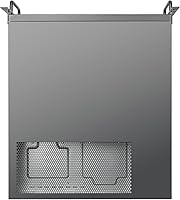
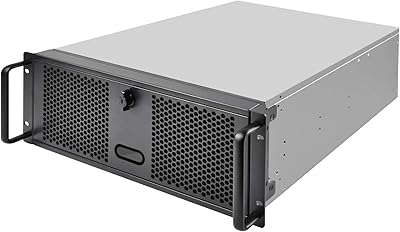
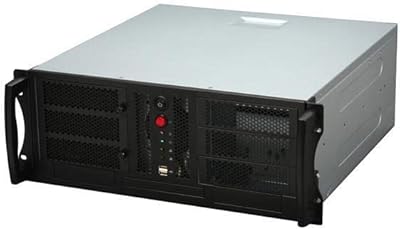
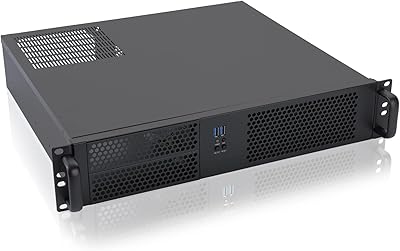
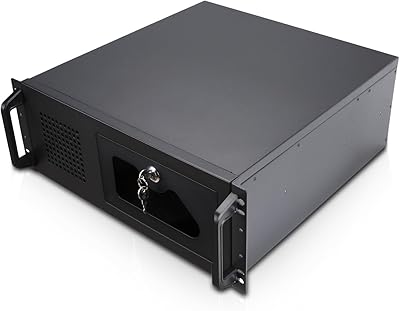
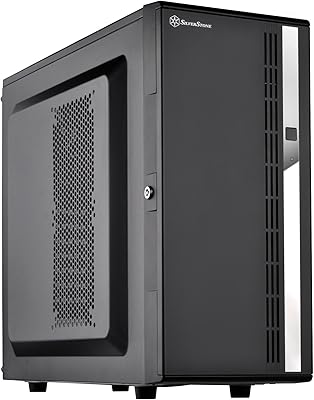
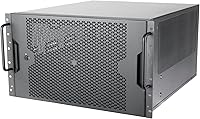
The SilverStone RM600 6U Rackmount Chassis is built squarely for professionals and serious enthusiasts who need a dependable, rack-ready enclosure for workstation-class or server hardware. This isn't a case you buy because it looks nice on a desk — it's a deliberate, high-investment platform for people who run demanding workloads and need hardware they can trust. The alloy steel construction gives it a satisfying rigidity that cheaper sheet-metal alternatives simply can't match. What sets this rackmount chassis apart from most competitors at this tier is its support for both upright and horizontal orientation, a practical flexibility that matters when rack space and airflow constraints vary across different deployments.
Features & Benefits

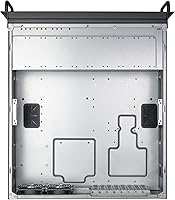
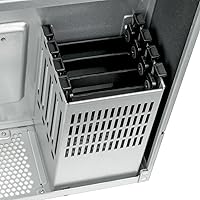
The RM600 packs a lot of practical engineering into its 6U frame. The tool-less drive bays — six 3.5-inch trays and four 2.5-inch trays — mean swapping drives during maintenance takes seconds rather than minutes, a real benefit in production environments. Dual PSU support is genuinely useful for always-on systems where an unexpected power supply failure can't result in downtime; redundancy at the power level is one of those investments you don't appreciate until you need it. Support for triple 360mm radiators means serious custom liquid cooling is on the table, not just a theoretical option. The chassis also accommodates E-ATX and SSI-EEB motherboards, making it compatible with high-core-count workstation and dual-socket server platforms.

Best For

This 6U case is purpose-built for a specific kind of buyer, and it's worth being direct about who that is. Homelab enthusiasts who've outgrown consumer desktop cases and want proper rack integration will find the RM600 a natural fit. Small businesses running render nodes, NAS systems, or local compute infrastructure benefit from its storage capacity and large motherboard support. System integrators dealing with demanding thermal requirements — think dense virtualization hosts or GPU-heavy workloads — will appreciate the cooling headroom. It also suits anyone consolidating high-core-count hardware into a mixed rack alongside switches and storage arrays. If you're running 24/7 operations and PSU redundancy is a requirement rather than a luxury, this chassis belongs on your shortlist.

User Feedback

With a 4.5-star average across over 340 ratings, buyer satisfaction for this rackmount chassis is high, but the feedback is nuanced. Build quality draws consistent praise — owners frequently describe it as solid, well-finished, and clearly engineered for longevity rather than cost-cutting. The orientation flexibility and tool-less drive access also earn positive mentions from professionals and hobbyists alike. The criticisms, though, are worth noting. At 46.6 lbs, this is a heavy chassis before any hardware goes in, so rack mounting is genuinely a two-person job. A few buyers also flag the front panel I/O as a weak point: no USB-C in 2024 is a noticeable omission at this price. Assembly complexity gets occasional mentions too, particularly for first-time rack builders.

Pros

  • Alloy steel construction feels genuinely robust — this isn't a chassis that flexes or rattles under load.
  • Tool-less drive trays across all ten bays make drive swaps fast and frustration-free in production environments.
  • Dual PSU support provides meaningful redundancy for always-on systems where downtime has real consequences.
  • Triple 360mm radiator compatibility gives serious liquid-cooling builds the space they need without compromise.
  • Support for E-ATX and SSI-EEB motherboards opens up high-core-count and multi-socket platform options.
  • Upright and horizontal orientation support adds genuine flexibility for varied rack and cabinet configurations.
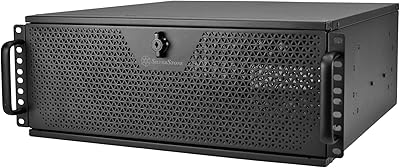
  • The lockable front door is a practical physical security feature for shared server rooms or office environments.
  • Eight expansion slots accommodate GPU-heavy or multi-card workstation configurations without crowding.
  • Rated 4.5 stars across hundreds of real buyer reviews, with consistent praise for build quality and versatility.
  • Ranks among the top 150 computer cases on Amazon, reflecting sustained buyer confidence in this product.

Cons

  • At 46.6 lbs empty, moving and mounting this chassis alone is genuinely difficult — plan for a second pair of hands.
  • No USB-C on the front panel is a noticeable omission for a chassis at this price in 2024.
  • The sheer physical footprint (over 20 inches deep) demands careful rack planning before purchase.
  • Assembly complexity has caught some first-time rack builders off guard, particularly around radiator and PSU fitment.
  • The premium price means buyers who don't need all its features are paying for capacity they may never use.
  • Front USB 2.0 ports feel outdated and offer little practical value for modern peripherals.
  • Lead time and availability can be inconsistent, making it harder to plan builds around tight project timelines.
  • No included PSU means the overall system cost climbs quickly once you factor in one or two quality units.

Ratings

The SilverStone RM600 6U Rackmount Chassis scores below are generated by AI after analyzing verified buyer reviews from global markets, with spam, bot activity, and incentivized feedback actively filtered out. Based on 342 real-world ratings, this chassis earns strong marks in several areas while showing honest weaknesses that prospective buyers deserve to know about. Both the standout strengths and the genuine frustrations are reflected transparently in every score.
Build Quality
93%
Buyers consistently describe the alloy steel construction as noticeably rigid and well-finished — not the thin, flexing panels you get from budget-tier rackmount cases. Professionals deploying this in active server rooms report zero structural complaints even after extended use under heavy hardware loads.
A small number of buyers noted minor paint inconsistencies on interior panels, and a few reported slightly misaligned front door hinges out of the box. These are cosmetic issues rather than functional ones, but they do stand out at this price point.
Cooling Flexibility
91%
The ability to mount up to three 360mm radiators simultaneously is genuinely rare in the rackmount segment, and builders running dense liquid-cooling loops consistently praise having that space available. For GPU-heavy workstations and high-TDP server builds, the thermal headroom this chassis offers is a real differentiator.
Fitting multiple large radiators alongside dual PSUs and high-density storage does require careful pre-planning — users report that routing tubing cleanly is challenging and benefits from experience with custom loops. Airflow cable management in such a loaded configuration can become complex.
Drive Bay System
89%
The tool-less tray system for all ten drive bays is one of the most praised practical features among real users, particularly those managing homelab storage arrays or small business NAS setups where drives get swapped regularly. The mechanism is described as secure and reliable, with no reports of trays loosening unexpectedly under vibration.
A handful of users noted that the 2.5-inch trays feel slightly less premium than the 3.5-inch equivalents, with one or two reporting minor flex in the tray frame when loaded. The total bay count, while generous, may still feel limiting for users planning very large storage pools.
PSU Redundancy Support
88%
Dual PSU support in a rackmount chassis at this size is a significant feature for small business and homelab users who need uptime guarantees without paying for full enterprise hardware. Buyers running 24/7 workloads specifically call out this capability as one of the primary reasons they chose the RM600 over competing models.
The dual PSU configuration only works with two separate standard ATX or SSI-PS2 units — there is no built-in failover switching logic, so buyers expecting intelligent redundancy management will need to source that separately. Neither PSU is included, which adds to the overall system cost.
Motherboard Compatibility
87%
Support for both E-ATX and SSI-EEB motherboards puts this 6U case in a distinct category for buyers building around high-core-count workstation or dual-socket server platforms. System integrators working with large Threadripper or Xeon-class boards consistently confirm that fitment is straightforward with no forced compromises.
Users with standard ATX boards may find the interior feel unnecessarily cavernous, which can complicate cable management if the build doesn't fill the chassis. The chassis does not include standoff adapters for smaller board formats, so builders need to plan their own mounting solutions.
Orientation Flexibility
84%
The ability to deploy the same chassis either flat in a rack or upright as a tower is a genuinely useful option for buyers who are building out their lab incrementally or operating in environments where rack space is limited. Several homelab users describe starting with an upright setup and later transitioning to rack-mounted without replacing the chassis.
The transition between orientations requires some physical effort given the chassis weight, and users report that front-panel labeling and cable exit points are clearly optimized for horizontal rack use rather than vertical tower deployment. The upright orientation is functional but clearly secondary in the design.
Front Panel I/O
58%
42%
The two USB 3.0 ports handle the most common use cases — plugging in a flash drive for firmware updates or connecting a keyboard during initial setup — and the ports themselves are described as well-seated and reliable in day-to-day use.
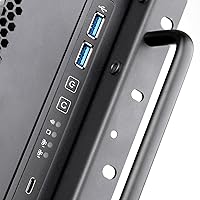
The absence of USB-C is a real gap at this price tier in 2024, and it comes up frequently enough in negative reviews to be a genuine buyer concern. The two USB 2.0 ports add little practical value for modern peripherals, and the overall front I/O feels like it belongs on a chassis from several years ago.
Installation & Assembly
62%
38%
Experienced rack builders and system integrators generally report a smooth assembly process, with logical interior layout and clear mounting points for major components. The tool-less drive trays reduce hands-on time for storage installation specifically, which is appreciated in professional deployment contexts.
First-time rack builders flag the assembly as significantly more complex than a standard desktop build, particularly around routing dual PSU cabling and fitting large radiators in a populated interior. Several buyers recommend setting aside considerably more time than expected, especially for first-time builds in this form factor.
Physical Manageability
51%
49%
Once installed in a rack, the chassis stays put — its weight actually contributes to stability, and buyers in fixed server room deployments rarely mention the weight as an ongoing concern after initial setup.
At 46.6 lbs empty, this is one of the heaviest chassis in its class, and multiple buyers describe the rack-mounting process as requiring a second person and ideally a support shelf or lift. Anyone managing hardware solo in a home environment will find the physical demands of this chassis a recurring inconvenience.
Value for Money
74%
26%
For buyers who genuinely need what the RM600 delivers — dual PSU support, large-board compatibility, serious cooling capacity — the pricing is considered fair relative to the feature set and build quality. Professionals comparing it against alternatives in the same functional tier frequently conclude it represents reasonable value.
Buyers who end up using only a fraction of the chassis capabilities report feeling that the cost is hard to justify in hindsight. When total system cost is factored in — including two PSUs, drives, and cooling hardware — the chassis investment is just the starting point, which gives some budget-conscious buyers pause.
Security Features
77%
23%
The lockable front door is a practical physical deterrent in shared environments like small office server rooms, co-working spaces, or educational labs where opportunistic tampering is a real concern. Buyers in these contexts consistently rate it as a useful and well-implemented addition.
The lock mechanism is functional but not high-security — determined access is possible, and the locking door doesn't protect the rear of the chassis at all. Users with strict physical security requirements will need to supplement with rack-level locking or cabinet enclosures.
Cable Management
66%
34%
The large interior gives builders room to route cables cleanly, and the dual PSU bottom-mount placement helps keep power cabling separated from data cables in well-planned builds. Experienced builders report clean results with some forethought.
The sheer volume of cabling involved in a fully populated build — dual PSUs, ten drives, multiple radiator fans, and a large motherboard — means cable management requires real effort and planning. Without behind-panel routing channels, some users describe the finished interior as cluttered despite their best efforts.
Thermal Performance
82%
18%
Buyers running fully populated builds with active cooling report stable and consistent thermals, with the generous interior volume contributing to good airflow separation between heat-generating components. Custom liquid-cooling users in particular report excellent temperature results under sustained workloads.
In purely air-cooled configurations without dedicated fan mounts filled, passive airflow through the large interior can be uneven. A few users noted that specific hot spots near dense drive arrays required additional fan configuration to resolve properly.

Suitable for:

The SilverStone RM600 6U Rackmount Chassis is the right call for anyone building or expanding a serious rack-based system where reliability, thermal headroom, and hardware flexibility all matter at once. Homelab enthusiasts who have outgrown desktop towers and want their workstation-class hardware properly integrated into a rack will find this chassis hits the right balance of capacity and build quality. Small businesses and creative studios running render farms, local virtualization hosts, or storage-heavy workloads benefit from the dual PSU support and the generous drive bay count — ten bays total means you aren't compromising on storage before you even start. System integrators working with large-format motherboards, including SSI-EEB boards used in multi-socket server platforms, will appreciate that this 6U case doesn't force any awkward compromises on board selection. If your workloads run around the clock and a single point of failure at the power supply level is unacceptable, the redundancy options here make the investment easy to justify.

Not suitable for:

The SilverStone RM600 6U Rackmount Chassis is not the right fit for buyers who don't already have a rack or aren't planning to build one — at these dimensions and this weight, it simply isn't practical as a freestanding desktop case for most environments. Budget-conscious builders will also want to look elsewhere; this chassis sits at a premium price point, and if your hardware doesn't genuinely need dual PSU support, large-board compatibility, or triple-radiator cooling, you'd be paying for headroom you'll never use. Buyers who rely heavily on front-panel connectivity for day-to-day tasks may be frustrated — there's no USB-C port, which feels like a gap at this tier in 2024. First-time rack builders who underestimate the physical demands of installation should also be cautious: at nearly 47 pounds empty, this is a two-person job once you factor in hardware. If you're building a compact, quiet home office machine or a basic NAS with modest specs, a smaller and less expensive enclosure will serve you better.

Specifications

  • Form Factor: The chassis follows a standard 6U rackmount form factor, compatible with 19-inch server racks used in professional and homelab environments.
  • Dimensions: Overall dimensions measure 20.6″ deep by 17.3″ wide by 10.5″ high, requiring careful rack depth planning before installation.
  • Weight: The unit weighs 46.6 lbs empty, meaning rack mounting should always be treated as a two-person task.
  • Material: The chassis body is constructed from alloy steel, providing rigid structural integrity and long-term durability under continuous-use conditions.
  • Color: Available in black, with a consistent finish across the front door, body panels, and drive trays.
  • Motherboard Support: Supports E-ATX and SSI-EEB motherboard form factors, accommodating both high-end workstation boards and dual-socket server platforms.
  • Expansion Slots: Provides 8 expansion slots, suitable for multi-GPU, HBA, or multi-NIC configurations common in workstation and server builds.
  • 3.5″ Drive Bays: Includes 6 tool-less 3.5″ drive trays, allowing hot-swap-style access without requiring a screwdriver during drive changes.
  • 2.5″ Drive Bays: Includes 4 tool-less 2.5″ drive trays, supporting SSD integration alongside traditional spinning disk storage.
  • PSU Support: Accommodates dual power supply units in a bottom-mount configuration, enabling redundant power delivery for always-on systems.
  • Cooling Support: Supports up to three 360mm radiators simultaneously, making it one of the few rackmount chassis viable for extreme custom liquid-cooling loops.
  • Orientation: Can be installed in both upright (tower-style) and horizontal (rack-flat) orientations, offering deployment flexibility across different rack and cabinet setups.
  • Front I/O: Front panel connectivity includes 2x USB 2.0 and 2x USB 3.0 ports; no USB-C port is present on this model.
  • Front Door: Features a removable front door with a physical security lock, providing basic access control in shared or semi-public server room environments.
  • PSU Mount Type: Power supplies are mounted at the bottom of the chassis, keeping weight low and improving overall stability in horizontal rack configurations.

Related Reviews

SilverStone RM400 4U Rackmount Server Chassis
83%
89%
Build Quality
82%
Ease of Installation
75%
Cooling Efficiency
90%
Security Features
85%
Motherboard Compatibility
More
SilverStone SST-RM44 4U Rackmount Server Chassis
79%
93%
Build Quality
91%
Liquid Cooling Support
89%
Motherboard Compatibility
88%
Expansion Slot Count
86%
Rail Installation
More
SilverStone RM22-308 2U 8-Bay Rackmount Storage Chassis
77%
92%
Build Quality
89%
Hot-Swap Reliability
84%
Cooling Performance
61%
Fan Noise
78%
Drive Compatibility
More
RackChoice N4058 4U Rackmount Server Chassis
84%
90%
Build Quality
85%
Cooling Performance
80%
Storage Capacity
88%
Ease of Maintenance
83%
Security Features
More
Chenbro RM42300-F 4U Rackmount Server Chassis
86%
93%
Build Quality & Durability
91%
Expansion Slot Flexibility
75%
Cooling Performance
88%
Ease of Installation & Setup
90%
Space Optimization
More
RackChoice 238C-A 2U Micro ATX Rackmount Chassis
84%
89%
Build Quality
91%
Cooling Performance
85%
Ease of Setup
76%
Internal Space Efficiency
92%
Compatibility with Motherboards
More
Rosewill RSV-R4100U 4U Server Chassis Rackmount Case
85%
89%
Cooling Efficiency
91%
Build Quality
85%
Ease of Setup
88%
Expansion Options
92%
Security Features
More
ECHOGEAR 6U Enclosed Wall Mount Network Rack
82%
88%
Build Quality
91%
Value for Money
83%
Cooling Performance
84%
Installation Experience
72%
Capacity & Space Utilization
More
SilverStone SST-RM23-502-MINI
89%
95%
Build Quality
91%
Cooling Efficiency
88%
Drive Bay Accessibility
93%
Motherboard Compatibility
89%
Power Supply Flexibility
More
RIVECO 6U Wall Mount Network Rack
75%
78%
Build Quality
84%
Value for Money
81%
Ease of Installation
86%
Hardware Completeness
88%
Mounting Flexibility
More

FAQ

Yes, the RM600 is designed for standard 19-inch server racks and occupies 6U of vertical space. Just pay close attention to your rack's usable depth — at over 20 inches deep, you'll want to confirm your rack can accommodate it before ordering.

Yes, the chassis has dedicated dual PSU mounting positions at the bottom. This is primarily useful for redundancy — if one PSU fails, the system stays online. You'll need two compatible ATX or SSI-PS2 form factor power supplies; they are not included with the chassis.

It should fit without any modification. SSI-EEB is a large server board standard used in dual-socket platforms, and the SilverStone RM600 6U Rackmount Chassis is explicitly designed to support it alongside the more common E-ATX format. Always double-check your board's exact dimensions against the chassis interior clearances before building.
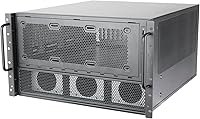
The support is genuine, not just theoretical. The chassis accommodates up to three 360mm radiators simultaneously, which is enough for a full custom loop covering CPU and multiple GPUs. Routing and fitting will still require planning, but the physical space is there for serious builds.

It's functional rather than high-security, but it serves a real purpose. In shared rack environments — like a small office server room or a co-working space with open rack cabinets — it discourages casual tampering and keeps the front panel tidy. It won't stop a determined person, but it's a practical feature for the target use case.

It's a fair criticism. At the price point this chassis sits at, the omission of at least one USB-C port on the front I/O is noticeable. You get two USB 3.0 and two USB 2.0 ports, which covers basic peripheral and flash drive access, but if you regularly connect modern devices to your system, you may find yourself routing cables to the rear of the motherboard instead.

Realistically, you shouldn't try it alone. The chassis weighs nearly 47 lbs before any hardware is installed, and maneuvering it into rack rails at height is awkward and risky by yourself. Get a second person, and if your rack is tall, a lift or shelf support makes the job much safer.

They are genuinely tool-less for standard 3.5-inch and 2.5-inch drives. The trays use a clip or rail mechanism that holds drives securely without screws, which makes swaps fast during maintenance or storage expansion. Some users with non-standard drive sizes may need adapters, but for typical HDDs and SSDs the system works as described.

Yes, the RM600 officially supports both horizontal rack-mount and upright tower-style orientations. If you're building a powerful workstation before committing to a full rack, you can run it upright in the meantime. Just account for the footprint and weight when placing it on any surface.

It's noticeably more involved than a standard consumer tower build. The large interior, dual PSU routing, and radiator mounting points mean there are more decisions to make and more cables to manage. Most experienced builders handle it without issue, but if this is your first rack system, budget extra time and review SilverStone's documentation before starting.

Where to Buy