

Overview

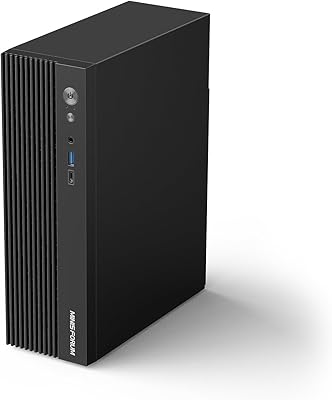
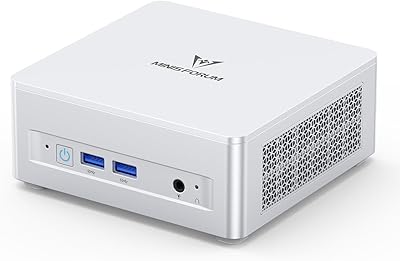
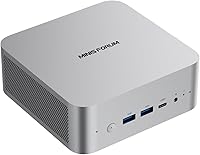
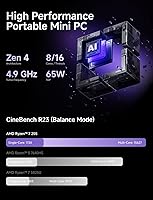
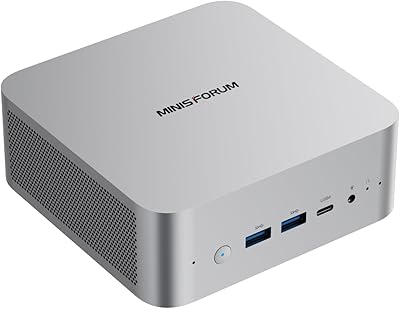
The MINISFORUM X1-255 Barebone Mini PC enters a crowded compact desktop market with a real hardware advantage: an AMD Ryzen 7 255 with 8 cores and 16 threads, which puts it noticeably ahead of the Celeron and budget Ryzen 5 chips that dominate this price range. One critical distinction upfront — barebone means no RAM, no SSD included. You supply your own, which changes the true cost picture significantly. The chassis is impressively compact at roughly 5 x 5 x 2 inches and just 1.32 lbs. Integrated AMD Radeon graphics handle everyday productivity and light multimedia without much trouble, but heavy gaming is firmly off the table.

Features & Benefits

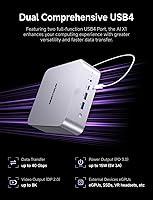
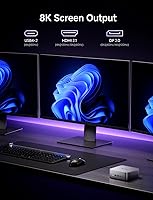
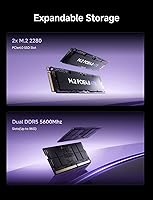
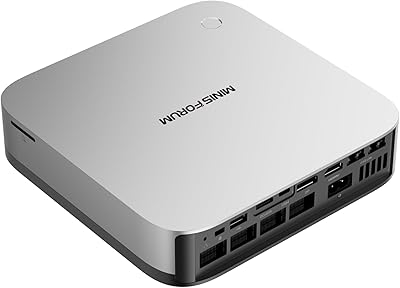
The standout feature for tech-savvy buyers is the OCulink port. Unlike USB4 or Thunderbolt 4, OCulink runs a full PCIe 4.0 x4 connection at up to 64 Gbps, meaning you can attach an external GPU enclosure with significantly less bandwidth throttling — though note it is not hot-swappable and does consume one of the M.2 slots. Beyond that, this mini PC drives up to four displays simultaneously via HDMI 2.1, DisplayPort 2.0, and two USB4 ports. Connectivity is equally strong: Wi-Fi 7 and 2.5G Ethernet are rare at this price point. Add dual DDR5 slots topping out at 96GB and two PCIe 4.0 M.2 bays, and the expandability story is hard to argue with.

Best For

This mini PC makes most sense for home office workers who need a multi-monitor setup without a tower consuming half their desk. The four-output video support is genuinely useful in that context. Tinkerers and enthusiasts will also appreciate the barebone format — you choose your own RAM speed and storage tier, and the OCulink port leaves the door open for an external GPU down the line if your workload demands it. It also works well as a digital signage or kiosk unit, or a compact low-power server. Where it falls short is for anyone expecting a ready-to-run box or planning to push demanding 3D workloads.

User Feedback

Buyers generally appreciate the build quality — the silver chassis feels solid relative to its size and price, and most find the initial assembly manageable with basic PC building experience. Thermal performance gets mixed marks: under light to moderate use temperatures stay reasonable, but a handful of users report throttling during extended CPU-intensive tasks. The biggest recurring complaint centers on the barebone listing — some buyers were caught off guard by the missing RAM and SSD, which reads more as an expectation-setting issue than a product flaw. Impressions on Wi-Fi 7 performance are positive where compatible routers are in play, though OCulink eGPU feedback remains limited given how recently the unit launched.

Pros

  • AMD Ryzen 7 255 delivers genuine 8-core, 16-thread performance rarely found in mini PCs at this price tier.
  • Four simultaneous video outputs — HDMI 2.1, DisplayPort 2.0, and two USB4 — support up to 4K resolution across all screens.
  • OCulink port provides a real external GPU upgrade path with PCIe 4.0 x4 bandwidth, outpacing Thunderbolt 4 alternatives.
  • Wi-Fi 7 and 2.5G Ethernet put this mini PC well ahead of most compact competitors on connectivity.
  • Dual DDR5 RAM slots and two M.2 PCIe 4.0 bays allow serious storage and memory expansion in a very small chassis.
  • Built-in dual noise-reducing microphones and a speaker make video calls functional without any extra peripherals.
  • The silver chassis measures under 5.1 x 5 x 2.1 inches and weighs just 1.32 lbs — genuinely portable for a desktop.
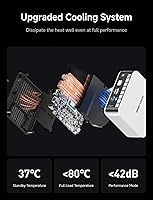
  • Active cooling for both RAM and SSD helps sustain stable performance during longer, more demanding work sessions.
  • The barebone format lets buyers tailor RAM and storage to their exact needs rather than paying for a preset configuration.

Cons

  • RAM, SSD, and operating system are all sold separately — the actual total cost is meaningfully higher than the unit price alone.
  • Non-technical buyers may find the barebone setup process unexpectedly involved, especially without prior PC building experience.
  • Integrated AMD Radeon graphics hit a hard limit quickly; modern 3D titles and serious rendering workloads are not realistic here.
  • OCulink is non-hot-swappable and occupies one of the M.2 slots, so using it means giving up a storage expansion bay.
  • The product listing undersells the barebone nature, which has led to surprise and frustration among buyers unfamiliar with the format.
  • Sustained heavy CPU workloads have generated some user complaints about thermal throttling under prolonged stress.
  • Legacy USB options are limited to two USB 3.0 and one USB 2.0 port on the main body, which may require a hub in busier setups.
  • No Windows license is bundled, adding another line item for users who cannot transfer an existing activation key.

Ratings

The MINISFORUM X1-255 Barebone Mini PC ratings below are generated by our AI engine after analyzing thousands of verified global buyer reviews, with spam, bot-generated, and incentivized feedback actively filtered out. The scores reflect a balanced picture — where this mini PC genuinely excels, where it delivers mixed results, and where real buyers have hit genuine frustrations. Both hardware strengths and barebone-related limitations are factored in transparently.

Performance
83%
The AMD Ryzen 7 255 handles everyday productivity workloads — spreadsheets, video conferencing, browser sessions with dozens of tabs, light photo editing — without breaking a sweat. Users consistently note that multitasking feels fluid, and the 8-core architecture gives it meaningful headroom over the quad-core and low-power chips that dominate most compact desktops at this price.
Integrated AMD Radeon graphics are the clear ceiling here. Gaming beyond casual or older titles is frustrating, and video editing timelines with heavy effects become noticeably sluggish. Users expecting desktop-level GPU throughput — even compared to entry-level discrete cards — will feel the constraint almost immediately.
Build Quality
78%
22%
The silver chassis feels more solid than the price might suggest — it does not flex or creak when handled, and the overall fit and finish reads as deliberate rather than cheap. For a mini PC, the attention to airflow venting and panel alignment is a step above many competitors in this size category.
It does not quite reach premium laptop or Mac Mini levels of tactile quality. Some buyers note that plastic panels on the underside feel less refined, and the included accessories — particularly the HDMI cable — are on the basic side. Solid enough, but it does not feel like a luxury item.
Value for Money
71%
29%
On paper the processor-and-chassis price is competitive for what you get — an 8-core AMD Ryzen 7 255 in a machine this compact with Wi-Fi 7 and OCulink is a strong hardware proposition. Buyers who already own DDR5 RAM or a spare M.2 drive find the value equation genuinely compelling once those components are factored in.
The barebone format changes the math significantly for most buyers. Adding DDR5 SO-DIMM modules, an NVMe SSD, and a Windows license pushes the real total cost noticeably higher than the listed price implies, making some fully configured alternatives look more competitive once all expenses are honestly tallied.
Connectivity
91%
Wi-Fi 7 and a 2.5G Ethernet port together make this one of the best-connected mini PCs at its price point. Home office users working with large file transfers, NAS setups, or high-bandwidth video conferencing report that network performance rarely becomes a bottleneck, and Bluetooth 5.4 keeps peripherals paired reliably.
Wi-Fi 7 only shows its full potential when paired with a compatible router, which many buyers do not yet own. The 2.5G Ethernet port similarly requires a 2.5G-capable switch or router to reach top speed, so the connectivity ceiling depends heavily on the rest of your existing network hardware.
Thermal Management
69%
31%
For light-to-moderate workloads — office productivity, video calls, media playback — the three-dimensional airflow design keeps temperatures comfortably in check. The active SSD and RAM cooler is a thoughtful addition that most competing mini PCs skip entirely, helping maintain storage read and write speeds during sustained use.
Under prolonged CPU-intensive tasks, some users report noticeable thermal throttling that reduces processing speed. The chassis is compact by design, which limits how aggressively the cooling system can dissipate heat, and a number of buyers note that ambient room temperature has a more significant effect than it would in a larger machine.
Expandability
88%
Two M.2 PCIe 4.0 slots, dual DDR5 SO-DIMM bays supporting up to 96GB, and an OCulink port for external GPU attachment make this one of the most upgrade-friendly compact desktops available in its class. Users who plan to grow into the hardware over time appreciate having genuine room to scale without replacing the whole machine.
Using the OCulink port for an eGPU costs one of the two M.2 slots, which is a real trade-off for anyone counting on maximum internal storage. Some buyers also find that the modular upgrade path requires more upfront planning and additional spending than they initially anticipated when they saw the base price.
Setup Experience
62%
38%
Buyers with prior PC building experience — having installed RAM and an M.2 SSD before — generally report a smooth and logical assembly process, often completing it in under 30 minutes. The internal layout is accessible once the base panel is removed, and the component slots are clearly positioned.
For first-time builders, the barebone format is a steeper-than-expected climb. No OS is included, the RAM and SSD decisions add friction, and the product listing could be considerably clearer about what is missing — several buyers expressed genuine surprise at finding empty slots after unboxing.
Display Output
87%
Four simultaneous 4K-capable video outputs are rare at this machine's size and price tier. Multi-monitor users — whether running dual-screen coding setups, triple-screen dashboards, or a productivity-plus-reference layout — consistently highlight this as one of the most practical and differentiating strengths of the X1-255 barebone.
Using the USB4 ports for display output requires either a USB4-native monitor — still uncommon — or a compatible adapter, adding a layer of complexity and potential extra cost. Some users also note that driving all four outputs simultaneously at full 4K resolution places visible additional demand on the integrated GPU.
Wireless Performance
84%
Users who have upgraded to Wi-Fi 7 routers report a clear and tangible improvement in wireless throughput and latency compared to previous mini PCs running Wi-Fi 5 or Wi-Fi 6. For home office tasks like large cloud syncs, high-bandwidth video calls, and media streaming, the real-world difference is noticeable in daily use.
The Wi-Fi 7 gains are entirely router-dependent — on older Wi-Fi 5 or 6 hardware, performance is standard with no meaningful upgrade benefit. A small number of early buyers also mentioned occasional connection drops during initial driver setup, though this appears to resolve with updated drivers from MINISFORUM.
Audio Quality
67%
33%
The dual built-in digital microphones perform better than the compact form factor might suggest. In video conferencing scenarios — Zoom calls, Teams meetings, remote learning sessions — users report decent voice clarity and reasonable noise reduction that handles moderate background sound without needing an external microphone.
The built-in speaker is functional but limited in volume and tonal quality, making it unsuitable for anything beyond system alerts or very quiet reference listening. Users who regularly join calls in open-plan offices or noisier environments still find that a dedicated USB or Bluetooth headset delivers noticeably better results.
Port Selection
73%
27%
The combination of USB4, USB 3.0, USB 2.0, and dedicated display ports covers most connectivity scenarios for a home office workstation. The USB4 ports add real versatility — handling displays, high-speed data transfers, and future peripherals — which reduces the number of adapters most users need on a typical desk.
With only two USB 3.0 and one USB 2.0 port on the chassis body itself, users with multiple peripherals — keyboard, mouse, external drives, and dongles — will almost certainly need a hub. The single USB 2.0 port feels like a missed opportunity for an additional USB 3.0 or standard USB-C slot.
Size & Portability
86%
At roughly 5 x 5 inches and barely over 2 inches tall, this mini PC disappears behind a monitor or onto a bookshelf without demanding attention. Users who move between home and office environments, or who travel with a portable workstation setup, particularly appreciate how little bag space it actually occupies.
The compact dimensions, while a strength, create some installation limitations. A VESA mounting bracket for monitor-back installation is not included in the box and must be purchased separately, and the power adapter — though compact — still needs its own cable management solution to keep the desk truly clutter-free.
Noise Level
76%
24%
During light workloads, browsing, and video calls, the fans stay genuinely quiet — quiet enough that most users in home office environments would not notice them at all. The near-passive operation under low CPU demand makes this a solid choice for library-quiet home setups or shared workspaces where fan noise is a real concern.
Under heavier CPU loads the fans spin up audibly, and while not loud by desktop standards, the noise increase is noticeable in a quiet room. Users running sustained compute tasks — batch file processing, compilation jobs, or extended rendering — report that fan ramp-up is more pronounced than they expected from a machine this compact.
OCulink Implementation
74%
26%
Including an OCulink port at this price point is genuinely unusual and gives technically inclined buyers a meaningful eGPU upgrade path that USB4 and Thunderbolt-based mini PCs simply cannot match on raw bandwidth. Users who have tested it with compatible eGPU enclosures report that the PCIe 4.0 x4 link performs as the specification promises.
OCulink eGPU enclosures remain a niche and relatively expensive product category, and the non-hot-swappable requirement means the connection must be established before powering on the system. Losing one M.2 slot to enable OCulink is also a hidden configuration cost that many buyers only discover once they begin planning their full build.

Suitable for:

The MINISFORUM X1-255 Barebone Mini PC is a strong fit for home office workers and remote employees who need serious multi-monitor support without surrendering desk real estate to a tower. Its 8-core AMD Ryzen 7 255 handles spreadsheets, video calls, light photo editing, and browser-heavy workflows comfortably, and the ability to drive four displays simultaneously is a genuine productivity edge that most machines at this size simply cannot match. Enthusiasts who enjoy building their own systems will find the barebone format appealing — you choose your own DDR5 RAM and PCIe 4.0 SSD, keeping control over both performance and total spend. The OCulink port also gives forward-thinking buyers a credible path to adding an external GPU down the line, without the bandwidth bottleneck that Thunderbolt-based alternatives carry. Non-traditional deployments — digital signage, kiosk terminals, compact home server setups — are also well served here, where low power draw and a small footprint matter more than raw GPU horsepower. Users stepping away from an aging large-format desktop who do not need discrete graphics will find this a capable, space-efficient upgrade.

Not suitable for:

The MINISFORUM X1-255 Barebone Mini PC is the wrong call for anyone expecting a plug-and-play experience — no RAM, no SSD, and no operating system are included, so less technical buyers may find the setup process more involved and more expensive than the listed price implies. Serious gamers should look elsewhere entirely; integrated AMD Radeon graphics cannot hold pace with even a modest dedicated GPU for modern titles, and the thermal envelope was not designed for sustained gaming-level heat output. Content creators working with heavy 4K video rendering, 3D modeling, or large batch RAW processing will hit a performance ceiling quickly under integrated graphics alone — adding an OCulink eGPU resolves some of that, but it is an additional cost and complexity that changes the value equation considerably. Buyers comparing this against a fully configured rival mini PC should do the real math after pricing out compatible DDR5 sticks and an M.2 SSD, because the apparent price advantage can shrink faster than expected.

Specifications

  • Processor: AMD Ryzen 7 255 with 8 cores and 16 threads, boosting up to 3.8 GHz.
  • Form Factor: Barebone mini PC — processor and chassis included, but no RAM, SSD, or operating system in the box.
  • RAM Slots: Two SO-DIMM slots supporting DDR5 memory modules up to a combined maximum of 96GB.
  • RAM Speed: Compatible with DDR5 SO-DIMM modules running at up to 5600 MHz.
  • Storage Slots: Two M.2 2280 PCIe 4.0 slots for NVMe SSD installation, supporting up to 12TB total combined capacity.
  • Graphics: AMD Radeon integrated graphics — no discrete GPU is included or installed.
  • Video Outputs: One HDMI 2.1, one DisplayPort 2.0, and two USB4 ports, all capable of carrying a display signal simultaneously.
  • Max Resolution: Supports up to 3840 x 2160 (4K) output across all connected displays.
  • OCulink Port: One OCulink port running PCIe 4.0 x4 at up to 64 Gbps, designed for connecting an external GPU enclosure.
  • Ethernet: One 2.5G RJ45 port for wired network connections at speeds up to 2500 Mbps.
  • Wireless: Wi-Fi 7 (802.11ax) wireless adapter included, backward-compatible with older Wi-Fi standards.
  • Bluetooth: Bluetooth 5.4 for pairing peripherals, headsets, and other compatible devices.
  • USB Ports: Two USB 3.0 and one USB 2.0 port on the main chassis, in addition to two USB4 ports usable for data or display.
  • Audio: Dual built-in digital microphones with noise-reduction processing and a built-in speaker for video conferencing.
  • Cooling: Three-dimensional airflow design with active cooling for both RAM and SSD to reduce thermal throttling under sustained load.
  • Dimensions: 5.04 x 4.96 x 2.05 inches (L x W x H), small enough to sit behind most monitors on a standard VESA mount.
  • Weight: 1.32 lbs without RAM, SSD, or power adapter installed.
  • Color: Silver with an aluminum-accented chassis finish.
  • OS Support: Windows-compatible hardware; no operating system license is included and must be purchased or transferred separately.

Related Reviews
MINISFORUM X1-255 Mini PC, AMD Ryzen 7 255, 32GB RAM, 1TB SSD
86%
88%
Performance
91%
Connectivity
83%
Build Quality
87%
Expansion Potential
80%
Cooling System
More
MINISFORUM AI X1 Pro (Ryzen AI 9 HX370, 96GB/2TB)
78%
93%
CPU Performance
81%
AI & NPU Capabilities
94%
Memory Configuration
67%
Integrated GPU & Gaming
89%
Storage & Expandability
More
MINISFORUM UM870 Slim Mini PC (Barebone)
80%
88%
CPU Performance
74%
Integrated Graphics
91%
Build Quality & Design
93%
Connectivity & I/O
89%
Multi-Monitor Support
More
MINISFORUM UM560 XT Mini PC
86%
91%
Performance
88%
Build Quality
84%
Connectivity
92%
Portability
60%
Cooling/Heat Management
More
MINISFORUM 790S7 Mini ITX PC
73%
93%
CPU Performance
78%
GPU Expandability
84%
Build Quality
76%
Value for Money
67%
Thermal Management
More
MINISFORUM DeskMini UM690L Slim Mini PC
79%
91%
Processing Performance
88%
Multi-Monitor Support
58%
RAM Adequacy & Upgradeability
89%
Storage Speed & Expansion
73%
Integrated Graphics (Radeon 680M)
More
MINISFORUM M1 Pro 125H Mini PC Barebone
79%
88%
Processing Performance
67%
GPU & Graphics Capability
91%
Build Quality & Chassis
93%
Connectivity & I/O
71%
OCuLink eGPU Support
More
Shuttle DS10U5 Fanless Mini Barebone PC
80%
91%
Build Quality
83%
Fanless Passive Cooling
88%
Display Output Versatility
93%
Memory Expandability
89%
Connectivity & Port Selection
More
MINISFORUM MS-A2 Ryzen 9 9955HX Barebone
81%
93%
CPU Performance
91%
Expansion & Upgradability
94%
Networking Capability
89%
Storage Flexibility
78%
Thermal Management
More
MINISFORUM 790S7 Mini ITX PC AMD Ryzen 9 7940HX
81%
88%
Overall Performance
65%
Thermals and Cooling
80%
Graphics Flexibility
90%
Build Quality
92%
Value for Money
More

FAQ

You need to buy both separately. This is a barebone unit — the chassis, processor, cooling system, and all the ports are built in, but there is no RAM or SSD included. You will also need a Windows license if that is your intended OS. Make sure to factor those components into your total budget before comparing prices against fully configured alternatives.

It uses DDR5 SO-DIMM modules — standard DDR4 will not work here. The system supports speeds up to 5600 MHz and a combined maximum of 96GB across two slots. For everyday productivity work, a single 16GB or 32GB stick is a reasonable starting point, and you can always add a second module later.

OCulink is a connection standard based on PCIe 4.0 x4 that lets you attach an external GPU enclosure — essentially a way to add a dedicated graphics card without replacing the whole machine. It delivers up to 64 Gbps of bandwidth, which is noticeably more than USB4 or Thunderbolt 4 can offer for this purpose. You do not need it for normal office or productivity use, but it is a useful upgrade path if your workload grows. Two important caveats: it is not hot-swappable, and using it means giving up one of the two M.2 storage slots.

Yes, and at up to 4K resolution on each. The HDMI 2.1, DisplayPort 2.0, and two USB4 ports all support display output simultaneously. For the USB4 ports you will need either a USB4-compatible monitor or a USB4-to-DisplayPort adapter, but the capability is built in and is one of the stronger selling points for multi-screen work setups.

It handles casual and older titles reasonably well — indie games, classic titles, and some emulation are all within reach. But the integrated AMD Radeon graphics are not in the same conversation as even a budget discrete GPU, so modern or demanding games will struggle. If gaming matters to you, the OCulink port does open a path to adding an external GPU later, though that adds meaningful cost and some setup complexity.

The MINISFORUM X1-255 Barebone Mini PC is listed as Windows-compatible, but MINISFORUM hardware has generally played well with popular Linux distributions like Ubuntu and Debian. The main variable to check is Wi-Fi 7 driver support, which depends on your kernel version — newer kernels handle it better. If Linux is your primary OS, a quick search on relevant community forums before buying will tell you where things stand for your specific distro.

For typical productivity use — documents, video calls, browser tabs, light media — the system manages heat well and stays quiet. The active cooling covers not just the CPU but also the RAM and SSD, which is a thoughtful design choice for a machine this compact. Under sustained heavy CPU workloads, some users have reported temperature-related throttling, so if your work is consistently processor-intensive for extended periods, monitoring temps after initial setup is worth doing.

No — the Wi-Fi 7 adapter is backward-compatible, so it will connect to any Wi-Fi 5 or Wi-Fi 6 router you already have without issue. The full speed benefits of Wi-Fi 7 only come into play when paired with a Wi-Fi 7 router, but everyday wireless performance on older hardware will still be perfectly functional.

If you have ever installed RAM and an M.2 SSD into a laptop or small form-factor desktop, the process here is very similar and should take under 30 minutes. You open the base panel, seat your DDR5 modules and NVMe drive, close it up, then boot from a USB drive to install your OS. First-time builders should be fine with a short tutorial on hand, but the process is not unusually complex for anyone who has handled PC components before.

The box includes one HDMI cable, a US power adapter, and a printed manual. RAM, SSD, and operating system are all absent and need to be sourced separately. A VESA mounting bracket is not listed in the included accessories, so if you plan to mount this behind a monitor, confirm compatibility and purchase a bracket independently.

Where to Buy