Overview

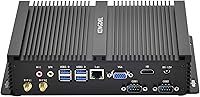
The KINGDEL NC3000 Fanless Mini PC is not trying to compete with mainstream consumer desktops — it occupies a much more specific lane. Built for environments where noise, dust, and continuous operation are real concerns, its all-metal fanless chassis is the central design decision everything else flows from. No spinning fan means no moving parts to fail, no dust accumulation during months of 24/7 runtime. Paired with an 8th Gen Intel Core i7, it punches noticeably harder than typical budget mini PCs in this bracket. The inclusion of COM RS232 serial ports pushes it firmly into industrial territory. Available since late 2019, it has accumulated enough real-world usage to be evaluated on actual performance rather than just spec sheets.

Features & Benefits

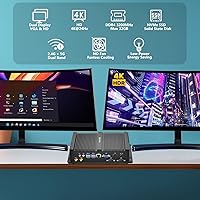
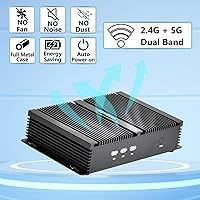
The fanless passive cooling is the headline feature here — the thick metal shell dissipates heat without any spinning parts, making it genuinely viable for 24/7 operation in dusty warehouses, quiet studios, or server closets. That said, under sustained heavy workloads it will thermally throttle, so extended video rendering is not where this machine shines. Memory and storage are solid: 16GB DDR4 and a 512GB NVMe SSD out of the box, with mSATA and SATA expansion slots available. The dual COM RS232 ports set it apart from nearly every other mini PC at this size. One honest caveat on display output: the 4K HD connection tops out at 24Hz, which suits static dashboards but not smooth video playback.

Best For

This fanless mini PC fits a specific kind of buyer, and it fits them well. Industrial integrators who need to communicate with legacy POS terminals, CNC controllers, or serial-based sensors via RS232 COM ports will find very few modern alternatives in this size. Beyond that industrial niche, it works well as an always-on silent workstation in acoustically sensitive spaces — medical reception desks, recording booths, or home offices where fan noise genuinely disrupts work. Compact enough for kiosk enclosures and rated to operate from 0°C to 70°C, it handles environments that would stress a standard consumer PC. Small businesses wanting a clutter-free desktop with real upgrade headroom will also find it a practical match.

User Feedback

Across verified purchases, the KINGDEL NC3000 holds a 4.3-star average, and the praise is fairly consistent: build quality and the port lineup come up repeatedly as genuine strengths. Most buyers in office and industrial roles report the chassis staying warm but manageable under everyday loads, and the out-of-box setup is described as straightforward for experienced users. The complaint worth flagging honestly is the dual-SKU situation — some buyers ordered expecting the i7-8565U and received the i7-8559U instead, which has a different GPU and a notably different base clock. OS installation can also surprise first-time buyers, as the unit ships without a pre-loaded operating system. For mission-critical deployments, factor in the mixed feedback on customer support responsiveness.

Pros

  • Completely silent operation makes it ideal for noise-sensitive settings like medical offices, studios, and libraries.
  • The all-metal chassis doubles as a passive heatsink, enabling reliable 24/7 operation without moving parts to fail.
  • Two COM RS232 serial ports make this industrial desktop one of the very few modern compact options for legacy equipment integration.
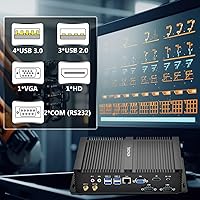
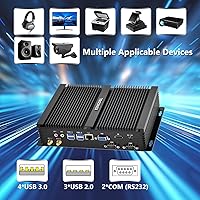
  • Seven USB ports across two speed tiers give it more connectivity than most mini PCs at this size.
  • 16GB DDR4 RAM and a 512GB NVMe SSD provide solid everyday performance right out of the box.
  • Additional mSATA and SATA slots offer real storage upgrade headroom without replacing the main drive.
  • Rated to operate from 0°C to 70°C, making it viable for temperature-variable industrial environments.
  • Wake-On-LAN and AMI BIOS support make remote management and kiosk deployment genuinely practical.
  • The compact footprint — under 10 inches long — fits easily behind a monitor or inside a kiosk enclosure.
  • Dual-monitor support via HD and VGA outputs covers both modern and legacy display setups simultaneously.

Cons

  • Some buyers receive the i7-8559U instead of the i7-8565U, with no reliable way to guarantee the variant at purchase.
  • The 4K HD output is capped at 24Hz, making it unsuitable for video playback, gaming, or fluid animation.
  • No operating system comes pre-installed, which adds setup complexity for non-technical or first-time buyers.
  • Under sustained heavy processing, the fanless chassis can thermally throttle, limiting performance on demanding workloads.
  • Multiple reviewers have flagged slow or unhelpful customer support responses, a real risk for business deployments.
  • The i7-8565U and i7-8559U ship with different integrated GPUs, creating inconsistency across otherwise identical-looking units.
  • Driver availability for less common operating systems like Linux can require extra research and manual installation.
  • The 8th Gen Intel platform is aging; buyers planning a multi-year deployment should weigh long-term software support.

Ratings

Our AI rating system analyzed verified global buyer reviews for the KINGDEL NC3000 Fanless Mini PC, actively filtering out incentivized, duplicated, and bot-generated feedback before assigning any scores. What emerged is a product with clear category strengths — particularly around build quality, port density, and industrial reliability — alongside real pain points around CPU variant consistency, display output limitations, and after-sales support. Both sides of that picture are reflected honestly in the scores below.

Build Quality
88%
The solid all-metal chassis is consistently the first thing buyers mention, and for good reason — it feels far more substantial than the plastic shells common at this price point. Users running it in workshop environments and under-desk office setups both note the case shows minimal wear after extended use, and the heft gives it a reassuringly permanent feel.
A few buyers have noted the exterior finish can accumulate minor scratches over time, particularly when the unit is repositioned frequently in kiosk or POS setups. The overall layout also makes internal access somewhat involved if you need to swap components, which is a minor but real inconvenience during routine maintenance.
Fanless Cooling
83%
Buyers deploying this in recording studio anterrooms, medical reception desks, and library checkout stations consistently praise the complete absence of fan noise as a genuine operational advantage. In environments where acoustic control matters, the difference between a silent machine and one with even a low-speed fan is more significant than it sounds.
The thermal ceiling is a real trade-off that some buyers discover only after purchase — sustained CPU-heavy tasks like batch processing cause the chassis to heat up significantly and the processor to throttle. Users expecting desktop-class sustained performance from an i7 may be caught off guard when workloads push the chip continuously for more than a few minutes.
Processing Performance
74%
26%
For the workloads this machine is actually designed for — office productivity, web browsing, light data entry, or background automation processes — the i7 platform performs well above what buyers of cheaper mini PCs are accustomed to. Everyday tasks feel snappy, and users transitioning from aging embedded systems report a noticeable improvement in responsiveness.
The dual-SKU problem is the biggest concern — receiving the i7-8559U when you expected the i7-8565U means a different base clock and integrated GPU, which matters for specific use cases. The 8th Gen platform is also aging, and buyers planning multi-year deployments should factor in its narrowing software and driver support horizon.
Port Selection
91%
Seven USB ports across two speed tiers, two hardware RS232 serial ports, Gigabit LAN, Wi-Fi, and Bluetooth on a machine this size is rare. Integrators managing legacy POS systems, barcode scanners, and serial-controlled equipment frequently cite the port density as the deciding factor in choosing this unit, often eliminating the need for an external USB hub entirely.
The only meaningful complaint here comes from buyers who need more than two serial ports for complex multi-device automation setups, as there is no easy way to expand beyond the built-in pair without an additional adapter. The absence of HDMI 2.0 also limits compatibility with newer monitors that lack legacy HD or VGA inputs.
Value for Money
72%
28%
For buyers in the industrial and embedded computing space, the combination of i7 processing, fanless operation, dual RS232 ports, and this level of connectivity in a compact chassis is hard to match at this price tier. IT teams that have priced out comparable industrial panel PCs or DIN-rail computers understand the relative value quickly.
Consumer buyers comparing this to mainstream mini PCs on a per-dollar basis may feel the value proposition less keenly, especially given the aging CPU generation and the lack of a pre-installed OS. The dual-SKU uncertainty also stings — paying for an i7-8565U and receiving an i7-8559U without recourse makes the pricing feel less justified.
Storage & Memory
84%
16GB DDR4 at 3200 MHz is more than adequate for the tasks this industrial desktop is commonly asked to perform, and the NVMe SSD delivers fast boot times and responsive application loading even on a lean OS installation. The extra mSATA and SATA slots are a genuine advantage for deployments that need local data logging or expanded storage capacity.
Some buyers have noted actual RAM operating speeds may differ from the listed 3200 MHz depending on installed BIOS settings, requiring a manual check post-setup. Buyers building data-intensive kiosk applications or running large local databases may also find themselves relying on the expansion slots sooner than expected with the base 512GB drive.
Display Output
57%
43%
Dual-monitor output is a practical advantage for office setups and signage configurations that need to drive two screens simultaneously without an external splitter. The VGA port is a thoughtful inclusion for buyers still operating legacy monitors in industrial environments, saving the cost of a separate active adapter.
The 4K ceiling of 24Hz is the most frequently misunderstood spec on this machine — buyers expecting smooth 4K output for video playback or modern UI work are genuinely disappointed when it arrives. At 24Hz, any motion on screen looks visibly choppy, effectively limiting 4K use to static content like dashboards or informational displays only.
Industrial Reliability
86%
The 0°C to 70°C operating temperature rating, Wake-On-LAN support, and fanless design combine to make this a credible choice for unattended kiosk and automation deployments running continuously for months. IT managers who have deployed this fanless mini PC in light industrial settings report stable uptime with far less maintenance intervention than fan-cooled alternatives.
The lack of any redundancy features — no dual LAN port, no hardware watchdog timer in the standard configuration — means that in high-availability scenarios, a single point of failure could cause unplanned downtime. Buyers building mission-critical systems will likely need external monitoring or a secondary unit rather than relying on this alone.
Wireless Connectivity
79%
21%
Dual-band Wi-Fi 802.11ac covering both 2.4 GHz and 5 GHz gives this fanless mini PC solid wireless performance for environments where running Ethernet is not practical. Bluetooth support further rounds out the wireless stack, useful for connecting wireless peripherals in space-constrained kiosk or point-of-sale setups where cable clutter is a problem.
A number of buyers note that Wi-Fi signal strength is average rather than strong, which can be a real issue in installations where the unit is tucked inside a metal enclosure or kiosk cabinet that further attenuates the signal. The Gigabit LAN port is the more dependable choice for stable industrial deployments, and buyers with that option should prioritize wired connections.
Setup Experience
62%
38%
Buyers with prior experience building or deploying PCs report that getting this machine running is fairly smooth — BIOS configuration is accessible, and port labeling is clear enough to avoid confusion during initial wiring in an equipment rack or kiosk enclosure. Hardware documentation is adequate by the standards of this product category.
The absence of a pre-installed OS is the most consistent friction point — the gap between what buyers expect to receive and what actually arrives ready to use catches less technical users off guard. Some have also spent considerable time hunting down correct Wi-Fi and chipset drivers for non-standard OS installations, which adds to the initial frustration.
Customer Support
48%
52%
A portion of buyers — particularly those in straightforward use cases — report no issues requiring support at all, which is arguably the best-case outcome for any hardware purchase. When problems are hardware-related and self-diagnosable, the broad community knowledge around the Intel 8th Gen platform fills some of the gap left by official support.
This is one of the weakest areas in the verified review record — multiple buyers report slow response times, difficulty reaching support, and in some cases no resolution at all to complaints about receiving the wrong CPU variant. For business buyers deploying a fleet of units, the lack of reliable after-sales support is a meaningful and quantifiable operational risk.
Upgrade Potential
81%
19%
Two RAM slots, one NVMe slot, one mSATA slot, and one SATA3 slot give this machine more internal expandability than most mini PCs in its size class. Users who started with the base configuration and later added a secondary SSD for data logging or bumped to 32GB RAM report the upgrade process as straightforward with no BIOS complications.
The CPU and GPU are soldered to the board and cannot be upgraded, meaning the performance ceiling is fixed at purchase — worth taking seriously given the 8th Gen platform will not benefit from future microarchitecture improvements. Buyers who anticipate needing stronger integrated graphics down the line have no upgrade path available within this chassis.
Software Compatibility
67%
33%
Windows 10 and Windows 11 are both supported, and the 8th Gen Intel platform has broad driver coverage across major Windows builds. For Linux users, Ubuntu and Debian-based installations generally work well, and the hardware is common enough that community-sourced driver solutions exist for most peripheral components.
Buyers using less common Linux distributions or niche industrial operating systems sometimes encounter driver support gaps, particularly for the wireless adapter, and have reported needing to resort to manual kernel module compilation. The dual-SKU situation adds another variable — the two CPU variants carry slightly different graphics drivers, which can introduce unexpected compatibility issues depending on which unit arrives.

Suitable for:

The KINGDEL NC3000 Fanless Mini PC is genuinely well-suited to a narrow but clearly defined set of buyers who know exactly what they need. Industrial IT teams and system integrators are the most obvious fit — if your environment requires RS232 COM serial ports to bridge modern computing with legacy POS terminals, CNC controllers, or sensor arrays, compact alternatives at this price point are extremely rare. It also makes a strong case for acoustically sensitive deployments: medical reception desks, recording studio control rooms, or library workstations where even a quiet fan is one distraction too many. Digital signage operators and kiosk builders will appreciate the always-on reliability, passive dust resistance, and the wide 0°C to 70°C operating temperature rating. Small business owners wanting a discreet, low-maintenance office desktop will also find it a capable fit for everyday productivity work.

Not suitable for:

The KINGDEL NC3000 Fanless Mini PC is the wrong machine for buyers who want a general-purpose consumer PC with no significant trade-offs to manage. Anyone planning sustained heavy workloads — video encoding, large software compilations, or 3D rendering — will run into the thermal ceiling the fanless design inherently creates, causing throttling that a fan-cooled system would handle more gracefully. Multimedia enthusiasts and gamers should look elsewhere entirely: the 4K HD output is capped at 24Hz, which is unusable for smooth video or gaming, and the integrated graphics are not capable of running modern titles regardless. Buyers who need a guaranteed specific CPU variant should also proceed carefully, as there is a well-documented pattern of units arriving with the i7-8559U rather than the i7-8565U, with no reliable way to specify the variant at purchase. Finally, anyone expecting a ready-to-use Windows experience out of the box should know that no operating system comes pre-installed.

Specifications

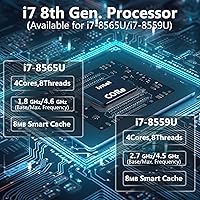
  • Processor: The unit ships with either an Intel Core i7-8565U or i7-8559U (8th Gen, quad-core), with base clocks of 1.8 GHz or 2.7 GHz respectively and a max turbo frequency of up to 4.6 GHz.
  • System RAM: 16GB DDR4 RAM running at 3200 MHz is pre-installed across two slots, with a maximum supported capacity of 32GB.
  • Storage: A 512GB NVMe SSD serves as the primary drive, with one additional mSATA slot and one SATA3 slot available for storage expansion.
  • Graphics: Integrated graphics are either Intel UHD Graphics 620 (i7-8565U variant) or Intel Iris Plus Graphics 655 (i7-8559U variant), depending on the unit received.
  • Display Output: Dual-monitor output is supported via one HD port capable of 4096×2304 at 24Hz and one VGA port for legacy or secondary displays.
  • USB Ports: Seven USB ports are provided in total: four USB 3.0 and three USB 2.0, all accessible from the chassis exterior.
  • Serial Ports: Two hardware COM RS232 serial ports are built directly into the chassis for connection to legacy industrial equipment, POS terminals, and serial-interface devices.
  • Networking: Network connectivity includes a Gigabit RJ-45 LAN port, dual-band Wi-Fi 802.11a/b/g/n/ac supporting both 2.4 GHz and 5 GHz bands, and Bluetooth.
  • Cooling: The system uses fully passive fanless cooling, with no fans or moving parts; heat is dissipated through the all-metal chassis, which acts as an integrated heatsink.
  • Dimensions: The chassis measures 9.2″ (L) × 5.9″ (W) × 2.0″ (H).
  • Weight: Listed weight ranges from approximately 3.0 to 4.9 lbs depending on the source listing and installed configuration.
  • Power Supply: The included universal AC adapter accepts 100–240V input and delivers a regulated 12V at 5A DC output.
  • Operating Temp: The unit is rated for continuous operation across an ambient temperature range of 0°C to 70°C.
  • BIOS Features: AMI BIOS is pre-installed with full ACPI compliance and Wake-On-LAN support enabled for remote power management and unattended deployments.
  • Audio Port: A single 3.5mm combined MIC/SPK jack provides basic microphone input and speaker output connectivity.

Related Reviews
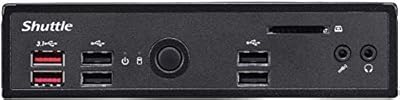
Shuttle DS10U5 Fanless Mini Barebone PC
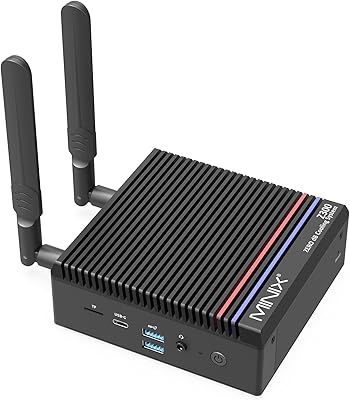
80%
91%
Build Quality
83%
Fanless Passive Cooling
88%
Display Output Versatility
93%
Memory Expandability
89%
Connectivity & Port Selection
More
MINIX NEO Z300-0dB 512GB Mini PC
83%
97%
Noise Level
71%
Thermal Management
78%
Everyday Performance
84%
Build Quality
88%
Connectivity & Ports
More
Beelink Mini S12 Pro (N100, 16GB, 500GB)

83%
83%
Everyday Performance
91%
Value for Money
76%
Build Quality & Design
84%
Thermal Management & Noise
88%
Connectivity & Ports
More
Beelink Mini S12 Mini PC
78%
88%
Value for Money
82%
Performance for Daily Tasks
79%
Build Quality & Design
91%
Dual Monitor Support
84%
Thermal Management & Noise
More
ACEMAGICIAN Kron Mini K1 Mini PC
73%
83%
Everyday Performance
54%
Gaming Capability
61%
Thermal Management
89%
Display & Connectivity
78%
Value for Money
More
Beelink ME Mini PC
Beelink ME Mini PC
87%
88%
Performance
91%
Connectivity
85%
Storage Expansion
95%
Power Efficiency
90%
Noise Levels
More
FUNYET STARSHIP N95 512GB Mini PC
74%
83%
Value for Money
72%
Performance
58%
Storage Speed
91%
Port Selection
88%
Display Output
More
Beelink EQi13 Pro (32GB/500GB)
83%
88%
Processing Performance
91%
Memory & Multitasking
86%
Storage Speed & Expandability
74%
Thermal Management & Noise
93%
Networking Capabilities
More
MINISFORUM UM560 XT Mini PC
86%
91%
Performance
88%
Build Quality
84%
Connectivity
92%
Portability
60%
Cooling/Heat Management
More
Intel NUC7I3BNH Mini PC Kit
75%
88%
Build Quality
93%
Compact Form Factor
79%
Everyday Performance
74%
Value for Money
63%
Thermal Management
More

FAQ

No, the unit ships without any OS loaded. You will need to install Windows 10, Windows 11, or a Linux distribution yourself using a bootable USB drive. Most experienced users find the process straightforward, but first-time buyers should plan for this extra step before the machine is usable.

This is a legitimate concern and worth being upfront about. Some buyers have received the i7-8559U rather than the i7-8565U, and the two chips differ in meaningful ways — the 8559U carries a higher base clock but a different integrated GPU (Iris Plus 655), while the 8565U uses UHD Graphics 620 with a lower base clock. There is no guaranteed way to specify which variant you will receive at checkout, so if this distinction is critical for your use case, contact the seller directly before ordering.

Yes, and this is one of its more practical advantages over sealed mini PCs. There are two RAM slots supporting up to 32GB total, so upgrading from the stock 16GB is simple. For storage, beyond the primary NVMe SSD, you have an additional mSATA slot and a SATA3 slot available for expansion drives.

Not really, and this is important to understand before buying. The HD port supports 4K resolution (4096×2304), but only at 24Hz, which produces visible judder during any motion on screen. For static dashboards, digital signage, or text-heavy work it is perfectly adequate, but for smooth video playback you would want to run at a lower resolution where higher refresh rates are available.

Yes, dual-monitor output is supported. The HD port and the VGA port can both be active simultaneously, which works well for office workstations or multi-display kiosk setups. Just keep in mind the 24Hz ceiling on 4K over the HD port if you plan to run a high-resolution primary display.

Under typical office workloads, most users report the metal case getting warm to the touch but not uncomfortably so. That warmth is normal and expected — the chassis itself is the heatsink, and that heat has to go somewhere. Under sustained heavy processing the temperature climbs more noticeably and the processor may throttle to protect itself, so this is not the right machine for extended rendering or compilation jobs.

The KINGDEL NC3000 Fanless Mini PC includes two hardware COM RS232 serial ports built directly into the chassis, so no USB-to-serial adapter is needed. On Windows, standard serial port drivers are typically recognized automatically during OS installation. If you are running Linux, most modern kernels handle standard serial hardware without additional configuration, though it is worth verifying compatibility with your specific distribution beforehand.

It was designed with exactly that scenario in mind. The fanless chassis eliminates the fan-failure risk that affects most consumer mini PCs in always-on deployments, and the 0°C to 70°C operating temperature rating provides headroom in less climate-controlled environments. Wake-On-LAN support also makes remote power cycling practical for unattended installations.

Linux runs on this hardware, and a number of buyers use it specifically for embedded and industrial deployments on Linux. That said, driver support is not guaranteed for every distribution, and you may need to source drivers manually for the Wi-Fi adapter depending on your chosen distro. Ubuntu and Debian-based systems tend to offer the broadest out-of-the-box hardware compatibility for this class of 8th Gen Intel hardware.

The package includes the mini PC itself, the power adapter, and basic mounting hardware. What it does not include is an operating system, a display cable, a keyboard, or a mouse. Most buyers will need to prepare a bootable OS installation drive and source at least an HD or VGA cable before the machine is ready to use.