Overview

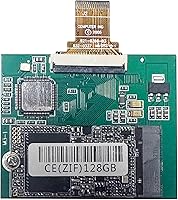
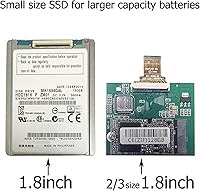
The SELLTOONE 128GB iPod Classic ZIF SSD is a purpose-built storage replacement for iPod Video (5th and 5.5th generation) and iPod Classic (6th and 7th generation) owners whose original mechanical drives have started clicking, grinding, or simply given up. Those Toshiba ZIF hard drives were never built to last two decades, and finding a working replacement is increasingly difficult. This ZIF SSD upgrade slots in using the same CE ZIF connector as the original drive, so no adapters or modifications are needed. The 128GB capacity is specifically suited for 80GB and 120GB Classic models, which have a firmware ceiling that prevents recognizing anything larger. For the price, it is one of the more accessible ways to breathe new life into aging Apple hardware.

Features & Benefits

The ZIF CE interface is the critical detail here — it connects directly to the original ribbon cable header without any conversion board, keeping the installation clean and straightforward. Because there are no spinning platters, the drive is completely silent and far more resistant to the bumps and drops that used to cause skipping on older mechanical models. At just over an ounce and measuring roughly 2.16 by 1.78 by 0.19 inches, it fits the iPod chassis exactly as the factory drive did. One mandatory step buyers need to know upfront: after installation, iTunes restore is required before the iPod will function. This is not optional — skip it and the device simply will not boot.

Best For

This iPod storage mod makes the most sense for hands-on DIY repairers who are already comfortable cracking open an iPod with a spudger and prying the back panel without cracking the chrome. If your 6th or 7th gen Classic has a dead or clicking hard drive, this is a practical, cost-effective path back to a working device. It also appeals to audiophiles who prize that iPod sound signature and want a skip-free, completely silent listening experience without background drive hum. One important boundary: users with 80GB or 120GB Classic models should stick to 128GB — the motherboard simply cannot address more than roughly 130GB, so larger-capacity versions are not compatible with those units.

User Feedback

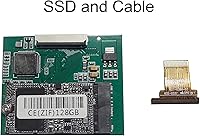
Buyer sentiment around the iPod Classic solid-state drive is mostly positive, with many reporting snappier menu navigation and a noticeable improvement in boot times after swapping out the original spinning drive. That said, the included ribbon cable gets mixed reviews — some users find it seats reliably, while others report it does not make a firm connection and end up reusing the cable from the original drive. First-timers also frequently mention being caught off guard by the iTunes restore requirement, which is worth repeating: the device will not work until that step is completed. A small number of buyers received non-functional units, so checking compatibility before ordering and keeping purchase records handy is genuinely good advice.

Pros

  • Direct ZIF CE connector fit means no adapters, no soldering, and no modification to the iPod chassis.
  • Silent solid-state operation eliminates the background hum and skip risk of an aging spinning drive.
  • At just over an ounce, this iPod Classic solid-state drive adds zero noticeable weight to the device.
  • Menu navigation and boot times are noticeably faster after swapping out the original mechanical drive.
  • 128GB capacity is a genuine step up from what most Classic models shipped with originally.
  • Replaces several discontinued Toshiba drive models that are nearly impossible to source reliably today.
  • The compact 2.16 x 1.78 x 0.19-inch form factor fits the original drive bay without any modification.
  • Buyers who research compatibility thoroughly before ordering report high satisfaction rates overall.
  • No moving parts means the restored iPod handles bumps and drops far better than before.

Cons

  • The included ribbon cable has mixed reliability — some units require using the original cable from the old drive instead.
  • A small but consistent number of buyers receive non-functional units straight out of the packaging.
  • iTunes restore is mandatory post-installation, which is a real barrier for users without access to a compatible computer.
  • Compatibility rules are strict and easy to get wrong; ordering the wrong capacity for your specific Classic model wastes both time and money.
  • No compatibility whatsoever with any iPod model outside the supported Video and Classic lines.
  • Firmware limits on 80GB and 120GB Classic models mean buyers are capped at 128GB regardless of preference.
  • Installation requires comfort with iPod disassembly tools; first-timers risk damaging clips or the screen cable.
  • Customer support options from a smaller third-party brand like this are generally more limited than with established storage manufacturers.

Ratings

Our AI rating system analyzed verified global buyer reviews for the SELLTOONE 128GB iPod Classic ZIF SSD, actively filtering out incentivized, duplicate, and bot-generated submissions to surface what real users consistently experienced. The scores below reflect a transparent synthesis of both the genuine strengths and the recurring frustrations reported across thousands of purchases. Where buyers thrived and where they struggled are both represented honestly.

Compatibility Accuracy
83%
The vast majority of buyers who cross-referenced their iPod model against the compatibility chart before purchasing found that this ZIF SSD upgrade dropped in without a single adapter or modification. For 80GB and 120GB Classic owners specifically, the 128GB ceiling is respected, and the CE ZIF connector matched the original header cleanly in almost every documented case.
Compatibility confusion is the single biggest source of negative reviews — primarily from buyers who assumed any capacity would work in any Classic model. The firmware ceiling on older mainboards is a real hard limit, and buyers who did not verify this before ordering ended up with a drive their iPod simply refused to recognize.
Installation Experience
71%
29%
Experienced iPod repairers — those who have cracked open a Classic before with a spudger and pry tool — generally found the physical swap straightforward and completed it in under 30 minutes. The drive slots in the same orientation as the original, and the connector alignment is consistent with what anyone familiar with ZIF hardware would expect.
First-timers frequently underestimated the fiddly nature of iPod disassembly, and several reported accidentally damaging ribbon cable connectors during the process. Instructions included in the packaging are minimal, and buyers who relied solely on them rather than seeking out a dedicated video guide had a noticeably rougher experience.
Post-Install Setup
68%
32%
Buyers who went in knowing that an iTunes restore was required — not optional — sailed through the setup process with no surprises. Once the iPod was placed into recovery mode and iTunes detected it, the restore completed cleanly in most cases and the device booted up fully functional shortly after.
A surprisingly large portion of first-time buyers were caught off guard by the mandatory iTunes restore, expecting the iPod to simply power on after swapping the drive. Those without easy access to a computer running iTunes, or using outdated iTunes versions, faced additional troubleshooting steps that dragged the setup experience out considerably.
Ribbon Cable Quality
54%
46%
When the included cable seats properly, it works fine and eliminates any need to handle the fragile original cable during the swap. A portion of buyers reported no issues at all with the supplied cable, completing a clean install without touching the old hardware.
The included ribbon cable is a recurring point of failure in buyer feedback — enough so that it is one of the most frequently mentioned issues in negative reviews. A meaningful number of buyers found the cable did not make a firm connection, and the practical fix was to reuse the original cable from the old Toshiba drive, which requires keeping it intact during disassembly.
Drive Recognition
86%
Once the iTunes restore is completed correctly, the iPod Classic solid-state drive is recognized immediately and consistently. Buyers report the device appearing in iTunes within seconds of connection, and the formatting process completes without errors in the vast majority of successful installs.
A small but notable share of buyers received units that iTunes failed to recognize even after repeated restore attempts and troubleshooting steps, pointing to what appear to be isolated hardware defects rather than a systemic issue. These cases are frustrating precisely because they are hard to diagnose without a known-good replacement on hand to test against.
Performance Improvement
91%
The performance uplift over an original Toshiba spinning drive is real and immediately noticeable. Buyers consistently describe snappier menu scrolling, faster song loading, and a boot time that feels significantly quicker — especially on devices that had been limping along on a degraded mechanical drive for years.
A small number of buyers noted that while navigation felt faster, the improvement was less dramatic on devices whose slowness stemmed from battery degradation rather than the hard drive. For those iPods, the storage swap alone did not fully restore the responsive feel they were expecting.
Build & Form Factor
88%
The physical dimensions are a near-perfect match for the original drive, and buyers consistently note that it sits flush in the drive bay without any shimming or forcing. At just over an ounce, it adds nothing perceptible to the iPod weight, which matters for a device people carry in a pocket or clip to a gym bag daily.
The drive itself has minimal protective packaging in some shipments, and a handful of buyers received units showing minor cosmetic scratches on arrival — not functional damage, but worth noting for buyers who care about the condition of internal components in a restoration build.
Value for Money
82%
18%
Relative to the cost of sourcing a working used iPod Classic or paying a repair shop to handle a drive replacement, this iPod storage mod sits at a price point that most buyers described as fair to good. For someone who already owns the disassembly tools, the cost-per-result ratio is genuinely strong.
Buyers who received non-functional units found the value equation deteriorating quickly, particularly if return shipping was required. A few also noted that pricing for this niche component can fluctuate, and at higher price points, the value calculation becomes less clear-cut compared to alternatives.
Noise & Vibration
97%
This is where solid-state technology delivers an unambiguous win — the drive is completely silent under all operating conditions. Buyers who remembered the faint mechanical hum of an original Toshiba drive were consistently struck by how quiet and vibration-free the restored iPod felt during playback and navigation.
There is essentially nothing to criticize here from a noise standpoint. The only adjacent complaint noted by a very small number of users was coil whine from the iPod logic board itself, which was already present before the swap and is unrelated to the drive.
Packaging & Unboxing
63%
37%
The drive arrives in a compact package that is easy to handle, and most buyers received it in serviceable condition with the included cable and basic documentation present. For a niche replacement component, the presentation is adequate for the market it serves.
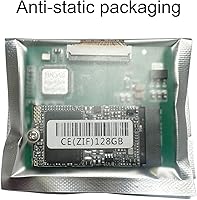
Packaging quality drew some criticism — particularly around protective foam or anti-static wrapping being inconsistent between units. A handful of buyers questioned whether adequate protection was in place for a component being shipped internationally, though functional damage on arrival remained relatively rare.
DOA Rate & Reliability
61%
39%
The majority of buyers received a fully functional unit that worked as expected after the iTunes restore. For most purchasers, the drive operated reliably from day one with no hardware failures reported over the ownership period covered by reviews.
The dead-on-arrival rate is higher than buyers expect for a storage component — enough to be a genuine concern rather than an outlier. Because troubleshooting a non-functional unit requires ruling out cable, installation, and iTunes issues first, the process of confirming an actual DOA is time-consuming and frustrating before a return can even be initiated.
Documentation & Instructions
47%
53%
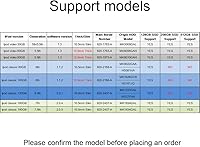
The product listing images include a compatibility reference chart that, if studied carefully before purchase, can prevent the most common ordering mistakes. Buyers who referenced those images avoided most of the compatibility pitfalls that tripped up others.
The printed instructions included with the drive are widely regarded as inadequate — particularly on the iTunes restore requirement and the ribbon cable seating process. Buyers who relied solely on in-box documentation without seeking external guides had a disproportionately high rate of installation problems.

Suitable for:

The SELLTOONE 128GB iPod Classic ZIF SSD is squarely aimed at DIY-minded iPod owners who want to rescue a device with a dead, clicking, or sluggish original hard drive rather than toss it out or pay a repair shop. If you own a 6th or 7th generation iPod Classic originally configured as a 80GB or 120GB model, this is one of the few direct-fit solid-state replacements available at an accessible price point. Audiophiles who have stayed loyal to the iPod Classic for its sound output and tactile click wheel will appreciate the completely silent, skip-free playback that comes with eliminating a spinning platter. It also suits hobbyist repairers who are comfortable with basic iPod disassembly — the kind of person who already owns a spudger, knows how to pry a back panel without gouging the chrome, and is not intimidated by an iTunes restore process after swapping hardware. For that audience, this ZIF SSD upgrade delivers a meaningful second life at a fraction of what a working used Classic costs on the secondary market.

Not suitable for:

The SELLTOONE 128GB iPod Classic ZIF SSD is not a fit for everyone, and getting the wrong variant is an easy and frustrating mistake to make. Owners of an 80GB or 120GB iPod Classic cannot simply buy a 256GB or 512GB version hoping for more storage — their device firmware has a hard ceiling of roughly 130GB, and the board will not recognize anything beyond that. This iPod storage mod is also not intended for casual buyers who expect a plug-and-play experience; an iTunes restore is required after installation, and if you no longer have access to iTunes or a computer that can run it, the drive will not function out of the box. Anyone unfamiliar with iPod disassembly should think carefully before ordering, since incorrect installation — including inserting the drive backwards — is a common cause of failure that voids any return goodwill. Finally, users with a 5th gen iPod Nano, any iPod Touch, or any model outside the supported iPod Video and Classic lines should look elsewhere entirely, as this drive has zero compatibility with those devices.

Specifications

  • Brand: Manufactured and sold by SELLTOONE, a third-party storage accessory brand specializing in legacy Apple device upgrades.
  • Capacity: Provides 128GB of solid-state storage, replacing original Toshiba ZIF hard drives in supported iPod models.
  • Interface: Uses a ZIF CE (Zero Insertion Force, Compact Flash-style Embedded) connector, matching the original drive header on compatible iPods.
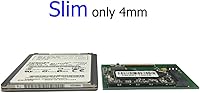
  • Form Factor: Measures 2.16 x 1.78 x 0.19 inches, mirroring the physical footprint of the original iPod hard drive for a direct-fit replacement.
  • Weight: Weighs approximately 1.13 ounces, adding no perceptible mass to the restored iPod chassis.
  • Moving Parts: Contains no spinning platters or mechanical components, making it fully solid-state and resistant to vibration and physical shock.
  • Compatible Models: Supports iPod Video (5th and 5.5th generation) and iPod Classic (6th and 7th generation), including original 80GB and 120GB configurations.
  • Capacity Limit Note: 80GB and 120GB iPod Classic models have a firmware ceiling of roughly 130GB and cannot recognize higher-capacity drive variants.
  • Replaces Drives: Serves as a direct replacement for Toshiba drive models HS081HA, MK8010GAH, MK8022GAA, MK1634GAL, and MK1231GAL.
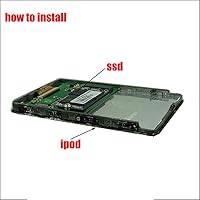
  • Installation Type: Internal direct replacement; no adapters, soldering, or chassis modification required on supported iPod models.
  • Post-Install Step: An iTunes restore is mandatory after installation; the iPod will not boot or function until this step is completed on a compatible computer.
  • Color: The drive is black in finish, consistent with the internal component aesthetics of supported iPod models.
  • Drive Technology: Solid-state NAND flash storage with no moving parts, offering quieter operation and improved longevity compared to the original spinning drives.
  • BSR Ranking: Ranked #379 in the Internal Solid State Drives category on Amazon at time of listing, indicating consistent sales volume in a niche segment.
  • First Available: This product listing was first made available in March 2020, giving it several years of real-world buyer feedback to draw from.

Related Reviews
SSK SD451 128GB External SSD
86%
94%
Transfer Speed
88%
Build Quality
95%
Portability
90%
Compatibility
92%
Ease of Setup
More
SSK SD450 128GB Portable SSD
85%
89%
Transfer Speed
94%
Portability
87%
Build Quality
90%
Compatibility
68%
Storage Capacity
More
Transcend MSA230S 128GB mSATA SSD
82%
88%
Read/Write Performance
61%
Storage Capacity
91%
Compatibility & Fit
79%
Installation Experience
84%
Build Quality & Durability
More
Apple iPod Classic 160GB MP3 Player
68%
96%
Storage Capacity
91%
Battery Life
74%
Build Quality
88%
Click Wheel & Navigation
83%
Audio Format Compatibility
More
KIOXIA 128GB M.2 2230 PCIe NVMe SSD
83%
92%
Value for Money
88%
Performance Speed
84%
Durability & Reliability
78%
Ease of Installation
85%
Compatibility
More
TEAMGROUP T-Create Classic C47 2TB PCIe NVMe SSD
87%
94%
Performance
91%
Speed (Read/Write)
88%
Durability
93%
Ease of Installation
75%
Temperature Management
More
SK hynix BC711 128GB PCIe NVMe M.2 2230 SSD
86%
91%
Performance
93%
Read Speed
89%
Write Speed
87%
Ease of Installation
92%
Compatibility with Devices
More
HP TPN-Q286 15.6″ Laptop (N200, 16GB, 128GB)
69%
83%
Value for Money
76%
Performance & Speed
51%
Display Quality
88%
RAM & Multitasking
44%
Storage Capacity
More
iRasptek Raspberry Pi 5 Starter Kit 8GB RAM 128GB SSD Edition
85%
91%
Performance
88%
Build Quality & Durability
86%
Cooling & Thermal Management
94%
Ease of Setup
90%
Storage Speed & Reliability
More
UGREEN NASync DXP4800 Plus 4-Bay NAS, 8GB RAM, 128GB SSD
83%
89%
Performance
92%
Data Transfer Speed
85%
Ease of Setup
91%
Flexibility of RAID Configurations
78%
AI Photo Organization Feature
More

FAQ

Yes, the 128GB variant is the correct choice for 120GB and 80GB iPod Classic models. Those devices have a firmware limitation that prevents the motherboard from recognizing anything above roughly 130GB, so you should not attempt to use a 256GB or 512GB version in those units.

Basic iPod disassembly tools are needed — typically a plastic spudger, a thin pry tool, and a small Phillips screwdriver. The drive itself slots directly into the ZIF connector without any adapters. There are plenty of disassembly guides and video walkthroughs online specific to your iPod model that are worth reviewing before you start.

The most common cause is skipping the iTunes restore step, which is mandatory — the iPod will not boot from a new drive without it. Also double-check that the drive is not installed backwards and that the ribbon cable is fully and firmly seated. If the included cable does not seat well, try using the original cable from your old hard drive instead.

Yes, iTunes is required to restore the iPod after installation, and it does run on Windows 11. Make sure you have the latest version installed before you begin. The restore process itself is straightforward — iTunes will detect the iPod in recovery mode and walk you through it.

No, because the restore process wipes the drive to a clean state. You will need to sync your music library back through iTunes after the restore is complete, just as you would when setting up the iPod fresh from the factory.

Yes, both the 5th generation and the 5.5th generation (also called the enhanced iPod Video) are supported. Just make sure you are purchasing the correct capacity for your model, and cross-reference the compatibility chart provided in the product images before ordering.

Unfortunately, a portion of buyers have reported that the included cable does not seat as firmly as expected. If that happens, the easiest fix is to simply reuse the ribbon cable from your original hard drive rather than the replacement one. It is worth holding onto that cable during disassembly for exactly this reason.

No. This ZIF SSD upgrade is strictly for iPod Video and iPod Classic models only. iPod Nano and iPod Touch models use entirely different storage technology and form factors, and this drive has no compatibility with them whatsoever.

The key factor is which generation and original capacity your Classic is. iPod Classic 7th generation (160GB) and iPod Video models can support the 256GB and 512GB variants. If your Classic was originally an 80GB or 120GB model, you are limited to the 128GB version due to a firmware restriction on those mainboards. The product images include a compatibility chart that lays this out clearly.

Solid-state drives have no moving parts, so they are generally more durable and longer-lasting than the original Toshiba spinning drives they replace. That said, a small number of buyers have received units that were non-functional out of the box, so it is worth keeping your order confirmation and noting your iPod model details before purchasing in case you need to address a defective unit.