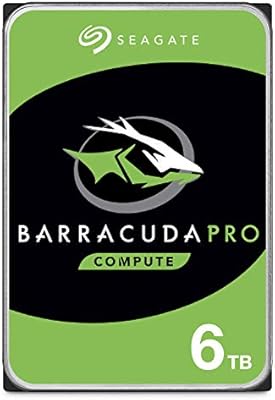
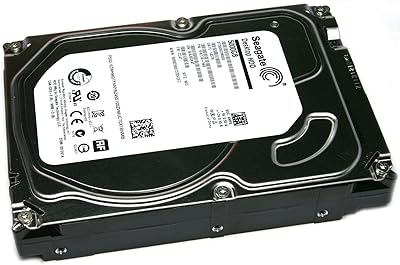
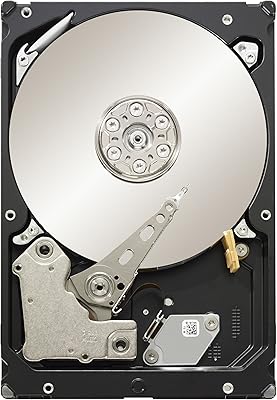
Overview

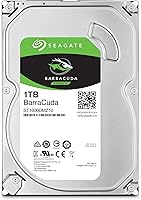
The Seagate BarraCuda ST1000DM010 1TB Internal Hard Drive has been a go-to choice for desktop storage since it launched in 2016, and it still earns that reputation today. It sits comfortably in the budget-to-midrange tier, offering a practical way to add bulk storage to any desktop build without overspending. Spinning at 7200 RPM over a SATA 6Gb/s connection, it punches above its weight class for a mechanical drive. That said, nobody should mistake this BarraCuda drive for an SSD — it is a traditional spinning disk, and expectations should be set accordingly from the start.
Features & Benefits

Where the Seagate 1TB desktop HDD earns its keep is in day-to-day practicality. The 7200 RPM spindle speed gives it a meaningful edge over slower 5400 RPM alternatives, particularly when moving large video files or loading bulky game installs. A 64MB cache buffer keeps sequential transfers running smoothly, and the SATA 6Gb/s interface means it drops straight into virtually any desktop motherboard without compatibility headaches. The standard 3.5-inch form factor fits any full or mid-tower case without adapters. Backing it all up is a two-year limited warranty — not exceptional, but honest for a drive at this price point.

Best For

This internal hard drive makes the most sense as a secondary storage drive paired alongside a primary SSD. Builders who want fast boot times from their SSD but need affordable space for game libraries, raw photo archives, or video projects will find it fits that role well. It is equally at home in a small office machine where cost-per-gigabyte matters more than raw speed. Budget-focused builders and anyone refreshing an aging desktop with extra capacity are the clearest target here — people who need reliable, roomy storage without overthinking it.

User Feedback

Across nearly 15,000 ratings, the sentiment is broadly positive, with most buyers praising how straightforward the installation is and noting that the drive simply works as expected for years. That said, a consistent minority of reviewers report early failures — dead on arrival or within the first year — and that is worth taking seriously rather than brushing aside. Longevity feedback is genuinely mixed, though the majority of long-term owners report no issues over multi-year use. Many buyers specifically call it out as a reliable backup or secondary drive, which seems to be its sweet spot based on real-world usage patterns.

Pros

  • Excellent cost-per-gigabyte ratio for desktop bulk storage — hard to beat at this capacity tier.
  • The 7200 RPM speed gives it a real edge over slower 5400 RPM drives for everyday file transfers.
  • Universal SATA 6Gb/s compatibility means it fits virtually any desktop motherboard, old or new.
  • Standard 3.5-inch form factor slots into any desktop bay without adapters or brackets.
  • Installation is genuinely straightforward — most buyers have it running within minutes.
  • Works exceptionally well as a secondary drive paired alongside a primary SSD.
  • A two-year limited warranty provides at least a baseline safety net after purchase.
  • Strong track record for buyers who use it within its intended role as bulk storage.
  • With nearly 15,000 ratings and a high average score, the volume of positive real-world feedback is hard to dismiss.

Cons

  • A consistent minority of buyers report early drive failures within the first year — not a fringe complaint.
  • RMA and warranty support experiences are hit or miss, with slow turnarounds reported by multiple buyers.
  • Audible clicking and vibration during heavy workloads can be distracting in quiet environments.
  • Performance degrades noticeably when the drive is filled past roughly 80 percent capacity.
  • Random access speeds are slow by modern standards, making it a poor choice for system or application drives.
  • Some units have arrived with physical damage or internal rattling, pointing to inconsistent shipping protection.
  • Long-term reliability feedback is genuinely mixed — multi-year durability is not guaranteed for every unit.
  • Running it as a sole storage drive amplifies every mechanical HDD limitation in ways most buyers will regret.

Ratings

The scores below reflect an AI-driven analysis of verified global buyer reviews for the Seagate BarraCuda ST1000DM010 1TB Internal Hard Drive, with spam, bot-generated, and incentivized feedback actively filtered out before scoring. Ratings span everything from installation experience to long-term durability, giving you a clear picture of where this BarraCuda drive genuinely excels and where real buyers have run into frustration.

Value for Money
91%
Buyers consistently point to the cost-per-gigabyte ratio as the strongest argument for choosing this drive. For desktop builders stretching a build budget, getting a full terabyte of 7200 RPM storage at this price tier is hard to argue with, and most users feel they got exactly what they paid for.
A small but vocal group of buyers who experienced early failures felt the value proposition collapsed entirely once they had to deal with returns or replacements. When a drive dies young, no price point feels like a bargain.
Reliability & Longevity
74%
26%
The majority of long-term owners report the Seagate 1TB desktop HDD running without issues for three or more years in everyday desktop use. For a budget mechanical drive used as secondary storage, that track record holds up reasonably well across a large sample of buyers.
Early failure reports are consistent enough across reviews to be taken seriously. A measurable share of buyers experienced drive failure within the first twelve months, which is a real concern for anyone planning to use this as their only storage layer without a backup strategy.
Read & Write Performance
79%
21%
At 7200 RPM, this internal hard drive moves files noticeably faster than 5400 RPM alternatives. Users loading large game installs or transferring bulk video files report snappier response times than expected for a mechanical drive at this price point.
It is still a spinning platter drive, and anyone copying large batches of small files will feel that limitation quickly. Sequential speeds are respectable, but random access performance is nowhere near what even a budget SSD delivers.
Installation Ease
93%
Plug-in simplicity is one of the most frequently praised aspects of this drive. The standard 3.5-inch form factor drops straight into any desktop bay, and buyers across all skill levels — from first-time builders to seasoned PC veterans — report zero compatibility headaches with the SATA connection.
A handful of reviewers noted that their systems required a BIOS update or manual initialization before the drive appeared, which caught a few less experienced builders off guard. Nothing insurmountable, but worth flagging for first-timers.
Noise & Vibration
68%
32%
Under light to moderate workloads, most users describe the drive as acceptably quiet — a low background hum that disappears into standard case noise. For secondary storage that only spins up when accessed, day-to-day noise is rarely a concern.
During sustained read or write operations, several buyers noted an audible clicking or buzzing that became distracting in quiet environments. A few users also mentioned perceptible vibration when the drive is mounted in a case without rubber dampening.
Compatibility
92%
The SATA 6Gb/s interface and standard 3.5-inch form factor make this one of the most universally compatible drives on the market. Buyers report smooth integration into builds ranging from decade-old desktop chassis to current-gen motherboards without any adapter or configuration work.
A small number of users encountered issues with older motherboards that defaulted to IDE mode rather than AHCI, causing the drive to underperform until settings were manually adjusted. It is a rare edge case, but it tripped up a few buyers.
Transfer Speed Consistency
72%
28%
For large sequential workloads like moving full game folders or archiving video projects, the 64MB cache keeps speeds reasonably steady. Users who use this BarraCuda drive for bulk media storage report transfer rates that meet expectations without significant slowdowns mid-transfer.
Speed consistency drops noticeably when the drive is heavily fragmented or near capacity. Several buyers reported sluggish performance after filling the drive past 80 percent, which is a mechanical HDD limitation rather than a Seagate-specific flaw, but it affects real-world experience.
Build & Structural Quality
76%
24%
The physical construction feels solid and appropriately dense for a desktop drive. Buyers who have handled multiple drives from different brands generally describe this one as well-made, and the weight distribution suggests a properly assembled unit inside the enclosure.
Some buyers reported receiving units with cosmetic damage or loose internal sounds out of the box, raising questions about packaging and handling during shipping rather than the drive itself. Quality control appears consistent for most but not universal.
Heat Management
71%
29%
Under typical secondary storage workloads — occasional file access, backups, game installs — this internal hard drive stays at reasonable operating temperatures. Users running it in adequately ventilated mid-tower cases rarely report heat as a concern during normal use.
In tight mini-ITX builds or cases with poor airflow, a handful of users noted elevated temperatures during prolonged sequential writes. Running a mechanical drive hot over time accelerates wear, so thermal management in compact builds deserves attention.
Warranty & Support Experience
63%
37%
The two-year limited warranty provides a basic safety net, and buyers who filed claims within the coverage window generally report that Seagate processed replacements without excessive friction. For a budget drive, having any warranty coverage at all is appreciated.
Multiple reviewers flagged frustrating experiences with the RMA process — slow turnaround times, confusing online portals, and in some cases refurbished replacements for brand-new failed units. The warranty exists on paper, but the support experience behind it is inconsistent.
Packaging & Out-of-Box Condition
69%
31%
Most buyers receive the drive in acceptable condition, protected by foam or anti-static packaging that does the job for standard shipping conditions. The majority of units arrive intact and ready to install with no reported issues.
A recurring thread in negative reviews involves drives arriving with physical damage or internal rattling, suggesting that protective packaging is not always sufficient for rough courier handling. Buying from a reputable seller with solid return policies is genuinely advisable here.
Use as Secondary or Backup Drive
88%
This is arguably where the Seagate 1TB desktop HDD earns its strongest endorsement from real buyers. Paired with a primary SSD, it handles bulk storage duties — game libraries, media archives, local backups — reliably and cost-effectively, which is exactly the role most buyers purchase it for.
Buyers who attempted to use it as a sole system drive were more likely to report dissatisfaction, as the mechanical speed gap becomes obvious in that context. It is a strong supporting player but a weak lead.
Long-Term Performance Stability
67%
33%
Owners who have run this drive for two or more years without incident report that it maintains consistent speeds and shows no signs of degradation under normal workloads. Many describe it as a set-it-and-forget-it storage layer that simply keeps working in the background.
The minority of buyers who experienced early degradation — slow read speeds, occasional bad sectors, or unexpected disconnects — found the issues appeared gradually, making it easy to miss until data was at risk. Running regular S.M.A.R.T. checks is strongly recommended.

Suitable for:

The Seagate BarraCuda ST1000DM010 1TB Internal Hard Drive is an excellent fit for desktop PC builders who want affordable bulk storage to complement a primary SSD rather than replace it. Gamers with growing libraries will find it a practical home for titles that do not need lightning-fast load times, keeping those files off their expensive SSD without sacrificing too much performance. Home users who accumulate large collections of photos, home videos, or music archives get a full terabyte of organized storage at a fraction of what equivalent SSD capacity would cost. Small office setups running routine file storage or local backups are also a natural match — workloads that reward capacity over raw speed. Budget-focused builders upgrading an aging desktop will appreciate how effortlessly this BarraCuda drive drops into any standard desktop bay with zero adapter fuss.
Not suitable for:

The Seagate BarraCuda ST1000DM010 1TB Internal Hard Drive is a poor choice for anyone expecting SSD-level responsiveness — if fast boot times, quick application launches, or snappy game load screens are the goal, a mechanical drive simply cannot deliver that experience regardless of brand or price. Buyers who plan to use it as their only drive in a compact mini-ITX build should think carefully about thermals and vibration, as tight cases with poor airflow can stress mechanical drives over time. Anyone working in a noise-sensitive environment may find the drive's audible activity during sustained transfers an ongoing irritant. Users who need mission-critical storage without a backup layer should also reconsider — the early failure reports in the review pool are real enough to make sole-reliance risky. Laptop users or anyone needing a portable external solution should look elsewhere entirely, as this is strictly an internal desktop drive.

Specifications

  • Brand: Manufactured by Seagate, one of the longest-established names in hard drive production.
  • Series: Part of the BarraCuda lineup, Seagate's mainstream desktop storage family.
  • Model Number: The exact model identifier for this drive is ST1000DM010.
  • Capacity: Provides 1TB of formatted storage space for files, applications, and media.
  • Form Factor: Standard 3.5-inch form factor designed for desktop PC drive bays.
  • Interface: Uses a SATA 6Gb/s connection, compatible with the vast majority of desktop motherboards.
  • Rotational Speed: Spins at 7200 RPM, placing it in the faster tier of consumer mechanical hard drives.
  • Cache Buffer: Equipped with a 64MB cache to help smooth sequential data transfers.
  • Drive Type: Traditional mechanical hard disk drive using spinning platters and a read/write head.
  • Installation Type: Internal drive intended for permanent mounting inside a desktop PC chassis.
  • Dimensions: Measures 5.79 x 4 x 0.79 inches, conforming to the standard 3.5-inch drive specification.
  • Weight: Weighs 14.7 ounces, consistent with typical desktop mechanical hard drives.
  • Compatible Devices: Designed for use in desktop PCs and compatible tower workstations.
  • Warranty: Backed by a two-year limited warranty provided directly by Seagate.
  • Launch Date: First made available in September 2016 and remains in active production.
  • Operating System: Compatible with Windows, macOS, and Linux desktop environments.
  • Power Connection: Requires a standard SATA power connector, supplied by any desktop PC power supply unit.

Related Reviews
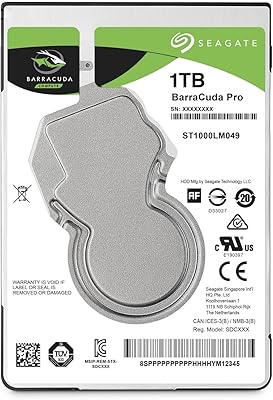
Seagate BarraCuda Pro 1TB 7200RPM Internal Hard Drive
87%
92%
Performance
90%
Speed
88%
Reliability
95%
Ease of Installation
65%
Noise Levels
More
Seagate BarraCuda 2TB Internal Hard Drive
85%
88%
Performance
91%
Reliability
86%
Build Quality
72%
Noise Level
85%
Data Transfer Speed
More
Seagate Exos 1TB Internal Hard Drive
85%
91%
Performance
94%
Reliability
89%
Durability
87%
Workload Handling
80%
Installation Ease
More
Seagate BarraCuda ST8000DM004 8TB Internal Hard Drive
73%
93%
Storage Capacity Value
67%
Reliability & Longevity
61%
Read & Write Performance
89%
Installation & Compatibility
63%
Noise & Vibration
More
Seagate Barracuda 6TB Internal Hard Drive
77%
93%
Value for Money
91%
Storage Capacity
74%
Reliability & Longevity
89%
Installation Ease
61%
Read/Write Performance
More
Seagate BarraCuda 4TB Internal Hard Drive
87%
86%
Performance
90%
Reliability
93%
Setup & Installation
95%
Storage Capacity
72%
Data Transfer Speed
More
Seagate Barracuda ST5000DM000 5TB Internal Hard Drive
83%
91%
Value for Money
94%
Storage Capacity
88%
Ease of Setup
85%
Performance for General Use
65%
Speed for Demanding Tasks
More
Seagate Barracuda XT 3TB Internal Hard Drive
84%
89%
Performance
95%
Storage Capacity
88%
Speed/Access Time
92%
Value for Money
85%
Build Quality
More
Seagate BarraCuda Pro 10TB Internal Hard Drive
86%
91%
Performance
98%
Storage Capacity
88%
Reliability & Durability
85%
Ease of Installation
60%
Noise Levels
More
Seagate BarraCuda Pro 6TB Internal Hard Drive
87%
88%
Performance
95%
Storage Capacity
89%
Speed (7200 RPM)
85%
Reliability
91%
Ease of Setup
More

FAQ

No adapters are needed — the standard 3.5-inch form factor fits directly into any desktop drive bay. You will need a Phillips-head screwdriver to mount it with the included or chassis-supplied screws, and a free SATA data cable to connect it to your motherboard. Most desktop cases already include spare cables or have them routed for additional drives.

Technically yes, but it is not the ideal setup. Booting from a mechanical drive feels noticeably sluggish compared to an SSD — Windows startup, application loading, and file access will all be slower. Most builders use this BarraCuda drive as a secondary storage drive paired with an SSD for the operating system, which gives you the best of both worlds.

Almost certainly yes. The SATA 6Gb/s interface is backward compatible with SATA 3Gb/s and SATA 1.5Gb/s ports, so it will work with older boards — just at the slower transfer speed of whichever port generation your board supports. The only caveat is to make sure your motherboard BIOS is set to AHCI mode rather than IDE for best performance.

Under light workloads or when idle, most users describe it as a low background hum that blends into typical PC noise. During sustained reads or writes — like copying a large folder or running a defrag — an audible spinning and occasional seek noise is normal for any 7200 RPM mechanical drive. If you are in a very quiet environment or using an open-air case, you will notice it more.

It is not officially recommended for NAS use — Seagate makes the IronWolf series specifically for that purpose, with firmware optimized for always-on multi-drive operation. In a USB external enclosure it will technically function, but the 3.5-inch form factor requires a powered enclosure, and you lose the warranty coverage that applies to internal desktop installations.

Once installed and connected, boot into your BIOS and check the storage device list — the drive should appear there if the SATA data and power cables are properly seated. Inside Windows, you may need to initialize and format it through Disk Management before it shows up in File Explorer. New drives shipped without a partition will not appear in Windows automatically until this step is completed.

It is a fair concern and worth taking seriously rather than dismissing. The failure rate for this drive is not dramatically high relative to the category, but it is real and consistent enough across reviews to suggest that a small percentage of units do not survive the first year. The practical advice is to never store irreplaceable data on any single drive without a backup, regardless of brand, and to monitor drive health periodically using free tools like CrystalDiskInfo.

For large sequential file transfers — moving video files, copying game folders — the Seagate 1TB desktop HDD holds up reasonably well and the speed gap is less dramatic. Where mechanical drives fall behind sharply is in random access tasks: opening many small files, booting an OS, or launching programs. If speed is your priority, a budget SSD wins decisively. If raw storage capacity per dollar is what matters, this drive is still hard to beat.

It arrives unformatted and unpartitioned. On Windows, open Disk Management, locate the new disk, initialize it as either MBR or GPT depending on your system setup, then create a partition and format it as NTFS. The whole process takes about two minutes and requires no additional software.

Most buyers who use this internal hard drive in a secondary storage role — not as a constantly thrashed boot drive — report reliable operation across three to five years. Some units last longer with no issues; others fail earlier. Running periodic health checks with diagnostic software and keeping the drive in a well-ventilated case goes a long way toward maximizing its working life.

Where to Buy