Overview

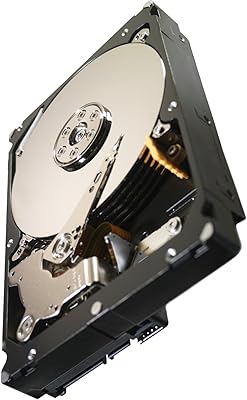
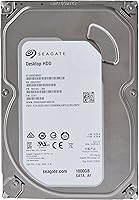
The Seagate ST1000DM003 1TB Internal Hard Drive is one of those rare products that has quietly outlasted most of its competition — introduced back in 2011 and still moving units today. That kind of staying power says something. It sits firmly in the budget tier of mechanical desktop storage, which means it won't break the bank for someone building or upgrading a desktop PC. One terabyte gives you room for roughly 200,000 photos, thousands of hours of music, or a solid media library. The fact that it holds a top-200 ranking in internal hard drives after all these years reflects consistent demand from real buyers.
Features & Benefits

At 7200 RPM, this Seagate desktop drive spins faster than many budget alternatives, which translates to noticeably quicker file transfers and snappier load times for stored applications. The SATA 6Gb/s interface means it slots right into any modern desktop motherboard without fuss — no adapters, no compatibility headaches. A 64MB cache isn't massive by today's standards, but it handles sequential reads and everyday multitasking well enough for a drive at this price point. The standard 3.5-inch form factor fits any full or mid-tower case directly. It ships as a bare drive, so you're not paying for packaging extras you probably don't need. A two-year warranty rounds out the package.

Best For

This 1TB mechanical hard drive makes the most sense as a secondary storage drive — not your main system disk. If you're a home user with a growing photo library, a modest video collection, or years of documents piling up, it handles all of that without complaint. Small office setups benefit too, especially when you just need a dependable place to archive files. Budget PC builders who already have a solid-state drive for the operating system will find this a practical add-on. It also works reasonably well inside an external enclosure for light backup duties, though it was clearly designed for internal desktop use.

User Feedback

With over 6,000 ratings and a 4.5-star average, buyer sentiment for the ST1000DM003 skews strongly positive. Most people praise how straightforward it is to install and how quietly it runs day-to-day. Value per gigabyte comes up repeatedly as a reason to buy. That said, the reviews aren't without concern — a meaningful number of buyers report failures somewhere in the two-to-three-year range, which is a known reality for mechanical drives at this price. The general consensus is to treat it as secondary storage and maintain backups, not to trust it with irreplaceable data solo. A few older reviews also flag firmware revision issues, so it's worth checking Seagate's support site before putting it into service.

Pros

  • Excellent value per gigabyte for budget desktop builds where cost per terabyte matters most.
  • The 7200 RPM spindle speed is faster than many competing drives at the same price tier.
  • Fits any standard desktop tower bay with no adapters or special mounting hardware required.
  • SATA III compatibility means it works with virtually every motherboard made in the past decade.
  • A consistent bestseller with thousands of real-world reviews to validate long-term reliability expectations.
  • Installation is straightforward — most users report being up and running in under ten minutes.
  • Works well as a dedicated media or backup drive alongside a faster primary SSD.
  • The bare drive format means you only pay for the storage itself, not bundled accessories you may not need.
  • Two-year manufacturer warranty offers a basic level of protection for the purchase.

Cons

  • Significantly slower than any SSD, making it a poor choice as a primary boot or system drive.
  • Mechanical design makes it more vulnerable to damage from drops or physical shocks compared to solid-state alternatives.
  • Some buyers have reported drive failures within two to three years of regular use, which is a real concern.
  • The 64MB cache is modest and shows its age compared to newer HDD models with larger buffers.
  • Older firmware revisions on some units may require a manual update from Seagate before the drive performs optimally.
  • Generates more noise and vibration during heavy read/write cycles than a solid-state drive would.
  • At only 1TB, power users or anyone dealing with large video or game libraries may find themselves running out of space sooner than expected.
  • No built-in hardware encryption, which matters for users storing sensitive personal or business data.

Ratings

The scores below for the Seagate ST1000DM003 1TB Internal Hard Drive were generated by our AI engine after analyzing thousands of verified global buyer reviews, with spam, bot-generated, and incentivized submissions actively filtered out. Each category reflects the honest consensus of real-world users — desktop builders, home office workers, and budget upgraders alike — with both the strengths and frustrations weighted fairly. Nothing has been glossed over, and the numbers tell the full story.
Value for Money
91%
Buyers consistently point to this drive as one of the most cost-effective ways to add a terabyte of storage to a desktop build. For users who just need a reliable place to offload photos, music collections, or file archives, the price-per-gigabyte ratio is hard to argue with at this tier.
A handful of reviewers note that slightly stretching the budget gets you into newer-generation drives with larger caches and better long-term reliability data, which makes the value calculus feel less clear-cut for buyers who plan to run the drive hard for several years.
Ease of Installation
88%
The standard 3.5-inch form factor means it drops into any desktop tower bay without adapters or head-scratching. First-time builders frequently call out how straightforward the process is — connect a SATA data cable, plug in power, and the drive shows up in BIOS within minutes.
It ships with absolutely no accessories, so buyers who are new to PC building and do not already have a spare SATA cable on hand will need to purchase one separately, which catches some people off guard when they unbox a bare drive for the first time.
Read/Write Performance
67%
33%
At 7200 RPM, this Seagate desktop drive is genuinely faster than 5400 RPM alternatives in the same price range. Users storing and retrieving large media files — video libraries, photo archives, music collections — report transfer speeds that feel adequate for everyday use as a secondary drive.
Anyone who has used a modern SSD will notice the speed difference immediately and sharply. Boot times, application launches, and large file transfers are all noticeably slower than solid-state storage, and this is a recurring theme in negative reviews from users who mistakenly used it as a primary drive.
Long-Term Reliability
61%
39%
Many buyers report the drive running without issues for three or more years in lightly used secondary storage roles. When treated as a media or backup drive rather than a constant-write workhorse, the ST1000DM003 has a reasonable track record among home users who do not stress it heavily.
A meaningful cluster of reviews describes failures between the two and three-year mark, which is earlier than many buyers expect. This is not unique to this model — it reflects the general failure curve of budget mechanical drives — but it is frequent enough in the feedback to warrant serious attention from anyone storing important data.
Compatibility
93%
The SATA III interface is essentially universal for desktop hardware made in the last fifteen years, and buyers across a wide range of motherboard brands and vintages report zero compatibility issues out of the box. It also works reliably in external USB enclosures, which adds flexibility for users who want a portable backup option.
It is strictly a desktop drive, and a small number of buyers have left frustrated reviews after discovering it does not fit laptop bays or compact mini-ITX cases that only support 2.5-inch drives — a detail that is easy to miss if you are shopping quickly.
Noise & Vibration
72%
28%
Under light workloads — browsing files, streaming local media, background backups — this 1TB mechanical hard drive is unobtrusive enough that most users simply forget it is there. Buyers with well-damped mid-tower cases particularly note that the drive blends into the ambient system noise without issue.
During sustained read/write cycles, the audible hum and platters-spinning click become noticeable, especially in quiet environments or open-air test bench setups. A subset of reviewers with noise-sensitive workspaces found the vibration enough to warrant adding rubber mounting grommets.
Heat Management
74%
26%
Under normal secondary storage workloads, the drive runs at moderate temperatures that fall well within safe operating limits. Users who monitor drive temps with tools like CrystalDiskInfo generally report readings that stay comfortable during typical desktop use throughout the day.
In poorly ventilated cases or systems where airflow is restricted, temperatures can creep up during prolonged transfers. A few reviewers running this drive in tight, fanless enclosures noted elevated temps that required adding a small fan to the setup to keep things stable.
Firmware & Software Support
58%
42%
Seagate provides its own free diagnostic utility, SeaTools, which works well with this model and gives users a straightforward way to run health checks and S.M.A.R.T. diagnostics without needing third-party tools. Most buyers who update firmware before use report no ongoing software-related issues.
A recurring complaint in older reviews involves shipping firmware on some units that required an update before the drive performed reliably or was recognized correctly by certain systems. The process is not difficult, but it adds an extra setup step that many buyers do not expect to deal with on a new purchase.
Packaging & Shipping Durability
69%
31%
The majority of buyers receive the drive in working condition, and for orders fulfilled directly by reliable sellers, the bare drive arrives well enough protected to survive transit without damage. Most users report no issues with dead-on-arrival units when purchasing from reputable sources.
Because it ships as a bare drive, the level of physical protection varies significantly depending on the third-party seller. A subset of reviewers has noted inadequate cushioning on some shipments, and a small but consistent number of DOA reports appear to be linked to rough handling in transit rather than a manufacturing defect.
Warranty & After-Sales Support
63%
37%
A two-year manufacturer warranty is included, which is a reasonable baseline for a mechanical drive at this price point. Buyers who have gone through the Seagate RMA process generally describe it as functional, with replacement units arriving within a standard window for drives still within the warranty period.
Two years is shorter than the three-year coverage some competing drives offer at similar price points, and several reviewers note that failures tend to cluster just around or slightly after the warranty period expires. Reaching Seagate customer support has also drawn mixed feedback, with some users describing longer resolution timelines than they expected.
Storage Capacity Satisfaction
83%
For the typical secondary storage use case — photos, music, documents, downloaded movies — buyers consistently describe 1TB as more than adequate. Home users who offload their primary drives onto this one report having plenty of breathing room for several years of accumulated files.
Power users, gamers managing large title libraries, or anyone working with 4K video footage often find 1TB fills up faster than anticipated. Reviews from these users tend to reflect mild regret at not choosing a larger capacity option upfront, even if the drive itself performed as expected.
Build Quality
66%
34%
The physical construction feels solid in hand — standard for a Seagate desktop drive — and there are no widespread reports of loose connectors, misaligned ports, or cosmetic defects that would suggest quality control problems at the manufacturing level.
As a budget-tier mechanical drive, it is not built to the same tolerance standards as enterprise or NAS-grade equivalents. Buyers who have owned multiple drives over many years tend to note that it feels utilitarian rather than premium, which is expected at this price but worth flagging for buyers with high durability expectations.

Suitable for:

The Seagate ST1000DM003 1TB Internal Hard Drive is a smart pick for anyone building or upgrading a desktop PC on a tight budget who needs reliable secondary storage without overspending. If your primary drive is already an SSD handling the operating system and core apps, adding this as a dedicated storage volume for photos, music, video files, or project archives is exactly the use case it was built for. Home users with growing media libraries will appreciate how much headroom 1TB provides at this price point. Small office environments that need a simple, no-frills local backup destination will also find it more than adequate. DIY builders who are comfortable installing a bare 3.5-inch drive and want a proven, widely-compatible option should feel confident here — this drive has been in circulation long enough that installation guides, compatibility data, and community support are easy to find.
Not suitable for:

The Seagate ST1000DM003 1TB Internal Hard Drive is not the right choice if speed is anywhere near the top of your priorities. As a mechanical hard drive, it cannot come close to matching the read and write performance of even a mid-range SSD, so using it as a primary boot drive will result in noticeably slower system startup and application load times. Anyone storing truly irreplaceable data — family archives, critical business files, or anything with no backup copy — should think carefully before relying solely on this drive, given that mechanical HDDs at this price tier carry a real failure risk after a few years of regular use. It is also not ideal for write-intensive workloads like video editing scratch disks or running virtual machines, where sustained performance under load matters. Laptop users or anyone working in a compact form factor should look elsewhere, as the 3.5-inch size is strictly a desktop fit.

Specifications

  • Brand: This drive is manufactured by Seagate, one of the longest-established names in mechanical hard disk storage.
  • Model Number: The official model designation is ST1000DM003, which identifies this specific revision of the Desktop HDD line.
  • Capacity: Total formatted storage capacity is 1TB, enough to hold approximately 200,000 photos, 250,000 songs, or around 120 hours of HD video.
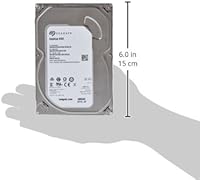
  • Form Factor: The drive uses the standard 3.5-inch form factor, which fits directly into any full-size or mid-tower desktop PC bay.
  • Interface: It connects via SATA 6Gb/s (SATA III), which is backward compatible with SATA II ports at reduced throughput.
  • Spindle Speed: The platters spin at 7200 RPM, which is faster than budget 5400 RPM alternatives and improves general read and write responsiveness.
  • Cache: The drive includes a 64MB buffer cache to assist with sequential data handling and reduce latency during multi-file operations.
  • Drive Type: This is a traditional mechanical hard disk drive (HDD) using spinning magnetic platters, not a solid-state or hybrid design.
  • Installation: The ST1000DM003 is designed for internal installation and ships as a bare drive without mounting screws, cables, or enclosure.
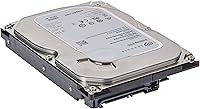
  • Dimensions: Physical dimensions measure 4 x 5.79 x 0.79 inches, consistent with the standard 3.5-inch desktop drive specification.
  • Weight: The drive weighs 14.1 ounces, which is typical for a single-platter mechanical desktop hard drive.
  • Warranty: Seagate covers this drive with a 2-year limited manufacturer warranty from the date of purchase.
  • Compatible Devices: Designed specifically for use in desktop PCs; not intended for laptops, which require the smaller 2.5-inch form factor.
  • Power Connector: Uses a standard 15-pin SATA power connector, compatible with any desktop ATX power supply made in the last fifteen-plus years.
  • Operating Temp: The drive is rated to operate reliably within a temperature range of 0°C to 60°C under normal desktop conditions.
  • First Available: This model was first made available in November 2011, making it a mature and extensively field-tested product.
  • Sales Rank: It holds a top-250 ranking in the Internal Hard Drives category on Amazon, reflecting sustained and consistent consumer demand.

Related Reviews
Seagate Exos 1TB Internal Hard Drive
80%
91%
Reliability & Uptime
67%
Value for Money
78%
Sequential Performance
88%
Noise Level
84%
Build & Durability
More
Seagate BarraCuda ST1000DM010 1TB Internal Hard Drive
77%
91%
Value for Money
74%
Reliability & Longevity
79%
Read & Write Performance
93%
Installation Ease
68%
Noise & Vibration
More
Seagate BarraCuda Pro 1TB 7200RPM Internal Hard Drive
87%
92%
Performance
90%
Speed
88%
Reliability
95%
Ease of Installation
65%
Noise Levels
More
Seagate Constellation ES 1TB Internal Hard Drive
77%
93%
TLER / Error Recovery
91%
Drive Longevity
88%
RAID Compatibility
54%
Refurbished Condition Consistency
79%
Value for Money
More
Seagate 1TB Pipeline HD SATA 6Gb/s Internal Hard Drive
88%
88%
Performance
91%
Reliability for 24/7 Use
93%
Power Efficiency
85%
Noise Level
86%
Ease of Installation
More
Seagate BarraCuda 4TB Internal Hard Drive
87%
86%
Performance
90%
Reliability
93%
Setup & Installation
95%
Storage Capacity
72%
Data Transfer Speed
More
Seagate Barracuda 6TB Internal Hard Drive
77%
93%
Value for Money
91%
Storage Capacity
74%
Reliability & Longevity
89%
Installation Ease
61%
Read/Write Performance
More
Seagate BarraCuda ST8000DM004 8TB Internal Hard Drive
73%
93%
Storage Capacity Value
67%
Reliability & Longevity
61%
Read & Write Performance
89%
Installation & Compatibility
63%
Noise & Vibration
More
Seagate BarraCuda 2TB Internal Hard Drive
79%
91%
Value for Money
74%
Transfer Speed
77%
Reliability & Longevity
93%
Installation Ease
79%
Noise Level
More
Seagate FireCuda Gaming Hard Drive 1TB
84%
88%
Performance
91%
Data Transfer Speed
94%
Ease of Setup
80%
RGB Lighting Customization
85%
Compatibility with PC & Mac
More
Seagate IronWolf 8TB NAS Internal Hard Drive
88%
88%
Performance
92%
Reliability
85%
Ease of Setup
89%
Data Transfer Speed
94%
Noise Levels
More

FAQ

You technically can, but it is not the best idea. Booting from a mechanical drive means noticeably slower startup times and longer application load times compared to even a basic SSD. Most people who buy this use it as a secondary drive for storing files, with an SSD handling the operating system.

Almost certainly yes. The SATA III interface is the standard connection used by virtually every desktop motherboard released in the past fifteen years. As long as your case has a 3.5-inch drive bay and your power supply has a SATA power connector — which all modern ATX PSUs do — you are good to go.

Yes, the hardware itself is compatible with both platforms. Keep in mind that the drive ships unformatted, so you will need to initialize and format it to the file system your operating system uses — NTFS for Windows or APFS/HFS+ for Mac — before it will show up and be usable.

It produces a soft, low hum during operation and a faint clicking sound during active reads and writes — both completely normal for a 7200 RPM mechanical drive. It is not silent like an SSD, but most users find the noise level unremarkable once the case is closed.

Mechanical hard drives do fail eventually — that is just the reality of the technology. The Seagate ST1000DM003 1TB Internal Hard Drive has a solid track record given its price tier, but like any HDD, failure rates do climb after two to three years of continuous use. The practical advice is straightforward: use it for secondary or backup storage, and do not keep irreplaceable files on any single drive without a separate backup copy somewhere else.

No. It ships as a bare drive only. You will need a SATA data cable to connect it to your motherboard and a free SATA power connector from your power supply. Most desktop PC builders already have these on hand, but if you are new to building, pick up a SATA cable before you start.

Yes, a standard 3.5-inch USB enclosure will work fine with this drive. Just make sure the enclosure is rated for 3.5-inch drives and has its own power adapter, since 3.5-inch drives draw more power than a USB port alone can supply.

A small number of users have flagged older firmware revisions on units from earlier production batches. It is worth visiting Seagate's support site, entering your drive's serial number, and checking whether a firmware update is available before you start using it. This takes about ten minutes and can prevent potential compatibility issues down the road.

That depends on what you are storing. For documents, photos, and music, 1TB is generous for most home users. If you are working with large video files, game libraries, or professional media projects, you will likely fill it faster than you expect. For light to moderate home use as a secondary drive, it holds up well.

Once installed and formatted, it should show up in your operating system's disk management or disk utility tool. From there, you can run a free tool like CrystalDiskInfo on Windows or check the S.M.A.R.T. data to confirm the drive is healthy. Seagate also offers its own diagnostic utility called SeaTools if you want a more thorough check.

Where to Buy