
Overview

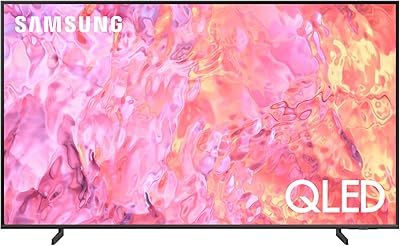
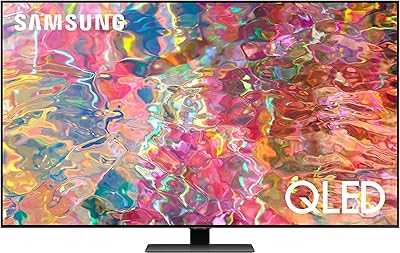
The Samsung Q60D 75-Inch QLED 4K TV sits in a comfortable middle ground — large enough to anchor a living room, priced well below Samsung's Neo QLED flagship tier. The 2024 model refines rather than reinvents its predecessor, the Q60C, keeping the same core panel approach while tightening up the smart TV software experience. At 75 inches, the sheer screen real estate is the headline here. The AirSlim design keeps the chassis thin enough to wall-mount without looking bulky, which matters if clean aesthetics are part of the plan. This is a capable TV for the money, not a reference-grade display.

Features & Benefits

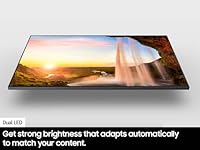
The Q60D uses Dual LED backlighting, splitting the backlight into warm and cool zones to improve contrast — but this is not full-array local dimming, so don't expect inky blacks in a dark room. The Quantum Dot panel genuinely delivers rich, punchy color, particularly for sports and HDR content in a bright space. The Quantum Processor Lite handles 4K upscaling competently; lower-resolution content looks acceptable, not spectacular. Motion Xcelerator deserves a straight answer: the panel runs at a native 60Hz, so gamers hoping for 120Hz performance won't find it here. Audio is a 2CH setup, and while Object Tracking Sound Lite adds a modest spatial effect, it is no substitute for an external soundbar.

Best For

This 75-inch Samsung QLED makes the most sense for households upgrading from an older 1080p set or a noticeably smaller screen, where the jump in size and color quality will feel substantial. It is a strong pick for daytime living room viewing and sports — the Quantum Dot panel handles brightness well enough that ambient light is less of an issue. Buyers wanting a clean wall-mount setup will appreciate the slim profile. Casual console gamers can use it without frustration, though anyone chasing competitive play with VRR or high frame rates should look at Samsung's higher-tier panels. It is not the right fit for dark-room home theater setups where contrast depth is a priority.

User Feedback

Owners consistently praise color vibrancy and screen size for the price point, with many noting the picture looks impressive in a bright living room. The Tizen interface earns positive marks for responsiveness, though a recurring complaint is Samsung's habit of pushing ads and promotional banners onto the home screen. Dark-room viewers tend to be more critical — limited local dimming means black uniformity is inconsistent, and the contrast gap versus an OLED becomes obvious in a dim environment. The built-in speaker system draws steady criticism, and most buyers end up adding a soundbar. Gamers on standard 60Hz consoles report a solid experience, while those expecting high-refresh-rate performance express clear frustration. Build quality feedback is generally positive, with few reports of panel defects or shipping damage.

Pros

  • A 75-inch Quantum Dot panel delivers genuinely rich, saturated color that holds up well in bright rooms.
  • The size-to-price ratio is one of the strongest arguments for the Q60D in its market tier.
  • AirSlim design keeps the TV looking clean and modern whether wall-mounted or on a stand.
  • Samsung's Tizen smart platform is fast, well-organized, and supports all major streaming apps.
  • Alexa built-in and Gaming Hub make this a practical choice for cord-cutters and casual gamers alike.
  • 4K upscaling handles lower-resolution sources reasonably well for everyday cable and streaming content.
  • Bluetooth and Wi-Fi connectivity cover the basics without requiring a wired network setup.
  • Build quality is consistently reported as solid, with very few complaints about panel defects out of the box.

Cons

  • No full-array local dimming means black levels and contrast suffer noticeably in darker viewing environments.
  • The native 60Hz panel cannot support 120Hz gaming, despite Motion Xcelerator branding causing frequent buyer confusion.
  • Dolby Vision is not supported, which limits HDR compatibility compared to some rivals at a similar price.
  • The built-in 2CH speaker system is underwhelming for a screen this size; a soundbar is a near-essential add-on.
  • Samsung's Tizen home screen pushes promotional content and ads that many owners find intrusive and hard to dismiss.
  • The Quantum Processor Lite trails Samsung's higher-end processors in upscaling quality and picture refinement.
  • At 70.5 pounds, wall-mounting requires a sturdy bracket and ideally a second person — it is not a lightweight install.
  • Remote pairing can be inconsistent out of the box and occasionally requires manual re-pairing after a power cycle.

Ratings

Our AI rating system analyzed thousands of verified global owner reviews for the Samsung Q60D 75-Inch QLED 4K TV, actively filtering out incentivized, bot-generated, and duplicate submissions to surface honest sentiment. The scores below reflect a balanced synthesis of real buyer experiences — from living room setups to gaming rigs — capturing both the standout strengths and the genuine frustrations that repeat across the owner base.

Picture Quality
78%
22%
In a well-lit living room, the Quantum Dot panel consistently earns praise for producing saturated, punchy color that makes sports broadcasts and nature documentaries genuinely pop. Owners upgrading from older 1080p sets frequently describe the color improvement as immediately noticeable.
Dark scene performance is a recurring complaint — without full-array local dimming, bright objects on dark backgrounds produce visible blooming that distracts during nighttime viewing. Cinephiles watching moody or contrast-heavy films in a dim room tend to be the most vocal critics of this panel.
Contrast & Black Levels
58%
42%
The Dual LED system does provide a modest improvement over basic edge-lit panels, and in mixed-lighting content — daytime dramas, sports, brightly colored animation — the contrast feels acceptable for the price tier.
This is the Q60D's most consistently criticized weakness. The absence of local dimming means blacks appear more as deep grays, and backlight uniformity issues are noticeable across several owner reports. Buyers who watch a lot of dark content in a dedicated theater-style room will likely find the performance underwhelming.
Color Accuracy
83%
The Quantum Dot layer contributes genuine color volume improvements that hold up across different brightness levels, which most owners notice when watching HDR content on streaming platforms. Color reproduction for everyday content — news, sports, cable — earns consistently positive remarks.
Out-of-the-box calibration tends to push saturation and backlight levels higher than accurate, which looks impressive in a store but benefits from manual adjustment at home. Without Dolby Vision support, some HDR content on Apple TV+ and select Netflix titles does not reach its full tonal potential.
Motion Handling
71%
29%
For sports and action movies at standard frame rates, Motion Xcelerator processing keeps the picture clean and reduces blur effectively enough that casual viewers rarely complain about motion artifacts during live broadcasts.
The native 60Hz ceiling is a hard limit that frustrates buyers who expected more from the Motion Xcelerator branding. At higher interpolation settings, the soap opera effect becomes distracting for film content, and the processing is not as refined as Samsung's higher-tier models.
Gaming Performance
61%
39%
Input lag in game mode is low enough for comfortable casual gaming on PS5 and Xbox Series X, and owners playing story-driven or slower-paced games report a smooth, responsive experience without notable lag issues.
The 60Hz native panel is a genuine barrier for performance-focused gamers — 120fps output from modern consoles is simply not supported, and the absence of VRR means frame rate fluctuations cannot be smoothed out. Competitive players and those specifically shopping for a next-gen gaming display should look at higher-spec panels.
HDR Performance
67%
33%
Quantum HDR support does bring a visible improvement to HDR10+ content, with highlights appearing brighter and more dynamic than SDR equivalents. Streaming HDR content during the day or in a moderately lit room is where the Q60D presents HDR most convincingly.
Peak brightness falls short of what premium QLED and Mini LED panels achieve, which limits the full impact of HDR highlights. Dolby Vision is unsupported, and the contrast ceiling means dark HDR scenes lose much of their intended depth compared to OLED or higher-end QLED alternatives.
Audio Quality
52%
48%
Object Tracking Sound Lite adds a noticeable sense of directionality that basic stereo TV speakers lack, and dialogue clarity in normal listening conditions is adequate for everyday news and talk show viewing.
The 2CH speaker system simply cannot fill a room the size this 75-inch screen implies. Bass is thin, volume ceiling is limited, and for anything cinematic the audio falls significantly behind the visual experience. Most owners add a soundbar within months, treating the built-in speakers as a stopgap.
Smart TV Experience
74%
26%
Samsung's Tizen OS is responsive, boots quickly, and integrates all major streaming platforms without friction. Gaming Hub is a useful addition for cloud gaming subscribers, and the overall app ecosystem is one of the strongest available on any smart TV platform.
Promotional banners, recommended content tiles, and first-party ads cluttering the home screen are among the most frequently mentioned frustrations in owner reviews. Samsung does not offer a clean way to fully disable these, which bothers users who paid a premium and expect a distraction-free interface.
Voice & Smart Assistant
76%
24%
Built-in Alexa works reliably for controlling smart home devices, switching inputs, and adjusting volume without needing a separate Echo device. Owners already in the Amazon ecosystem find this integration genuinely convenient for daily use.
Bixby, Samsung's own assistant, continues to receive mediocre feedback for command accuracy and usefulness compared to Alexa. Some owners report occasional delays or misrecognitions that require repeating voice commands, particularly with accented speech.
Design & Build
84%
The AirSlim chassis is a genuine selling point — owners consistently praise how clean and minimal the TV looks when wall-mounted, with slim bezels that keep the focus on the screen rather than the frame. Build quality feedback is largely positive with few reports of structural defects.
At 70.5 pounds, installation requires two people and a sturdy wall mount, which catches some buyers off guard. The stand design, while stable, has a relatively narrow footprint that a few owners note feels less secure on larger furniture surfaces.
Setup & Usability
81%
19%
The initial setup process is guided and approachable for non-technical users, and most owners report having the TV up and running within 20 to 30 minutes out of the box. The Solar Cell remote is well-regarded for its clean layout and comfortable feel in hand.
Remote pairing intermittently fails after power cycles or firmware updates, requiring a manual re-pair process that confuses some users. A small but consistent number of owners also report that initial account setup and data-sharing prompts feel intrusive and difficult to skip.
Connectivity
79%
21%
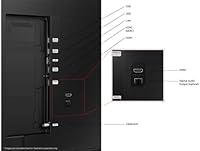
Four HDMI ports cover the typical household setup of cable box, gaming console, and streaming stick without requiring a switch. Bluetooth and Wi-Fi both perform reliably, and the inclusion of eARC on one HDMI port is a practical bonus for soundbar users.
Only one of the four HDMI ports supports HDMI 2.1 bandwidth, which limits flexibility for multi-device 4K setups. USB ports are functional but limited to basic media playback and device charging, with no hub-level capabilities.
Value for Money
82%
18%
At 75 inches, the Q60D occupies a price point that owners consistently describe as difficult to beat for sheer screen size combined with a reputable brand and a capable picture in bright conditions. For households upgrading from smaller or older sets, the perceived value is high.
Buyers who compare it closely against competing 75-inch options from LG or TCL — or who step up to Samsung's own Q70D — sometimes feel the spec-to-price ratio is tighter than it appears. The lack of local dimming and 60Hz limitation are meaningful trade-offs at this price level that not every buyer anticipates.
Brightness
77%
23%
In a standard living room with windows and overhead lighting, the Q60D holds up well — the Quantum Dot panel pushes enough peak brightness that glare and washout are not major issues during daytime viewing, which owners frequently cite as a practical everyday strength.
Maximum brightness falls short of Samsung's higher-tier panels and dedicated HDR workhorses, meaning the full punch of HDR highlights is somewhat limited. In side-by-side comparisons with Mini LED or Neo QLED alternatives, the brightness gap becomes obvious.
Upscaling Quality
69%
31%
The Quantum Processor Lite handles upscaling of 1080p broadcast and streaming content competently — cable TV and standard-def sources look noticeably cleaner than on older or budget sets, which casual viewers tend to appreciate for everyday watching.
Upscaling performance is a step behind what Samsung's higher-end processors deliver, and heavily compressed or low-quality source content can look soft or overly smoothed. Users feeding the TV with varied source quality will notice the Lite processor's limitations more than those who primarily stream from major 4K services.

Suitable for:

The Samsung Q60D 75-Inch QLED 4K TV is a strong fit for households that want a genuinely large screen without paying flagship prices. If your living room gets plenty of natural light during the day, the Quantum Dot panel's color brightness is a real advantage — sports, nature documentaries, and streaming content all look vivid and punchy. Buyers upgrading from an older 1080p or smaller 4K set will notice an immediate and meaningful improvement in both size and color richness. The slim AirSlim profile suits people who wall-mount their TV and care about how it looks when nothing is playing. Casual console gamers on standard 60Hz hardware — think PlayStation or Xbox players who aren't chasing competitive frame rates — will find the Q60D a comfortable and responsive screen to game on.

Not suitable for:

Anyone building a dedicated dark-room home theater should think twice before committing to the Samsung Q60D 75-Inch QLED 4K TV, because the Dual LED backlight without full-array local dimming means black uniformity is noticeably inconsistent in low-light conditions. Viewers who watch a lot of dark, cinematic content — think moody dramas or horror films at night — will likely find the contrast limitations frustrating compared to an OLED or even a higher-tier QLED. Competitive gamers who need 120Hz refresh rates, VRR, or AMD FreeSync Premium support should look elsewhere, as this panel's native 60Hz ceiling is a hard constraint, not a marketing qualification. Dolby Vision enthusiasts will also need to weigh in that this mid-range Samsung set supports Quantum HDR but not Dolby Vision, which can matter for certain Netflix and Apple TV+ content. Finally, if you're expecting the built-in speakers to carry the room, you'll almost certainly want to budget for a soundbar alongside this purchase.

Specifications

  • Screen Size: The panel measures 75 inches diagonally, making it well-suited for large living rooms with seating distances of 9 feet or more.
  • Display Type: QLED with Quantum Dot technology delivers high color volume across a wide range of brightness levels.
  • Resolution: Native 4K Ultra HD resolution at 3840 x 2160 pixels provides four times the pixel density of a standard 1080p display.
  • Refresh Rate: The panel runs at a native 60Hz refresh rate; Motion Xcelerator is a processing feature, not a hardware refresh rate upgrade.
  • Backlight: Dual LED backlighting uses separate warm and cool light sources to improve contrast accuracy, but does not include full-array local dimming zones.
  • HDR Support: Quantum HDR is supported, along with HDR10+ and HLG; Dolby Vision is not supported on this model.
  • Processor: The Quantum Processor Lite handles real-time 4K upscaling and basic picture optimization for lower-resolution source content.
  • Audio System: A 2-channel speaker system with Object Tracking Sound Lite provides basic virtual spatial audio, rated at approximately 20W total output.
  • Smart Platform: Samsung Tizen OS powers the smart TV interface, with Gaming Hub, built-in Alexa, and support for all major streaming services.
  • Voice Assistant: Alexa is built in and fully functional without an external Echo device; Samsung Bixby is also accessible via the remote.
  • Connectivity: The TV includes built-in Wi-Fi and Bluetooth, along with multiple HDMI ports, USB ports, and an ethernet jack for wired network connections.
  • HDMI Ports: Four HDMI ports are included, with one HDMI 2.1 port supporting eARC for audio passthrough to a compatible soundbar or AV receiver.
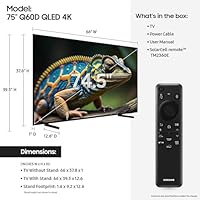
  • Dimensions: With the stand attached, the TV measures 66″ wide, 39.3″ tall, and 12.6″ deep; without the stand it sits considerably shallower against the wall.
  • Weight: The set weighs 70.5 pounds with the stand, so wall installation strongly benefits from a second person and a rated VESA-compatible mount.
  • VESA Pattern: The rear VESA mounting pattern is 400 x 300mm, which is compatible with most standard large-screen wall mount brackets.
  • Design: The AirSlim profile keeps the chassis thin for a cleaner wall-mount appearance and reduces visual bulk in the room.
  • Model Number: The full US model number is QN75Q60DAFXZA, which should be referenced when checking compatibility with mounts, covers, or service records.
  • Release Year: This is a 2024 model, released in February of that year as an incremental update to the Q60C lineup.
  • Power: The TV operates on standard 120V AC power and includes a detachable power cable in the box.
  • In the Box: The package includes the TV panel, stand legs with screws, a power cable, the Samsung Solar Cell remote, and a printed user manual.

Related Reviews
Samsung Q60D 55-inch QLED 4K TV
83%
88%
Picture Quality
91%
Color Accuracy
82%
HDR Performance
84%
Motion Handling
70%
Audio Performance
More
Samsung 75-Inch The Frame Pro 4K Neo QLED TV
89%
96%
Display Quality
94%
Art Mode Realism
89%
Gaming Performance
92%
Color Accuracy
85%
Connectivity Options
More
Samsung Q70A 75-inch QLED 4K Smart TV
77%
78%
Picture Quality
61%
Contrast & Black Levels
84%
Motion Handling
82%
Gaming Performance
83%
Smart TV Experience
More
Samsung 75-Inch QLED Q80B 4K UHD Smart TV
86%
94%
Picture Quality
91%
Gaming Performance
85%
Smart Features & Voice Control
72%
Sound Quality
88%
Ease of Setup
More
Samsung QN75Q60C 75″ QLED 4K TV
87%
94%
Display Quality
91%
Color Accuracy
89%
HDR Performance
86%
Motion Handling
88%
Sound Clarity
More
Samsung The Serif 55-inch QLED 4K TV
79%
96%
Design & Aesthetics
78%
Picture Quality
91%
Anti-Glare Performance
88%
Stand & Placement Flexibility
74%
Smart Platform & App Support
More
Samsung Q80C 75-inch QLED 4K Smart TV
77%
84%
Picture Quality
91%
Gaming Performance
73%
Contrast & Local Dimming
88%
Smart TV Platform
62%
Built-in Audio
More
Samsung QN90C 75-inch Neo QLED 4K TV

81%
91%
Picture Quality
67%
Mini LED Blooming
93%
Brightness & HDR Performance
84%
Anti-Glare & Viewing Angle
89%
Gaming Performance
More
Samsung 65-Inch QLED 4K TV Q60C
86%
94%
Picture Quality
91%
Gaming Performance
87%
Ease of Setup
88%
Smart Features
72%
Sound Quality
More
Samsung QN75Q900RBFXZA 75-Inch 8K QLED TV
83%
94%
Picture Quality
90%
8K Upscaling Performance
88%
Smart Features & Alexa Integration
86%
Design & Aesthetics
78%
Sound Quality
More

FAQ

This is one of the most common points of confusion with this TV. The panel is natively 60Hz — Motion Xcelerator is a frame interpolation and motion processing feature, not a hardware upgrade to the refresh rate. If 120Hz is a firm requirement for your gaming setup, you will need to look at a higher-tier Samsung model.

The Q60D handles bright rooms quite well — the Quantum Dot panel produces strong peak brightness that competes with ambient light effectively. In a dark room, however, the lack of full-array local dimming becomes noticeable, with some backlight blooming around bright objects on dark backgrounds. If most of your watching happens in a fully darkened room, the contrast limitations may bother you.

It works fine for casual gaming on either console, and input lag in game mode is acceptably low. That said, the 60Hz native panel means you will not get the benefit of 120fps output that both consoles support, and there is no VRR to smooth out frame rate inconsistencies. For competitive or performance-focused gaming, you would want a panel with true 120Hz support.

No, it does not. This model supports Quantum HDR, HDR10+, and HLG, but Dolby Vision is absent. For most streaming content on Netflix, Disney+, or Prime Video this is a minor limitation, but Apple TV+ users who watch a lot of Dolby Vision content will notice the difference in HDR tone mapping.

For casual daytime viewing the built-in 2CH speakers are adequate, but they lack bass depth and the sound can feel thin on a screen this size. Most owners who use this TV as a primary entertainment center end up adding a soundbar within the first few months. If you already own one, the HDMI eARC port makes connecting it straightforward.

This is a real frustration for a meaningful portion of owners. Samsung's Tizen interface displays promotional banners and suggested content tiles on the home screen by default, and while you can reduce some of them through the settings menu, they cannot be fully removed. If a clean, clutter-free smart TV interface is important to you, this is worth factoring into your decision.

You will need a mount that supports a 400 x 300mm VESA pattern, which is standard for most large-screen TV mounts in this size range. Given the 70.5-pound weight, make sure your bracket is rated for at least that load, and ideally mount into wall studs rather than drywall anchors alone.

The Q70D adds full-array local dimming, which is the single most meaningful upgrade for contrast and dark scene performance. If dark-room viewing is a priority, the Q70D is worth the step up. For bright-room use where contrast depth matters less, the Q60D offers a strong picture at a noticeably lower price, making it harder to justify the premium.

Yes, the Q60D functions as a standard display without an internet connection — you can use HDMI inputs for cable boxes, gaming consoles, and streaming sticks without any Wi-Fi setup. Smart TV features, Alexa, Gaming Hub, and Samsung's app store all require an internet connection, so those will be unavailable offline.

Generally yes. Attaching the stand takes about 15 minutes with a basic screwdriver, and Samsung's on-screen setup wizard walks you through Wi-Fi, account login, and input detection step by step. The Solar Cell remote is intuitive for most users. The trickiest part for some buyers is navigating the initial settings to reduce the number of promotional elements on the home screen, but that is optional.