Overview

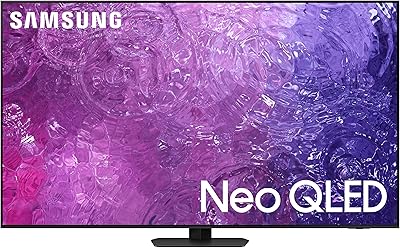
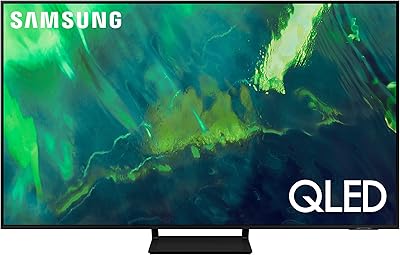
The Samsung QN90C 75-inch Neo QLED 4K TV sits in an interesting spot in Samsung's 2023 lineup — premium enough to satisfy serious home theater buyers, yet practical enough for everyday living rooms that never go fully dark. Unlike Samsung's OLED tier, which demands careful light control, this 75-inch Samsung was built with real-world rooms in mind. The anti-glare panel is a genuine differentiator, not a checkbox feature. Out of the box, setup is straightforward, and the physical build impresses — the Titan Black finish looks refined, and the slim profile feels almost implausible for a display this large and this capable.

Features & Benefits

The Mini LED backlight is where the QN90C earns its reputation. Rather than relying on a single broad backlight zone, it controls thousands of tiny LEDs in tight clusters, producing noticeably deeper blacks and more restrained highlights during HDR sequences. The Neural Quantum Processor handles upscaling competently across cable, streaming, and gaming inputs — HD content lands closer to native 4K than you might expect. Color accuracy benefits from Pantone validation, keeping skin tones and natural scenes honest rather than oversaturated. The 60W audio holds its own for casual viewing, though serious listeners will still want a soundbar. On the gaming side, input lag drops to roughly 1ms in Game Mode, and FreeSync Premium Pro keeps frame delivery smooth across compatible consoles and PCs.

Best For

This 75-inch Samsung makes the most sense for people watching content in rooms that get genuine sunlight — the anti-glare coating meaningfully reduces the need to close every blind before a movie. Sports fans will appreciate the 120Hz refresh rate and capable motion processing, which keeps fast action sharp without excessive smoothing. Console gamers running a PlayStation 5 or Xbox Series X get a solid 4K at 120Hz display with VRR and low response times. That said, if your primary goal is the absolute deepest blacks for late-night cinematic viewing, Samsung's own OLED options will outperform it. And if your space is smaller or budget tighter, the 65-inch variant is worth considering before committing to this footprint.

User Feedback

Owners consistently praise the QN90C's brightness and color vibrancy in normal room lighting — most report it looks impressive without any elaborate calibration. The Tizen smart interface earns positive marks for responsiveness and app availability, with major streaming platforms running reliably. Gaming feedback skews positive too, with users citing the Game Bar and dependable VRR as practical strengths. On the critical side, mini LED blooming — that faint halo around bright objects against dark backgrounds — is a real, frequently mentioned issue, particularly in space scenes or dark credit rolls. Some buyers also found the remote control feels underwhelming for the TV's tier, and a handful noted difficulties reaching a satisfying resolution through Samsung's customer support when hardware concerns came up.

Pros

  • Exceptional brightness handles direct sunlight and bright rooms better than almost any competing panel at this size.
  • Mini LED local dimming produces noticeably richer contrast than traditional QLED or standard LCD TVs.
  • Input lag drops to around 1ms in Game Mode, making it genuinely responsive for competitive and fast-paced gaming.
  • The anti-glare coating works in practice — reflections are controlled without the color washout seen on matte-coated budget sets.
  • FreeSync Premium Pro and 4K at 120Hz support cover current-gen consoles and mid-to-high-end gaming PCs completely.
  • Pantone-validated color accuracy means natural tones like skin and foliage look honest without heavy manual calibration.
  • Four HDMI 2.1 ports let you keep every device connected simultaneously — no cable-swapping required.
  • Tizen OS is responsive and well-stocked with streaming apps, and the Samsung Gaming Hub consolidates game access usefully.
  • The slim Titan Black design looks genuinely premium in person and does not dominate a room the way older large-format TVs did.
  • Upscaling handles HD cable and streaming content well, making non-4K sources look respectable rather than soft.

Cons

  • Mini LED blooming around bright objects on dark backgrounds is noticeable in dim rooms and has not been fully corrected by updates.
  • Dolby Vision is not supported, which limits HDR compatibility compared to some rival sets at similar price points.
  • The built-in 60W audio struggles in larger rooms during action content — a soundbar budget should be factored in from the start.
  • The default home screen displays sponsored content tiles that feel out of place on a premium television.
  • At nearly 88 lbs, installation genuinely requires two people and ideally professional wall mounting, adding cost and effort.
  • The stand footprint is wide enough to be incompatible with many standard TV consoles without risers or a wall mount.
  • Customer support experiences are inconsistent — resolving hardware issues through Samsung directly can be slow and frustrating.
  • Some upscaling modes over-smooth facial detail in close-up shots, producing an unnatural look that requires manual adjustment.
  • Only two USB ports is limiting for users with multiple connected accessories or external storage devices.
  • Long-term panel uniformity issues, including dead pixels within the first year, appear with enough frequency in owner reviews to be worth noting.

Ratings

The Samsung QN90C 75-inch Neo QLED 4K TV earns a strong overall standing in our analysis, which draws on verified buyer reviews from global markets — with spam, incentivized posts, and bot activity actively filtered out before scoring. Ratings reflect what real owners experience week after week, from bright living rooms to late-night gaming sessions. Both the standout strengths and the legitimate frustrations are represented honestly in every category below.
Picture Quality
91%
In well-lit rooms, the brightness output and color richness consistently impress owners who previously owned standard QLED or LCD TVs. HDR content on streaming platforms looks punchy and detailed, with highlights that feel genuinely luminous rather than just bright.
Pure cinephiles watching in fully dark rooms will notice that black levels, while improved over traditional QLED, still trail true OLED panels. The difference is most visible during closing credits or space sequences where deep blacks matter most.
Mini LED Blooming
67%
33%
Compared to older edge-lit or direct-lit LCD sets, the fine-grained Mini LED zones handle most everyday content — sports, daytime dramas, animated films — without obvious halo artifacts. Most users watching mixed content in normal lighting rarely find it distracting.
Blooming around bright text or credits against dark backgrounds is a recurring complaint, and it is the single most cited frustration among owners who use this TV in dim rooms. It is manageable but not invisible, and buyers expecting OLED-level contrast will be disappointed.
Brightness & HDR Performance
93%
The QN90C is genuinely one of the brightest panels in its class, and owners frequently mention how well it holds up in rooms with large windows or direct afternoon sunlight. HDR specular highlights — a light bulb in frame, sunlight through a window — look convincingly intense.
Sustained peak brightness can throttle slightly during prolonged bright scenes due to thermal management, meaning a single bright flash looks more impressive than a prolonged bright scene at maximum intensity. Most users will not notice this in typical viewing scenarios.
Anti-Glare & Viewing Angle
84%
The anti-glare coating is a practical strength that buyers in open-plan living spaces specifically call out. Colors stay accurate and readable at angles well past 45 degrees, which matters in households where seating is spread across a wide room.
Off-axis performance, while above average for a non-OLED panel, does show some brightness rolloff beyond roughly 60 degrees. It is better than most competing LCD-based sets, but viewers seated far to the side will notice a subtle shift in contrast.
Gaming Performance
89%
Input lag in Game Mode measures around 1ms at 4K, which is excellent and confirmed consistently by owners pairing it with PlayStation 5 and Xbox Series X. VRR via FreeSync Premium Pro keeps gameplay smooth during frame rate drops, and the Game Bar provides quick access to settings without leaving the game.
HDMI 2.1 bandwidth supports 4K at 120Hz, but some users report that enabling all advanced gaming features simultaneously — VRR, HDR, and 4K at 120Hz — can require careful port and settings management that is not always intuitive out of the box.
Upscaling & Processor
82%
18%
Cable broadcasts and older HD streaming content come through looking noticeably cleaner and sharper than on mid-range sets, with the AI upscaling doing a credible job of adding detail without introducing artificial sharpening halos. Sports in 1080i look particularly well-handled.
The upscaling occasionally over-processes faces in close-up shots, producing a slightly waxy or smoothed appearance that is not universally liked. It is not a constant issue, but users who watch a lot of close-dialogue drama may find the default settings need adjusting.
Built-in Audio
71%
29%
For a 75-inch TV, the 60W output is above average, and the Object Tracking Sound feature does a decent job of anchoring dialogue to on-screen characters. Casual viewers watching news, sitcoms, or sports will find the built-in speakers fully adequate without any supplemental hardware.
Action films and music-heavy content expose the limits fairly quickly — bass is thin, and the soundstage does not fill a large room convincingly at higher volumes. Buyers investing at this price tier almost certainly have or should budget for a soundbar or full audio setup.
Smart TV Interface
78%
22%
Tizen OS is among the more responsive smart TV platforms available, and owners report that apps like Netflix, Disney+, and YouTube launch quickly with minimal buffering delays. The Samsung Gaming Hub consolidating streaming games and console games in one interface is a genuinely useful addition.
The default home screen loads several sponsored content tiles and ads that some users find cluttered and intrusive. Navigation also requires a few too many button presses to reach certain settings menus, which becomes a minor irritant over repeated daily use.
Design & Build Quality
86%
The Titan Black finish looks premium in person, and the slim bezel makes the screen feel even more expansive for its already generous 75-inch footprint. At nearly 88 lbs, the build feels solid and sturdy rather than hollow or plasticky.
The stand design, while stable, has a relatively wide footprint that can be challenging on narrower TV consoles. Wall mounting is the cleaner solution aesthetically, but at this weight, professional installation is strongly advisable and adds to the overall cost.
Color Accuracy
88%
Pantone validation translates into noticeable accuracy out of the box, particularly with natural tones like foliage, skin, and textiles. Buyers who do minor manual calibration report excellent results that match what professional reviewers measure in controlled settings.
The default Movie mode is well-calibrated, but the Standard and Dynamic modes push saturation harder than accurate, which can mislead buyers who judge color quality on those presets. First-time Samsung owners sometimes need guidance to find the best picture mode.
Motion Handling
81%
19%
Fast-motion content — football, basketball, action sequences — stays sharp and fluid at 120Hz, and the motion interpolation options give users enough control to dial in their preferred balance between smoothness and the so-called soap opera effect.
The highest interpolation settings can introduce visible artifacts around fast-moving objects, and some users find the default Auto motion setting occasionally applies more smoothing than they want. It is a tuning issue rather than a hardware limitation, but it requires attention.
Connectivity
83%
Four HDMI 2.1 ports is a genuine advantage for households with multiple devices — a games console, streaming stick, cable box, and AV receiver can all stay connected simultaneously without swapping cables. Bluetooth and Wi-Fi 5 perform reliably in typical home network environments.
There are only two USB ports, which feels limiting for users who want to connect external storage or accessories simultaneously. Some users also noted that ARC and eARC audio handshakes with third-party soundbars occasionally required troubleshooting to function reliably.
Setup & Installation
74%
26%
The initial guided setup walks through Wi-Fi, account sign-in, and input detection in a clear sequence, and most buyers report the process takes around 20 to 30 minutes without frustration. The e-Manual is thorough for those who need it.
The physical assembly of the stand requires two people given the panel weight, and the instructions use only diagrams without written steps, which some buyers found ambiguous. First-time Samsung TV owners also report a learning curve around navigating the settings menus.
Value for Money
76%
24%
For buyers specifically needing a large-format anti-glare display that handles both movies and 4K gaming at 120Hz, the QN90C delivers a compelling and cohesive package. The feature depth at this size is difficult to match from other brands without spending more.
At its typical retail price, it sits uncomfortably close to competing OLED options from LG and Sony that offer superior black levels. Buyers who primarily watch in dark environments should genuinely compare before committing, as the gap in contrast performance can feel harder to justify at this spend level.
Long-term Reliability
72%
28%
The majority of owners report no hardware issues after a year or more of regular use, and the software update cadence has kept the Tizen platform feeling current. Build consistency appears strong across units based on aggregated feedback patterns.
A recurring thread in long-term user reviews concerns Samsung customer support responsiveness when panel issues do arise — response times and resolution quality receive mixed scores. A small but consistent group of buyers reported dead pixels or panel uniformity issues emerging within the first year.

Suitable for:

The Samsung QN90C 75-inch Neo QLED 4K TV is purpose-built for buyers whose living rooms were not designed around a TV. If your main viewing space gets real sunlight through large windows, or your seating arrangement spreads people across a wide arc rather than dead-center, the anti-glare panel and wide viewing angle make a practical, daily difference. Sports households will get strong value here — the 120Hz panel keeps fast motion sharp, and the sheer screen size makes a packed stadium feel genuinely immersive. Console and PC gamers who want one display that handles both 4K gaming at 120Hz and casual movie nights will find the feature set unusually complete, with low input lag, VRR support, and a gaming dashboard that actually saves time. It also makes excellent sense for buyers already using Samsung smart home products, since the SmartThings integration and Alexa support fold in without friction. Anyone prioritizing brightness, color vibrancy, and versatility over absolute black-level perfection will feel well-served by this panel.

Not suitable for:

The Samsung QN90C 75-inch Neo QLED 4K TV has real limitations that certain buyers should think through carefully before purchasing. If your primary use case is late-night movie watching in a fully darkened room — think dedicated home cinema setups or pitch-black bedroom viewing — the mini LED blooming around bright objects on dark backgrounds is a genuine, persistent issue that no firmware update has fully resolved. At this price tier, OLED alternatives from LG and Sony offer contrast performance that the QN90C simply cannot match in those conditions, and the investment comparison deserves serious consideration. Buyers who prioritize audio and expect to skip a soundbar may also find the built-in speakers underwhelming for larger spaces or action-heavy content. If your room is under 12 feet deep, a 75-inch screen at this price may also be disproportionate — the 65-inch variant would deliver the same picture quality at a more comfortable viewing distance and a lower cost. Finally, anyone with a history of frustrating brand support experiences should note that Samsung's customer service has drawn mixed feedback, which is worth factoring in when buying a large, expensive panel.

Specifications

  • Screen Size: The panel measures 75 inches diagonally, making it suited for living rooms with a viewing distance of roughly 9 to 12 feet for comfortable 4K viewing.
  • Display Technology: Neo QLED uses a Mini LED backlight behind a Quantum Dot LCD panel, offering finer local dimming control than traditional full-array or edge-lit QLED designs.
  • Resolution: Native 4K UHD resolution at 3840 x 2160 pixels, with AI-assisted upscaling applied to lower-resolution sources through the Neural Quantum Processor.
  • Refresh Rate: Native 120Hz panel refresh rate supports smooth motion for sports, fast-action content, and high-frame-rate gaming without requiring motion interpolation.
  • HDR Support: Compatible with Neo Quantum HDR+ and HDR10+; Dolby Vision is not supported, which may be a consideration for buyers with a Dolby Vision content library.
  • Processor: The Neural Quantum Processor 4K handles scene-by-scene upscaling, noise reduction, and picture optimization using AI-trained models built into the chip.
  • Audio Output: Integrated speaker system delivers 60W total output with Dolby Atmos decoding and Object Tracking Sound+ for directional audio tied to on-screen movement.
  • Gaming Features: Supports FreeSync Premium Pro, Variable Refresh Rate (VRR), Auto Low Latency Mode (ALLM), 4K at 120Hz, and an on-screen Game Bar for real-time settings access.
  • Input Lag: In Game Mode, input lag measures approximately 1ms at 4K resolution, which is competitive for both console and PC gaming use cases.
  • Smart Platform: Runs Samsung Tizen OS with built-in access to major streaming apps, Samsung Gaming Hub, SmartThings integration, Alexa, and Google Assistant voice control.
  • Connectivity: Rear panel includes four HDMI 2.1 ports, two USB ports, one Ethernet port, Bluetooth, and dual-band Wi-Fi for wired and wireless device connections.
  • Anti-Glare Coating: The panel includes an anti-glare filter with Ultra Viewing Angle technology designed to reduce reflections and maintain color accuracy at wide off-axis seating positions.
  • Color Accuracy: Color output is Pantone Validated, meaning the panel has been independently verified to reproduce Pantone color references accurately across a broad range of content types.
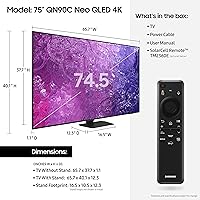
  • Dimensions (with stand): With the stand attached, the TV measures 65.7″ wide, 40″ tall, and 11.9″ deep — the wide dual-leg stand requires a console surface of at least 57 inches.
  • Weight: The unit weighs approximately 87.5 lbs with the stand installed, making two-person assembly and professional wall mounting strongly advisable.
  • Power & Voltage: Operates at 120 volts with a rated output of 60 watts for the audio system; total panel power consumption will vary based on brightness settings and content.
  • Color & Finish: Available in Titan Black, a matte-finish dark colorway that minimizes visible dust and integrates neutrally with most room decor styles.
  • Included Items: Box contents include the TV panel, stand hardware, a power cable, a physical user manual, and access to the e-Manual via the TV's settings menu.

Related Reviews

Samsung 75-Inch The Frame Pro 4K Neo QLED TV
89%
96%
Display Quality
94%
Art Mode Realism
89%
Gaming Performance
92%
Color Accuracy
85%
Connectivity Options
More
Samsung QN90C 50-inch Neo QLED 4K TV
79%
93%
Picture Brightness
88%
Color Accuracy
71%
Contrast & Black Levels
91%
Gaming Performance
86%
Anti-Glare Performance
More
Samsung Q60D 75-Inch QLED 4K TV
73%
78%
Picture Quality
58%
Contrast & Black Levels
83%
Color Accuracy
71%
Motion Handling
61%
Gaming Performance
More
Samsung 98-Inch Neo QLED 4K QN90D TV
86%
94%
Picture Quality
89%
Sound Quality
91%
Gaming Performance
83%
Ease of Setup
88%
Size and Viewing Experience
More
Samsung QN90F 50-inch Neo QLED 4K TV
88%
96%
Picture Quality
94%
HDR Performance
92%
Brightness and Glare Handling
90%
Motion Handling
91%
Gaming Performance
More
SAMSUNG 65-Inch Neo QLED 4K QN95B TV
88%
96%
Picture Quality
92%
Sound Quality
90%
Gaming Performance
85%
Value for Money
94%
Build Quality
More
SAMSUNG 43-Inch Neo QLED 4K QN90B TV
88%
95%
Picture Quality
92%
Color Accuracy
87%
Sound Quality
94%
Brightness & Contrast
89%
Ease of Setup
More
Samsung The Terrace 85-inch Neo QLED TV
78%
93%
Picture Quality
89%
Outdoor Durability
81%
Anti-Glare Performance
84%
Smart Features
52%
Installation Experience
More
Samsung Q70A 75-inch QLED 4K Smart TV
77%
78%
Picture Quality
61%
Contrast & Black Levels
84%
Motion Handling
82%
Gaming Performance
83%
Smart TV Experience
More
Samsung 75-Inch Neo QLED 8K TV QN800C (2023)
89%
95%
Display Quality
91%
Sound Quality
94%
Picture Clarity
89%
Design & Aesthetics
87%
Ease of Setup
More

FAQ

No, the QN90C does not support Dolby Vision. It handles HDR10+ and Neo Quantum HDR+ content, which covers most major streaming platforms. If you have a large Dolby Vision library through Apple TV+ or Vudu, that is worth factoring into your decision since HDR10+ and Dolby Vision are competing formats and content mastered in one will not render in the other.

It depends entirely on how and where you watch. In a bright or normally lit room, most users never notice it during typical content. The issue becomes more visible in a darkened room during scenes with bright objects — like a spaceship against a black void or white text on a black background. If you watch a lot of dark, cinematic content in a fully dim room, it is a real consideration. For mixed or daytime viewing, the majority of owners find it easy to overlook.

Yes, all four HDMI ports are HDMI 2.1, which supports 4K at 120Hz with VRR on both consoles. You will want to make sure the correct HDMI port settings are enabled in the TV menu, as some users have found the advanced gaming features need to be manually activated rather than detected automatically.

For everyday watching — news, streaming shows, casual sports — the 60W built-in system is genuinely above average and most people find it perfectly workable. Where it falls short is in larger rooms or during action-heavy content, where the bass gets thin and the sound does not fill the space convincingly. If you are investing at this level and care about audio, budgeting for a soundbar from the start is the smarter approach.

For a 4K panel at 75 inches, the sweet spot is roughly 9 to 12 feet. At that distance you get the full immersive benefit of the screen size without individual pixels becoming visible. If your seating is closer than 8 feet, the 65-inch size may actually be more comfortable for extended watching.

Yes, beyond SmartThings it supports Amazon Alexa and Google Assistant natively, so it integrates with most major smart home setups. Apple HomeKit is not natively supported, though AirPlay 2 is available for mirroring Apple device content directly to the screen.

The dual-leg stand spans a wide footprint and requires a surface of at least 57 inches to sit stably. If your current TV console is narrower than that, wall mounting is the practical alternative — just be aware the TV weighs close to 88 lbs, so a proper wall bracket rated for that load and professional installation are worth considering.

Most new users get comfortable with Tizen within a few days. The main home screen and app launcher are intuitive, and popular streaming services are pre-installed. The settings menus go deep and can feel complex at first, but day-to-day use — switching inputs, adjusting volume, opening apps — is straightforward. The one genuine friction point is that the home screen does show some sponsored content rows that some users find cluttered.

The difference in a bright room is meaningful. A standard glossy panel will reflect window light and overhead lighting clearly enough to wash out the picture. The QN90C's coating diffuses those reflections, keeping the image readable and color-accurate even with light sources behind or to the side of the viewer. It is not the same as a fully matte panel — direct sunlight pointed straight at the screen will still create some glare — but it handles normal household lighting conditions very well.

The majority of owners report no issues after a year or more of use, and Samsung pushes regular software updates that keep the platform current. That said, a consistent minority of buyers have reported panel uniformity issues — including dead pixels or backlight irregularities — emerging within the first year. Samsung's warranty covers manufacturing defects, but customer support response times have received mixed feedback, so registering the product and keeping purchase documentation organized from day one is a practical precaution.

Where to Buy