Overview

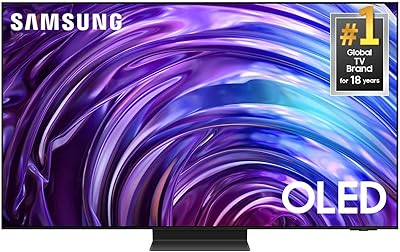
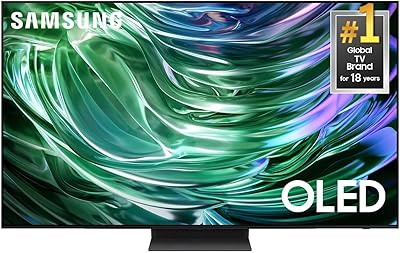
The Samsung S90F 42-inch 4K OLED Smart TV occupies a genuinely interesting spot in the market — one that most manufacturers largely ignore. A 42-inch OLED sits in the narrow gap between a large desktop monitor and a proper living room display, making it a rare find for anyone who wants true OLED picture quality without dedicating an entire wall to it. As Samsung's 2025 refresh of the S90 line, the S90F builds on its predecessor with a more capable AI processor and refined picture tuning. Expectations should be set clearly: you get premium display technology in a compact body, but OLED has real trade-offs in bright rooms that are worth understanding before buying.

Features & Benefits

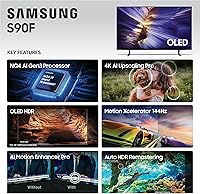
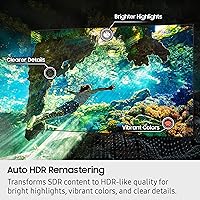
What sets the S90F apart starts at the panel level. Each pixel produces its own light and can switch off entirely — this is per-pixel dimming in action, and it delivers black levels that no LED backlight can match. Samsung's latest processor analyzes motion, sharpens upscaled streaming content to near-4K quality, and can coax HDR-like color range from standard-definition footage. For gaming, 144Hz VRR support covers PS5 and Xbox Series X at their highest frame rates, with input lag sitting under 10 milliseconds in Game Mode. The Tizen smart platform is fluid and well-stocked with apps, and Alexa voice control works reliably for hands-free operation.

Best For

This 42-inch OLED makes the most sense for a specific kind of buyer. Gamers who prefer sitting close to a display — at a desk or in a tight room — will appreciate the size-to-performance ratio. It's a strong fit for apartment living, where a 55-inch set would simply overwhelm the space. Secondary bedrooms and home offices benefit too, especially for anyone who wants solid color accuracy for photo editing or content work alongside everyday viewing. Buyers upgrading from a mid-range LCD will notice the difference immediately — the jump in contrast and motion clarity is hard to ignore. It's less suited to open, sunlit living rooms.

User Feedback

Owners consistently praise picture quality and black levels as standout strengths, with gaming performance earning strong marks as well. Where feedback gets mixed is around real-world brightness — in sunlit rooms, Samsung's compact OLED can struggle to compete with brighter QLED panels at a similar price point. Burn-in anxiety surfaces in almost every discussion, though most short-to-medium-term owners report no visible issues under normal, varied viewing habits. A handful of users found the remote less intuitive than expected, and several noted that the smart TV interface occasionally promotes ads on the home screen. Long-term owners, especially those who use the set primarily for gaming or dark-room viewing, generally feel the investment holds up well.

Pros

  • Per-pixel OLED dimming produces black levels and contrast that no LED backlight can replicate.
  • Sub-10ms input lag in Game Mode makes the S90F genuinely competitive with dedicated gaming monitors.
  • 144Hz VRR support covers PS5 and Xbox Series X at their full frame rate potential.
  • The 42-inch form factor fills a rare gap — OLED quality in a size that actually fits smaller rooms.
  • AI upscaling handles non-4K streaming content well, making Netflix and YouTube look noticeably sharper.
  • Tizen is one of the more responsive smart TV platforms, with a solid app library and fast navigation.
  • SDR-to-HDR enhancement breathes life into older TV shows and standard YouTube videos.
  • At 19.2 pounds, this 42-inch OLED is easy to wall-mount or reposition without extra help.
  • Alexa integration works reliably for voice control without needing a separate smart home hub.
  • Long-term owners who use it for dark-room viewing or gaming consistently report satisfaction months in.

Cons

  • Peak brightness falls short in sun-filled rooms, putting it at a real disadvantage against QLED rivals.
  • Burn-in is a legitimate long-term risk if you regularly display static images or leave the screen paused.
  • The home screen surfaces ads and promoted content, which some owners find intrusive and hard to remove.
  • 42 inches may feel restrictive for anyone used to 55-inch or larger screens in a shared living space.
  • The included remote has a learning curve, and several users find its layout less intuitive than expected.
  • Samsung's compact OLED lacks a dedicated headphone jack, which limits private listening options.
  • No Dolby Vision support — Samsung uses its own HDR formats, which may matter to format-loyal viewers.
  • The smart platform occasionally pushes software updates that can temporarily disrupt settings or app layouts.

Ratings

The scores below reflect AI-driven analysis of verified buyer reviews for the Samsung S90F 42-inch 4K OLED Smart TV, sourced globally and filtered to remove incentivized, bot-generated, and duplicate submissions. Every category captures what real owners consistently praised and what genuinely frustrated them — strengths and shortcomings weighted equally so you get an honest picture before buying.

Picture Quality
93%
Owners repeatedly describe the image as a step above anything they had previously owned, particularly in dark scenes where OLED's per-pixel contrast makes black backgrounds look truly black rather than a murky grey. Watching films at night or in a dimmed bedroom is where the S90F earns near-universal praise.
A consistent minority of reviewers note that the panel cannot match the sheer brightness of competing QLED sets, which becomes apparent when watching HDR content in a sun-lit room during the afternoon. The peak brightness ceiling limits the full impact of HDR highlights in bright environments.
Gaming Performance
91%
Console gamers using a PS5 or Xbox Series X consistently report the experience feels close to a dedicated gaming monitor, with input lag in Game Mode registering under 10 milliseconds and VRR keeping frame pacing smooth during demanding titles. The 42-inch screen size also works well at desk distance, which many buyers specifically chose it for.
A small number of PC users noted that enabling 4K at 144Hz required specific HDMI 2.1 cable configurations that were not obvious from the manual, causing initial frustration. A few competitive gamers also wished for a clearer on-screen input lag display rather than having to rely on third-party tools to verify settings.
Black Levels & Contrast
96%
This is the category where the S90F receives its most passionate feedback — owners who watch thriller or horror films frequently comment that shadow detail and dark scene rendering feel cinematic in a way their previous LCD never achieved. Per-pixel dimming means there is no blooming or halo effect around bright objects against dark backgrounds.
A handful of users noticed very faint uniformity variance at extremely low brightness levels during fully dark scenes, though this was only visible when actively looking for it on test patterns rather than real content. In practice, almost no real-world movie or game content exposes this as a genuine viewing concern.
Brightness (Peak & Sustained)
62%
38%
In a darkened room, the S90F produces more than enough brightness for comfortable viewing, and HDR highlights in dimly lit environments look punchy and well-defined. Users who primarily watch TV in the evening or in rooms with controlled lighting rarely raise brightness as an issue.
This is the most commonly cited pain point across user feedback. Buyers who positioned Samsung's compact OLED in a living room with large windows or overhead lighting found the image looked washed out during daytime hours, and several mentioned they wished they had opted for a QLED alternative instead. Sustained brightness under prolonged high-output loads also dims noticeably compared to the initial peak.
Upscaling & AI Processing
83%
Streaming content from Netflix or Disney+ at 1080p or lower resolution upscales to a noticeably sharper result compared to prior Samsung generations, with reviewers commenting that older TV series look cleaner and less soft than on their previous sets. The AI processor also handles fast-moving sports footage with less motion blur than many buyers anticipated.
Upscaling performance is inconsistent with very low bitrate or heavily compressed content — cheap YouTube uploads and some free ad-supported streaming channels still look rough despite the processing. Users who primarily stream from premium platforms benefit far more than those relying on lower-quality sources.
Smart TV Platform
74%
26%
Tizen runs fluidly on the S90F, with app launches and navigation feeling faster than older Samsung models. The major streaming platforms are all present, and Alexa voice control works reliably for switching inputs, adjusting volume, and controlling smart home devices without needing a separate speaker.
The home screen persistently surfaces Samsung-promoted content and advertising tiles that many owners describe as intrusive and difficult to fully remove. A few long-term users also noted that automatic software updates occasionally reset custom picture or audio settings without warning, requiring manual reconfiguration.
Motion Handling
86%
Sports viewers and action film fans give the S90F solid marks for motion clarity, noting that fast-moving subjects like a football or a car chase stay sharp without the artificial soap-opera effect that heavier motion processing can introduce. The 120Hz native refresh rate gives the panel a head start before any processing even kicks in.
Some users found the default motion settings too aggressive out of the box, requiring time in the menu to dial back smoothing before the image looked natural. Those who did not tweak settings reported an overly processed look during live sports that took away from the viewing experience until corrected.
Build Quality & Design
81%
19%
The slim Graphite Black chassis feels premium to the touch and looks noticeably thinner than most LCD sets at this price, which owners appreciated both aesthetically and when mounting on a wall. At under 20 pounds, solo installation is practical and straightforward for most adults.
The stand design drew occasional criticism for not feeling as sturdy as the panel quality implies — a few buyers noted minor wobble on uneven surfaces or when bumped. The stand also adds meaningful depth, making it less ideal for narrow shelves or furniture with limited clearance.
Value for Money
77%
23%
Buyers who understood what they were paying for — a rare 42-inch OLED with current-generation gaming specs — generally felt the price was justified, especially those upgrading from older LCD panels who described the visual difference as dramatic. For gaming-focused buyers in particular, the cost comparison to a standalone high-refresh OLED gaming monitor often tilts in the S90F's favor.
A recurring theme in mixed reviews is the perception that competing OLED brands offer comparable panel quality at a lower price point at larger sizes, making the 42-inch premium feel steep relative to the screen area provided. Budget-conscious buyers who stretched to afford it occasionally expressed buyer's remorse when seeing sales on 55-inch LCD alternatives.
Audio Quality
58%
42%
For a built-in TV speaker system, dialogue clarity receives reasonably positive feedback, and the AI sound mode does a passable job adjusting output for different content types without manual changes. Casual viewers watching news or talk shows in a small room report it is adequate for everyday use.
Bass response is thin and the speakers struggle to fill any room larger than a small bedroom at higher volumes. The overwhelming consensus among buyers who care about audio is that a soundbar or external speaker is essentially required to match the quality the display delivers visually, which adds cost to the overall setup.
Input & Connectivity
84%
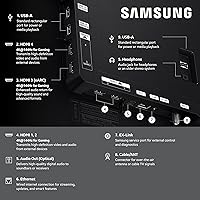
The HDMI 2.1 ports are well-placed and the full connectivity suite — including Ethernet, USB, Bluetooth, and Wi-Fi — covers practically every use case without requiring adapters or hubs. Gamers specifically appreciated having enough ports to keep a console, PC, and streaming stick all connected simultaneously.
A few users found the port placement on the rear panel inconvenient when wall-mounted flush, as some ports face directly backward rather than sideways, making cable management awkward without a recessed mount. The number of USB ports was also flagged as limited by buyers running multiple peripherals.
Remote Control
66%
34%
The Solar Cell remote charges via ambient light and avoids the need for replacement batteries, which long-term owners appreciated as a genuinely practical design choice. Basic navigation and volume control work well with a low learning curve for most users.
The slim remote lacks dedicated buttons that many buyers expected, and the reliance on a home button and on-screen navigation for certain functions felt unintuitive to users coming from other brands. Button feedback is also described as mushy by a notable portion of reviewers, with accidental presses being a recurring complaint.
Burn-in Resistance
69%
31%
Short-to-medium-term owners — those using the S90F for six months to a year with typical mixed-content viewing habits — almost universally report no visible burn-in or image retention. Samsung's built-in pixel-shift and automatic screen-maintenance cycles provide meaningful protection under normal conditions.
The concern is real and well-documented enough that buyers who use the set heavily for static-heavy content — such as sports score overlays, gaming HUDs, or desktop use — do report anxiety about long-term panel health. A small number of users with very high static-content usage over extended periods reported faint ghosting, reinforcing that the risk is not zero.
Setup & Out-of-Box Experience
82%
18%
Most buyers described the unboxing and initial setup as smooth, with the on-screen guide walking through Wi-Fi, account login, and calibration quickly. Stand assembly was straightforward and required no tools beyond the included hardware.
Some users found the default picture mode heavily over-processed out of the box, with overly saturated colors and aggressive sharpening that required manual adjustment to look natural. The initial setup also prompts numerous account sign-ins and permissions screens that a portion of buyers found tedious before reaching the actual viewing experience.

Suitable for:

The Samsung S90F 42-inch 4K OLED Smart TV was built for buyers who want flagship display technology without the footprint of a large screen. Apartment dwellers and anyone furnishing a smaller room will find the 42-inch size genuinely practical — it fills the space without dominating it. Gamers are a particularly strong match: sub-10ms input lag in Game Mode, 144Hz VRR, and full PS5 and Xbox Series X compatibility make this a compelling alternative to a high-end gaming monitor, especially for those who want a proper TV experience at a desk or in a compact setup. Home office users and photo or video enthusiasts who care about accurate color will also get a lot of value here. Anyone upgrading from a mid-range LCD — especially one over four or five years old — will notice an immediate and significant improvement in contrast, motion handling, and overall image quality.
Not suitable for:

The Samsung S90F 42-inch 4K OLED Smart TV is not the right choice for everyone, and a few scenarios stand out where buyers are likely to feel shortchanged. If your primary viewing room gets strong natural light during the day, this OLED will struggle to compete — brighter QLED panels at a similar price hold up noticeably better in those conditions. Buyers expecting a large-screen experience for family movie nights or sports viewing in a living room will find 42 inches limiting; stretching to a 55-inch or 65-inch model makes far more sense in that context. Those who run static content on screen for extended periods — such as a news ticker, a paused game HUD, or a screensaver left on indefinitely — should be mindful of burn-in risk, which is a real long-term concern with any OLED panel, even with modern mitigation features. Budget-focused shoppers comparing raw screen size per dollar will also find better value elsewhere in the LCD or QLED category.
Specifications

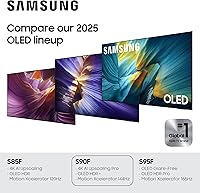
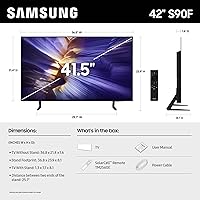
  • Screen Size: The panel measures 42 inches diagonally, making it one of the smaller OLED options available in Samsung's 2025 TV lineup.
  • Display Type: Uses an OLED panel with per-pixel light emission and individual pixel dimming for true black reproduction.
  • Resolution: Native 4K resolution at 3840 x 2160 pixels delivers four times the pixel density of a standard 1080p display.
  • Refresh Rate: Native 120Hz panel supports up to 144Hz through Variable Refresh Rate when connected to a compatible gaming device.
  • HDR Support: Compatible with OLED HDR+ and includes AI-driven tone mapping that converts SDR content to HDR-like output.
  • Processor: The NQ4 AI Gen3 chip uses 128 neural networks to handle picture optimization, upscaling, and sound enhancement in real time.
  • Upscaling: AI-based 4K upscaling processes lower-resolution content from streaming platforms to approach native 4K sharpness.
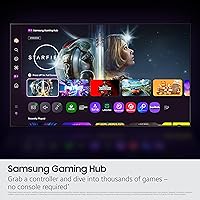
  • Smart Platform: Runs Samsung's Tizen OS with the Vision AI layer, supporting major streaming apps and voice assistant control.
  • Voice Assistant: Alexa is built into the TV natively; Samsung Bixby is also supported for hands-free control.
  • Connectivity: Includes HDMI, USB, Ethernet, Wi-Fi, and Bluetooth ports for broad compatibility with consoles, soundbars, and home networks.
  • Input Lag: Game Mode reduces input lag to under 10 milliseconds, suitable for competitive and fast-paced gaming.
  • Dimensions: With the stand attached, the TV measures 36.8″ wide, 23.9″ tall, and 8.1″ deep.
  • Weight: The unit weighs 19.2 pounds with the stand, making solo wall mounting manageable for most adults.
  • Color & Finish: Available in Graphite Black with a slim bezel design intended to minimize visual distraction around the screen.
  • Model Number: The official model identifier is QN42S90FAEXZA, which can be used to verify compatibility with accessories and mounts.
  • Aspect Ratio: Standard 16:9 widescreen aspect ratio is optimized for modern streaming, broadcast, and gaming content.
  • In the Box: Includes a power cable, remote control, stand hardware, and a printed user manual — no third-party cables or streaming dongles are bundled.
  • Audio: Features built-in speakers with AI-based sound optimization that adjusts output based on the content being played.
  • Availability Date: This model was first made available for purchase in April 2025 as part of Samsung's updated S90 series.
  • VESA Compatibility: The rear panel supports standard VESA wall mount patterns, allowing use with most third-party mounting brackets sold separately.

Related Reviews
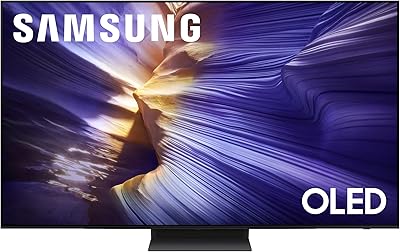
Samsung S90F 55-Inch OLED 4K Smart TV
78%
94%
Picture Quality
91%
Gaming Performance
88%
HDR Performance
71%
Smart TV Interface
83%
AI Upscaling
More
Samsung 83-Inch Class OLED S90F 4K Smart TV
85%
95%
Display Quality
92%
Gaming Performance (144Hz Refresh Rate)
91%
AI Picture Enhancement
88%
Sound Quality
77%
Ease of Setup
More
Samsung 65-Inch Class OLED 4K S95D Series Smart TV
86%
94%
Display Quality
91%
Gaming Performance
89%
Sound Quality
85%
Smart Features and Usability
78%
Setup and Installation
More
Samsung 77-Inch Class OLED 4K S90D Series Smart TV
84%
94%
Picture Quality
91%
Gaming Performance
77%
Sound Quality
88%
Ease of Setup
85%
Smart Features & Alexa Integration
More
LG 42-Inch OLED C5 Smart TV
83%
96%
Picture Quality
94%
Gaming Performance
81%
Smart TV Platform
61%
Audio Quality
78%
Value for Money
More
Samsung 48-inch S90F OLED 4K Smart TV
79%
93%
Picture Quality
91%
Gaming Performance
96%
Contrast & Black Levels
88%
Motion Handling
84%
HDR Performance
More
Sony A90K 42-inch OLED TV
81%
96%
Picture Quality
94%
Gaming Performance
97%
Contrast & Black Levels
91%
Color Accuracy
93%
Input Lag & Responsiveness
More
Samsung RU8000 55-inch 4K UHD Smart TV
76%
83%
Picture Quality
81%
Motion Handling
72%
HDR Performance
76%
Smart TV Interface
54%
Audio Performance
More
Samsung 50-inch Crystal UHD TU8000 Smart TV
61%
61%
Picture Quality
47%
Motion Handling
78%
Smart Platform
74%
Voice Control
52%
HDR Performance
More
LG OLED C1 55-inch 4K Smart TV
86%
96%
Picture Quality
93%
Gaming Performance
62%
Peak Brightness
88%
Smart TV Platform
91%
Build Quality & Design
More

FAQ

It holds up well in practice. In Game Mode, input lag drops under 10 milliseconds, and the 144Hz VRR support works with both PS5 and Xbox Series X at their maximum frame rates. If you sit within 6 to 8 feet of the screen, the combination of OLED contrast and fast response time is genuinely hard to beat at this size.

It is a real concern worth taking seriously, not dismissing outright. OLED panels can develop permanent image retention if static elements — like a news ticker, a game HUD, or a paused menu — are displayed for extended periods over months or years. Samsung includes pixel-shift and screen-saver tools to reduce the risk, and most users with varied viewing habits report no issues. However, if you plan to use it as a dedicated PC monitor with a static taskbar, you should factor this in.

This is where the S90F has a real limitation. OLED panels, including this one, produce less peak brightness than high-end QLED or mini-LED alternatives at a comparable price. In a well-lit room during daytime, you may notice washed-out colors and reduced contrast. It performs best in a controlled or dim lighting environment, which is worth considering based on where you plan to put it.

It connects to any Bluetooth or HDMI ARC-compatible soundbar without issue, and pairing with a Samsung soundbar unlocks some additional integration features through the Tizen platform. The built-in speakers are adequate for casual viewing but lack bass depth and volume for larger spaces or immersive movie watching. If audio quality matters to you, a soundbar is a worthwhile addition.

That really depends on your viewing distance and room size. At around 4 to 6 feet away, 42 inches feels appropriately sized and the 4K resolution stays sharp. For a living room couch at 8 to 10 feet, you may start to wish for more screen real estate. This size genuinely shines in bedrooms, home offices, or compact apartment setups — it was designed for those spaces, not large open-plan rooms.

No, it does not. Samsung uses its own HDR formats — HDR10, HDR10+, and OLED HDR+ — instead of Dolby Vision. For most streaming content on Netflix or Disney+, this makes little practical difference since both platforms support HDR10. If you have a strong preference for Dolby Vision, that is something to weigh against the other strengths of this panel.

Setup is straightforward. The stand attaches with a few screws, and the on-screen guided setup walks you through Wi-Fi, Samsung account sign-in, and app installation within about 15 to 20 minutes. The Tizen interface is reasonably intuitive for most users, though the home screen does promote Samsung content and ads that some people find distracting.

Technically yes, but with caution. The display handles text and color well, and the HDMI inputs work with most laptops and desktops. The main concern for office use is static content — a persistent taskbar, dock, or desktop icons shown for hours every day over years could contribute to burn-in. If you plan to use Samsung's compact OLED as a primary work display, enabling pixel-shift settings and using a screensaver is strongly recommended.

Tizen covers the major platforms: Netflix, Disney+, Apple TV+, Prime Video, YouTube, and most regional streaming services. The interface is generally fast and well-organized, though Samsung's home screen includes promoted content that not everyone appreciates. Software updates have occasionally rearranged settings, which a small number of users have flagged as mildly frustrating.

The TV supports standard VESA wall mount patterns, but the mounting bracket itself is not included in the box. You will need to purchase a compatible third-party bracket separately and verify it matches the VESA spacing on the QN42S90FAEXZA. Given the TV's weight of just under 20 pounds, most standard fixed or tilting mounts in the appropriate size range will work without issue.