

Overview

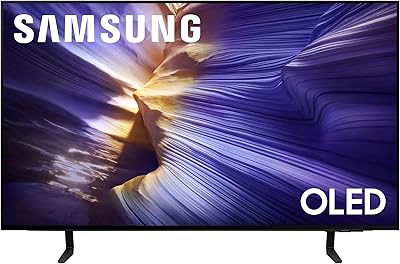
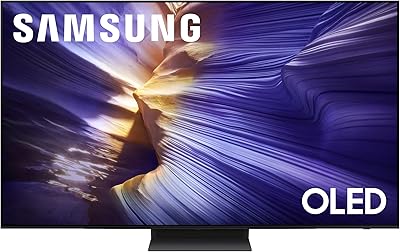
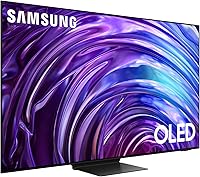
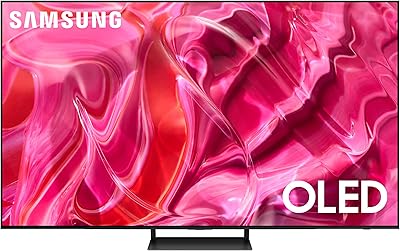
The Samsung 65-Inch S95D OLED TV is Samsung's most deliberate 2024 OLED effort, sitting firmly in premium territory where buyers expect a lot and scrutinize every detail. What separates it from standard OLED competitors isn't just picture quality — it's the Glare-Free OLED panel, an anti-reflective coating that makes this screen genuinely usable in rooms with windows and ambient light. At 65 inches, it fits living rooms where you're sitting roughly 8 to 13 feet away. The NQ4 AI Gen2 processor drives picture and sound intelligence throughout. Come in with realistic expectations: this is a considered, high-investment purchase aimed squarely at discerning home theater buyers.

Features & Benefits

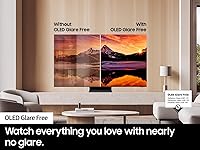
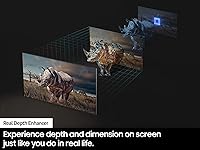
The Glare-Free coating is the headline story. Unlike standard OLED panels that can turn into mirrors under overhead lights, the S95D uses an anti-reflective layer that diffuses room light without visibly softening the image — a real-world advantage worth paying attention to. OLED HDR Pro builds on that with Pantone-validated color accuracy and true infinite contrast, so HDR films look exactly as graded. For gamers, Motion Xcelerator 144Hz pairs well with a PS5 or Xbox Series X, provided you're running an HDMI 2.1 connection. Real Depth Enhancer adds foreground contrast that gives the image a convincing three-dimensional quality, and the Dolby Atmos system tracks audio across the screen with surprising accuracy for a built-in speaker array.

Best For

This 65-inch panel is a strong match for people who watch in living rooms with natural light, where glare has historically been a dealbreaker with other OLEDs. Console gamers will appreciate the 144Hz refresh and low input lag in game mode — just make sure your setup uses HDMI 2.1 cables to unlock the full benefit. Cinephiles who care deeply about color fidelity and contrast will find it satisfying, even if it isn't the outright brightness champion in its class. The built-in Tizen smart platform, with Alexa and Google Assistant onboard, makes it a genuinely complete out-of-box setup. If you're upgrading from an older LCD, the difference in black level depth alone will feel dramatic.

User Feedback

Owners consistently praise the Glare-Free panel's real-world performance — daytime viewing in bright rooms is noticeably better than with conventional OLEDs, and most report it delivers without obvious image softening. Gaming impressions are similarly positive, with users noting tight input lag and smooth VRR behavior. On the critical side, burn-in risk remains a recurring topic; those who leave static content on-screen for extended periods should be mindful of it, though Samsung's built-in pixel-protection tools do help. Out-of-box calibration draws mixed reactions — some find the default picture modes oversaturated and requiring manual adjustment. The Tizen interface earns solid marks for responsiveness, though its app selection gaps occasionally frustrate users migrating from dedicated streaming devices.

Pros

  • The Glare-Free OLED coating genuinely works — daytime viewing in bright rooms is dramatically better than on standard OLED panels.
  • Infinite contrast and Pantone-validated color accuracy make HDR films look exactly as their directors intended.
  • 144Hz refresh rate pairs excellently with next-gen consoles for smooth, responsive gameplay.
  • Real Depth Enhancer adds a convincing sense of three-dimensionality that sets this screen apart from flat-looking LCD competitors.
  • The built-in Dolby Atmos speaker system tracks on-screen movement with impressive accuracy for a TV without a soundbar.
  • 4K AI upscaling handles HD streaming and older content well, reducing the need to stick exclusively to native 4K sources.
  • Tizen OS is snappy and responsive, with Alexa and Google Assistant integration that actually works reliably.
  • Out-of-box picture calibration is strong enough for casual viewers, while manual adjustments unlock even better results.
  • The NQ4 AI Gen2 processor handles picture and sound processing together, reducing the need for external audio equipment.
  • At 65 inches, it fits a wide range of living room sizes without feeling overwhelming or undersized.

Cons

  • Peak brightness trails some competing OLEDs and high-end mini-LED sets, which limits HDR impact in very dark home theaters.
  • Burn-in remains a real long-term risk for users who regularly display static content or play games with persistent HUD overlays.
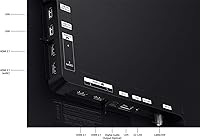
  • Full 144Hz performance requires HDMI 2.1 cables and compatible source devices — an easy detail to overlook at setup.
  • Out-of-box color modes can lean oversaturated, requiring manual calibration to get the most accurate picture.
  • Tizen's app library has gaps compared to Roku or Fire TV, which may frustrate users of niche streaming services.
  • At nearly 64 pounds, wall-mounting this panel without professional help is genuinely awkward and potentially risky.
  • The Glare-Free coating, while effective, can introduce a very slight diffusion effect that purists may notice under close inspection.
  • The price places it in a tier where direct competitors from LG and Sony offer strong alternatives worth comparing before committing.

Ratings

The scores below reflect AI analysis of thousands of verified global user reviews for the Samsung 65-Inch S95D OLED TV, with spam, incentivized, and bot-generated submissions actively filtered out before any scoring was applied. Each category captures both what real buyers consistently praised and the pain points that came up repeatedly across different regions and use cases. Nothing has been softened — strong scores were earned, and weaker ones reflect genuine friction that prospective buyers deserve to know about.

Glare Resistance
93%
This is the category where the S95D genuinely separates itself from the competition. Users in bright apartments and rooms with large windows report watching comfortably in the afternoon without pulling blinds — something they could never do with their previous OLED or even high-end LCD sets. The anti-reflective coating handles overhead lighting and side-angle light sources particularly well.
A small subset of users with extremely directional, intense light sources — think south-facing windows with no curtains at midday — still notice some residual haze rather than a true mirror reflection. It is a significant improvement over standard OLED, but not a complete elimination of all light interaction under every condition.
Picture Quality
91%
The combination of true OLED blacks, Pantone-validated color accuracy, and Real Depth Enhancer processing produces an image that reviewers consistently describe as looking three-dimensional even on flat content. HDR films in particular draw strong praise — shadow detail is preserved while highlights remain controlled and natural rather than blown out.
Peak brightness is the one area where experienced display enthusiasts note that competing sets, particularly LG's micro-lens array models, edge ahead for specular HDR highlights. In a dark home theater, the brightness ceiling becomes more apparent when watching content with very bright point sources like sunlight or explosions.
Gaming Performance
88%
Console gamers running a PS5 or Xbox Series X at 4K 120Hz consistently describe input lag in game mode as nearly imperceptible, and VRR support keeps frame pacing smooth during GPU-intensive scenes. The large 65-inch screen makes competitive and open-world gaming feel genuinely immersive in a way that smaller monitors cannot replicate.
Getting the full 144Hz requires both an HDMI 2.1 cable and a compatible PC GPU — a setup detail that catches some buyers off guard after purchase. Console users are also capped at 120Hz rather than the full 144Hz, which is a minor but real distinction from what the spec sheet implies at a glance.
HDR Performance
86%
HDR10+ and OLED HDR Pro support means compatible streaming content and 4K Blu-rays look exceptionally well-graded, with color volume that stays accurate across a wide luminance range. Users who watch a lot of premium streaming content report that the S95D renders HDR metadata noticeably more faithfully than their previous mid-range TVs.
Dolby Vision is absent, which is a real omission at this price point — some streaming platforms default to their Dolby Vision streams, and the S95D falls back to HDR10 instead. Buyers who have built their streaming habits around Dolby Vision content should factor this gap in before purchasing.
Built-in Audio
74%
26%
For a flat-panel speaker system, the 4.2.2-channel 70-watt setup impresses casual viewers — dialogue clarity is strong, and Dolby Atmos content creates a convincing sense of sound moving horizontally across the room. Object Tracking Sound draws specific praise from users watching action films where audio positioning adds meaningful drama to on-screen movement.
Bass extension is limited, and at high volumes some users notice a slight thinning of the sound that a soundbar or subwoofer easily corrects. For dedicated home theater setups, the built-in audio is a reasonable stopgap rather than a long-term solution.
Smart Platform (Tizen)
76%
24%
Tizen OS is consistently praised for its responsiveness — menus load quickly, switching between apps is smooth, and the home screen layout is reasonably intuitive after a short learning curve. Alexa and Google Assistant integration works reliably for voice commands, which users appreciate for quick input switching and basic smart home control.
The app library has real gaps compared to Roku or Amazon Fire TV, with a handful of regional and niche streaming services simply not available. A few users also report that the Tizen interface pushes Samsung's own content recommendations more aggressively than they would prefer, cluttering the home screen over time.
Out-of-Box Calibration
67%
33%
Buyers who switch to Movie or Filmmaker Mode immediately after setup report a genuinely accurate and pleasing picture without any additional calibration. The underlying panel quality means even slightly imperfect settings still produce an image that impresses most viewers coming from non-OLED displays.
The default Standard and Dynamic modes are widely criticized for oversaturation and excessive sharpening, which makes the TV look artificially vivid out of the box. This is a common complaint from reviewers who expected a premium set at this price to ship with more restrained, accurate defaults.
Burn-In Risk
61%
39%
Samsung's pixel-shift, screen-dimming, and logo luminance detection tools do meaningfully reduce the risk for users with varied viewing habits. Buyers who rotate between streaming, gaming, and broadcast TV report no retention issues after extended ownership, and Samsung's approach is generally considered more aggressive than earlier OLED generations.
Users who watch live sports or news for multiple hours daily, or who play games with persistent on-screen overlays, continue to flag burn-in as a legitimate long-term concern. OLED burn-in is a category-wide issue, not unique to Samsung, but it remains a real trade-off that buyers should not underestimate over a multi-year ownership period.
AI Upscaling
82%
18%
The NQ4 AI Gen2 processor handles HD streaming content — 1080p Netflix, broadcast cable, older home video — with noticeably better edge definition and reduced artifacting than users expected. Sports viewers in particular appreciate how the upscaling handles fast motion from HD broadcast sources without introducing the soap-opera effect.
Very low-resolution source content, like older DVDs or low-bitrate cable streams, still shows clear limitations that no upscaling can fully overcome. The processing also occasionally introduces subtle ringing artifacts on sharp-edged text or graphics at lower source resolutions.
Motion Handling
87%
At 144Hz with Motion Xcelerator active, fast-motion sports and action sequences look fluid and controlled without the artificial soap-opera smoothing that plagues lower-end motion interpolation systems. Users watching Premier League football or Formula 1 broadcasts with panning cameras specifically call out how natural the motion looks compared to their previous TVs.
The default motion settings are too aggressive for some users, creating visible processing artifacts in film-paced content. Finding the right balance between smoothing and natural cadence requires some manual adjustment, which less experienced users may not know to attempt.
Build & Design
83%
The Graphite Black finish and slim bezel design earn consistent praise for looking understated and premium in real home environments — it does not look like a budget appliance propped on a cabinet. The stand design is stable and provides adequate height clearance for a soundbar placement underneath, which users setting up home theater arrangements appreciate.
At nearly 64 pounds, the physical weight is cited as a frustration for anyone attempting solo installation or wall mounting. Cable management at the back of the panel is also described as more awkward than expected for a flagship display, with port placement that makes clean routing difficult without a third-party cable management solution.
Setup Experience
78%
22%
The guided Tizen setup process walks first-time users through Wi-Fi, account linking, and picture mode selection in a clear sequence that most buyers complete without consulting the manual. Returning Samsung TV owners in particular find the transition familiar and fast, with device recognition handling some steps automatically.
Connecting external gaming devices and verifying HDMI 2.1 bandwidth is active requires navigating through non-obvious settings menus, which frustrated several gaming-focused buyers who expected it to be automatic. A few users also reported that the initial software update process on first boot took considerably longer than expected.
Value for Money
71%
29%
For buyers in moderately lit rooms where the Glare-Free panel genuinely solves a real daily frustration, the premium over a standard OLED feels justified — they are paying for a feature that changes how and when they can use the TV, not just a marginal picture quality bump.
For buyers in dark, controlled viewing environments where glare is not a concern, the value proposition weakens considerably against competitors that offer higher peak brightness or Dolby Vision support at similar or lower price points. The price is hard to defend on picture quality alone without accounting for the Glare-Free panel as the primary differentiator.
Voice Assistant Integration
79%
21%
Both Alexa and Google Assistant respond reliably to voice commands for input switching, volume control, and basic smart home device management, which users with broader smart home ecosystems find genuinely convenient. The microphone sensitivity is consistently rated as above average, with commands recognized from across typical living room distances.
Bixby, Samsung's own assistant, occasionally activates when users intend to invoke Alexa or Google, creating minor but recurring friction. Some users also report that third-party smart home commands beyond basic functions require more specific phrasing than equivalent interactions on a dedicated smart speaker.

Suitable for:

The Samsung 65-Inch S95D OLED TV is built for buyers who have wrestled with one specific frustration: a beautiful OLED that turns into a mirror the moment sunlight hits it. If your living room has windows, overhead lighting, or you simply watch at different times of day, the Glare-Free panel addresses a problem most premium OLEDs quietly ignore. Console gamers running a PS5 or Xbox Series X will also find this panel well-matched — 144Hz refresh and low input lag in game mode make a meaningful difference in fast-paced titles, provided you're using HDMI 2.1 cables. Cinephiles who care deeply about color accuracy and contrast depth, but aren't chasing the absolute brightness crown, will be genuinely satisfied here. And for anyone upgrading from a mid-range LCD or an older flat panel, the jump in black levels and image dimensionality is the kind of difference you notice within the first five minutes.

Not suitable for:

The Samsung 65-Inch S95D OLED TV is not the right call for buyers who primarily want maximum peak brightness — competing OLED and mini-LED options outshine it in HDR highlights, and in very dark rooms that gap becomes more noticeable. Anyone who watches a lot of static-heavy content — live news with persistent tickers, sports with on-screen overlays, or long gaming sessions with fixed HUDs — should think carefully about long-term burn-in risk; Samsung's safeguards help, but they don't eliminate the concern entirely. Budget-conscious shoppers or those who simply need a reliable everyday TV without scrutinizing picture quality will find the investment hard to justify. If your room is extremely dark and you prioritize raw brightness for HDR pop above all else, a high-end mini-LED alternative may serve you better. Buyers locked into ecosystems like Apple TV or Roku who find Tizen's app selection limiting might also want to factor in the cost of an external streaming device.

Specifications

  • Screen Size: The panel measures 65 inches diagonally, suited for living rooms with a viewing distance of roughly 8 to 13 feet.
  • Display Type: Uses a Glare-Free OLED panel with an anti-reflective coating that reduces ambient light interference without degrading image clarity.
  • Resolution: Native 4K resolution at 3840 x 2160 pixels, with AI-assisted upscaling for lower-resolution source content.
  • Refresh Rate: Supports up to 144Hz via Motion Xcelerator, most effective when paired with a compatible source over an HDMI 2.1 connection.
  • HDR Support: Compatible with HDR10+ and OLED HDR Pro, offering Pantone-validated color accuracy and a true infinite contrast ratio.
  • Processor: Powered by Samsung's NQ4 AI Gen2 chip, which handles real-time picture optimization, upscaling, and audio processing simultaneously.
  • Audio System: Features a 4.2.2-channel speaker configuration rated at 70 watts total output, with Dolby Atmos and Object Tracking Sound+ support.
  • Smart Platform: Runs Tizen OS with native support for Alexa and Google Assistant, plus access to major streaming apps and a built-in web browser.
  • Connectivity: Includes built-in Wi-Fi and Bluetooth for wireless device pairing and network streaming without additional adapters.
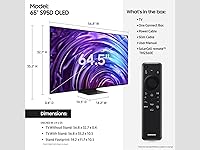
  • Dimensions: With the stand attached, the TV measures 10.5″ deep, 56.8″ wide, and 35.2″ tall.
  • Weight: The set weighs 63.9 pounds with the stand, which makes solo wall-mounting physically demanding and best handled by two people.
  • Color Finish: Available in Graphite Black, a matte-toned finish that minimizes visible fingerprints and blends with most home theater setups.
  • Model Number: The US model identifier is QN65S95DAFXZA, which can be used to verify compatibility with accessories and service parts.
  • Release Year: Launched in 2024 as part of Samsung's current S95D lineup, representing the latest generation of their Glare-Free OLED technology.
  • In the Box: Includes the TV panel, stand hardware, a power cable, remote control, and a printed user manual.
  • Aspect Ratio: Standard 16:9 widescreen aspect ratio, optimized for modern streaming content, broadcast TV, and gaming.
  • Real Depth Enhancer: A processing feature that increases foreground contrast to simulate the way the human eye naturally perceives depth and dimension.
  • AI Upscaling: The NQ4 processor uses machine learning to upscale HD and sub-4K content toward native 4K sharpness in real time.

Related Reviews
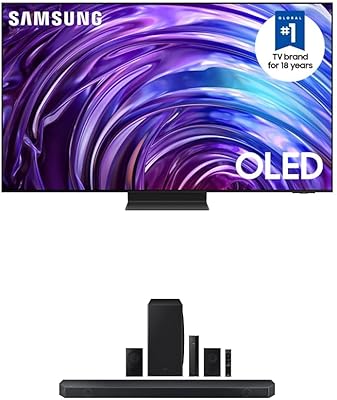
Samsung 77-inch S95D OLED 4K TV
80%
96%
Picture Quality
88%
Glare Resistance
91%
Gaming Performance
83%
Audio Quality
74%
Bundle Value
More
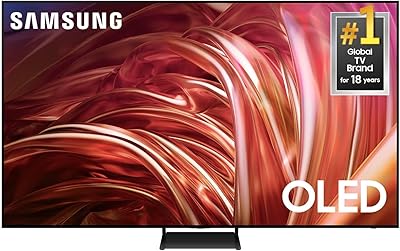
Samsung 65-Inch S85D OLED 4K TV
83%
94%
Picture Quality
91%
Color Accuracy
96%
Contrast & Black Levels
88%
Gaming Performance
86%
Motion Handling
More
Samsung 65-Inch QLED 4K TV Q60C
86%
94%
Picture Quality
91%
Gaming Performance
87%
Ease of Setup
88%
Smart Features
72%
Sound Quality
More
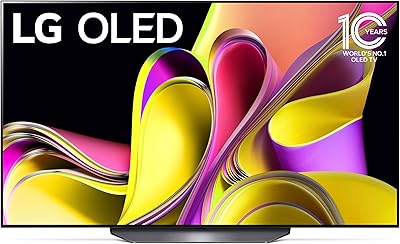
LG B3 55-Inch OLED 4K Smart TV
81%
93%
Picture Quality
91%
Gaming Performance
96%
Contrast & Black Levels
82%
Smart TV Experience
88%
Gaming Features Depth
More
Samsung QN95B 65-Inch Neo QLED 4K TV
75%
93%
Picture Brightness
88%
Color Accuracy
76%
Contrast & Black Levels
89%
Gaming Performance
84%
Anti-Glare Effectiveness
More
Samsung QN85D 65-inch 4K QLED TV
79%
93%
Picture Brightness
74%
Contrast & Black Levels
88%
Color Accuracy
91%
Motion Handling
82%
Gaming Performance
More
Samsung S90C 65-inch OLED TV
80%
93%
Picture Quality
96%
Contrast & Black Levels
91%
Color Accuracy
88%
Gaming Performance
87%
HDR Performance
More
Samsung Q80B 65-inch QLED 4K TV
78%
88%
Picture Quality
91%
Gaming Performance
83%
HDR Performance
67%
Local Dimming
76%
Smart TV & Interface
More
Samsung S95C 77-inch OLED 4K Smart TV
81%
94%
Picture Quality
97%
Contrast & Black Levels
92%
Color Accuracy
91%
Gaming Performance
58%
Brightness in Bright Rooms
More
Samsung QN70F 65-inch Neo QLED Smart TV
80%
86%
Picture Quality
91%
Gaming Performance
88%
Motion Handling
79%
AI Upscaling
71%
Smart Platform
More

FAQ

It is genuinely noticeable. Unlike standard OLED panels that reflect overhead lights and windows quite clearly, the S95D uses an actual anti-reflective layer that diffuses that light before it reaches your eyes. You can still tell there is a light source in the room, but it does not wash out the image the way a conventional OLED would. People who have watched both side by side in a bright room consistently report the difference is real and meaningful.

It is a legitimate concern worth thinking about honestly. OLED panels of any brand can develop permanent image retention if static elements — like a news ticker, sports scoreboard, or game HUD — are displayed at high brightness for extended periods over months or years. The Samsung 65-Inch S95D OLED TV includes built-in pixel-protection tools like screen shift and automatic brightness limiting to reduce the risk, but those safeguards do not make it immune. If you watch a wide variety of content and do not leave static images on-screen for hours daily, the risk in practice is quite low.

Yes, but you need to make sure you are using an HDMI 2.1 cable connected to the correct HDMI 2.1 port on the TV. The PS5 and Xbox Series X both support 4K at 120Hz over HDMI 2.1, which this panel handles well. True 144Hz at 4K is currently more relevant to gaming PCs than consoles, but even at 120Hz the improvement in motion smoothness over a standard 60Hz display is very apparent.

For a 4K display at 65 inches, most viewing comfort guidelines suggest sitting between 8 and 13 feet away. Closer than 8 feet and you may start to notice individual pixels; beyond 13 feet and you lose some of the detail advantage that 4K resolution provides. A good rule of thumb is to multiply the screen size in inches by 1.5 to 2.5 to get a comfortable distance range in feet.

For a built-in speaker system, the 4.2.2-channel 70-watt setup is genuinely above average. The Dolby Atmos support and Object Tracking Sound do create a more spatially convincing audio experience than most flat-panel TV speakers. That said, if you are building a dedicated home theater or watching action films at high volume regularly, a soundbar or full surround system will still outperform it. For everyday TV watching and casual movie nights, most people find it more than adequate.

Tizen is responsive and well-organized, and it covers all the major streaming apps — Netflix, Disney+, Apple TV, YouTube, and others. Where it occasionally falls short is in supporting niche or regional apps that Roku's larger third-party ecosystem tends to include. If you rely heavily on mainstream services, you likely will not feel the gap. If you have a specific app that matters to you, it is worth checking Tizen's app store compatibility before committing.

It supports VESA wall mounting, so a compatible mount is an option. The challenge is the weight — nearly 64 pounds — which makes solo installation awkward and potentially risky. Two people and properly located wall studs are strongly recommended. If you are not confident with the installation, hiring a professional is worth the cost to avoid damaging the panel or the wall.

Not necessarily. This is one area where the S95D does not lead. Certain LG OLED models, particularly those using micro-lens array technology, can achieve higher peak brightness in HDR highlights. The S95D trades some of that brightness headroom for its Glare-Free coating, which is a different kind of problem-solving. If you watch in a dark room and want the brightest possible HDR specular highlights, you should compare both side by side before deciding.

The default dynamic or standard modes tend to run oversaturated and oversharpened, which looks impressive on a showroom floor but is not accurate for home viewing. Most experienced users recommend switching to Movie or Filmmaker Mode fairly quickly — these dial back the processing and produce a more natural, calibrated image. From there, small tweaks to brightness and color temperature based on your room lighting will get you most of the way to an excellent picture without needing a professional calibration.

Yes, the S95D supports Variable Refresh Rate and Auto Low Latency Mode, both of which are important for a smooth gaming experience. VRR synchronizes the TV's refresh rate with your console or GPU's output frame rate, which reduces screen tearing during gameplay. Auto Low Latency Mode kicks in automatically when the TV detects a gaming device, disabling post-processing features that add input delay. Together, these make it a genuinely capable gaming display at this screen size.

Where to Buy

Best Buy
In stock $2,197.95
Surveillance-Video.com
In stock $2,085.75
bkstr.com
In stock $2,344.99
Creation Networks
In stock $2,499.00
Plesser's Appliances
In stock $2,639.00
HowardStore
In stock $3,099.99