Overview

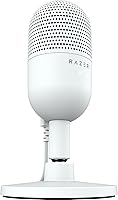
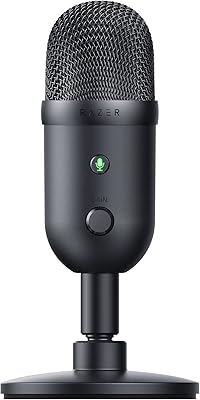
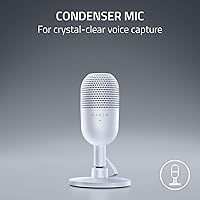
The Razer Seiren V3 Mini is a compact USB condenser mic built for people who want noticeably better audio without the hassle of an audio interface or driver installation. Plug it in and it works — on Discord, OBS, or any standard conferencing tool. It sits at #4 in Computer Microphones on Amazon with a 4.7-star average across 631+ reviews, which speaks to broad satisfaction among everyday users. The white version looks sharp on a minimal desk, and the small footprint is a genuine advantage in tight spaces. That said, this is entry-to-mid range territory — solid for its class, but not a substitute for a dedicated studio mic.
Features & Benefits

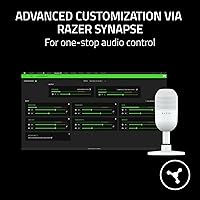
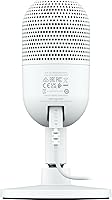
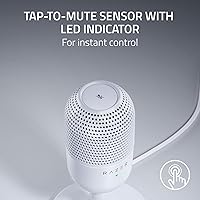
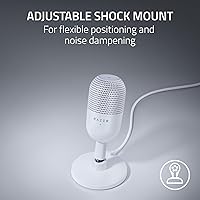
The supercardioid pickup pattern is probably the most practically useful spec here. Unlike a standard cardioid mic that captures a wider cone of sound, the supercardioid design narrows the focus directly in front while rejecting noise from the sides — so keyboard clatter and desk fans stay mostly out of your recordings. The tap-to-mute sensor is a genuinely thoughtful addition; one touch silences the mic instantly, and the LED tells you at a glance whether you are live or muted. The stand has a built-in shock absorber for accidental knocks and detaches cleanly for a boom arm. Razer Synapse unlocks 96 kHz/24-bit sampling and custom EQ, though it is Windows and Mac only — Linux users get basic plug-and-play and nothing more.

Best For

This USB condenser mic punches above its weight for anyone stepping up from a headset microphone for the first time. It is an especially natural fit for streamers and gamers who want cleaner audio on Discord or OBS without rearranging their entire desk. The compact footprint works well in small spaces where a large-diaphragm mic on an arm would feel intrusive. Remote workers and students on frequent video calls will also notice a meaningful improvement over a laptop mic or budget webcam. If you run a professionally treated recording space, this is not your tool — but for everyday PC audio, the Seiren V3 Mini covers a wide range of use cases at a fair price.

User Feedback

Buyers consistently highlight voice clarity and setup speed — most report being fully up and running in under two minutes with no drivers involved. The tap-to-mute gets strong marks for dependability during live streams. On the critical side, the absence of a headphone monitoring port comes up repeatedly; the pricier Chroma version includes one, which makes some buyers feel shortchanged. A few long-term reviewers also note the included cable is on the short side for larger desk configurations. Stacked against alternatives like the HyperX SoloCast, most feel the value is solid, though anyone wanting onboard gain control will find the lack of a physical dial mildly inconvenient.

Pros

  • Plug-and-play setup takes under two minutes with zero driver installation on Windows or macOS.
  • The supercardioid pickup pattern keeps keyboard noise and desk fan hum noticeably out of recordings.
  • Tap-to-mute with an LED indicator makes silencing the mic mid-stream fast, reliable, and glanceable.
  • The Seiren V3 Mini fits easily on even the most crowded desk without blocking screens or eating up workspace.
  • Voice clarity is a genuine step above headset mics and webcam audio for calls and streams.
  • The built-in shock absorber handles everyday desk bumps without transferring vibration into the audio signal.
  • Works immediately with Discord, OBS Studio, XSplit, Zoom, and Teams without any manual configuration.
  • The stand detaches cleanly for users who prefer a boom arm, making it more adaptable than it appears.
  • Razer Synapse unlocks 96 kHz/24-bit sampling and EQ control for Windows and Mac users who want more depth.
  • Strong price-to-performance value compared to similarly priced rivals like the HyperX SoloCast.

Cons

  • No headphone monitoring port means you cannot listen back to your mic signal in real time.
  • The included 1.2-meter USB cable is too short for many floor-standing PC tower setups.
  • There is no physical gain dial on the unit — adjustments require opening Razer Synapse software.
  • Razer Synapse is unavailable on Linux, locking out advanced settings for those users entirely.
  • In acoustically untreated rooms, some room echo and ambient noise still bleeds through despite the tighter pickup pattern.
  • The USB cable feels noticeably thin and has drawn long-term durability concerns from repeat reviewers.
  • The tap sensor provides no tactile click, making it easy to miss a mute registration during fast-paced sessions.
  • Buyers who later discover the Chroma version includes headphone monitoring often feel this model is under-specced for the price gap.

Ratings

The Razer Seiren V3 Mini scores were determined by our AI system after parsing and filtering verified buyer reviews from multiple global markets, with bot-generated, incentivized, and outlier submissions actively excluded from the analysis. What follows reflects genuine user sentiment on both the strengths and the real-world shortcomings of this compact USB condenser mic. Across the board, the Razer Seiren V3 Mini earns strong marks for daily usability, with a few consistent pain points that serious buyers should weigh before purchasing.

Audio Clarity
83%
For a USB mic in this price range, voice intelligibility is genuinely impressive — particularly in the mid and upper frequencies where vocal detail lives. Streamers and remote workers consistently report that call and stream recipients notice an immediate step up from headset mics or laptop audio.
In untreated rooms, the mic picks up enough ambient resonance that post-processing is sometimes needed. It does not compete with XLR condensers in perceived warmth or low-end body, so podcasters expecting studio depth will likely be underwhelmed.
Background Noise Rejection
78%
22%
The supercardioid polar pattern does a measurably better job of ignoring off-axis noise than a standard cardioid design. Keyboard clicks, mouse movement, and desk fans are noticeably reduced, which is a real benefit for gamers playing in shared spaces or open-plan home offices.
In louder environments — think mechanical keyboards at close range or HVAC systems — some bleed still comes through. Users in acoustically live rooms (hardwood floors, bare walls) report that room echo still finds its way into recordings without additional treatment.
Ease of Setup
96%
Plug in the USB cable and the mic is recognized instantly by Windows and macOS — no driver downloads, no configuration menus, no restarts. First-time mic buyers in particular praise how zero friction the experience is, especially compared to USB-C or XLR alternatives that require interface setup.
There is genuinely little to criticize here, though Linux users do hit a wall when it comes to Razer Synapse — the advanced customization software simply does not run on that platform, limiting those users to whatever defaults the OS assigns.
Tap-to-Mute Reliability
88%
The physical tap sensor is consistently called out as one of the best features by streamers who need to mute quickly between takes or during unexpected interruptions. The LED status indicator is bright enough to confirm mute state at a glance without breaking focus from the game or stream.
A small number of users note that the tap sensor can feel slightly over-sensitive in rare cases, triggering on an accidental brush. There is no tactile click feedback, which means in the heat of a session, a few users have found themselves unsure whether the tap registered.
Build Quality & Materials
74%
26%
The overall construction feels solid relative to competitors at this price — the stand is weighted enough to stay put, and the matte white finish resists fingerprints better than glossy alternatives. The tilt mechanism on the stand is stiff in a reassuring way rather than loose or wobbly.
Some longer-term owners flag that the included 1.2-meter USB cable feels thin and light relative to the mic itself, raising questions about longevity under frequent plug/unplug cycles. The plastic housing, while clean-looking, does not inspire the same confidence as metal-bodied rivals.
Shock Absorption
81%
19%
The built-in shock absorber in the stand handles the kind of casual desk knocks that happen constantly in gaming setups — accidental elbow bumps, mouse slams, and keyboard thumps are damped effectively. It is a practical feature that reduces the need for a separate isolation mount for most users.
For users who type aggressively or work on a desk that vibrates from nearby speakers, the built-in absorber alone is not always sufficient. Those doing more critical recording work will still want to consider a dedicated boom arm with a proper shock mount for complete isolation.
Design & Desk Footprint
89%
The compact dimensions make this one of the least intrusive desktop mics available. Users with small desks or multi-monitor setups frequently mention that it fits naturally without blocking sight lines or consuming valuable surface space, something larger condensers cannot claim.
The minimalist design means there are no onboard controls beyond the mute sensor — no gain dial, no headphone volume knob. Users who prefer hands-on hardware control over diving into software settings will find the bare-bones physical interface limiting in daily use.
Software & Customization
67%
33%
Razer Synapse unlocks a genuinely useful layer of control — adjustable sample rates up to 96 kHz/24-bit, EQ tweaking, and separate volume mixes for playback versus stream output. For Windows and Mac users willing to engage with the software, there is meaningful flexibility available.
Razer Synapse is not available on Linux, and its reputation for background resource usage is a recurring complaint among Windows users who prefer lightweight setups. Several reviewers also note that the software interface feels cluttered when all they need is a simple gain adjustment.
Value for Money
82%
18%
Buyers consistently find the price-to-performance balance favorable when comparing it directly to alternatives like the Blue Snowball iCE or HyperX SoloCast. The combination of supercardioid pattern, tap-to-mute, and plug-and-play operation at this price point is hard to fault for casual to intermediate use.
The absence of headphone monitoring — a feature available on the more expensive Seiren V3 Chroma — makes some buyers feel the feature-to-price ratio could be better optimized. Those who budget-stretch to this tier expecting near-professional results may feel the gap to the next level up is noticeable.
Cable Quality & Length
61%
39%
The included 1.2-meter USB-A cable is functional for most standard desk setups where the PC tower or USB hub sits reasonably close. It routes neatly alongside a desk edge without being overly rigid or kinked.
For larger desk setups or tower PCs placed on the floor, 1.2 meters falls noticeably short — several buyers report needing a third-party cable almost immediately. The cable itself also feels lightweight, and a handful of long-term users have reported fraying near the connector after extended daily use.
Headphone Monitoring
29%
71%
There is no meaningful positive to offer here for those who need it — this model simply does not include a headphone monitoring port, which is a factual hardware omission rather than a performance weakness.
This is the most commonly cited disappointment in user reviews, particularly from streamers and podcasters who rely on real-time monitoring to catch audio issues mid-session. The Chroma version includes a 3.5mm port, and buyers who discover this distinction only after purchase often feel they made the wrong choice.
Compatibility
91%
Out of the box, it works with virtually every major platform a typical user would encounter — Discord, OBS Studio, XSplit, Zoom, Teams, and Google Meet all recognize it immediately without any configuration. Both Windows and macOS are fully supported at the driver-free level.
Linux compatibility is functional at the OS level for basic audio capture, but Razer Synapse support is absent entirely, locking out advanced settings for those users. There is also no mobile device support, so creators using phones or tablets for streaming are not served by this mic.
Boom Arm Compatibility
77%
23%
The stand detaches cleanly to expose a standard mounting thread, making it compatible with most third-party boom arms without adapters. Users who prefer positioning the mic directly in front of their face — rather than relying on the fixed desk stand — appreciate this flexibility.
The thread attachment is functional but not particularly robust, and a few users note some wobble when the mic is extended horizontally on longer boom arms. The out-of-box stand experience also limits vertical positioning options compared to a full boom arm setup.
Long-Term Durability
69%
31%
The majority of reviewers who have owned the mic for six months or more report no functional degradation in audio performance. The capsule itself holds up well under normal daily use, and there are few reports of hardware failures outside of cable-related issues.
The USB cable durability is the most frequently flagged long-term concern, with multiple reviewers noting wear at the connector end. The plastic stand shows scuffing over time with regular repositioning, which is a minor cosmetic issue but noticeable on the white variant.

Suitable for:

The Razer Seiren V3 Mini is the right call for anyone who wants a meaningful audio upgrade without the learning curve of an XLR setup or audio interface. It fits particularly well into the workflow of part-time streamers, casual content creators, and gamers who spend hours on Discord and simply want their voice to sound clean and present without spending an afternoon configuring software. Remote workers and students who rely on Zoom, Teams, or Google Meet will notice a genuine improvement over built-in laptop mics, and the compact footprint means it does not compete for space with monitors, drawing tablets, or other desk gear. First-time standalone mic buyers will find the setup experience refreshingly painless — plug it in and it works, full stop. Those with noisy desk environments, like mechanical keyboard users or people in open-plan spaces, will also benefit from the tighter supercardioid pickup that does a decent job of keeping peripheral sounds out of the recording.
Not suitable for:

If real-time headphone monitoring is part of your workflow — as it is for most serious podcasters, voice-over artists, or musicians recording to a DAW — the Razer Seiren V3 Mini is simply the wrong tool, since it has no headphone output whatsoever. Users who want hands-on hardware control, like a physical gain knob or a dedicated mute button rather than a tap sensor, will find the bare-bones physical interface frustrating over time. Linux users should also think carefully before purchasing: the mic works at a basic driver-free level, but Razer Synapse, which is required to access higher sample rates and custom EQ, does not run on Linux at all. Anyone expecting studio-tier audio quality — the kind that makes a podcast sound professionally produced without post-processing — will hit the ceiling of what a compact USB condenser in this price bracket can realistically deliver. Finally, if your PC setup involves a tower placed on the floor or a desk where USB ports are far from your sitting position, the short 1.2-meter cable will likely send you straight to a third-party cable purchase before the first week is out.
Specifications

  • Polar Pattern: Supercardioid condenser capsule with a tighter pickup angle than standard cardioid designs, optimized for rejecting off-axis noise sources like keyboards and room reflections.
  • Sample Rate: Supports up to 96 kHz / 24-bit audio resolution when configured via Razer Synapse software on Windows or macOS.
  • Signal-to-Noise Ratio: Rated at 78 dB, indicating a clean noise floor suitable for voice capture in reasonably quiet desktop environments.
  • Frequency Response: Captures audio across a 20 Hz to 20 kHz range, covering the full spectrum of human speech and most vocal performance needs.
  • Connectivity: USB Type-A plug-and-play connection; no drivers or audio interface required for basic operation on Windows or macOS.
  • Dimensions: Measures 3.59 x 3.59 x 6.38 inches with the stand attached, making it one of the more compact desktop condenser mics in its class.
  • Weight: 8.32 ounces total unit weight, light enough to reposition easily without the stand tipping under normal desk conditions.
  • Included Cable: Ships with a 1.2-meter USB-A cable, which is adequate for most standard desk setups but may require a third-party extension for floor-standing PC towers.
  • Mute Control: Physical tap-to-mute sensor on the top of the mic body, paired with an LED status indicator that shows active or muted state at a glance.
  • Stand & Mount: Comes with a tiltable desktop stand featuring a built-in shock absorber; the stand detaches to expose a standard thread for boom arm compatibility.
  • Headphone Output: No 3.5mm headphone monitoring port is included on this model; real-time mic monitoring is not supported without external hardware.
  • Software Support: Compatible with the optional Razer Synapse application on Windows and macOS for EQ adjustment, gain control, and separate volume mixing for playback and broadcast.
  • Platform Support: Confirmed plug-and-play compatibility with Discord, OBS Studio, XSplit, Zoom, Microsoft Teams, and Google Meet without manual configuration.
  • Channels: Single-channel mono capture, standard for voice-focused USB microphones in this category.
  • Power Source: Bus-powered via the USB connection; no external power supply or batteries are required.
  • Color Options: Available in Matte White and Black finishes; color choice does not affect audio performance or included accessories.
  • In the Box: Package includes the Seiren V3 Mini microphone unit, a 1.2m USB-A cable, and an Important Product Information Guide.
  • OS Compatibility: Full feature support on Windows and macOS; Linux users can use the mic for basic audio capture but cannot run Razer Synapse for advanced configuration.

Related Reviews
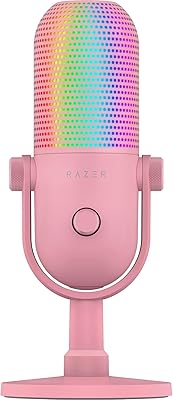
Razer Seiren V3 Chroma Microphone
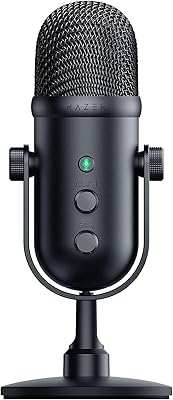
84%
88%
Sound Clarity
85%
Noise Cancellation
91%
RGB Lighting Features
93%
Ease of Use
80%
Microphone Durability
More
Razer Seiren V2 Pro
Razer Seiren V2 Pro
91%
96%
Audio Clarity
93%
Noise Suppression
91%
Build Quality
95%
Ease of Setup
92%
USB Connectivity Reliability
More
Razer Seiren Elite USB Digital Microphone
86%
91%
Audio Performance
88%
Build Quality
89%
Ease of Setup
92%
Sound Clarity
93%
Latency/Monitoring
More
Razer Seiren X USB Streaming Microphone
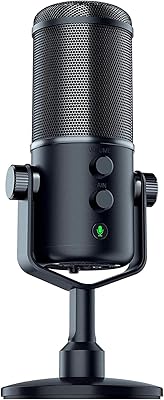
87%
88%
Sound Quality
90%
Noise Reduction
95%
Ease of Setup
85%
Build Quality
78%
Microphone Sensitivity
More
Razer Pro Click Mini Wireless Mouse
86%
92%
Quiet Click Performance
88%
Ergonomics/Comfort
85%
Multi-Device Connectivity
91%
Battery Life
89%
Build Quality
More
Razer Seiren V2 X
Razer Seiren V2 X
79%
88%
Voice Clarity
84%
Background Noise Rejection
93%
Ease of Setup
86%
Clipping & Distortion Control
67%
Build Quality
More
Cooler Master NR200P V3 Mini-ITX Case
83%
88%
Build Quality
91%
Ease of Assembly
93%
GPU Compatibility
85%
Cooling Efficiency
78%
Size & Portability
More
Razer Basilisk V3 Ergonomic Wired Gaming Mouse
87%
94%
Precision & Responsiveness
89%
Ergonomics & Comfort
91%
Customizability (Lighting & Buttons)
84%
Build Quality
76%
Weight & Balance
More
Beelink Mini S12 Pro (N100, 16GB, 500GB)

83%
83%
Everyday Performance
91%
Value for Money
76%
Build Quality & Design
84%
Thermal Management & Noise
88%
Connectivity & Ports
More
Beelink Mini S12 Mini PC, Intel 12th Gen, 8GB RAM, 256GB SSD
86%
87%
Performance for Everyday Tasks
92%
Energy Efficiency
82%
Multitasking Capability
89%
Setup and Installation
85%
Display Quality
More

FAQ

No, you do not. The mic works as a standard USB audio device the moment you plug it in — Windows and macOS both recognize it automatically. Razer Synapse is only needed if you want to push the sample rate to 96 kHz/24-bit or fine-tune EQ and gain settings. For basic voice capture on Discord or Zoom, software is completely optional.

Yes, it works with OBS Studio out of the box. Just plug it in, open OBS, and select it as your audio input device under Settings. No special drivers or configuration are required, and it also works the same way with XSplit and most other streaming platforms.

Unfortunately, no. This model does not have a headphone output port, so real-time monitoring through the mic itself is not possible. If you need to hear yourself while streaming or recording, you would need to route monitoring through your PC software, which introduces a small delay. The step-up Chroma version does include a 3.5mm headphone port if that feature is important to you.

It does a better job than most cardioid mics thanks to the supercardioid pickup pattern, which narrows the capture zone and pushes keyboard noise further into the rejection area. That said, if your keyboard is directly beside the mic or you type loudly, some bleed will still come through. Positioning the mic directly in front of your mouth and angling it slightly away from the keyboard makes a noticeable difference.

Yes. The desktop stand detaches cleanly to reveal a standard 5/8-inch thread, which fits the vast majority of boom arms and desktop mic stands available on the market. No adapter is needed for most popular options like the Rode PSA1 or Elgato Wave Arm.

It functions as a basic USB audio device on Linux without any drivers, so you can capture audio at default system settings. However, Razer Synapse does not run on Linux, which means advanced controls like sample rate adjustment and EQ are not accessible. If you are a Linux user who only needs straightforward voice capture, it will work — just without the extra software layer.

There is an LED indicator on the mic body that changes color depending on the mute state — you can tell at a quick glance whether your audio is going out or silenced. To mute, just tap the top of the mic once; tap again to unmute. It is straightforward and quick once you get used to the tap action.

Yes, any standard USB-A extension or longer USB-A cable will work fine. The mic does not require a proprietary cable, so a quality third-party cable from a reputable brand is a simple and inexpensive fix. Just make sure the replacement cable is not excessively long, as very long passive USB cables can occasionally cause signal or power instability.

For most people, yes — a dedicated condenser mic like this USB condenser mic will produce noticeably cleaner and fuller voice audio compared to the small capsules built into most gaming headsets. The improvement is most obvious to people listening on the other end of your Discord calls or watching your stream. If your current headset audio sounds thin, muffled, or picks up a lot of background noise, this is a meaningful step forward.

The stand has a passive dampening mechanism built into the base that absorbs low-frequency vibrations from the desk — things like accidental elbow knocks, mouse slams, or minor table movement. It works reasonably well for casual impacts. It is not a fully floating shock mount, so very heavy thumps or aggressive keyboard pounding directly on the desk can still transmit some noise, but it handles everyday accidents without issue.