Overview

The PWAYTEK DT257W-H Wireless HDMI Extender is a compact transmitter-receiver kit that cuts the cord between your source device and display, handling both video and audio over the air. It runs on dual-band Wi-Fi — 2.4GHz or 5GHz — giving you some flexibility depending on your environment. Setup is genuinely straightforward: connect the receiver to your TV or projector, plug the transmitter into your laptop or media box, and you are streaming. The advertised range tops out at 400 meters, though that figure applies to open outdoor spaces. Inside a typical home, wall obstruction trims that distance considerably. Output resolution stays at 1080p regardless of what you feed into the input side.
Features & Benefits

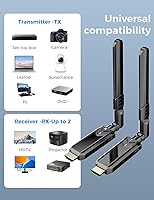
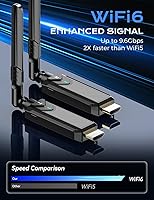
One of the more useful touches is the cable-free transmitter mode — if your laptop was manufactured after 2022, the transmitter can draw power directly from your machine's HDMI port, so there is nothing extra to plug in on the source side. The kit supports both 2.4GHz for extended range and 5GHz for tighter, lower-latency connections, which you can pick based on your setup. Device compatibility is broad, covering game consoles, Blu-ray players, cameras, and projectors alongside standard laptops. No drivers, no software installs. The whole unit weighs under six ounces, so tossing it in a bag for a presentation or outdoor screening is genuinely no added burden.

Best For

This cable-free display adapter makes the most sense for home users who want to push video from a laptop or streaming box to a distant TV without running cables through walls. It also works well for educators and presenters who need a quick wireless display solution in classrooms or meeting rooms where long HDMI cables are impractical. Outdoor setups — backyard movie nights, pop-up projection screens — are where the longer range actually has room to breathe. If you own a newer laptop and want a fully wireless experience on both ends, that is the sweet spot this kit is built for. Those needing low-latency performance for gaming may want to look elsewhere.

User Feedback

Buyers tend to praise how quickly the kit gets up and running — most report no fuss at all during initial setup, which matches the plug-and-play promise. The compact size also earns positive mentions from people who travel with it regularly. On the downside, real-world range through walls draws the most consistent criticism; users in multi-story homes or office environments report noticeably shorter effective distances than the outdoor spec suggests. A handful of buyers also flag noticeable latency when mirroring fast-moving content, making it a poor fit for gaming. Opinions on build quality are mixed — the plastic construction feels lightweight, which some find convenient and others find cheap. Picture quality at 1080p is generally described as clean for casual viewing.

Pros

  • Plug-and-play setup takes under two minutes with no software, accounts, or configuration required.
  • Dual-band support on 2.4GHz and 5GHz gives you flexibility to reduce interference in crowded Wi-Fi environments.
  • Works with a genuinely wide range of source devices including laptops, consoles, Blu-ray players, and cameras.
  • Owners of post-2022 laptops can run the transmitter completely cable-free off the HDMI port alone.
  • At under six ounces, this transmitter-receiver kit fits easily into a laptop bag without adding noticeable weight.
  • Outdoor range is strong enough for backyard screenings and open-air presentations where cables are impractical.
  • 1080p output looks clean and sharp for presentations, document mirroring, and casual video streaming.
  • No pairing codes or network passwords needed — the two units find each other automatically on power-up.

Cons

  • Indoor range drops sharply through walls; multi-room or multi-story use is unreliable in practice.
  • Latency makes this cable-free display adapter unsuitable for gaming or any fast-motion interactive content.
  • Output is capped at 1080p regardless of input resolution, which will disappoint 4K display owners.
  • The power-free transmitter mode only works with laptops manufactured after 2022, locking out many existing machines.
  • Plastic construction feels fragile around the connector ports, raising questions about long-term durability.
  • Signal consistency degrades noticeably in apartment buildings or offices with heavy Wi-Fi congestion.
  • Documentation is sparse and unevenly translated, making troubleshooting harder than it should be.
  • No carrying pouch is included, leaving the units vulnerable to scratches and minor damage in a bag.

Ratings

The PWAYTEK DT257W-H Wireless HDMI Extender scores below are generated by AI after analyzing verified buyer reviews from multiple global markets, with spam, bot activity, and incentivized feedback actively filtered out. The ratings reflect a balanced picture — where this transmitter-receiver kit genuinely delivers and where real users have run into friction. Strengths and pain points are weighted equally so you can make an informed call before buying.

Ease of Setup
88%
Most buyers describe the initial setup as refreshingly quick — plug the receiver into the display, connect the transmitter to the source, and content starts flowing within a minute or two. No driver downloads, no pairing codes, no configuration menus. For non-technical users, that straightforwardness is a genuine relief.
A small but consistent group of users reports confusion about the correct connection sequence, particularly around which unit needs power first. The instructions could be clearer, and a few buyers had to restart the process after connecting things in the wrong order.
Wireless Range — Indoors
54%
46%
In open-plan spaces like large living rooms or studio apartments, the kit handles distances of 15 to 20 meters without much complaint. Users in single-story homes with minimal wall interference generally find the range more than adequate for typical home theater use cases.
The 400-meter headline figure is strictly a line-of-sight outdoor number, and buyers in multi-room or multi-story homes learn that quickly. Concrete walls, metal studs, and even dense furniture noticeably shorten the effective range, with some users reporting drop-outs beyond 8 to 10 meters indoors.
Wireless Range — Outdoors
78%
22%
For outdoor setups like backyard screenings or open-air presentations, the kit performs respectably well. Users running projectors in gardens or on patios with clear sightlines report stable connections at distances well beyond what a cable run would allow.
Even outdoors, obstacles like fences, hedges, or parked vehicles introduce interference. The full 400-meter spec appears to be a best-case ceiling rather than a typical expectation, and users who plan around that number outdoors may still be disappointed in practice.
Video Quality — Output
71%
29%
At 1080p, the transmitted picture looks clean and sharp enough for presentations, casual streaming, and movie nights. Users mirroring office documents or slide decks onto a projector report a crisp, legible image with no visible compression artifacts under normal conditions.
The 4K input versus 1080p output distinction catches some buyers off guard — what you feed in does not come out at 4K on the other end. For anyone expecting to push high-resolution content to a 4K display at full native resolution, this kit will fall short of expectations.
Latency & Sync
57%
43%
For static content like slideshows, document mirroring, or streaming video where a half-second delay is unnoticeable, the latency is manageable. Users running business presentations or casual Netflix playback rarely flag sync as a problem in their reviews.
Gaming and fast-motion video are where the latency becomes genuinely problematic. Multiple buyers who attempted to mirror console or PC gameplay describe a lag that makes the experience frustrating. Audio sync can also drift during extended sessions, which several users noted during movie playback.
Build Quality
62%
38%
The compact, slim profile is a practical advantage for anyone tossing this into a laptop bag. The form factor is genuinely travel-friendly, and the low weight means it does not add meaningful bulk to a carry setup.
The plastic housing feels noticeably lightweight — in a way that reads more fragile than premium. Several buyers question long-term durability, especially around the HDMI connector ports, which do not inspire confidence under repeated plugging and unplugging.
Dual-Band Performance
74%
26%
Having the option to switch between 2.4GHz and 5GHz is a meaningful practical advantage. Users in crowded Wi-Fi environments — apartment buildings, busy offices — find that hopping to 5GHz reduces interference and stabilizes the connection noticeably.
The band-switching process is not always intuitive, and some buyers are unsure which band they are actually on at any given time. There is no clear visual indicator distinguishing the two, so troubleshooting a weak connection requires some trial and error.
Cable-Free Transmitter Feature
67%
33%
For owners of laptops manufactured after 2022, the ability to run the transmitter purely off the HDMI port — no separate power cable — is a genuinely convenient touch. It reduces desk clutter and simplifies setup in spaces where outlets are scarce.
The 2022 cutoff locks out a large portion of potential users, and this limitation is not prominently communicated at purchase. Buyers with slightly older machines who expected full wireless operation on both ends have expressed clear frustration after unboxing.
Device Compatibility
81%
19%
The breadth of compatible source devices is a real strength. Buyers have used this kit successfully with laptops, streaming sticks, Blu-ray players, game consoles, and cameras — all without needing to swap adapters or wrestle with driver conflicts.
A handful of users report inconsistent behavior with certain older Blu-ray players and some smart TV HDMI-out configurations. Compatibility is broad but not universal, and edge cases do exist, particularly with devices that have non-standard HDMI implementations.
Signal Stability
63%
37%
In interference-light environments — a dedicated home office or a suburban backyard — the signal holds steadily for extended periods. Users running looped presentations or continuous background video in clean RF environments report few spontaneous disconnections.
In apartments or offices with heavy Wi-Fi congestion, signal dropout is a recurring complaint. Some users describe the connection as inconsistent enough to require periodic restarts, which is disruptive during live presentations or uninterrupted movie viewing.
Audio Transmission
72%
28%
For standard stereo and basic surround content, audio comes through cleanly and in sync under stable signal conditions. Buyers using this for background music playback or voice-heavy presentation audio are generally satisfied with the result.
High-bitrate audio formats and multi-channel surround setups are not reliably supported, and audiophiles will notice the limitations quickly. A few users also mention intermittent audio dropouts that appear independently of video stability, suggesting the audio path has its own weak points.
Portability
86%
At under six ounces and with a slim, flat profile, this cable-free display adapter is one of the more genuinely portable options in its category. Teachers, traveling consultants, and event organizers have highlighted how easy it is to carry alongside a laptop without a dedicated case.
While the size is an asset, the lack of a protective carrying pouch means the transmitter and receiver rattle around loosely in a bag. A few buyers have arrived at their destination to find a scratched or slightly bent unit as a result.
Value for Money
76%
24%
At its price point, this transmitter-receiver kit offers a compelling entry into wireless HDMI for casual users who do not want to invest in higher-end extender systems. The plug-and-play convenience and broad compatibility justify the cost for everyday home and office use.
Users with demanding use cases — gaming, 4K output, reliable long indoor range — tend to feel the price-to-performance trade-off less favorably. Spending more on a dedicated wireless HDMI solution with lower latency and better signal management is a reasonable conclusion for power users.
Documentation & Support
51%
49%
The physical setup steps are simple enough that most users get running without ever consulting the manual. Buyers who only need basic mirroring functionality rarely have to dig deeper than the quick-start card included in the box.
The documentation is thin and translation quality is uneven in places, leaving edge-case troubleshooting largely up to the buyer. Customer support response times and resolution rates draw consistent criticism, which becomes a real problem when the kit behaves unexpectedly.

Suitable for:

The PWAYTEK DT257W-H Wireless HDMI Extender is a practical pick for anyone who wants to cut the cable between a source device and a distant display without dealing with complex networking setups. Home users who want to mirror a laptop to a living room TV across a large open-plan space will find the plug-and-play approach genuinely refreshing — no IT background required. Teachers and corporate presenters who move between rooms and need a reliable wireless display solution will appreciate how quickly the kit deploys and packs away. Outdoor setups are another clear sweet spot: backyard movie nights, open-air events, or temporary projection setups in spaces where running a cable is simply not practical. If you own a laptop manufactured after 2022 and want both ends of the connection to be fully cable-free, this transmitter-receiver kit is one of the more accessible ways to get there without spending on a high-end solution.
Not suitable for:

The PWAYTEK DT257W-H Wireless HDMI Extender will frustrate buyers who take the 400-meter range claim at face value inside a typical home — that figure only holds in open outdoor conditions with no obstacles, and real-world indoor range through multiple walls is considerably shorter. Gamers should look elsewhere entirely; the latency introduced by this cable-free display adapter makes fast-paced gaming noticeably sluggish, and no amount of band-switching will close that gap. Anyone expecting native 4K output will be disappointed, since the signal is transmitted and delivered at 1080p regardless of what resolution the source is pushing. Users with laptops older than 2022 who want a fully wireless setup on the transmitter side will also find that the no-power-cord feature does not apply to their hardware. If your environment is dense with competing Wi-Fi networks — a busy apartment building or a heavily networked office — signal stability may be inconsistent enough to make this kit unreliable for professional or uninterrupted use.
Specifications

  • Brand: Manufactured and sold under the PWAYTEK brand.
  • Model Number: The unit's official model designation is DT257W-H.
  • Transmission Range: Supports wireless transmission up to 400 meters in open, line-of-sight outdoor conditions; indoor range is significantly reduced by walls and obstacles.
  • Frequency Bands: Operates on both 2.4GHz and 5GHz Wi-Fi bands, allowing users to select based on range or latency preference.
  • Protocol: Uses the IEEE 802.11n wireless protocol for data transmission between the transmitter and receiver units.
  • Input Resolution: Accepts video input at resolutions up to 4K from compatible source devices.
  • Output Resolution: Delivers video output at a maximum resolution of 1080p to the connected display, regardless of input resolution.
  • Compatible Devices: Works with laptops, desktop PCs, cameras, monitors, projectors, TVs, game consoles, and Blu-ray players via standard HDMI connections.
  • Setup Type: Plug-and-play operation with no drivers, software installation, or account registration required.
  • Power — Transmitter: The transmitter can draw power directly from an HDMI port on laptops manufactured after 2022, eliminating the need for a separate power cable on those devices.
  • Special Feature: Supports screen mirroring, allowing users to duplicate or extend their source device display wirelessly to a remote screen.
  • Weight: The complete kit weighs approximately 5.6 ounces (0.16 kg), making it lightweight and travel-friendly.
  • Package Dimensions: The retail package measures 6.26 x 5.67 x 0.94 inches, compact enough to fit easily in a laptop bag or backpack pocket.
  • Color: Available in black finish for both the transmitter and receiver units.
  • Audio Support: Transmits audio signals alongside video over the same wireless connection, supporting standard stereo and basic multi-channel audio formats.
  • Date Available: This product was first listed for sale on March 29, 2025.

Related Reviews
Weeryyi Wireless HDMI Extender Receiver
83%
91%
Value for Money
88%
Ease of Setup
85%
Signal Stability
83%
Range Performance
70%
Latency
More
Hollyland Pyro H Wireless HDMI Video Transmission System
87%
94%
Video Transmission Quality
92%
Latency Performance
89%
Range and Signal Stability
82%
Ease of Setup
90%
Multi-Receiver Support
More
Mirabox Wireless HDMI Transmitter and Receiver Extender 1x4-1080P@60Hz
85%
88%
Signal Strength & Range
91%
Setup & Installation
85%
Latency & Performance
83%
Build Quality
89%
Multi-Screen Setup
More
J-Tech Digital Wireless HDMI Extender 1X2 (JTECH-WEX200V3)
85%
91%
Value for Money
95%
Setup & Installation
88%
Signal Strength
92%
Latency for Video Playback
80%
Range Performance
More
PWAYTEK HDMI Extender Splitter 1x2 1080P@60Hz Over Cat 5E/6/7 Ethernet Cable
85%
88%
Value for Money
92%
Ease of Setup
89%
Signal Quality & Clarity
86%
Long-Distance Performance
84%
Build Quality
More
Mirabox HDMI Extender 400ft
85%
94%
Signal Quality
85%
Ease of Setup
90%
Build Quality
91%
Transmission Range
89%
Audio Performance
More
DxInvb Wireless HDMI Transmitter and Receiver Kit
75%
91%
Ease of Setup
58%
Device Compatibility
74%
Wireless Range & Stability
69%
Video Quality
83%
Build Quality & Portability
More
TESmart HDMI KVM Extender Receiver
85%
91%
Signal Stability
86%
Installation Ease
90%
Build Quality
88%
Heat Dissipation
93%
Compatibility
More
AGPTEK LKV373A 1080P HDMI Extender
86%
93%
Signal Reliability
88%
Installation Ease
89%
Compatibility with Devices
85%
Build Quality
91%
Value for Money
More
OREI EX-500IR HDMI Extender
88%
94%
Transmission Distance
92%
Signal Quality
89%
Ease of Installation
85%
Build Quality
88%
Power over Cable (PoC) Functionality
More

FAQ

It depends on your laptop. If your laptop was manufactured after 2022, the transmitter can pull power directly from your laptop's HDMI port, so the sending side is fully cable-free. The receiver unit, which plugs into your TV or projector, will still need its own power source. So for newer laptops, yes — you can have a genuinely wireless experience on the transmitter end.

That 400-meter figure is a best-case, open-air, line-of-sight measurement taken outdoors with nothing in the way. Inside a typical home, walls, floors, and other wireless devices all eat into that range significantly. Realistically, you can expect reliable performance up to around 8 to 15 meters indoors depending on how many walls are between the two units. Think of the 400-meter spec as the ceiling in ideal conditions, not the everyday expectation.

The 4K specification refers to input only — meaning the transmitter can accept a 4K signal from your source device, but the output delivered to your display is capped at 1080p. If you are connecting this to a 4K television hoping to watch 4K content wirelessly, you will not get that. The image at 1080p is clean and watchable, but it is not native 4K.

We would not recommend it for gaming, honestly. The wireless transmission introduces latency that is noticeable enough to affect gameplay, particularly in fast-paced titles where timing matters. It is fine for casual video streaming or presentations where a slight delay is invisible, but for gaming you would be better served by a wired connection or a purpose-built low-latency wireless solution.

Unfortunately, no. The power-free transmitter function is only compatible with laptops manufactured after 2022 — it depends on how HDMI ports on those newer machines are configured to supply power. On a 2020 laptop, you will need to plug the transmitter into a USB power source or wall adapter separately. The kit will still work; it just will not be fully cable-free on your end.

No, and this is actually one of the more practical aspects of this transmitter-receiver kit. The two units create a direct wireless link between themselves without going through your home network or router. That means you do not need to share your Wi-Fi password, configure network settings, or worry about your internet speed affecting the transmission.

For slide-based presentations and document mirroring, the latency is generally not an issue. The slight delay that exists is not visible to an audience watching static or slowly changing slides. Where it becomes noticeable is during video playback or any content with rapid motion, but for a standard business or classroom presentation, most users report a smooth enough experience.

Yes, this is actually one of the better use cases for this cable-free display adapter. In an open backyard with clear sightlines between the transmitter and the projector's receiver, the range is more than sufficient and the connection tends to be more stable than indoors. Just keep the two units within a reasonable distance and avoid placing them behind solid obstacles.

As distance increases or walls come between the units, you may notice the image quality degrade or the connection become unstable before it drops entirely. On the 5GHz band you tend to get better quality at shorter distances, while 2.4GHz gives you slightly more range at the cost of potential interference. If you start seeing pixelation or stuttering, switching bands or repositioning the units closer together usually helps.

The kit is lightweight and compact, which makes it easy to carry, but the plastic construction is on the thinner side. The connector ports in particular feel like they would not hold up well to rough handling over a long period. If you are traveling with it regularly, keeping the units in a padded pouch rather than loose in a bag is a good idea — one that is not included in the box, so you would need to source that separately.