Overview

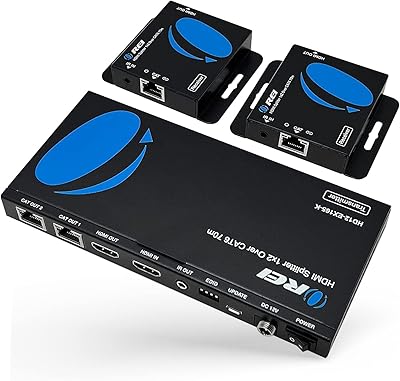
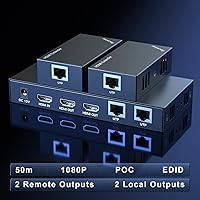
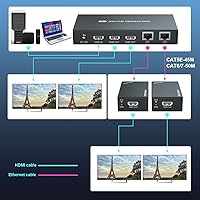
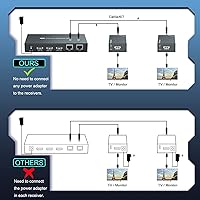
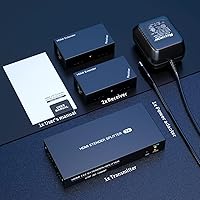
The PWAYTEK HTS010X HDMI Extender Splitter 1x2 does something genuinely useful: it takes one HDMI source and distributes it to two displays up to 50 meters away, all over ordinary ethernet cabling you likely already have in the walls. No need to pull long HDMI runs or invest in expensive matrix hardware. It sits comfortably in the middle ground — more capable than the cheapest no-name options, but far more affordable than pro AV gear. A local HDMI loopout on the transmitter lets you keep a nearby monitor connected too, and Power over Cable means the receivers never need their own power bricks.

Features & Benefits

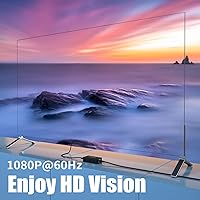
At its core, this HDMI extender splitter runs full 1080p at 60Hz to both output screens simultaneously — crisp, fluid video with no compression artifacts when paired with decent cabling. Cat6 or Cat7 gets you the full 50-meter range; Cat5e tops out closer to 45 meters. The built-in EDID copy function is worth calling out specifically: it stores display capability data on the transmitter side, which dramatically reduces the handshake failures that plague mixed-display setups. Both receivers show identical content, the whole chain runs off a single power adapter, and backward compatibility with 720p, 1080i, and 3D rounds out the signal support nicely.

Best For

This 1x2 HDMI over ethernet unit makes the most sense for anyone doing a structured install where ethernet is already in place. Conference rooms and classrooms are the obvious fit — run one laptop or media player feed to two projectors or displays without signal degradation. Retail and exhibition spaces benefit from the synchronized dual-screen output, keeping messaging consistent across both screens without extra software. Home users routing a single source to two rooms will find it equally practical, as will security setups needing a remote feed over existing Cat6 runs. If you are re-cabling from scratch anyway, just run HDMI directly.

User Feedback

Across 158 ratings averaging 4.3 out of 5, this extender kit earns most of its praise for reliable signal quality at range and the clean install that the POC design enables. Many buyers appreciate how little setup fuss is involved. The critical notes are worth heeding though: cable quality matters significantly here, and users running older or lower-grade Cat5e have reported intermittent dropouts that cleared up after upgrading their cable. A small number mention EDID handshake delays on first power-up, though a simple power cycle typically resolves it. One honest caveat — if your source outputs 4K and downscales, results can be inconsistent. Native 1080p sources work reliably.

Pros

  • Distributes a single 1080p source to two remote displays over Cat6 cabling already in the walls.
  • Power over Cable design means only one power adapter is needed for the entire transmitter-and-receiver chain.
  • Built-in EDID copy function reduces handshake failures when the two connected displays are different brands or models.
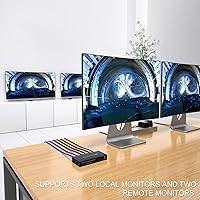
  • Local HDMI loopout on the transmitter keeps a nearby monitor active without consuming a receiver unit.
  • Plug-and-play setup gets most installs running in minutes with zero driver or software configuration.
  • Full 50-meter range over Cat6 or Cat7 holds up reliably in real-world office and classroom deployments.
  • Compatible with 720p, 1080i, and 3D signals in addition to 1080p, so older source equipment integrates cleanly.
  • Single-adapter POC design reduces outlet requirements and cable clutter at remote receiver locations significantly.
  • Priced in a practical middle tier — more capable than budget no-name units, far less than enterprise matrix gear.

Cons

  • Signal dropouts and flickering are common on older or lower-grade Cat5e runs — cable quality directly impacts performance.
  • Occasional EDID handshake delays on first boot can leave one or both screens dark until the unit is power-cycled.
  • 4K sources set to downscale to 1080p can cause inconsistent display initialization across the two receivers.
  • Both outputs always mirror the same signal — independent content per screen is not possible with this hardware.
  • A single adapter powering the whole chain means one failure point takes down all connected displays simultaneously.
  • Transmitter housing runs noticeably warm during extended use, which may be a concern in enclosed or unventilated installs.
  • No clearly documented warranty or manufacturer support process creates uncertainty for long-term commercial deployments.
  • Cannot route through a managed network switch between transmitter and receivers, limiting install topology options.

Ratings

The PWAYTEK HTS010X HDMI Extender Splitter 1x2 has been scored below using AI analysis of verified global buyer reviews, with spam, bot activity, and incentivized feedback actively filtered out. The ratings reflect where this extender kit genuinely delivers and where real users have hit friction — no scores have been softened to protect the brand. Both the strengths that make it a go-to for structured AV installs and the practical limitations buyers encounter in the field are represented transparently.

Signal Quality
86%
Users running Cat6 or Cat7 cabling consistently report clean, stable 1080p output to both screens with no visible degradation even at the full 50-meter range. In conference room and classroom installs, the picture quality holds up well enough that most audiences cannot tell the signal has traveled across a building.
Signal integrity drops noticeably when older or lower-grade Cat5e is in the walls — a handful of buyers reported intermittent flickering or brief dropouts that only cleared after swapping cables. This is a real-world limitation worth factoring in before purchase.
Ease of Setup
83%
The plug-and-play experience is one of the most praised aspects here. Most buyers report having both receivers up and displaying within minutes, with no driver installs or configuration menus to navigate — a genuine advantage for quick deployment in office or retail environments.
A small but consistent group of reviewers ran into EDID handshake delays on initial boot, where one or both screens stayed dark until the unit was power-cycled. It is not a dealbreaker, but it can be confusing the first time it happens.
Transmission Range
88%
Reaching two separate rooms or zones from a single source over ethernet cabling already in the walls is the core use case here, and the extender handles it well. Cat6 runs hitting the full 50-meter ceiling returned reliable results in multiple user-reported installs.
The effective range steps down meaningfully on older cabling — Cat5e caps around 45 meters and Cat5 around 40 meters. If your building uses mixed cabling standards across runs, one receiver may perform noticeably worse than the other.
Power over Cable Convenience
91%
Installers and home users alike single out the POC design as a standout practical feature. Running a single power adapter at the transmitter end and having both receivers draw power through the ethernet cable keeps remote locations tidy and cuts down on wall outlet requirements significantly.
The dependency on a single adapter means a power interruption or adapter failure takes down the entire chain at once. A spare adapter on hand is worth keeping around for critical installs where downtime is not acceptable.
EDID Compatibility
74%
26%
The built-in EDID copy function meaningfully reduces the display negotiation headaches that often occur when splitting a signal to two screens with different manufacturers or native resolutions. Users mixing a projector and a flat panel on the same system appreciated not having to fiddle with forced resolution settings.
Some users pairing the extender with a 4K source deliberately downscaled to 1080p reported inconsistent behavior — one screen would initialize correctly while the other lagged or showed a blank screen. Pure 1080p sources behave predictably; mixed-resolution chains do not always.
Build Quality
71%
29%
The housings feel solid enough for rack-adjacent or wall-mounted installs, and the RJ45 and HDMI ports seat firmly without wobble. For a device that is typically installed and forgotten, the physical construction is adequate for the price tier.
The plastic shell does not inspire confidence for high-traffic environments, and a few buyers noted the transmitter unit ran warmer than expected during extended use. Nothing that caused failures in reported cases, but worth monitoring in enclosed or poorly ventilated spaces.
Value for Money
82%
18%
Sitting between bargain-bin no-name units and significantly pricier professional AV gear, this extender kit offers a workable middle ground for buyers who need reliable 1080p distribution without a large budget. The POC feature alone offsets some of the cost compared to kits that require separate receiver power supplies.
If your environment demands 4K output or long-term enterprise reliability, this price tier starts to feel limiting. A few buyers who assumed the unit would handle 4K passthrough felt the value proposition weakened once they discovered the 1080p ceiling.
Compatibility
69%
31%
Works reliably with standard 1080p sources including laptops, media players, and desktop PCs connected via HDMI. Backward compatibility with 720p and 1080i signals means older source equipment integrates without issues in most cases.
The 4K downscaling edge case is the most reported compatibility pain point — sources set to output 4K that rely on the display chain to negotiate down can cause handshake problems on one or both receivers. Buyers with 4K source equipment should set the output to 1080p manually before connecting.
Cable Sensitivity
58%
42%
When paired with quality Cat6 or Cat7 cabling, the extender performs at its rated specifications without issue. Buyers who invested in good-quality cable from the start reported zero signal complaints across their reviews.
This is one of the more cable-dependent extenders users have flagged in this category. Cheap patch cables, old building ethernet, or damaged runs will surface problems that might otherwise be attributed to the device itself — and that distinction is not always obvious to less experienced buyers.
Local Loopout Functionality
79%
21%
The transmitter-side HDMI loopout port is a genuinely useful feature for installs where a nearby monitor needs to stay active — think a presenter monitor at the front of a room while two projectors handle the audience-facing displays. Users in classroom and stage setups found this practical.
The loopout is a passive convenience rather than a fully independent output — it mirrors the source and cannot be configured separately. For users hoping to show different content on the local screen versus the remote receivers, this limitation is significant.
Installation Flexibility
81%
19%
The combination of ethernet-based distribution, POC, and a local loopout gives installers several layout options that a simple HDMI splitter cannot match. Running cable through existing conduit or wall runs is far more practical than pulling thick HDMI cables over the same distances.
The setup does require that both receivers are on the same ethernet segment as the transmitter — you cannot route through a managed network switch between them. That constraint rules out some building topologies where the two display locations are on separate network runs.
Long-term Reliability
73%
27%
The majority of buyers who have had this extender kit deployed for extended periods — six months or more in commercial installs — report no degradation in performance when the cabling infrastructure is solid. Set-it-and-forget-it describes the experience for most long-term users.
The sample of long-term reviews is relatively small given the product age, and a handful of users reported units developing intermittent issues after a year of continuous use. The absence of a well-documented warranty process for a lesser-known brand adds some uncertainty for mission-critical deployments.

Suitable for:

The PWAYTEK HTS010X HDMI Extender Splitter 1x2 is a strong fit for anyone who needs to push a single 1080p source to two separate displays across meaningful distances — and who already has ethernet cabling in place to do it. IT coordinators setting up dual-screen presentation systems in conference rooms or training spaces will find the plug-and-play install refreshingly straightforward compared to pulling new HDMI runs through finished walls. Classroom AV setups benefit from the same logic: one media player or laptop feeds both a teacher-facing monitor and a projector without any additional hardware. Retail and exhibition installers running synchronized signage on two screens will appreciate that both outputs mirror each other reliably with no content drift. Home users routing a single streaming device to a living room TV and a bedroom screen will also find this extender kit practical, provided their home has Cat6 or Cat5e already wired between rooms. Security and surveillance operators who need a remote monitoring feed over existing structured cabling round out the ideal audience.

Not suitable for:

Buyers expecting 4K output should look elsewhere — this extender kit is a 1080p device, full stop, and users who connect 4K sources without manually forcing 1080p output have reported inconsistent display negotiation across the two receivers. If your infrastructure runs on older or lower-grade Cat5e cabling, you may find the signal reliability frustrating; this is one of the more cable-sensitive extenders in its class, and the hardware will only perform as well as the cabling supporting it. Anyone needing to distribute content independently to each screen — different sources or different content streams per display — will hit a hard wall here, since both outputs always mirror the same signal. Buyers in enterprise or mission-critical environments may find the lack of a clearly documented warranty or manufacturer support process a meaningful risk over multi-year deployments. Finally, users working in topologies where the two remote displays sit on separate network segments cannot bridge the gap with a managed switch between them — the transmitter and both receivers need to be on the same direct ethernet run.

Specifications

  • Brand: Manufactured and sold under the PWAYTEK brand, model number HTS010X.
  • Signal Split: Accepts one HDMI input and distributes the identical signal to two HDMI outputs simultaneously.
  • Max Resolution: Supports up to 1920x1080p at 60Hz for full HD output on both connected displays.
  • Compatible Resolutions: Backward compatible with 1080i, 720p, and 3D signal formats in addition to 1080p.
  • Max Range (Cat6/7): Achieves a maximum transmission distance of 50 meters (approximately 164 feet) over Cat6 or Cat7 ethernet cable.
  • Max Range (Cat5e): Transmission distance is limited to approximately 45 meters (147 feet) when using Cat5e ethernet cable.
  • Max Range (Cat5): Transmission distance is limited to approximately 40 meters (131 feet) when using standard Cat5 ethernet cable.
  • Power over Cable: A single power adapter at the transmitter powers the entire kit via the ethernet cable, eliminating the need for separate adapters at receiver locations.
  • Local Loopout: The transmitter unit includes a dedicated HDMI loopout port allowing a nearby display to be connected directly at the source end.
  • EDID Function: Integrated EDID copy function stores display capability data on the transmitter to reduce handshake failures across mixed display setups.
  • Connector Types: Uses HDMI connectors on source and display ends, and RJ45 connectors for the ethernet cable runs between transmitter and receivers.
  • Cable Required: Requires Cat5, Cat5e, Cat6, or Cat7 ethernet cable (sold separately); higher-grade cable is strongly recommended for maximum range and stability.
  • Package Dimensions: The packaged kit measures 8.86 x 6.54 x 3.03 inches, suitable for standard shipping and storage.
  • Item Weight: The complete kit weighs 1.43 pounds including transmitter, two receivers, and accessories.
  • Color: All units in the kit are finished in black.
  • Package Contents: The kit includes one transmitter unit and two receiver units, forming a complete 1-in 2-out over-ethernet distribution system.
  • Input Count: The transmitter accepts a single HDMI input from a source device such as a PC, media player, or set-top box.
  • Output Count: The system provides two remote HDMI outputs via the receiver units, plus one local HDMI loopout on the transmitter, for up to three total connected displays.

Related Reviews
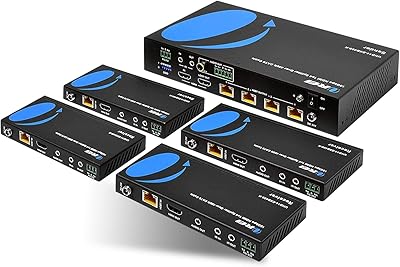
OREI UHD14-EXB400-K 1x4 HDBaseT HDMI Extender Splitter
77%
91%
Signal Quality & Stability
88%
4K & HDR Performance
83%
Transmission Range
47%
Ecosystem Compatibility
78%
Ease of Setup
More
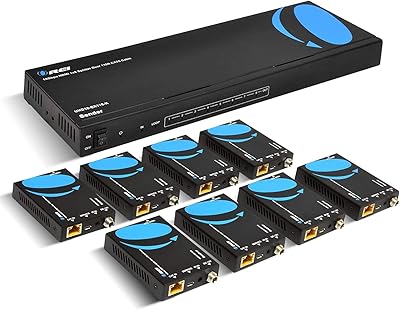
OREI HD14-EX165-K
OREI HD14-EX165-K
78%
84%
Signal Stability
62%
4K Performance
88%
1080p Performance
91%
Installation Ease
93%
Power Over Cable
More
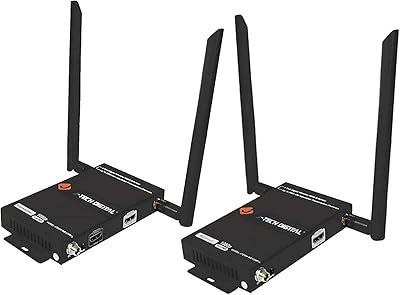
J-Tech Digital Wireless HDMI Extender 1X2 (JTECH-WEX200V3)
85%
91%
Value for Money
95%
Setup & Installation
88%
Signal Strength
92%
Latency for Video Playback
80%
Range Performance
More
OREI HD12-EX165-K 4K HDMI Over Ethernet Extender Splitter
85%
88%
Ease of Setup
91%
Signal Quality and Performance
89%
Long-Distance HDMI Transmission
84%
IR Control Functionality
87%
Power Over Cable (PoC) Feature
More
OREI UHD18-EX115-K 4K 1x8 HDMI Extender Splitter
84%
88%
Performance
91%
Signal Quality
93%
Installation & Setup
85%
Range & Connectivity
68%
IR Control Range
More
Arvitek 1x8 HDMI Splitter
82%
92%
Ease of Setup
88%
Build Quality
87%
Compatibility with Devices
85%
Performance (Resolution & Speed)
84%
Durability
More
Mirabox HDMI Extender 400ft
85%
94%
Signal Quality
85%
Ease of Setup
90%
Build Quality
91%
Transmission Range
89%
Audio Performance
More
AGPTEK LKV373A 1080P HDMI Extender
86%
93%
Signal Reliability
88%
Installation Ease
89%
Compatibility with Devices
85%
Build Quality
91%
Value for Money
More
KAGO B042-8 1x8 HDMI Splitter
74%
83%
Signal Distribution Reliability
76%
4K Performance
79%
HDCP 2.2 Compatibility
88%
Ease of Setup
74%
Build Quality
More
OREI EX-500IR HDMI Extender
88%
94%
Transmission Distance
92%
Signal Quality
89%
Ease of Installation
85%
Build Quality
88%
Power over Cable (PoC) Functionality
More

FAQ

For the vast majority of setups, yes — connect the source to the transmitter, run your Cat6 cables to each receiver, plug in the displays, and it works without any software or menu configuration. The EDID copy function handles display negotiation automatically. The one exception some users hit is a blank screen on first boot that resolves after a quick power cycle.

Both outputs always mirror the identical signal — there is no way to send different content to each screen with this device. If you need independent content per display, you would need a matrix switcher or a different distribution solution entirely.

Cat5e will work, but your effective range drops to around 45 meters instead of the full 50 meters you get with Cat6. More importantly, the quality of your Cat5e matters — old, damaged, or low-grade runs are the most common cause of signal dropouts reported by users of this extender kit. If the cable is in good condition and your run is under 40 meters, you should be fine.

This is actually one of the trickier scenarios with this unit. If your source device is set to output 4K natively and relies on the display chain to negotiate a lower resolution, some users have reported inconsistent initialization on one or both screens. The safest approach is to manually force your source device to output at 1080p before connecting — that way the EDID handshake is clean from the start.

Just one adapter for the whole system. The Power over Cable design routes power from the transmitter end through the ethernet cables to both receivers, so neither remote location needs its own outlet or adapter. It is one of the more practical aspects of this setup for keeping remote installs tidy.

No — the PWAYTEK HTS010X HDMI Extender Splitter 1x2 requires a direct point-to-point ethernet connection between the transmitter and each receiver. Routing through a managed or unmanaged network switch in between will not work. Each receiver needs its own dedicated cable run back to the transmitter.

Nothing — it just sits unused with no effect on the remote receiver outputs. The loopout port is entirely optional and only comes into play if you want a third display connected directly at the source location. Most installers leave it unused unless they specifically need a presenter monitor at the transmitter end.

Users have not widely reported lip sync problems, and HDMI over ethernet extenders of this type carry audio and video together with consistent latency across the cable run. At 50 meters over Cat6 the signal delay is negligible for standard viewing. If you are doing live performance or broadcast monitoring where sub-frame latency matters, this class of device is generally not recommended.

Not directly in a chain — you cannot daisy-chain the receivers. However, if you need more than two remote outputs, one approach is to connect the local loopout on the transmitter to a second unit as its input, giving you up to four remote displays in total. Signal quality on the second stage will depend heavily on cable quality throughout.

PWAYTEK does not have a prominently documented warranty policy on the Amazon listing, which is worth knowing before you commit to a critical commercial install. For home or low-stakes office use the risk is manageable, but for mission-critical deployments it is worth reaching out to the seller directly before purchasing to clarify support terms.