Overview

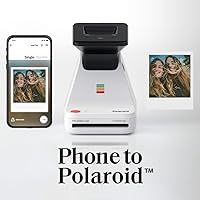
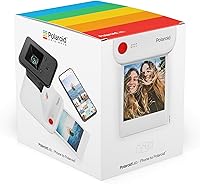
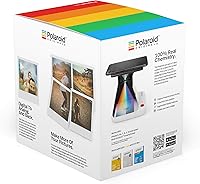
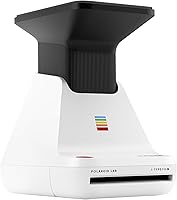
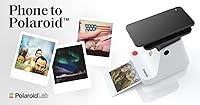
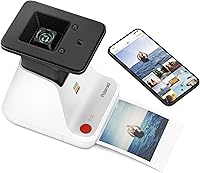
The Polaroid Lab Instant Photo Printer does something genuinely clever: it takes photos sitting on your iPhone and turns them into real, bordered Polaroid prints. There's a real appetite for this right now — people are tired of great shots that live permanently on a screen and get seen by almost nobody. The workflow is app-driven, which makes it feel distinct from a traditional instant camera; you pick your shot, place your phone face-down on the device, and let it work. A few things worth knowing upfront: film is not included, it outputs one print at a time, and this is essentially an iOS-only experience.
Features & Benefits

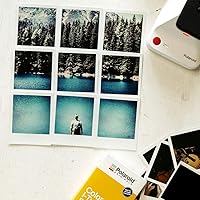
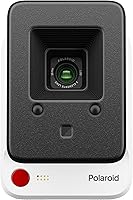
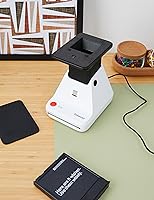
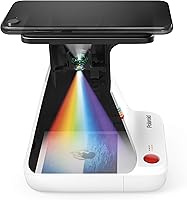
What makes the Polaroid Lab technically interesting is its three-element lens system, which physically projects your phone screen onto the film — no inkjet, no cartridges, just light hitting film the old-fashioned way. That process gives prints their characteristic soft, slightly dreamy quality. The companion app adds genuinely useful extras: collage layouts and augmented reality overlays that activate when someone points a phone at the finished print. Setup is simple — plug in via USB, load your film, and you're ready. At 1.4 pounds with a compact cube shape measuring 5.9″ on each side, it's easy to bring out at a gathering without dominating the space.

Best For

This instant photo printer suits a specific kind of buyer rather than everyone. If you have years of digital photos you love but rarely revisit, physically printing a few favorites has a way of making them feel real again. It also works well as a gift for creative teens and young adults who want something tangible beyond a screen. Party hosts will appreciate having an activity that produces physical keepsakes on the spot. That said, Android users should skip this — compatibility is firmly iPhone-focused. And if the recurring cost of film gives you pause, factor it in carefully before committing, since each pack covers only eight shots.

User Feedback

Buyers tend to settle into one of two camps pretty fast. Those who love this Polaroid printer describe the experience as genuinely fun — there's something satisfying about watching a blank white frame slowly develop into a photo from your camera roll. First-timers consistently mention easy initial setup as a highlight. The most common frustration, though, isn't the hardware — it's the ongoing film expense that catches people off guard. Some also report prints coming out darker or less vibrant than the original digital image, which surprises anyone expecting crisp photo-realistic output. App stability draws mixed feedback, with most finding it reliable but a few noting occasional crashes.

Pros

  • Converts your existing digital photo library into physical Polaroid prints without needing a separate camera.
  • The optical lens system produces genuinely analog-looking prints with authentic vintage character.
  • Setup is fast and approachable — most users are printing within minutes of unboxing.
  • Compact and light enough to bring to parties, gatherings, or a friend's place without hassle.
  • No ink cartridges or consumable hardware components beyond film packs to manage.
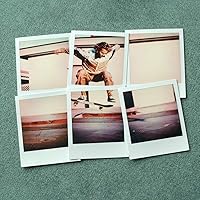
  • The companion app adds creative options like collage layouts that go beyond basic single-shot printing.
  • Makes an immediately understandable, visually appealing gift that lands well across age groups.
  • USB power means it can run off a laptop or portable battery bank, not just a wall outlet.
  • Supports both i-Type and 600 film formats, giving users flexibility in film choice and pack size.

Cons

  • Film is sold separately and not included — first-time buyers cannot print anything straight out of the box.
  • Each film pack yields only eight prints, making the per-print cost notably high over time.
  • Prints frequently come out darker than the original digital image, requiring brightness adjustments through trial and error.
  • Completely incompatible with Android devices, with no workaround or alternative app available.
  • The app has a history of instability following iOS updates, occasionally disrupting the print workflow.
  • Output capacity is strictly one print at a time — batch printing is not possible in any form.
  • The augmented reality overlay feature requires recipients to have the app installed, limiting its real-world usefulness.
  • Prints are sensitive to UV exposure and humidity, and can fade faster than standard photo paper if displayed in direct light.

Ratings

The Polaroid Lab Instant Photo Printer has been put through its paces by thousands of buyers worldwide, and our AI-driven scoring system has combed through verified purchase reviews — actively filtering out incentivized, spam, and bot submissions — to produce the balanced scorecard below. Scores reflect the full picture: what genuinely delights users and where real frustrations surface. Nothing has been softened or inflated.
Print Quality & Character
73%
27%
Users consistently describe the output as having a warm, soft, vintage quality that feels intentional and charming. For buyers who want that classic Polaroid look — slightly faded edges, gentle color shifts — the prints deliver exactly the nostalgic aesthetic they were hoping for.
Those expecting crisp, photo-realistic reproductions are frequently disappointed. Prints often come out darker than the original digital image, and fine details can get lost in shadows, which frustrates buyers who selected carefully edited photos expecting them to translate faithfully.
Ease of Setup & Use
88%
Getting up and running takes only a few minutes — plug in via USB, download the app, load film, and you're printing. First-time users repeatedly note how intuitive the phone-placement process is, with the app guiding each step clearly enough that almost no one needs the manual.
A small but consistent group of users reports confusion around aligning the phone correctly on the first try, leading to off-center or partially exposed prints. The learning curve is short, but those early wasted film sheets sting given the per-print cost.
App Experience
66%
34%
The companion app covers the basics well and adds genuinely creative extras like collage layouts and AR overlays that give finished prints an interactive dimension. Most users find the core print workflow stable and responsive during normal sessions.
App crashes and connectivity drops are a recurring complaint, particularly on older iPhone models or after iOS updates. Several users mention that the augmented reality features feel underdeveloped and are rarely used after the initial novelty wears off.
Film Cost & Ongoing Value
41%
59%
The hardware itself is priced reasonably for what it offers, and buyers who go in knowing about the film cost tend to budget for it without major complaints. Those who print selectively — a handful of favorites per month — find the expense manageable.
Eight shots per film pack is the single most cited pain point across all reviews. The per-print cost adds up fast, and many buyers admit they use the device far less than they intended once the reality of recurring film purchases sets in. This is the most common source of post-purchase regret.
Device Compatibility
53%
47%
For iPhone users on iOS 13 or newer, compatibility is solid and the app connection is generally reliable. iPhone 7 and above covers a wide installed base, so most Apple users won't hit any walls.
Android users are completely locked out, which generates a disproportionate share of negative reviews from buyers who missed the fine print. This is a hard limitation with no workaround, and it catches enough people off guard that it meaningfully drags down overall satisfaction scores.
Build Quality & Design
79%
21%
The compact cube form factor feels intentional and considered rather than cheap. At 1.4 pounds it's light enough to move around easily, and the exterior has a solid, matte finish that holds up well to regular handling at parties or on a desk.
The plastic casing, while acceptable, doesn't convey a premium feel at this price point. A few users report that the film door feels slightly flimsy, and there are occasional complaints about the phone-rest surface showing scuffs after extended use.
Portability
82%
18%
The Polaroid Lab fits neatly into a bag and draws genuine enthusiasm when brought out at gatherings. Its USB power means it can run off a laptop or power bank, giving it real flexibility for use away from a wall outlet.
It's not quite pocket-sized, and you always need to carry film packs alongside it, which adds bulk. Some users note that the USB cable included is short, limiting placement options when powered from a fixed outlet.
Print Speed
71%
29%
The development process — watching a blank frame slowly reveal the image — is actually part of the experience most buyers enjoy. It creates a natural pause and a moment of anticipation that feels fitting for the product's analog personality.
At one print at a time with no queue or batch function, producing prints for a group event takes longer than many buyers anticipate. Impatient users or anyone hoping to print a stack of photos in one sitting will find the pace genuinely limiting.
Lens & Optical Performance
68%
32%
The three-element lens system is a genuinely clever approach — projecting the phone screen onto film rather than using inkjet technology gives prints an organic quality that digital printers simply can't replicate. Technically minded buyers appreciate the analog authenticity of the method.
The optical projection approach means output quality is sensitive to ambient light and phone screen brightness settings. Prints made in brightly lit rooms or with screens set too low come out noticeably inconsistent, requiring some trial and error to dial in.
Collage & Creative Features
63%
37%
The ability to arrange multiple small images into a single Polaroid frame through the app is a standout feature for creative users. It works reliably and opens up layout possibilities beyond simple single-shot prints, which buyers who discover it tend to enjoy.
The feature set hasn't expanded much since launch, and several long-term users note that the app feels stagnant. The augmented reality overlay feature, while novel, requires the recipient to have the app installed to experience it, which limits its practical appeal.
Gift Appeal
91%
As a gift, this instant photo printer consistently lands well. The unboxing experience is polished, the concept is immediately understandable, and it appeals across a wide age range — particularly for teens and young adults who are enthusiastic about the analog-meets-digital format.
Gift-givers who don't include a film pack alongside the printer report some disappointment from recipients who can't use it immediately. The film-not-included reality, while stated on the box, can still feel like an incomplete gift if the buyer isn't aware.
Print Durability
74%
26%
Finished prints hold up reasonably well under normal handling — they're resistant to casual smudging once fully developed and display nicely on walls or in albums without special coating or lamination required.
Polaroid film is inherently sensitive to prolonged UV exposure and humidity, and prints can fade or discolor faster than standard photo paper if stored carelessly. Users who plan to display prints in sunny spots often notice color shift within months.
Unboxing & First Impression
84%
The packaging is clean and the device looks attractive straight out of the box. Setup instructions are concise, and the overall presentation reinforces the sense that this is a considered, purposeful product rather than a generic gadget.
The inclusion of only the printer body — no film, no sample prints — means the first impression is somewhat incomplete. New users have to purchase film before they can experience anything, which creates a slight delay between excitement and actual use.

Suitable for:

The Polaroid Lab Instant Photo Printer is a natural fit for iPhone users who have years of digital photos they love but rarely revisit in any meaningful way — it gives those images a physical life that a screen simply can't replicate. Photography enthusiasts who already edit their shots carefully will appreciate the ability to select exactly the right image before committing it to film, something a traditional instant camera doesn't allow. It works especially well as a gift for creative teens and young adults who are drawn to the analog aesthetic but live their lives on smartphones. Party hosts will find it earns its place on a table — it creates an interactive, communal moment without requiring everyone to own a camera. Anyone who has ever taped a photo to a wall, kept one in a wallet, or mailed one to a relative will understand the appeal immediately.
Not suitable for:

The Polaroid Lab Instant Photo Printer is a poor match for Android users — this is a firm, non-negotiable limitation, not a minor inconvenience, and no workaround exists. Buyers who want high-fidelity, color-accurate photo prints should also look elsewhere; the output has a soft, lo-fi character by design, and those expecting results comparable to a standard photo lab will be let down. If you're hoping to print batches of photos quickly — say, for an event or a scrapbooking project — the one-print-at-a-time process will test your patience fast. Anyone who is budget-conscious about ongoing costs needs to think carefully: each eight-shot film pack represents a recurring expense that adds up considerably with regular use. And buyers who want a truly standalone, self-contained device should note that the smartphone app is not optional — it is central to every single print.
Specifications

  • Print Format: Outputs standard 3x5 inch bordered Polaroid prints with the classic white frame.
  • Printing Technology: Uses a three-element optical lens system to project the phone screen directly onto film — no inkjet, toner, or ink cartridges involved.
  • Compatible Film: Works with Polaroid i-Type and 600 format film packs, both sold separately from the device.
  • Device Compatibility: Requires an iPhone 7 or newer running iOS 13 or higher; Android devices are not supported.
  • Required App: The Polaroid Originals app is mandatory for all print functions and must be installed before use.
  • Connectivity: Connects to a power source via USB; no Wi-Fi or Bluetooth connectivity is used.
  • Dimensions: The unit measures 4.6″ deep, 5.9″ wide, and 5.9″ tall, forming a compact near-cube shape.
  • Weight: Weighs 1.4 pounds, making it light enough to carry in a bag to events or gatherings.
  • Power Source: USB-powered, compatible with standard USB wall adapters, laptop ports, or portable power banks.
  • Output Capacity: Prints one frame at a time with no batch or queue functionality available.
  • Color Output: Produces full-color prints; black-and-white output depends on the film type selected.
  • Special Features: The companion app supports collage layouts and augmented reality overlays that activate when a phone is pointed at the finished print.
  • Included in Box: The box contains the printer body and one LR44 battery; no film is included.
  • Battery: Requires one LR44 battery for the internal sensor, which is included in the box.
  • Warranty: Covered by a limited manufacturer warranty through Polaroid Originals.
  • Model Number: Official model designation is PRD9019, also listed as model 9019 in product documentation.
  • Manufacturer: Designed and produced by Polaroid Originals, the brand that revived classic Polaroid film formats.
  • Release Date: First made available for purchase in October 2019.

Related Reviews
KODAK Step Instant Photo Printer
78%
91%
Ease of Setup
63%
Print Quality
67%
App Experience
94%
Portability
74%
Battery Life
More
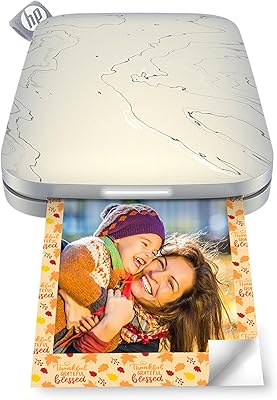
HP Sprocket Panorama Portable Photo Printer
73%
93%
Portability & Form Factor
61%
Print Quality
88%
Zink Ink-Free Convenience
74%
App Experience
67%
Bluetooth Connectivity
More
HP Sprocket Select Portable Photo Printer
75%
93%
Portability & Form Factor
67%
Print Quality
91%
Ease of Setup
74%
App Experience
52%
Paper & Consumable Costs
More
Kodak Mini Shot 3 ERA Instant Camera and Photo Printer
87%
85%
Print Quality
90%
Ease of Use
93%
Portability
88%
Print Durability
78%
Battery Life
More
Kodak Mini Shot 3 Retro Instant Camera
74%
84%
Print Quality
81%
Ease of Use
67%
App Experience
63%
Value for Money
61%
Build Quality
More
KODAK Memo Shot ERA Instant Camera Printer
77%
88%
Ease of Use
74%
Print Quality
61%
Monochrome Output Transparency
71%
Build Quality & Durability
83%
Paper Roll & Cartridge System
More
KODAK Mini Shot 4 ERA Instant Camera
72%
88%
Print Quality
92%
Print Size & Format
86%
Print Durability
43%
Portability & Form Factor
67%
Bluetooth Connectivity
More
Liene ZPP110 2x3 Portable Instant Photo Printer
77%
74%
Print Quality
93%
Portability & Size
88%
Ease of Setup & Use
79%
Adhesive Paper Quality
71%
Battery Life
More
HPRT CP2100 Portable Mini Photo Printer
73%
84%
Print Quality
79%
Color Accuracy
88%
Print Durability
91%
Portability
67%
App Experience
More
HP Sprocket Photo Booth Instant Photo Printer
71%
91%
Ease of Setup
68%
Print Quality
83%
Portability & Design
52%
Paper Tray & Reload Experience
57%
Print Speed
More

FAQ

No — this is an iOS-only device. It requires an iPhone 7 or newer running iOS 13 or above, and the Polaroid Originals app is only functional on Apple devices. If you use an Android phone, this printer simply won't work for you, and there is no workaround available.

Yes, film is not included in the box and must be purchased separately. Each film pack typically contains eight shots, so the per-print cost adds up noticeably if you print regularly. It's worth factoring this ongoing expense into your decision before buying, since it's the most common source of frustration among long-term users.

You place your iPhone face-down on top of the Polaroid Lab, select your photo in the app, and the device uses a three-element lens system to optically project your phone screen onto the film below. It's a genuinely analog process — light hits the film the same way it would in a traditional camera. The print then develops slowly over a few minutes, just like a classic Polaroid.

Not exactly, and that's partly the point. The output has a soft, warm, slightly vintage quality that's inherent to the Polaroid film format. Colors can appear a bit muted or darker than the original digital image, so photos with strong contrast and bright tones tend to translate better. If you're expecting photo-lab accuracy, this isn't the right tool — but if you love the analog aesthetic, the results are charming.

No — the Polaroid Lab prints one frame at a time, and there's no queue or batch function in the app. If you're planning to print a large number of photos, set aside plenty of time and film. For casual use or small groups it's fine, but running it at a large event where many people want prints can become a bottleneck.

The device works with both Polaroid i-Type and 600 format film packs. i-Type is generally the more affordable option and is specifically made for devices like this one that supply power internally. Both are widely available online and in some retail stores.

Neither — the instant photo printer connects to power via USB and communicates with your phone through the Polaroid Originals app over a direct connection, not a wireless network. You don't need Wi-Fi to print, which makes it handy for use in locations without internet access.

Most users find the core printing workflow stable under normal conditions. That said, app updates — particularly after major iOS version releases — have occasionally introduced temporary glitches, and a minority of users on older iPhone models report more frequent disconnections. Keeping both the app and your iOS version current helps minimize issues.

The printer itself supports full-color output, but the final look depends on the film you load. If you use black-and-white Polaroid film, you'll get monochrome prints. If you load standard color film and send it a black-and-white edited photo, the result will still have the slight color cast characteristic of that film type.

It can be, with a bit of preparation on your end. The setup is straightforward enough for most people, but gifting it without a film pack means the recipient can't use it right away — which dampens the experience. If you include a film pack and, ideally, help them install the app beforehand, it makes for a genuinely memorable and accessible gift.

Where to Buy