Overview

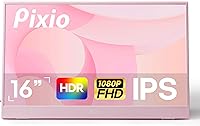
The Pixio PX160 Wave 15.6-inch Portable Monitor arrived in April 2025 as one of the more personality-driven options in a market that typically plays it safe with black and silver. It sits in the mid-range tier — not cheap, not premium — which sets realistic expectations from the start. The 15.6-inch IPS panel is the spec most buyers will anchor on, and rightly so. This pink portable monitor is built for people who move around: remote workers, students pulling long library sessions, and casual gamers wanting a personal screen on the road. It is a capable everyday display, not a color-accurate workhorse for professional editors.
Features & Benefits

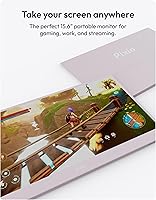
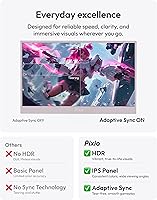
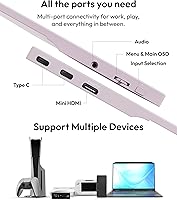
The Full HD IPS panel delivers sharp, consistent visuals with wide viewing angles, and the matte finish handles reflections well enough for most indoor settings. Connectivity is a genuine strong point — two USB-C ports and a Mini HDMI input mean this travel display will talk to almost any device you throw at it, from MacBooks to the Nintendo Switch. Built-in speakers keep things tidy when you just need basic audio without hunting for headphones. The included cover cleverly converts into a stand, which cuts down on what you need to carry. One honest caveat: 250 nits of brightness is fine indoors but will struggle in a sunlit room or patio.

Best For

The PX160 Wave makes the most sense for laptop users and students who want a quick second screen without committing to a bulky desktop setup. If you regularly work across multiple tabs, documents, or video calls, the extra real estate makes a tangible difference. Casual console gamers will appreciate how easily it pairs with a Switch or PS5 for a personal gaming session in a hotel room or dorm. Android users with a compatible USB-C phone can also get a surprisingly usable desktop-like experience. Creatives and professionals who want their gear to reflect their personality will find that this pink portable monitor stands out visually without compromising on everyday performance.

User Feedback

Buyers consistently praise how plug-and-play simple setup is — most report having it up and running in under a minute, which matters when you are in a coffee shop and just want to get to work. The pink design draws genuine appreciation too; people seem happy to own something that stands out visually. On the flip side, a few commuters note that 4.49 lbs is not featherweight for a daily bag. The cover-stand combo works well on flat, firm surfaces but can wobble on softer ones. Some buyers also mention that a better USB-C cable would have been a welcome addition in the box.

Pros

  • Plug-and-play setup works with laptops, consoles, and Android phones with no driver hassle.
  • The matte IPS panel handles indoor lighting well and keeps reflections from becoming a distraction.
  • Two USB-C ports plus Mini HDMI means broad compatibility without needing adapters for most devices.
  • Built-in speakers handle casual audio needs, so you are not always reaching for headphones.
  • The included screen cover doubles as a functional stand, cutting down on accessories to pack.
  • Full HD resolution looks sharp and clear for productivity tasks, streaming, and light gaming.
  • The pink colorway is genuinely distinctive — this travel display has a look that stands out without being garish.
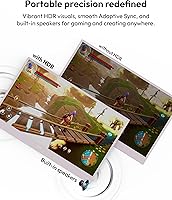
  • HDR support adds a noticeable boost to contrast in compatible content, even if it is not reference-level.
  • Wide viewing angles make it easy to share your screen or work at off-axis positions without color shift.

Cons

  • At 4.49 lbs, it is on the heavier end for a portable monitor aimed at daily commuters.
  • The 250-nit brightness cap becomes a real problem in sunlit rooms or any outdoor setting.
  • No USB-C cable is included in the box, which is an easy thing to forget until you are ready to set up.
  • The cover-stand can wobble or feel unstable on soft or uneven surfaces like beds or fabric laptop bags.
  • The 8ms response time is a drawback for anyone hoping to use this for fast-paced or competitive gaming.
  • HDR performance is entry-level at best — do not expect the kind of impact you get from a dedicated HDR display.
  • Only one Mini HDMI port means older devices without USB-C have limited connection options.
  • At this brightness level, the matte coating alone cannot fully compensate in very bright indoor environments.

Ratings

The scores below for the Pixio PX160 Wave 15.6-inch Portable Monitor were generated by our AI system after analyzing verified purchase reviews from buyers worldwide, with spam, bot activity, and incentivized feedback actively filtered out before scoring. Each category reflects the honest spread of real user experiences — not just the highlights — so both the strengths and the friction points are represented fairly. Whether this travel display fits your workflow or falls short depends heavily on how you plan to use it, and these ratings are designed to help you figure that out fast.
Display Clarity
83%
The Full HD IPS panel consistently earns praise for sharp, readable text and clean visuals during everyday productivity tasks. Students and remote workers in particular note that the screen holds up well for long sessions without causing significant eye fatigue, especially thanks to the matte coating that cuts down on distracting reflections under office lighting.
A small number of buyers coming from higher-resolution displays find 1080p slightly soft on a 15.6-inch screen when viewing dense text or fine UI elements up close. It is a noticeable step down for anyone used to a 2K or Retina-class display.
Brightness & Visibility
61%
39%
For typical indoor environments — home desks, libraries, dimly lit coffee shops — the brightness level handles the job without complaints from most users. The matte finish helps the image remain usable even when ambient light is moderate, which softens the impact of the brightness limitation in controlled settings.
This is the most frequently cited frustration in user reviews. Buyers who work near windows or in sunlit rooms report that the screen washes out quickly and becomes genuinely uncomfortable to use. Anyone planning to use this display outdoors or in a brightly lit space should consider this a real dealbreaker.
Color Accuracy
69%
31%
For casual use — streaming, browsing, light document work — colors look vibrant and pleasing to the eye. The IPS panel delivers better color consistency than TN alternatives at this price tier, and most everyday users find the out-of-box color rendering perfectly acceptable for non-critical tasks.
Professional creatives who need accurate, calibrated color for photo or video work will find this display disappointing. There is no factory calibration, and the HDR mode, while present, adds impact rather than accuracy — making it unsuitable as a reference display for color-sensitive workflows.
HDR Performance
58%
42%
When viewing HDR-compatible streaming content on supported devices, most users notice a modest but real improvement in contrast and shadow detail compared to standard mode. For casual movie watching in a hotel room or dorm, it adds enough visual pop to be appreciated.
Experienced display users are quick to point out that this is entry-level HDR in practice — the brightness ceiling limits how dramatic the effect can actually be, and it falls well short of what dedicated HDR monitors deliver. Calling it HDR sets expectations it cannot fully meet.
Connectivity
88%
The dual USB-C plus Mini HDMI combination is one of the PX160 Wave's clearest strengths, and buyers notice it immediately. Being able to connect a MacBook, a Nintendo Switch dock, and an Android phone to the same monitor without adapters covers the vast majority of real-world use cases without friction.
A few users with older Windows laptops lacking USB-C video output found themselves dependent on the single Mini HDMI port, which limits flexibility. Others noted that not including a USB-C cable in the box is an oversight that creates an unnecessary barrier at first setup.
Setup & Ease of Use
91%
Plug-and-play performance is where this travel display earns its most enthusiastic praise. The overwhelming majority of buyers report having a working second screen within one to two minutes of unboxing, with zero driver installation or configuration required — a huge plus for users who are not technically confident.
A small subset of users with certain USB-C laptops encountered compatibility hiccups, typically traced to cables not fully supporting video signal alongside power delivery. Since no cable is included, buyers who happen to grab an incompatible cable first can have a frustrating initial experience.
Build Quality
74%
26%
The overall construction feels solid for a mid-range portable monitor — the panel does not flex noticeably, and the slim profile holds together well during regular bag transport. The matte finish on both the screen and the casing resists fingerprints reasonably well compared to glossy alternatives.
The plastic housing, while functional, does not feel particularly premium when handled next to higher-end portable displays. A few buyers noted minor flex along the display edges when applying any pressure, and the port area feels slightly less robust than the rest of the unit.
Stand & Stability
66%
34%
The built-in cover-stand is a genuinely practical solution that eliminates one more accessory from your bag. On flat, solid surfaces like desks and tables, it holds the monitor at a comfortable angle with enough firmness for normal typing and touch-adjacent use.
On soft or uneven surfaces — laps, beds, fabric bags — the cover-stand struggles to keep the monitor steady and can tip with minimal disturbance. Users who need reliable stability across varied environments often end up supplementing with a third-party mini stand, which adds cost and bulk.
Portability
71%
29%
The slim 0.40-inch profile and compact footprint make the PX160 Wave easy to slip into most laptop bags without needing a dedicated sleeve. For users who move between a fixed desk and one or two regular spots, the size is more than manageable.
At 4.49 lbs, it sits on the heavier side for a device marketed as a portable daily driver. Buyers who walk or cycle long distances with their gear frequently mention that the cumulative weight becomes a consideration, especially when paired with a 15-inch laptop and accessories.
Gaming Performance
56%
44%
For slow-paced games, indie titles, turn-based strategy, or casual console play — Switch sessions on the road, for instance — the display performs adequately and the image looks clean enough to enjoy. Casual gamers report a satisfying experience for low-stakes gaming.
The 60Hz refresh rate and 8ms response time are genuine limitations for anyone playing fast-paced or competitive titles. Motion blur is noticeable in action-heavy games, and the response time lags behind what dedicated gaming monitors offer, making it a poor choice for anyone who takes competitive gaming seriously.
Speaker Quality
62%
38%
Having speakers at all on a portable monitor is appreciated more than most buyers expect — they handle video call audio, YouTube playback, and background music at low volume without distortion at moderate levels. In quiet rooms, they are functional enough to avoid reaching for headphones every time.
Volume headroom is limited, and bass is virtually nonexistent. In any environment with ambient noise — coffee shops, shared offices, commuter lounges — the speakers are simply too quiet to be useful, and audio quality at higher volumes degrades noticeably.
Value for Money
77%
23%
Within its segment, the PX160 Wave delivers a well-rounded package that most buyers feel is fairly priced. The combination of IPS display quality, broad connectivity, built-in speakers, and a distinctive design at this tier makes it competitive against similarly priced rivals that often compromise on one or more of those fronts.
Buyers who prioritize brightness, response time, or build premium will likely feel the value proposition weakens compared to alternatives in the same range that trade the aesthetic appeal for stronger core specs. It earns its price for the right buyer but not unconditionally.
Design & Aesthetics
86%
The pink colorway is a genuine differentiator that resonates strongly with its target audience. Buyers — particularly students and creatives — frequently mention how refreshing it is to own a piece of tech that reflects personal style rather than defaulting to anonymous black or silver.
The bold color is a deliberate design choice that will not appeal to everyone, and buyers who prefer understated or professional-looking gear may find it too expressive for certain workplace environments. There is no neutral colorway option for those who want the specs without the statement.
Compatibility
79%
21%
The broad device compatibility is a real selling point — most buyers confirm it works reliably with MacBooks, Windows laptops, PS5, Xbox, and Nintendo Switch without requiring special settings or adapters. Android phone users with compatible USB-C hardware also report consistent results.
Compatibility is not universal, and a handful of users with older or niche devices encountered issues. The requirement for full-featured USB-C cables — which are not included — creates occasional confusion, and a few specific laptop models have shown inconsistent signal handshake behavior reported across reviews.

Suitable for:

The Pixio PX160 Wave 15.6-inch Portable Monitor is a natural fit for anyone who spends their day moving between locations and needs a reliable second screen without hauling desktop gear. Students juggling multiple browser tabs, lecture notes, and video calls will get real productivity value from the added screen real estate. Remote workers who hop between coffee shops, libraries, and co-working spaces will appreciate how quickly it connects and gets out of the way — no driver installs, no complicated setup. Casual console gamers who want a dedicated personal display for Switch sessions in a hotel room or dorm will find it more than capable for that use case. Android phone users looking to extend their device into something closer to a desktop experience via USB-C will also find this travel display surprisingly capable. If personal style matters to you alongside function, the pink colorway makes this one of the few portable monitors that actually has a visual identity.
Not suitable for:

The Pixio PX160 Wave 15.6-inch Portable Monitor is not the right call for buyers with demanding or specialized display needs. Photo editors, video colorists, or anyone who relies on accurate color reproduction should look elsewhere — the IPS panel here is solid for everyday use, but it is not calibrated or designed for professional creative work. Competitive gamers will also hit a wall quickly; the 8ms response time and 60Hz refresh rate are fine for casual play but noticeably behind what fast-paced titles demand. If you plan to use this outdoors or in brightly lit environments regularly, the brightness ceiling is a real limitation and worth taking seriously before buying. Commuters traveling light every day may also want to weigh the 4.49-pound heft against thinner, lighter alternatives on the market. And if you need a sturdy, adjustable stand for varied desk setups, the built-in cover-stand may not give you the flexibility or stability you are expecting.
Specifications

  • Panel Type: The display uses an IPS panel, which provides consistent color and contrast across wide viewing angles.
  • Screen Size: The active display area measures 15.6 inches diagonally, with an overall unit footprint of 14.05″ wide by 8.85″ tall.
  • Resolution: Native resolution is 1920x1080 Full HD, delivering sharp text and clear visuals for productivity and casual media use.
  • Refresh Rate: The panel runs at 60Hz, which is standard for productivity monitors and adequate for casual gaming and video playback.
  • Brightness: Maximum brightness is rated at 250 nits, suitable for typical indoor environments but limited in brightly lit or outdoor settings.
  • Contrast Ratio: The contrast ratio is 1200:1, offering reasonable depth between dark and light areas for an entry-to-mid-range IPS panel.
  • Response Time: Grey-to-grey response time is 8ms, which is acceptable for everyday use but not optimized for fast-paced competitive gaming.
  • Viewing Angles: Horizontal and vertical viewing angles both reach 178 degrees, making shared viewing comfortable from nearly any position.
  • HDR Support: The monitor supports HDR, providing enhanced contrast and color depth in compatible content at an entry-level HDR performance tier.
  • Screen Surface: The matte screen coating reduces glare and surface reflections, improving usability in mixed indoor lighting conditions.
  • Connectivity: Inputs include two USB-C ports (USB 3.1 Gen 1, each carrying both power and signal) and one Mini HDMI 1.4 port.
  • Built-in Speakers: Integrated speakers are included, allowing basic audio output without requiring a separate speaker or headphone connection.
  • Aspect Ratio: The display uses a standard 16:9 widescreen aspect ratio, compatible with virtually all modern content formats and interfaces.
  • Physical Dimensions: The monitor body measures 14.05″ x 8.85″ x 0.40″, keeping the profile slim enough for most laptop bags and sleeves.
  • Weight: The unit weighs 4.49 lbs, which is functional for transport but sits toward the heavier end of the portable monitor category.
  • Stand Solution: The included protective screen cover converts into a stand, eliminating the need for a separate kickstand or monitor arm for basic use.
  • Compatibility: The monitor is compatible with laptops, MacBooks, PCs, PS5, Xbox, Nintendo Switch, and USB-C-enabled Android smartphones.
  • Availability Date: This model became available in April 2025, making it a recent addition to the portable monitor market.

Related Reviews

Topmonitor P15.6/2.5K 15.6-inch Portable Monitor
77%
91%
Image Sharpness
87%
Color Accuracy
93%
Portability
82%
Connectivity
88%
Value for Money
More
InnoView INVPM406 15.6-inch Portable Monitor
75%
91%
Ease of Setup
83%
Display Clarity
78%
Portability & Build
62%
USB-C Compatibility
88%
Value for Money
More
LUMIPIX Magic-001 15.6-inch Portable Monitor
76%
78%
Display Quality
91%
Portability
72%
Connectivity
61%
Stand Stability
79%
Value for Money
More
CAPERAVE CF15 15.6-inch Portable Monitor
70%
83%
Portability & Build
76%
Display Quality
51%
Brightness
91%
Setup & Ease of Use
82%
Value for Money
More
HotYeah 15.6-inch 1080P Portable Monitor
76%
83%
Display Quality
62%
Brightness & Visibility
91%
Portability & Design
88%
Value for Money
93%
Setup & Ease of Use
More
VILVA V156F1 15.6-inch Portable Monitor
69%
74%
Display Quality
61%
Portability
82%
Connectivity & Compatibility
67%
Build Quality
83%
Value for Money
More
Anyuse PM1561P 15.6-inch Portable Monitor
74%
91%
Portability & Form Factor
84%
Image Clarity
72%
Setup & Compatibility
74%
Build Quality & Durability
61%
Brightness & Outdoor Usability
More
Westinghouse 15.6 Inch Portable Monitor
82%
88%
Display Quality
92%
Portability
86%
Connectivity Options
94%
Ease of Setup
80%
Build Quality
More
VisionOwl Portable Monitor 15.6-inch FHD
86%
89%
Display Quality
91%
Portability
88%
Ease of Setup
85%
Compatibility
92%
Connectivity Options
More
VILVA 15.6-inch 4K Portable Monitor
75%
91%
Display Sharpness
88%
Color Accuracy
93%
Portability
86%
Value for Money
67%
USB-C Compatibility
More

FAQ

Yes, in most cases it does. As long as your MacBook has a USB-C port that supports video output — which most modern MacBook Air and MacBook Pro models do — you can plug directly into one of the two USB-C inputs and get a signal without installing any software. Just make sure you have a good USB-C cable handy, as one is not included in the box.

It does, but you will need the Switch docked and connected via the Mini HDMI input rather than USB-C, since the Switch dock outputs through HDMI. The PX160 Wave handles that connection well, and it makes for a solid personal gaming display in a hotel room or dorm setup.

It is a genuine pink — not a blush or barely-there rose tone. If you are hoping it will pass as neutral, it probably will not. That said, the finish is clean and consistent, and most buyers who have seen it in person seem genuinely happy with how it looks rather than surprised by it.

Absolutely. That is one of the most common use cases for this travel display. Connect via USB-C or Mini HDMI, and Windows will recognize it as an extended display. The cover-stand works fine on a flat desk, though if you want adjustable height or tilt, you would need a third-party stand.

They are adequate for a quiet room — good enough for video calls, YouTube, or background music at low volume. Do not expect room-filling sound or strong bass. For anything where audio quality matters, headphones or external speakers will serve you better.

Honestly, only in shade. The Pixio PX160 Wave 15.6-inch Portable Monitor tops out at 250 nits, which is fine in a dimmer indoor setting but starts to wash out near bright windows and becomes hard to read in direct sunlight. If outdoor or bright-environment use is a priority for you, look for a monitor with 400 nits or higher.
You need a USB-C cable that supports both power delivery and video signal — sometimes labeled as a full-featured or Thunderbolt-compatible cable. Unfortunately, a cable is not included in the box, so you will want to have one ready before your first setup. Many buyers overlook this and have to wait before they can use it.

It can, as long as your Android phone supports USB-C video output (commonly called DisplayPort Alt Mode). Not all Android phones support this, so it is worth checking your specific model before buying. When it does work, you get a desktop-like display that is genuinely useful for presentations or extended productivity sessions.

On a solid, flat surface like a desk or table, it holds up well. On softer or uneven surfaces — think a couch cushion or a fabric laptop bag — it can wobble and tip. It is a practical solution for travel and light desk use, but if you need a really firm, adjustable setup every day, a dedicated monitor stand would serve you better.

Not ideally. The panel is not factory calibrated for color accuracy, and the HDR implementation is entry-level rather than professional grade. It will show you a clear and pleasant image, but if your work depends on accurate color representation, you would want a display specifically designed and calibrated for that purpose.

Where to Buy