Overview

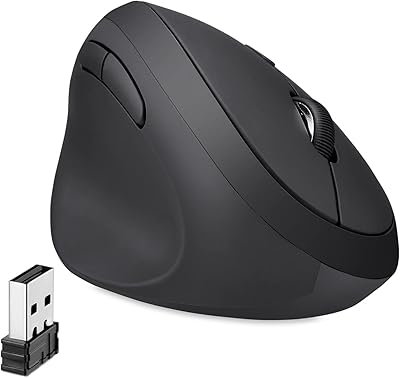
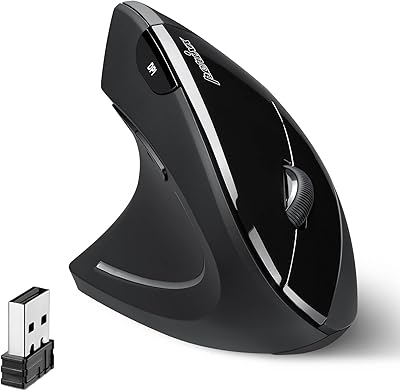
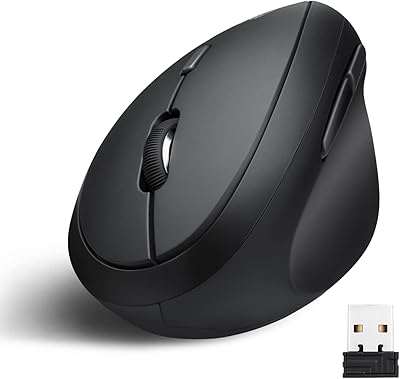
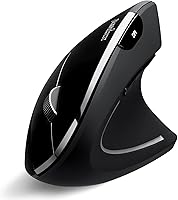
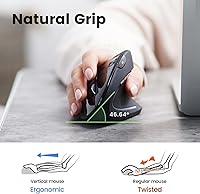
The Perixx PERIMICE-813B Bluetooth Vertical Mouse is a practical, wallet-friendly option for anyone juggling multiple devices throughout the day. Unlike standard flat mice, the vertical form factor holds your hand in a natural handshake position, which many users find significantly reduces forearm tension over long work sessions. What makes this multi-device wireless mouse stand out at its price point is the 3-in-1 wireless connectivity — Bluetooth 5.0, Bluetooth 3.0, and a 2.4 GHz USB receiver all in one compact body. It even ships with a travel carry pouch, a thoughtful inclusion for remote workers. That said, the compact shape fits small to medium hands best, and it won't satisfy power users or gamers looking for high-end precision.
Features & Benefits

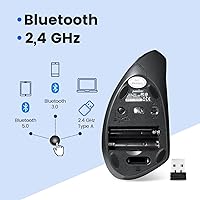
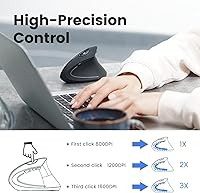
The triple wireless modes are where this vertical mouse genuinely earns its keep. You can pair it simultaneously to your office desktop via USB receiver, your personal laptop over Bluetooth 5.0, and a tablet on Bluetooth 3.0 — switching between them with a dedicated button on the base. The handshake grip angle reduces forearm pronation, and the rubberized side coating keeps things steady during extended sessions. DPI adjusts between 800, 1200, and 1600, which covers general office use comfortably. A hardware on/off switch combined with auto-sleep helps stretch battery life on two AAA batteries — though note those batteries are not included in the box. Compatibility spans Windows, ChromeOS, Linux, and iPadOS, but macOS users lose the forward and back button functions entirely.

Best For

This multi-device wireless mouse hits its stride for right-handed office users who spend long hours at a desk and have started noticing wrist or forearm discomfort. It's a reasonable first step into ergonomic territory without a steep investment. Students who move between a dorm desktop and a tablet will appreciate the multi-device switching capability. Frequent travelers will find the carry bag more useful than it sounds — it keeps the mouse and USB dongle together in a bag pocket. Just be aware: the sculpted body is built exclusively for right-handed use, and macOS users will find the missing browser navigation buttons a real inconvenience. It's not a fit for creative professionals or anyone needing high-precision tracking.

User Feedback

With over 10,800 ratings and a 4.3-star average, the Perixx ergonomic mouse has earned a solid reputation for its price tier. The most consistent praise centers on wrist and forearm relief — many buyers report a noticeable difference after switching from a conventional flat mouse, though results naturally vary by person. On the critical side, the scroll wheel draws complaints for feeling flimsy and imprecise, and several users note that pairing three devices isn't immediately intuitive. macOS users are the most vocal critics, frequently flagging the loss of forward and back button functionality. The included carry bag gets mentioned surprisingly often as a genuine perk, especially among users who regularly pack up and work on the go.

Pros

  • Connects to three devices simultaneously via Bluetooth 5.0, Bluetooth 3.0, and a 2.4 GHz USB receiver.
  • The vertical handshake grip reduces forearm pronation, with many users reporting less wrist strain during long sessions.
  • Lightweight at just over 3 ounces, making it one of the easier vertical mice to travel with.
  • Includes a carry bag in the box — a genuinely useful accessory that similar mice in this price range rarely offer.
  • Hardware on/off switch and auto-sleep mode help conserve battery life between uses.
  • DPI switching between 800, 1200, and 1600 covers everyday browsing, document work, and general productivity without diving into settings.
  • Rubberized side grip prevents the mouse from slipping during extended use sessions.
  • Broad compatibility across Windows, Linux, ChromeOS, and iPadOS makes it flexible for most non-Apple workflows.
  • Strong track record with over 10,800 ratings averaging 4.3 stars, suggesting consistent performance at its price tier.

Cons

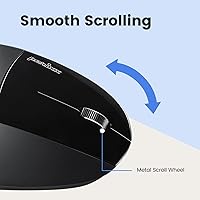
  • The scroll wheel feels noticeably cheap and imprecise — a common complaint that stands out compared to pricier alternatives.
  • Switching between three paired devices is not intuitive and has a real learning curve for new users.
  • Forward and back navigation buttons are non-functional on macOS, making this a poor fit for Mac users.
  • Two AAA batteries are required but not included in the box, which catches many buyers off guard at setup.
  • Exclusively right-handed design locks out left-handed users with no alternative configuration.
  • The 1600 DPI maximum limits usefulness on high-resolution or multi-monitor setups where finer tracking is needed.
  • Partial or broken compatibility with iOS and Android smartphones makes mobile pairing unreliable.
  • Compact dimensions may feel cramped for users with large hands during extended work sessions.

Ratings

The scores below reflect an AI-driven analysis of thousands of verified global reviews for the Perixx PERIMICE-813B Bluetooth Vertical Mouse, with spam, bot-generated, and incentivized feedback actively filtered out before scoring. Each category is rated independently to give you an honest picture of where this mouse excels and where it falls short. Both the genuine strengths and the recurring frustrations are transparently baked into every number you see here.

Ergonomic Comfort
83%
The handshake-position grip is the single most praised aspect of this mouse, with a large share of buyers reporting noticeably less forearm and wrist tension after making the switch from a flat mouse. Office workers who clock six or more hours at a desk consistently highlight this as the reason they kept it.
Comfort gains are not universal — users with larger hands find the compact body forces an awkward grip over time, and a handful of reviewers note that the benefit plateau is real: after initial relief, comfort does not continue improving. It is also not a substitute for professional ergonomic advice.
Wireless Connectivity
81%
19%
Having Bluetooth 5.0, Bluetooth 3.0, and a 2.4 GHz USB receiver in a single mouse at this price is genuinely uncommon, and buyers who work across a desktop, laptop, and tablet treat this as the defining reason to choose it over competing options. Connection stability on all three modes is generally solid in everyday office conditions.
The process of initially pairing all three connections and understanding the switching sequence trips up a meaningful number of users, with some reporting they gave up on one connection slot entirely. Switching speed between devices is functional but not instantaneous, which can feel clunky mid-workflow.
Multi-Device Switching
71%
29%
Once all three devices are properly paired, moving between a PC, a tablet, and a secondary laptop with a single button press is a real convenience that frequent multi-device workers genuinely appreciate. Reviewers who travel for work mention that this alone justifies the purchase.
The learning curve during setup is steeper than it should be, and the switching button placement on the underside of the mouse means you have to physically flip it to change devices — not ideal when you are mid-task. A few users report occasional dropped pairings that require re-setup after a period of inactivity.
Build Quality
63%
37%
The overall shell feels reasonably solid for the price, and the rubberized side panels add a layer of grip that makes the mouse feel more substantial than its lightweight frame might suggest. Daily handling for typical office use holds up fine across months of normal wear.
The scroll wheel is the most criticized component by a wide margin — users describe it as feeling hollow, imprecise, and noticeably cheaper than the rest of the mouse. The plastic clicks also lack the satisfying tactile feedback that buyers coming from mid-range mice will expect.
Scroll Wheel
54%
46%
It scrolls, and for basic document reading or web browsing at a desk, most users can tolerate it without major issues day to day. Those who use the mouse primarily for light browsing rather than heavy document work tend to rate it higher.
This is the most consistently flagged weak point across the review base — the wheel feels flimsy, lacks clear tactile steps, and occasionally skips or feels unresponsive under faster scrolling. Users upgrading from even a mid-tier mouse will notice the drop in quality immediately.
OS Compatibility
67%
33%
Windows, ChromeOS, Linux, iPadOS, and Android tablet users generally have a plug-and-play experience with no drivers required, making setup fast and frustration-free across the most common office and student device combinations.
macOS support is the biggest compatibility gap — the forward and back navigation buttons simply do not function, which is a real productivity loss for Mac users who rely on those for browser and Finder navigation. iOS and Android phone users also get only partial functionality, which the product listing does not make adequately clear.
Tracking Precision
69%
31%
For spreadsheet work, document editing, and general web use, the optical sensor tracks accurately enough that most office-focused buyers will not have complaints. The three DPI settings give a usable range for different screen resolutions and working distances.
The 1600 DPI ceiling is limiting for anyone working on a high-resolution display or a multi-monitor setup, and the optical sensor lacks the smoothness of the laser or higher-end optical sensors found in more expensive mice. Creative and technical users will outgrow the precision quickly.
Value for Money
78%
22%
At its price point, the combination of vertical ergonomics, three wireless modes, and an included carry bag is genuinely difficult to beat — most competing mice at the same price offer only one or two of those features. The strong rating volume and consistent satisfaction signal that most buyers feel they got a fair deal.
The value equation weakens for macOS users and anyone with larger hands, since they are paying for features they cannot fully use. Buyers who later discover the scroll wheel quality may also feel the trade-off is steeper than expected.
Portability
84%
At just over 3 ounces and with a dedicated carry pouch in the box, this multi-device wireless mouse is one of the more travel-friendly ergonomic options at its price. Remote workers who shuttle between home, office, and client sites mention the pouch as a legitimately useful perk that keeps the dongle from getting lost.
The USB receiver adds one more small item to keep track of when using the 2.4 GHz mode, and the pouch, while included, is basic — it is a protective sleeve rather than a structured case, so it will not protect the mouse from meaningful impact in a packed bag.
Battery Life
74%
26%
The hardware on/off switch is a practical addition that many users remember to use, and the auto-sleep feature acts as a useful backup for those who forget — together they extend the usable time between battery changes to a reasonable duration for typical office workdays.
Running on 2 AAA batteries that are not included in the box is a minor but recurring frustration in reviews, especially for buyers who were not expecting it. Battery life is also harder to predict than it would be with a built-in rechargeable battery, and there is no charge indicator to warn you before they die.
Setup & Pairing
66%
34%
For users connecting via just the USB receiver, setup is essentially instant — plug in and go, with no software installation needed on Windows or ChromeOS. Single-device Bluetooth pairing is also straightforward for most users.
Configuring all three connections simultaneously is where things get messy, and the manual does not explain the process as clearly as it should. Several reviewers report spending 20 or more minutes troubleshooting before getting all three device slots working correctly.
Grip & Hand Feel
76%
24%
The rubberized side coating gives the mouse a secure feel in hand, and the vertical angle genuinely changes the resting position of the wrist in a way that feels natural within a day or two for most new users. The transition from a flat mouse is smoother than many buyers expect.
The shape is firmly optimized for small to medium right hands, and users outside that range — whether larger hands or left-handed users — report discomfort that does not improve with time. There is no ambidextrous design option in this model line.
Click Response
72%
28%
The left and right primary buttons register clicks cleanly and consistently for standard office tasks, and the side buttons for forward and back navigation work well on supported operating systems, adding genuine utility for Windows and ChromeOS users.
The click travel and feedback feel slightly soft compared to mice in a higher price bracket, and the side buttons becoming non-functional on macOS is a recurring disappointment that disproportionately affects Apple ecosystem users who purchased without reading the fine print.

Suitable for:

The Perixx PERIMICE-813B Bluetooth Vertical Mouse is a strong pick for right-handed office workers and students who spend several hours a day at a desk and have started feeling tension in their wrist or forearm — it won't fix a medical problem, but many users report genuine day-to-day comfort improvements after ditching a flat mouse. It's particularly well-suited to anyone who works across multiple devices, since the ability to pair three connections simultaneously and switch between them removes the need to carry separate mice for a home desktop, work laptop, and tablet. Remote workers and frequent travelers will also get real value here, as the included carry pouch keeps everything tidy in a bag without the usual dongle-hunting frustration. The compact form factor and lightweight build make it easy to toss in a backpack, and the broad compatibility with Windows, ChromeOS, Linux, and iPadOS means most non-Apple setups will work out of the box without any driver installation.
Not suitable for:

The Perixx PERIMICE-813B Bluetooth Vertical Mouse is not the right tool for left-handed users — the sculpted grip is shaped exclusively for right-hand use, and there is no left-handed variant of this model. macOS users should approach with caution: the forward and back navigation buttons simply do not function on Mac, which is a meaningful loss for everyday browsing and file navigation. Anyone hoping to use this mouse with an iPhone or Android phone will also be disappointed, as mobile phone support is only partial and unreliable. Power users, graphic designers, video editors, or anyone who needs fine cursor control should look elsewhere, since the maximum 1600 DPI ceiling and basic optical sensor are not built for precision work. Gamers should skip it entirely — the ergonomic shape, DPI range, and click response are optimized for productivity, not performance.
Specifications

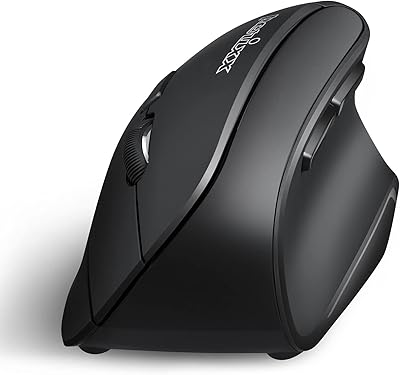
  • Form Factor: Vertical ergonomic design sculpted exclusively for right-handed use, holding the hand in a natural handshake position to reduce forearm pronation.
  • Dimensions: The mouse measures 4.92 x 2.44 x 3.03 inches, making it a compact fit best suited to small and medium-sized hands.
  • Weight: At 3.17 oz without batteries, it is light enough to carry daily without adding meaningful bulk to a laptop bag.
  • Connectivity: Supports three simultaneous wireless connections: Bluetooth 5.0, Bluetooth 3.0, and a 2.4 GHz USB receiver for up to three paired devices.
  • DPI Levels: Optical sensor offers three switchable DPI settings — 800, 1200, and 1600 — selectable via a dedicated button on the top of the mouse.
  • Tracking: Uses an optical tracking sensor for cursor movement detection, suitable for everyday office surfaces without requiring a dedicated mousepad.
  • Power Source: Runs on 2 AAA batteries, which are not included in the box; a hardware on/off switch and auto-sleep function help extend battery runtime.
  • Grip Coating: The side panels feature a rubberized coating that improves grip stability and reduces slippage during extended use sessions.
  • OS Compatibility: Fully supported on Windows, Linux Ubuntu 16.04, ChromeOS, iPadOS, Android tablets, and Amazon Fire Tablets.
  • Partial Support: Forward and back button functionality is unavailable on macOS, iOS smartphones, and Android smartphones; basic cursor movement still works on these platforms.
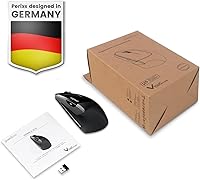
  • In the Box: Package includes the mouse, a 2.4 GHz USB receiver, a fabric carry bag, and a printed user manual.
  • Certifications: Carries FCC, CE, and RoHS certifications, confirming compliance with standard safety and environmental regulations.
  • Multi-Device: Can be paired with up to three separate devices simultaneously, with switching handled by a dedicated button on the underside of the mouse.
  • Bluetooth Version: Supports both Bluetooth 5.0 and Bluetooth 3.0, allowing connection to a wide range of modern and slightly older Bluetooth-enabled devices.
  • Handedness: Right-handed only; the sculpted vertical body does not accommodate left-handed use and no left-handed variant is available in this model line.

Related Reviews

Perixx PERIMICE-804 Bluetooth Vertical Mouse
87%
91%
Ergonomics and Comfort
88%
Bluetooth Connectivity
85%
Build Quality
92%
Setup and Installation
87%
Grip and Texture
More
Perixx PERIMICE-713RX Wireless Rechargeable Vertical Mouse
83%
88%
Ergonomics & Comfort
91%
Charging Flexibility
86%
Quiet Click Feature
75%
Wireless Performance
82%
DPI Precision & Control
More
Perixx PERIMICE-713L Left-Handed Wireless Vertical Mouse
82%
91%
Ergonomics and Comfort
88%
Connectivity Range
85%
Ease of Use
83%
Adjustable DPI Precision
80%
Build Quality
More
Perixx Perimice-719L Left Handed Wireless Vertical Mouse
84%
88%
Ergonomics & Comfort
85%
DPI Adjustability & Precision
91%
Portability & Size
84%
Silent-Click Feature
79%
Battery Life
More
Perixx PERIMICE-719 Right-Handed Wireless Mini Vertical Mouse
85%
89%
Ergonomics
86%
Wireless Performance
92%
Ease of Use
80%
DPI Settings Flexibility
78%
Build Quality
More
Micropack MP-V01B Vertical Wireless Mouse
74%
84%
Ergonomic Comfort
78%
Multi-Device Switching
61%
Build Quality
83%
Battery Life
91%
Click Noise Level
More
Perixx PERIDUO-512B US Ergonomic Keyboard and Vertical Mouse Combo
83%
88%
Ergonomic Comfort
83%
Build Quality
90%
Ease of Setup
65%
Mouse Learning Curve
84%
Keypad Comfort
More
Perixx Periduo-605 Wireless Ergonomic Keyboard Mouse Combo
72%
83%
Ergonomic Comfort
61%
Keyboard Feel & Typing
79%
Mouse Comfort & Design
69%
Wireless Reliability
76%
Value for Money
More
Logitech M535 Bluetooth Mouse
75%
93%
Portability
78%
Bluetooth Connectivity
89%
Battery Life
63%
Ergonomics & Comfort
71%
Tracking Performance
More
Logitech M557 Bluetooth Mouse
79%
88%
Bluetooth Connectivity
93%
Battery Life
91%
Cross-Platform Compatibility
89%
Portability
63%
Ergonomics & Comfort
More

FAQ

Many users report noticeable relief from forearm and wrist discomfort after switching from a standard flat mouse, because the vertical grip reduces the inward rotation of the forearm. That said, results vary by person and it is not a medical treatment — if you have a diagnosed condition like carpal tunnel, consult a doctor before relying on any peripheral as a solution.

You can connect it to a Mac and move the cursor around without any issues, but the forward and back navigation buttons will not work on macOS. If those buttons are part of your daily workflow — for browser navigation or file management — this is a meaningful limitation worth factoring into your decision.

You pair each connection method — Bluetooth 5.0, Bluetooth 3.0, and the USB receiver — to a different device during initial setup, then use a dedicated button on the base of the mouse to cycle between them. It works well once configured, but a few users find the initial pairing process a bit trial-and-error, so budget a few minutes to get it set up properly the first time.

No, they do not. The Perixx PERIMICE-813B Bluetooth Vertical Mouse requires 2 AAA batteries to operate, and they are not in the box. It is a small thing, but worth grabbing a pack before your new mouse arrives so you are not hunting for batteries on day one.
Yes — iPadOS is fully supported, and the mouse connects cleanly via Bluetooth without needing any apps or drivers. It is a practical pairing for tablet users who want more precise navigation than a touchscreen allows.

Probably not the ideal choice. The compact dimensions are designed with small to medium hands in mind, and users with larger hands frequently mention that the grip feels a bit cramped during long sessions. If your hands are on the larger side, it may be worth looking at a full-size vertical mouse before committing.

Battery life will vary depending on usage, but the combination of the hardware on/off switch and the auto-sleep function means you can get a reasonable run time out of a standard pair of AAA batteries. Turning the mouse off when you step away from your desk will make a noticeable difference over time.

Yes, that is actually one of the strongest use cases for this multi-device wireless mouse. You pair your PC to one connection slot and your tablet to another, then switch between them with a button press — no re-pairing needed each time.

It is functional for everyday tasks, but it is one of the weaker points of this mouse. A recurring theme in user feedback is that the scroll wheel feels a bit plasticky and lacks the tactile precision you would find on more expensive ergonomic options. For general web browsing and document scrolling it gets the job done, but do not expect a premium feel.

Unfortunately, no. The vertical body is ergonomically sculpted for right-handed use only, and using it with your left hand would be awkward and potentially uncomfortable. There is no ambidextrous or left-handed version of this model currently available.

Where to Buy