Overview

The YuLinca F2602GP 24-Port PoE+ Unmanaged Switch lands in a crowded market but makes a strong case for itself by packing 24 powered ports and two Gigabit uplinks into a fanless metal chassis that undercuts most name-brand competitors on price. For small businesses or prosumers deploying IP cameras and wireless access points, that combination is genuinely compelling. The 300W total power budget is worth understanding early — if you plan to max out many ports at full 30W draw, you need to tally the load before committing. Out of the box, it requires zero configuration, which is the whole point.
Features & Benefits

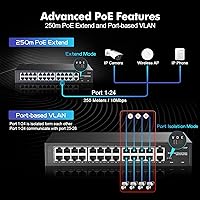
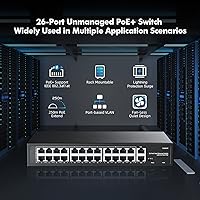
What makes this PoE+ switch practical rather than just affordable is how its three operating modes handle real-world network demands. A front-panel DIP switch toggles between Default (all ports communicate freely), VLAN isolation (each PoE port speaks only to the uplinks, keeping camera traffic off your general LAN), and Extend mode, which stretches cable runs to 250 meters at 10Mbps. That last option is handy for outdoor cameras or distant access points where pulling shorter runs is not realistic. Both uplink ports run at full Gigabit speed, so your router or NAS connection stays uncongested regardless of PoE load.

Best For

This unmanaged switch is a natural fit for small surveillance setups — a retail shop, small office, or residential property where you are running a dozen or more IP cameras alongside a few access points. Network installers will value the 250-meter Extend mode when covering large buildings or outdoor areas where cable routing is constrained. Silent operation makes it a reasonable pick for noise-sensitive spaces. Where it falls short is anywhere you need managed switch features: there is no SNMP, no port statistics, no link aggregation, and no remote management. Know that going in and it will not disappoint.

User Feedback

Across more than 400 ratings, the YuLinca 24-port switch holds a 4.5-star average, and reading through the reviews the satisfaction is pretty consistent. Build quality and value get the most praise — buyers regularly note that the metal housing feels more substantial than expected. The LED panel is also called out as easy to read at a glance. On the downside, passive 24V PoE incompatibility catches people off guard; the switch only supports standard 802.3af/at, and anything outside that will not receive power. The printed manual is also thin, though the setup is simple enough that most people work it out quickly.

Pros

  • 24 PoE+ ports in a single fanless unit is exceptional value at this price point.
  • Metal chassis feels solid and looks appropriate in a rackmount or wall-mount install.
  • Three DIP-switch modes cover most small network scenarios without any software.
  • PoE Extend mode reaches 250 meters, removing a major limitation of standard Ethernet.
  • Dual Gigabit uplinks prevent the core router connection from becoming a choke point.
  • VLAN port isolation keeps camera or IoT traffic off the main LAN with zero configuration.
  • Plug-and-play setup means non-technical users can deploy it in minutes.
  • Clean LED indicators make it easy to spot a dead port or downed device at a glance.
  • Rackmount brackets are included in the box, so no extra hardware purchase is needed.
  • Broad 100-240V AC input makes it suitable for international or UPS-backed installations.

Cons

  • No managed features whatsoever — no SNMP, no port statistics, no remote access.
  • The 300W shared power budget requires careful load planning across all 24 ports.
  • Passive 24V PoE devices will not receive power, which is easy to overlook when buying.
  • PoE Extend mode drops all ports to 10Mbps, which rules it out for bandwidth-heavy cameras.
  • The included instruction manual is thin and offers little troubleshooting guidance.
  • No SFP or fiber uplink option limits integration with larger existing networks.
  • MAC address table is limited to 2K entries, which can be a constraint in busier environments.
  • No link aggregation support means uplink redundancy or bonding is not possible.

Ratings

The scores below reflect AI-driven analysis of verified global buyer reviews for the YuLinca F2602GP 24-Port PoE+ Unmanaged Switch, with spam, bot-submitted, and incentivized feedback actively filtered out before scoring. Each category captures both the genuine strengths buyers highlight and the real frustrations that surface across hundreds of real-world deployments. Nothing is sugar-coated — the numbers reflect what this unmanaged switch actually delivers in practice.

Value for Money
93%
Across verified reviews, the cost-per-port ratio is the single most praised attribute of this PoE+ switch. Buyers consistently note that comparable port counts from better-known brands cost significantly more, and that the metal chassis and PoE+ compliance make the price feel genuinely fair rather than a compromise.
A small number of buyers feel the value calculus shifts if you factor in the 300W power ceiling, since hitting that limit early means buying a second switch sooner than expected. For light deployments, though, this concern rarely materializes.
Build Quality
88%
The metal enclosure is a standout for this price tier. Buyers frequently describe it as feeling more robust than expected, and installers appreciate that it does not flex or creak when mounted in a rack. The dual-side vents are cleanly cut and the panel finish is consistent.
A handful of reviewers note that the port labeling could be crisper, and the rackmount brackets, while functional, feel slightly lighter than the chassis itself. Nothing structurally concerning, but noticeable compared to premium-tier hardware.
PoE Performance
84%
Standard 802.3af and 802.3at devices — IP cameras, VoIP phones, Wi-Fi access points — power up reliably and stay powered under normal load conditions. Buyers running mixed camera deployments report stable power delivery without drops or renegotiation issues during continuous operation.
The 300W shared budget is a genuine ceiling that some buyers hit when populating all 24 ports with higher-draw devices. A few users also report that the switch provides no feedback when the power budget is exceeded, making troubleshooting less intuitive.
Ease of Setup
91%
The plug-and-play experience is consistently praised, especially by non-technical buyers deploying cameras or access points without IT support. Reviewers note that from unboxing to a fully operational network took under ten minutes in most cases, with no drivers, software, or configuration required.
The printed manual is widely described as minimal, offering little guidance for Extend or VLAN mode use cases. Buyers who want to understand the DIP switch behavior in depth have to rely on trial and error or third-party resources.
VLAN & Isolation Features
78%
22%
The hardware-level port isolation mode is well-regarded by buyers setting up surveillance networks who want cameras kept off the main LAN without touching a management interface. The DIP switch approach makes activating it accessible to non-IT users, which is genuinely uncommon at this price point.
The isolation is all-or-nothing — you cannot isolate select ports while allowing others to communicate freely. Buyers who need more nuanced segmentation find this limiting quickly, and there is no way to configure exceptions without moving to a managed switch.
Extend Mode Utility
74%
26%
For installers pulling cable to remote cameras or outdoor access points, the 250-meter Extend mode resolves a real-world limitation without requiring additional hardware. Buyers covering large warehouses or multi-building sites call it one of the more useful features on the unit.
The mandatory drop to 10Mbps in Extend mode is a hard trade-off that surprises buyers expecting better throughput. High-bitrate 4K cameras in particular can struggle in this mode, and users are not warned about the speed cap prominently enough during purchase.
Fanless & Noise Level
89%
Silent operation is confirmed by virtually every reviewer who mentions the topic. Buyers in open-plan offices, server closets adjacent to workspaces, and even home living room installs report zero audible noise under full load, which is the expected outcome of passive cooling done well.
Passive cooling means the chassis runs noticeably warm under sustained high-load conditions, particularly in enclosed or poorly ventilated spaces. A small number of installers in hot climates flag this as something to plan for when choosing a mounting location.
Port Count & Density
87%
Twenty-four PoE ports in a compact 1U form factor is a strong offering for small business deployments where rack space is limited. Buyers replacing multiple smaller switches with this unit consistently report that the density simplifies cable management and reduces clutter noticeably.
The MAC address table caps at 2,048 entries, which works fine for most small deployments but can become a constraint in environments with a high number of short-lived or rotating client devices. Most buyers will never notice this limit, but it is worth knowing.
Uplink Performance
82%
18%
Both Gigabit uplink ports perform reliably under sustained load. Buyers connecting the switch to a NAS for camera recording report consistent throughput without the uplinks becoming a bottleneck, even when multiple cameras write simultaneously.
There is no SFP or fiber uplink option, which limits integration with larger enterprise networks or multi-building fiber backbones. Buyers needing fiber connectivity must add a separate media converter, adding cost and a potential failure point.
LED Indicators
83%
The front-panel LEDs are frequently called out as clear and easy to read from across a room. The per-port link and activity indicators, combined with the mode indicator, give enough at-a-glance information to diagnose basic connectivity problems without tools.
There is no per-port PoE status LED to confirm whether a specific port is actively delivering power versus just linked. Buyers troubleshooting a camera that is not powering up have to rely on process of elimination rather than a direct power-status indicator.
Compatibility
72%
28%
Standard 802.3af and 802.3at devices from any manufacturer work without issue, and buyers report successful deployments with cameras and access points from Hikvision, Dahua, Reolink, Ubiquiti, TP-Link, and others that use compliant PoE.
Passive 24V PoE devices — commonly found in older Ubiquiti and MikroTik hardware — receive no power from this switch, and this catches buyers off guard more than any other compatibility issue in the reviews. The product listing mentions this, but it is easy to miss before purchasing.
Documentation Quality
51%
49%
The basic installation steps are covered adequately enough that straightforward plug-and-play setups proceed without confusion. Most buyers report having no trouble getting the switch operational for standard use cases without consulting the manual at all.
The manual is thin and lacks practical guidance on the DIP switch modes, power budget management, or troubleshooting common issues. Buyers who encounter edge cases — like Extend mode instability or unexpected power drops — have very little official documentation to fall back on.
Rackmount Installation
86%
Rackmount brackets are included in the box, which buyers appreciate as a small but meaningful cost saving. The unit fits cleanly into a standard 19-inch rack, and the cable management is straightforward given the front-facing port layout that most installers prefer.
The included brackets feel slightly lightweight relative to the chassis, and a few installers note they prefer aftermarket brackets for permanent rack installs. The unit does not ship with rack screws, requiring buyers to source them separately.

Suitable for:

The YuLinca F2602GP 24-Port PoE+ Unmanaged Switch is built for buyers who need a high port-count PoE solution without paying enterprise prices or wrestling with management software. It is particularly well-suited to small businesses running IP security camera systems, where you need to power and connect a large number of cameras from a single switch without adding a separate power injector at every drop. Network installers will appreciate the Extend mode, which pushes PoE data and power out to 250 meters — a real advantage when covering warehouses, large retail floors, or outdoor areas where cable runs are long. IT generalists or non-technical owners who just want to plug devices in and have things work will find the DIP-switch simplicity refreshing. The rackmount metal chassis also makes it a credible option for prosumers building out a proper home lab rack on a modest budget.
Not suitable for:

The limitations of this unmanaged switch are real and worth understanding before buying. Anyone who needs granular network control — port-based access lists, SNMP monitoring, link aggregation, or per-port traffic statistics — should look at a managed switch instead, because this PoE+ switch offers none of that. The 300W shared power ceiling also means it is not a fit for dense deployments where most ports need to run power-hungry 802.3at devices simultaneously; you will hit the budget before filling the rack. Passive 24V PoE devices, which are common in certain older Ubiquiti and MikroTik hardware, will not receive power from this switch at all, which has frustrated buyers who did not check compatibility first. If your environment demands redundant uplinks, SFP fiber connectivity, or VLAN tagging beyond basic port isolation, this switch is simply the wrong tool for the job.

Specifications

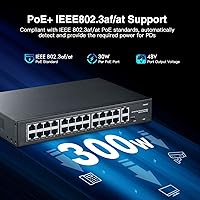
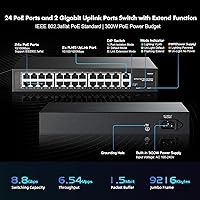
  • PoE Ports: 24 ports support 10/100Mbps data rates with IEEE 802.3af and 802.3at PoE, delivering up to 30W per port.
  • Uplink Ports: 2 dedicated RJ45 uplink ports operate at 100/1000Mbps Gigabit speeds for connection to a router, NAS, or core switch.
  • Total PoE Power: The shared PoE power budget across all 24 ports is capped at 300W, requiring load planning when running multiple high-draw devices.
  • PoE Standards: Fully compliant with IEEE 802.3af (up to 15.4W) and IEEE 802.3at (up to 30W); passive 24V PoE devices are not supported.
  • Switching Bandwidth: Non-blocking switching fabric runs at 8.8 Gbps, providing ample headroom for simultaneous traffic across all ports.
  • Forwarding Rate: Packet forwarding rate is 6.54 Mpps, suitable for the throughput demands of small to mid-size surveillance and access point deployments.
  • MAC Table: Supports a MAC address table of up to 2,048 entries, sufficient for small office and home network environments.
  • Jumbo Frames: Jumbo frame support up to 9,216 bytes allows efficient transfer of large data payloads between compatible devices on the network.
  • Extend Mode: PoE Extend mode stretches both power delivery and data transmission to 250 meters over a single Cat5e or higher cable, at a fixed 10Mbps rate.
  • VLAN Isolation: DIP-switch-activated VLAN mode isolates all 24 PoE ports from each other, channeling all traffic exclusively through the two uplink ports.
  • Operating Modes: A three-position DIP switch on the front panel selects Default, VLAN isolation, or Extend mode with no software or computer required.
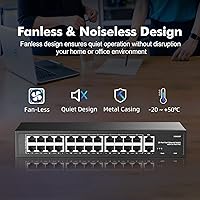
  • Chassis Material: The enclosure is constructed from metal with dual-side ventilation slots for passive heat dissipation in a fanless design.
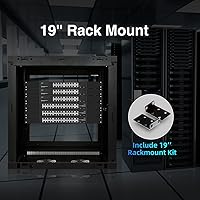
  • Mounting Options: Includes a pair of rackmount brackets and supports desktop, wall-mount, or standard 19″ rack installation.
  • Dimensions: The unit measures 268 x 181 x 44mm (approximately 10.6 x 7.1 x 1.7 inches), fitting a 1U rack profile.
  • Weight: Net weight is 1.44 kg (approximately 3.2 lbs), with a shipping weight of 1.92 kg including packaging and accessories.
  • Power Input: Universal AC input accepts 100–240V at 50/60Hz, making it compatible with standard outlets and UPS systems worldwide.
  • PoE Voltage: Output PoE voltage ranges from 44V to 57V DC, with a typical operating value of 48V across all active PoE ports.
  • Operating Temperature: Rated for use between -10°C and 50°C (14°F to 122°F), covering most indoor commercial and home installation environments.
  • Cable Standards: Supports Cat3 or higher for 10BASE-T, Cat5 or higher for 100BASE-TX, and Cat5e or higher UTP/STP for Gigabit uplink connections.
  • In the Box: Package includes the switch unit, one power cord, one printed user manual, and one pair of rackmount brackets.

Related Reviews

YuLinca 6-Port Gigabit PoE Switch with 4 PoE+ Ports
87%
95%
Ease of Installation
88%
PoE Functionality
91%
Build Quality
87%
Performance and Speed
94%
Fanless Operation (Noise)
More
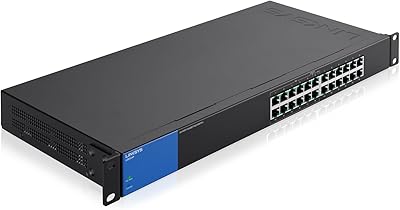
Linksys LGS124P 24-Port Gigabit Unmanaged PoE Switch
90%
91%
Ease of Setup
88%
Build Quality
93%
PoE Performance
85%
Durability
89%
Energy Efficiency
More
YuLinca G1002G 8-Port PoE Gigabit Switch
79%
94%
Ease of Setup
89%
Value for Money
82%
PoE Performance
76%
Build Quality
67%
Thermal Management
More
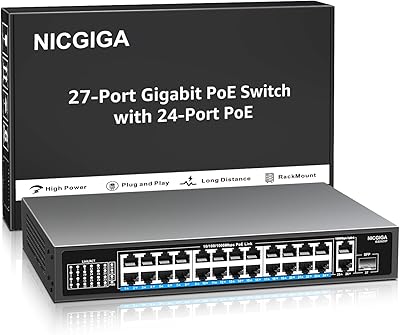
NICGIGA GS2421P 24-Port PoE+ Gigabit Switch
77%
91%
Value for Money
93%
Ease of Setup
78%
PoE Performance
84%
Build Quality
62%
Thermal Management
More
YuLinca 5-Port Mini PoE+ Industrial Switch
86%
90%
Performance in Harsh Environments
94%
Ease of Installation
89%
Build Quality & Durability
82%
Power Redundancy
91%
Value for Money
More
YuLinca F1602GP 16-Port PoE+ Unmanaged Switch
78%
91%
Value for Money
88%
PoE Reliability
84%
Build Quality
93%
Ease of Setup
71%
Thermal Management
More
NETGEAR GS116LP 16-Port Unmanaged PoE+ Switch
86%
97%
Ease of Setup
93%
PoE Port Coverage
62%
PoE Power Budget
96%
Silent Operation
88%
Build Quality
More
TP-Link TL-SG1428PE 28-Port PoE+ Gigabit Switch
80%
93%
Value for Money
81%
PoE Performance
88%
Build Quality
91%
Ease of Setup
72%
Management Interface
More
TP-Link TL-SG2428P Jetstream 24-Port Gigabit Smart Managed PoE Switch
84%
89%
Value for Money
70%
Ease of Setup
93%
PoE+ Performance
85%
Security Features
92%
Network Management (Omada SDN)
More
MokerLink POE-F062F 8-Port PoE Switch
86%
91%
Value for Money
88%
Performance Stability
95%
Ease of Installation
85%
PoE Power Output
82%
Build Quality
More

FAQ

Yes, as long as your cameras use standard IEEE 802.3af or 802.3at PoE, which nearly all modern Hikvision and Dahua cameras do. Just plug in the camera, connect the uplink to your NVR or router, and the switch detects and powers the device automatically. No configuration needed.

Not quite. The total PoE power budget is 300W shared across all 24 ports, which works out to an average of 12.5W per port. If your devices each draw close to 30W — like some high-end PTZ cameras or Wi-Fi 6 access points — you will hit the ceiling before filling every port. Add up the wattage of your specific devices before assuming full capacity.

Extend mode is designed for situations where your cable run is longer than the standard 100-meter Ethernet limit — think a camera mounted on a distant pole, or an access point at the far end of a large building. It pushes that limit to 250 meters, which is genuinely useful. The trade-off is that the port speed drops to 10Mbps in this mode, so it works well for standard-definition cameras or basic access points, but may not handle high-bitrate 4K streams reliably.

No, it will not. This unmanaged switch only supports active 802.3af and 802.3at PoE standards. Passive 24V PoE — common in older Ubiquiti radios and some MikroTik devices — is a different system entirely, and the switch will not deliver power to those devices. You would need a separate passive PoE injector for that hardware.

The VLAN mode on this PoE+ switch is a hardware-level toggle, not a software-configured VLAN in the traditional sense. When you flip the DIP switch to VLAN mode, ports 1 through 24 can no longer talk to each other — each device can only communicate with whatever is connected to the two uplink ports. It is ideal for surveillance networks where cameras should never be able to reach each other or other devices on your LAN. There is nothing to configure; the switch handles it at the hardware level.

No. The YuLinca F2602GP 24-Port PoE+ Unmanaged Switch has no management interface of any kind — no web UI, no SNMP, no telnet, and no app. The only status feedback you get is from the LED indicators on the front panel. If you need remote monitoring or traffic visibility, you would need a managed switch instead.
You can connect both uplink ports to your network, but the switch does not support link aggregation (LACP), so they will not bond into a single faster pipe. In a simple network, using both ports simultaneously without managed switching typically causes a loop. It is safest to use one uplink port at a time unless you have a managed upstream switch that can handle spanning tree to prevent loops.

Fanless switches do run warmer than actively cooled ones, and the dual-side vents help move heat passively. In a well-ventilated rack or wall-mount location it handles normal loads fine, and the operating temperature rating goes up to 50°C. That said, if you are putting it in a sealed or poorly ventilated enclosure with other gear generating heat, it is worth leaving some breathing room around the unit to avoid long-term reliability issues.

For the PoE ports running at 10/100Mbps, Cat5e is more than sufficient and is the standard recommendation. For the Gigabit uplink ports, Cat5e or Cat6 is ideal. Cable quality matters more in Extend mode — higher-quality, well-terminated Cat5e or Cat6 gives you a better chance of a stable 250-meter run. Avoid using old or damaged cable, especially for longer runs, as signal degradation will cause connection instability before you hit the distance limit.

Very straightforward. Plug the power cord in, connect your PoE devices to ports 1 through 24, and connect the uplink port to your router or NVR. The switch auto-detects each device and starts delivering power and data within seconds. The DIP switch defaults to normal mode, so you do not need to touch it unless you want VLAN isolation or Extend mode. Most people have it running in under five minutes.