Overview

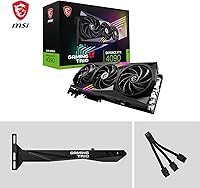
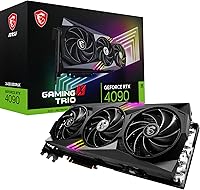
The MSI RTX 4090 Gaming X Trio GPU is MSI's most ambitious take on NVIDIA's Ada Lovelace flagship, built for enthusiasts who refuse to compromise on anything. The Ada Lovelace architecture brings genuine generational leaps in rasterization, ray tracing, and AI-accelerated tasks — not just incremental gains on paper. Physically, this is a triple-slot, triple-fan card stretching 12.6 inches and finished in an all-black aesthetic. Before buying, be honest about your case clearance and PSU headroom — this GPU has a serious power appetite. Available since late 2022, it still holds a commanding position in the high-end discrete GPU market today.
Features & Benefits

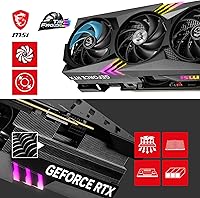
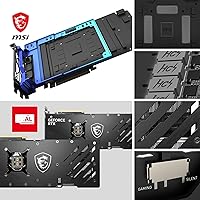
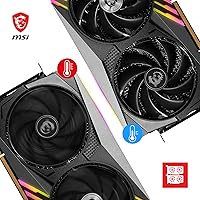
The Gaming X Trio's cooling setup is its clearest differentiator. MSI's TRI FROZR 3 system uses segmented heatsink fins that deliberately interrupt airflow harmonics — the result is notably lower fan noise under sustained gaming load compared to reference-style coolers. The TORX FAN 5.0 blades link via interlocked ring arcs, building higher static pressure and more consistent airflow across the heatsink surface. A copper baseplate pulls heat off the GPU die and VRAM directly, routing it into precision-machined Core Pipe heatpipes that spread thermal load across the full fin stack. Then there is the memory: 24GB of GDDR6X on a 384-bit bus handles demanding 4K texture streaming, video editing timelines, and local AI workloads without hitting a ceiling. The factory 2595 MHz boost clock arrives stable and tuning-free.

Best For

This top-tier GPU is purpose-built for people who want their rig to handle anything thrown at it, now and years ahead. Enthusiast 4K gamers will appreciate the thermal headroom — frame rates stay high and consistent in extended sessions because the cooler never lets the GPU throttle. Content creators rendering in Blender, DaVinci Resolve, or similar tools will find the 24GB VRAM buffer genuinely useful rather than a marketing number. AI hobbyists running local inference or fine-tuning smaller models benefit from that large pool too. The card suits full-tower builds with ample clearance and a high-capacity PSU; if your case is compact, measure carefully first. Set-and-forget users will appreciate that the cooler performs well with zero manual configuration.

User Feedback

Across roughly 190 verified ratings, the Gaming X Trio holds a 4.3-star average, which reflects a mostly satisfied but candid buyer base. Owners are consistently vocal about how quiet the card runs — many mention being genuinely surprised that a GPU this powerful barely registers above ambient noise during long sessions. Out-of-box stability is another recurring highlight; the factory overclock holds without coaxing. Where feedback turns more critical: the 12.6-inch length catches buyers off guard, and several report needing a GPU support bracket to prevent sag due to the card's weight. A handful of early reviews flagged driver hiccups with certain PCIe Gen 4 boards, though most resolved through BIOS updates. Long-term reliability feedback is broadly positive with no widespread failure patterns.

Pros

  • Triple-fan TRI FROZR 3 cooling keeps the card genuinely quiet even under heavy sustained loads.
  • Factory overclock of 2595 MHz boost arrives stable and performs well without any manual tuning.
  • 24GB GDDR6X VRAM handles demanding 4K gaming, professional rendering, and local AI workloads without hitting memory limits.
  • The Gaming X Trio runs noticeably cooler than reference-style RTX 4090 designs, protecting long-term component health.
  • Supports up to four simultaneous displays, including 8K HDR output, through a versatile port selection.
  • TORX FAN 5.0 blade design maintains consistent airflow pressure without the coil whine some competing coolers produce.
  • Out-of-box PCIe Gen 4 compatibility is broad, with most modern motherboards working reliably without issues.
  • All-black build quality feels premium and integrates cleanly into dark-themed or understated system builds.
  • Copper direct-contact baseplate draws heat off both the GPU die and VRAM modules simultaneously for efficient dissipation.
  • Holds a strong 4.3-star average across nearly 200 verified ratings, with long-term reliability feedback remaining consistently positive.

Cons

  • At 12.6 inches, this top-tier GPU will not physically fit many mid-tower or compact cases without case modification.
  • The card is heavy enough that a GPU sag bracket is essentially a required accessory, not an optional one.
  • Power consumption is substantial — an underpowered PSU is a real compatibility risk, not just a performance concern.
  • Some early buyers reported driver friction with specific PCIe Gen 4 motherboard configurations that required BIOS-level troubleshooting.
  • The price tier is extremely high, making it very difficult to justify for anyone primarily gaming at 1080p or 1440p.
  • Triple-slot width can block airflow to adjacent expansion slots in tightly packed systems.
  • The 16-pin power connector adapter bundled with some configurations has caused fitment concerns for a subset of users.
  • Resale value for flagship GPUs tends to drop steeply once a new generation launches, which is worth factoring into the long-term value calculation.

Ratings

The scores below reflect our AI-driven analysis of verified global buyer reviews for the MSI RTX 4090 Gaming X Trio GPU, with spam, incentivized, and bot-flagged submissions actively filtered out before scoring. Each category is weighted against real purchase feedback from enthusiasts, creators, and professionals who have lived with this card beyond the unboxing honeymoon. Both the genuine strengths and the recurring frustrations are reflected honestly — nothing is softened to protect the rating.

Thermal Performance
93%
Buyers running demanding titles for hours consistently report that the card holds stable temperatures without the fans spinning into uncomfortable territory. The TRI FROZR 3 system genuinely manages heat well enough that many owners never feel compelled to tweak the fan curve at all.
A small subset of users in poorly ventilated cases found temperatures creeping higher than expected during extended rendering sessions, suggesting the cooler rewards good airflow in the surrounding environment. It is excellent, but not entirely immune to the limits of its chassis.
Noise Levels
89%
The most recurring praise across the review pool centers on how quiet this card stays during real gameplay — multiple buyers mention being genuinely caught off guard given the GPU's performance tier. At moderate gaming loads, the TORX FAN 5.0 blades and segmented fin design keep acoustic output impressively low.
Under maximum stress — sustained rendering workloads or prolonged compute tasks — the fans do spin up audibly, which is expected but worth noting for those building near a quiet workspace. It is not loud by class standards, but it is not silent either at full tilt.
Raw Gaming Performance
96%
At 4K with demanding settings, the Gaming X Trio consistently delivers frame rates that no other single GPU can match, and the 2595 MHz factory boost clock sustains itself reliably without throttling mid-session. Buyers moving from previous-generation flagship cards describe the jump as the most noticeable generational leap they have experienced.
At 1080p or even 1440p, the performance advantage over substantially less expensive cards narrows considerably, making the premium feel misaligned for buyers who are not actually running high-resolution setups. The raw power is undeniable — it just needs a display and use case worthy of it.
VRAM & Memory
91%
The 24GB GDDR6X buffer on a 384-bit bus handles everything thrown at it without complaint — from loading 4K texture packs in open-world games to working with high-resolution assets in Blender or DaVinci Resolve. Content creators in particular note this as the feature that most directly accelerates their actual day-to-day workflows.
For pure gaming at current resolutions, most buyers will not come close to exhausting 24GB in the near term, which means a portion of the memory capacity is effectively paid-for headroom that remains unused for now. That future-proofing argument holds, but it does soften the immediate value equation.
Build Quality
88%
The all-black shroud and backplate feel substantial in hand, with no flex or creaking reported during installation. The overall finish is clean and consistent, and owners appreciate that MSI did not resort to aggressive RGB lighting that would date the aesthetic quickly.
A few buyers noted that the card's weight, while expected at this size, made installation slightly awkward without a second pair of hands. The 16-pin power connector area has also drawn scrutiny — earlier retail units shipped with an adapter that generated community concern, though revised versions have since addressed this.
Cooling System Design
87%
The copper direct-contact baseplate pulling heat from both the GPU die and VRAM simultaneously, routed through precision-machined heatpipes across the full fin stack, is a genuinely well-engineered thermal path rather than a spec-sheet bullet point. Owners who monitor GPU temperatures closely during workloads confirm that heat is distributed evenly across the heatsink.
The cooling system's effectiveness is partly dependent on the card having adequate exhaust space around it, and the triple-slot footprint means neighboring slots often get blocked entirely. Builders in tighter cases report warmer ambient temperatures inside the chassis as a secondary side effect.
Value for Money
61%
39%
For the specific buyer — a 4K enthusiast gamer, a professional creator, or an AI researcher who genuinely needs the VRAM and sustained clock speed — this top-tier GPU represents a justifiable investment in a tool that removes bottlenecks for years. The out-of-box factory overclock adds measurable real-world performance without the cost or risk of manual tuning.
For the broader market, the price-to-performance ratio is very difficult to defend honestly at resolutions below 4K, and even at 4K the gap versus less expensive RTX 4080-class cards does not always match the price gap. Buyers who overestimate how much performance they actually need will feel the premium acutely.
Physical Fit & Size
58%
42%
For full-tower case owners who planned their build around a flagship GPU, the 12.6-inch length fits cleanly and the triple-slot footprint is exactly what was expected. Buyers in this camp report no installation complications beyond standard cable management.
Mid-tower owners are the consistent pain point in the review pool — the card's length exceeds clearance limits in a wide range of popular cases, and this catches buyers off guard despite the spec being publicly listed. The weight also causes visible GPU sag in builds that lack a support bracket, which is an easy-to-miss extra cost.
Out-of-Box Setup
84%
Most buyers report a clean plug-and-play experience — drivers install without issue, the factory overclock is stable from the first boot, and there is no expectation to configure anything before getting into games or workloads. NVIDIA's software ecosystem is mature enough that the setup process rarely causes friction.
A subset of early buyers flagged compatibility quirks with specific PCIe Gen 4 motherboard and BIOS configurations that required troubleshooting before the card ran optimally. These issues were not universal, but they were specific enough to appear as a recognizable pattern in the review feedback.
Display Connectivity
86%
Three DisplayPort 1.4a outputs and one HDMI 2.1a port give multi-monitor users real flexibility, and the HDMI 2.1a connection handles 4K at high refresh rates or 8K HDR without needing an adapter or compromise. Sim-racing and productivity users running triple-display setups find the port layout practical.
There is no USB-C or Thunderbolt output, which limits direct connectivity with certain newer displays or capture devices without an adapter. This is a minor limitation in day-to-day use, but worth noting for users with display setups built around USB-C input.
Professional Workload Capability
92%
Creators running GPU-accelerated rendering in Blender, video grading in DaVinci Resolve, or working with large assets in generative AI tools consistently highlight the 24GB VRAM and Ada Lovelace compute performance as transformative compared to previous setups. Tasks that formerly required overnight renders complete in a fraction of the time.
Professional-grade compute applications that favor NVIDIA's Quadro or data center product lines may not unlock all of the Ada architecture's capabilities in the same way as consumer gaming drivers allow. For most hobbyist creators this is irrelevant, but it is worth researching for niche enterprise software environments.
Long-Term Reliability
83%
Across a review pool spanning over two years of real-world ownership, catastrophic failure reports are rare and no widespread hardware defect pattern has emerged. Buyers who purchased at launch and have used the card heavily report continued stable performance with no degradation in thermals or clocks.
The 16-pin power adapter situation from the broader RTX 4090 launch period created genuine concern for early adopters, and some buyers remain cautious about long-term connector health under heavy cycling. MSI has revised their adapter since launch, but the episode left a residual trust question for a portion of the audience.
Driver & Software Stability
79%
21%
The vast majority of buyers report stable day-to-day driver behavior across a wide range of games and creative applications, with NVIDIA's ongoing driver support for the Ada generation being a clear positive. Most compatibility issues that appeared early in the product's life have been resolved through subsequent driver and motherboard BIOS updates.
Early adopters on certain PCIe Gen 4 platforms experienced instability that required BIOS-level intervention to resolve, which is a frustrating ask for buyers who expected a straightforward installation. Driver rollbacks were occasionally necessary as a short-term fix, an experience that leaves a mark even when ultimately resolved.
AI & Local Inference
88%
The 24GB VRAM pool is one of the largest available in a consumer GPU, making the Gaming X Trio one of the few off-the-shelf cards capable of running meaningful local large language model inference or image generation at useful batch sizes without constantly hitting memory limits. AI hobbyists specifically seek out this card for exactly this reason.
Buyers specifically targeting AI workloads over gaming may find that purpose-built data center hardware or future consumer alternatives eventually close this gap at a lower cost. For now the advantage is real, but it is tied closely to the current absence of affordable high-VRAM consumer alternatives rather than any unique AI-specific hardware feature.

Suitable for:

The MSI RTX 4090 Gaming X Trio GPU is built for a specific kind of buyer: someone who has already maxed out what a mid-range card can do and genuinely needs more. Enthusiast gamers running a high-refresh 4K monitor will find this card delivers without thermal throttling dragging performance down in long sessions. Content creators who spend real hours in GPU-accelerated renderers, 3D applications, or heavy video editing timelines will appreciate having 24GB of fast VRAM as an actual working buffer rather than a number on a spec sheet. AI hobbyists running local inference, image generation, or experimenting with fine-tuning smaller models will also get genuine utility from that memory pool. It suits builders who have already invested in a full-tower case, a high-wattage PSU, and a PCIe Gen 4 motherboard — people who have thought the whole system through, not just the GPU.
Not suitable for:

If your case is a mid-tower or smaller, pause before ordering — at 12.6 inches long and triple-slot wide, the MSI RTX 4090 Gaming X Trio GPU physically will not fit many popular mid-tower builds without significant compromise. Buyers on a tight budget who are stretching to reach this tier should reconsider: the price-per-frame at 1080p or even 1440p is very hard to justify when less expensive cards close the gap substantially at those resolutions. Anyone running a PSU under 850W should treat that as a hard blocker, not a soft concern. Casual gamers who play lighter titles or spend most of their time at 1080p are paying a steep premium for headroom they will never realistically use. If you are not prepared to also invest in a GPU support bracket and potentially manage PCIe power cable compatibility, the ownership experience could frustrate early on.
Specifications

  • GPU Architecture: Built on NVIDIA's Ada Lovelace architecture, which powers the GeForce RTX 4090 processor at the core of this card.
  • VRAM: Equipped with 24GB of GDDR6X memory running on a 384-bit bus for high-bandwidth texture and data throughput.
  • Boost Clock: Factory-boosted to 2595 MHz out of the box, running above NVIDIA's reference specification without requiring manual overclocking.
  • Cooling System: MSI TRI FROZR 3 thermal design uses three TORX FAN 5.0 fans, segmented heatsink fins, a copper baseplate, and Core Pipe heatpipes to manage heat across the full card length.
  • Fan Design: TORX FAN 5.0 blades are linked by interlocked ring arcs that increase structural rigidity and direct airflow with higher static pressure than standard open-blade designs.
  • Heatpipes: Precision-machined Core Pipe copper heatpipes maintain maximum contact with the baseplate and distribute thermal load evenly along the heatsink stack.
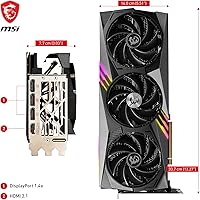
  • Display Outputs: Provides three DisplayPort 1.4a ports and one HDMI 2.1a port, supporting up to four simultaneous displays.
  • Max Resolution: Capable of driving output up to 8192x4320 (8K) with HDR support via the HDMI 2.1a connection.
  • PCIe Interface: Uses a PCI Express Gen 4 interface for compatibility with modern motherboards and optimal bandwidth utilization.
  • Card Length: Measures 12.6 inches (approximately 320mm) in length, requiring a case with sufficient GPU clearance.
  • Slot Width: Occupies 4.33 inches in height across three expansion slots, blocking adjacent slots in most standard ATX form factor cases.
  • Memory Bus: The 384-bit memory bus provides substantial bandwidth headroom for 4K gaming, 8K rendering, and VRAM-intensive professional workloads.
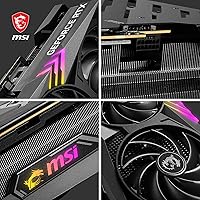
  • Color: Finished entirely in black across the shroud, backplate, and fan frame for a clean, understated aesthetic.
  • Power Connector: Requires a 16-pin (PCIe 5.0 style) power connector, typically supplied via an adapter included in the retail package.
  • User Rating: Holds a 4.3-out-of-5-star average across approximately 191 verified purchaser ratings on Amazon as of the time of publication.

Related Reviews
MSI RTX 3070 Gaming X Trio Graphics Card
76%
93%
Thermal Performance
91%
Noise Levels
89%
1440p Gaming Performance
88%
Build Quality
74%
Value for Money
More
MSI RTX 4070 Gaming X Trio GPU
82%
92%
1440p Gaming Performance
93%
Thermal Performance
91%
Noise Levels
89%
Build Quality
71%
Value for Money
More
MSI GeForce RTX 2080 Ti Gaming X Trio
87%
94%
Gaming Performance
91%
Ray Tracing Quality
88%
Thermals and Cooling
90%
Build Quality
65%
Noise Level Under Load
More
MSI GeForce RTX 3060 Gaming X Trio 12G
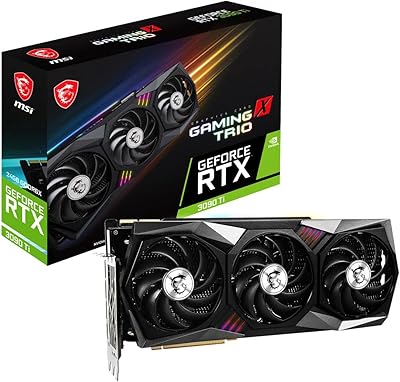
84%
91%
Gaming Performance
94%
Cooling Efficiency
87%
Build Quality
89%
Value for Money
70%
Compatibility with Cases
More
MSI GeForce RTX 3080 Ti Gaming X Trio 12G
86%
94%
Cooling Performance
92%
4K Gaming Performance
88%
Build Quality
91%
Noise Levels Under Load
85%
Installation and Setup
More
MSI RTX 3060 Ti X Trio GPU
77%
93%
Thermal Performance
91%
Noise Levels
88%
1440p Gaming Performance
89%
Build Quality
67%
Value for Money
More
MSI GeForce RTX 3070 Ti Gaming X Trio 8GB
85%
92%
Gaming Performance
89%
Cooling Efficiency
88%
4K Gaming Experience
85%
RGB Customization
70%
Size & Compatibility
More
MSI GeForce RTX 3090 Ti Gaming X Trio 24GB
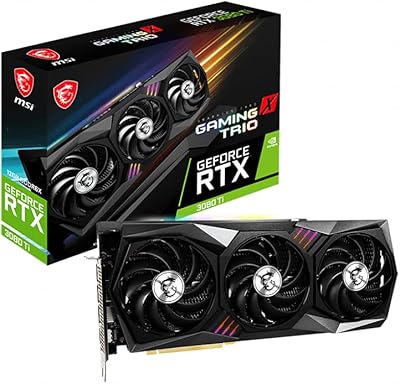
84%
94%
Gaming Performance
70%
Power Consumption
88%
Cooling Efficiency
65%
Size and Compatibility
92%
Overclocking Performance
More
MSI RTX 3050 Gaming X 6G GPU
82%
78%
1080p Gaming Performance
84%
Thermal Management
71%
Value for Money
89%
Build & Physical Quality
93%
Form Factor & Compatibility
More
MSI RTX 4090 SUPRIM Liquid X GPU
80%
94%
Thermal Performance
92%
Noise Levels
91%
Raw GPU Performance
93%
VRAM Capacity
58%
Installation Experience
More

FAQ

That depends heavily on your specific case model. The Gaming X Trio measures 12.6 inches long and takes up three slots in height, which exceeds the GPU clearance limit on many popular mid-tower cases. Before ordering, check your case manufacturer's listed maximum GPU length — if it is under 320mm, you will likely have a fitment problem.

Most builders pair the RTX 4090 with an 850W to 1000W PSU at minimum, and many experienced builders recommend 1000W or higher when the rest of the system is also power-hungry. Running this top-tier GPU on an undersized power supply risks instability, unexpected shutdowns, and in worst cases, hardware damage.

Based on real buyer feedback, it does run noticeably quietly for a card of its performance class. Multiple owners across the review base specifically called out how surprised they were that the fans stay calm during long gaming sessions. That said, under extreme sustained load — think heavy rendering loops — the fans will spin up audibly, as they will on any high-performance GPU.

It is fine out of the box. The factory boost clock of 2595 MHz is already above NVIDIA's reference specification, and the thermal headroom means it can sustain that clock reliably without you touching anything. Overclocking is an option if you want to push further, but it is not required to get strong performance.

Yes, the HDMI 2.1a port supports 8K HDR output. For gaming at 8K, performance will vary significantly by title and settings, but for productivity, media creation, or video playback at 8K, the card handles it comfortably. Make sure your monitor also supports HDMI 2.1 or DisplayPort 1.4a at your desired resolution and refresh rate.

Given the card's size and weight, a support bracket is strongly recommended. Several buyers in the review pool mentioned visible sag without one. Most full-tower cases include a bracket or have mounting points for aftermarket options, but budget for one if yours does not.

Very well. The 24GB GDDR6X VRAM is a practical advantage in applications like DaVinci Resolve, Blender, and Cinema 4D, where large scene files or high-resolution timelines can exhaust smaller GPU memory pools. GPU-accelerated rendering tasks that would take significantly longer on a card with less VRAM complete noticeably faster here.

It will physically work, since PCIe is backward compatible, but you will not be getting the full bandwidth the card is designed for. For everyday gaming the real-world performance difference is often small, but for bandwidth-sensitive workloads the gap can be more noticeable. If you are spending at this tier on a GPU, pairing it with a Gen 4 platform makes sense.

A small number of early RTX 4090 adopters across various card models and brands reported melting or fitting issues with 16-pin adapters, and MSI was aware of this industry-wide concern. MSI subsequently updated their adapter design. If you are buying new from a reputable seller today, check that the included adapter is the revised version, and ensure cables are seated firmly and not sharply bent near the connector.

At 4K, the Gaming X Trio is likely to remain capable for several years in most gaming scenarios — the RTX 4090 class still leads the market by a meaningful margin. For professional workloads, the 24GB VRAM buffer also buys considerable future headroom. That said, GPU generations move fast, and resale value for flagship cards tends to drop steeply once a successor generation arrives, so factor that into your long-term cost thinking.

Where to Buy