Overview

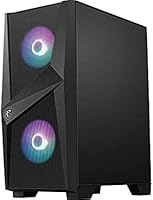
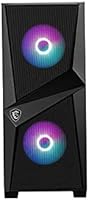
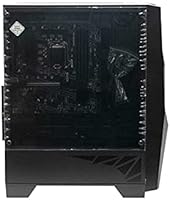
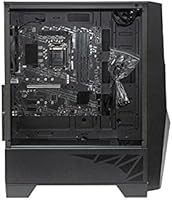
The MSI Codex ZS Barebones Tower PC is exactly what the name says — bare. You get the case, motherboard, and power supply pre-assembled, but you still need to supply your own CPU, RAM, GPU, and storage. That distinction matters, and it trips up buyers expecting a plug-and-play experience. Think of this AMD-ready shell as a curated starting point: MSI has already matched the components that tend to cause compatibility headaches, and packaged them inside the MSI Forge 100R mid-tower with its tempered glass side panel and pre-loaded ARGB fan setup. Underneath it all, the AMD B550M chipset supports the full Ryzen 5000-series lineup, making it a genuinely capable platform foundation.

Features & Benefits

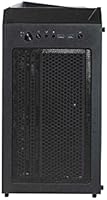
The MSI Codex ZS platform ships with more onboard connectivity than you might expect at this price point. The B550M motherboard includes Wi-Fi 6 and Bluetooth 5.1 built right in, so there is no need to budget for a separate wireless adapter. The 550W 80 Plus Bronze power supply provides enough headroom to pair with a mid-range discrete GPU without worrying about an upgrade. Three fans come pre-installed out of the box — two 120mm ARGB units up front and one standard 120mm at the rear — meaning thermals are handled from the start. USB coverage is broad too, with front-panel Gen1 Type-A ports and a six-port rear cluster rounding out the I/O.

Best For

This barebones tower kit makes the most sense for a specific kind of buyer. If you already own DDR4 RAM and storage from a previous system, this AMD-ready shell offers a fast path to a refreshed build without hunting down every component individually. It is a natural fit for first-time builders who find component matching intimidating — the case, PSU, and board arrive pre-paired, so you are mainly deciding on a Ryzen CPU and a GPU. Budget-focused gamers planning to drop in an entry-level discrete card will find the 550W supply handles the load comfortably. Small home office setups looking for a configurable tower without pre-built pricing will also feel right at home here.

User Feedback

With just 59 ratings and a 4.1 out of 5 score, the reception leans positive — but the sample size is small enough that it should not be treated as a settled verdict. Buyers consistently highlight easy assembly and the included ARGB fans as standout positives, and the Forge 100R case earns praise for feeling solid and well-built for the price. On the downside, some first-timers flag sparse documentation, and a few mention that cable management inside the enclosure can get cramped around the PSU area. Worth noting for anyone planning to run a Ryzen 5000-series chip: a BIOS update may be required before the CPU is recognized, so have a plan ready before you power on.

Pros

  • Wi-Fi 6 and Bluetooth 5.1 are built into the motherboard, so no separate adapter is needed.
  • Three fans come pre-installed, giving solid out-of-the-box airflow without extra purchases.
  • The AMD B550M chipset supports the full Ryzen 5000-series lineup for strong upgrade headroom.
  • A tempered glass side panel gives the Forge 100R case a clean, modern look at this price tier.
  • The 550W 80 Plus Bronze PSU handles a mid-range discrete GPU without requiring an immediate swap.
  • Front and rear USB ports are plentiful, covering both older and current peripheral standards.
  • The barebones bundle approach lets builders reuse existing DDR4 RAM and storage from previous systems.
  • The Micro-ATX case accepts standard ATX components, keeping future upgrade paths open.
  • Assembly experience is consistently rated as straightforward by buyers who have built before.
  • Onboard gigabit LAN provides a reliable wired connection option alongside the wireless module.

Cons

  • No CPU, RAM, GPU, or storage is included — total build cost is considerably higher than the kit price alone.
  • Ryzen 5000-series CPUs may require a BIOS update before they are recognized, which needs a compatible older processor to perform.
  • Cable management inside the Forge 100R enclosure can get cramped, particularly around the PSU routing area.
  • Documentation bundled with this AMD-ready shell is sparse, which can leave true first-timers without clear guidance.
  • The 59-review sample size is too small to draw confident conclusions about long-term reliability.
  • The 550W supply leaves limited overhead for high-performance GPUs drawing 250W or more under load.
  • No optical drive bay or front-panel audio jack details are explicitly confirmed in the spec sheet.
  • Buyers unfamiliar with barebones kits risk purchasing under the mistaken impression it is a complete system.

Ratings

Our scores for the MSI Codex ZS Barebones Tower PC are generated by AI after analyzing verified buyer reviews from global markets, with automated systems actively filtering out spam, bot-generated submissions, and incentivized feedback to ensure only genuine purchase experiences inform each category. The scorecard below reflects an honest, transparent picture of this AMD platform — covering both the areas where it consistently impressed real-world builders and the friction points that resurfaced across independent reviews worldwide.

Build Quality
83%
The Forge 100R case feels solid for its class — steel panels show minimal flex and the tempered glass side panel is secured with proper thumbscrews rather than flimsy plastic clips. Buyers consistently described the chassis as more substantial than expected for a kit sitting in this price tier.
A handful of builders noted that the front I/O bezel uses thinner plastic that can feel mismatched against the steel body, and interior paint around screw mounts showed cosmetic wear after repeated hardware swaps. It holds up fine as a permanent build, but is not made to endure constant teardowns.
Value for Money
78%
22%
Getting a matched case, B550M motherboard, and 550W PSU — with Wi-Fi 6 and Bluetooth 5.1 already onboard — for this price represents real savings versus sourcing those parts individually. For a builder starting an AMD Ryzen system from scratch, the bundled value is genuinely difficult to replicate piece by piece.
The value equation shifts considerably once CPU, RAM, GPU, and storage are factored in. Buyers who did not budget for those additional components found the true total cost of a working build significantly higher than the kit price initially suggested, leading to some buyer frustration in reviews.
Ease of Assembly
74%
26%
Having the case, PSU, and motherboard pre-installed together removes the most intimidating steps for someone building their first PC. Buyers with even a basic level of familiarity with PC hardware reported completing their full build in a single afternoon without major complications or do-overs.
The bundled documentation is notably thin — several users described it as barely sufficient, especially around fan header mapping and front-panel connector placement. Builders without prior experience will almost certainly need to supplement it with MSI's online manual or third-party video tutorials to fill the gaps.
Connectivity
86%
Six rear USB ports, two front-panel Gen1 Type-A connectors, onboard Wi-Fi 6, Bluetooth 5.1, and gigabit LAN give this AMD-ready shell a connectivity profile that comfortably exceeds what most competing kits offer at the same price. Most builders reported having every port they needed without a single expansion card purchase.
There is no USB-C on the front panel, which is an increasingly standard expectation for builds assembled in 2024 and beyond. Buyers relying on front-facing USB-C for modern peripherals or fast charging will need to route cables to the rear I/O or invest in an add-on bracket.
Airflow & Thermals
81%
19%
Three pre-installed fans — two ARGB front intakes and a standard rear exhaust — establish a workable positive-pressure airflow path without any extra purchases. Under typical mid-range GPU workloads, builders reported comfortable system temperatures that did not demand immediate fan additions or aftermarket coolers.
The rear exhaust fan is a basic non-ARGB unit that becomes audible under sustained gaming or rendering loads. Builders pairing a high-TDP CPU with a discrete GPU may find warm air accumulating in the upper chamber and want to add a top exhaust fan to address it.
Motherboard Quality
79%
21%
The B550M board is a reliable, well-tested AMD platform with PCIe 4.0 support on the primary slot and a stable VRM layout suited to mainstream Ryzen processors. Buyers running Ryzen 5 and 7 chips reported consistent stability across gaming, productivity, and mixed workload scenarios.
The Micro-ATX footprint means fewer PCIe expansion slots and fan headers than a full ATX board in the same enclosure, which can limit a more ambitious build. Overclocking headroom is also modest — this is a productivity-oriented board rather than one aimed at performance tuning enthusiasts.
Power Supply Quality
73%
27%
The 550W 80 Plus Bronze unit handled mainstream GPU pairings — cards in the RTX 3060 or RX 6600 class — without any reported instability or unexpected shutdowns. The Bronze efficiency rating also means it runs relatively cool and quietly during typical gaming and desktop sessions.
At 550W, headroom for power-hungry GPU configurations is limited, and the non-modular cable design contributes to interior clutter inside the enclosure. Builders already planning to install a high-end card should factor a PSU upgrade into their budget rather than assuming the included unit will cover it.
Aesthetics
84%
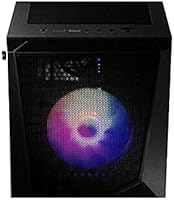
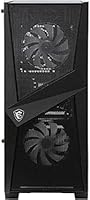
The tempered glass panel and dual ARGB front fans give the MSI Codex ZS platform a clean, modern desk presence that would not look out of place alongside a premium monitor setup. The mesh front panel adds a subtle refinement that buyers consistently called out as a positive surprise at this price.
ARGB lighting is confined to the two front fans, leaving the rest of the interior unlit — so the visual effect is concentrated rather than immersive. Buyers expecting a fully illuminated build will want to add ARGB strips or swap the rear fan for a matching ARGB unit to achieve a cohesive look.
Documentation
47%
53%
MSI includes a standard printed guide that covers basic port identification and memory slot configuration adequately for builders who already have B550 platform experience. Those comfortable with AMD builds generally found enough labeled diagrams to orient themselves without reaching for external resources.
First-time builders consistently flagged the included documentation as insufficient — fan header assignments, front-panel wiring, and BIOS navigation were all cited as poorly explained. The absence of a barebones-specific assembly walkthrough is the single most frequently recurring complaint across user reviews for this kit.
Upgrade Potential
82%
18%
B550 platform support for Ryzen 5000-series processors, PCIe 4.0 NVMe storage, and a wide range of DDR4 memory kits gives this AMD-ready shell a meaningful upgrade runway without needing a new motherboard. The mid-tower enclosure also has physical clearance for larger tower coolers, full-length GPUs, and additional drives.
DDR4 is the ceiling for this platform — it will not transition to DDR5, which matters for buyers planning a long-term hold on the build. The Micro-ATX board also provides fewer expansion slots than a full ATX alternative, capping how far the system can realistically grow over time.
Wireless Performance
77%
23%
Wi-Fi 6 delivers noticeably better throughput and lower latency compared to the Wi-Fi 5 adapters still common on competing boards in this price bracket. Home office users reported stable connections through typical streaming, video conferencing, and file transfer workloads without needing to run an Ethernet cable.
Real-world Wi-Fi 6 performance is constrained by router capability, and a handful of users noted intermittent drops in congested network environments. Antenna placement at the rear I/O panel can also be awkward depending on where the tower sits relative to the access point, limiting effective range.
Cable Management
58%
42%
The Forge 100R includes basic cable routing cutouts and tie points that, when used carefully, allow for a reasonably tidy build. Builders with prior experience managing non-modular PSU bundles found the enclosure workable, particularly when excess cables were bundled and tucked behind the motherboard tray.
The non-modular PSU means all cables are present inside the case whether they are in use or not, and the space behind the motherboard tray is tighter than many competing mid-towers at this price. Multiple buyers described managing the PSU cable bundle as the most frustrating part of finishing the build cleanly.
Component Compatibility
71%
29%
AM4 socket support covers Ryzen 3000 and 5000-series CPUs, and DDR4 compatibility spans a broad selection of widely available memory kits. The case accommodates standard full-length ATX graphics cards and most tower air coolers within common height clearances, keeping component sourcing straightforward.
Ryzen 5000-series compatibility may require a BIOS update that itself needs an older compatible CPU to execute — a real obstacle for buyers who do not have an AM4 chip available to borrow. The platform is AMD-exclusive, so Intel CPU users have no path to this barebones tower kit at all.
Noise Levels
76%
24%
Under light desktop workloads, the pre-installed fans run quietly enough that most buyers did not raise fan noise as a concern during day-to-day use. The Bronze-rated PSU fan also stays subdued at the load levels typical of everyday computing and casual gaming sessions.
The standard rear 120mm exhaust fan becomes audible under sustained GPU or CPU load, and out-of-box fan curves are not always tuned for low idle noise without a BIOS adjustment. Buyers who work in quiet environments may want to set a custom fan profile or replace the rear unit with a quieter option.

Suitable for:

The MSI Codex ZS Barebones Tower PC is purpose-built for buyers who understand what they are getting into and want a head start on a custom AMD build without sourcing every part separately. First-time PC builders will appreciate that the case, power supply, and motherboard are already paired and physically assembled, which removes one of the most intimidating steps in the process. If you have DDR4 RAM and a storage drive sitting in an older system, this platform lets you carry those parts forward and just add a Ryzen CPU and a discrete GPU to have a functioning machine. Budget-conscious gamers who plan to start with an entry-level graphics card will find the 550W Bronze-rated supply handles that without any immediate upgrade. Home office users who want a configurable, expandable tower — rather than paying the premium of a fully configured pre-built — will also find it a practical fit.

Not suitable for:

Anyone expecting a ready-to-use computer out of the box should look elsewhere — the MSI Codex ZS Barebones Tower PC ships without a CPU, RAM, GPU, or storage, and it will not boot without at minimum a processor and memory installed. Buyers who are not comfortable researching CPU compatibility, checking BIOS revision requirements for Ryzen 5000-series chips, or managing cables inside a mid-tower case may find the experience frustrating rather than rewarding. This is also not the right choice for someone who needs ITX or full-ATX compatibility, since the Micro-ATX board occupies a fixed position in the Forge 100R enclosure. Power users planning a high-end GPU with a TDP north of what a mid-range 550W supply can sustain comfortably will want a platform with a beefier PSU from the start. Finally, buyers who need extensive manufacturer documentation or guided setup support may find the included materials fall short of their expectations.

Specifications

  • Brand & Model: Manufactured by MSI under the model designation Codex ZS 3-002BUS.
  • Case: MSI Forge 100R mid-tower enclosure with a tempered glass side panel for component visibility.
  • Form Factor: Micro-ATX motherboard housed in a standard mid-tower chassis compatible with ATX-sized builds.
  • Motherboard: MSI B550M Micro-ATX board based on the AMD B550 chipset, supporting AM4 socket processors.
  • Chipset: AMD B550 chipset provides PCIe 4.0 support on the primary slot and compatibility with Ryzen 3000 and 5000-series CPUs.
  • Power Supply: 550W 80 Plus Bronze certified unit, offering reasonable efficiency and headroom for a mid-range discrete GPU.
  • Included Fans: Three pre-installed fans: two 120mm ARGB units at the front intake and one 120mm standard fan at the rear exhaust.
  • Wireless: Wi-Fi 6 (802.11ax) is integrated directly on the motherboard, requiring no add-in card.
  • Bluetooth: Bluetooth 5.1 is onboard alongside Wi-Fi 6, supporting modern peripherals and audio devices natively.
  • Ethernet: Realtek 8111HN controller delivers 10/100/1000 Mbps wired LAN connectivity via the rear I/O panel.
  • Onboard Audio: Realtek 8111HN audio codec provides baseline stereo output and microphone input without a dedicated sound card.
  • Front USB: Two USB 3.2 Gen1 Type-A ports are accessible on the front panel for easy peripheral and storage connections.
  • Rear USB: The rear I/O cluster includes four USB 3.2 Gen1 Type-A ports and two USB 2.0 ports for a total of six connections.
  • Memory Type: Supports DDR4 SDRAM; specific speed and capacity limits depend on the installed B550M motherboard memory slots.
  • Case Material: Steel chassis construction with a tempered glass left-side panel for interior visibility.
  • Item Weight: The assembled unit weighs approximately 23.4 pounds, reflecting a standard steel mid-tower build.
  • Package Size: Packaged dimensions measure 23.5 x 21.5 x 12.2 inches, accounting for protective shipping materials.

Related Reviews
MSI MPG SEKIRA 100R Mid Tower Gaming PC Case
86%
94%
Cooling Performance
89%
Build Quality
91%
Ease of Installation
88%
Aesthetics & RGB Lighting
90%
Airflow & Ventilation
More
RUIX OV502 mATX Mini-Tower PC Case
68%
83%
Value for Money
86%
Aesthetic Design
79%
Glass Panel Quality
84%
Component Compatibility
71%
Airflow & Cooling
More
MINISFORUM DeskMini UM690L Slim Mini PC
79%
91%
Processing Performance
88%
Multi-Monitor Support
58%
RAM Adequacy & Upgradeability
89%
Storage Speed & Expansion
73%
Integrated Graphics (Radeon 680M)
More
SAMA V60 Mid Tower PC Case
80%
93%
Out-of-Box Cooling Value
78%
Airflow Performance
91%
AIO & Radiator Flexibility
88%
Tempered Glass & Aesthetics
71%
Build Quality & Materials
More
Corsair FRAME 4000D RS Mid-Tower Case
82%
91%
Airflow Performance
88%
Build Quality
86%
Modularity & Upgradability
83%
Fan Mounting System
78%
GPU Compatibility
More
SAMA NEVIEW 4503 Mid Tower PC Case
76%
91%
Value for Money
78%
Build Quality
83%
Airflow Performance
76%
ARGB Lighting
82%
Hardware Compatibility
More
Zalman S2 ATX Mid-Tower PC Case
76%
88%
Airflow Performance
63%
Build Quality
91%
Value for Money
86%
Ease of Assembly
84%
Cooling Expandability
More
Corsair 3000D Airflow Mid-Tower PC Case
81%
93%
Airflow Performance
88%
Build Quality & Materials
91%
Thermal Management Design
84%
Cable Management
61%
Included Fans Quality
More
darkFlash DS900 ATX Mid-Tower PC Case

75%
76%
Build Quality
83%
Cooling Potential
91%
Aesthetics & Visibility
88%
Value for Money
74%
Cable Management
More
SAMA S40 Mid Tower ATX PC Case
79%
88%
Airflow Performance
83%
Included Fan Quality
79%
Build Quality & Finish
92%
GPU Compatibility
61%
Cable Management
More

FAQ

No — the MSI Codex ZS Barebones Tower PC ships without a CPU, RAM, GPU, or storage drive. You receive the case, motherboard, and power supply pre-assembled, but you are responsible for sourcing and installing the remaining components before the system will boot.

The B550M board uses an AM4 socket, so it is compatible with AMD Ryzen 3000-series and 5000-series CPUs. Ryzen 5000-series chips may require a BIOS update first, which is worth confirming before your parts arrive — some boards ship with older firmware that does not yet recognize the newer processors.

This is the trickiest part of the process. You will need to temporarily install a compatible Ryzen 3000-series CPU to boot into the BIOS and run the update, then swap in your 5000-series chip. Some B550 boards also support BIOS flashback via USB without any CPU installed — check the MSI support page for this specific model to see if that option is available.

For most entry-level to mid-range cards — such as an RX 6600 or RTX 3060 — 550W is generally sufficient. If you are planning to install a high-performance card that draws over 200W on its own, you should calculate total system power consumption carefully, as headroom gets tight quickly with a power-hungry CPU in the mix as well.

Wi-Fi 6 and Bluetooth 5.1 are both built directly into the motherboard, so no add-in card or USB dongle is needed. Just connect the included antennas to the rear I/O panel and you are ready to connect wirelessly out of the box.

The major advantage of this AMD-ready shell is that the case, PSU, and motherboard are already installed together, which cuts out some of the most intimidating steps. That said, the documentation included in the box is fairly minimal, so first-time builders should plan to supplement it with MSI's online manual and a few YouTube build guides specific to the B550M board before getting started.

Yes, the two front ARGB fans are designed to work with MSI's Mystic Light software, which allows you to customize lighting modes and colors through the operating system. The single rear fan is a standard non-ARGB unit, so it runs at fixed speed and does not respond to lighting controls.

Yes, the Forge 100R is a mid-tower with enough internal clearance for full-length ATX graphics cards. Check MSI's published GPU clearance specification for the exact maximum card length, and measure your chosen GPU before ordering if it is on the longer end of the spectrum.

A handful of buyers have noted that routing PSU cables can feel cramped, particularly around the modular cable area near the bottom of the case. It is not a dealbreaker, but having a set of cable ties on hand before you build will make things considerably tidier and improve airflow.

The MSI Codex ZS platform supports expansion — the B550M motherboard includes M.2 slots for NVMe SSDs and standard SATA connectors for additional drives or SSDs. The Forge 100R case also has drive mounting points, so adding storage down the road is straightforward as long as your chosen drives are standard form factors.